Yes! You can use AI to fill out Application for Mechanical Permit
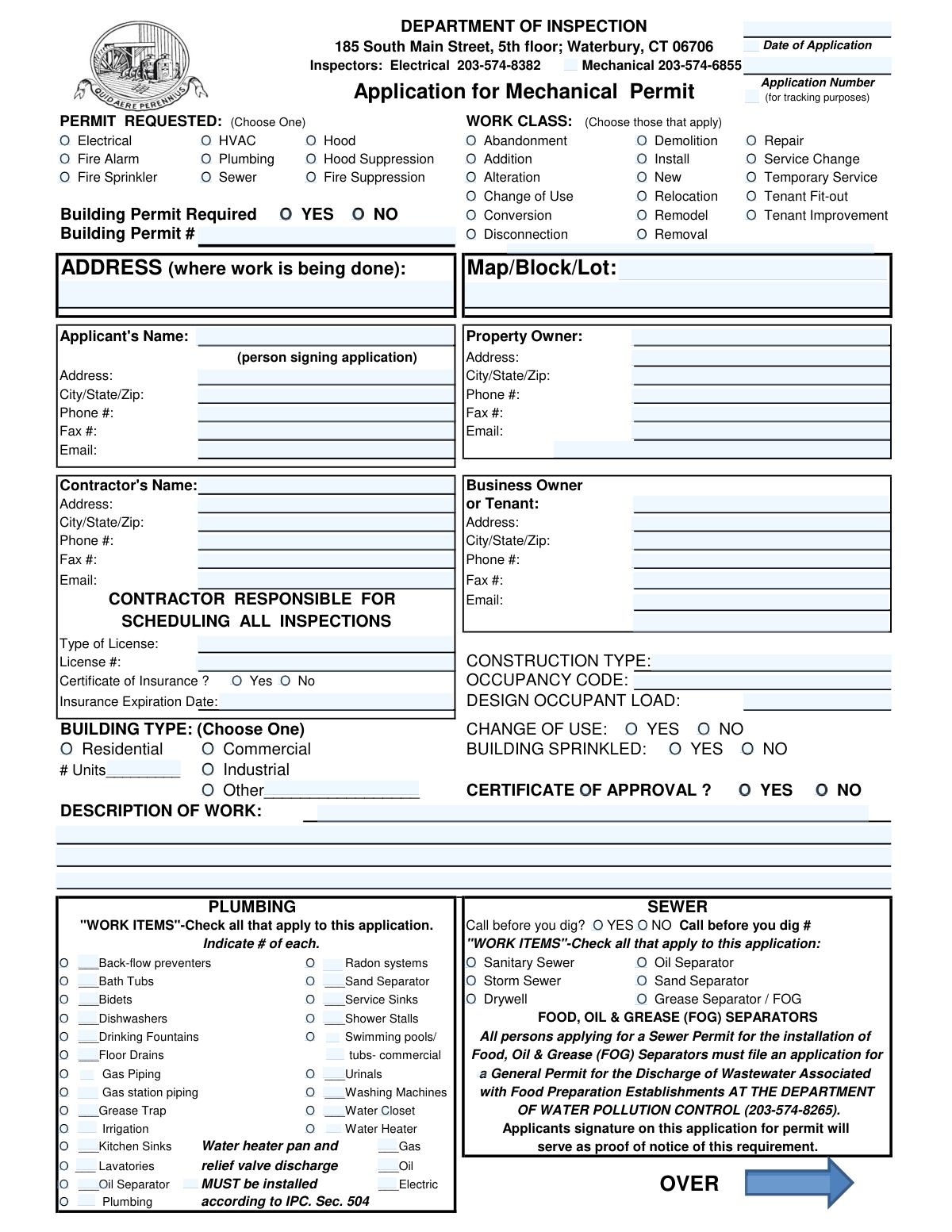
The Application for Mechanical Permit is an official local government permit request used to document and authorize specific types of building system work (e.g., plumbing/sewer, HVAC, electrical, fire protection, hood and suppression) at a given job site. It captures project location details, applicant/owner/contractor information, licensing and insurance data, building characteristics (occupancy, construction type, sprinkler status), and detailed “work items” to be installed, altered, repaired, or removed. Submitting it is important because it enables code compliance review, fee assessment, and inspection scheduling by the Department of Inspection. Today, this form can be filled out quickly and accurately using AI-powered services like Instafill.ai, which can also convert non-fillable PDF versions into interactive fillable forms.
Mechanical Permit Application is part of the
permit application forms, permit forms and ERM forms categories on Instafill.
Rather not fill this in by hand? Instafill is an online form filler that completes PDF forms automatically — upload the blank form, answer a few questions, and the AI fills every field.
Form specifications
| Form name: | Application for Mechanical Permit |
| Number of pages: | 1 |
| Language: | English |
Our AI automatically handles information lookup, data retrieval, formatting, and form filling.
It takes less than a minute to fill out Mechanical Permit Application using our AI form filling.
Securely upload your data. Information is encrypted in transit and deleted immediately after the form is filled out.
Instafill Demo: How to fill out PDF forms in seconds with AI
How to Fill Out Mechanical Permit Application Online for Free in 2026
Are you looking to fill out a MECHANICAL PERMIT APPLICATION form online quickly and accurately? Instafill.ai offers the #1 AI-powered PDF filling software of 2026, allowing you to complete your MECHANICAL PERMIT APPLICATION form in just 37 seconds or less.
Follow these steps to fill out your MECHANICAL PERMIT APPLICATION form online using Instafill.ai:
- 1 Go to Instafill.ai and upload the Mechanical Permit Application (or select it from the form library).
- 2 Choose the permit requested and work class(es) that apply (e.g., plumbing, HVAC, electrical, fire alarm/sprinkler, hood/suppression) and indicate whether a building permit is required (and enter the building permit number if applicable).
- 3 Enter the job site information: address where work is being done and map/block/lot (if required).
- 4 Fill in applicant, property owner, and contractor details, including mailing addresses, phone/fax, email, contractor license type/number, and certificate of insurance status and expiration date.
- 5 Complete building/project details such as construction type, occupancy code, building type (residential/commercial/industrial/other), change of use, sprinklered status, number of units, occupant load, and a clear description of work.
- 6 Select and quantify the relevant “work items” sections (e.g., plumbing/sewer fixtures and systems, electrical service change/meters/feeders, HVAC equipment, hood/chimney details, fire alarm, fire sprinkler, fire/hood suppression) and provide any required identifiers (e.g., call-before-you-dig number, CRS#).
- 7 Review the generated entries for accuracy, then sign/date the application and download/submit it to the Department of Inspection as required (keeping a copy for tracking and inspections).
Our AI-powered system ensures each field is filled out correctly, reducing errors and saving you time.
Why Choose Instafill.ai for Your Fillable Mechanical Permit Application Form?
Speed
Complete your Mechanical Permit Application in as little as 37 seconds.
Up-to-Date
Always use the latest 2026 Mechanical Permit Application form version.
Cost-effective
No need to hire expensive lawyers.
Accuracy
Our AI performs 10 compliance checks to ensure your form is error-free.
Security
Your personal information is protected with bank-level encryption.
Frequently Asked Questions About Mechanical Permit Application
This form is used to request a permit for building-related work such as electrical, HVAC, plumbing, sewer, fire alarm, fire sprinkler, hood, and suppression systems. It helps the Department of Inspection review the scope of work and schedule required inspections.
The applicant (often the contractor or authorized agent) completes the form, and the person signing certifies they are authorized by the property owner. You must print the applicant’s name and provide a signature in the certification section.
Select the permit type(s) that match the trade involved (e.g., Electrical, HVAC, Plumbing, Fire Alarm, Fire Sprinkler, Hood). Then check the work class that best describes the project (e.g., New, Install, Repair, Alteration, Addition, Demolition, Abandonment).
If a building permit is required, mark "YES" and provide the Building Permit #. If it is not required, mark "NO" and leave the building permit number blank.
You must provide the job site address (where the work is being done) and the Map/Block/Lot if available. The form also asks for mailing addresses for the applicant and property owner (and contractor/business owner or tenant, if applicable).
You must list the contractor’s name, license type, and license number, plus contact details. The form states the contractor is responsible for scheduling all inspections, so ensure the contractor contact info is accurate.
The form asks whether a Certificate of Insurance is provided and requests the insurance expiration date. If you mark "Yes," be prepared to submit the certificate and ensure it is current.
Fill in the construction type, occupancy code, and design occupant load as applicable to the space. Check whether the building is sprinkled and whether there is a change of use, and select the building type (Residential, Commercial, Industrial, or Other).
Provide a clear summary of what you are installing, altering, repairing, or removing, including locations and key equipment details. If you are also checking specific work items (e.g., water heater, gas piping, meters), make sure the description matches those selections.
Check each item that applies and write the number of fixtures/devices in the blank (for example, number of water closets, lavatories, floor drains, backflow preventers, etc.). For sewer-related work, check the appropriate category (sanitary sewer, storm sewer, drywell, separators) and include any required identifiers like “Call before you dig” information.
If you are installing a Food, Oil & Grease (FOG) separator for a food preparation establishment, you must also file a General Permit for wastewater discharge with the Department of Water Pollution Control (203-574-8265). Your signature on this permit application serves as proof you were notified of this requirement.
Each trade section asks for system-specific details (e.g., electrical meters/amps/wire type, HVAC manufacturer/model, sprinkler main size and hydrants, hood duct/clearances, chimney materials, and fire alarm occupancy type). Complete only the sections that match the permit(s) and work items you selected.
The form lists the Department of Inspection at 185 South Main Street, 5th floor, Waterbury, CT 06706. For questions, the form provides inspector phone numbers, including Electrical (203-574-8382) and Mechanical (203-574-6855).
Processing time can vary based on reviews required (e.g., Fire Marshal or Water Pollution Control). Use the Application Number (for tracking purposes) once it is assigned, and note that the “For Inspector’s Use Only” section is completed by the department during review and fee assessment.
Yes—AI tools can help organize your project details and auto-fill fields to reduce errors and save time. Services like Instafill.ai use AI to auto-fill form fields accurately based on the information you provide.
Upload the PDF to Instafill.ai, answer a few prompts about the job site, contractor, and work scope, and the AI will populate the matching fields for review before you download. If your PDF is flat/non-fillable, Instafill.ai can convert it into an interactive fillable form so you can complete it digitally.
Compliance Mechanical Permit Application
Validation Checks by Instafill.ai
1
Validates exactly one Permit Requested option is selected
Checks that the applicant selected one (and only one) value for the "PERMIT REQUESTED (Choose One)" field. This prevents ambiguous routing and fee/review determination when multiple permit types are accidentally chosen or none are chosen. If validation fails, the submission should be rejected and the user prompted to select exactly one permit requested type.
2
Validates at least one Work Class is selected and matches the permit scope
Ensures at least one checkbox is selected under "WORK CLASS (Choose those that apply)" and that the selected classes are consistent with the described work (e.g., selecting Plumbing when only Electrical work is described). This is important for assigning the correct inspectors and required reviews. If validation fails, the system should require the applicant to select applicable work classes and/or revise the description to align with selections.
3
Requires Building Permit Required flag and enforces Building Permit # when YES
Verifies the "Building Permit Required" field is answered (YES/NO). If YES is selected, the "Building Permit #" must be present and follow the jurisdiction’s expected format (e.g., numeric or alphanumeric with separators). If validation fails, the application should be held until the building permit number is provided or the requirement is corrected.
4
Validates job site address completeness and format
Checks that the "ADDRESS (where work is being done)" includes required components (street number, street name, city/state/zip) and that the ZIP code is valid (5-digit or ZIP+4). This is critical for inspection scheduling, jurisdiction verification, and mapping to parcel data. If validation fails, the system should block submission and request a complete standardized address.
5
Validates Map/Block/Lot format and presence when required by jurisdiction
Ensures Map/Block/Lot is provided when the municipality requires parcel identifiers and that it matches an expected pattern (e.g., map-block-lot segments, numeric with delimiters). This reduces mis-association of permits to the wrong parcel and supports internal record matching. If validation fails, the system should prompt for correction or allow conditional submission only if the jurisdiction marks it optional.
6
Validates Applicant identity fields and signature/printed name pairing
Checks that "Applicant’s Name" is present and that the printed name and signature fields are both completed (or both captured via e-signature) for certification. This is important because the form includes an attestation of authorization and compliance with laws. If validation fails, the application should be rejected as incomplete and not legally attestable.
7
Validates Property Owner/Business Owner/Tenant information completeness and consistency
Ensures the property owner (or business owner/tenant, as applicable) name and mailing address are provided, and that the person signing is identified (e.g., owner vs authorized agent). This supports legal notice, billing, and authorization verification. If validation fails, the system should require missing party details and clarify the signer’s role before acceptance.
8
Validates contact information formats (phone, fax, email) for all provided contacts
Checks that phone and fax numbers contain valid digits and formatting (e.g., 10-digit US numbers with optional separators) and that emails match a standard email pattern. Reliable contact data is necessary for inspection scheduling and deficiency notifications. If validation fails, the system should flag the specific field(s) and require correction for required contacts (at minimum applicant and contractor).
9
Requires Contractor Responsible for Scheduling Inspections and validates contractor contact completeness
Verifies that the section indicating the contractor responsible for scheduling inspections is completed, including contractor name, address, phone, and email. This prevents missed inspections and ensures accountability for coordination. If validation fails, the submission should be blocked until a responsible party is clearly identified with usable contact details.
10
Validates contractor license type and license number format
Ensures "Type of License" is selected/entered and "License #" is present and matches expected formatting rules for the license type (e.g., state license prefix, length, numeric-only constraints). This is essential for compliance and to prevent unlicensed work from being permitted. If validation fails, the system should reject the application or route it to manual review depending on policy.
11
Validates insurance indicator and enforces Insurance Expiration Date when insurance is required
Checks that "Certificate of Insurance?" is answered YES/NO and, when YES (or when the work class requires insurance), requires a valid "Insurance Expiration Date" in an acceptable date format and not in the past. This protects the municipality and property owner from uninsured work. If validation fails, the system should require a valid expiration date and/or documentation before issuing the permit.
12
Validates Construction Type, Occupancy Code, and Building Type selections
Ensures "CONSTRUCTION TYPE," "OCCUPANCY CODE," and "BUILDING TYPE (Choose One)" are completed and that building type is exactly one of the allowed options (Residential/Commercial/Industrial/Other with text if Other). These fields drive code requirements, plan review needs, and inspection criteria. If validation fails, the system should prevent submission until the classification fields are complete and internally consistent.
13
Validates Change of Use logic and requires supporting details when YES
Checks that "CHANGE OF USE" is answered YES/NO and, if YES, requires additional information in "DESCRIPTION OF WORK" (and/or occupancy code updates) describing prior and proposed use. Change-of-use impacts code compliance, life safety requirements, and review routing. If validation fails, the system should require the applicant to provide the missing change-of-use details before acceptance.
14
Validates numeric fields for occupant load, unit count, meters, amps, and similar quantities
Ensures fields such as "DESIGN OCCUPANT LOAD," "# Units," "#Meters," "AMPS," "Calculated load," and other quantity entries are numeric, non-negative, and within reasonable bounds (e.g., occupant load > 0 when commercial/mixed occupancy). This prevents calculation errors, fee misassessment, and unsafe underspecification. If validation fails, the system should highlight the invalid numeric entries and require correction.
15
Validates Work Items counts and dependencies (checked item requires a quantity where indicated)
For work items that show a blank quantity line (e.g., "___Bath Tubs", "___Water Closet", "___Back-flow preventers"), verifies that if the item is selected, a positive integer count is provided. This supports accurate fee calculation, inspection scope, and material review. If validation fails, the system should require counts for selected items and prevent submission until resolved.
16
Validates Call Before You Dig selection and requires ticket number when YES
Checks that "Call before you dig?" is answered YES/NO and, if YES, requires a "Call before you dig #" with an acceptable ticket/reference format. This is important for excavation safety and compliance with utility notification laws. If validation fails, the system should require the ticket number or require the applicant to change the selection to NO with appropriate justification per policy.
Common Mistakes in Completing Mechanical Permit Application
People often check multiple options (or none) in the “PERMIT REQUESTED (Choose One)” area because the form is dense and the work categories overlap. This can route the application to the wrong reviewer, delay issuance, or trigger requests for resubmission. Avoid this by confirming the primary permit type with the scope of work and selecting exactly one option; AI-powered tools like Instafill.ai can flag “choose one” conflicts before submission.
Applicants frequently check work classes that don’t match the described work (or forget to check the ones that do), especially when multiple trades are involved. Inconsistencies can cause missing review requirements, incorrect fees, or failed inspections because the permit doesn’t cover the actual work performed. Avoid this by aligning checked work classes with the “Description of Work” and the detailed sections (Plumbing/HVAC/Electrical/Fire); Instafill.ai can help validate that selected classes match the entered scope.
Many people skip the “Building Permit Required” question or mark YES but leave the Building Permit number blank. This creates a processing hold because the department may need the related building permit to be issued first or cross-referenced. Avoid this by confirming with the project plans whether a building permit is required and entering the correct Building Permit # when applicable; Instafill.ai can prompt for the number when YES is selected.
A common error is entering an address without unit/suite numbers, using a mailing address instead of the work site, or leaving Map/Block/Lot blank. This can lead to jurisdiction issues, incorrect property records, and inspection scheduling problems. Avoid this by using the exact site address where work is performed (including unit/tenant space) and matching Map/Block/Lot to assessor records; Instafill.ai can standardize address formatting and reduce omissions.
Because the form has multiple parties with similar fields, applicants often put the contractor as the property owner, list the tenant as the owner, or leave the “person signing application” unclear. This can invalidate the authorization statement and trigger requests for proof of authorization. Avoid this by clearly identifying the owner of record, the applicant/authorized agent, and the tenant/business owner in their correct sections; Instafill.ai can map known contact data into the right fields consistently.
People frequently leave “Type of License” and “License #” blank, enter an expired number, or provide a license that doesn’t match the trade (e.g., plumbing vs. HVAC). This can prevent permit issuance or cause enforcement issues if the contractor is not properly credentialed for the work. Avoid this by verifying the exact license classification and number before submission; Instafill.ai can help format license numbers consistently and remind you to complete required credential fields.
Applicants often check “Certificate of Insurance? Yes” but don’t provide an expiration date, or they check “No” when insurance is required for the contractor/trade. This can delay approval while staff request updated COI documentation. Avoid this by attaching/confirming the COI status and entering the correct insurance expiration date; Instafill.ai can prompt for the date when “Yes” is selected and reduce missing-field errors.
These building characteristics are commonly skipped because applicants assume they are only for new construction, or they don’t know the code terms. Missing or incorrect entries can trigger Fire Marshal review delays, incorrect life-safety requirements, or inspection issues. Avoid this by referencing approved plans or prior permits for construction type/occupancy, entering the design occupant load when applicable, and accurately marking whether the building is sprinkled; Instafill.ai can help ensure these required code fields are not overlooked.
In the Plumbing/Sewer sections, people often check an item (e.g., water closets, lavatories, backflow preventers) but leave the quantity blank, or they write quantities without checking the box. This can lead to incorrect fees, incomplete scope documentation, and inspection confusion about what was permitted. Avoid this by entering a numeric count for each selected item and leaving unselected items blank; Instafill.ai can enforce quantity formats and prevent mismatched check/quantity entries.
Applicants frequently miss the note requiring a separate Water Pollution Control general permit for Food, Oil & Grease (FOG) separators, and they often leave “Call before you dig? YES/NO” and the ticket number blank. This can cause compliance violations, stop-work orders, or delays if excavation begins without proper notification/permits. Avoid this by confirming whether any FOG/grease equipment is included and obtaining/entering the call-before-you-dig ticket number when excavation is involved; Instafill.ai can highlight these conditional requirements based on selected work items.
When applicants select a work class, they often forget to complete the corresponding technical fields (e.g., HVAC manufacturer/model, electrical amps/wire type/size, sprinkler main size, hood duct metal/clearances). Missing specs can force plan review follow-ups, delay inspections, or result in corrections in the field. Avoid this by completing the relevant section for every checked work class and pulling details from equipment submittals and plans; Instafill.ai can guide completion by detecting selected trades and prompting for the required technical fields.
A frequent submission error is leaving the applicant signature area blank, not printing the applicant’s name, or having someone sign who is not the authorized agent/owner representative referenced in the certification statement. This can invalidate the application and require resubmission, delaying permit issuance. Avoid this by ensuring the correct authorized applicant prints their name, signs, and dates the form exactly as required; if the form is a flat non-fillable PDF, Instafill.ai can convert it into a fillable version and reduce missed signature/date fields.
Saved over 80 hours a year
“I was never sure if my IRS forms like W-9 were filled correctly. Now, I can complete the forms accurately without any external help.”
Kevin Martin Green
Your data stays secure with advanced protection from Instafill and our subprocessors




Robust compliance program
Transparent business model
You’re not the product. You always know where your data is and what it is processed for.
ISO 27001, HIPAA, and GDPR
Our subprocesses adhere to multiple compliance standards, including but not limited to ISO 27001, HIPAA, and GDPR.
Security & privacy by design
We consider security and privacy from the initial design phase of any new service or functionality. It’s not an afterthought, it’s built-in, including support for two-factor authentication (2FA) to further protect your account.
Fill out Mechanical Permit Application with Instafill.ai
Worried about filling PDFs wrong? Instafill securely fills application-for-mechanical-permit forms, ensuring each field is accurate.
