Yes! You can use AI to fill out County of Louisa Department of Community Development – New Non-Residential Building Permit Package

The New Non-Residential Building Permit Package is a set of Louisa County Department of Community Development forms and instructions used to request zoning review and a building permit for constructing a new non-residential structure. It collects property and project details (tax map, zoning district, setbacks, disturbance area), construction specifications, and contractor licensing/authorization information. The package is important because the County uses it to verify zoning compliance, confirm required setbacks and surveys, and complete building plan review under applicable codes before issuing a permit and scheduling inspections.
Our AI automatically handles information lookup, data retrieval, formatting, and form filling.
It takes less than a minute to fill out Louisa County New Non-Residential Building Permit Package using our AI form filling.
Securely upload your data. Information is encrypted in transit and deleted immediately after the form is filled out.

Form specifications

Form name: County of Louisa Department of Community Development – New Non-Residential Building Permit Package
Number of pages: 8
Filled form examples: Form Louisa County New Non-Residential Building Permit Package Examples
Language: English
main-image

Instafill Demo: filling out a legal form in seconds

How to Fill Out Louisa County New Non-Residential Building Permit Package Online for Free in 2026

Are you looking to fill out a LOUISA COUNTY NEW NON-RESIDENTIAL BUILDING PERMIT PACKAGE form online quickly and accurately? Instafill.ai offers the #1 AI-powered PDF filling software of 2026, allowing you to complete your LOUISA COUNTY NEW NON-RESIDENTIAL BUILDING PERMIT PACKAGE form in just 37 seconds or less.
Follow these steps to fill out your LOUISA COUNTY NEW NON-RESIDENTIAL BUILDING PERMIT PACKAGE form online using Instafill.ai:
  1. 1 Enter applicant, owner, and contractor contact information and indicate whether the applicant is the owner, contractor, or agent.
  2. 2 Complete the Development Permit Application section with project description, property location/address, tax map number, zoning/subdivision details, acreage, disturbance area, existing structures, deed/plat references, directions to the site, and proposed setbacks/structure height.
  3. 3 Fill out the Construction Information Sheet with job value, whether electrical is included (and whether a separate service is needed), building dimensions/stories, finished square footage by story, and construction types (roof framing/covering, foundation, floor, exterior siding, decks/porches).
  4. 4 Complete the Contractor Information Sheet by either (a) providing contractor/company details and Virginia contractor license information (and optional tradesman details) with owner authorization, or (b) completing the Contractor License Exemption section if eligible (noting the exemption limits for new commercial structures).
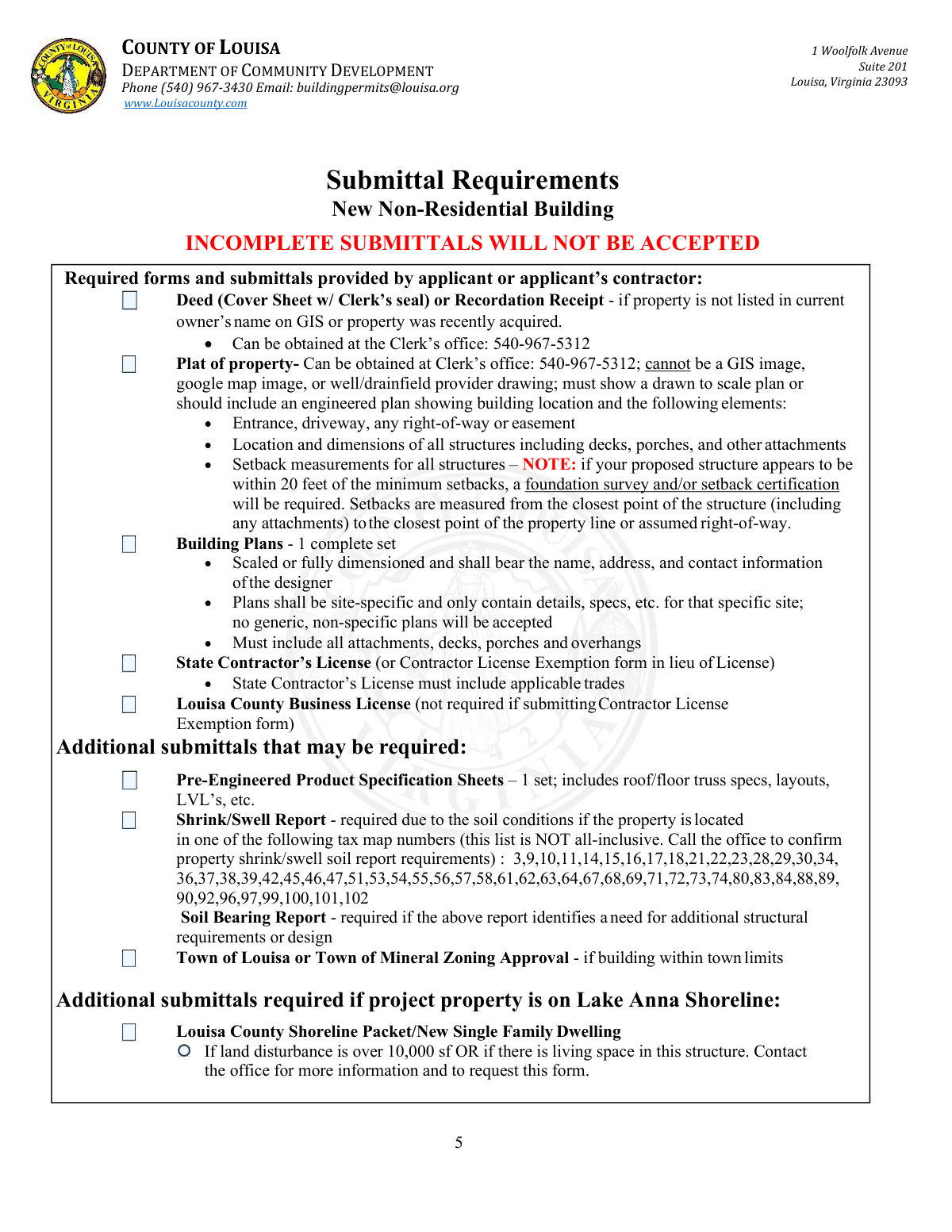
  5. 5 Gather and upload required submittals: deed/recordation receipt (if needed), a scaled plat showing structures/driveway/easements and setback measurements, one complete set of site-specific building plans, contractor license (or exemption form), and Louisa County business license (if applicable).
  6. 6 Add any additional required documents based on the project (e.g., pre-engineered product specs, shrink/swell and soil bearing reports, town zoning approval, Lake Anna shoreline packet if applicable), then review for completeness before submission.
  7. 7 E-sign the owner/authorized agent certification acknowledging zoning/building compliance, County inspection access, and potential foundation survey/setback certification requirements, then submit for zoning review and building plan review and be prepared to pay fees at permit issuance.

Our AI-powered system ensures each field is filled out correctly, reducing errors and saving you time.

Why Choose Instafill.ai for Your Fillable Louisa County New Non-Residential Building Permit Package Form?

Speed

Complete your Louisa County New Non-Residential Building Permit Package in as little as 37 seconds.

Up-to-Date

Always use the latest 2026 Louisa County New Non-Residential Building Permit Package form version.

Cost-effective

No need to hire expensive lawyers.

Accuracy

Our AI performs 10 compliance checks to ensure your form is error-free.

Security

Your personal information is protected with bank-level encryption.

Frequently Asked Questions About Form Louisa County New Non-Residential Building Permit Package

This package is used to apply for a permit to construct a new non-residential building in Louisa County. It includes the development permit application, construction details, contractor information, and zoning approval requirements.

All sections of the packet must be completed, and the applicant can be the owner, contractor, or an authorized agent. The form requires the applicant to indicate which role applies and provide the appropriate signatures/authorizations.

No. The packet states that incomplete submittals will not be accepted, and all required forms and items must be complete before the application can be accepted.

Common required items include a deed cover sheet with the Clerk’s seal (or recordation receipt if ownership isn’t current on GIS), a plat of the property (not a GIS/Google image), one complete set of site-specific building plans, and contractor licensing documentation (or an exemption form if allowed). A Louisa County business license is also required unless a Contractor License Exemption form is used.

The plat must be a drawn-to-scale plan (or engineered plan) and cannot be a GIS image, Google map image, or a well/drainfield provider drawing. It must show the entrance/driveway, any right-of-way or easements, all structures (including decks/porches/attachments), and setback measurements for all structures.

Zoning review determines whether a foundation survey and/or setback certification is required. The packet notes that if the proposed structure appears to be within 20 feet of the minimum setbacks, a foundation survey and/or setback certification will be required, and the County may require them at any time during construction or before a Certificate of Occupancy.

Setbacks are measured from the closest point of the structure (including attachments) to the closest point of the property line or assumed right-of-way. The front setback is measured from the road at the edge of the right-of-way.

Yes—generic, non-specific plans will not be accepted. Plans must be scaled or fully dimensioned, include the designer’s name/address/contact information, and show all attachments such as decks, porches, and overhangs.

For commercial/industrial/manufacturing properties, the exemption is limited to repairs or improvements to existing structures. New structures (including additions) are not included, so the owner must be properly licensed or hire a properly licensed contractor for new non-residential construction.

A non-refundable zoning review fee of $125 applies, and building fees include a 25% non-refundable portion plus a 2% state fee. All fee balances are due at permit issuance.

Yes. Working without a permit is charged at 50% of the permit fee with a $250 minimum, and re-inspection fees apply (e.g., $30 for the first failed inspection, $50 for additional failures of the same issue, and $250 if the site is not ready when the inspector arrives).

The County performs a submittal review (to confirm completeness), a zoning review (property details and buildable area), a building plan review (code/structural compliance), and a final review. Staff will notify the primary contact when the permit is ready for issuance.

No. The packet states that same-day inspections are not available.

Yes, but the inspector must be on Louisa County’s approved third-party list, the County must be notified before any third-party inspection, and results must be submitted within 72 hours. All third-party inspection results must be submitted before moving forward to the next stage.

If the building is within town limits, Town of Louisa or Town of Mineral zoning approval may be required. If the property is on the Lake Anna shoreline, additional shoreline-related submittals may be required, and you should contact the office—especially if land disturbance exceeds 10,000 sq. ft. or if the structure includes living space.

Compliance Louisa County New Non-Residential Building Permit Package
Validation Checks by Instafill.ai

1
Validates Applicant Role Selection (Owner/Contractor/Agent) is Exactly One
Checks that the 'Applicant is' field has exactly one option selected (Owner, Contractor, or Agent) and that it is not left blank or multi-selected. This is important because it determines who is legally responsible for the submission and which supporting documents/authorizations are required. If validation fails, the application should be rejected as incomplete and the applicant prompted to select a single role.
2
Ensures Required Contact Fields are Complete for Property Owner and Contractor
Verifies that Property Owner name, phone, address (including city/state/zip), and email are provided, and that Contractor name, phone, address, and email are provided when a contractor is involved. Complete contact information is necessary for plan review questions, fee notifications, and inspection coordination. If any required contact fields are missing, the submission should be flagged as incomplete and not accepted until corrected.
3
Validates Phone Number Format for Owner/Contractor/Trades
Checks that all phone numbers (owner, contractor, and any listed trades) match an acceptable format (e.g., 10 digits with optional separators) and are not obviously invalid (e.g., too short, alphabetic characters). Correct phone formatting reduces failed contact attempts and delays in scheduling inspections. If validation fails, the system should require correction before submission or mark the record for follow-up.
4
Validates Email Address Format for Owner/Contractor
Ensures email fields contain syntactically valid email addresses (e.g., [email protected]) and are not placeholders (e.g., 'N/A' in an email field). Email is a primary channel for permit readiness notifications and document requests. If validation fails, the applicant should be prompted to correct the email or explicitly indicate no email (if allowed by policy).
5
Validates Signature and Acknowledgement Completion (Print Name, Signature, Date)
Checks that the Development Permit Application acknowledgement includes printed name, signature of owner/authorized agent, and a date, and that the date is a valid calendar date. This is important because the acknowledgement includes legal attestations and permission for county staff entry/inspections. If any element is missing or the date is invalid, the application should be considered unsigned and rejected.
6
Validates Project Location Fields: Property Address or Directions Must Be Provided
Ensures the submission includes enough location information to identify the site, requiring either a property address (if applicable) or clear directions from the County Office Building. This prevents misidentification of the project site and inspection routing errors. If validation fails, the system should block submission until a usable location is provided.
7
Validates Tax Map Number Presence and Format
Checks that the Tax Map # field is present and matches the county’s expected pattern (e.g., numeric/segment format as used in GIS) and is not blank. Tax map identification is essential for zoning review, shoreline/flood checks, and determining special report requirements (e.g., shrink/swell areas). If validation fails, the application should be held for correction because zoning review cannot proceed.
8
Validates Zoning and Jurisdiction Fields (Magisterial District, Zoning District, Subdivision)
Ensures Magisterial District and Zoning District are provided (and Subdivision if applicable) and that values are consistent with known county options when the system can validate against a reference list. These fields drive setback rules, height limits, and whether town zoning approval is required. If validation fails, the submission should be flagged for staff review or returned to the applicant for correction.
9
Validates Acreage and Land Disturbance are Numeric and Logically Consistent
Checks that Present Acreage is a positive number and Amount of Disturbance (sq. ft.) is a non-negative number, and that disturbance is not unreasonably large relative to acreage (e.g., disturbance cannot exceed total lot area converted to square feet). This prevents data entry errors that can affect environmental and zoning determinations. If validation fails, the system should require corrected values or route to manual review.
10
Validates Proposed Setbacks are Provided and Numeric (Front/Rear/Left/Right)
Ensures all proposed setback fields are completed with numeric values (feet) and are not negative or zero where not allowed. Proposed setbacks are required for zoning review and to determine whether a foundation survey or setback certification may be needed. If validation fails, the application should be rejected as incomplete because zoning review cannot confirm compliance.
11
Validates Structure Height is Provided and Within Zoning Constraints When Available
Checks that Height of Structure is provided as a numeric value and, when zoning rules are available, that it does not exceed the maximum building height for the zoning district. Height is a core zoning compliance factor and impacts plan review requirements. If validation fails, the system should flag the application for correction or zoning staff review before acceptance.
12
Validates Construction Valuation (Job Value) is Present and Non-Negative Currency
Ensures Job Value is provided, is numeric, and is not negative, and optionally enforces reasonable upper/lower bounds to catch obvious typos (e.g., extra zeros). Job value is commonly used for fee calculation, state reporting, and review prioritization. If validation fails, the system should prevent submission or require applicant confirmation/correction.
13
Validates Building Area and Story Counts are Numeric and Internally Consistent
Checks that building dimensions and number of stories are provided where applicable, and that finished square footage by story (1st/2nd/3rd) are numeric and consistent with the stated number of stories (e.g., if # of stories is 1, 2nd/3rd story square footage should be blank or zero). This reduces plan review confusion and supports fee/permit classification. If validation fails, the system should prompt the applicant to correct story count or square footage entries.
14
Validates Electrical Included / Separate Service Logic
Ensures that if 'Electrical Included' is marked 'No', the 'separate service' option is not selected, and if 'Electrical Included' is 'Yes', the separate service indicator is explicitly answered (Yes/No) if required by the form design. This prevents contradictory electrical scope information that affects inspections and permitting. If validation fails, the system should require the applicant to resolve the inconsistency before submission.
15
Validates Contractor Licensing Information When Contractor/Agent is Used
If the applicant is a Contractor or Agent (or an Owner/Agent Affidavit is used), checks that Virginia Contractor’s License #, license designation(s) (e.g., CBC/RBC/ELE), and expiration date are provided and that the expiration date is a valid date not in the past. Licensing verification is required to ensure the contractor is authorized for the applicable trades and to protect the county and property owner. If validation fails, the submission should be blocked or routed for staff verification with a request for corrected/valid license details.
16
Enforces Mutual Exclusivity: Contractor License Exemption vs Owner/Agent Affidavit
Checks that the applicant completes either the Contractor License Exemption section or the Owner/Agent Affidavit/Contractor section, but not both, and not neither. This is critical because the exemption has legal limitations for commercial/industrial projects and changes who is responsible for work performed onsite. If validation fails, the system should require the applicant to choose the correct pathway and complete only the applicable section.

Common Mistakes in Completing Louisa County New Non-Residential Building Permit Package

Submitting an incomplete packet (missing required forms or signatures)

Applicants often focus on the building plans and overlook that the county requires every section of the packet to be completed, including acknowledgements, printed names, dates, and signatures. This leads to the submittal being rejected at intake because the form explicitly states incomplete submittals will not be accepted. Before submitting, use the Submittal Requirements checklist and confirm every page that applies is filled out, signed, and dated (owner/agent acknowledgement, contractor/agent signatures, and contact fields).

Using an unacceptable “plat” (GIS screenshot, Google map, or septic/well sketch)

A very common error is attaching a GIS image or a Google map printout instead of a true plat or engineered site plan drawn to scale. The county specifically disallows these substitutes, and the application will stall until a compliant plat/site plan is provided. To avoid this, submit a recorded plat or an engineered/drawn-to-scale plan that shows the building location and all required elements (driveway/entrance, easements/ROW, all structures, and setback measurements).

Omitting attachments from the site plan and setbacks (decks, porches, overhangs, landings)

People frequently measure and draw only the main building footprint and forget that setbacks are measured from the closest point of the structure, including attachments and overhangs. This can trigger zoning noncompliance, redesign, or a requirement for a foundation survey/setback certification late in the process. Include every attachment (decks, porches, stoops, landings, overhangs) on both the site plan and the building plans, and measure setbacks from the outermost edge.

Listing required setbacks instead of proposed setbacks (or leaving them blank)

The form asks for proposed setbacks and explicitly says “do not list the required setbacks,” but applicants often copy the zoning district minimums or leave the fields empty. This prevents zoning staff from verifying the actual placement and can delay the zoning review or lead to incorrect assumptions about compliance. Use your scaled plat/site plan to calculate the actual proposed front/rear/side distances and enter those numbers (and remember the front setback is measured from the road at the edge of right-of-way).

Incorrect or missing Tax Map number, zoning district, or property identifiers

Applicants sometimes enter a mailing address only, use an old tax map number, or leave the magisterial district/subdivision fields blank, assuming staff will look it up. Errors here slow zoning verification and can cause the project to be reviewed under the wrong property record. Confirm the Tax Map # from the county GIS/records and ensure the property address (if applicable), magisterial district, zoning district, and deed/plat book/page information are consistent with recorded documents.

Failing to provide deed cover sheet/recordation receipt when ownership is not current in GIS

When a property was recently purchased, the GIS may not yet reflect the new owner, and applicants often skip the deed cover sheet with the clerk’s seal or the recordation receipt. This can prevent staff from confirming legal ownership/authorization and can stop the application from being accepted. If the GIS owner name does not match the applicant/owner, include the deed cover sheet (with clerk’s seal) or recordation receipt with the initial submittal.

Submitting generic or non-site-specific building plans

Applicants commonly submit stock plans or plan sets that include multiple options, generic notes, or details not specific to the project site. The county states that generic, non-specific plans will not be accepted, which results in rejection or a request for resubmittal. Ensure the plan set is fully dimensioned or scaled, includes the designer’s name/address/contact info, and only contains details/specs that match the exact building, location, and scope being permitted.

Contractor licensing and business license documentation errors

A frequent issue is providing an expired Virginia contractor license, a license without the applicable trade designations, or forgetting the Louisa County business license when required. This can delay acceptance and may require re-submittal or verification before issuance. Provide a current Virginia contractor license showing the correct classifications (e.g., CBC/RBC/ELE as applicable), include the expiration date, and attach the Louisa County business license unless a valid Contractor License Exemption is being used.

Misusing the Contractor License Exemption for new non-residential structures

Owners sometimes check the exemption because they believe it applies to any owner-built project, but the form warns that for commercial/industrial/manufacturing facilities the exemption is only for repairs or improvements to existing structures—not new structures or additions. Using the exemption incorrectly can cause the application to be rejected and may require hiring a properly licensed contractor. To avoid this, confirm whether the project is a new structure/addition (generally not eligible) and complete the Owner/Agent Affidavit and contractor section with a properly licensed contractor when required.

Leaving Construction Information Sheet fields incomplete or inconsistent (job value, dimensions, stories, square footage)

Applicants often omit job value, fail to list building dimensions and number of stories, or provide square footage that doesn’t match the plans. This creates plan review questions and can affect fee calculations and permit processing time. Fill out all applicable fields, ensure finished square footage by story matches the drawings, and clearly indicate structural selections (roof framing, foundation type, floor type, siding) so reviewers can confirm code compliance.

Not addressing conditional submittals (shrink/swell report, truss/LVL specs, town zoning, Lake Anna shoreline requirements)

Many applicants miss “may be required” items because they assume they are optional, especially shrink/swell reports tied to certain tax map numbers, pre-engineered truss/LVL specification sheets, or town zoning approvals within Louisa/Mineral limits. Missing these can halt review after intake when staff identifies the trigger condition. Before submitting, verify whether the property is in a listed tax map area, within town limits, or on the Lake Anna shoreline, and include the required reports/approvals and manufacturer/engineer spec sheets with the initial package.
Saved over 80 hours a year

“I was never sure if my IRS forms like W-9 were filled correctly. Now, I can complete the forms accurately without any external help.”

Kevin Martin Green

Your data stays secure with advanced protection from Instafill and our subprocessors

Robust compliance program

Transparent business model

You’re not the product. You always know where your data is and what it is processed for.

ISO 27001, HIPAA, and GDPR

Our subprocesses adhere to multiple compliance standards, including but not limited to ISO 27001, HIPAA, and GDPR.

Security & privacy by design

We consider security and privacy from the initial design phase of any new service or functionality. It’s not an afterthought, it’s built-in, including support for two-factor authentication (2FA) to further protect your account.

Fill out Louisa County New Non-Residential Building Permit Package with Instafill.ai

Worried about filling PDFs wrong? Instafill securely fills county-of-louisa-department-of-community-developme forms, ensuring each field is accurate.