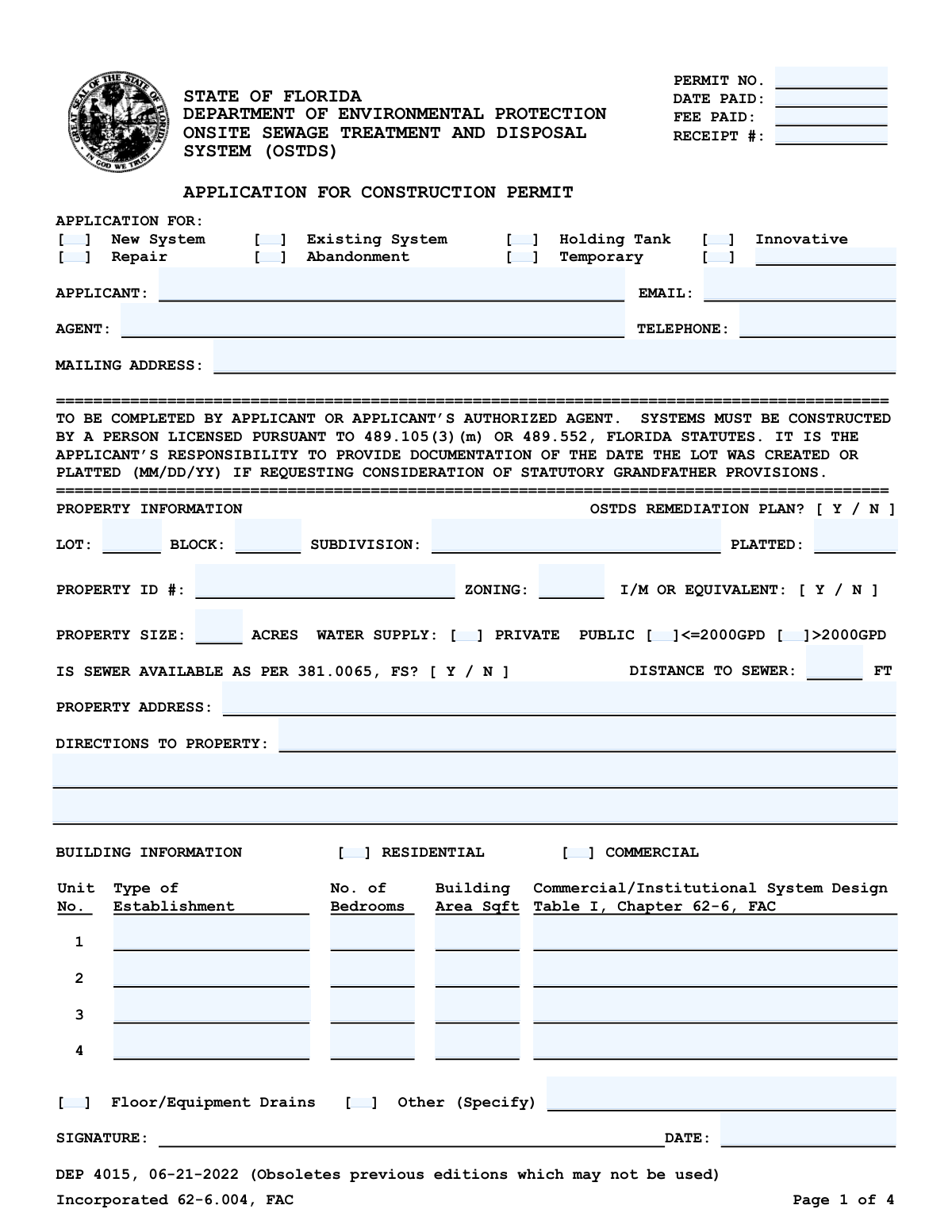
Yes! You can use AI to fill out Form DEP 4015, Application for Construction Permit for an Onsite Sewage Treatment and Disposal System (OSTDS)

Form DEP 4015 is an application submitted to the Florida Department of Environmental Protection to obtain a permit for the construction, repair, or modification of an Onsite Sewage Treatment and Disposal System (OSTDS). This document is essential for property owners to ensure their septic system plans comply with state health and environmental regulations before beginning any work. Today, this form can be filled out quickly and accurately using AI-powered services like Instafill.ai, which can also convert non-fillable PDF versions into interactive fillable forms.
Our AI automatically handles information lookup, data retrieval, formatting, and form filling.
It takes less than a minute to fill out DEP 4015 using our AI form filling.
Securely upload your data. Information is encrypted in transit and deleted immediately after the form is filled out.

Form specifications

Form name: Form DEP 4015, Application for Construction Permit for an Onsite Sewage Treatment and Disposal System (OSTDS)
Number of pages: 1
Language: English
Categories: permit application forms, construction forms, permit forms
main-image

Instafill Demo: How to fill out PDF forms in seconds with AI

How to Fill Out DEP 4015 Online for Free in 2026

Are you looking to fill out a DEP 4015 form online quickly and accurately? Instafill.ai offers the #1 AI-powered PDF filling software of 2026, allowing you to complete your DEP 4015 form in just 37 seconds or less.
Follow these steps to fill out your DEP 4015 form online using Instafill.ai:
  1. 1 Navigate to Instafill.ai and upload the DEP 4015 form or select it from their template library.
  2. 2 Provide applicant, agent, and property information, including name, mailing address, lot, block, and subdivision details.
  3. 3 Specify the application type (e.g., New System, Repair, Abandonment) and provide building information such as residential/commercial use and number of bedrooms.
  4. 4 Answer questions regarding property size, water supply source, sewer availability, and whether the property is subject to an OSTDS Remediation Plan.
  5. 5 Upload necessary attachments, such as a detailed site plan, floor plans, and legal property descriptions as required by the form.
  6. 6 Review all the information populated by the AI for accuracy, then provide your digital signature and the date.
  7. 7 Download the completed application package and submit it to the appropriate Florida County Health Department along with the required fees.

Our AI-powered system ensures each field is filled out correctly, reducing errors and saving you time.

Why Choose Instafill.ai for Your Fillable DEP 4015 Form?

Speed

Complete your DEP 4015 in as little as 37 seconds.

Up-to-Date

Always use the latest 2026 DEP 4015 form version.

Cost-effective

No need to hire expensive lawyers.

Accuracy

Our AI performs 10 compliance checks to ensure your form is error-free.

Security

Your personal information is protected with bank-level encryption.

Frequently Asked Questions About Form DEP 4015

This form is used to apply for a permit from the Florida Department of Environmental Protection to construct, repair, modify, or abandon an Onsite Sewage Treatment and Disposal System (OSTDS), commonly known as a septic system.

The application must be completed and signed by the property owner (the Applicant) or their legally authorized representative (the Agent).

You must attach a scaled site plan, a floor plan showing bedrooms and building area, and for commercial properties, a plan showing all plumbing drains. If your lot is not in a recorded subdivision, you must also attach a copy of the deed or legal description.

The Property ID Number is the official parcel number for your property, which can usually be found on your property tax bill or by searching on your county's property appraiser website.

You must count all rooms designed primarily for sleeping, plus any other areas like dens or studies that could be expected to provide sleeping accommodations for occupants.

Building area is the total square footage of the enclosed habitable space, based on outside measurements. It does not include garages, carports, open patios, or exterior storage sheds.

If your property does not have a lot, block, and subdivision name, you are required to attach a copy of the property's legal description or deed with your application.

The completed and signed application, along with all required attachments and fees, must be submitted to your local County Health Department for processing.

Check 'New System' if you are installing a septic system on a property for the first time. Check 'Repair' if you are applying for a permit to perform maintenance or fix components of an existing system.

This refers to specific exemptions from current regulations that may apply to older lots. If you believe your property qualifies, you are responsible for providing documentation of the date the lot was created or platted.

For commercial properties, you must provide details on the type of establishment, business activity such as employee numbers and hours, and a floor plan showing all plumbing fixtures and drains.

Yes, services like Instafill.ai use AI to accurately auto-fill form fields, which saves time and helps prevent common errors on complex government forms.

You can upload the DEP 4015 form to the Instafill.ai website. The platform's AI will make the document interactive, guiding you through each field to ensure you complete the application correctly.

If you have a non-fillable PDF, you can use a service like Instafill.ai. It can convert any flat PDF into an interactive, fillable form that you can easily complete and sign online.

Compliance DEP 4015
Validation Checks by Instafill.ai

1
Exclusive Application Type Selection
Ensures that the applicant selects exactly one option from the 'APPLICATION FOR' checkbox group (e.g., New System, Repair, Abandonment). This is crucial for routing the permit to the correct department and applying the appropriate review criteria. If more than one or zero types are selected, the form submission should be blocked with an error message prompting the user to choose a single application type.
2
Validates Property ID Number Format
This check verifies that the 'PROPERTY ID #' field contains exactly 27 characters, as specified in the form instructions. This ID is a critical unique identifier for the property in state and county databases, and an incorrect format can lead to processing delays or misidentification of the parcel. Failure to provide a valid 27-character ID will prevent submission.
3
Conditional Requirement for Sewer Distance
This validation enforces a logical rule: if 'IS SEWER AVAILABLE' is answered 'Y' (Yes), then the 'Distance to Sewer' field must be completed with a positive number. This information is legally required under Florida Statutes to determine if the property is eligible for an onsite system. If the condition is not met, the user will be prompted to provide the distance in feet.
4
Ensures Correct Data Entry for Building Type
This check ensures that data is entered into the correct fields based on the building type selected. If 'Residential' is checked, fields like 'No. of Bedrooms' must be filled for at least one unit; if 'Commercial' is checked, 'Commercial/Institutional System Design' must be filled. This prevents irrelevant or contradictory information from being submitted and ensures the system design calculations are based on the correct parameters.
5
Validates Platted Date
This check ensures the 'Platted' date is a valid calendar date (e.g., MM/DD/YY) and is not a date in the future. The platted date is essential for determining if the lot qualifies for statutory grandfather provisions. An invalid or future date would be nonsensical and could lead to incorrect legal interpretations, so the form will reject invalid entries.
6
Applicant Name and Contact Information Completeness
This validation ensures that the 'APPLICANT' name field is not empty and that at least one form of contact, either a valid 'EMAIL' or 'TELEPHONE' number, is provided. This is critical for ensuring the department can communicate with the responsible party regarding the application status or requests for information. The form cannot be submitted without this essential information.
7
Validates Property Size in Acres
This check verifies that the 'Property Size (acres)' field contains a positive numerical value greater than zero. The lot size is a fundamental parameter for determining the feasibility and design of an onsite sewage system. Submitting a zero, negative, or non-numeric value would make proper assessment impossible and will be flagged as an error.
8
Public Water Supply Capacity Selection
This validation ensures that if the 'PUBLIC' water supply option is selected, the user must also select one of the corresponding capacity options (either '<=2000GPD' or '>2000GPD'). This information is necessary to understand the potential load on the public water system and its relation to the wastewater system design. The form will show an error if 'PUBLIC' is checked without a capacity selection.
9
Verifies Signature and Date Presence
This check confirms that the application has been marked as signed and that the 'Date Signed' field is filled with a valid date. A signature and date are legal requirements that attest to the accuracy of the provided information by the applicant or their agent. An application is considered incomplete and legally invalid without a signature and date.
10
Conditional Requirement for Innovative System Details
This validation rule ensures that if the 'Innovative' checkbox is selected under 'APPLICATION FOR', then the 'Innovative System Identifier' field must be filled out. This identifier is crucial for the department to look up the specific alternative technology being proposed and its approval status. The form will prevent submission if 'Innovative' is checked but the identifier is missing.
11
Mutually Exclusive Building Type Selection
This check ensures that the user selects either 'Residential' or 'Commercial' but not both. The design requirements, flow calculations, and regulations differ significantly between residential and commercial properties. Selecting both would create ambiguity and make it impossible to process the application correctly.
12
Validates Applicant Email Format
This check verifies that any value entered into the 'EMAIL' field follows the standard format for an email address (e.g., '[email protected]'). This ensures that electronic communications from the department will be deliverable. An incorrectly formatted email address would lead to communication failures, so the system will flag it as an error.
13
Numeric Building Fields Validation
This check ensures that for any residential unit entered, the 'Number of Bedrooms' and 'Building Area' fields contain positive, non-zero numerical values. These numbers are direct inputs for calculating the required capacity of the sewage system. Non-numeric or zero values would result in incorrect calculations and an improperly designed system.

Common Mistakes in Completing DEP 4015

Using an Incorrect Property ID Format

The form instructions mention a 27-character number but also note that the county may require a different format, like a property appraiser ID. Applicants often enter the shorter, more common appraiser ID without verifying the specific requirement for their county. This discrepancy can lead to processing delays as the department must manually look up the correct property. To avoid this, applicants should contact their local County Health Department to confirm the required Property ID format before submission.

Inaccurate Calculation of Property Size in Acres

The form requires the property size in acres, calculated by dividing the total square footage by 43,560. Applicants frequently make mathematical errors during this conversion or incorrectly use the lot's square footage instead of converting to acres. An incorrect property size can affect setback requirements and system design approval, potentially requiring a revised application. Double-checking the calculation and using only the square footage within the legal property bounds is crucial.

Incorrectly Counting the Number of Bedrooms

The system's required capacity is based on the number of bedrooms, which includes any room that could be used for sleeping, not just rooms labeled 'bedroom' on a floor plan. Applicants often omit dens, offices, or bonus rooms that meet this definition, leading to an undersized system design. This can result in system failure, costly repairs, and non-compliance with health codes, so it's essential to count all potential sleeping areas per Florida Statute 381.0065(2)(b).

Incorrect Calculation of Building Area

The form specifies calculating building area from 'outside measurements' and excluding garages, carports, and patios. A common error is using interior room dimensions or incorrectly including these excluded spaces in the total square footage. This incorrect data affects wastewater flow calculations and system design. To prevent this, applicants must carefully measure the structure's exterior footprint for each story and exclude all non-habitable areas as instructed.

Submitting an Incomplete Application Package

The application explicitly requires several attachments, including a detailed site plan, floor plans, and potentially a legal property description or deed. Applicants frequently forget to include one or more of these crucial documents, resulting in an immediate rejection of the application. This oversight halts the entire process until a complete package is resubmitted. Creating a checklist of all required documents before submission can help ensure the application is complete.

Providing Vague or Incomplete Property Directions

For lots without a formal street address or in new developments, applicants often provide unclear directions like 'next to the big oak tree.' This ambiguity makes it difficult for inspectors to locate the property, causing significant delays in the site evaluation and permitting process. Applicants should provide precise, step-by-step directions from a major, easily identifiable intersection, including road names, distances, and distinct landmarks.

Using an Incorrect Commercial Establishment Type

For commercial properties, the form requires listing the 'Type of Establishment' from Table I, Chapter 62-6, FAC. Applicants often guess or provide a generic description instead of consulting the official table for the correct classification. Using the wrong type leads to incorrect wastewater flow estimates and system design parameters, which will cause the application to be rejected. Applicants must reference the specified Florida Administrative Code to find the precise designation for their business activity.

Missing Legal Lot, Block, or Subdivision Information

The 'Lot,' 'Block,' and 'Subdivision' fields are critical for legally identifying the property, but applicants may leave them blank, especially for unrecorded subdivisions. Failing to provide this information or attach a deed as required prevents the department from verifying the property's legal status, leading to rejection. It is vital to copy this information exactly from the property deed and attach the deed if the lot is not in a recorded subdivision.

Incorrectly Assessing Sewer Availability

The question 'IS SEWER AVAILABLE AS PER 381.0065, FS?' is a legal determination, not just a question of physical proximity. Applicants may answer 'No' because they prefer an onsite system, even if a public sewer is legally deemed 'available' based on the statute's criteria. An incorrect 'No' can lead to the application being denied if the department determines a sewer connection is required. Applicants should review the statute or consult with the local utility provider to confirm the legal availability of sewer service.

Submitting an Unsigned or Undated Application

An unsigned or undated application is legally invalid and cannot be processed. This is a simple but surprisingly common oversight that occurs when applicants are rushing to complete the paperwork. An unsigned form will be returned immediately, delaying the start of the review process. Always perform a final check to ensure the signature and date fields are completed before submission.

Illegible Handwriting on a Non-Fillable Form

This form is often available as a non-fillable PDF, forcing applicants to fill it out by hand, which can result in illegible entries. Poor handwriting leads to data entry errors, misinterpretation of critical information, and significant processing delays. To avoid this, applicants can use AI-powered tools like Instafill.ai, which can convert any non-fillable PDF into an interactive, fillable form, ensuring all entries are clear, legible, and accurate.
Saved over 80 hours a year

“I was never sure if my IRS forms like W-9 were filled correctly. Now, I can complete the forms accurately without any external help.”

Kevin Martin Green

Your data stays secure with advanced protection from Instafill and our subprocessors

Robust compliance program

Transparent business model

You’re not the product. You always know where your data is and what it is processed for.

ISO 27001, HIPAA, and GDPR

Our subprocesses adhere to multiple compliance standards, including but not limited to ISO 27001, HIPAA, and GDPR.

Security & privacy by design

We consider security and privacy from the initial design phase of any new service or functionality. It’s not an afterthought, it’s built-in, including support for two-factor authentication (2FA) to further protect your account.

Fill out DEP 4015 with Instafill.ai

Worried about filling PDFs wrong? Instafill securely fills form-dep-4015-application-for-construction-permit-for-an-onsite-sewage-treatment-and-disposal-system-ostds forms, ensuring each field is accurate.