Yes! You can use AI to fill out Form 433-A (OIC), Collection Information Statement for Wage Earners and Self-Employed Individuals
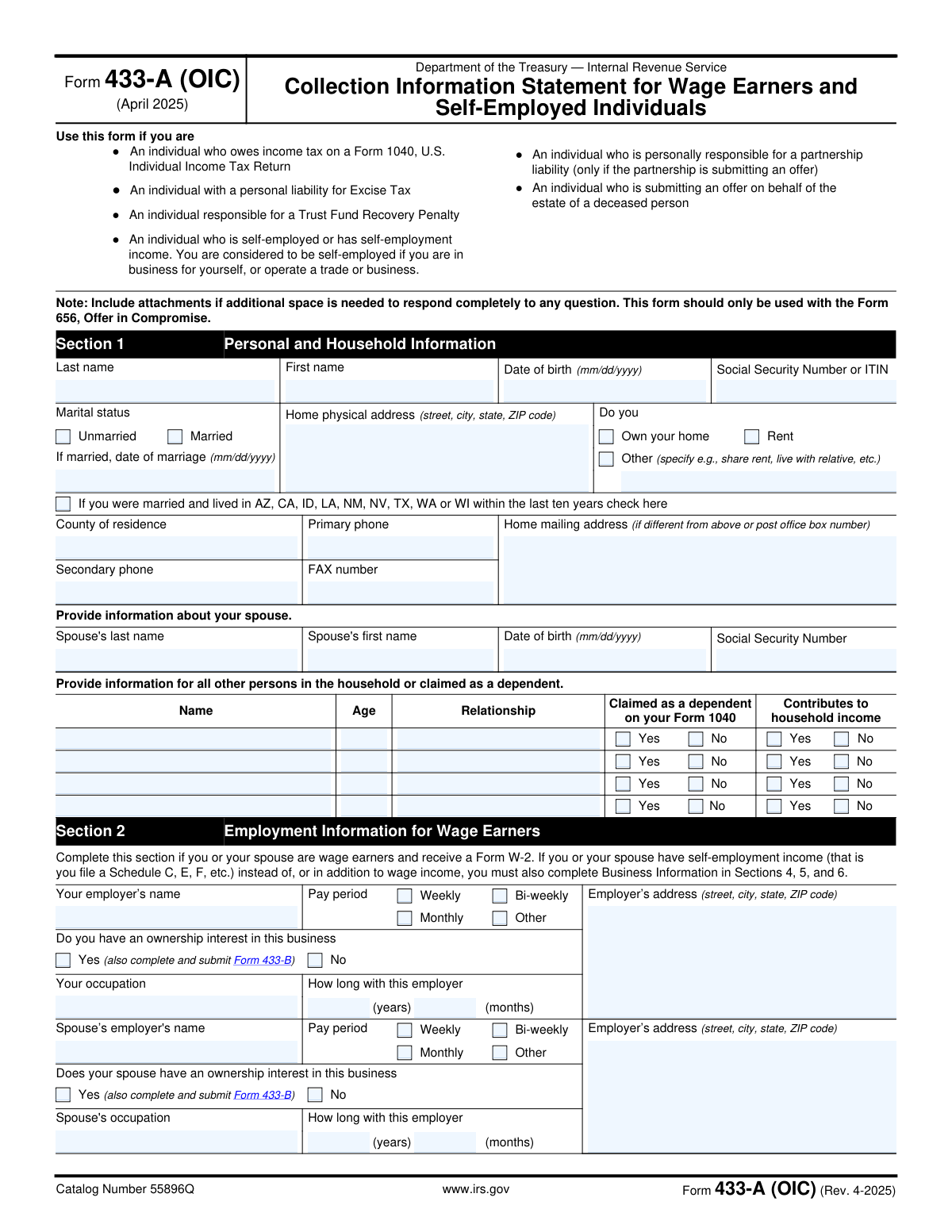
Form 433-A (OIC) is a comprehensive financial statement required by the IRS for individuals seeking to resolve their tax liability through an Offer in Compromise (OIC). It collects detailed information on personal and business assets, income, and living expenses to help the IRS evaluate the taxpayer's ability to pay. Completing this form accurately is crucial for the OIC process, and today this form can be filled out quickly and accurately using AI-powered services like Instafill.ai, which can also convert non-fillable PDF versions into interactive fillable forms.
Our AI automatically handles information lookup, data retrieval, formatting, and form filling.
It takes less than a minute to fill out Form 433-A (OIC) using our AI form filling.
Securely upload your data. Information is encrypted in transit and deleted immediately after the form is filled out.
Form specifications
| Form name: | Form 433-A (OIC), Collection Information Statement for Wage Earners and Self-Employed Individuals |
| Number of pages: | 8 |
| Filled form examples: | Form Form 433-A (OIC) Examples |
| Language: | English |
| Categories: | self-employed forms, PA state forms, NJ state forms |
Instafill Demo: How to fill out PDF forms in seconds with AI
How to Fill Out Form 433-A (OIC) Online for Free in 2026
Are you looking to fill out a FORM 433-A (OIC) form online quickly and accurately? Instafill.ai offers the #1 AI-powered PDF filling software of 2026, allowing you to complete your FORM 433-A (OIC) form in just 37 seconds or less.
Follow these steps to fill out your FORM 433-A (OIC) form online using Instafill.ai:
- 1 Navigate to Instafill.ai and upload your PDF of Form 433-A (OIC) or select it from the form library.
- 2 Use the AI assistant to automatically populate your personal, spousal, and household information in Section 1.
- 3 Provide details about your employment as a wage earner in Section 2 and, if applicable, your self-employment information in Sections 4, 5, and 6.
- 4 List all personal and business assets, including bank accounts, real estate, vehicles, and investments, allowing the AI to guide you through the required calculations in Sections 3 and 5.
- 5 Detail your complete monthly household income and expenses in Section 7 to determine your financial standing.
- 6 Follow the form's instructions in Section 8 to calculate your minimum offer amount based on your assets and remaining monthly income.
- 7 Carefully review all entered data, answer the questions in Section 9, and then e-sign and download the completed form for submission with your Form 656.
Our AI-powered system ensures each field is filled out correctly, reducing errors and saving you time.
Why Choose Instafill.ai for Your Fillable Form 433-A (OIC) Form?
Speed
Complete your Form 433-A (OIC) in as little as 37 seconds.
Up-to-Date
Always use the latest 2026 Form 433-A (OIC) form version.
Cost-effective
No need to hire expensive lawyers.
Accuracy
Our AI performs 10 compliance checks to ensure your form is error-free.
Security
Your personal information is protected with bank-level encryption.
Frequently Asked Questions About Form Form 433-A (OIC)
Form 433-A (OIC) is a Collection Information Statement used by the IRS to evaluate your financial situation. You must submit it with Form 656 when you are making an Offer in Compromise (OIC) to settle your tax debt for less than the full amount you owe.
You need to file this form if you are an individual wage earner or self-employed person submitting an Offer in Compromise (Form 656). This includes individuals who owe income tax, are responsible for certain penalties, or are submitting an offer on behalf of an estate.
You must attach several documents, including recent pay stubs, bank statements for the last three months, investment and retirement account statements, and loan statements. A complete checklist of required attachments is provided in Section 10 of the form.
If you are self-employed, you must complete Sections 4, 5, and 6 in addition to the other relevant sections. These sections require detailed information about your business structure, assets, income, and expenses.
For real estate and vehicles, you must multiply the current market value by 0.8 (or 80%) and then subtract any outstanding loan balance. This 'quick sale value' is what the IRS uses to determine your equity in the asset for the offer calculation.
Yes, you must report all digital assets, such as cryptocurrencies and NFTs, in Section 3 for personal assets and Section 5 for business assets. You need to provide a description, the number of units, its location, and its current U.S. dollar equivalent.
The minimum offer amount is calculated by adding your available equity in assets (from Boxes A and B) to your future remaining income. Your future income is determined by multiplying your remaining monthly income (Box F) by either 12 or 24, depending on your proposed payment plan.
Yes, you must include your spouse's income, employment, and asset information, as the IRS needs a complete picture of your household's financial situation to evaluate the offer. This is especially critical if you live in a community property state.
This form should not be sent by itself; it must be submitted as part of a package with Form 656, Offer in Compromise. Follow the submission instructions provided for Form 656 to ensure your entire offer package is processed correctly.
If you cannot pay the calculated minimum offer amount, you can propose a different amount on Form 656. You must provide a detailed explanation of your special circumstances in the designated section of Form 656 and attach supporting documentation.
Yes, services like Instafill.ai use AI to help you accurately auto-fill form fields, which can save you significant time and reduce errors. These tools can guide you through complex sections and ensure your information is entered correctly.
To fill out Form 433-A (OIC) with Instafill.ai, you can upload the PDF to their platform. The AI will identify the fields, and you can answer simple questions to have your information automatically and accurately placed into the correct sections of the form.
If you have a non-fillable or 'flat' PDF, you can use a service like Instafill.ai to make it interactive. Simply upload the file, and the platform will convert it into a fillable form that you can complete, sign, and download online.
Compliance Form 433-A (OIC)
Validation Checks by Instafill.ai
1
SSN/ITIN Format and Presence
Validates that the Social Security Number (SSN) or Individual Taxpayer Identification Number (ITIN) in Section 1 is entered in a valid 9-digit format (e.g., XXX-XX-XXXX or XXXXXXXXX). This is a critical identifier for the IRS to correctly associate the form with the taxpayer's account. Failure to provide a valid number will prevent form processing and require resubmission.
2
Conditional Spouse Information Requirement
Checks if the 'Married' status is selected in Section 1. If it is, this validation ensures that the spouse's first name, last name, date of birth, and Social Security Number are all provided. This information is essential for the IRS to have a complete financial picture of the household. If these fields are left blank while 'Married' is checked, the form will be considered incomplete.
3
Date of Birth and Marriage Date Validity
Ensures all date fields, such as 'Date of birth' and 'Date of marriage', are in a valid mm/dd/yyyy format and represent a logical date in the past. For example, the date of birth cannot be a future date, and the date of marriage cannot be before the taxpayer's date of birth. This prevents data entry errors that would create an invalid record and cause processing delays.
4
Non-Negative Financial Value Enforcement
Ensures that all monetary fields throughout the form, including asset values, income, and expenses, contain only zero or positive numbers, as explicitly stated in the instructions. The form states that negative numbers should be entered as '0'. This rule prevents calculation errors and ensures that financial deficits in one area do not improperly reduce the overall net worth calculation.
5
Asset Value Calculation Accuracy (Section 3)
Verifies that the calculations for asset values in Section 3 are performed correctly according to the form's instructions (e.g., Current Market Value x 0.8 - Loan Balance). These calculations are fundamental to determining the taxpayer's 'Available Individual Equity in Assets' (Box A). An incorrect calculation will lead to an inaccurate minimum offer amount and will likely cause the offer to be rejected.
6
Vehicle Value Logic for Leased vs. Owned
Verifies the logic for vehicles in Section 3. If the 'Lease' checkbox is selected for a vehicle, this validation ensures that the 'Total value of vehicle' (line 6a or 6c) is entered as '0', as instructed. This is important to prevent the value of a non-owned, leased asset from being incorrectly included in the taxpayer's total equity, which would wrongly inflate the minimum offer amount.
7
Self-Employment Sections Completion Trigger
Checks if the taxpayer has indicated self-employment income. If so, this validation ensures that Sections 4, 5, and 6 (Self-Employed Information, Business Assets, and Business Income/Expenses) are completed. Failure to provide this detailed business information when required will result in an incomplete application, as the IRS cannot evaluate the offer without a full financial disclosure.
8
Net Business Income Calculation (Box C)
Validates that the 'Net Business Income' in Box C is the correct result of subtracting total business expenses (line 29) from total business income (line 17). This figure is a key input for the total household income calculation in Section 7. An error here will cascade and lead to an incorrect offer amount.
9
Net Business Income Consistency Check
Validates that the amount entered for 'Net business income from Box C' on line 36 (Section 7) is identical to the calculated total in 'Box C' at the end of Section 6. This cross-sectional check ensures data integrity and consistency as information flows between sections. A mismatch would indicate a data entry error and would require correction.
10
Remaining Monthly Income Calculation (Box F)
Validates that the 'Remaining Monthly Income' in Box F is the correct result of subtracting 'Total Household Expenses' (Box E) from 'Total Household Income' (Box D). This figure is the basis for calculating the future income component of the offer. An error here will directly lead to an incorrect minimum offer amount in Section 8.
11
Minimum Offer Amount Calculation and Value
Confirms that the final 'Offer Amount' in Section 8 is correctly calculated by summing the available equity (Box A and Box B) and the future remaining income (Box G or Box H). It also checks that the resulting offer is greater than zero, as required. This is the ultimate purpose of the form, and any error in this final calculation will render the submission invalid.
12
Conditional Bankruptcy Details Requirement
Checks if the question 'Have you filed bankruptcy in the past 7 years?' in Section 9 is answered 'Yes'. If so, it validates that the subsequent fields for date filed, petition number, and location are all completed. This information is crucial for the IRS to determine eligibility, as active bankruptcy proceedings can disqualify an applicant.
13
Signature and Date Presence
Ensures that the 'Signature of Taxpayer' and the signature 'Date' fields in Section 10 are both completed. An unsigned form is legally invalid and cannot be processed. If the offer is submitted jointly with a spouse, this check also verifies the presence of the spouse's signature and date.
Common Mistakes in Completing Form 433-A (OIC)
Section 7 asks for gross monthly income before any taxes or deductions are taken out. A frequent mistake is entering take-home (net) pay, which significantly understates the household's actual income and ability to pay. This misrepresentation can cause the IRS to reject the offer. To avoid this, always use the pre-tax amount shown on your pay stubs and earnings statements.
The form requires specific calculations, such as multiplying the market value of real estate and vehicles by 80% (0.8) before subtracting loans. People often use the full market value or make simple arithmetic errors, leading to an inaccurate 'Available Equity' figure. This can cause the IRS to reject the offer for being too low. To prevent this, use a calculator for each step and double-check your math, or use a tool that automates these calculations.
For self-employed filers, Section 7 (Line 36) requires that non-cash expenses like depreciation must be added back to the net business income from Box C. Many people forget this step, as depreciation is a normal deduction on a tax return. This error artificially lowers your reported monthly income, resulting in an understated and incorrect minimum offer amount that the IRS will flag for correction.
A note in Section 7 specifies that for expenses like 'Food, clothing, and miscellaneous' (Line 39), you should enter the full allowable IRS standard amount, even if your actual spending is less. Many people enter their lower, actual costs, which works against them by making their disposable income appear higher. This results in a higher calculated minimum offer, so you should always look up and use the correct national or local standard.
The form requires disclosing all assets, including cryptocurrency, NFTs, online payment accounts (e.g., PayPal), and old retirement plans. People often forget small accounts or are unsure how to value and report digital assets, leading to omissions. Failing to disclose all assets is a serious error that can lead to immediate rejection of the offer and potential penalties for providing false information.
Section 10 lists numerous required attachments, such as three months of bank statements, recent pay stubs, and loan statements. Submitting the form without all necessary supporting documents is a primary reason for an offer to be returned as unprocessable. This causes significant delays and requires a complete resubmission. To avoid this, create a checklist from Section 10 and gather all documents before sending.
The form allows specific deductions, such as subtracting $1,000 from cash/bank accounts (Line 1) and $3,450 from a vehicle's value (Line 6b). Filers often miss these deductions entirely or make mathematical errors when applying them. This leads to an overstatement of available assets and a higher calculated minimum offer. AI-powered form-filling tools like Instafill.ai can help prevent these errors by automatically applying these calculations correctly.
The IRS evaluates the entire household's financial situation, not just the taxpayer's. A common mistake is omitting income contributions from other household members like an adult child, a partner, or a roommate, as required in Sections 1 and 7. This under-reports the total household income available to pay expenses and can be seen as a misrepresentation of the ability to pay.
In Section 8, the 'Remaining Monthly Income' (Box F) is multiplied by either 12 or 24, depending on the proposed payment timeframe. Using the wrong multiplier will result in a completely incorrect 'Minimum Offer Amount.' This fundamental error invalidates the final calculation and will require a full correction. Carefully read the instructions for Box G and Box H to select the multiplier that matches your payment plan.
This is a long and complex form, and it is often available only as a non-fillable PDF, leading to handwritten submissions. Common mistakes include leaving required fields blank, providing illegible handwriting, or making calculation errors that are hard to trace. This can cause processing delays or an outright rejection. Using a service like Instafill.ai can convert the flat PDF into an interactive, fillable form, ensuring all data is legible, validated, and correctly calculated.
Saved over 80 hours a year
“I was never sure if my IRS forms like W-9 were filled correctly. Now, I can complete the forms accurately without any external help.”
Kevin Martin Green
Your data stays secure with advanced protection from Instafill and our subprocessors

Robust compliance program
Transparent business model
You’re not the product. You always know where your data is and what it is processed for.
ISO 27001, HIPAA, and GDPR
Our subprocesses adhere to multiple compliance standards, including but not limited to ISO 27001, HIPAA, and GDPR.
Security & privacy by design
We consider security and privacy from the initial design phase of any new service or functionality. It’s not an afterthought, it’s built-in, including support for two-factor authentication (2FA) to further protect your account.
Fill out Form 433-A (OIC) with Instafill.ai
Worried about filling PDFs wrong? Instafill securely fills form-433-a-oic-collection-information-statement-for-wage-earners-and-self-employed-individuals forms, ensuring each field is accurate.



