Yes! You can use AI to fill out Form DEP 4015, Onsite Sewage Treatment and Disposal System Site Evaluation and System Specifications
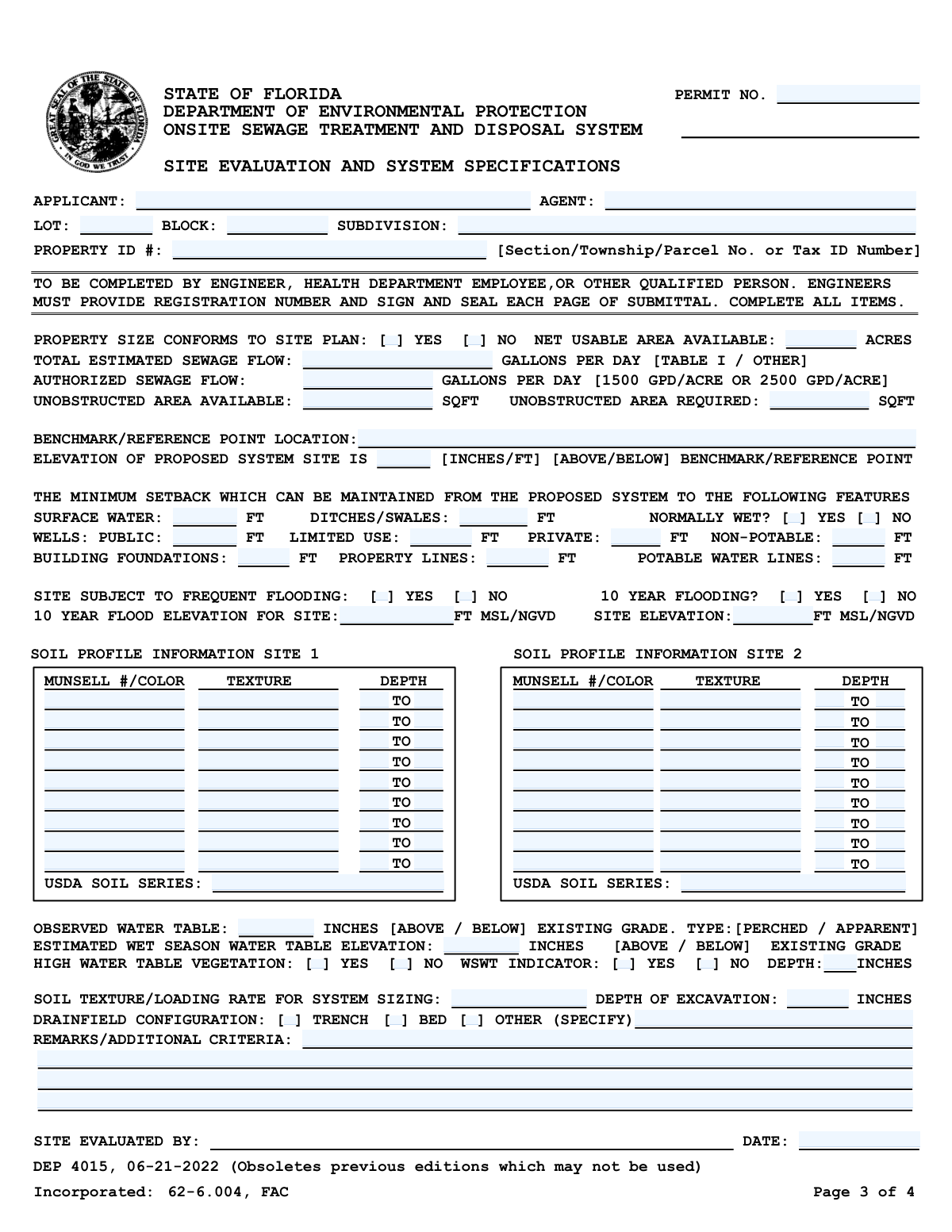
Form DEP 4015 is a required document in Florida for evaluating a property's suitability for an onsite sewage treatment and disposal system (OSTDS), commonly known as a septic system. It is completed by a qualified professional to record critical site data, including soil profiles, water table levels, and setback distances, ensuring the proposed system complies with state environmental regulations. Today, this form can be filled out quickly and accurately using AI-powered services like Instafill.ai, which can also convert non-fillable PDF versions into interactive fillable forms.
Our AI automatically handles information lookup, data retrieval, formatting, and form filling.
It takes less than a minute to fill out DEP 4015 using our AI form filling.
Securely upload your data. Information is encrypted in transit and deleted immediately after the form is filled out.
Form specifications
| Form name: | Form DEP 4015, Onsite Sewage Treatment and Disposal System Site Evaluation and System Specifications |
| Number of pages: | 1 |
| Language: | English |
Instafill Demo: How to fill out PDF forms in seconds with AI
How to Fill Out DEP 4015 Online for Free in 2026
Are you looking to fill out a DEP 4015 form online quickly and accurately? Instafill.ai offers the #1 AI-powered PDF filling software of 2026, allowing you to complete your DEP 4015 form in just 37 seconds or less.
Follow these steps to fill out your DEP 4015 form online using Instafill.ai:
- 1 Navigate to Instafill.ai and upload or select the Florida DEP 4015 form.
- 2 Provide the applicant, agent, and property identification details, such as lot, block, subdivision, and Property ID number.
- 3 Enter the site's physical characteristics, including property size, estimated sewage flow, available unobstructed area, and minimum setback distances from wells, surface water, and property lines.
- 4 Input the detailed soil profile information for Site 1 and Site 2, including Munsell color, texture, and depth for each soil horizon as determined by the site evaluator.
- 5 Record the water table data, including the observed depth, estimated wet season water table elevation, and the presence of any high water table indicators.
- 6 Specify the drainfield configuration (trench, bed, or other), soil loading rate, and excavation depth, adding any necessary remarks or additional criteria.
- 7 Review all AI-populated fields for accuracy, then have the qualified evaluator sign and date the form before submission to the Florida Department of Environmental Protection.
Our AI-powered system ensures each field is filled out correctly, reducing errors and saving you time.
Why Choose Instafill.ai for Your Fillable DEP 4015 Form?
Speed
Complete your DEP 4015 in as little as 37 seconds.
Up-to-Date
Always use the latest 2026 DEP 4015 form version.
Cost-effective
No need to hire expensive lawyers.
Accuracy
Our AI performs 10 compliance checks to ensure your form is error-free.
Security
Your personal information is protected with bank-level encryption.
Frequently Asked Questions About Form DEP 4015
This form, DEP 4015, is used to document the results of a site evaluation to determine if a property in Florida is suitable for an onsite sewage treatment and disposal system, commonly known as a septic system. It records critical data about the property's soil, water table, and available space.
This form must be completed by a qualified professional, such as a Florida-registered engineer, a health department employee, or another person deemed qualified by the Department of Environmental Protection. Property owners cannot fill out this form themselves.
The 'Total Estimated Sewage Flow' is the amount of wastewater the proposed building is expected to produce daily. The 'Authorized Sewage Flow' is the maximum amount the site is permitted to handle based on its size and soil conditions, as determined by regulations.
This section requires detailed observations from soil borings at two separate locations on the property. The evaluator must record the soil color (using the Munsell system), texture, and the depth of each soil layer.
The form requires data for two sites to identify a suitable location for the primary system and a viable repair or replacement area. This ensures long-term viability and provides a contingency plan if the primary drainfield fails.
Setbacks are the minimum required distances between the septic system and features like wells, surface water, property lines, and buildings. They are legally required to protect public health and prevent contamination of drinking water and the environment.
This is the evaluator's professional estimate of the highest point the groundwater will reach during the rainiest time of the year. This measurement is crucial for ensuring the septic system's drainfield will function properly and not become saturated.
This section is for the site evaluator to note any unique site conditions, additional requirements, or justifications for design choices that are not covered elsewhere on the form. This could include details about mounding, specific system components, or site limitations.
Once completed and signed by the qualified evaluator, this form becomes a key part of the application package submitted to the local county health department for a permit to construct the septic system.
While a professional must conduct the physical evaluation, services like Instafill.ai can be used by the evaluator to accurately auto-fill the form fields from their collected data. This helps save time and reduce data entry errors.
You or your agent can use a service like Instafill.ai to upload the form and fill it out digitally. The platform allows you to easily type information into the fields, making the process faster and more organized than filling it out by hand.
If you have a non-fillable or 'flat' PDF, you can use a tool like Instafill.ai to convert it into an interactive, fillable form. Simply upload the document, and the platform will automatically detect the fields for easy online completion.
A benchmark or reference point is a stable, known point of elevation on or near the property, such as a survey marker or a specific point on a permanent structure. It is used as a consistent starting point for measuring all other site elevations.
Compliance DEP 4015
Validation Checks by Instafill.ai
Common Mistakes in Completing DEP 4015
Users often enter the Property ID or Tax ID Number without the required dashes or leading zeros, or they transpose digits. This happens because they copy it from an unofficial source or enter it from memory. An incorrect ID prevents the reviewing agency from locating the property in their official records, leading to immediate processing delays or rejection. To avoid this, copy the number exactly as it appears on the official tax roll or property deed, and use an AI-powered tool like Instafill.ai to validate the format automatically.
When documenting soil horizons, the 'Depth To' of one layer must equal the 'Depth From' of the layer directly beneath it. Evaluators frequently create gaps (e.g., layer one ends at 12", layer two begins at 14") or overlaps, which invalidates the soil profile data. This critical error leads to incorrect system design calculations and requires a full resubmission. Always ensure depth values are continuous from one horizon to the next.
The 'Munsell #/Color' field requires a specific scientific notation (e.g., '10YR 4/3'), not a simple color name like 'dark brown'. This mistake is common among those not trained in soil science and renders the technical data useless for evaluation. An incomplete or incorrect notation will cause the application to be returned for correction. This field must be completed by a qualified person referencing a Munsell Soil Color Chart.
Applicants often mix up 'Total Estimated Sewage Flow' and 'Authorized Sewage Flow'. The estimated flow is calculated based on the building's specific use (per Table I), while the authorized flow is a regulatory limit based on property size (e.g., 1500 GPD/Acre). Entering the wrong value in either field can lead to an improperly sized system design and will cause the application to be rejected. Carefully calculate estimated flow based on state guidelines and determine authorized flow based on acreage.
This form contains fields that are only required if a preceding checkbox is marked 'Yes', such as providing the 'WSWT Depth' after checking 'WSWT Indicator - Yes'. A frequent error is checking the 'Yes' box but failing to provide the required corresponding data. This omission makes the form incomplete and halts the review process until the missing information is supplied. To prevent this, double-check that every 'Yes' answer has its required follow-up data entered.
The form specifies different units for various fields, such as 'inches' for water table depth and 'feet' for setbacks. Users may accidentally enter values in the wrong unit (e.g., entering 2 feet as '2' in an inches field). This leads to grossly inaccurate data and a flawed system design that will be rejected. Pay close attention to the unit specified next to each field (FT, INCHES, SQFT, ACRES) before entering any numerical value.
The 'Benchmark/Reference Point Location' field requires a description of a permanent, easily identifiable point for elevation reference. Entries like 'stake in ground' or 'tree' are too vague and not permanent, making the site evaluation unverifiable. This can lead to the rejection of the evaluation. The description should be precise, such as 'Top of concrete monument at NE property corner' or 'Top of water meter cover at front curb'.
The instructions mandate that engineers must sign, seal, and provide their registration number on every single page of the submittal, not just the first or last page. Forgetting to seal even one page is a common procedural error that invalidates the entire application. This forces a complete resubmission, causing significant delays. Before submitting, engineers must perform a final check to ensure every page is properly signed and sealed.
Setback distances from wells, surface water, and property lines are critical for health and environmental compliance. These values are often estimated or measured inaccurately on site, which is a major violation. An incorrect setback can lead to automatic permit denial, require a costly system redesign, or result in fines if discovered after installation. These distances must be measured precisely by a qualified professional using reliable equipment.
When an applicant selects 'Other' for the drainfield configuration, they often forget to fill in the corresponding specification field to describe the system. This leaves critical design information missing from the application. The reviewer cannot approve a system without knowing its type, which will cause the form to be returned as incomplete. If 'Other' is checked, always provide a clear description of the alternative configuration in the space provided.
Saved over 80 hours a year
“I was never sure if my IRS forms like W-9 were filled correctly. Now, I can complete the forms accurately without any external help.”
Kevin Martin Green
Your data stays secure with advanced protection from Instafill and our subprocessors
Robust compliance program
Transparent business model
You’re not the product. You always know where your data is and what it is processed for.
ISO 27001, HIPAA, and GDPR
Our subprocesses adhere to multiple compliance standards, including but not limited to ISO 27001, HIPAA, and GDPR.
Security & privacy by design
We consider security and privacy from the initial design phase of any new service or functionality. It’s not an afterthought, it’s built-in, including support for two-factor authentication (2FA) to further protect your account.
Fill out DEP 4015 with Instafill.ai
Worried about filling PDFs wrong? Instafill securely fills form-dep-4015-onsite-sewage-treatment-and-disposal-system-site-evaluation-and-system-specifications forms, ensuring each field is accurate.