Yes! You can use AI to fill out Minimum Wage Ordinance (MWO) Complaint Intake Form
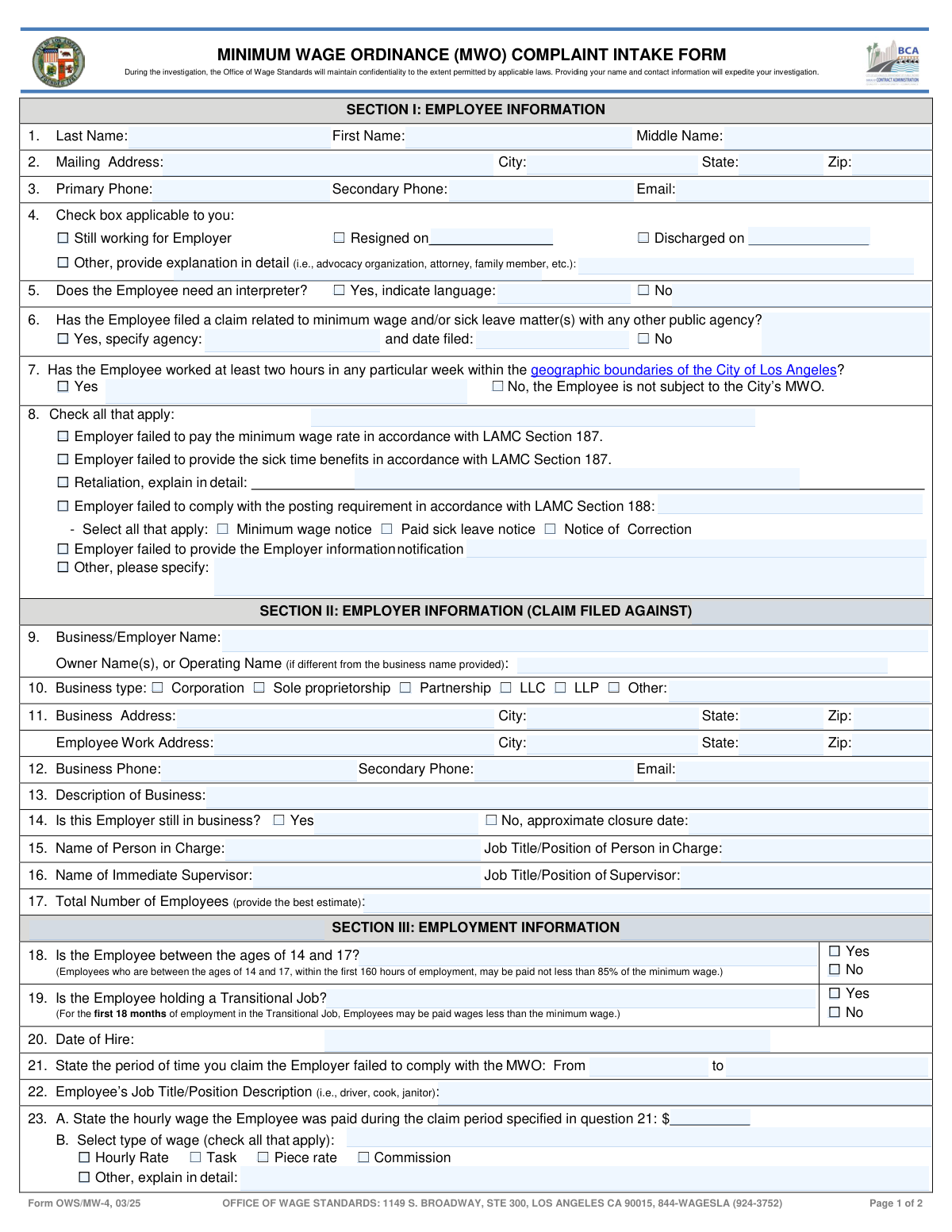
Form OWS/MW-4, the Minimum Wage Ordinance (MWO) Complaint Intake Form, is a legal document used by employees in the City of Los Angeles to report violations by their employers. It allows the Office of Wage Standards to investigate claims related to failure to pay minimum wage, provide sick leave, or illegal retaliation. Today, this form can be filled out quickly and accurately using AI-powered services like Instafill.ai, which can also convert non-fillable PDF versions into interactive fillable forms.
Our AI automatically handles information lookup, data retrieval, formatting, and form filling.
It takes less than a minute to fill out OWS/MW-4 using our AI form filling.
Securely upload your data. Information is encrypted in transit and deleted immediately after the form is filled out.
Form specifications
| Form name: | Minimum Wage Ordinance (MWO) Complaint Intake Form |
| Number of pages: | 3 |
| Language: | English |
Instafill Demo: How to fill out PDF forms in seconds with AI
How to Fill Out OWS/MW-4 Online for Free in 2026
Are you looking to fill out a OWS/MW-4 form online quickly and accurately? Instafill.ai offers the #1 AI-powered PDF filling software of 2026, allowing you to complete your OWS/MW-4 form in just 37 seconds or less.
Follow these steps to fill out your OWS/MW-4 form online using Instafill.ai:
- 1 Navigate to Instafill.ai and upload or select the MWO Complaint Intake Form (OWS/MW-4).
- 2 Use the AI assistant to provide your personal and employment details for Section I, including contact information, employment status, and any interpreter needs.
- 3 Input the employer's details in Section II. The AI can help structure the information, such as business name, address, and manager names, even if you only have partial details.
- 4 Detail your employment and claim information in Section III, including your hire date, job title, pay rate, and the specific MWO violations you are reporting.
- 5 Complete Section IV by describing your work hours and attaching supporting documents. Instafill.ai allows you to easily upload and attach files like pay stubs or timekeeping records.
- 6 Review all the information auto-filled by the AI for accuracy, then electronically sign and date the form in Section V to declare the information is true to the best of your knowledge.
- 7 Download the completed, signed form and submit it to the Los Angeles Office of Wage Standards as per their instructions.
Our AI-powered system ensures each field is filled out correctly, reducing errors and saving you time.
Why Choose Instafill.ai for Your Fillable OWS/MW-4 Form?
Speed
Complete your OWS/MW-4 in as little as 37 seconds.
Up-to-Date
Always use the latest 2026 OWS/MW-4 form version.
Cost-effective
No need to hire expensive lawyers.
Accuracy
Our AI performs 10 compliance checks to ensure your form is error-free.
Security
Your personal information is protected with bank-level encryption.
Frequently Asked Questions About Form OWS/MW-4
This form is used to file a complaint with the Los Angeles Office of Wage Standards if you believe your employer has violated the city's Minimum Wage Ordinance, which includes rules on minimum pay and paid sick leave.
You are likely eligible if you have worked for an employer for at least two hours in any particular week within the geographic boundaries of the City of Los Angeles. You can verify a work address at neighborhoodinfo.lacity.gov to confirm it's within the city.
You should still submit the form even if you cannot answer every question. However, please be aware that providing incomplete information may affect the processing time of your complaint.
You should attach copies of any documents that support your claim, such as pay stubs, timekeeping records, cancelled checks, or a copy of your employer's sick time policy. Providing these documents can help expedite the investigation.
The 'Business Address' is the company's main or corporate location, while the 'Employee Work Address' is the specific physical location where you actually performed your work. It is crucial to provide the address where you worked to confirm MWO eligibility.
If you have an irregular schedule, skip the 'Regular Work Hours' chart in question 28 and complete the 'Irregular Work Hours' chart in question 29. Fill it out to the best of your ability with details about hours worked and pay rates for different periods.
No, the City of Los Angeles Minimum Wage Ordinance took effect on July 1, 2016. For claims related to periods before this date, you should contact the California Department of Labor Standards Enforcement (DLSE).
The Office of Wage Standards maintains confidentiality to the extent permitted by applicable laws during the investigation. Providing your name and contact information is important as it helps expedite the process.
The form does not state a specific processing time, but it notes that providing complete and accurate information, along with supporting documents, will help expedite the process. Incomplete forms may lead to delays.
To be eligible for paid sick leave under the MWO, you must work in the City of Los Angeles for the same employer for 30 or more days within a year. You can typically start using accrued sick leave after 90 days of employment.
Submit the completed form to the Office of Wage Standards at 1149 S. Broadway, Ste 300, Los Angeles, CA 90015. You may also use the online Minimum Wage Complaint short form as an alternative.
Yes, services like Instafill.ai use AI to accurately auto-fill form fields from your saved information, which can save you significant time and help reduce errors.
Simply upload the MWO Complaint Intake Form to the Instafill.ai platform. The AI will identify the fields, allowing you to fill them out interactively or use the auto-fill feature to populate your information quickly.
You can use a service like Instafill.ai, which is designed to convert flat, non-fillable PDFs into interactive, fillable forms. This allows you to type your information directly into the fields before printing or submitting.
Compliance OWS/MW-4
Validation Checks by Instafill.ai
1
MWO Effective Date Compliance
This check ensures the 'From' date of the claim period (Field 21) is not earlier than July 1, 2016. The City of Los Angeles Minimum Wage Ordinance only took effect on this date, so claims for periods prior to it are not valid under this ordinance. If the date is too early, the form should instruct the user to correct the date or contact the Department of Labor Standards Enforcement for state-level claims.
2
Logical Claim Period Chronology
This validation verifies that the 'to' date in the claim period (Field 21) is on or after the 'from' date. An end date that precedes the start date is a logical impossibility and would prevent any accurate calculation of potential unpaid wages. Failure will require the user to correct the date range before proceeding.
3
Hire Date Precedes Claim Period
This check confirms that the employee's 'Date of Hire' (Field 20) is on or before the 'From' date of the claim period (Field 21). An employee cannot have a wage claim for a period before they were employed by the employer. If validation fails, the user must correct one or both dates to ensure the claim period falls within the employment tenure.
4
Mandatory Separation Date
This validation ensures that if the employee's status (Field 4) is marked as 'Resigned on' or 'Discharged on,' the corresponding date field is filled. This date is crucial for determining the statute of limitations and the final pay period of the claim. A missing date will halt submission and prompt the user to provide it.
5
Mandatory Interpreter Language Specification
This check verifies that if the 'Yes' box is checked for needing an interpreter (Field 5), the adjacent text field for specifying the language is not left blank. This information is essential for the Office of Wage Standards to arrange for appropriate language services and communicate effectively with the claimant. Failure to specify a language will prevent submission until the field is completed.
6
Mandatory Retaliation Explanation
This validation ensures that if the 'Retaliation' checkbox is selected as a type of complaint (Field 8), the corresponding explanation text box is filled out. A claim of retaliation requires specific details to be investigated properly. If the explanation is missing, the form will prompt the user to provide details about the retaliatory action.
7
Work Location Eligibility Check
This check validates that the 'Employee Work Address' (Field 11) is located within the geographic boundaries of the City of Los Angeles. Eligibility for the City's MWO is contingent on having worked at least two hours per week within city limits. If the address appears to be outside the city, the system should display a warning that the claim may not be eligible and direct the user to verify the address.
8
Mandatory Business Closure Date
This validation confirms that if the employer is marked as 'No' longer in business (Field 14), the 'approximate closure date' field is populated. This information is vital for the investigation, helping to locate records and former owners or managers. The form will not proceed without this date if the business is marked as closed.
9
Sick Leave Eligibility Logic
This check assesses the answers to sick leave eligibility questions 26.A and 26.B. If the user answers 'No' to working for at least 30 days or it being at least 90 days since hire, the form should display an informational message stating they may not be eligible for paid sick leave. This manages claimant expectations and ensures they understand the eligibility requirements upfront.
10
Regular Work Hours Calculation Consistency
This validation performs a logical check on the 'Sample Week' table in Field 28. It verifies that for each day entered, the 'Hours Worked' value is less than or equal to the duration between 'Time In' and 'Time Out'. This helps catch data entry errors and ensures the hours claimed are plausible, accounting for required unpaid meal breaks.
11
Mandatory Pay Frequency Amount
This check ensures that if a pay frequency option like 'Daily,' 'Weekly,' or 'Bi-weekly' is selected in Field 25, the corresponding dollar amount field is filled with a numeric value. It is impossible to process a wage claim without knowing the amount the employee was paid. The form will show an error if the amount is missing for a selected frequency.
12
Signature Block Completion
This validation verifies that the Signature, Printed Name, and Date fields in Section V are all completed before final submission. Since the form is signed under penalty of perjury, a complete signature block is a legal requirement for the complaint to be considered valid and actionable. The submission will be blocked until all three fields are filled.
13
Conditional 'Other' Field Requirement
This validation rule applies to multiple fields (4, 8, 10, 23.B, 24, 25, 31) where an 'Other' option is available. It ensures that if an 'Other' checkbox is selected, the associated text field for explanation or specification is not left empty. This is crucial for capturing necessary details that don't fit into predefined categories, preventing incomplete or ambiguous data.
14
Phone Number Format Validation
This check ensures that the phone numbers entered in the 'Primary Phone' and 'Secondary Phone' fields for both the employee (Field 3) and employer (Field 12) adhere to a standard format. Correctly formatted phone numbers are essential for investigators to be able to contact the parties involved in the complaint. An invalid format would prompt the user to correct the entry to a recognizable 10-digit number format.
Common Mistakes in Completing OWS/MW-4
People often enter the same address for both the main business location (Question 11) and their specific work site, even if they are different. This happens when an employee works at a satellite office or client location but only knows the corporate headquarters address. This error can delay the investigation, especially for verifying eligibility under the City's MWO. To avoid this, carefully distinguish between the company's official address and the physical location where you performed your work, providing both as accurately as possible.
A complaint is only valid if the work was performed within the geographic boundaries of the City of Los Angeles, not just Los Angeles County. Complainants often assume their 'Los Angeles, CA' address qualifies, leading to their claim (Question 7) being rejected after processing has begun. The guide provides a specific URL (neighborhoodinfo.lacity.gov) to verify the address. Always use this tool to confirm eligibility before submitting the form to avoid wasting time on an invalid claim.
When filling out the work week chart (Question 28), individuals frequently list their total shift time (e.g., 8.5 hours for an 8:00-4:30 shift) instead of deducting unpaid meal breaks as instructed. This inflates the number of hours claimed and creates inaccuracies that investigators must correct, slowing down the process. Always subtract any unpaid break time from your total shift duration to report the actual hours worked.
Complainants may enter a start date for their claim (Question 21) that is before the Los Angeles Minimum Wage Ordinance took effect on July 1, 2016. This part of the claim is invalid for this specific form and must be filed with a different agency. This error leads to confusion and requires the agency to separate or reject parts of the claim. Always ensure your claim period starts on or after July 1, 2016.
In Question 9, employees often write the public-facing brand name or 'Doing Business As' (DBA) name of the company instead of the legal entity name found on their paystub (e.g., 'J.T. Enterprises, LLC'). This makes it difficult for investigators to officially identify and contact the correct employer, causing significant delays. Always check your paystub or W-2 for the official legal name of your employer and list that on the form.
When claiming retaliation (Question 8), people often just check the box or write a short, non-specific phrase like 'they fired me.' This lacks the necessary detail for an investigator to understand the context, such as what protected activity you engaged in and how the employer's adverse action was linked to it. To build a strong claim, provide a detailed narrative including dates, names of individuals involved, and specific actions taken against you.
Forgetting to sign and date the form in Section V is a simple but critical error that invalidates the entire complaint. The signature confirms the information is provided under penalty of perjury, making it a legal requirement. This mistake often happens when people are in a rush. Always perform a final review of the entire form before submission, paying special attention to the signature block.
A very common error is checking boxes in Question 31 to indicate possession of pay stubs or timekeeping records, but then forgetting to attach copies to the submission. A claim without supporting evidence is much harder and slower to investigate. Before submitting, double-check that you have attached copies of every document you indicated you have. If the form is a non-fillable PDF, a tool like Instafill.ai can convert it to a fillable version where you can more easily manage attachments.
In Question 23, an employee might enter an hourly wage but then check boxes for 'Piece rate' or 'Commission,' creating confusion about how they were actually paid. This often occurs with complex pay structures where the employee is unsure how to calculate their effective hourly rate. Be precise: if paid hourly, enter the rate and check 'Hourly.' If paid by other means, check the appropriate box and use the 'Additional Comments' section (Question 32) to explain the pay structure.
The form has two distinct eligibility questions for sick leave (26A and 26B): working for 30 days within a year and being employed for 90 calendar days. Employees often get these confused or believe they are eligible just by working there, leading to incorrect 'Yes' answers. This results in time spent investigating a non-viable sick leave claim. Carefully read both questions and answer them accurately based on your specific employment timeline.
Saved over 80 hours a year
“I was never sure if my IRS forms like W-9 were filled correctly. Now, I can complete the forms accurately without any external help.”
Kevin Martin Green
Your data stays secure with advanced protection from Instafill and our subprocessors

Robust compliance program
Transparent business model
You’re not the product. You always know where your data is and what it is processed for.
ISO 27001, HIPAA, and GDPR
Our subprocesses adhere to multiple compliance standards, including but not limited to ISO 27001, HIPAA, and GDPR.
Security & privacy by design
We consider security and privacy from the initial design phase of any new service or functionality. It’s not an afterthought, it’s built-in, including support for two-factor authentication (2FA) to further protect your account.
Fill out OWS/MW-4 with Instafill.ai
Worried about filling PDFs wrong? Instafill securely fills minimum-wage-ordinance-mwo-complaint-intake-form forms, ensuring each field is accurate.