Yes! You can use AI to fill out Consumer Complaint Form - Office of the Arizona Attorney General
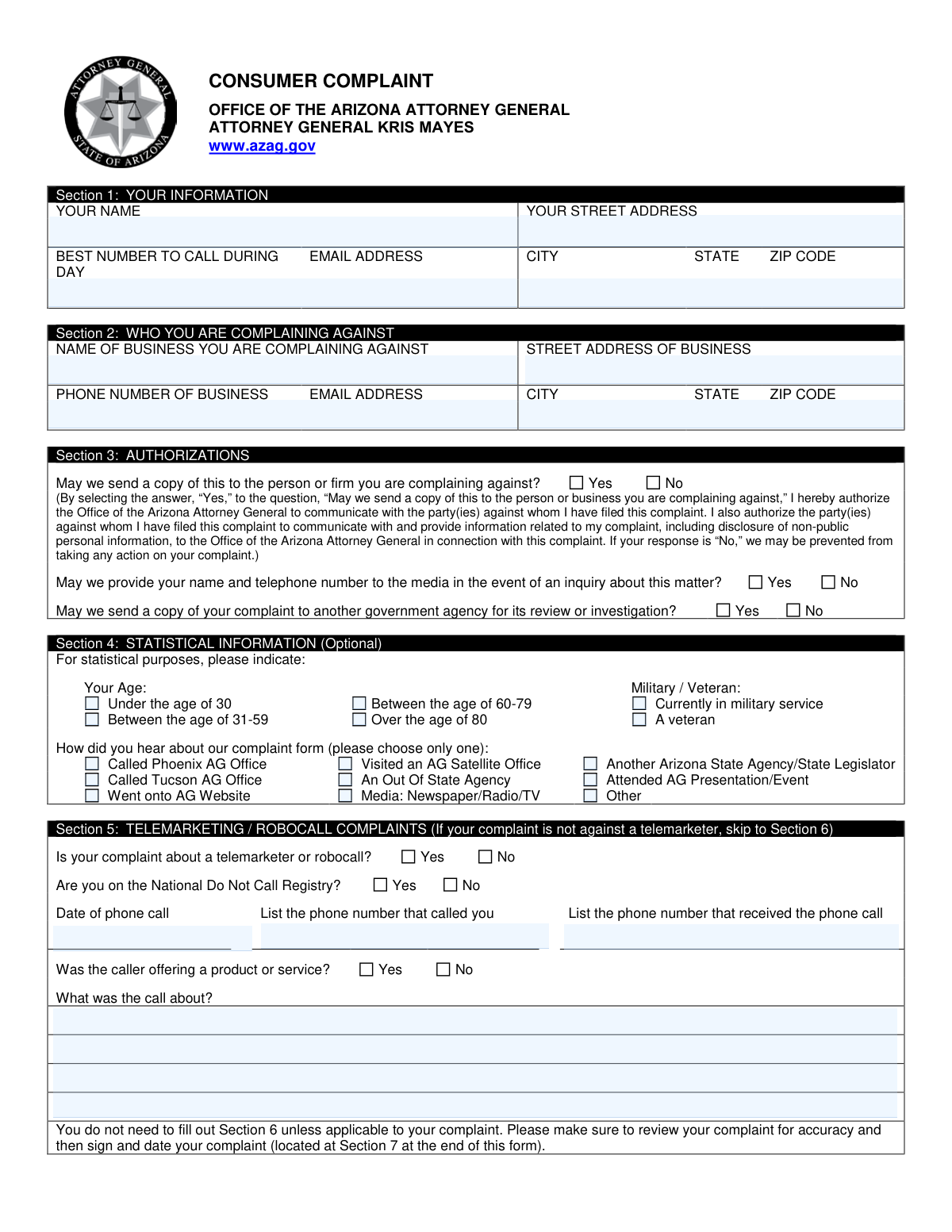
The Arizona Consumer Complaint Form is a document used by consumers to report unfair or deceptive business practices, telemarketing violations, or other consumer-related issues to the Office of the Arizona Attorney General. Filing this form initiates a process where the Attorney General's office may mediate the dispute, investigate the business, or take legal action. Today, this form can be filled out quickly and accurately using AI-powered services like Instafill.ai, which can also convert non-fillable PDF versions into interactive fillable forms.
Our AI automatically handles information lookup, data retrieval, formatting, and form filling.
It takes less than a minute to fill out Arizona Consumer Complaint Form using our AI form filling.
Securely upload your data. Information is encrypted in transit and deleted immediately after the form is filled out.
Form specifications
| Form name: | Consumer Complaint Form - Office of the Arizona Attorney General |
| Number of pages: | 2 |
| Language: | English |
| Categories: | consumer forms |
Instafill Demo: How to fill out PDF forms in seconds with AI
How to Fill Out Arizona Consumer Complaint Form Online for Free in 2026
Are you looking to fill out a ARIZONA CONSUMER COMPLAINT FORM form online quickly and accurately? Instafill.ai offers the #1 AI-powered PDF filling software of 2026, allowing you to complete your ARIZONA CONSUMER COMPLAINT FORM form in just 37 seconds or less.
Follow these steps to fill out your ARIZONA CONSUMER COMPLAINT FORM form online using Instafill.ai:
- 1 Navigate to Instafill.ai and upload or select the Arizona Consumer Complaint form.
- 2 Provide your personal contact information in Section 1, including your name, address, and phone number.
- 3 Enter the complete details of the business you are complaining against in Section 2.
- 4 Complete the authorization section to grant permission for the Attorney General's office to share your complaint with the business and other agencies if necessary.
- 5 Detail the specifics of your complaint in Section 6 (and Section 5 for telemarketing issues), including transaction dates, damages, and a full explanation of the events.
- 6 Review all the information populated by the AI for accuracy, then electronically sign and date the declaration in Section 7 to certify that the information is true and correct.
Our AI-powered system ensures each field is filled out correctly, reducing errors and saving you time.
Why Choose Instafill.ai for Your Fillable Arizona Consumer Complaint Form Form?
Speed
Complete your Arizona Consumer Complaint Form in as little as 37 seconds.
Up-to-Date
Always use the latest 2026 Arizona Consumer Complaint Form form version.
Cost-effective
No need to hire expensive lawyers.
Accuracy
Our AI performs 10 compliance checks to ensure your form is error-free.
Security
Your personal information is protected with bank-level encryption.
Frequently Asked Questions About Form Arizona Consumer Complaint Form
This form is used to file a formal complaint against a business with the Office of the Arizona Attorney General. It allows you to report issues like unfair business practices, problems with products or services, or telemarketing violations.
Any consumer who has a dispute with a business and has been unable to resolve it directly should use this form. It is for individuals seeking assistance from the Attorney General's office to mediate or investigate their complaint.
You should gather your contact details, the full name and address of the business, and any relevant dates, such as the date of the transaction. It is also helpful to have copies of any contracts, receipts, or warranties related to your complaint.
If you select 'No' to sharing the complaint, the Attorney General's Office may be prevented from taking any action on your behalf. Sharing the complaint with the business is a necessary step for them to begin their review and mediation process.
No, Section 5 is only for complaints specifically about telemarketers or robocalls. If your complaint is about a different issue, you should skip Section 5 and proceed to Section 6.
Provide a clear, detailed, and chronological summary of your complaint, including dates, names of individuals involved, and what was said or promised. Be sure to explain what you have already done to try and resolve the issue and what outcome you are seeking.
This is the specific monetary amount you have lost as a direct result of the issue. You should only list your actual, out-of-pocket financial losses, not estimates for things like emotional distress or time spent.
Provide as much information as you can, such as the business name, phone number, website, and city. The more details you provide, the better the chance the Attorney General's Office has of locating the business to process your complaint.
Yes, you can still file a complaint, but you must disclose that you have an attorney and provide their contact information in Section 6. This ensures the Attorney General's Office is aware of any pending or potential legal action.
The form itself does not list submission methods, but you can typically mail it or file it online. Please visit the Arizona Attorney General's website at www.azag.gov for the most current submission instructions.
No, Section 4 is optional and is used for statistical purposes only. Your decision to provide or withhold this information will not affect the handling of your complaint.
Yes, services like Instafill.ai use AI to help you accurately auto-fill form fields, which saves time and helps prevent errors. This ensures all necessary information is entered correctly before submission.
Simply upload the PDF of the Consumer Complaint form to the Instafill.ai platform. The AI will make the form interactive, and you can answer simple questions to have your information automatically and accurately placed into the correct fields.
If you have a non-fillable or 'flat' PDF, you can use a service like Instafill.ai to convert it into an interactive, fillable form. This allows you to easily type your information directly into the document online.
Compliance Arizona Consumer Complaint Form
Validation Checks by Instafill.ai
1
Complainant Contact Information Completeness
This check verifies that all fields in Section 1 (Your Name, Street Address, City, State, ZIP Code, and Best Number to Call) are filled out. This information is critical for the Attorney General's office to communicate with the complainant for follow-up questions or updates. If any of these fields are missing, the form submission will be rejected with a message indicating which required fields are empty.
2
Business Name Requirement
Ensures that the 'NAME OF BUSINESS YOU ARE COMPLAINING AGAINST' field in Section 2 is not empty. A complaint cannot be processed or investigated without identifying the party it is being filed against. Failure to provide a business name will result in a validation error, preventing the user from submitting the form.
3
Phone Number Format Validation
This validation ensures that all phone number fields ('Best Number to Call During Day', 'Phone Number of Business', 'Phone number that called you', 'Phone number that received the phone call') follow a standard format, such as 10 digits with an optional country code or formatting characters. This is important for ensuring the numbers are valid and usable for contact. An invalid format will trigger an error message prompting the user to correct the entry.
4
ZIP Code Format Validation
Verifies that the ZIP Code fields for both the complainant and the business contain a valid 5-digit or 9-digit (ZIP+4) numeric format. Correct ZIP codes are essential for mail correspondence and for accurately locating the parties involved. An invalid entry will prevent submission and prompt the user for a correction.
5
Date Validity and Chronology
Checks that all date fields ('Date of phone call', 'Date of transaction', 'Date' of signature) contain a valid calendar date and are not set in the future. It also ensures that the transaction and phone call dates are on or before the signature date. This prevents logical impossibilities and ensures the timeline of events is accurate. An invalid or future date will result in an error.
6
Conditional Telemarketing Section Requirement
This check enforces conditional logic for Section 5. If the user answers 'Yes' to 'Is your complaint about a telemarketer or robocall?', then the fields 'Date of phone call', 'Phone number that called you', 'Phone number that received the phone call', and 'What was the call about?' become mandatory. This ensures that all necessary details for a telemarketing complaint are captured. If these fields are not filled after selecting 'Yes', the submission will be blocked.
7
Conditional Attorney Information Requirement
This validation is triggered by the answer to 'Do you have an attorney?'. If the user selects 'Yes', the 'Attorney’s name and address' field becomes a required field. This ensures the AG's office is aware of legal representation and has the necessary contact information. If 'Yes' is selected but the details are left blank, an error will be displayed.
8
Conditional Advertisement Details Requirement
If the user answers 'Yes' to 'Was the product or service advertised?', this check ensures the 'date and how it was advertised' field is completed. This information can be crucial evidence for claims of false advertising. If the field is left empty after selecting 'Yes', the form will show an error message.
9
Complaint Explanation Minimum Length
Verifies that the 'PLEASE EXPLAIN THE ENTIRE CIRCUMSTANCES' field meets a minimum character count to ensure a substantive complaint is provided. This prevents the submission of blank or overly brief complaints that lack the necessary detail for an investigation. If the explanation is too short, the user will be prompted to provide more detail.
10
Damages Amount Format
Ensures the 'Total amount of damages' field contains only a valid, non-negative numeric currency value. This prevents users from entering text or invalid symbols, ensuring the data is clean and usable for statistical and case management purposes. An invalid entry will trigger an error asking for a proper monetary amount.
11
Authorization Selections Completeness
This check validates that a 'Yes' or 'No' option has been selected for all three authorization questions in Section 3. These authorizations are legally significant and dictate how the complaint information can be shared and used. An incomplete selection in this section will halt the submission process until all questions are answered.
12
Declaration and Signature Date Requirement
Confirms that the 'Signature' field is completed (e.g., via a digital signature or a checked box) and that the 'Date' field next to it is filled out. The signed declaration is a legal attestation to the truthfulness of the complaint, making it and the date of signing mandatory for submission. The form cannot be submitted without completing this section.
13
Statistical Information Single-Choice Validation
For the statistical groups 'Your Age' and 'How did you hear about our complaint form', this check ensures that only one option is selected within each group. This maintains data integrity for statistical analysis by preventing contradictory or multiple answers where only one is appropriate. If multiple options are selected (in a web form context), the system should either default to one or prompt the user to choose only one.
14
State Abbreviation Validity
This validation checks that the 'STATE' fields for both the consumer and the business contain a valid two-letter U.S. state or territory abbreviation. This ensures data consistency and proper address formatting for mailings and location-based analysis. An entry that does not match a valid abbreviation will be flagged as an error.
Common Mistakes in Completing Arizona Consumer Complaint Form
In Section 3, consumers sometimes select 'No' to sending a copy of the complaint to the business, often due to fear of retaliation. However, the form explicitly states this may prevent the Attorney General's office from taking any action, as they cannot mediate or investigate without notifying the accused party. To ensure your complaint can be processed, you must authorize this communication, which is a standard part of the dispute resolution process.
An unsigned or undated form is legally invalid and will be rejected. This common oversight occurs when people focus on the details of the complaint and forget the final step in Section 7. This mistake halts the entire process, requiring the form to be resubmitted and causing significant delays. Always double-check that you have physically or digitally signed and dated the declaration before submitting.
In Section 6, filers often write a narrative that is heavy on emotion but light on specific, actionable facts. A successful complaint requires a clear, chronological account with specific dates, names of individuals involved, and a factual description of events. Vague statements make it difficult for investigators to understand the issue and build a case, which can lead to the complaint being dismissed for lack of clarity.
Consumers may list a business's common name (e.g., 'The corner coffee shop') or an incorrect address in Section 2, making it impossible for the Attorney General's office to formally contact the correct legal entity. This leads to major delays or the inability to proceed with the complaint. It is crucial to find the full, official business name and its registered corporate or primary address, not just a local storefront.
The form asks in Section 6 if you signed documents and implies you should attach copies, but many people fail to include this evidence. Without copies of contracts, warranties, advertisements, or receipts, your complaint is significantly weakened and may be considered unsubstantiated. Always gather and attach all relevant documentation to provide concrete proof for your claims.
The form in Section 6 specifically requests the 'actual loss only,' but people often inflate this number with estimates for emotional distress, punitive damages, or time lost. This can discredit the complaint and complicate the mediation process, as the figure does not reflect the true financial harm. You should only list the exact, out-of-pocket monetary losses you can prove with receipts or invoices.
When a complaint is about a robocall, some filers miss the instruction to complete Section 5 and instead go directly to the general details in Section 6. This omits critical information required for telemarketing investigations, such as the calling number, the number that received the call, and your Do Not Call Registry status. Failing to fill out this specific section can prevent authorities from effectively tracking and acting against illegal telemarketers.
In Section 1, the form asks for the 'BEST NUMBER TO CALL DURING DAY,' but individuals often provide a home landline or a number they cannot answer during business hours. This simple mistake can lead to frustrating games of phone tag and significantly delay the intake and investigation process. Always provide a mobile number or direct line where investigators can reliably reach you between 9 a.m. and 5 p.m.
In Section 3, people may hastily check 'Yes' or 'No' regarding media contact without fully considering the consequences. Checking 'Yes' could lead to your name and phone number being shared publicly, while checking 'No' could prevent your story from being used to warn other consumers about a widespread scam. Carefully weigh your privacy against the public interest before making a selection.
Throughout the form, such as in the 'How did you hear about our complaint form' section, there is an 'Other' option. Filers often check the box but neglect to write in the specific details. This leaves a gap in the data that could be valuable for the Attorney General's outreach and statistical analysis, making it harder for them to understand how the public finds their resources.
Saved over 80 hours a year
“I was never sure if my IRS forms like W-9 were filled correctly. Now, I can complete the forms accurately without any external help.”
Kevin Martin Green
Your data stays secure with advanced protection from Instafill and our subprocessors

Robust compliance program
Transparent business model
You’re not the product. You always know where your data is and what it is processed for.
ISO 27001, HIPAA, and GDPR
Our subprocesses adhere to multiple compliance standards, including but not limited to ISO 27001, HIPAA, and GDPR.
Security & privacy by design
We consider security and privacy from the initial design phase of any new service or functionality. It’s not an afterthought, it’s built-in, including support for two-factor authentication (2FA) to further protect your account.
Fill out Arizona Consumer Complaint Form with Instafill.ai
Worried about filling PDFs wrong? Instafill securely fills consumer-complaint-form-office-of-the-arizona-attorney-general forms, ensuring each field is accurate.