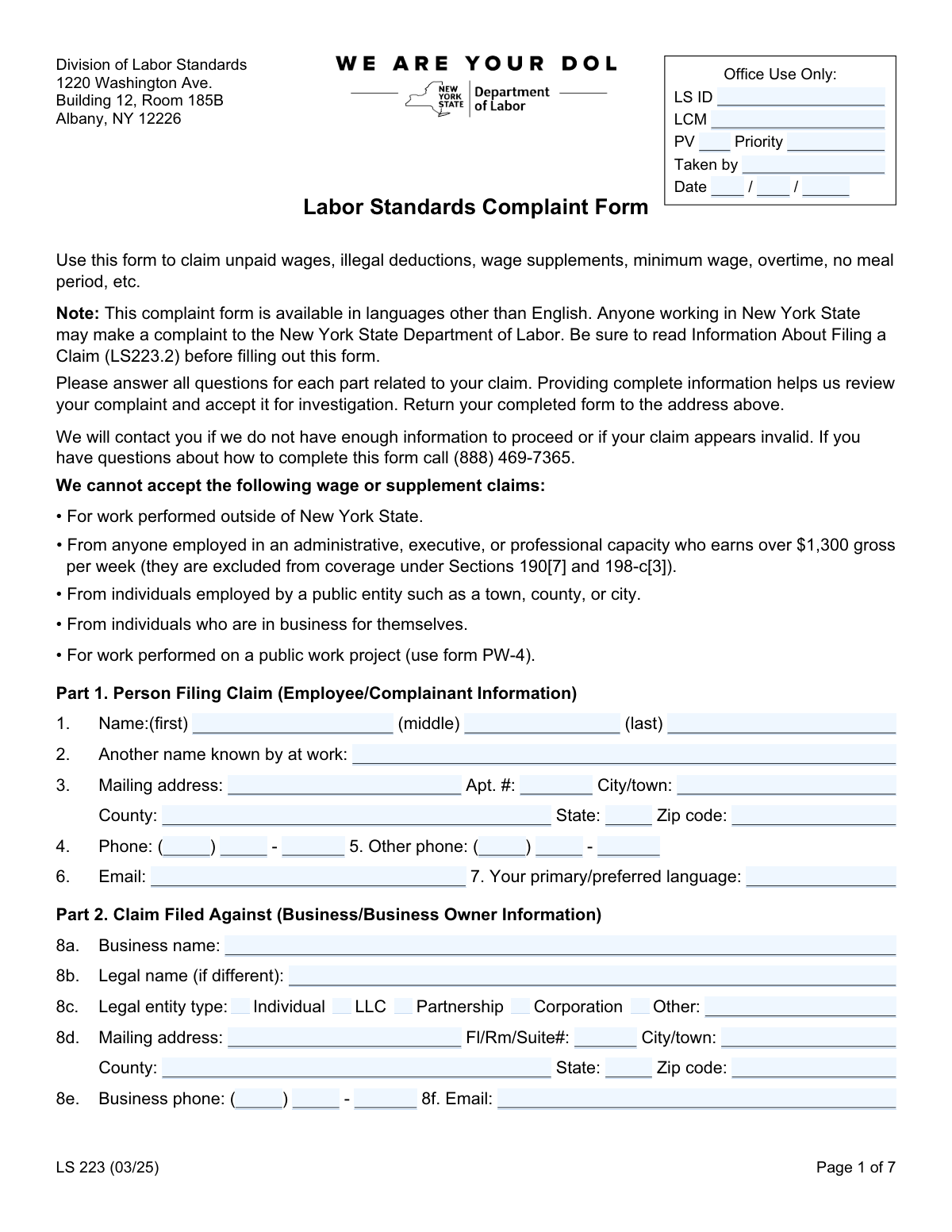
Yes! You can use AI to fill out New York State Department of Labor, Division of Labor Standards Complaint Form (LS 223)
The Labor Standards Complaint Form (LS 223) is an official New York State Department of Labor form that an employee (complainant) uses to file a labor standards complaint against an employer for wage-related issues such as unpaid wages, unpaid paid sick leave, unpaid wage supplements (e.g., vacation/holiday pay), and minimum wage or overtime violations, as well as selected non-wage violations (e.g., missing pay stubs or meal period issues). It collects detailed information about the worker, the business/owner, employment dates, pay rates, hours worked, and the claim period so NYSDOL can evaluate whether to open an investigation and determine the scope of review. Providing complete and accurate details is important because incomplete information can delay processing or lead to the claim being deemed invalid or outside NYSDOL coverage. Today, this form can be filled out quickly and accurately using AI-powered services like Instafill.ai, which can also convert non-fillable PDF versions into interactive fillable forms.
Our AI automatically handles information lookup, data retrieval, formatting, and form filling.
It takes less than a minute to fill out LS 223 using our AI form filling.
Securely upload your data. Information is encrypted in transit and deleted immediately after the form is filled out.
Form specifications
| Form name: | New York State Department of Labor, Division of Labor Standards Complaint Form (LS 223) |
| Number of pages: | 7 |
| Language: | English |
| Categories: | employment forms, labor forms, New York forms, New York labor forms, labor complaint forms |
Instafill Demo: filling out a legal form in seconds
How to Fill Out LS 223 Online for Free in 2026
Are you looking to fill out a LS 223 form online quickly and accurately? Instafill.ai offers the #1 AI-powered PDF filling software of 2026, allowing you to complete your LS 223 form in just 37 seconds or less.
Follow these steps to fill out your LS 223 form online using Instafill.ai:
- 1 Go to Instafill.ai and upload the LS 223 (Labor Standards Complaint Form) PDF or select it from the form library.
- 2 Let the AI detect and map the form fields, then confirm the form version/date (LS 223 (03/25)) and review any auto-identified sections (Parts 1–10).
- 3 Enter complainant (employee) details in Part 1, including name, contact information, mailing address, and preferred language.
- 4 Enter employer/business and owner information in Part 2, including legal entity type, addresses, phone/email, business type, hours, employee count, and bankruptcy/bank details if known.
- 5 Complete employment details in Part 3 (job title, work performed, hire/last day worked, pay rates, tips, pay frequency/method, worksite address, union status, and uniform information).
- 6 Fill the claim sections that apply: Part 4 (unpaid wages by week), Part 5 (unpaid paid sick leave), Part 6 (unpaid wage supplements), Part 7 (minimum wage/overtime schedule and claim range), and Part 8 (non-wage complaints), attaching supporting documents where relevant.
- 7 Review the generated totals and claim ranges, add any additional comments, e-sign and date the certification, then download/print and submit the completed form to NYSDOL at the address listed on Page 1 (keeping a copy for your records).
Our AI-powered system ensures each field is filled out correctly, reducing errors and saving you time.
Why Choose Instafill.ai for Your Fillable LS 223 Form?
Speed
Complete your LS 223 in as little as 37 seconds.
Up-to-Date
Always use the latest 2026 LS 223 form version.
Cost-effective
No need to hire expensive lawyers.
Accuracy
Our AI performs 10 compliance checks to ensure your form is error-free.
Security
Your personal information is protected with bank-level encryption.
Frequently Asked Questions About Form LS 223
This form is used to file a complaint with the New York State Department of Labor (NYSDOL) for issues like unpaid wages, illegal deductions, unpaid wage supplements (vacation/holiday pay), minimum wage, overtime, paid sick leave, and certain non-wage violations (like missing pay stubs or meal periods). Providing complete details helps NYSDOL decide whether to open an investigation.
Anyone who worked in New York State may file a complaint with NYSDOL. You should complete the form if you believe your employer did not follow NYS labor standards related to pay or required notices/benefits.
Yes. The form states NYSDOL cannot accept claims for work performed outside New York State, for certain high-earning administrative/executive/professional employees (over $1,300 gross per week), for people employed by public entities (town/county/city), for individuals in business for themselves, or for work on a public work project (use form PW-4 instead).
Mail the completed form to: Division of Labor Standards, 1220 Washington Ave., Building 12, Room 185B, Albany, NY 12226. The form instructs you to return it to the address listed on Page 1.
Fill in as much as you can and use âUnknownâ where the form provides that option (such as bankruptcy status). If youâre unsure of the legal name or entity type, provide the business name you know and any identifying details (address, phone, owner/manager names) to help NYSDOL locate the employer.
Attach any proof you have, such as pay stubs, time records, schedules, tip records, written policies/handbooks for benefits, and especially a copy of a check or check stub if you list the employerâs bank (the form specifically requests this). If a paycheck bounced, include the check number and a copy of the check if available.
Use one row per week and estimate as accurately as possible using schedules, texts, calendars, or bank deposits, and attach extra sheets if needed. Enter gross wages owed (before taxes), any illegal deductions, what you were actually paid, and the difference for each week.
Part 4 is for wages you were owed but not paid (or were reduced by illegal deductions) for specific payroll weeks. Part 7 is for being paid below minimum wage, not receiving time-and-a-half over 40 hours, or not receiving required extra pay for certain long days/two-shift days, and it asks for your weekly schedule and pay rates during the claim period.
List the accrual period, the amount of sick leave accrued, the dates you used leave, the benefit time owed, your regular rate of pay, and the amount due. The form notes that covered employees began accruing leave on September 30, 2020 (1 hour per 30 hours worked) and could start using accrued leave on January 1, 2021.
Wage supplements are fringe benefits promised by the employer, such as vacation pay, holiday pay, or expense reimbursements. Explain what was promised and whether it was promised by a written policy/handbook or a verbal promise, and include the time period earned and the amount due.
In Part 3, indicate whether you regularly earned tips and whether the employer kept your tips (yours or othersâ), then explain how much and what happened. Include any records you have (tip sheets, POS reports, texts, or witness information) in an attachment if possible.
Yes. Part 8 allows you to check non-wage complaints such as failure to provide a 30-minute meal period, failure to provide wage statements (pay stubs), failure to provide a day of rest, missing pay rate notices, sick leave accrual issues, missing required posters, minor labor rule violations, or other issuesâthen explain the details.
You must disclose that in Part 9 and explain what action you took. NYSDOL uses that information to determine how (or whether) it can proceed with an investigation.
Yes. Part 10 asks whether you have a representative (attorney/advocacy group) and whether you want NYSDOL to speak with them; if so, the representative must submit a Letter of Representation (LS 11). You also must disclose if anyone else helped you fill out the form and why.
YesâAI tools can help organize your information and auto-fill form fields accurately to save time; services like Instafill.ai can do this. Typically, you upload the PDF to Instafill.ai, answer a guided set of questions (employer info, dates, pay rates, weekly hours), and the system maps your answers into the correct LS 223 fields for you to review before downloading and submitting.
If the PDF is âflatâ (non-fillable), you can still print and handwrite it, or use a tool that converts it into a fillable form. Instafill.ai can convert non-fillable PDFs into interactive fillable forms and then help auto-fill the fields so you can review, sign, and mail the completed complaint.
Compliance LS 223
Validation Checks by Instafill.ai
1
Validates required complainant identity fields are present (First/Last Name)
Checks that Complainant First Name and Complainant Last Name are provided and are not blank, placeholder text, or only punctuation/whitespace. This is essential to identify the claimant and to create a valid case record. If missing or invalid, the submission should be rejected or routed to an exception queue for follow-up before investigation can begin.
2
Validates complainant mailing address completeness and postal format
Ensures Complainant Street Address, City/Town, State, and Zip Code are present, and that State is a valid US state/territory abbreviation while Zip Code is either 5 digits or ZIP+4 (#####-####). A complete, correctly formatted address is required for official correspondence and service of notices. If validation fails, flag the record and require correction because mail delivery and jurisdictional processing may be impacted.
3
Validates phone number structure for complainant and business/owner
Verifies that each phone number is either fully provided as a 10-digit NANP number (Area Code + Prefix/Exchange + Line Number) or left entirely blank when optional (e.g., other phone). Also checks that each segment is numeric and correct length (3/3/4) and not all zeros. If invalid, the system should prompt for correction because investigators rely on phone contact to clarify claim details.
4
Validates email address format for complainant, business, and owner
Checks that any provided email fields (Complainant Email, Business Email, Owner Email) match a reasonable email pattern (e.g., [email protected]) and do not contain spaces or invalid characters. Email is often the fastest way to request missing information and send updates. If an email fails validation, the system should either block submission (if email is required by policy) or warn and mark the record as contact-risk.
5
Ensures exactly one legal entity type is selected and 'Other' is specified when chosen
Validates that the Business Legal Entity Type selection is mutually exclusive (Individual, LLC, Partnership, Corporation, Other) and that only one option is checked. If 'Other' is selected, the Other Legal Entity Type text must be provided and non-trivial (not 'N/A' or blank). If this fails, the submission should be flagged because entity type affects liability, naming, and enforcement actions.
6
Validates business identification minimums (Business name + address or phone)
Checks that Business Name is present and that at least one reliable locator is provided: a complete Business Mailing Address or a valid Business Phone/Email. This prevents uninvestigable complaints where the employer cannot be identified or contacted. If insufficient, the system should stop acceptance for investigation and request additional employer details.
7
Validates company status logic (Still in business vs closure date)
If 'Still in Business: No' is selected, requires Company Closure Date and validates it as a real calendar date. If 'Still in Business: Yes' is selected, Company Closure Date must be blank. If inconsistent, the system should flag the record because closure timing can affect records availability, service, and recovery options.
8
Validates employment dates (Hire Date, Last Day Worked, Signature Date) and chronological order
Validates that Hire Date, Last Day Worked (if not still employed), and Signature Date are valid dates (MM/DD/YYYY) and not impossible (e.g., 02/30). Also checks chronology: Hire Date must be on/before Last Day Worked, and Signature Date should be on/after Hire Date and not unreasonably in the future. Failures should trigger correction because date logic is central to claim timeliness and wage calculations.
9
Validates relationship-with-business vs last day worked/reason for leaving requirements
If Relationship with Business is Discharged/Quit/Temporarily laid-off, requires Last Day Worked and Reason for Leaving; if Still employed is selected, Last Day Worked and Reason for Leaving should be blank or explicitly not applicable. This ensures the case narrative is coherent and supports investigator triage. If inconsistent, the system should require edits or route to manual review.
10
Validates pay rate fields and pay period selection consistency
Ensures Rate of Pay is a positive currency amount and that exactly one pay period unit is selected (Day/Week/Hour/Other). If 'Other' is selected, Other Rate of Pay Period must be provided; if Hour is selected, the rate should be plausible (e.g., not negative or zero) and formatted to two decimals. If invalid, the system should block or flag because pay rate is required to compute owed wages and overtime.
11
Validates overtime rate reasonableness relative to regular rate
If Overtime Rate of Pay is provided, checks it is a positive amount and typically not less than the regular hourly equivalent when the regular rate is hourly. While exceptions can exist (e.g., mispayment claims), a lower overtime rate should trigger a warning and require an explanation in the overtime/minimum wage explanation area. If the value is missing when an overtime claim is indicated, the system should prompt for completion.
12
Validates tip-related conditional fields and mutually exclusive selections
If Regular Tip Earnings is 'Yes', requires Average Tips Per Hour to be a non-negative numeric amount and validates the 'Kept Tips' selection is one of the allowed options (No / Yesâyours / Yesâothersâ). If any 'Yes' kept-tips option is selected, requires an explanation/amount in Employer Tip Handling Explanation. If these conditions fail, the system should flag because tip handling is a distinct violation type requiring specific facts.
13
Validates payday selection and pay frequency selection are each single-choice
Ensures exactly one weekday is selected for Payday (MonâSun) and exactly one option is selected for How often were you paid (Daily/Weekly/Every two weeks/Other). If 'Other' is selected for frequency, Other Payment Frequency must be provided. If invalid, the system should require correction because pay cycle is needed to interpret payroll weeks and claim ranges.
14
Validates wage payment method selection and requires explanation for 'Combination'
Checks that at least one wage payment method is selected (Cash/Check/Direct Deposit/Pay Card/Combination) and that 'Combination Payment Explanation' is provided when Combination is selected. This supports evidence requests (e.g., check stubs, pay card statements) and helps detect common wage theft patterns. If missing or inconsistent, the system should prompt for clarification before acceptance.
15
Validates unpaid wages table arithmetic and row completeness
For each completed unpaid wages row, requires Week Ending Date, Days Worked, Hours Worked, Rate of Pay, Gross Wages Owed, Gross Wages Paid, and Difference; validates numeric fields are non-negative and that Difference equals (Gross Wages Owed - Gross Wages Paid) within a small rounding tolerance. Also checks Days Worked is between 0 and 7 and Hours Worked is within a plausible weekly range (e.g., 0â168). If arithmetic or completeness fails, the system should flag because incorrect totals can misstate damages and delay investigation.
16
Validates claim date ranges (wage claim range and overtime/minimum wage claim range) for order and alignment
Ensures each claim range has both start and end dates, that start date is on/before end date, and that the ranges are not after the Signature Date. Additionally checks that any payroll week ending dates entered fall within (or reasonably overlap) the wage claim range provided. If validation fails, the system should require correction because claim scope determines what periods can be investigated and calculated.
Common Mistakes in Completing LS 223
People often assume every blank must be completed and try to enter something in the âOffice Use Onlyâ section. This can confuse intake staff, cause data-entry conflicts, or make it look like the form was altered. Leave these fields blank unless NYSDOL specifically instructs you to complete them; AI-powered tools like Instafill.ai can also detect âoffice use onlyâ areas and prevent accidental entries.
Claimants sometimes put a nickname in the main name fields, or use different spellings between âNameâ and âAnother name known by at work.â This can make it harder to match payroll records, timecards, or employer-provided documents, slowing the investigation. Use your legal name in Part 1 and list any workplace alias in the âAnother name known by at workâ field exactly as it appears on schedules, pay stubs, or HR records.
A very common issue is leaving out apartment/unit numbers, entering the wrong ZIP code, or skipping the county field. If NYSDOL canât mail notices or requests for more information, your claim may be delayed or closed for lack of response. Double-check every address component (street, apt/unit, city/town, county, state, ZIP); Instafill.ai can auto-format addresses and flag missing components before submission.
Because the form splits phone numbers into area code, exchange/prefix, and line number, people often type the full number into one box or shift digits into the wrong field. This can make the number unusable, preventing investigators from contacting you quickly. Enter exactly 3 digits for area code, 3 for prefix, and 4 for line number (no extra characters); Instafill.ai can validate phone length and place digits into the correct boxes.
Many claimants only list the storefront/brand name and skip the legal name or choose the wrong entity type (Individual/LLC/Partnership/Corporation). If the wrong legal entity is pursued, enforcement and collection can be harder and may require follow-up to correct the respondent. Use the name on pay stubs, W-2/1099, offer letters, or posted business filings for the legal name, and select the entity type if known; if unsure, provide best available info and explain in comments.
People often omit owner names/titles, the employerâs bank name/location, or the business closure date when the company is no longer operating, assuming itâs optional. Missing these details can significantly reduce NYSDOLâs ability to locate the responsible parties or recover wages, especially if the business has closed or changed names. Provide as much as you know and attach a check/check stub when requested; if you truly donât know (e.g., bankruptcy), mark âUnknownâ rather than guessing.
A frequent mistake is mixing up month/day order, leaving date parts blank, or listing a claim range that doesnât match the weeks entered in the wage tables. Inconsistent timelines can make the claim appear invalid or require NYSDOL to request clarification, delaying acceptance for investigation. Use consistent MM/DD/YYYY entries and ensure the âDate from/toâ ranges match the payroll week ending dates and your last day worked; Instafill.ai can standardize date formats and flag mismatches.
The form specifically asks for gross wages (before taxes/deductions), but many people enter take-home (net) amounts from their bank deposits. This leads to incorrect calculations of wages owed and can weaken the claim or require recalculation by investigators. Use pay stubs to capture gross wages owed and gross wages paid, list illegal deductions separately in column E, and compute the difference as instructed (owed minus paid).
Claimants often summarize the entire claim as one lump sum or try to squeeze multiple weeks into one row, even though the form requires one row per week. This makes it difficult to verify hours, rates, and partial payments, and can slow down or limit the scope of the investigation. Enter each payroll week ending date separately and attach additional pages for more weeks; Instafill.ai can help structure repeating rows and keep totals consistent.
People frequently enter a dollar amount but forget to check whether itâs per hour, per day, or per week, or they enter an overtime rate that doesnât align with time-and-a-half rules. This can create confusion about what you were promised versus what you were paid and may require follow-up questions. Always pair the rate with the correct unit (Hour/Day/Week/Other) and, if you know it, list the overtime rate separately; if rates changed over time, use Part 7âs rate-range section to document each period.
In Part 7, claimants often leave out AM/PM, forget to include meal breaks, or donât total daily/weekly hours, especially when schedules vary. Missing or ambiguous time entries make it hard to determine whether you exceeded 40 hours or qualify for spread-of-hours/extra hour pay. Provide start/end times with AM/PM, list meal time off, calculate total hours per day, and complete the weekly total; Instafill.ai can validate time logic (e.g., end time after start time) and compute totals.
Saved over 80 hours a year
âI was never sure if my IRS forms like W-9 were filled correctly. Now, I can complete the forms accurately without any external help.â
Kevin Martin Green
Your data stays secure with advanced protection from Instafill and our subprocessors

Robust compliance program
Transparent business model
Youâre not the product. You always know where your data is and what it is processed for.
ISO 27001, HIPAA, and GDPR
Our subprocesses adhere to multiple compliance standards, including but not limited to ISO 27001, HIPAA, and GDPR.
Security & privacy by design
We consider security and privacy from the initial design phase of any new service or functionality. Itâs not an afterthought, itâs built-in, including support for two-factor authentication (2FA) to further protect your account.
Fill out LS 223 with Instafill.ai
Worried about filling PDFs wrong? Instafill securely fills new-york-state-department-of-labor-division-of-labor-standards-complaint-form-ls-223 forms, ensuring each field is accurate.