Yes! You can use AI to fill out Murrieta Police Department Citizen Complaint Form (California Penal Code § 148.6 Advisory Statement)

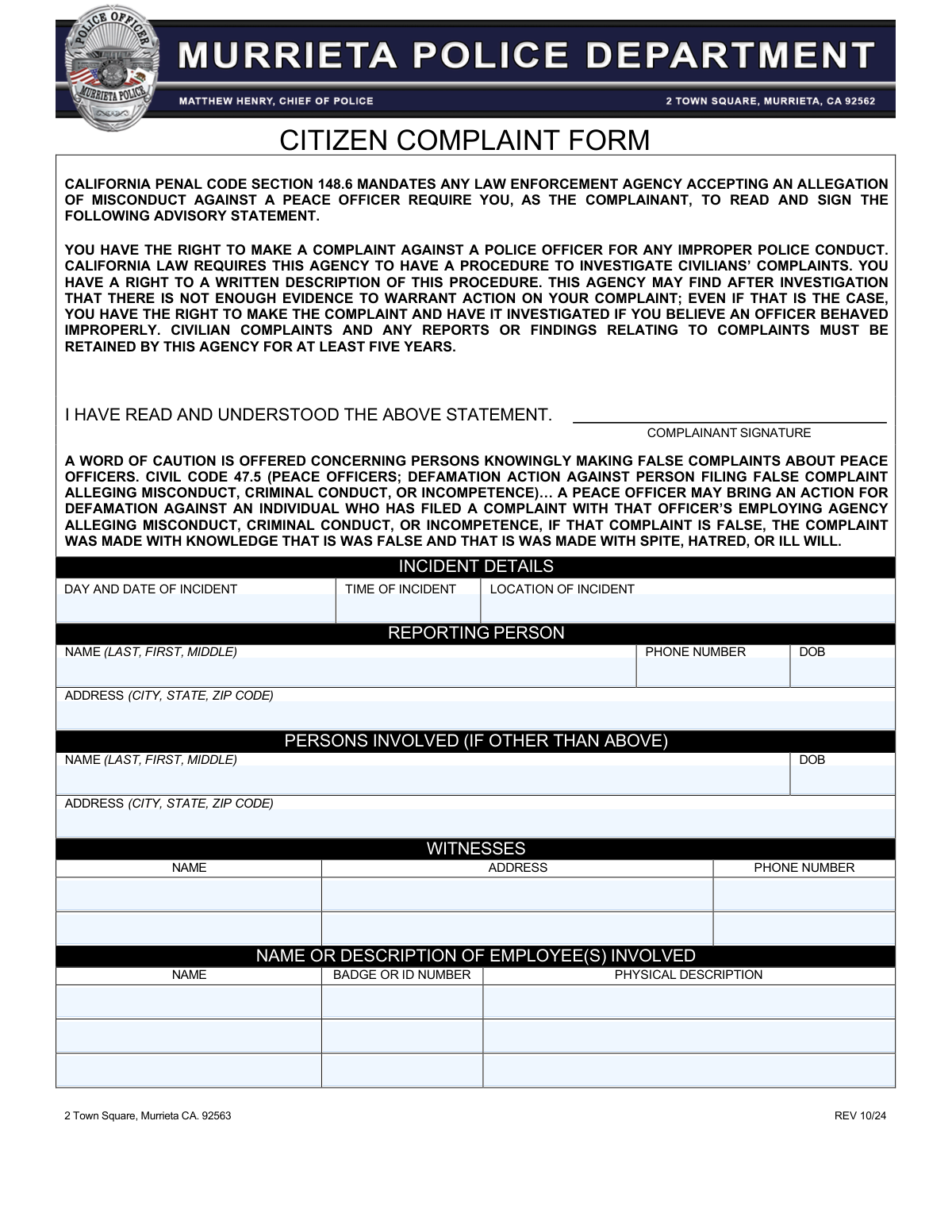
The Murrieta Police Department Citizen Complaint Form is an official intake document used to record a civilian’s allegation of misconduct involving a peace officer or other department employee, along with required incident details and signatures. It includes the California Penal Code § 148.6 advisory statement that the complainant must read and sign, and it documents key facts such as date/time/location, involved parties, witnesses, and a narrative summary. Submitting a complete and accurate form helps the department investigate objectively and issue a disposition (e.g., unfounded, exonerated, sustained, not sustained, or frivolous). Today, this form can be filled out quickly and accurately using AI-powered services like Instafill.ai, which can also convert non-fillable PDF versions into interactive fillable forms.
Our AI automatically handles information lookup, data retrieval, formatting, and form filling.
It takes less than a minute to fill out Murrieta PD Citizen Complaint Form using our AI form filling.
Securely upload your data. Information is encrypted in transit and deleted immediately after the form is filled out.

Form specifications

Form name: Murrieta Police Department Citizen Complaint Form (California Penal Code § 148.6 Advisory Statement)
Number of pages: 2
Language: English
Categories: police forms, law enforcement forms, citizen complaint forms, California police forms
main-image

Instafill Demo: filling out a legal form in seconds

How to Fill Out Murrieta PD Citizen Complaint Form Online for Free in 2026

Are you looking to fill out a MURRIETA PD CITIZEN COMPLAINT FORM form online quickly and accurately? Instafill.ai offers the #1 AI-powered PDF filling software of 2026, allowing you to complete your MURRIETA PD CITIZEN COMPLAINT FORM form in just 37 seconds or less.
Follow these steps to fill out your MURRIETA PD CITIZEN COMPLAINT FORM form online using Instafill.ai:
  1. 1 Go to Instafill.ai and upload the Murrieta Police Department Citizen Complaint Form PDF (or select it from the form library if available).
  2. 2 Let the AI detect and map the form fields (incident details, reporting person, involved persons, witnesses, employees involved, and intake fields) and confirm the correct form version (REV 10/24).
  3. 3 Enter the incident details (date, time, and location) and provide the reporting person’s identifying and contact information (name, phone, DOB, address).
  4. 4 Add information for any other persons involved and list witnesses with their names, addresses, and phone numbers (include additional rows if needed).
  5. 5 Identify the employee(s) involved by name and badge/ID number if known, and add a brief physical description for each listed employee.
  6. 6 Write a clear, factual Summary of Complaint describing what happened, who was involved, and any supporting details; then review the Penal Code § 148.6 advisory and confirm understanding.
  7. 7 Use Instafill.ai to validate completeness, then sign where required (complainant and parent/guardian if under 18), export the completed form, and submit it to the department per the provided instructions (online or at the station).

Our AI-powered system ensures each field is filled out correctly, reducing errors and saving you time.

Why Choose Instafill.ai for Your Fillable Murrieta PD Citizen Complaint Form Form?

Speed

Complete your Murrieta PD Citizen Complaint Form in as little as 37 seconds.

Up-to-Date

Always use the latest 2026 Murrieta PD Citizen Complaint Form form version.

Cost-effective

No need to hire expensive lawyers.

Accuracy

Our AI performs 10 compliance checks to ensure your form is error-free.

Security

Your personal information is protected with bank-level encryption.

Frequently Asked Questions About Form Murrieta PD Citizen Complaint Form

This form is used to file an allegation of misconduct or improper conduct by a Murrieta Police Department employee/peace officer. It starts the department’s formal complaint and investigation process.

Any citizen who believes they were the victim of misconduct by a member of the Murrieta Police Department may file a complaint. A complaint can be made to any department member, though a supervisor will handle it whenever possible.

Yes. California Penal Code Section 148.6 requires the agency to have you read and sign the advisory statement as the complainant when submitting an allegation of misconduct against a peace officer.

It warns that knowingly filing a false complaint with spite, hatred, or ill will may expose you to a defamation lawsuit by the officer. If you are reporting in good faith based on what you believe happened, you can still file and request an investigation.

You should provide the day/date, time, and specific location of the incident. If you don’t know an exact time or address, provide your best estimate and describe the location (e.g., intersection, business name, or nearby landmarks).

Enter your full name (last, first, middle), phone number, date of birth, and complete mailing address. Use a phone number and address where you can reliably receive follow-up and mail about the disposition.

Complete this section only if the person involved is different from the reporting person (for example, you are reporting on behalf of a family member). Provide that person’s name, date of birth, and address if known.

If you have witnesses, list their names, addresses, and phone numbers so investigators can contact them. If you don’t have witnesses or don’t know their details, leave those fields blank and note in the summary that no witness information is available.

You can still file the complaint. Provide any identifying details you do know, such as physical description, patrol car number, approximate age/height, uniform details, or the location and time so the department can help identify the employee(s).

Include a clear narrative of what happened, when and where it occurred, who was involved, what was said/done, and any witnesses or evidence. Stick to facts and include any supporting details (photos, videos, messages, or report numbers) if you have them.

The form doesn’t list required attachments, but providing relevant evidence can help the investigation (e.g., photos, video links, medical records, receipts, or names of additional witnesses). If you can’t attach items, mention them in the summary and explain how they can be obtained.

The department states the Citizen Complaint form is available online via the department website or at the station’s lobby counter. You may also make the complaint to any department member, and a supervisor will handle it whenever possible.

California law requires civilian complaints and any related reports or findings to be retained by the agency for at least five years.

After investigation and review, the department will advise you of the complaint disposition by mail. Possible outcomes include Unfounded, Exonerated, Sustained, Not Sustained, or Frivolous.

Yes—AI tools can help you draft and auto-fill fields accurately; services like Instafill.ai can extract your information and populate the form to save time. If the PDF is flat/non-fillable, Instafill.ai can convert it into an interactive fillable form and then guide you to complete it online.

Compliance Murrieta PD Citizen Complaint Form
Validation Checks by Instafill.ai

1
Validates Incident Date is a real date and not in the future
Checks that the Date of Incident is present, follows an accepted date format (e.g., MM/DD/YYYY), and represents a real calendar date. The date should not be in the future relative to the submission/received date because an incident cannot occur after the complaint is filed. If validation fails, the submission should be flagged for correction and the user prompted to enter a valid past or current date.
2
Validates Incident Time format and range
Ensures the Time of Incident is provided and matches a supported time format (e.g., HH:MM with AM/PM or 24-hour HH:MM). It also verifies the time values are within valid ranges (00–23 hours, 00–59 minutes) and rejects ambiguous entries like "evening" unless the system explicitly allows free-text time. If validation fails, the form should require a corrected time entry or a clearly marked "unknown" option if supported.
3
Ensures Incident Location is sufficiently specific
Verifies the Location of Incident is not blank and contains enough detail to identify a place (e.g., street address, intersection, or named location plus city). This prevents unusable entries like "Murrieta" or "home" without additional context, which can hinder investigation and record retention requirements. If validation fails, the user should be prompted to add missing components such as street/intersection and city/state.
4
Validates Reporting Person name completeness and structure
Checks that the Reporting Person name is present and includes at least a last and first name, with middle name/initial optional. It also validates that the name field does not contain invalid characters (e.g., only punctuation or numbers) and is not an obvious placeholder like "N/A". If validation fails, the submission should be blocked until a minimally complete legal name is provided.
5
Validates Reporting Person phone number format
Ensures the Reporting Person phone number is present and matches a valid US phone pattern (10 digits, allowing punctuation, and optional extension). This is important for follow-up and investigation; invalid numbers prevent contact and delay case handling. If validation fails, the user should be prompted to correct the number or provide an alternate contact method if the workflow allows.
6
Validates Reporting Person DOB format and plausible age
Checks that the Reporting Person DOB is a valid date and results in a plausible age (e.g., not negative, not over a configured maximum such as 120 years). This supports the under-18 logic for parent/guardian signature and helps avoid data entry errors like transposed month/day. If validation fails, the system should request a corrected DOB and flag potential age-related signature requirements.
7
Validates Reporting Person address completeness (Street, City, State, ZIP)
Ensures the Reporting Person address includes street, city, state, and ZIP code, and that the state is a valid US state/territory abbreviation (e.g., CA) and ZIP is 5 digits (optionally ZIP+4). A complete mailing address is needed for written disposition notices and official correspondence. If validation fails, the form should require completion of missing components and reject malformed ZIP/state values.
8
Conditional validation for 'Person Involved (Other Than Reporting)' fields
If any 'Person Involved (Other Than Reporting)' field is filled (name, DOB, or address), the validation requires at minimum the person's name and at least one additional identifier (DOB or address) to avoid partial, unusable records. Conversely, if the person involved is the same as the reporting person, these fields should be empty to prevent duplicate/conflicting identities. If validation fails, the system should prompt the user to either complete the involved person section or clear it.
9
Validates witness rows for internal completeness when used
For each witness row, if a witness name is provided, the system should require at least one reliable contact method (phone or full address), and validate phone/address formats when present. This prevents entries that list a witness but provide no way to contact them, which undermines investigation. If validation fails, the user should be prompted to add missing contact details or remove the witness entry.
10
Validates employee involved identification (name vs. description and badge/ID format)
Ensures that for each employee involved row, at least a name or a meaningful description is provided, and that badge/ID numbers (if provided) match allowed patterns (numeric or alphanumeric, preserving leading zeros). This improves the ability to identify the subject employee(s) and reduces misidentification risk. If validation fails, the system should require either a name/description and/or a correctly formatted badge/ID, depending on configured minimum requirements.
11
Ensures Physical Description is present when employee name is missing or ambiguous
If an employee name is not provided (or is clearly unknown such as "unknown"), the physical description field must be populated with distinguishing details (e.g., approximate height/build/clothing) to support identification. This is important when the complainant cannot provide a name or badge number. If validation fails, the submission should be flagged and the user prompted to add identifying description details.
12
Validates Summary of Complaint minimum content and non-placeholder text
Checks that the Summary of Complaint is not empty, meets a minimum length/word count threshold, and is not generic placeholder text (e.g., "see above", "N/A", or repeated characters). A substantive narrative is essential to evaluate allegations, determine involved parties, and initiate an investigation. If validation fails, the system should require additional detail before accepting the complaint.
13
Validates complainant acknowledgment/signature presence for PC 148.6 advisory
Ensures the complainant signature (or an approved electronic signature/attestation) is present to confirm they read and understood the mandated advisory statement. This is legally significant because the form explicitly requires the complainant to read and sign the advisory. If validation fails, the complaint should not be accepted as complete and should be routed back for signature/attestation.
14
Validates parent/guardian signature requirement when complainant is under 18
Uses the Reporting Person DOB to determine if the complainant is under 18 at the time of submission/receipt, and if so requires the Parent/Guardian signature field to be completed. This ensures proper authorization and reduces challenges to the validity of the complaint submission. If validation fails, the system should block completion until the parent/guardian signature is provided or the DOB is corrected.
15
Validates intake section completeness and consistency (Date Received, receiver identity, contact)
Ensures Date Received is present, is a valid date, and is not earlier than the incident date by an impossible margin if the agency enforces such rules (at minimum, it must not be before the incident date). It also requires Person Receiving Complaint, Employee ID Number, and Business Telephone Number to be present and properly formatted (phone format, ID pattern). If validation fails, the record should be flagged as incomplete for internal processing and prevented from being finalized until corrected.

Common Mistakes in Completing Murrieta PD Citizen Complaint Form

Missing the required advisory acknowledgment signature

People often jump straight to the incident narrative and overlook the Penal Code 148.6 advisory section that requires the complainant to read and sign. If this signature is missing, the agency may treat the submission as incomplete and delay intake or require you to re-submit. Before turning in the form, confirm the “I have read and understood
” section is signed and dated where applicable; AI-powered tools like Instafill.ai can flag missing required signatures and prevent submission with blank signature fields.

Using an ambiguous or incomplete incident date/time

A common error is entering only a day of the week (“Friday”), an approximate date (“early January”), or a time without AM/PM. This can make it difficult to match the event to dispatch logs, body-worn camera footage, or reports, which can slow or limit the investigation. Provide the full date (MM/DD/YYYY) and a specific time with AM/PM (or note “approx.” with a best estimate and time window); Instafill.ai can standardize date/time formats and prompt for missing AM/PM.

Vague incident location (no address, cross-streets, or place name)

Many complainants write broad locations like “Murrieta” or “near the mall” without a street address, intersection, or identifiable landmark. Investigators may be unable to determine jurisdiction, locate cameras, or identify involved units without a precise location. Include the street address or cross-streets, plus any relevant details (parking lot name, business name, direction of travel); Instafill.ai can help format addresses consistently and ensure city/state/ZIP are complete.

Name fields entered in the wrong order or with missing legal names

This form specifically requests names in “Last, First, Middle” order, but people often enter “First Last,” nicknames, or omit middle names/initials. Incorrect name formatting can cause mismatches with records and make it harder to contact the right person or verify identities. Enter the full legal name in the requested order and use the same spelling across all sections; Instafill.ai can auto-format names into the correct order and reduce typos.

Incomplete contact information (phone/address) for reporting person or witnesses

People frequently provide a phone number without area code, an old number, or an address missing apartment/unit, ZIP code, or state. If investigators cannot reach you or witnesses, the complaint may be harder to substantiate and may end as “not sustained” due to insufficient evidence. Provide a reliable daytime phone number (with area code) and a complete mailing address; Instafill.ai can validate phone number length/format and prompt for missing address components.

Confusing “Reporting Person” vs. “Person Involved (Other Than Above)”

A frequent misunderstanding is duplicating the reporting person’s information in the “Person Involved” section or leaving it blank when the involved person is someone else (e.g., a family member). This can create confusion about who experienced the incident, who is the complainant, and who should be interviewed. Only complete the “Person Involved (Other Than Reporting)” fields when the involved person is different, and clearly distinguish roles in the summary; Instafill.ai can guide conditional fields so you only fill what applies.

Leaving employee/officer identification too sparse (no badge/ID or usable description)

Complainants often write “unknown officer” without adding badge number, unit, patrol car number, or a physical/clothing description. Without identifiers, the department may have difficulty determining which employee was involved, especially in busy areas or multi-officer responses. If you don’t know the name, provide badge/ID if seen, vehicle number, approximate age/height/build, uniform details, and any distinguishing features; Instafill.ai can prompt for key descriptive elements when a name is unknown.

Witness section errors: listing people who didn’t observe, or omitting witness contact details

People sometimes list friends/family who heard about the incident rather than true witnesses, or they provide only a first name with no phone/address. This reduces the evidentiary value of the witness list and can slow the investigation when staff must track down identities. List only individuals who directly observed relevant events and include full contact information and best times to reach them; Instafill.ai can enforce completeness checks for witness rows.

Summary of complaint is too short, emotional, or missing key facts

A common mistake is writing a brief statement (“Officer was rude”) or a highly emotional narrative without a clear timeline, specific actions, quotes, or what policy/law you believe was violated. Vague summaries make it harder to assess allegations, identify evidence, and interview parties consistently. Use a structured narrative: what happened, who did what, exact words if remembered, sequence of events, injuries/damages, and any evidence (photos, video, case number); Instafill.ai can help by prompting for missing elements and keeping the narrative organized.

Minor complainant section overlooked (missing parent/guardian signature)

When the complainant is under 18, people often forget the required parent/guardian signature or assume the minor’s signature alone is sufficient. Missing this signature can delay processing and may require re-contact or re-submission. If the complainant is a minor, ensure both the reporting person and the parent/guardian sign where indicated; Instafill.ai can detect age from DOB and remind you to complete the parent/guardian signature field.

Filling out agency-only intake fields (Date Received / Person Receiving Complaint / Employee ID / Business Phone)

Complainants sometimes write their own information in the “Date Received” and “Person Receiving Complaint” section, not realizing it is intended for department staff. This can create recordkeeping confusion and may require staff to correct or re-enter the complaint. Leave those intake fields blank unless a department employee instructs you otherwise; Instafill.ai can lock or clearly label staff-only fields to prevent accidental entry (and if the form is a flat non-fillable PDF, Instafill.ai can convert it into a fillable version with the correct field permissions).
Saved over 80 hours a year

“I was never sure if my IRS forms like W-9 were filled correctly. Now, I can complete the forms accurately without any external help.”

Kevin Martin Green

Your data stays secure with advanced protection from Instafill and our subprocessors

Robust compliance program

Transparent business model

You’re not the product. You always know where your data is and what it is processed for.

ISO 27001, HIPAA, and GDPR

Our subprocesses adhere to multiple compliance standards, including but not limited to ISO 27001, HIPAA, and GDPR.

Security & privacy by design

We consider security and privacy from the initial design phase of any new service or functionality. It’s not an afterthought, it’s built-in, including support for two-factor authentication (2FA) to further protect your account.

Fill out Murrieta PD Citizen Complaint Form with Instafill.ai

Worried about filling PDFs wrong? Instafill securely fills murrieta-police-department-citizen-complaint-form-california-penal-code-1486-advisory-statement forms, ensuring each field is accurate.