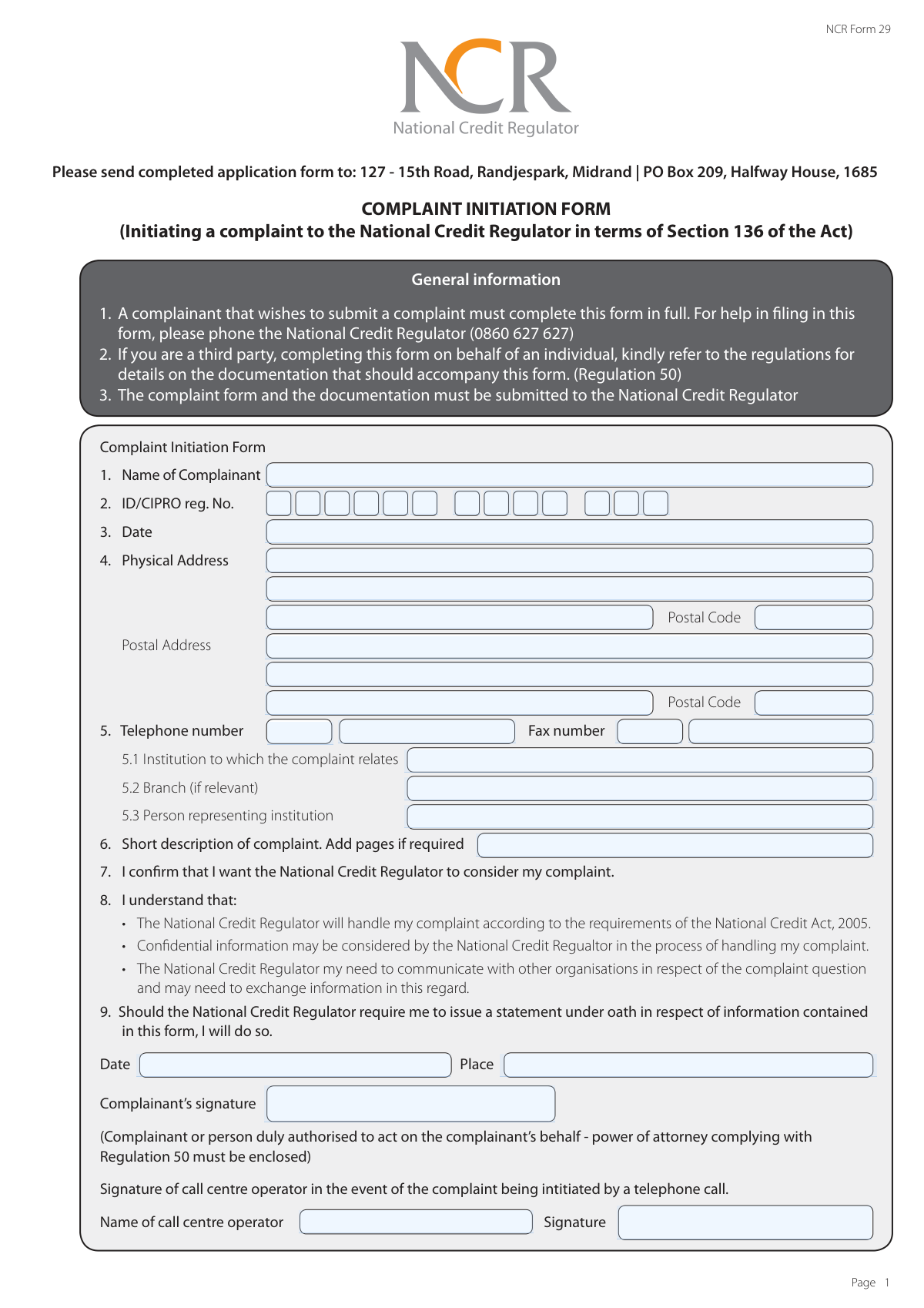
Yes! You can use AI to fill out NCR Form 29, Complaint Initiation Form

NCR Form 29, the Complaint Initiation Form, is a legal document for consumers in South Africa to formally file a complaint against a credit provider with the National Credit Regulator (NCR) as per Section 136 of the National Credit Act. It allows individuals to detail their grievances, provide evidence, and seek resolution for issues related to credit agreements. Today, this form can be filled out quickly and accurately using AI-powered services like Instafill.ai, which can also convert non-fillable PDF versions into interactive fillable forms.
Our AI automatically handles information lookup, data retrieval, formatting, and form filling.
It takes less than a minute to fill out NCR Form 29 using our AI form filling.
Securely upload your data. Information is encrypted in transit and deleted immediately after the form is filled out.

Form specifications

Form name: NCR Form 29, Complaint Initiation Form
Number of pages: 3
Language: English
main-image

Instafill Demo: How to fill out PDF forms in seconds with AI

How to Fill Out NCR Form 29 Online for Free in 2026

Are you looking to fill out a NCR FORM 29 form online quickly and accurately? Instafill.ai offers the #1 AI-powered PDF filling software of 2026, allowing you to complete your NCR FORM 29 form in just 37 seconds or less.
Follow these steps to fill out your NCR FORM 29 form online using Instafill.ai:
  1. 1 Navigate to Instafill.ai and upload or select the NCR Form 29.
  2. 2 Provide your personal information, including your full name, ID/CIPRO number, and contact details.
  3. 3 Enter the details of the institution the complaint is against, such as its name and branch.
  4. 4 Write a clear and detailed description of your complaint, including specific dates and a summary of events.
  5. 5 Describe the steps you have already taken to resolve the matter and state the outcome you are seeking.
  6. 6 Review all the information auto-filled by the AI to ensure it is accurate and complete.
  7. 7 Sign the form, add the date and place of signing, and submit it to the National Credit Regulator along with any supporting documents.

Our AI-powered system ensures each field is filled out correctly, reducing errors and saving you time.

Why Choose Instafill.ai for Your Fillable NCR Form 29 Form?

Speed

Complete your NCR Form 29 in as little as 37 seconds.

Up-to-Date

Always use the latest 2026 NCR Form 29 form version.

Cost-effective

No need to hire expensive lawyers.

Accuracy

Our AI performs 10 compliance checks to ensure your form is error-free.

Security

Your personal information is protected with bank-level encryption.

Frequently Asked Questions About Form NCR Form 29

NCR Form 29 is used to formally initiate a complaint with the National Credit Regulator (NCR) regarding a credit-related issue. It is for individuals who believe their rights under the National Credit Act have been violated.

Yes, a third party can complete the form on your behalf. However, they must include a power of attorney that complies with Regulation 50, authorizing them to act for you.

You must complete the main 'Complaint Initiation Form' in full. The 'Additional Complaint Form' is not mandatory, but it is highly recommended as it helps you provide the detailed information the NCR needs to assess your case.

You should attach any documents relevant to your complaint, such as credit agreements, statements, letters, emails, or any other correspondence with the institution. Be sure to list these documents on the form.

You must submit the completed form and all supporting documents to the National Credit Regulator via post or hand delivery. The addresses are provided on the form: PO Box 209, Halfway House, 1685 or 127 - 15th Road, Randjespark, Midrand.

In this section, clearly state the specific resolution you are seeking. This could be a refund, a correction to your credit record, a change in the institution's practices, or another specific remedy.

Yes, a complaint generally cannot be referred more than three years after the act or omission that is the cause of the complaint occurred. It is best to file your complaint as soon as possible.

By signing the form, you agree that the NCR may consider confidential information and may need to exchange it with other organizations to properly investigate your complaint as required by the National Credit Act.

For assistance with completing the form, you can phone the National Credit Regulator's call centre at 0860 627 627.

Yes, services like Instafill.ai use AI to help you accurately auto-fill form fields with your information. This can save you time and help reduce errors when completing the form.

You can use a service like Instafill.ai to easily fill out the form online. Simply upload the PDF to their platform, and it will become an interactive form that you can type into and save securely.

If you have a non-fillable or 'flat' PDF, you can upload it to a platform like Instafill.ai. Their technology can convert it into an interactive, fillable form that you can complete on your computer or mobile device.

The NCR will assess your complaint and inform you of the outcome. If they find no reasonable suspicion of prohibited conduct, you can request a Notice of Non-Referral to take the matter to a consumer court or the Tribunal yourself.

Compliance NCR Form 29
Validation Checks by Instafill.ai

1
Mandatory Complainant Name
This check ensures that the 'Name of Complainant' field is not empty. The complainant's full name is a fundamental piece of information required to identify the individual lodging the complaint. A failure to provide this information would make it impossible to process the complaint, leading to an immediate rejection of the form submission.
2
Valid ID/CIPRO Number Format
This validation verifies that the 'ID/CIPRO reg. No.' conforms to the standard format for a South African ID number (13 digits) or a CIPRO registration number. This number is crucial for uniquely identifying the complainant and preventing fraud. An invalid or incorrectly formatted number could lead to misidentification or rejection of the complaint.
3
Valid and Non-Future Complaint Date
This check ensures the 'Date of Complaint' field contains a valid date in a recognized format and that the date is not in the future. This is important for establishing a correct timeline for the complaint as per legal requirements, such as the three-year limitation mentioned in section 166. An invalid or future date would render the submission's timeline nonsensical and cause processing errors.
4
Logical Signature Date
This validation confirms that the 'Signature date' is a valid date that is not in the future. It also checks for logical consistency, ensuring the signature date is on or after the 'Date of Complaint'. This is important to verify that the complaint was signed after it was formally dated. A signature date preceding the complaint date would be illogical and could invalidate the submission.
5
Mandatory Institution Name
This check verifies that the 'Institution to which complaint relates' field has been filled out. It is impossible for the National Credit Regulator to investigate a complaint without knowing which institution the complaint is against. If this field is left blank, the form submission will be considered incomplete and cannot be processed.
6
Mandatory Complaint Description
This validation ensures that the 'Short description of complaint' field is not left empty. This summary provides the initial context for the regulator to understand the nature of the issue. Without a description, the complaint has no substance and cannot be assessed or assigned for investigation.
7
Signature Presence Confirmation
This check ensures that the 'Complainant's signature' field is completed. The signature legally confirms the complainant's intent to file the complaint and their agreement with the terms stated in the form. A missing signature invalidates the declaration and will result in the complaint being rejected as unverified.
8
Contact Method and Data Consistency
This check ensures that if a preferred contact method ('Email', 'Telephone', 'Sms', 'Post') is selected, the corresponding contact information is provided. For example, if 'Email' is checked, the 'Email address' field must be filled. This is critical for ensuring the NCR can communicate with the complainant regarding their case; failure means the NCR has no way to provide updates or request further information.
9
Valid Email Address Format
If the 'Email address' field is filled, this validation checks that the entry conforms to a standard email format (e.g., [email protected]). This prevents submission of unusable contact information and reduces communication failures. An invalid email format would result in bounced emails and delay the complaint handling process.
10
Telephone Number Presence for Contact
This check verifies that if 'Telephone' or 'Sms' is selected as a preferred contact method, the 'Telephone number' field is populated. This ensures the regulator has a valid phone number to reach the complainant as requested. If the method is selected but the number is missing, the form is incomplete and communication cannot proceed as requested.
11
Conditional Call Centre Operator Fields
This validation enforces the rule that the 'Call centre operator name' and 'signature' fields should only be filled if a telephone number is provided on the form. This logic correctly identifies complaints initiated via a telephone call to the call centre. Incorrectly filling these fields could cause confusion about the complaint's origin.
12
Name Consistency Across Form Sections
This check compares the 'Name of Complainant' from the main form with the 'Full name and surname' from the additional form, if both are filled. The names should match to ensure data consistency and confirm the identity of the person filling out both sections. A mismatch could indicate an error or that two different individuals' information was entered, requiring clarification.
13
Valid Province Selection
This validation ensures that the value entered in the 'Province of residence' field matches an entry from a predefined list of official South African provinces. This helps in standardizing data for reporting, regional analysis, and potentially assigning the case to a relevant regional office. An invalid entry would be rejected to maintain data quality.
14
Postal Address Completeness for Mail Contact
This check ensures that if 'Post' is selected as the preferred contact method, the 'Postal Address' fields are sufficiently filled to be usable. A complete postal address is necessary for the NCR to send physical correspondence. If the address is missing or incomplete, the regulator cannot communicate with the complainant via their preferred method, halting progress.

Common Mistakes in Completing NCR Form 29

Providing an Incomplete or Vague Complaint Description

Complainants often provide a description that lacks specific dates, account numbers, names of individuals, or a clear chronological order of events. This happens because they may be writing from memory or focus more on emotion than facts, leading to significant delays as the regulator must request more information. To avoid this, gather all relevant documents beforehand and write a clear, step-by-step account in the 'Detailed description of complaint' section, including all names, dates, and reference numbers.

Failing to List and Attach Supporting Documents

A frequent error is mentioning evidence like statements or emails in the complaint description but failing to list them in the dedicated section and physically attach them to the submission. This weakens the complaint, as the regulator cannot verify the claims made, and the complaint may be deemed unsubstantiated. Always create a numbered list of all supporting documents you are providing and ensure copies of every listed document are included with your form.

Skipping the 'Additional Complaint Form'

The form states that completing the 'Additional Complaint Form' is 'not mandatory,' which is confusing and leads many to skip it, even though the next line says 'a detailed complaint is required'. Submitting the form with only the 'short description' is insufficient for a proper investigation and will cause delays. Complainants should treat this second page as essential and use it to provide the full, detailed narrative of their issue, steps taken, and desired outcome.

Entering an Incorrect or Incomplete ID/CIPRO Number

Transposing digits or omitting parts of an ID or company registration (CIPRO) number is a critical error that prevents the regulator from verifying the complainant's identity. This often happens due to simple typos and can cause the entire complaint to be rejected at the outset. To avoid this, carefully double-check the number against your official documents. Using an AI-powered form-filling tool like Instafill.ai can also help prevent such errors by validating the format of the number as you enter it.

Forgetting to Detail Prior Resolution Attempts

The form asks for the 'steps you have taken to try and resolve this matter,' but complainants often leave this section blank. Regulators typically require that you first attempt to resolve the dispute directly with the institution before they will intervene. Failing to provide this information can result in the regulator sending the complaint back with instructions to contact the institution first, delaying any potential resolution.

Forgetting to Sign and Date the Form

An unsigned or undated form is legally invalid and will be rejected immediately, forcing the complainant to resubmit. This is a simple oversight that often happens when people are in a hurry to complete the paperwork. The signature confirms that the information is true and that you agree to the regulator's process. Always perform a final check of the form, specifically looking for the signature and date fields on page 1 before sending it.

Stating an Unrealistic or Vague Desired Outcome

When asked what outcome they would like, complainants may write something vague like 'justice' or demand an unrealistic settlement. This gives the regulator no clear, actionable goal for resolving the complaint. A specific and reasonable outcome, such as 'a correction of the incorrect balance on my account' or 'removal of the incorrect listing from my credit report,' is much more effective and helps guide the investigation.

Confusing Physical and Postal Addresses

People sometimes enter their P.O. Box in the physical address field or provide incomplete addresses, which can lead to missed communications from the regulator. A correct physical address may be required for legal notices, while the postal address is used for correspondence. Ensure the street address is in the 'Physical Address' field and the P.O. Box is in the 'Postal Address' field, and always include the correct postal codes. AI-powered tools like Instafill.ai can help by validating postal codes and ensuring address formats are correct.

Filing on Behalf of Someone Else Without Authorization

The form clearly states that a third party filing a complaint must include specific documentation, such as a power of attorney. People often try to file for a family member without this legal authorization, assuming it's unnecessary. Submissions without the required power of attorney will be rejected due to privacy laws and lack of legal standing. If you are filing for someone else, you must obtain a signed power of attorney complying with Regulation 50 and include it with the complaint form.
Saved over 80 hours a year

“I was never sure if my IRS forms like W-9 were filled correctly. Now, I can complete the forms accurately without any external help.”

Kevin Martin Green

Your data stays secure with advanced protection from Instafill and our subprocessors

Robust compliance program

Transparent business model

You’re not the product. You always know where your data is and what it is processed for.

ISO 27001, HIPAA, and GDPR

Our subprocesses adhere to multiple compliance standards, including but not limited to ISO 27001, HIPAA, and GDPR.

Security & privacy by design

We consider security and privacy from the initial design phase of any new service or functionality. It’s not an afterthought, it’s built-in, including support for two-factor authentication (2FA) to further protect your account.

Fill out NCR Form 29 with Instafill.ai

Worried about filling PDFs wrong? Instafill securely fills ncr-form-29-complaint-initiation-form forms, ensuring each field is accurate.