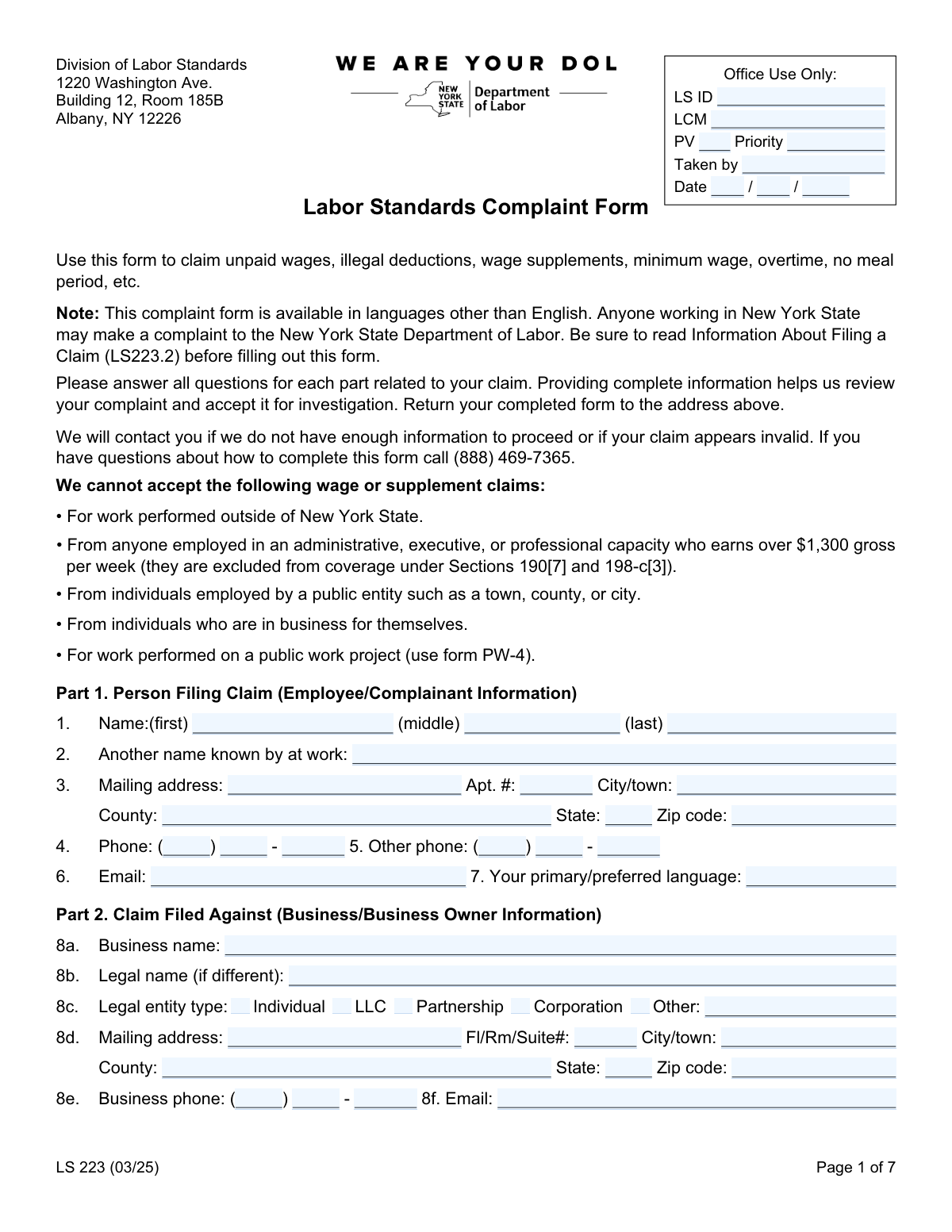
Yes! You can use AI to fill out New York State Department of Labor (NYSDOL) Division of Labor Standards Complaint Form (LS 223)
The Labor Standards Complaint Form (LS 223) is an official New York State Department of Labor form that employees use to file a labor standards complaint against an employer for issues such as unpaid wages, overtime, minimum wage violations, illegal deductions, unpaid paid sick leave, and unpaid wage supplements (e.g., vacation or holiday pay). It collects detailed information about the worker, the business/owner, employment terms, pay practices, and the time periods and amounts claimed so NYSDOL can evaluate whether to open an investigation. Providing complete and accurate details (including dates, hours, pay rates, and employer contact information) is important because incomplete claims may delay review or be deemed invalid. Today, this form can be filled out quickly and accurately using AI-powered services like Instafill.ai, which can also convert non-fillable PDF versions into interactive fillable forms.
Our AI automatically handles information lookup, data retrieval, formatting, and form filling.
It takes less than a minute to fill out LS 223 using our AI form filling.
Securely upload your data. Information is encrypted in transit and deleted immediately after the form is filled out.
Form specifications
| Form name: | New York State Department of Labor (NYSDOL) Division of Labor Standards Complaint Form (LS 223) |
| Number of pages: | 7 |
| Language: | English |
| Categories: | employment forms, labor forms, NYSDOL forms, New York forms, New York labor forms, labor complaint forms |
Instafill Demo: filling out a legal form in seconds
How to Fill Out LS 223 Online for Free in 2026
Are you looking to fill out a LS 223 form online quickly and accurately? Instafill.ai offers the #1 AI-powered PDF filling software of 2026, allowing you to complete your LS 223 form in just 37 seconds or less.
Follow these steps to fill out your LS 223 form online using Instafill.ai:
- 1 Go to Instafill.ai and upload the LS 223 (Labor Standards Complaint Form) PDF or select it from the form library.
- 2 Let the AI detect and map the form fields, then confirm the form version/date (e.g., LS 223 (03/25)) and review any auto-identified sections (Parts 1–10).
- 3 Enter claimant (employee) details in Part 1, including name, contact information, mailing address, and preferred language.
- 4 Provide employer/business information in Part 2 (business name, legal entity type, address, owner details, business type, hours, employee count, and bankruptcy/bank info if known).
- 5 Complete employment details in Part 3 (job title, duties, hire/last day worked, pay method/frequency, pay rates, tips, uniform requirements, and worksite address).
- 6 Fill the claim sections that apply—Part 4 (unpaid wages by week), Part 5 (unpaid paid sick leave), Part 6 (unpaid wage supplements), Part 7 (minimum wage/overtime schedule and claim range), and Part 8 (non-wage complaints)—and attach/upload supporting documents (pay stubs, checks, policies) if available.
- 7 Review the generated totals and claim ranges for accuracy, add any background/assistance details (Parts 9–10), e-sign and date the certification, then download/print and submit the completed form to the NYSDOL address listed on the form.
Our AI-powered system ensures each field is filled out correctly, reducing errors and saving you time.
Why Choose Instafill.ai for Your Fillable LS 223 Form?
Speed
Complete your LS 223 in as little as 37 seconds.
Up-to-Date
Always use the latest 2026 LS 223 form version.
Cost-effective
No need to hire expensive lawyers.
Accuracy
Our AI performs 10 compliance checks to ensure your form is error-free.
Security
Your personal information is protected with bank-level encryption.
Frequently Asked Questions About Form LS 223
This form is used to file a complaint with the New York State Department of Labor (NYSDOL) for issues like unpaid wages, illegal deductions, unpaid wage supplements (vacation/holiday), minimum wage, overtime, paid sick leave, and certain non-wage violations (like missing pay stubs or meal periods).
Anyone who worked in New York State may file a complaint with NYSDOL. You should complete the form as the employee/complainant (or with help from a representative).
Yes. The form states NYSDOL cannot accept claims for work performed outside New York State, public entity employment (town/county/city), self-employed individuals, certain high-earning administrative/executive/professional employees (over $1,300 gross per week), or public work projects (use form PW-4 for public work).
Have your contact details, employer/business information, job details (hire date, last day worked, pay rate), and your best records of hours and pay (pay stubs, time records, texts, schedules). If possible, also gather a copy of a check or check stub for the employerâs bank information (Part 2, #14).
Provide as much as you know (for example, the business name on the sign, receipts, or pay stubs) and mark unknown items as best you can. Complete details help NYSDOL investigate, but you can still file if some employer details are missing.
Use one row per week and estimate as accurately as possible using schedules, calendars, messages, or bank deposits. Enter gross wages owed vs. gross wages paid and list any illegal deductions; attach extra sheets if you need more rows or explanations.
The form gives examples such as fines, breakage, or other improper deductions taken from wages. If you list a deduction, briefly describe what it was for and the amount, and include it in the weekly row(s).
In Part 4, question 33a asks for the check number and the payroll week ending date if your paycheck was not honored by the bank. If available, include a copy of the check.
Complete Part 5 if you are owed paid sick leave benefits under NYS law (Section 196-b), such as accrued leave you should have been paid for when used. List the accrual period, dates used, hours owed, your regular rate, and the payment due.
Wage supplements are promised fringe benefits like vacation pay, holiday pay, or reimbursable expenses. In Part 6, explain what was promised (attach a policy/handbook if you have it), then list each benefit type, the period earned, when it was due, and whether it was promised by written policy or verbal promise.
Answer the yes/no questions about minimum wage and overtime, then fill in your typical weekly schedule (start/end times, meal time, total hours per day) and the claim date range. If your pay rate changed over time, use the rate-history lines in 36e to show regular and overtime rates for each period.
Yes. Part 8 lets you check non-wage complaints such as failure to provide a 30-minute meal period, wage statements (pay stubs), a day of rest, a proper pay rate notice, paid sick leave accrual, required posters, or minor labor rulesâthen you can explain details on the form or an attached sheet.
Mail the completed form to the address listed on Page 1: Division of Labor Standards, 1220 Washington Ave., Building 12, Room 185B, Albany, NY 12226. NYSDOL will contact you if more information is needed or if the claim appears invalid, using the phone/email you provide.
The form does not provide a specific processing timeline; it states NYSDOL will evaluate whether to accept the claim for investigation and will resolve claims as expeditiously as possible. Providing complete, organized information can help avoid delays.
YesâAI tools can help you complete forms faster and more accurately; services like Instafill.ai can auto-fill form fields using your information and reduce manual typing. To use Instafill.ai, upload the LS 223 PDF, answer the guided questions (your job, pay, dates, employer details), review the populated fields for accuracy, and then download the completed form to print/sign and mail.
If the PDF isnât fillable, you can still complete it by printing and writing neatly, but that can be time-consuming. Instafill.ai can convert flat, non-fillable PDFs into interactive fillable forms and then auto-fill the fields so you can review and export a clean completed version.
Compliance LS 223
Validation Checks by Instafill.ai
1
Office Use Only fields must be blank for claimant submissions
Validates that LS ID, LCM, PV, Priority, Taken by, and the Office Use Only Date fields are not populated by the claimant. These fields are intended for internal NYSDOL tracking and should only be set by staff or the receiving system. If any of these fields are filled by a claimant, the submission should be flagged for review or the fields should be cleared and the user prompted to remove them.
2
Claimant name completeness and character validation
Ensures the Person Filing Claim first and last name are present and contain only reasonable name characters (letters, spaces, hyphens, apostrophes), with middle name optional. This is important for identity matching, correspondence, and case creation. If missing or containing invalid characters (e.g., only numbers/symbols), the form should be rejected or the user prompted to correct the name fields.
3
Claimant mailing address completeness and ZIP format
Checks that claimant street address, city/town, state, and ZIP code are provided, and that ZIP is valid (5 digits or ZIP+4 in the form 12345-6789). A complete address is required for official notices and potential payment processing. If incomplete or ZIP format is invalid, the submission should fail validation and request corrected address details.
4
Phone number format and minimum contact method requirement
Validates that any provided phone number is exactly 10 digits when assembled from area code/prefix/line number, and that the area code and prefix are not 000. Also enforces that at least one reliable contact method exists (primary phone or email). If phone segments are incomplete/invalid or no contact method is provided, the system should block submission and prompt for corrected contact information.
5
Email address format validation (claimant and employer/owner)
Ensures that any entered email (claimant, business, owner) matches a standard email pattern (e.g., [email protected]) and does not contain spaces or invalid characters. Valid emails improve communication and reduce undeliverable notices. If an email is present but invalid, validation should fail and the user should be asked to correct or remove the email.
6
Preferred language required and normalized
Checks that the claimantâs primary/preferred language is provided and is not just whitespace, and optionally normalizes to a controlled list (e.g., English, Spanish, Chinese, etc.) while allowing âOtherâ text if supported. Language preference is important for accessibility and correct correspondence. If missing, the submission should be stopped and the claimant prompted to provide a language.
7
Business identity required: business name and legal entity type selection
Validates that the business name (8a) is provided and that exactly one legal entity type is selected (Individual, LLC, Partnership, Corporation, or Other). If 'Other' is selected, the 'Other (specify)' text must be filled. This is critical for proper respondent identification and enforcement actions. If missing or multiple entity types are selected, the system should require correction before accepting the complaint.
8
Business and owner address completeness and state/ZIP validation
Ensures the business mailing address (8d) and owner mailing address (9b) are complete enough for service/notice (street, city/town, state, ZIP) and that state is a valid US state/territory abbreviation or full name. Accurate addresses are necessary for investigation and legal notifications. If incomplete or invalid, the submission should be flagged as insufficient information and returned for correction.
9
Company status logic: closing date required only if business is not in business
Validates that 13a (still in business) has a single selection (Yes/No). If 'No' is selected, a valid business closing date must be provided; if 'Yes' is selected, the closing date must be blank. This prevents contradictory case facts and supports correct investigation routing. If the logic is violated, the system should prompt the user to fix the inconsistency.
10
Employment dates validity and chronological consistency
Checks that Date hired and (if provided) Last day worked are valid calendar dates in MM/DD/YYYY and that Last day worked is not earlier than Date hired. If the claimant indicates they are 'Still employed', Last day worked should be blank; if they are not still employed, Last day worked should be present. If dates are invalid or inconsistent, the submission should fail validation and request corrected dates/status.
11
Union membership dependency validation
Ensures 26a (union member) is answered Yes/No, and if 'Yes' is selected then union name and/or Local number is provided (at minimum one identifier, preferably both). This information can affect jurisdiction, records requests, and investigation steps. If 'Yes' is selected but union details are missing, the system should require completion or flag the claim as incomplete.
12
Pay rate and pay basis validation (regular and overtime)
Validates that the regular rate of pay is a positive currency amount and that exactly one pay basis is selected (per Day/Week/Hour/Other). If 'Other' is selected, the pay basis description must be provided; overtime rate (27b) must be a positive currency amount if overtime is being claimed or if the claimant provides it. If amounts are non-numeric/negative or pay basis is missing/ambiguous, the system should block submission and request correction.
13
Tips section conditional requirements and mutual exclusivity
If the claimant answers that they earned tips regularly (28a = Yes), validates that average tips per hour is provided and is a non-negative numeric amount. For employer kept tips (28c), ensures only one of the options is selected (No / Yesâyours / Yesâothersâ) and if any 'Yes' option is selected, the amount/explanation field (28d) must be completed. If these conditions are not met, the system should prompt for missing details or correct conflicting selections.
14
Unpaid wages table row arithmetic and required fields per populated row
For each populated payroll row in Part 4, validates that Week Ending Date is a valid date, days worked is an integer 0â7, hours worked is a non-negative number, and monetary fields are valid currency. Also checks that Gross Wages Owed equals Hours Worked Ă Rate of Pay when pay basis is hourly (or otherwise requires an explanation/override), and that Difference (H) equals Owed (F) minus Paid (G). If calculations do not match within a small rounding tolerance, the row should be rejected or flagged for review with a request to correct amounts.
15
Claim range date validation and alignment with detailed entries
Validates that claim range 'from' and 'to' dates (Part 4: 33b and Part 7: 36d) are valid dates and that 'from' is not after 'to'. Additionally, if wage table week-ending dates or schedule dates are provided, they should fall within (or reasonably overlap) the stated claim range to avoid contradictory timelines. If the range is invalid or inconsistent with entered weeks/schedules, the system should require correction or flag the submission as potentially invalid.
16
Signature and signature date required for submission
Ensures the claimant signature field is present (captured as a typed name, e-signature token, or uploaded signature depending on system design) and that the signature date is a valid date. Certification is legally important and required to proceed with investigation and potential recovery actions. If signature or date is missing/invalid, the system must not accept the submission and should prompt the claimant to complete certification.
Common Mistakes in Completing LS 223
People often assume every blank must be completed and write something in the âOffice Use Onlyâ section. This can confuse intake staff, cause misrouting, or require the agency to clarify/white-out entries before processing. Leave these fields blank unless NYSDOL staff specifically instructs you to complete them; AI-powered tools like Instafill.ai can also recognize and skip office-only fields to prevent accidental entries.
Claimants sometimes file even though the form states certain claims are not accepted (e.g., work performed outside NYS, public entity employers, being in business for yourself, public work projects requiring PW-4, or certain administrative/executive/professional employees earning over $1,300/week). This can lead to an immediate rejection or significant delays while the agency determines jurisdiction. Before completing the form, confirm your work was in New York State and that your employment situation fits the covered categories; if unsure, call the listed number or use Instafill.ai to flag potential eligibility conflicts based on your answers.
A common issue is entering a nickname/maiden name in Part 1 but not listing it in âAnother name known by at work,â or using different spellings across pages. This makes it harder to match payroll records, schedules, and employer documents, which can slow investigation. Use your legal name in the main name fields and list any alternate workplace names in the âAnother name known by at workâ field; Instafill.ai can help keep names consistent across repeated fields.
People frequently omit the county, leave out apartment/unit numbers, or enter partial phone numbers (e.g., missing area code/prefix) because the phone is split into multiple boxes. Missing or malformed contact details can prevent NYSDOL from reaching you for follow-up questions, which may stall or close the complaint for insufficient information. Double-check that all phone segments are filled with digits only and that your mailing address includes unit and ZIP; Instafill.ai can validate phone/email formats and ensure required address components are present.
Claimants often list only a storefront name (DBA) and skip the legal name, legal entity type (LLC/corporation/individual), and owner details. If the wrong entity is named, enforcement and collection can be harder, and NYSDOL may need additional research or request corrections. Use pay stubs, W-2/1099, offer letters, or the NYS business registry to capture the legal name and entity type, and list owner(s) and titles when known; Instafill.ai can prompt for missing employer identifiers and keep business/owner addresses separated correctly.
Many people skip 13a/13b and 15 or check a box but forget the required follow-up date/explanation. These items affect how NYSDOL prioritizes and pursues recovery, especially if the business closed or filed bankruptcy. Always answer Yes/No/Unknown and provide the closing date if applicable; Instafill.ai can enforce conditional logic so follow-up fields appear and are completed when required.
A frequent mistake is mixing formats (MM/DD/YY vs. DD/MM/YY), leaving month/day/year partially blank, or providing a claim range that doesnât match the weekly tables. Inconsistent dates can make the claim appear invalid or require NYSDOL to request clarification, delaying investigation. Use numeric month/day/year consistently and ensure your claim range matches the weeks/hours you list; Instafill.ai can standardize date formatting and cross-check ranges against entered payroll weeks.
People often enter a dollar amount but forget to check whether itâs per hour/day/week, or they enter an overtime rate that isnât time-and-a-half of the regular rate (or leave it blank). This can lead to incorrect calculations of wages owed and back-and-forth with investigators. Always pair the rate with the correct basis checkbox and provide the overtime hourly rate if you have it (or explain if unknown); Instafill.ai can calculate expected overtime rates and flag mismatches.
In Part 4, claimants commonly enter net pay (after taxes) instead of gross, forget to include illegal deductions in the right column, or miscalculate the âDifferenceâ column. Math errors can reduce credibility, cause under- or over-claiming, and slow review while NYSDOL recalculates. Use gross amounts from pay stubs when possible, keep deductions in the deductions column, and let the difference be F minus G; Instafill.ai can auto-calculate totals and ensure consistent gross/net handling.
The form requests specific supporting items (e.g., check number and week ending date for dishonored checks, copy of check/check stub for employer bank info, and written policy/handbook for wage supplements). People often leave these blank or write âsee attachedâ but forget to attach anything, weakening the evidence and delaying the case. Provide copies when available and clearly label attachments with your name and the relevant week/benefit; if youâre working from a flat non-fillable PDF, Instafill.ai can convert it into a fillable version and help package attachments/checklists so nothing is missed.
Claimants frequently check âYesâ (e.g., tips kept, uniforms required, not paid overtime, meal period not provided) but donât complete the required follow-up fields like amounts, dates, descriptions, or the weekly schedule. Without specifics, NYSDOL may be unable to compute damages or determine which labor law provisions apply. When you answer âYesâ or âNoâ to a question that asks for an explanation, add who/what/when/how much and include dates; Instafill.ai can guide you through follow-up prompts and prevent submission with missing conditional details.
Saved over 80 hours a year
âI was never sure if my IRS forms like W-9 were filled correctly. Now, I can complete the forms accurately without any external help.â
Kevin Martin Green
Your data stays secure with advanced protection from Instafill and our subprocessors

Robust compliance program
Transparent business model
Youâre not the product. You always know where your data is and what it is processed for.
ISO 27001, HIPAA, and GDPR
Our subprocesses adhere to multiple compliance standards, including but not limited to ISO 27001, HIPAA, and GDPR.
Security & privacy by design
We consider security and privacy from the initial design phase of any new service or functionality. Itâs not an afterthought, itâs built-in, including support for two-factor authentication (2FA) to further protect your account.
Fill out LS 223 with Instafill.ai
Worried about filling PDFs wrong? Instafill securely fills new-york-state-department-of-labor-nysdol-division-of-labor-standards-complaint-form-ls-223 forms, ensuring each field is accurate.