Yes! You can use AI to fill out CMS Survey and Certification Complaint/Revisit Report
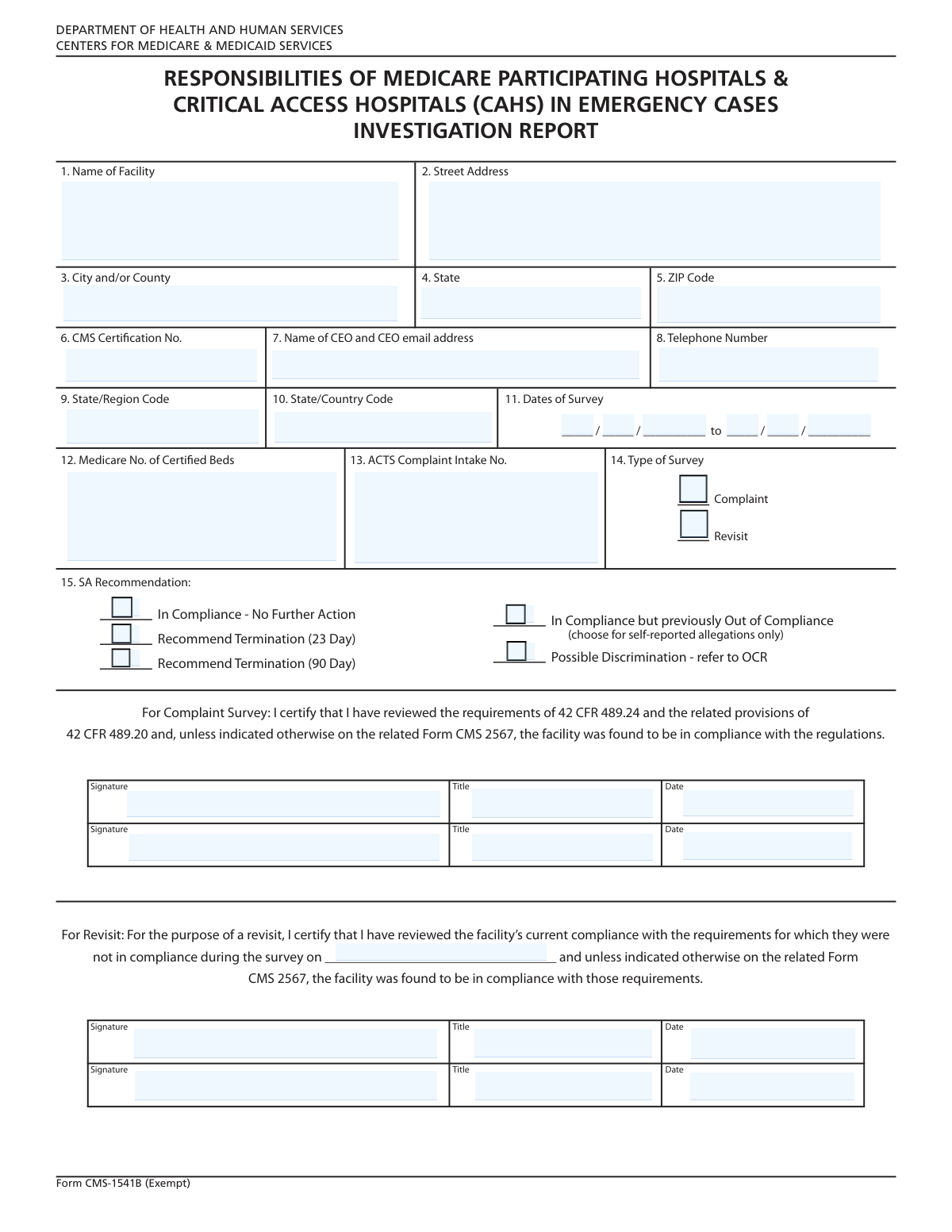
This form is an official document used by state survey agencies or the Centers for Medicare & Medicaid Services (CMS) to record the outcome of a complaint investigation or a revisit survey at a healthcare facility. It summarizes key administrative data, survey dates, and the final determination regarding the facility's compliance, including any recommendations for termination or other actions. Today, this form can be filled out quickly and accurately using AI-powered services like Instafill.ai, which can also convert non-fillable PDF versions into interactive fillable forms.
Our AI automatically handles information lookup, data retrieval, formatting, and form filling.
It takes less than a minute to fill out CMS Complaint Report using our AI form filling.
Securely upload your data. Information is encrypted in transit and deleted immediately after the form is filled out.
Form specifications
| Form name: | CMS Survey and Certification Complaint/Revisit Report |
| Number of fields: | 38 |
| Number of pages: | 1 |
| Language: | English |
| Categories: | CMS forms, certification forms |
Instafill Demo: How to fill out PDF forms in seconds with AI
How to Fill Out CMS Complaint Report Online for Free in 2026
Are you looking to fill out a CMS COMPLAINT REPORT form online quickly and accurately? Instafill.ai offers the #1 AI-powered PDF filling software of 2026, allowing you to complete your CMS COMPLAINT REPORT form in just 37 seconds or less.
Follow these steps to fill out your CMS COMPLAINT REPORT form online using Instafill.ai:
- 1 Navigate to Instafill.ai and upload or select the CMS Complaint/Revisit Report form.
- 2 Use the AI assistant to automatically populate the facility's name, address, and CMS Certification Number.
- 3 Enter the administrative details, including the CEO's contact information and the ACTS Complaint Intake Number.
- 4 Specify the start and end dates of the survey and check the box indicating the survey type (Complaint or Revisit).
- 5 Select the appropriate checkbox that reflects the survey's outcome, such as 'In Compliance' or 'Recommend Termination'.
- 6 Review all entered information for accuracy, then digitally sign and date the form in the designated signature sections.
- 7 Securely download, print, or share the completed report directly from the platform as required.
Our AI-powered system ensures each field is filled out correctly, reducing errors and saving you time.
Why Choose Instafill.ai for Your Fillable CMS Complaint Report Form?
Speed
Complete your CMS Complaint Report in as little as 37 seconds.
Up-to-Date
Always use the latest 2026 CMS Complaint Report form version.
Cost-effective
No need to hire expensive lawyers.
Accuracy
Our AI performs 10 compliance checks to ensure your form is error-free.
Security
Your personal information is protected with bank-level encryption.
Frequently Asked Questions About Form CMS Complaint Report
This form is used to document the official findings and recommended actions following a survey of a facility, such as a complaint investigation or a revisit for compliance checks.
This form is typically completed by the surveyor or a state agency official who conducted the facility investigation to certify the survey's findings and outcomes.
The CMS Certification Number (CCN) is a unique identifier for facilities participating in Medicare/Medicaid. It can be found on official correspondence from the Centers for Medicare & Medicaid Services (CMS) or in the facility's administrative records.
Check the 'Complaint' box if the survey was initiated because of a specific complaint. Check the 'Revisit' box if it is a follow-up survey to verify that previously cited deficiencies have been corrected.
No, you only need to complete the signature sections that correspond to the type of survey conducted. Fill out the 'Complaint Survey' signatures if it was a complaint, or the 'Revisit Survey' signatures if it was a revisit.
These options relate to the urgency of non-compliance. A 23-day recommendation is for severe issues posing immediate jeopardy, while a 90-day recommendation is for serious but less immediate threats to health and safety.
This is the unique tracking number assigned to a specific complaint within the Automated Complaint Tracking System (ACTS). This field should be filled out only when the survey is a complaint investigation.
Check the 'Possible Discrimination - refer to OCR' box if your survey uncovered evidence suggesting potential civil rights violations or discrimination. This flags the case for referral to the Office for Civil Rights.
The requirement for two signatures provides a layer of verification and oversight for the survey findings. It typically involves the primary surveyor and a supervisor or second reviewer.
Yes, services like Instafill.ai use AI to auto-fill form fields accurately and save time. It can help populate recurring information like facility details, reducing manual data entry.
You can upload the form to a platform like Instafill.ai to make it interactive. This allows you to type directly into the fields, add digital signatures, and download the completed PDF.
If you have a non-fillable or 'flat' PDF, you can use a tool like Instafill.ai to convert it into an interactive, fillable form. Simply upload the document, and the AI will automatically identify the fields for you to complete online.
The 'Start Date' is the first day the surveyors were on-site at the facility, and the 'End Date' is the final day of the on-site survey activities.
Compliance CMS Complaint Report
Validation Checks by Instafill.ai
1
Validates State Abbreviation Format
This check ensures the 'State' field contains a valid two-letter postal abbreviation. Using a standardized code is crucial for data consistency, address verification, and integration with other systems. If the entry is not a recognized two-letter code, the submission should be rejected and the user prompted for correction.
2
Ensures Valid ZIP Code Format
This validation confirms that the 'ZIP Code' field contains either a five-digit or a nine-digit (ZIP+4) numeric code. A correctly formatted ZIP code is essential for mail delivery, geographic reporting, and data accuracy. A failed validation would require the user to re-enter the ZIP code in the NNNNN or NNNNN-NNNN format.
3
Validates CEO Email Address Format
This check parses the 'CEO Name and Email Address' field to verify that the email portion conforms to the standard '[email protected]' format. A valid email is necessary for official communication with the facility's leadership. If the format is incorrect, the system should reject the submission and highlight the field for correction.
4
Verifies Survey Date Chronology
This validation ensures that the survey 'End Date' is on or after the 'Start Date'. A start date that occurs after the end date is a logical impossibility and indicates a significant data entry error. This check is critical for maintaining accurate historical records and timelines; failure would require the user to correct one or both dates.
5
Ensures Certified Beds is a Positive Integer
This validation verifies that the 'Medicare No. of Certified Beds' field contains a positive whole number. The number of beds cannot be negative, zero, or a fraction, as it represents a physical count of facility resources. An invalid entry would prevent accurate capacity reporting and must be corrected to a valid integer.
6
Checks for Mutually Exclusive Survey Outcomes
This validation ensures that only one of the survey outcome checkboxes (e.g., 'In Compliance', 'Recommend Termination') is selected. These outcomes are mutually exclusive, and selecting more than one creates a logical conflict in the report's conclusion. If multiple conflicting outcomes are checked, the form should display an error and require the user to select only one.
7
Enforces Conditional Complaint Signature Requirement
This rule checks that if the 'Complaint' checkbox is selected, the first 'Complaint Survey Signature', 'Title', and 'Date' fields are completed. These fields are required to certify the findings of a complaint investigation, and their absence would render the report incomplete and legally insufficient. If the 'Complaint' box is checked but the signature fields are empty, the submission should be blocked until they are filled.
8
Enforces Conditional Revisit Data Requirement
This validation ensures that if the 'Revisit' checkbox is selected, the 'Revisit Survey Date' and the first 'Revisit Signature' fields are filled out. A revisit survey requires specific documentation to be valid, including the date and certification of the follow-up action. Failure to provide this information when 'Revisit' is checked would result in an incomplete record, so the system must prompt the user to complete the required fields.
9
Validates Certification Date Logic
This check confirms that any signature date ('Complaint Survey Date', 'Revisit Signature Date') is on or after the survey 'End Date'. A certification date cannot precede the completion of the work it is certifying. This chronological validation prevents logical errors in the official record and ensures the integrity of the event timeline.
10
Validates Telephone Number Format
This check ensures the 'Telephone Number' field follows a standard North American format, such as (XXX) XXX-XXXX or XXX-XXX-XXXX. Consistent formatting aids in data parsing, ensures usability with communication systems, and improves overall data quality. If the entered number does not match an expected pattern, the user should be prompted to correct it.
11
Ensures Composite Date Fields Form a Valid Date
This validation applies to both the 'Start Date' and 'End Date', which are composed of separate Month, Day, and Year inputs. The check ensures that the combination of these three fields results in a valid calendar date, preventing impossible entries like April 31 or February 30. This is fundamental for data integrity, as an invalid date would corrupt survey records and timelines.
12
Requires CMS Certification Number
This validation confirms that the 'CMS Certification Number' field is not empty. This number is a unique and critical identifier for the facility within the CMS system, essential for linking the survey to the correct entity. A missing number would make the report difficult or impossible to process correctly, so the submission must be blocked until it is provided.
Common Mistakes in Completing CMS Complaint Report
Users often enter a common abbreviation or a 'doing business as' (DBA) name instead of the full legal name of the facility. This can cause the submission to be rejected if it doesn't match official records, leading to processing delays and compliance issues. Always verify the full, registered legal name of the facility from official documents before filling out the form.
Mistakes in the address block, such as using non-standard state abbreviations (e.g., 'Calif.' instead of 'CA') or entering an incorrect ZIP code format, are frequent. These errors can lead to returned mail and significant delays in communication from regulatory bodies. To avoid this, use standard USPS formatting for all address fields; AI-powered tools like Instafill.ai can automatically validate and format addresses correctly.
Transposing digits or entering an incorrect CMS Certification Number or ACTS Complaint Intake No. is a critical error. Because these numbers are unique identifiers, a mistake can prevent the form from being linked to the correct facility or complaint file in the database. Carefully double-check these numbers for accuracy before submission; using a tool that securely stores and auto-fills this data can prevent such transcription errors.
The fields 'State/Region Code' and 'State/Country Code' are similarly named and can be easily confused, leading users to enter the wrong information in each. This mistake results in data categorization errors and can cause the form to be misrouted or flagged for correction. To prevent this, refer to the form's official instructions to understand the distinction and find the correct codes for each field.
A common mistake is entering a survey 'End Date' that is earlier than the 'Start Date'. This logical error usually happens due to a simple typo or oversight when entering the day, month, or year across separate fields. Such an error will invalidate the survey period and require the form to be corrected and resubmitted, so always review the completed dates to ensure they make logical sense.
Users sometimes select mutually exclusive options, such as checking both 'In Compliance - No Further Action' and 'Recommend Termination'. This indicates a misunderstanding of the options or a simple slip-up, but it renders the form's conclusion invalid. Submissions with contradictory information will be rejected, so it is crucial to read each option carefully and select only one that accurately reflects the survey's outcome.
The form requires signatures only if specific checkboxes like 'Complaint' or 'Revisit' are selected, and filers often miss these dependent sections. Forgetting to provide the required signatures and dates in the 'Complaint Survey Signature' or 'Revisit Survey Signature' sections will make the certification incomplete and legally invalid. Always perform a final review of the entire form to ensure all required conditional fields are completed based on your selections.
Even when the signature is provided, users frequently omit the accompanying 'Title' and 'Date' fields. A signature without a title and date may not be considered a valid attestation, as it lacks the context of who signed and when. To ensure the form is accepted, treat the entire signature block—signature, title, and date—as a single, mandatory unit.
This checkbox is specifically designated for 'self-reported allegations only,' a detail that is easily missed. Selecting this option for other scenarios, such as a standard revisit, leads to incorrect data on the facility's compliance history, which can impact future regulatory oversight. It is essential to read all notes and instructions associated with checkboxes to ensure they are used correctly.
Providing a generic 'info@' or 'contact@' email instead of the CEO's specific email address is a frequent shortcut. This can prevent time-sensitive or confidential information from reaching the key decision-maker, delaying responses to critical compliance matters. Always obtain the correct, direct email address for the specified executive to ensure proper communication flow. If the form is a non-fillable PDF, a tool like Instafill.ai can convert it into a fillable version where you can easily input this information.
Saved over 80 hours a year
“I was never sure if my IRS forms like W-9 were filled correctly. Now, I can complete the forms accurately without any external help.”
Kevin Martin Green
Your data stays secure with advanced protection from Instafill and our subprocessors

Robust compliance program
Transparent business model
You’re not the product. You always know where your data is and what it is processed for.
ISO 27001, HIPAA, and GDPR
Our subprocesses adhere to multiple compliance standards, including but not limited to ISO 27001, HIPAA, and GDPR.
Security & privacy by design
We consider security and privacy from the initial design phase of any new service or functionality. It’s not an afterthought, it’s built-in, including support for two-factor authentication (2FA) to further protect your account.
Fill out CMS Complaint Report with Instafill.ai
Worried about filling PDFs wrong? Instafill securely fills cms-survey-and-certification-complaintrevisit-report forms, ensuring each field is accurate.