
Instafill.ai
7 days free
AI form filling · 71 fields · 4 pages · done in seconds

Yes! You can use AI to fill out Form WH-385, Certification for Serious Injury or Illness

Don't type 71 fields by hand. Tell our AI about yourself, or upload a document you already have, and it fills every field in seconds. You check it, then download, print or sign.
7 days free, then $19.99/month · Cancel anytime
AI fills it, no typingEncrypted, never used to train AICancel in two clicks
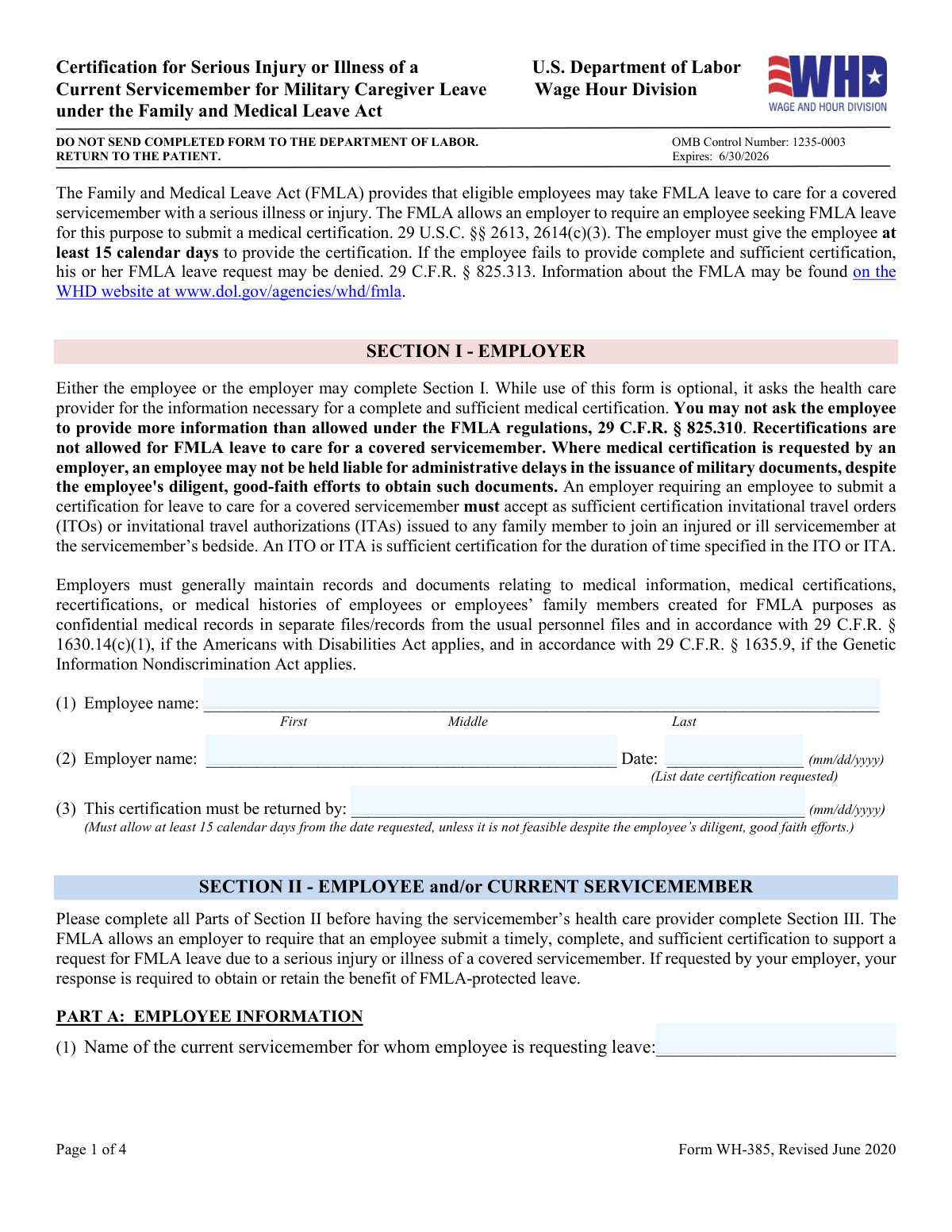
Form WH-385, Certification for Serious Injury or Illness, page 1
Moderate · 48/100Form Complexity Index

The AI does the filling. You just check it.

No typing into boxes, nothing to install.

Tell the AI about youAnswer a few questions in plain words, or upload a document you already have. That is all the typing there is.
AI fills every field in secondsIt puts each answer in the right box on every page, checkboxes included.
Check it and downloadReview every field, change anything, then download, print or sign the PDF.

What this form asks for

The AI fills all of it, from your answers or your documents.

Form WH-385, Certification for Serious Injury or Illness, is used by employees to request FMLA leave to care for a covered servicemember with a serious injury or illness. This form is crucial for ensuring that employees can take the necessary time off to provide care and support to their family members during difficult times.
Fillable fields71
Pages4
Sections16
Form Complexity IndexModerate, 48/100

The AI checks your answers before you download

15 checks built for this form, so a wrong date or a missing answer is caught before anyone else sees it.

Employee's Full Name Validation

Ensures that the employee's full name is correctly entered in Section I, including first, middle, and last names. The check involves verifying the presence of all name components and confirming their correct sequence and spelling. It also includes a comparison against any known databases or records to ensure consistency. Any discrepancies or omissions are flagged for review or correction.

Employer's Name Validation

Confirms that the employer's name is accurately provided in Section I. This validation involves checking the employer's name for correct spelling, proper capitalization, and the inclusion of any legal business designations (e.g., LLC, Inc.). The check also ensures that the name matches with registered business entities when applicable. Any inconsistencies are highlighted for further verification.

Certification Request Date Validation

Verifies that the date the certification was requested is properly formatted (mm/dd/yyyy) in Section I. This check ensures that the date contains the correct number of digits, uses proper separators, and represents a valid calendar date. It also confirms that the date is logical in the context of the form's submission, not occurring in the future or at an improbable past date.

Certification Return Date Validation

Checks that the certification return date is correctly entered and formatted (mm/dd/yyyy) in Section I. The validation process includes confirming the structure of the date, ensuring it is a plausible date, and checking that it follows any specific timelines or deadlines set forth by the form's requirements. It also compares the return date to the request date to ensure chronological consistency.

Servicemember's Name and Relationship Match Validation

Validates that the servicemember's name is entered in Section II, Part A, and matches the employee's stated relationship. This check involves ensuring that the servicemember's name is fully and accurately captured, and that it corresponds to the relationship designation provided by the employee. It also cross-references the information with any available records to confirm the validity of the claimed relationship.

Confirms the employee's relationship to the servicemember is appropriately indicated in Section II, Part A.

This validation check ensures that the employee has correctly identified their relationship to the servicemember in the specified section of the form. It confirms that the relationship is one of the options provided in the form's instructions and that it is clearly and accurately marked. The check prevents any ambiguity regarding the employee's connection to the servicemember, which is crucial for the form's validity. Additionally, it cross-verifies the information with any supporting documentation, if necessary, to ensure consistency.

And 9 more checks
  • Verifies the servicemember's current status, including military branch, rank, and unit details in Section II, Part B.
  • Checks if the servicemember is assigned to a medical treatment facility or unit and that the name is provided if applicable in Section II, Part B.
  • Determines whether the servicemember's TDRL status is indicated in Section II, Part B.
  • Validates the types of care to be provided by the employee and ensures any other specified care is clearly described in Section II, Part B.
  • Confirms the estimate of leave needed, including the amount and any reduced work schedule details, is provided in Section II, Part B.
  • Ensures the health care provider's information is complete, including name, business address, and contact details in Section III, Part A.
  • Verifies that the patient's name matches the servicemember's name listed in previous sections in Section III, Part B.
  • Checks that the condition start date, duration, and details are properly documented in Section III, Part B.
  • Confirms the health care provider's signature and date are present and that the form is signed in Section III.

Let AI fill out your Form WH-385

No typing. Every field filled in seconds, checked, ready to sign.

7 days free, then $19.99/month · Cancel anytime

How to Fill Out Form WH-385 Online for Free in 2026

What the AI walks you through.

  1. Visit instafill.ai site and select Form WH-385.
  2. Enter employee and employer information.
  3. Complete servicemember and care details.
  4. Health care provider fills out their section.
  5. Sign and date the form electronically.
  6. Check for accuracy and submit the form.

Common Mistakes in Completing Form WH-385

The ones the AI is built to catch.

Entering incomplete or inaccurate information
The Certification for Serious Injury or Illness of Current Servicemember form requires precise and complete information to ensure accurate processing. Incomplete or inaccurate data entry, such as missing or incorrect Social Security numbers, dates, or names, can lead to delays or denials. To avoid this mistake, double-check all entered information against the original documents and ensure all required fields are filled out completely and accurately.
Failing to return the form within the required timeframe
Timely submission of the Certification for Serious Injury or Illness of Current Servicemember form is crucial to ensure the continuation of benefits for the servicemember and the employee. Failing to return the form within the specified timeframe can result in the loss of benefits or additional administrative hassle. To prevent this mistake, familiarize yourself with the submission deadlines and ensure the form is completed and submitted promptly.
Forgetting to sign and date the form or having the health care provider fail to do so
Both the employee and the health care provider must sign and date the Certification for Serious Injury or Illness of Current Servicemember form to validate its authenticity. Failure to comply with this requirement can lead to processing delays or denials. To avoid this mistake, ensure all parties involved understand the importance of signing and dating the form and complete this task before submitting it.
Misidentifying the relationship between the employee and the servicemember
Proper identification of the relationship between the employee and the servicemember is essential to ensure the correct application of benefits. Misidentifying this relationship can lead to incorrect processing or denial of benefits. To prevent this mistake, carefully review the form instructions and ensure the relationship is accurately identified based on the defined criteria.
Providing incorrect military branch, rank, or unit details for the servicemember
Providing incorrect military branch, rank, or unit details for the servicemember can lead to processing delays or denials. Ensuring the accuracy of this information is crucial to ensure the servicemember receives the appropriate benefits. To avoid this mistake, consult official military records or contact the military personnel office to verify the information before submitting the form.
Omitting information about the servicemember's assignment to a medical facility or unit
The Certification for Serious Injury or Illness of Current Servicemember form requires the filer to indicate whether the servicemember is assigned to a medical facility or unit. Failure to provide this information can lead to processing delays or potential denial of benefits. To avoid this mistake, ensure that you have the most up-to-date information about the servicemember's medical assignment and include it on the form.
Neglecting to check all applicable boxes describing the care to be provided
The form includes several boxes that must be checked to indicate the type of care being provided to the servicemember. Failing to check all applicable boxes can result in incomplete or incorrect information being submitted. To prevent this mistake, carefully review the form instructions and check all boxes that apply to the servicemember's situation.
Providing an inaccurate estimate of the amount of leave needed
The form requires the filer to estimate the amount of leave that the servicemember will need during their recovery. Inaccurate estimates can lead to processing delays or potential denial of benefits. To avoid this mistake, consult with the servicemember's medical team and use their professional judgment to estimate the amount of leave needed.
Failing to provide the health care provider's name, contact information, and type
The form requires the filer to provide the name, contact information, and type of the health care provider treating the servicemember. Failure to provide this information can result in processing delays or potential denial of benefits. To prevent this mistake, ensure that you have the correct and complete information about the servicemember's health care provider.
Neglecting to indicate if the servicemember is on the TDRL
The form requires the filer to indicate whether the servicemember is on the TDRL (Total Disability Retirement List). Failing to provide this information can result in processing delays or potential denial of benefits. To prevent this mistake, ensure that you have the most up-to-date information about the servicemember's status on the TDRL and include it on the form.
Selecting an Incorrect Medical Condition Classification
When completing the Certification for Serious Injury or Illness of Current Servicemember form, it is crucial to accurately classify the medical condition of the servicemember. Incorrectly classifying a condition can lead to delays or denials in the processing of benefits. To avoid this mistake, carefully review the definition and eligibility criteria for each medical condition classification provided on the form. Consult with medical professionals and military personnel, if necessary, to ensure an accurate assessment of the servicemember's condition. Additionally, keep detailed records of all medical diagnoses and treatments to support the classification selection.
Forgetting to Provide Details on the Continuous Period of Leave and Medical Appointments
Another common mistake on the Certification for Serious Injury or Illness of Current Servicemember form is failing to provide sufficient details regarding the servicemember's continuous period of leave and medical appointments. This information is essential for determining eligibility for benefits and calculating the duration of entitlement. To prevent this mistake, be sure to document the start and end dates of the servicemember's leave, as well as the dates and types of medical appointments. Keep a record of all correspondence with military and healthcare providers regarding the servicemember's condition and treatment plan.
Failing to Maintain Confidentiality of Medical Records and Documents
Maintaining the confidentiality of medical records and documents is essential when completing the Certification for Serious Injury or Illness of Current Servicemember form. Unintended disclosure of sensitive medical information can result in privacy violations and potential harm to the servicemember. To ensure confidentiality, limit access to the form and related documents to authorized individuals only. Store and transmit the documents securely, using encryption or other protective measures as necessary. Additionally, be aware of the legal and regulatory requirements for handling and protecting sensitive medical information, such as the Health Insurance Portability and Accountability Act (HIPAA) and Department of Defense (DoD) policies.

Frequently Asked Questions About Form WH-385


Is it really free for 7 days?
Yes. You pay $0 today. Cancel before Nov 1 and you are never charged. Keep it, and it is $19.99 a month for 5 fills of your Form WH-385.
Can I fill other forms too?
This plan is for your Form WH-385: your own AI agent fills it as often as 5 times a month. To fill other forms and upload your own, choose a Professional plan from your account.
How do I cancel?
From your account, in two clicks, any time. No email, no call.
How does the AI fill out Form WH-385?
You answer a few questions in plain words, or upload a document you already have. The AI reads what you give it and puts each answer into the right field of Form WH-385, on every page, in seconds. It checks the answers against the form's own rules, and you review and change anything before you download, print or sign.
What happens to my information?
It is encrypted in transit and at rest, and it is never used to train AI.
How complex is Form WH-385 to fill out?
Form WH-385 has a Form Complexity Index of 48 out of 100, in the moderate tier: 71 fillable fields across 4 pages. Instafill.ai's AI fills it in under a minute, with every field there for you to review before you download.
What is the purpose of the Certification for Serious Injury or Illness of a Current Servicemember form?
This form is used to certify that a current servicemember has a serious injury or illness, and that an employee is taking FMLA leave to care for them.
Who can complete Section I of the form?
Either the employee or the employer can complete Section I of the form. While use of the form is optional, it asks the health care provider for the information necessary for a complete and sufficient medical certification.
What information is required in Section II of the form?
Section II of the form requires the employee to provide their relationship to the servicemember, the servicemember's military branch, rank, and unit, whether they are assigned to a military medical treatment facility, and a description of the care they will provide to the servicemember.
What is the purpose of Section III of the form?
Section III of the form is completed by the servicemember's health care provider. It requires the provider to confirm that the servicemember's injury or illness was incurred in the line of duty on active duty or that it existed before the beginning of their active duty and was aggravated by service in the line of duty on active duty, and that the servicemember is undergoing treatment for the injury or illness.
What is the difference between a VSI and SI designation in Part B of the form?
A VSI designation indicates that the servicemember's injury or illness is of such severity that life is imminently endangered, and family members are requested at the bedside immediately. An SI designation indicates that the servicemember's injury or illness is of such severity that there is cause for immediate concern, but there is no imminent danger to life, and family members are requested at the bedside.
What is the difference between intermittent and continuous care in Part C of the form?
Intermittent care refers to care needed on a periodic basis, such as care needed because of episodic flare-ups of the condition or assisting with the servicemember's recovery. Continuous care refers to care for a continuous period of time, including any time for treatment and recovery.
What is the purpose of the Paperwork Reduction Act Notice and Public Burden Statement in the form?
The Paperwork Reduction Act Notice and Public Burden Statement are required by law and inform respondents that they are not required to respond to the collection of information unless it displays a currently valid OMB control number, and that the Department of Labor estimates that it will take an average of 15 minutes for respondents to complete the collection of information.
What happens if the employee fails to provide complete and sufficient certification?
The employer may deny the employee's FMLA leave request if they fail to provide complete and sufficient certification.
What records and documents must employers maintain relating to medical information, medical certifications, recertifications, or medical histories of employees or employees’ family members created for FMLA purposes?
Employers must generally maintain records and documents relating to medical information, medical certifications, recertifications, or medical histories of employees or employees’ family members created for FMLA purposes as confidential medical records in separate files/records from the usual personnel files and in accordance with 29 C.F.R. § 1630.14(c)(1) and 29 C.F.R. § 1635.9.
What is the OMB Control Number for the Certification for Serious Injury or Illness of a Current Servicemember form?
The OMB Control Number for the Certification for Serious Injury or Illness of a Current Servicemember form is 1235-0003.
Encrypted in transit and at restNever used to train AIDelete your forms any time

Get your Form WH-385 filled out by AI

$0 today. Cancel before Nov 1 and you pay nothing.

Other forms like this one

certification forms: Form HS 200, Licensure & Certification Application, W-9, Request for Taxpayer Identification Number and Certification, Form WH-380-E, Certification of Health Care Provider, Form WH-380-F, Certification of Health Care Provider, Form WH-385-V, Certification for Serious Injury or Illness, Form 8802, Application for U.S. Residency Certification, Form I-905, Application for Authorization to Issue Certification for Health Care Workers, Form N-648, Medical Certification for Disability Exceptions, Form 01-339, Texas Sales and Use Tax Resale Certificate / Texas Sales and Use Tax Exemption Certification, Dakota County CDA New Admissions Informal Review Request Form (Housing Choice Voucher Program) and HUD Form 5382, Certification of Domestic Violence, Dating Violence, Sexual Assault, or Stalking, and Alternate Documentation, NJ Department of Labor & Workforce Development Form MW-562, Payroll Certification for Public Works Projects (Contractor and Subcontractor’s Weekly and Final Certification), ROTC Cadet Academic Plan / Degree and Credit Hour Worksheet (Student Identification, Term-by-Term Courses, GPA Summary, and Completion Certification), Certification for Special Assessment (Office of Building, Planning, & Code Compliance, City of Knox, Indiana), Outpatient Behavioral Health (BH) – ABA Treatment Request: Required Information for Precertification (GR-69017-4), Form W-9, Request for Taxpayer Identification Number and Certification, 401(k) Program Rollover Certification, WTIA 401(k) Plan Rollover Contribution Employee Certification, Trust Certification and Trustee Powers, Form GR-68831, Precertification Information Request Form, Precertification request form: Advanced Radiology and Cardiology Services

7 days free, then $19.99/month · Cancel anytime