Yes! You can use AI to fill out NJ Department of Labor & Workforce Development Form MW-562, Payroll Certification for Public Works Projects (Contractor and Subcontractor’s Weekly and Final Certification)
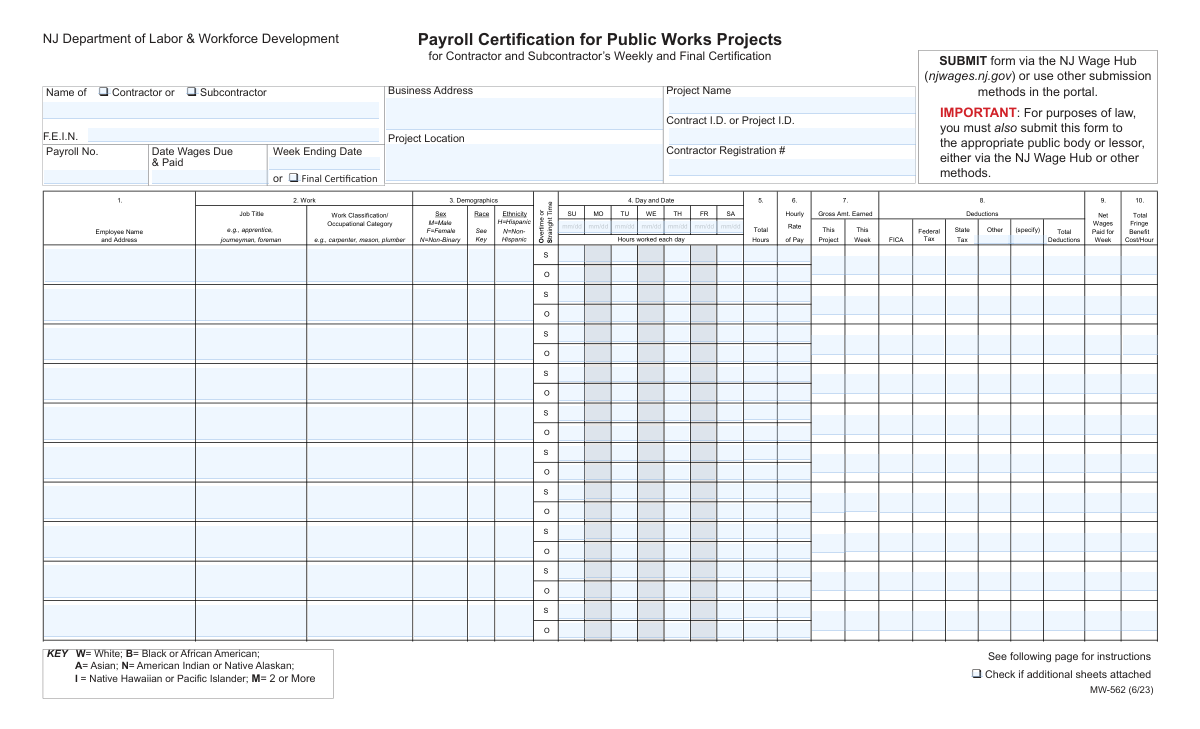
Form MW-562 is the New Jersey Department of Labor & Workforce Development certified payroll certification used on public works projects to document that workers were paid properly under the New Jersey Prevailing Wage Act and related wage payment laws. It captures contractor/subcontractor and project identifiers, employee work classifications, daily straight-time and overtime hours, gross wages, deductions, net wages, and (when applicable) fringe benefit plan contributions. The signer certifies the payroll is correct, classifications match the work performed, apprentices are properly registered, and no improper deductions or rebates occurredâmaking it a key compliance record that can be subject to civil or criminal penalties if falsified. Today, this form can be filled out quickly and accurately using AI-powered services like Instafill.ai, which can also convert non-fillable PDF versions into interactive fillable forms.
Our AI automatically handles information lookup, data retrieval, formatting, and form filling.
It takes less than a minute to fill out MW-562 using our AI form filling.
Securely upload your data. Information is encrypted in transit and deleted immediately after the form is filled out.
Form specifications
| Form name: | NJ Department of Labor & Workforce Development Form MW-562, Payroll Certification for Public Works Projects (Contractor and Subcontractor’s Weekly and Final Certification) |
| Number of pages: | 2 |
| Filled form examples: | Form MW-562 Examples |
| Language: | English |
| Categories: | payroll forms, OPM forms, labor forms |
Instafill Demo: filling out a legal form in seconds
How to Fill Out MW-562 Online for Free in 2026
Are you looking to fill out a MW-562 form online quickly and accurately? Instafill.ai offers the #1 AI-powered PDF filling software of 2026, allowing you to complete your MW-562 form in just 37 seconds or less.
Follow these steps to fill out your MW-562 form online using Instafill.ai:
- 1 Go to Instafill.ai and upload the MW-562 PDF (or select it from the form library) to start an AI-guided fill session.
- 2 Enter the contractor/subcontractor details and project information (name, FEIN, business address, project name/location, contract/project ID, contractor registration number, payroll number, and week ending date or final certification).
- 3 Add each employee line item: employee name/address, job title and work classification/occupational category, and demographic fields (sex, race, ethnicity) as required by the form.
- 4 Input daily hours for the payroll week, separating straight time and overtime, and confirm totals and applicable hourly rates for each category.
- 5 Enter wage and deduction amounts for each employee (gross earned, FICA, withholding, state tax, other deductions), then verify total deductions and net wages paid for the week.
- 6 Complete fringe benefit reporting: choose whether benefits are paid to approved plans or paid in cash, and if using approved plans, fill Section 4(c) with per-hour contribution amounts and plan/administrator details.
- 7 Review the certification statements, apply the electronic signature (name, title, date), attach any additional sheets if needed, then export and submit through the NJ Wage Hub (njwages.nj.gov) and to the appropriate public body/lessor as required.
Our AI-powered system ensures each field is filled out correctly, reducing errors and saving you time.
Why Choose Instafill.ai for Your Fillable MW-562 Form?
Speed
Complete your MW-562 in as little as 37 seconds.
Up-to-Date
Always use the latest 2026 MW-562 form version.
Cost-effective
No need to hire expensive lawyers.
Accuracy
Our AI performs 10 compliance checks to ensure your form is error-free.
Security
Your personal information is protected with bank-level encryption.
Frequently Asked Questions About Form MW-562
This form is used to certify that workers on a New Jersey public works project were paid correctly for a specific payroll period, including proper classifications, wage rates, and allowable deductions. It serves as the contractor/subcontractorâs weekly (or final) certified payroll certification.
Both prime contractors and subcontractors must complete it for the workers they pay or supervise on the public works project. Check the box for either âContractorâ or âSubcontractorâ to indicate which entity is submitting.
The form states public works employers must submit a certified payroll record each pay period within 10 days of the payment of wages. Submit it through the NJ Wage Hub (njwages.nj.gov) and also to the appropriate public body or lessor.
Submit the form via the NJ Wage Hub (njwages.nj.gov) or other submission methods available in the portal. The form also notes you must submit it to the appropriate public body or lessor (either via the NJ Wage Hub or other methods).
Use âWeek Ending Dateâ for a regular weekly submission covering that payroll week. Check âFinal Certificationâ only when this is the last payroll certification you will submit for the project.
Youâll need your company legal name, FEIN, business address, contractor registration number (if applicable), project name/location, contract or project ID, payroll number, and the date wages were due and paid. Youâll also need each employeeâs name/address, work classification, hours (straight time and overtime), pay rates, deductions, net wages, and fringe benefit details.
Enter hours worked each day for the payroll week, separating straight-time (S) and overtime (O) hours in the appropriate columns. Then total the straight-time and overtime hours for the week and apply the correct hourly rate(s) for each.
Job Title is the role level (for example, journeyman, foreman, apprentice). Work Classification/Occupational Category is the trade or classification (for example, carpenter, mason, plumber) that must match the work performed and the applicable prevailing wage determination.
The form includes a demographics section with coded options (e.g., Sex: M/F/N; Race key; Ethnicity: Hispanic/Non-Hispanic). If these fields are required for your submission, use the provided keys and enter the appropriate code for each employee.
The certification states that deductions must be permissible as defined under the New Jersey Prevailing Wage Act and related regulations, and the Payment of Wages Law. If youâre unsure whether a deduction is permissible, confirm before submitting to avoid compliance issues.
Check the box for fringe benefits paid to approved plans/funds/programs if contributions are made to benefit plans, and complete Section 4(c) with per-hour contribution details. If fringe benefits are paid in cash, check the âpaid in cashâ box and ensure the payroll reflects at least the base hourly wage plus the required fringe amount.
The form instructs: to calculate the cost per hour, divide 2,000 hours into the benefit cost per year per employee. Enter the resulting per-hour amounts under Health/Welfare, Vacation/Holiday, Apprenticeship/Training, Pension, and any other benefit type.
Attach additional sheets and check the box indicating additional sheets are attached. Make sure the added pages include the same required employee, hours, wage, deduction, and fringe benefit information.
Check the electronic signature box and type the signerâs name, title, and the signature date. The form states an electronic signature has the same legal effect as a written signature.
YesâAI form-filling tools (such as Instafill.ai) can help auto-fill fields from your payroll records and reduce manual data entry. You should still review the completed form for accuracy and compliance before submitting.
Upload the MW-562 PDF to Instafill.ai, connect or provide your payroll data (employee details, hours, rates, deductions, and fringe benefits), and let the AI map the information into the correct fields. After it fills the form, review, correct any exceptions, then download and submit through the NJ Wage Hub.
If the PDF isnât fillable, Instafill.ai can convert flat, non-fillable PDFs into interactive fillable forms so you can enter data cleanly. After conversion, you can auto-fill and export the completed document for submission.
Compliance MW-562
Validation Checks by Instafill.ai
1
Requires exactly one entity type selection (Contractor vs. Subcontractor)
Validates that the submitter selects either 'Contractor' or 'Subcontractor' and not both or neither. This is important because downstream routing, responsibility, and compliance reporting differ for prime contractors versus subcontractors. If validation fails, block submission and prompt the user to choose exactly one option.
2
Contractor/Subcontractor legal name required and non-placeholder
Ensures the 'Contractor or Subcontractor Name' field is present when either entity type is selected and contains a plausible legal business name (not blank, not only punctuation, not generic placeholders like 'N/A'). This matters for legal certification and audit traceability. If invalid, reject the submission and require correction before acceptance.
3
FEIN format and checksum-like sanity validation
Checks that F.E.I.N. is exactly 9 digits (optionally allowing a hyphen in the standard XX-XXXXXXX format) and is not an obvious invalid value (e.g., all zeros, 123456789). FEIN is a key identifier for enforcement and matching to registration records. If validation fails, prevent submission and request a corrected FEIN.
4
Business address completeness and NJ ZIP/state format validation
Validates that Business Address includes street, city, state, and ZIP, and that state is a valid US state abbreviation (e.g., 'NJ') with ZIP in 5-digit or ZIP+4 format. This is important for official notices and compliance correspondence. If incomplete or malformed, flag the field and require a complete standardized address.
5
Project identification fields required (Project Name + Location + Contract/Project ID)
Ensures Project Name, Project Location, and Contract I.D./Project I.D. are all provided and not duplicates of each other (e.g., the same text pasted into all fields). These fields uniquely tie the payroll to a specific public works contract and location. If missing or suspiciously duplicated, block submission and require proper project identifiers.
6
Contractor Registration Number presence and format constraints
Validates that the Contractor Registration # is provided when the submitter is a contractor (and optionally when a subcontractor is required to have one) and matches expected character rules (e.g., alphanumeric, reasonable length, no special characters beyond hyphen). This supports regulatory verification against state records. If invalid, show an error and require a corrected registration number or an allowed exception reason if the portal supports it.
7
Payroll number required and numeric/sequence validation
Checks that Payroll No. is present and follows a consistent format (commonly numeric, positive integer) and is not reused for the same contractor/project/week combination. Payroll numbering is used to track weekly submissions and detect missing weeks. If validation fails, prevent submission and prompt for a valid payroll number.
8
Final Certification vs. Week Ending Date mutual rule
Validates that Week Ending Date is required when 'Final Certification' is not checked, and that Week Ending Date is blank or optional when 'Final Certification' is checked (per form instruction). This prevents contradictory period labeling and ensures correct reporting cadence. If inconsistent, require the user to either provide the week ending date or mark the submission as final appropriately.
9
Payroll period date range validity and alignment to week ending
Ensures Payroll Period Start Date and Payroll Period End Date are valid dates, Start Date is on/before End Date, and the range represents a single payroll week (typically 7 consecutive days). Also checks that Week Ending Date (if provided) matches the Payroll Period End Date. If the range is invalid or mismatched, block submission and require corrected dates.
10
Date Wages Due & Paid must be on/after payroll period end and not in the future
Validates that 'Date Wages Due & Paid' is a valid date that occurs on or after the Payroll Period End Date and is not later than the current date (or within an allowed future window if the system permits scheduled payments). This supports statutory timing requirements and prevents impossible payment attestations. If invalid, flag the date and require correction before submission.
11
Daily date headers (Su–Sa) must be valid and correspond to the payroll week
Checks that the Su-date through Sa-date fields are valid mm/dd dates and form a continuous 7-day sequence matching the payroll period start/end dates. This is important because daily hours are tied to specific dates for compliance and audit. If the dates are missing, non-sequential, or outside the payroll period, reject or require correction.
12
Employee row completeness when any hours or wages are entered
For each employee row, if any hours, rates, gross, deductions, or net wages are entered, require Employee Name and Address, Job Title, Work Classification/Occupational Category, Sex, Race, and Ethnicity to be completed. This prevents partial rows that cannot be audited or used for demographic reporting. If incomplete, mark the row invalid and require missing fields or removal of the rowâs numeric entries.
13
Demographics code validation (Sex, Race, Ethnicity)
Validates that Sex is one of M/F/N, Race is one of the allowed key values (W, B, A, N, I, M), and Ethnicity is H or N. These are standardized codes used for reporting and must not contain free text. If invalid, block submission for that row and require selection from the allowed codes.
14
Hours and rate numeric validation with logical constraints (straight vs overtime)
Ensures all hour fields are numeric, non-negative, and within reasonable bounds (e.g., 0â24 per day), and that Total Hrs S equals the sum of daily straight-time hours and Total Hrs -O equals the sum of daily overtime hours. Also validates that Hourly Rate and Hourly Rate-O are positive currency values with at most two decimals, and that overtime rate is not less than straight-time rate. If any mismatch or invalid value occurs, flag the row and require recalculation/correction.
15
Gross, deductions, and net pay arithmetic consistency
Validates that Gross Week equals (Total Hrs S Ă Hourly Rate) + (Total Hrs O Ă Hourly Rate-O) (allowing a small rounding tolerance), and that Total Deductions equals the sum of FICA, Withholding Tax, State Tax, and any 'Other' deductions provided. Also checks that Weekly Net Wages equals Gross Week minus Total Deductions and is not negative. If arithmetic fails, reject the row and require corrected amounts.
16
Fringe benefits selection consistency and Section 4(c) conditional completeness
Ensures at least one of the fringe benefit options is selected when fringe information is required by the payroll context, and enforces conditional rules: if 'Fringe Benefits Paid to Approved Plans (4a)' is checked, then Section 4(c) must include at least one benefit program row with a Program Title and at least one positive per-hour contribution plus administrator name/address and a valid USDOL filing number/EIN format. If 'Paid in Cash' is checked, then employee 'Total Fringe Benefit Cost/Hour' should be present and non-negative for rows with hours. If these conditions are not met, block submission and prompt completion of the appropriate fringe section.
17
Electronic signature requirements (checkbox + signer identity + date)
Validates that if the electronic signature checkbox is checked, then Signer Name, Signer Title, and Signature Date are all present and Signature Date is a valid mm/dd/yy date not in the future. This is critical because the certification has legal effect and must be attributable to an individual. If validation fails, prevent submission until signature fields are completed correctly.
Common Mistakes in Completing MW-562
People often check the wrong box (or both) because the form is used by both prime contractors and subs and the labels appear near other header fields. This can cause the submission to be attributed to the wrong employer, triggering portal rejections, follow-up requests, or compliance flags. Confirm who is actually paying/supervising the workers on this payroll and check only the correct box. AI-powered tools like Instafill.ai can prompt for the correct role and prevent contradictory selections.
A common error is entering a Week Ending Date while also checking Final Certification, or forgetting to check Final Certification on the last payroll. This creates an inconsistent record of the payroll period and can delay closeout or final payment processing. If it is the final submission, check Final Certification and ensure the payroll period dates align with the last week worked/paid; otherwise, leave Final Certification unchecked and provide the correct Week Ending Date. Instafill.ai can validate these conditional fields so only the appropriate date fields are completed.
Users frequently enter payroll period start/end dates that donât match the daily âDay and Date (mm/dd)â columns (e.g., wrong week, wrong year, or mismatched SundayâSaturday sequence). This leads to audit issues because hours appear to be reported outside the certified payroll period. Always ensure the seven day/date entries correspond exactly to the stated payroll period and the Week Ending Date. Instafill.ai can auto-generate the correct day/date sequence from the week ending date and flag mismatches.
FEINs are often mistyped (missing digits, transposed numbers) or entered in the wrong format, and sometimes a Social Security Number is mistakenly used. An incorrect FEIN can prevent matching to registration records and may cause the NJ Wage Hub submission to be rejected or questioned. Use the official IRS-assigned FEIN (9 digits) and double-check against company tax documents. Instafill.ai can enforce FEIN length/format and reduce transposition errors.
Many filers enter a shortened name, DBA, or project nickname rather than the exact legal entity name used for registration and contracting. This can create mismatches with the Contractor Registration # and contract records, leading to delays and requests for clarification. Enter the full legal name exactly as it appears on the contract and state registration. Instafill.ai can store and reuse the verified legal entity name across submissions to keep it consistent.
These identifiers are commonly left blank, copied from the wrong project, or entered with missing characters because theyâre pulled from multiple systems (contract docs, internal job numbers, agency IDs). Incorrect IDs can route the payroll to the wrong project in the portal and complicate compliance tracking. Verify the Contract I.D./Project I.D. from the awarding agency documents and ensure the Contractor Registration # matches the registered entity. Instafill.ai can auto-fill known IDs and validate patterns to catch obvious mistakes.
Filers often repeat the business mailing address in the Project Location field, especially when the project is remote or has multiple work sites. This can cause the public body/lessor to question whether the payroll applies to the correct jobsite and may complicate prevailing wage determinations tied to location. Enter the physical jobsite address or clear location description (city, county, site name) for Project Location, and keep Business Address as the companyâs mailing address. Instafill.ai can separate and format these addresses correctly and flag duplicates.
Employee rows are often missing addresses, use nicknames, or have inconsistent last/first ordering, which makes it harder to verify workers during audits. Incomplete identification can trigger requests for corrected payrolls and slow compliance review. Use the employeeâs legal name and complete address as required by the form, consistently formatted across weeks. Instafill.ai can standardize name/address formatting and highlight missing components (street, city, state, ZIP).
People frequently put the trade classification (e.g., Carpenter) in the Job Title field and leave the Work Classification/Occupational Category unclear, or they use internal titles that donât match prevailing wage classifications. Misclassification can result in underpayment findings, back wage liability, and penalties if the wage rate doesnât match the correct classification. Use the prevailing wage classification that matches the work performed and keep âJob Titleâ for role level (e.g., apprentice, journeyman, foreman) as the form suggests. Instafill.ai can map common roles to standardized classifications and prompt when entries look inconsistent.
A very common mistake is putting all hours under straight time, leaving overtime blank, or entering an overtime rate that doesnât correspond to the stated base rate and policy. This can cause the gross wages to be wrong and may create prevailing wage noncompliance if overtime premiums arenât properly reflected. Record daily straight-time and overtime hours in the correct columns and ensure the overtime hourly rate is accurate for the classification. Instafill.ai can calculate totals, validate that gross pay aligns with hours Ă rates, and flag overtime inconsistencies.
Filers often enter FICA/withholding/state tax amounts that donât add up to Total Deductions, or they use the âOtherâ deduction fields without specifying what the deduction is. Non-reconciling totals can lead to rejection, audit questions, or the need to resubmit corrected payrolls. Always label âOtherâ deductions (e.g., union dues, garnishment) and verify that Total Deductions = sum of all deduction lines and Net Wages = Gross Week â Total Deductions. Instafill.ai can automatically sum columns, enforce labels for âOther,â and prevent arithmetic errors.
Users often check âFringe Benefits Paid to Approved Plans (4a)â but fail to complete Section 4(c), or they check both 4a and 4b without understanding the difference between paid-to-plan vs. paid-in-cash. This can create compliance risk because the certification statement depends on how fringes are provided and documented. Check only the option that matches how fringes were actually paid, and if 4(a) is checked, complete 4(c) with per-hour contributions and plan administrator details (including USDOL filing number/EIN where applicable). Instafill.ai can enforce the conditional requirement that 4(c) must be completed when 4(a) is selected and can help format per-hour amounts correctly.
Saved over 80 hours a year
âI was never sure if my IRS forms like W-9 were filled correctly. Now, I can complete the forms accurately without any external help.â
Kevin Martin Green
Your data stays secure with advanced protection from Instafill and our subprocessors

Robust compliance program
Transparent business model
Youâre not the product. You always know where your data is and what it is processed for.
ISO 27001, HIPAA, and GDPR
Our subprocesses adhere to multiple compliance standards, including but not limited to ISO 27001, HIPAA, and GDPR.
Security & privacy by design
We consider security and privacy from the initial design phase of any new service or functionality. Itâs not an afterthought, itâs built-in, including support for two-factor authentication (2FA) to further protect your account.
Fill out MW-562 with Instafill.ai
Worried about filling PDFs wrong? Instafill securely fills nj-department-of-labor-workforce-development-form-mw-562-payroll-certification-for-public-works-projects-contractor-and forms, ensuring each field is accurate.



