Yes! You can use AI to fill out CMS-855R, Medicare Enrollment Application: Reassignment of Medicare Benefits
The CMS-855R is a Centers for Medicare & Medicaid Services (CMS) form that allows individual practitioners to formally reassign their Medicare billing rights and payment receipts to an eligible organization, clinic, group practice, or other health care entity. It is also used to terminate or modify an existing reassignment of Medicare benefits. The form is required by both the individual practitioner and the receiving organization/group, both of whom must be enrolled in Medicare before the reassignment takes effect. Today, this form can be filled out quickly and accurately using AI-powered services like Instafill.ai, which can also convert non-fillable PDF versions into interactive fillable forms.
CMS-855R is part of the
CAR forms, healthcare provider forms, benefit forms, CMS forms, enrollment forms, L.A. Care forms, enrollment application forms, Medicare forms, Medicare enrollment forms, Medicare application forms, Medicare reassignment forms, medical billing forms and EDI enrollment forms categories on Instafill.
Rather not fill this in by hand? Instafill is an online form filler that completes PDF forms automatically — upload the blank form, answer a few questions, and the AI fills every field.
Form specifications
| Form name: | CMS-855R, Medicare Enrollment Application: Reassignment of Medicare Benefits |
| Number of pages: | 1 |
| Language: | English |
Our AI automatically handles information lookup, data retrieval, formatting, and form filling.
It takes less than a minute to fill out CMS-855R using our AI form filling.
Securely upload your data. Information is encrypted in transit and deleted immediately after the form is filled out.
Instafill Demo: How to fill out PDF forms in seconds with AI
How to Fill Out CMS-855R Online for Free in 2026
Are you looking to fill out a CMS-855R form online quickly and accurately? Instafill.ai offers the #1 AI-powered PDF filling software of 2026, allowing you to complete your CMS-855R form in just 37 seconds or less.
Follow these steps to fill out your CMS-855R form online using Instafill.ai:
- 1 Navigate to Instafill.ai and upload the CMS-855R form or select it from the available form library to begin filling it out online.
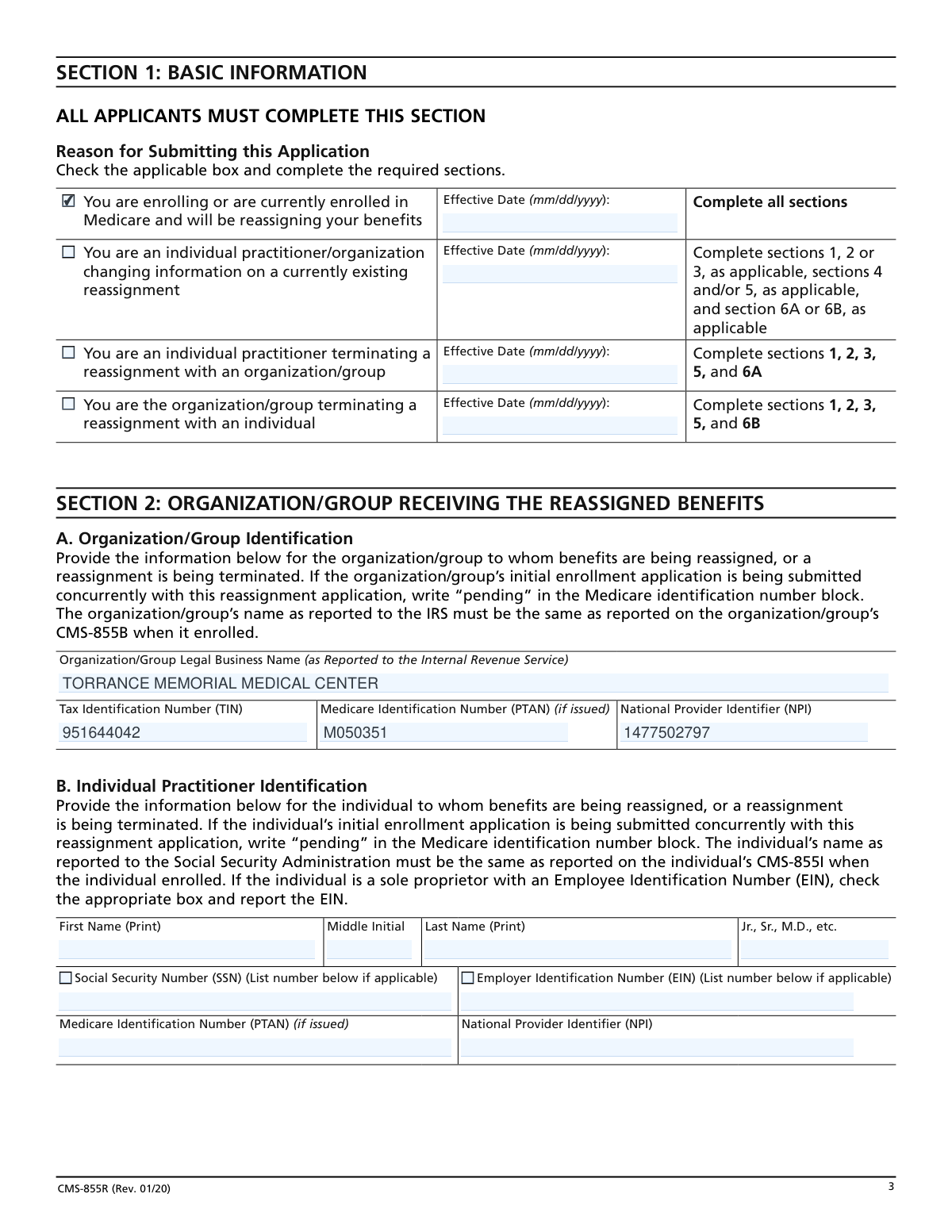
- 2 Complete Section 1 (Basic Information) by selecting the reason for submitting the application—such as new reassignment, change, or termination—and entering the applicable effective date.
- 3 Fill out Section 2 (Organization/Group Receiving the Reassigned Benefits) with the legal business name, Tax Identification Number (TIN), Medicare Identification Number (PTAN), and National Provider Identifier (NPI) of the receiving organization, as well as the individual practitioner's identification details in Section 2B.
- 4 Complete Section 3 (Individual Practitioner Who Is Reassigning Benefits) with the practitioner's full name, Social Security Number (SSN), Medicare Identification Number (PTAN), and NPI.
- 5 If applicable, fill out Section 4 (Primary and Secondary Practice Location) and Section 5 (Contact Person Information) with the relevant practice location addresses and contact details.
- 6 Review all entered information for accuracy, then complete Section 6 (Certification Statements and Signatures) by having both the individual practitioner (Section 6A) and the delegated or authorized official of the organization/group (Section 6B) sign and date the form.
- 7 Submit the completed CMS-855R with original signatures and all required supporting documentation to your designated Medicare Administrative Contractor (MAC) as directed, or follow Instafill.ai's guided submission process.
Our AI-powered system ensures each field is filled out correctly, reducing errors and saving you time.
Why Choose Instafill.ai for Your Fillable CMS-855R Form?
Speed
Complete your CMS-855R in as little as 37 seconds.
Up-to-Date
Always use the latest 2026 CMS-855R form version.
Cost-effective
No need to hire expensive lawyers.
Accuracy
Our AI performs 10 compliance checks to ensure your form is error-free.
Security
Your personal information is protected with bank-level encryption.
Frequently Asked Questions About CMS-855R
The CMS-855R is a Medicare Enrollment Application for Reassignment of Medicare Benefits. It is used by individual practitioners to reassign their right to bill Medicare and receive Medicare payments to an eligible organization or group, or to terminate an existing reassignment of benefits.
At Torrance Memorial Medical Center, physicians in the following specialties must complete this form: Burn, Cardiology, Pathology, Radiology, Radiation Oncology, and Cardiothoracic. The form allows these practitioners to reassign their Medicare billing rights to the medical center.
For Torrance Memorial Medical Center, you are required to complete Section 1 (including the effective date), Section 2B (Individual Practitioner Identification), Section 3 (Individual Practitioner Who Is Reassigning Benefits), and Section 6A (Individual Practitioner Certification Statement and Signature).
Return the completed form to Patricia Pearce in the Business Office at Torrance Memorial Medical Center, 3330 W. Lomita Blvd., Torrance, CA 90505. You can also contact her by phone at (310) 784-3783 or by email at [email protected].
Section 3 requires the individual practitioner's first name, middle initial, last name, suffix (Jr., Sr., M.D., etc.), Social Security Number (SSN), Medicare Identification Number (PTAN, if issued), and National Provider Identifier (NPI). If your initial enrollment application is being submitted concurrently, write 'pending' in the Medicare identification number field.
Yes, both the individual practitioner and the eligible organization/group must be currently enrolled in Medicare, or concurrently enrolling (via CMS-855B for the organization and CMS-855I for the individual), before the reassignment can take effect. A separate CMS-855R must be submitted for each organization where a reassignment is being established or terminated.
No, physician assistants should not use the CMS-855R to report employment arrangements. Employment arrangements for physician assistants must be reported using the CMS-855I application instead.
When establishing a new reassignment, Section 6A must be signed by the individual practitioner, and Section 6B must be signed by a delegated or authorized official of the organization/group. Both signatures are required, and the application must be signed and dated in order to be processed.
To terminate a reassignment, check the appropriate box in Section 1 and complete Sections 1, 2, 3, 5, and either Section 6A (if you are the individual practitioner) or Section 6B (if you are the organization/group). Either party may initiate the termination, and reassigned claims will no longer be paid to the organization after the effective termination date.
An NPI (National Provider Identifier) is a unique 10-digit identification number issued to healthcare providers by CMS. You will need to enter your NPI in the applicable sections of the form. You can look up your current Medicare reassignments and enrollment information at https://pecos.cms.gov.
Yes, you can use the Internet-based Provider Enrollment, Chain and Ownership System (PECOS) at https://pecos.cms.gov to manage your Medicare reassignments online. Alternatively, you can complete the paper CMS-855R form, but make sure you are using the most current version.
Yes, AI-powered services like Instafill.ai can help you accurately auto-fill the CMS-855R form fields, saving you time and reducing errors. If you have a flat, non-fillable PDF version of the form, Instafill.ai can also convert it into an interactive fillable form so you can complete it digitally.
To fill out the CMS-855R using Instafill.ai, upload your PDF to the Instafill.ai platform, and the AI will guide you through each field, auto-filling information where possible. Once completed, you can download the filled form, print it, sign it, and submit it to Patricia Pearce at Torrance Memorial Medical Center's Business Office.
If your version of the CMS-855R is a flat, non-fillable PDF, you can use Instafill.ai to convert it into an interactive fillable form. Alternatively, you can print the form and complete it by typing or printing legibly in ink — do not use pencil, as the instructions specify.
CMS estimates the form takes an average of 15 minutes to complete. After submission, the Medicare Administrative Contractor (MAC) will process your application and may request additional documentation within 30 days. You should keep a copy of your completed Medicare reassignment package for your own records.
Compliance CMS-855R
Validation Checks by Instafill.ai
1
Ensures Exactly One Reason for Submission is Selected in Section 1
Validates that one and only one checkbox is selected among the four available reasons for submitting the application: new reassignment, change to existing reassignment, individual practitioner terminating reassignment, or organization/group terminating reassignment. This is critical because each reason triggers different required sections to be completed, and selecting multiple or no reasons would make the application ambiguous and unprocessable. If no reason is selected or multiple are selected, the application must be returned for correction before processing can begin.
2
Validates Effective Date Format and Logical Value in Section 1
Checks that the Effective Date field is populated and follows the required mm/dd/yyyy format, contains a valid calendar date (e.g., not 13/45/2023), and is not a date in the distant past or an implausible future date. The effective date determines when the reassignment or termination takes legal effect for Medicare billing purposes, making it a critical field. If the date is missing, incorrectly formatted, or logically invalid, the MAC cannot process the reassignment and payments may be delayed or misdirected.
3
Validates Organization/Group Legal Business Name Matches IRS Records in Section 2A
Confirms that the Organization/Group Legal Business Name entered in Section 2A is the full legal name exactly as reported to the Internal Revenue Service, and that it matches the name on the organization's CMS-855B enrollment application. Abbreviated names, trade names, or 'doing business as' names are not acceptable in this field. A mismatch between the name on this form and IRS or CMS records can result in rejection of the application or improper routing of Medicare payments.
4
Validates Tax Identification Number (TIN) Format in Section 2A
Ensures the Tax Identification Number (TIN) for the organization/group in Section 2A is entered in the correct format, either as a 9-digit Employer Identification Number (EIN) in the format XX-XXXXXXX, and that it contains only numeric characters with no letters or special characters beyond the hyphen. The TIN is used to match the organization to IRS records and is essential for proper payment routing. An incorrectly formatted or missing TIN will cause the application to be rejected by the MAC.
5
Validates National Provider Identifier (NPI) Format in Sections 2A, 2B, and 3
Checks that all National Provider Identifier (NPI) fields across Sections 2A, 2B, and 3 contain exactly 10 numeric digits with no letters, spaces, or special characters, conforming to the CMS NPI standard. NPIs are required for both the organization/group and the individual practitioner to link the reassignment to active Medicare enrollment records. An invalid or missing NPI will prevent the MAC from verifying enrollment status and will result in application rejection.
6
Validates Individual Practitioner SSN Format in Sections 2B and 3
Ensures the Social Security Number (SSN) fields in Sections 2B and 3 are entered in the standard XXX-XX-XXXX format, contain exactly 9 numeric digits, and do not consist of all zeros or other obviously invalid sequences. The SSN is used to verify the individual practitioner's identity against Social Security Administration records and their existing CMS-855I enrollment. A missing, incorrectly formatted, or invalid SSN will prevent identity verification and cause the application to be returned.
7
Ensures Mutual Exclusivity of SSN and EIN Selection in Section 2B
Validates that in Section 2B, the applicant has selected either the SSN or the EIN checkbox (for sole proprietors with an EIN), but not both, and that the corresponding number field is populated with a correctly formatted identifier. Providing both or neither creates ambiguity about the practitioner's tax identification status and can cause mismatches with IRS and SSA records. If both are checked or neither is checked with a number provided, the form must be corrected before submission.
8
Validates Medicare Identification Number (PTAN) or 'Pending' Entry in Sections 2A, 2B, and 3
Checks that the Medicare Identification Number (PTAN) fields in Sections 2A, 2B, and 3 contain either a valid PTAN or the word 'pending' if the enrollment application is being submitted concurrently. A blank PTAN field is only acceptable if the concurrent enrollment is documented, and any other text entry is invalid. An incorrect or missing PTAN prevents the MAC from linking the reassignment to an active or pending Medicare enrollment record.
9
Validates Required Sections Are Completed Based on Selected Submission Reason
Cross-checks that all sections required for the selected reason in Section 1 have been completed: new reassignment requires all sections; change to existing reassignment requires Sections 1, 2 or 3, 4 and/or 5, and 6A or 6B; individual termination requires Sections 1, 2, 3, 5, and 6A; and organization termination requires Sections 1, 2, 3, 5, and 6B. Incomplete sections based on the submission reason will result in the application being returned as incomplete. This logical consistency check ensures the MAC receives all information necessary to process the specific type of action requested.
10
Validates Individual Practitioner Name Consistency Between Sections 2B, 3, and 6A
Confirms that the individual practitioner's first name, middle initial, last name, and suffix (Jr., Sr., M.D., etc.) entered in Sections 2B, 3, and 6A are consistent with one another and match the name as reported to the Social Security Administration and on the CMS-855I enrollment application. Discrepancies in the practitioner's name across sections can indicate data entry errors or identity mismatches that would prevent proper processing. Any inconsistency must be resolved before the MAC can validate the reassignment.
11
Validates Section 6A Individual Practitioner Signature and Date Are Present
Ensures that Section 6A contains both a wet (original) signature from the individual practitioner and a corresponding date signed in mm/dd/yyyy format, as explicitly required by the form instructions stating the application 'MUST be signed and dated' to be processed. The individual practitioner's signature is a legal certification under penalty of perjury and is required for new reassignments and individual-initiated terminations. A missing signature or date in Section 6A will result in the application being returned unprocessed.
12
Validates Section 6B Delegated/Authorized Official Signature and Date Are Present When Required
Checks that Section 6B contains both an original signature from the Delegated or Authorized Official of the organization/group and a date signed in mm/dd/yyyy format when establishing a new reassignment or when the organization/group is terminating a reassignment. The authorized official's signature serves as a legal attestation of compliance with CMS regulations and Medicare program safeguard standards under 42 C.F.R. section 424.80. If Section 6B is required based on the submission reason and is missing a signature or date, the application cannot be processed.
13
Validates Signature Date Is Not Prior to Effective Date in Section 1
Performs a logical date comparison to ensure that the date(s) signed in Section 6A and/or 6B are not earlier than the Effective Date entered in Section 1, as a reassignment cannot be certified before its stated effective date. Additionally, the signature date should not be unreasonably far in the future relative to the submission date. A signature date that precedes the effective date creates a legal inconsistency in the certification and may require the application to be resubmitted with corrected dates.
14
Validates Practice Location Address Does Not Use a P.O. Box in Section 4
Checks that the Practice Location Street Address Line 1 fields in Sections 4A and 4B do not contain a P.O. Box number, as explicitly prohibited by the form instructions which state the address must be a 'Street Name and Number – NOT a P.O. Box.' Medicare requires a physical practice location address to verify where services are rendered and to ensure the location is enrolled in Medicare. Submission of a P.O. Box as the practice location address will result in rejection of the location information.
15
Validates ZIP Code Format in Address Fields Across Sections 4 and 5
Ensures that all ZIP Code fields in Sections 4A, 4B, and 5 are entered in either the standard 5-digit format (XXXXX) or the ZIP+4 format (XXXXX-XXXX), contain only numeric digits and an optional hyphen, and correspond to a valid U.S. postal code. The form specifically labels the field as 'ZIP Code +4,' indicating the extended format is preferred. An invalid or missing ZIP code can cause mail delivery failures and may prevent the MAC from verifying the practice location against Medicare enrollment records.
16
Validates Telephone Number Format in Section 5 Contact Person Information
Checks that the Telephone Number field in Section 5 is populated with a 10-digit U.S. phone number in a standard format (e.g., (XXX) XXX-XXXX or XXX-XXX-XXXX), contains no letters or invalid special characters, and includes a valid area code. The contact person's telephone number is the primary means by which the MAC will reach the designated contact if questions arise during processing. An incorrectly formatted, incomplete, or missing telephone number will prevent the MAC from contacting the appropriate party, potentially delaying application processing.
Common Mistakes in Completing CMS-855R
Many applicants either leave the effective date blank or enter it in the wrong format (e.g., writing '7/1/24' instead of '07/01/2024' as required by the mm/dd/yyyy format). This is critical because the effective date determines when the reassignment takes effect, and an incorrect or missing date can delay processing or cause claims to be rejected. Always double-check the date format and ensure the date reflects the actual intended start or termination date of the reassignment. Tools like Instafill.ai can automatically format dates correctly to prevent this error.
Applicants frequently check the wrong checkbox in Section 1 — for example, checking 'enrolling/reassigning benefits' when they actually intend to terminate a reassignment, or vice versa. This mistake leads to completing the wrong sections of the form, which can result in rejection or processing delays. Carefully read all four options and match your situation before selecting, and ensure the sections you complete align with the instructions listed next to the checked box.
The organization/group's legal business name in Section 2A must exactly match the name on file with the IRS and on the CMS-855B enrollment application. Applicants often enter a 'doing business as' (DBA) name or an abbreviated version instead of the full legal name. This discrepancy can cause the application to be rejected or flagged for additional review. Always verify the exact legal name as it appears on IRS tax documents before completing this field.
Applicants sometimes enter a personal Social Security Number (SSN) in the TIN field for the organization, or transpose digits, resulting in a mismatch with IRS records. Since the TIN is used to verify the organization's identity and tax status, any error here can halt the enrollment process entirely. Double-check the TIN against official IRS correspondence or tax documents, and ensure you are using the organization's EIN rather than an individual's SSN. Instafill.ai can help validate TIN formats to catch transposition errors before submission.
When the organization/group or individual practitioner is concurrently enrolling in Medicare and has not yet received a PTAN, applicants often leave the PTAN field blank instead of writing 'pending' as instructed. A blank field may be interpreted as an oversight and cause the application to be returned or delayed. If the PTAN has not yet been issued, explicitly write 'pending' in the field to indicate that enrollment is in progress.
The individual practitioner's name must match exactly across Sections 2B, 3, and 6A, and must also match the name on file with the Social Security Administration and the CMS-855I. Applicants frequently use nicknames, abbreviations, or omit suffixes (e.g., 'M.D.', 'Jr.') inconsistently across sections. These discrepancies can trigger identity verification issues and delay processing. Always use the full legal name as it appears on official government documents in every section.
Section 2B asks for either a Social Security Number (SSN) or an Employer Identification Number (EIN) for the individual practitioner, with a checkbox to indicate which applies. Applicants often fail to check the appropriate box, enter the wrong type of number, or provide both when only one is required. For sole proprietors with an EIN, the correct box must be checked and the EIN entered. Failing to do this correctly can cause identity verification failures with CMS.
Section 4 explicitly states that the practice location address must be a physical street address and NOT a P.O. Box, yet many applicants enter a P.O. Box, especially if that is the mailing address they use most frequently. CMS requires a physical location address to verify that the practice location is legitimate and enrolled in Medicare. Always provide the actual street address of the practice location, and use a separate field or contact section for mailing addresses if needed.
When establishing a new reassignment, both the individual practitioner (Section 6A) and the delegated/authorized official of the organization/group (Section 6B) must sign. Applicants frequently submit the form with only one signature, often because only one party completes and submits the form. An unsigned section renders the application incomplete and it will be returned for correction. Ensure both parties review, sign, and date their respective certification sections before submission.
Section 6 requires both a printed name and a separate signature for the individual practitioner and the authorized official. Many applicants only provide a signature without printing their name, or their printed name does not include all required components (first name, middle initial, last name, and suffix). Since the form must be signed and dated to be processed, an incomplete or illegible certification section will result in the application being returned. Always print the full legal name clearly and provide a distinct signature.
The Torrance Memorial-specific cover sheet specifies that only certain sections need to be completed for their specialties: Section 1 (with effective date), Section 2B, Section 3, and Section 6A. Applicants from the listed specialties (Burn, Cardiology, Pathology, Radiology, Radiation Oncology, Cardiothoracic) sometimes complete unnecessary sections or skip required ones, causing confusion and processing delays. Carefully follow the Torrance Memorial instructions and return the completed form to Patricia Pearce at the Business Office as directed.
The CMS-855R has two different submission paths: for Torrance Memorial providers, the completed form must be returned to Patricia Pearce at the Business Office (3330 W. Lomita Blvd., Torrance, CA 90505), not directly to the Medicare Administrative Contractor (MAC). Applicants unfamiliar with this institutional process may mail the form directly to CMS or the MAC, bypassing the required internal routing. Always follow the institution-specific instructions on the cover sheet and confirm the correct submission address before mailing.
Saved over 80 hours a year
“I was never sure if my IRS forms like W-9 were filled correctly. Now, I can complete the forms accurately without any external help.”
Kevin Martin Green
Your data stays secure with advanced protection from Instafill and our subprocessors




Robust compliance program
Transparent business model
You’re not the product. You always know where your data is and what it is processed for.
ISO 27001, HIPAA, and GDPR
Our subprocesses adhere to multiple compliance standards, including but not limited to ISO 27001, HIPAA, and GDPR.
Security & privacy by design
We consider security and privacy from the initial design phase of any new service or functionality. It’s not an afterthought, it’s built-in, including support for two-factor authentication (2FA) to further protect your account.
Fill out CMS-855R with Instafill.ai
Worried about filling PDFs wrong? Instafill securely fills cms-855r-medicare-enrollment-application-reassignment-of-medicare-benefits-1 forms, ensuring each field is accurate.
