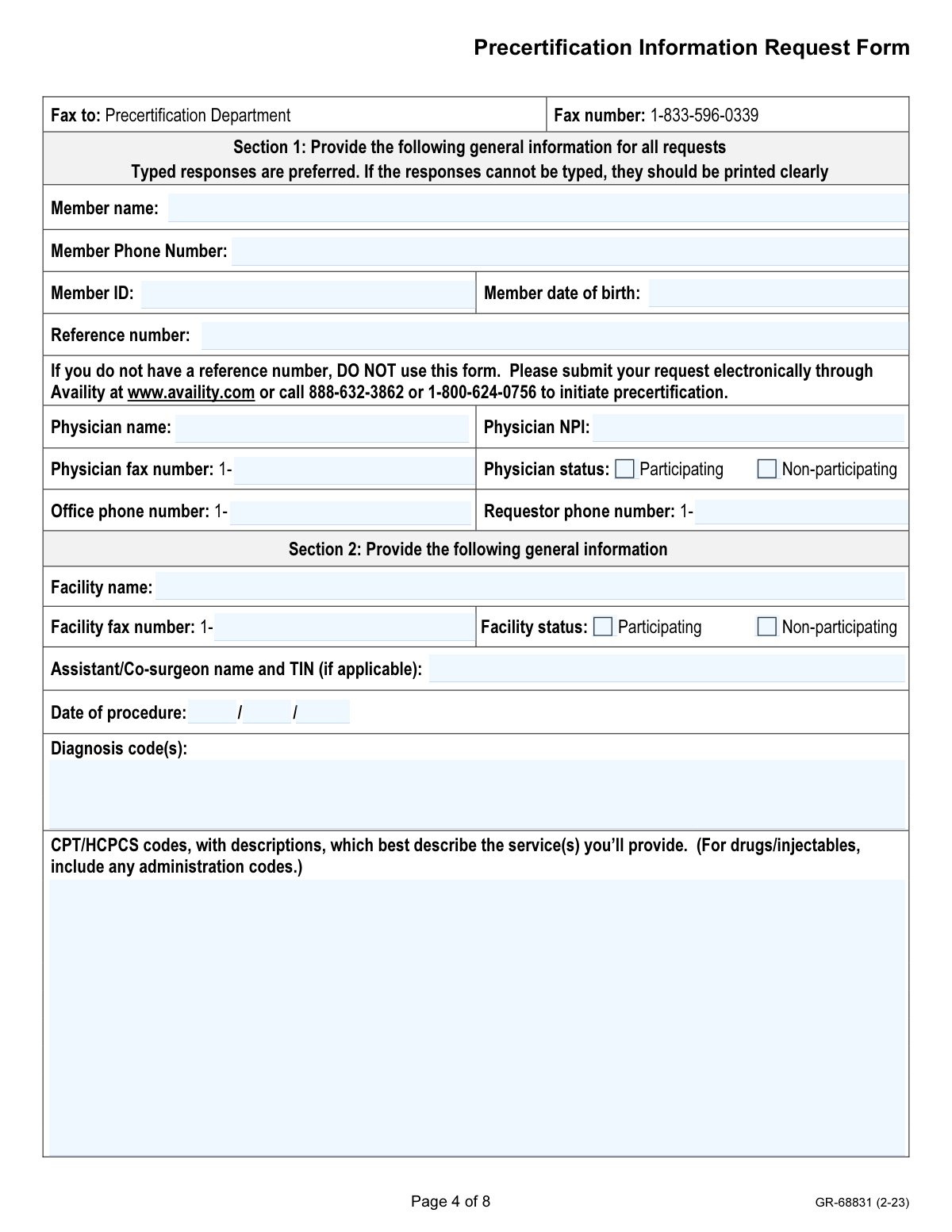
Yes! You can use AI to fill out Form GR-68831, Precertification Information Request Form
Aetna Form GR-68831, also known as the Precertification Information Request Form (PCFX), is a document used by physicians to provide supplemental medical information for a precertification request that has already been initiated with Aetna. It is not used to start a new request but to supply detailed clinical findings, patient history, and treatment rationale to support the medical necessity of a proposed service. Today, this form can be filled out quickly and accurately using AI-powered services like Instafill.ai, which can also convert non-fillable PDF versions into interactive fillable forms.
Our AI automatically handles information lookup, data retrieval, formatting, and form filling.
It takes less than a minute to fill out GR-68831 / PCFX using our AI form filling.
Securely upload your data. Information is encrypted in transit and deleted immediately after the form is filled out.
Form specifications
| Form name: | Form GR-68831, Precertification Information Request Form |
| Number of pages: | 8 |
| Language: | English |
| Categories: | certification forms |
Instafill Demo: How to fill out PDF forms in seconds with AI
How to Fill Out GR-68831 / PCFX Online for Free in 2026
Are you looking to fill out a GR-68831 / PCFX form online quickly and accurately? Instafill.ai offers the #1 AI-powered PDF filling software of 2026, allowing you to complete your GR-68831 / PCFX form in just 37 seconds or less.
Follow these steps to fill out your GR-68831 / PCFX form online using Instafill.ai:
- 1 Navigate to Instafill.ai and upload the Aetna GR-68831 form or select it from the template library.
- 2 Provide general information for the member and physician in Section 1, including names, ID numbers, and contact details. AI can assist by auto-filling from saved profiles.
- 3 Enter the existing precertification reference number, facility details, and procedure information, including diagnosis (ICD) and service (CPT/HCPCS) codes in Section 2.
- 4 Complete Section 3 by detailing the patient's symptoms, clinical findings, conservative management history, and anticipated treatment outcomes.
- 5 Answer the specific questions in Sections 4 through 8 regarding inpatient stays, out-of-network provider usage, and site-of-service justifications by checking the relevant boxes.
- 6 Gather and attach all required supporting documentation as listed in Section 9, such as history and physicals, office notes, and lab reports.
- 7 Review all entered information for accuracy, electronically sign and date the form in Section 11, and submit it along with attachments to the Aetna Precertification Department via fax or the Availity provider portal.
Our AI-powered system ensures each field is filled out correctly, reducing errors and saving you time.
Why Choose Instafill.ai for Your Fillable GR-68831 / PCFX Form?
Speed
Complete your GR-68831 / PCFX in as little as 37 seconds.
Up-to-Date
Always use the latest 2026 GR-68831 / PCFX form version.
Cost-effective
No need to hire expensive lawyers.
Accuracy
Our AI performs 10 compliance checks to ensure your form is error-free.
Security
Your personal information is protected with bank-level encryption.
Frequently Asked Questions About Form GR-68831 / PCFX
This form is used to submit additional clinical information for a precertification request that has already been initiated and is in a 'pended' status. It is not used to start a new request.
To initiate a new request, you must submit it electronically via the Availity provider portal or call the Aetna Precertification Department. This form should only be used after a request has been started and more information is needed.
A reference number is assigned when you first initiate a precertification request, and it is required on this form to link your additional documentation to the correct existing case. If you do not have a reference number, you must initiate a request first.
The patient's attending physician is responsible for completing all sections of the form to provide the necessary clinical information for the review.
You can attach the form to the case on the Availity portal, fax it to 1-833-596-0339, or mail it to the P.O. Box in Lexington, KY. Electronic or fax submission is recommended to avoid delays.
Failure to complete the form and submit all requested medical records may result in a delay in the review process or a denial of coverage for the requested service.
You should attach all relevant medical documentation as listed in Section 9, such as the current history and physical, office notes, lab reports, and a description of the proposed treatment.
Once the requested documentation is received, Aetna will perform a clinical review, make a coverage determination, and then notify you of the decision.
Section 8 requires you to check all applicable patient conditions, such as high-risk cardiac status or morbid obesity, that justify the medical necessity of using an outpatient hospital setting.
You must complete Sections 6 and 7, which require a medical reason for seeing the non-participating provider and details about the services being requested.
Yes, services like Instafill.ai use AI to accurately auto-fill form fields from your records, which can save significant time and help prevent errors.
You can upload the GR-68831 PDF to the Instafill.ai platform. The AI will make the fields interactive, allowing you to fill them out online or have the AI populate them automatically from your data.
Services like Instafill.ai can convert flat, non-fillable PDFs into interactive, fillable forms. Simply upload the document to their platform to make it easy to complete and save digitally.
For questions, you can call the phone number specific to the member's plan type: 1-800-624-0756 for HMO and Medicare plans, or 1-888-632-3862 for Traditional plans.
Compliance GR-68831 / PCFX
Validation Checks by Instafill.ai
1
Ensures Reference Number is Provided
This check verifies that the 'Reference number' field in Section 1 is not empty. The form instructions explicitly state it should not be used to initiate a request, meaning a reference number from a prior contact must exist. A missing number indicates improper use of the form, which will result in rejection and delay in processing the precertification.
2
Validates Phone and Fax Number Formats
This check ensures that all phone and fax number fields are entered in a valid 10-digit format (e.g., 'Member Phone Number', 'Physician fax number'). Correctly formatted numbers are crucial for communication between the insurance company, the provider, and the member regarding the request. Invalid formats can lead to communication failures and significant delays in the review process.
3
Verifies Date of Birth and Procedure Date Logic
This validation confirms that the 'Member date of birth' is a valid date in the past and the 'Date of procedure' is a valid date that is not unreasonably far in the past. This ensures data integrity and helps identify typographical errors. An invalid date of birth could prevent matching the member to their records, while an illogical procedure date could cause the request to be rejected for correction.
4
Validates Physician NPI Format
This check verifies that the 'Physician NPI' field contains a valid 10-digit National Provider Identifier. The NPI is a unique identifier for health care providers and is essential for accurately identifying the requesting physician for processing and network status verification. An invalid NPI will prevent the system from identifying the provider and will halt the precertification review until corrected.
5
Confirms Validity of Diagnosis and Procedure Codes
This validation ensures that the entered 'Diagnosis code(s)' (ICD-10) and 'CPT/HCPCS codes' are valid codes from the official, current code sets. Using valid and specific codes is critical for determining medical necessity and coverage under the member's plan. Submission with invalid or non-existent codes will result in an immediate rejection or a request for more information, delaying the patient's care.
6
Requires Rationale for Inpatient Hospitalization
This check enforces that if 'Yes' is selected for a hospital admission greater than 24 hours, the 'Provide clinical rationale for inpatient hospitalization' field must be completed. This rationale is the primary justification for the inpatient stay and is essential for the clinical reviewer to assess medical necessity. Failure to provide this information when required will lead to a denial or delay of the inpatient request.
7
Requires Specifics for Recent Cardiac Event
This validation ensures that if 'Yes' is selected for a 'recent (within the past 3 months) cardiac event' in Section 4, at least one of the specific event types (MI, CVA, or TIA) must also be selected. This level of detail is necessary for the clinical reviewer to accurately assess the patient's risk profile. An incomplete selection will trigger a request for clarification, delaying the review process.
8
Mandates Justification for Outpatient Hospital Setting
This check verifies that if 'Outpatient hospital' is selected as the site of service in Section 8, at least one of the subsequent qualifying clinical conditions must also be checked. Aetna requires specific clinical justification for using a more resource-intensive outpatient hospital setting. Without a valid reason selected, the request for that location may be denied or pended for more information.
9
Requires Specification of Unavailable Equipment
This validation ensures that if the 'required operative equipment is not available' checkbox is marked in Section 8, the 'List specific equipment not available' text field must be filled out. This detail allows the payer to verify the claim and determine if alternative, appropriate facilities exist. A failure to list the specific equipment will render the justification incomplete and likely lead to a denial of the site of service request.
10
Ensures Completion of Core Identification Information
This check confirms that all fields in Section 1, such as 'Member name', 'Member ID', 'Member date of birth', and 'Physician name', are completed. This information is the absolute minimum required to identify the patient, the provider, and the existing case. Any missing information in this section will make it impossible to process the form, resulting in an immediate rejection.
11
Validates Mutually Exclusive Provider/Facility Status
This check ensures that for both the physician and the facility, only one status ('Participating' or 'Non-participating') is selected. A provider or facility cannot be both simultaneously for a given request. This information is critical for determining benefit levels and applying the correct network rules, and selecting both would create ambiguity and require clarification.
12
Requires Specification of Outpatient Setting Type
This validation confirms that if the 'Outpatient' procedure location is selected in Section 8, the specific setting ('Outpatient hospital', 'Ambulatory Surgical Center', or 'Office') must also be indicated. The type of outpatient setting is a key factor in determining medical necessity, site-of-service appropriateness, and reimbursement. Failing to specify the setting leaves critical information missing and will cause the review to be pended.
13
Cross-Validates Patient Age with Outpatient Criteria
This validation performs a logical cross-check between the 'Member date of birth' in Section 1 and the 'Less than 12 years of age' checkbox in Section 8. If the checkbox is marked as a reason for an outpatient hospital setting, the patient's calculated age must actually be less than 12. This prevents data entry errors and ensures the justification for the site of service is based on accurate patient data.
14
Verifies Form Signature and Date
This check confirms that the form has been signed and dated in Section 11. The signature serves as an attestation to the accuracy of the information provided and acknowledges the fraud warning. An unsigned or undated form is not legally valid and will be returned, halting the entire precertification process.
Common Mistakes in Completing GR-68831 / PCFX
This form is intended only to supplement a request that has already been initiated, not to start a new one. The instructions clearly state not to use the form without a pre-existing reference number, but users often miss this and submit it as an initial request. This mistake results in an automatic rejection and significant delays, as the provider must then restart the entire process correctly through the Availity portal or by phone.
The reference number is the sole identifier linking this supplemental form to the original pended request. Staff may forget to enter it or make a typo, rendering the submission impossible to process. Without a correct reference number, the clinical information cannot be attached to the member's case, leading to delays or a denial for failure to provide requested information.
The open-ended fields in Section 3 for symptoms, clinical findings, and conservative management are often filled with vague or incomplete information. For example, writing "patient has back pain" is insufficient for a medical necessity review, which requires detailed objective findings and a history of treatments tried. This lack of detail is a primary reason for denials and forces the reviewer to request more information, delaying patient care.
Section 2 requires specific CPT/HCPCS codes and their descriptions. Common errors include using outdated codes, omitting necessary descriptions, or forgetting to include administration codes for drugs and injectables. A mismatch between the codes and the clinical justification can lead to an automatic denial or a request for clarification, as the reviewer cannot determine the exact service being requested.
The form itself is a summary; the final decision relies on the supporting documents listed in Section 9. It is a frequent oversight for administrative staff to send the form without attaching the corresponding history and physical, office notes, or lab reports. An incomplete submission will cause the review to be pended until all records are received, or it may be denied for lack of sufficient medical information.
Although the form states typed responses are preferred, offices often submit handwritten versions that are rushed and difficult to read. Illegible writing in critical fields like Member ID, NPI, or clinical descriptions can lead to data entry errors, misidentification, or the inability to process the form at all. AI-powered tools like Instafill.ai can convert non-fillable PDFs into fillable versions, ensuring all responses are typed, legible, and accurate.
Section 8 is a complex checklist used to justify performing a procedure in a higher-cost outpatient hospital setting. Staff may not fully understand the criteria or may fail to check all applicable boxes for comorbidities (e.g., morbid obesity, high-risk cardiac status) that are essential for approval. An incomplete justification can lead to the service being denied at that specific location, forcing a reschedule at a different facility or a lengthy appeal process.
Simple typos in the member's name, ID number, or date of birth are common but critical data entry mistakes. An incorrect Member ID can cause the system to reject the submission entirely or, worse, associate the clinical data with the wrong patient file. It is vital to double-check this information against the patient's current ID card. AI form-filling tools like Instafill.ai can prevent these errors by storing and accurately auto-filling validated member data.
Instead of summarizing key information in the narrative fields of Section 3, staff often write 'See attached notes.' While records must be attached, reviewers rely on the form for a concise summary to guide their review of the documentation. This practice forces the reviewer to hunt for the justification within potentially hundreds of pages, increasing review time and the risk of denial if the key information is not immediately apparent.
The form contains multiple fields for phone and fax numbers for the physician, office, and requestor. A single digit error in these fields can prevent the insurance reviewer from contacting the provider's office for urgent clarification. This communication breakdown often results in the request being delayed or denied due to 'insufficient information,' when a quick phone call could have resolved the issue.
Saved over 80 hours a year
“I was never sure if my IRS forms like W-9 were filled correctly. Now, I can complete the forms accurately without any external help.”
Kevin Martin Green
Your data stays secure with advanced protection from Instafill and our subprocessors

Robust compliance program
Transparent business model
You’re not the product. You always know where your data is and what it is processed for.
ISO 27001, HIPAA, and GDPR
Our subprocesses adhere to multiple compliance standards, including but not limited to ISO 27001, HIPAA, and GDPR.
Security & privacy by design
We consider security and privacy from the initial design phase of any new service or functionality. It’s not an afterthought, it’s built-in, including support for two-factor authentication (2FA) to further protect your account.
Fill out GR-68831 / PCFX with Instafill.ai
Worried about filling PDFs wrong? Instafill securely fills form-gr-68831-precertification-information-request-form forms, ensuring each field is accurate.