Yes! You can use AI to fill out Trust Certification and Trustee Powers
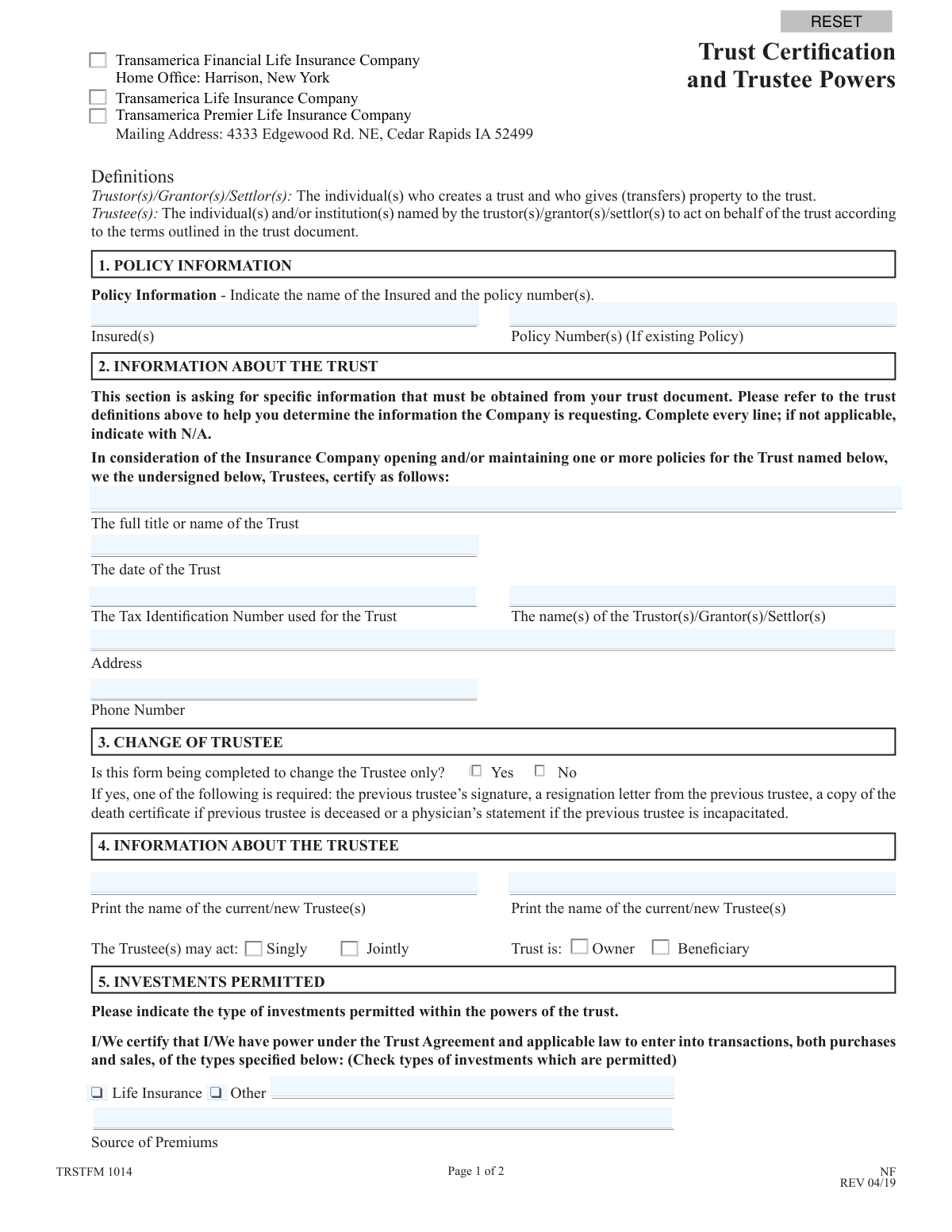
This form is a legal document required by Transamerica for trustees to certify key information about a trust, including its official name, date, tax ID, and the grantors. It confirms that proposed transactions, such as managing a life insurance policy, are within the powers granted by the trust agreement. Today, this form can be filled out quickly and accurately using AI-powered services like Instafill.ai, which can also convert non-fillable PDF versions into interactive fillable forms.
TRSTFM 1014 NF is part of the
trust forms, certification forms, trustee forms, trust certification forms and trustee certification forms categories on Instafill.
Rather not fill this in by hand? Instafill is an online form filler that completes PDF forms automatically — upload the blank form, answer a few questions, and the AI fills every field.
Form specifications
| Form name: | Trust Certification and Trustee Powers |
| Number of pages: | 1 |
| Language: | English |
Our AI automatically handles information lookup, data retrieval, formatting, and form filling.
It takes less than a minute to fill out TRSTFM 1014 NF using our AI form filling.
Securely upload your data. Information is encrypted in transit and deleted immediately after the form is filled out.
Instafill Demo: How to fill out PDF forms in seconds with AI
How to Fill Out TRSTFM 1014 NF Online for Free in 2026
Are you looking to fill out a TRSTFM 1014 NF form online quickly and accurately? Instafill.ai offers the #1 AI-powered PDF filling software of 2026, allowing you to complete your TRSTFM 1014 NF form in just 37 seconds or less.
Follow these steps to fill out your TRSTFM 1014 NF form online using Instafill.ai:
- 1 Navigate to Instafill.ai and upload or select the Trust Certification and Trustee Powers form.
- 2 Use the AI assistant to automatically populate policy information and details about the trust from your trust document.
- 3 Review the pre-filled information and complete the sections regarding trustee details, including specifying if there is a change of trustee.
- 4 Indicate the types of investments permitted under the trust agreement by checking the appropriate boxes.
- 5 Certify the information and provide authorized signatures in the designated fields for all current trustees.
- 6 If changing trustees, ensure the previous trustee signs or provide required documentation like a death certificate or resignation letter.
- 7 Securely download, print, or share the completed and signed certification directly from the platform.
Our AI-powered system ensures each field is filled out correctly, reducing errors and saving you time.
Why Choose Instafill.ai for Your Fillable TRSTFM 1014 NF Form?
Speed
Complete your TRSTFM 1014 NF in as little as 37 seconds.
Up-to-Date
Always use the latest 2026 TRSTFM 1014 NF form version.
Cost-effective
No need to hire expensive lawyers.
Accuracy
Our AI performs 10 compliance checks to ensure your form is error-free.
Security
Your personal information is protected with bank-level encryption.
Frequently Asked Questions About TRSTFM 1014 NF
This form is used to certify the existence and details of a trust to Transamerica. It identifies the current trustee(s) and confirms they have the authority to manage an insurance policy held by or benefiting the trust.
The current trustee(s) of a trust that owns or is the beneficiary of a Transamerica insurance policy must complete this form. It is also required when notifying Transamerica of a change in trustees.
All the information for this section, such as the trust's official name, date of creation, and Tax ID number, can be found within your official trust document.
If you are changing the trustee, you must provide the previous trustee's signature on the form. If that's not possible, you must submit a resignation letter, a death certificate if they are deceased, or a physician’s statement if they are incapacitated.
Selecting 'Singly' means any one trustee can act alone on behalf of the trust. Selecting 'Jointly' means all trustees must agree and sign off on transactions together.
You must review your trust agreement to determine the types of investments, such as life insurance, that the trustee is authorized to make. If you are unsure, it is best to consult with your legal counsel.
All current or new trustees must sign the form in Section 6. If you are reporting a change of trustee, the previous trustee must also sign, and a witness signature is required.
If you are the sole trustee, you should complete the form with your information and sign it. The form notes that a single signature constitutes a representation that you are the sole trustee.
Mail the completed and signed form to the Transamerica mailing address listed at the top of the form: 4333 Edgewood Rd. NE, Cedar Rapids, IA 52499.
While this certification form is often sufficient, Transamerica reserves the right to request a complete copy of the Trust Document if they deem it necessary.
Yes, services like Instafill.ai use AI to accurately auto-fill form fields from your saved information, which can save you time and help prevent errors.
You can upload the form's PDF to the Instafill.ai platform, and its AI will identify the fields. You can then quickly fill them in, sign electronically, and download the completed document.
You can use a service like Instafill.ai, which can convert flat, non-fillable PDFs into interactive forms that you can easily complete and sign on your computer.
Compliance TRSTFM 1014 NF
Validation Checks by Instafill.ai
1
Trust Date Chronology
This check ensures that 'The date of the Trust' provided in Section 2 is a valid date that occurs on or before the submission date. A future date is invalid as a trust cannot be established in the future. If validation fails, the form should be rejected with an error message prompting the user to enter a valid, past or present date for the trust's establishment.
2
Tax Identification Number Format
This validation verifies that the 'Tax Identification Number' in Section 2 is a 9-digit number, conforming to the standard format for a U.S. Employer Identification Number (EIN). This is crucial for correct tax reporting and legal identification of the trust entity. A failure would prevent submission and require the user to correct the number to a valid 9-digit format.
3
Conditional Requirement for Trustee Change
This check enforces the rule in Section 3. If the user selects 'Yes' for 'Is this form being completed to change the Trustee only?', the system must verify that the 'Previous Trustee Signature' block in Section 6 is completed or that an attachment (e.g., death certificate, resignation letter) is indicated. This is critical for establishing a clear chain of authority. If the condition is not met, the form is incomplete and cannot be processed.
4
Trustee Authority Specification
This validation ensures that one of the two options, 'Singly' or 'Jointly', is selected in Section 4 to define how the trustees may act. This information is legally significant as it dictates whether one or all trustees must approve transactions. Failure to select an option results in an ambiguous instruction, so the form submission should be blocked until a choice is made.
5
Investment Permission Completeness
This check verifies that at least one investment type ('Life Insurance' or 'Other') is selected in Section 5. Furthermore, if the 'Other' checkbox is selected, the corresponding text field must contain a description. This certification is required to confirm the transaction is within the trust's powers. An incomplete section would halt processing and require the user to specify the permitted investments.
6
Trustee Name Consistency Across Sections
This validation cross-references the printed names of the 'Current/New Trustee(s)' in Section 4 with the printed names in the signature block (Section 6). The names must match exactly to ensure the person identified as the trustee is the same person signing the document. A mismatch would indicate a critical error and prevent the form from being accepted until the names are consistent.
7
Signature Date and Trust Date Logic
This check ensures that the signature date(s) in Section 6 are on or after 'The date of the Trust' provided in Section 2. A trustee cannot legally sign a certification for a trust before the trust itself exists. If a signature date precedes the trust date, the form is logically invalid and must be corrected before it can be processed.
8
Completeness of Core Trust Information
This validation ensures all fields in Section 2 ('full title or name of the Trust', 'date of the Trust', 'Tax Identification Number', 'name(s) of the Trustor(s)', 'Address', 'Phone Number') are filled out. The form explicitly states to complete every line. Incomplete information prevents the company from properly identifying and servicing the trust account, so the form would be rejected until all required fields are populated.
9
Witness Block Completion
This check verifies that the witness name is printed, the witness signature is present, and the witness date is filled in Section 6. A witness signature is often a legal requirement to attest to the authenticity of the trustee's signature. An incomplete witness block can render the document legally insufficient, so the form should be flagged as incomplete if any part of this block is missing.
10
Source of Premiums Requirement
This validation ensures the 'Source of Premiums' field in Section 5 is completed. This information is vital for financial compliance, including Anti-Money Laundering (AML) regulations, to understand the origin of funds used for the policy. An empty field would trigger a compliance failure, and the form would be returned for completion.
11
Single vs. Joint Trustee Action Logic
This check validates the relationship between the number of trustees and their authority. If only one 'Current/New Trustee' is listed and signs in Section 6, the 'Jointly' option in Section 4 should not be selected, as joint action is impossible for a sole trustee. This logical check prevents contradictory instructions; if a conflict is found, an error should be displayed to the user for correction.
12
Policy Information Completeness
This check ensures that the 'Insured(s)' name and 'Policy Number(s)' fields in Section 1 are filled out. Since the form is used to certify a trust for a policy, this information is fundamental to linking the certification to the correct account. Without it, the form cannot be processed, and the submission should be blocked until the policy is clearly identified.
Common Mistakes in Completing TRSTFM 1014 NF
People often provide a shortened or informal name for the trust, such as 'The Smith Trust,' instead of the full legal title found in the trust document, like 'The John and Jane Smith Revocable Living Trust dated January 1, 2020.' This discrepancy can cause legal and administrative issues, leading to the rejection of the form and delays in processing transactions. To avoid this, you must carefully copy the exact, full title from the first page of your trust agreement.
A common error is entering the Trustor's or Trustee's personal Social Security Number (SSN) in the 'Tax Identification Number' field. While some trusts may use an SSN, many irrevocable trusts are required to have their own separate Employer Identification Number (EIN). Using the wrong number can lead to tax reporting errors and compliance issues with the IRS, so it is critical to verify the correct TIN from the trust's legal or tax documents.
When Section 3 is marked 'Yes' for a change of trustee, applicants frequently forget to include the required supporting documentation. The form requires the previous trustee's signature, a resignation letter, a death certificate, or a physician's statement of incapacitation. Submitting the form without this proof will halt the trustee change process, as the company cannot legally validate the new trustee's authority.
In Section 4, filers often neglect to check either the 'Singly' or 'Jointly' box, which specifies whether co-trustees can act alone or must act together. This omission creates ambiguity and can prevent the insurance company from accepting instructions from a single trustee if joint action is required. This can delay or block future policy transactions, so it's crucial to consult the trust document and select the correct option.
The roles of Trustor (creates the trust), Trustee (manages the trust), and Insured (person covered by the policy) are often confused, causing people to enter information in the wrong fields. For example, a Trustor might incorrectly sign in the Trustee signature block, which invalidates the form because only the current Trustee(s) have legal authority. Carefully reading the definitions provided on the form helps ensure the correct individual's information is entered in each section.
The form explicitly instructs filers to 'Complete every line; if not applicable, indicate with N/A.' Many people leave non-applicable fields blank, which can be interpreted as an incomplete form. This causes processing delays as the company may need to follow up to confirm the information is truly not applicable. Taking the extra second to write 'N/A' ensures the form is considered complete upon submission.
A specific instruction in Section 6 asks the signatory to 'list trustee after your name to indicate the capacity you are working in.' Many people overlook this detail and just sign their name. This omission can create ambiguity about the capacity in which the person is signing, potentially causing compliance reviews or processing delays. Always add ', Trustee' after your signature to clearly state your legal authority.
In Section 1, individuals sometimes omit the policy number or provide an incorrect one, especially if the trust holds multiple policies. Without the correct policy number, the insurance company cannot locate the account to which the trust certification applies, making it impossible to process the request. It is essential to double-check all policy numbers against statements or original policy documents before submission.
Signature errors are a primary reason for form rejection. This includes the new trustee forgetting to sign, signing in the wrong place, or failing to date their signature. If there are co-trustees who must act jointly, all must sign. An incomplete or incorrect signature section renders the entire certification invalid, requiring the form to be re-submitted from scratch.
Section 5 requires the trustee to certify the types of investments permitted by the trust agreement by checking the appropriate boxes. Some filers overlook this section entirely, leaving it blank. This failure to certify investment powers means the insurance company cannot confirm the proposed transaction is allowed, leading to the form's rejection. Since this form is a non-fillable PDF, using a tool like Instafill.ai can convert it into an interactive version that highlights required fields to prevent such omissions.
Saved over 80 hours a year
“I was never sure if my IRS forms like W-9 were filled correctly. Now, I can complete the forms accurately without any external help.”
Kevin Martin Green
Your data stays secure with advanced protection from Instafill and our subprocessors




Robust compliance program
Transparent business model
You’re not the product. You always know where your data is and what it is processed for.
ISO 27001, HIPAA, and GDPR
Our subprocesses adhere to multiple compliance standards, including but not limited to ISO 27001, HIPAA, and GDPR.
Security & privacy by design
We consider security and privacy from the initial design phase of any new service or functionality. It’s not an afterthought, it’s built-in, including support for two-factor authentication (2FA) to further protect your account.
Fill out TRSTFM 1014 NF with Instafill.ai
Worried about filling PDFs wrong? Instafill securely fills trust-certification-and-trustee-powers forms, ensuring each field is accurate.
