Yes! You can use AI to fill out CMS-855I, Medicare Enrollment Application for Physicians and Non-Physician Practitioners
Form CMS-855I is a Medicare Enrollment Application used by physicians and non-physician practitioners to enroll in the Medicare program, receive a billing number, revalidate enrollment, or report changes to their information. It is a critical document for healthcare providers who wish to bill Medicare for their services. Today, this form can be filled out quickly and accurately using AI-powered services like Instafill.ai, which can also convert non-fillable PDF versions into interactive fillable forms.
Our AI automatically handles information lookup, data retrieval, formatting, and form filling.
It takes less than a minute to fill out CMS-855I using our AI form filling.
Securely upload your data. Information is encrypted in transit and deleted immediately after the form is filled out.
Form specifications
| Form name: | CMS-855I, Medicare Enrollment Application for Physicians and Non-Physician Practitioners |
| Number of pages: | 25 |
| Language: | English |
| Categories: | CAR forms, healthcare provider forms, practitioner forms, CMS forms, physician forms, enrollment forms, L.A. Care forms, enrollment application forms, Medicare forms |
Instafill Demo: How to fill out PDF forms in seconds with AI
How to Fill Out CMS-855I Online for Free in 2026
Are you looking to fill out a CMS-855I form online quickly and accurately? Instafill.ai offers the #1 AI-powered PDF filling software of 2026, allowing you to complete your CMS-855I form in just 37 seconds or less.
Follow these steps to fill out your CMS-855I form online using Instafill.ai:
- 1 Navigate to Instafill.ai and upload or select the CMS-855I form to begin the AI-guided filling process.
- 2 Complete Section 2 with your personal identifying information, including your name, SSN, NPI, and professional license/certification details.
- 3 Disclose any final adverse legal actions in Section 3, providing all required details and documentation if applicable.
- 4 Fill out Section 4 with your business information, detailing your private practice structure, practice locations, and any reassignments of benefits.
- 5 Provide information for any managing employees (Section 6) and billing agents (Section 8) associated with your practice, if applicable.
- 6 Gather and attach all necessary supporting documentation as specified in Section 12, such as IRS confirmations and professional certifications.
- 7 Carefully review the entire application for accuracy, then sign and date the certification statement in Section 15 before submitting it to your designated Medicare Administrative Contractor (MAC).
Our AI-powered system ensures each field is filled out correctly, reducing errors and saving you time.
Why Choose Instafill.ai for Your Fillable CMS-855I Form?
Speed
Complete your CMS-855I in as little as 37 seconds.
Up-to-Date
Always use the latest 2026 CMS-855I form version.
Cost-effective
No need to hire expensive lawyers.
Accuracy
Our AI performs 10 compliance checks to ensure your form is error-free.
Security
Your personal information is protected with bank-level encryption.
Frequently Asked Questions About Form CMS-855I
The CMS-855I is the Medicare Enrollment Application for individual physicians and non-physician practitioners. You must complete it to enroll in Medicare for the first time, revalidate your enrollment, reactivate a billing number, or report changes to your existing information.
Yes, you must obtain an NPI before enrolling in Medicare, as it is a required field on the application. The name and Tax ID Number used to obtain your NPI must exactly match the information you provide on the CMS-855I.
You must send the completed application with original signatures and all required documentation to your designated Medicare Administrative Contractor (MAC). To find the correct mailing address for your MAC, visit the CMS.gov website.
No, the instructions explicitly state that the form must be typed and may not be handwritten. This helps prevent processing delays and ensures your information is legible and entered accurately.
Required documents are listed in Section 12 and vary based on your situation, but may include the CMS-588 for electronic payments, IRS confirmation of your business name (if applicable), and copies of licenses or certifications. Be sure to review Section 12 carefully.
You must complete Section 4F to reassign your Medicare benefits, which allows an eligible group to bill for your services. Both you and an authorized official from the group must sign the certification statements in Section 15 to finalize the arrangement.
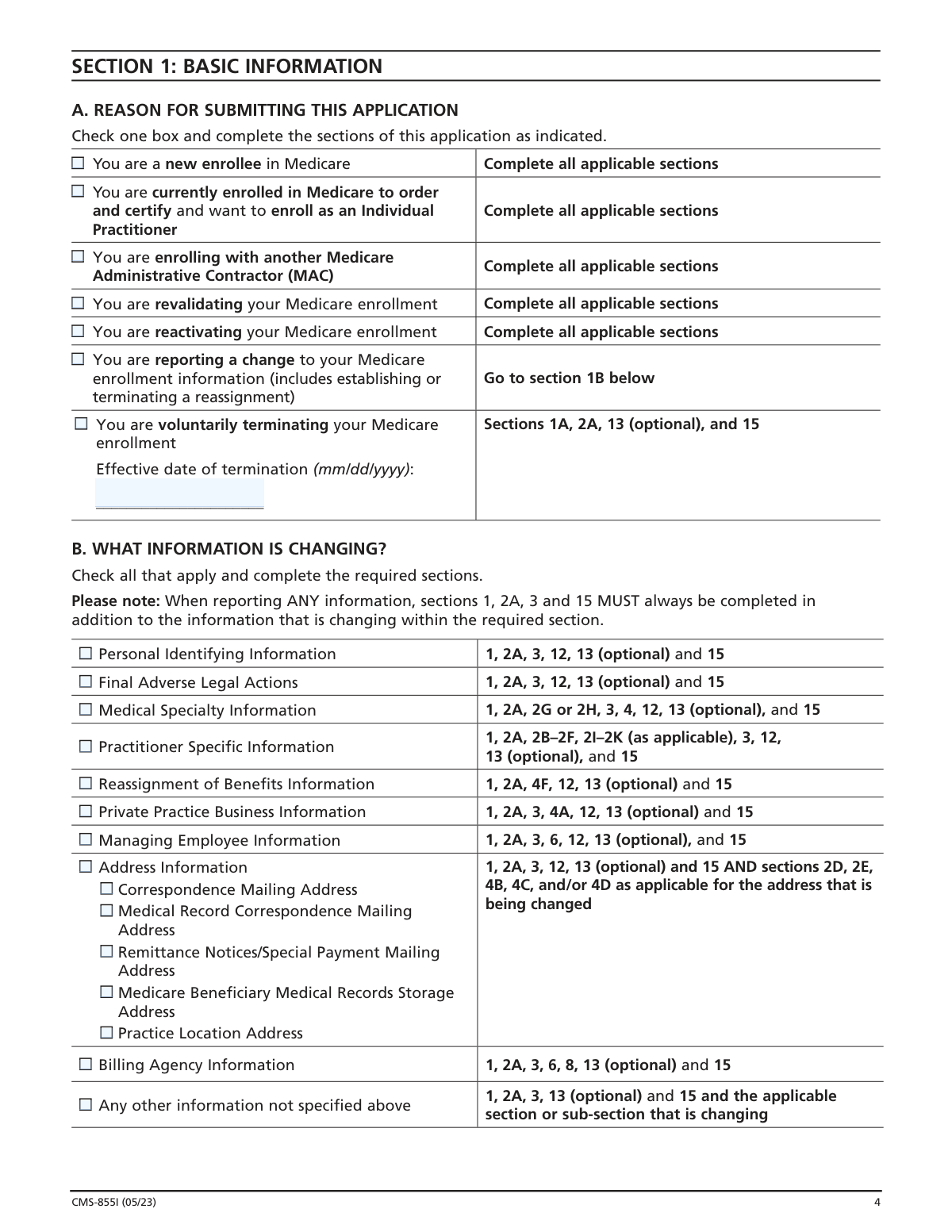
Yes, the CMS-855I is the correct form to use when you are revalidating your Medicare enrollment information. Check the 'You are revalidating your Medicare enrollment' box in Section 1A and complete all applicable sections as instructed.
A Type 1 NPI is for an individual health care provider, which you will report in Section 2A. A Type 2 NPI is for an organization, such as a group practice or corporation, which would be reported in Section 4A if you are enrolling a solely-owned business entity.
You must report all final adverse legal actions, such as convictions or license revocations, in Section 3. You are also required to attach copies of all related documentation, like notifications and resolutions, with your application submission.
Processing times can vary depending on your Medicare Administrative Contractor (MAC) and the accuracy of your application. To avoid delays, ensure all required sections are typed, all necessary documents are attached, and the form is properly signed.
Yes, services like Instafill.ai use AI to accurately auto-fill form fields, which can save you significant time and help reduce errors. These tools can help ensure your information is consistent across the application.
Simply upload the CMS-855I PDF to the Instafill.ai platform. The AI will identify the form fields, allowing you to provide your information once and have it automatically and accurately populated throughout the document.
If you have a non-fillable or 'flat' PDF, you can use a service like Instafill.ai to convert it into an interactive, fillable form. This allows you to easily type your information directly into the fields before printing for signature.
This optional section allows you to designate a person who the MAC can contact with questions about your application. This person can only discuss the enrollment application and not other Medicare issues.
Compliance CMS-855I
Validation Checks by Instafill.ai
1
Conditional Section Completion Based on Application Reason
Validates that the sections completed by the user correspond to the reason for submission selected in Section 1A and the changes indicated in Section 1B. For example, if 'Reporting a change to your Medicare enrollment information' is checked in 1A, at least one checkbox in 1B must be selected, and the system must verify that all corresponding sections are filled. This prevents incomplete submissions and ensures the application can be processed correctly based on its stated purpose.
2
NPI Cross-Verification with NPPES Database
This check validates that the practitioner's Name, Social Security Number (SSN) in Section 2A, and, if applicable, the Legal Business Name (LBN) and Tax Identification Number (TIN) in Section 4A, exactly match the information on file in the National Plan and Provider Enumeration System (NPPES) for the provided National Provider Identifier (NPI). A mismatch would cause claim rejections and enrollment delays. If validation fails, the user is instructed to update their information with either CMS or NPPES to ensure consistency.
3
Adverse Legal Action Disclosure Completeness
This validation checks if the user has answered 'YES' to having a final adverse legal action in Section 3C or for a managing employee in Section 6B. If 'YES' is selected, the system must ensure that at least one entry is made in the corresponding table detailing the action, date, and imposing body. This is a critical compliance check, and failure to provide details for a declared adverse action will halt the application process and flag it for manual review.
4
Medical Specialty Selection Logic
Verifies that specialty selections in Section 2G and 2H follow the form's rules. For Physician Specialties (2G), it ensures that exactly one specialty is marked as 'P' (Primary). For Non-Physician Specialties (2H), it ensures only one checkbox is selected per application. This prevents ambiguity in the practitioner's primary role and ensures they are enrolled under the correct specialty, which is crucial for billing and credentialing.
5
Reassignment of Benefits and Private Practice Logic
Checks for logical consistency based on the selections at the beginning of Section 4 regarding private practice and benefit reassignment. If the user checks the box indicating they reassign ALL benefits, the system must validate that Section 4F is completed and that sections related to a private practice (e.g., 4B Practice Location, 4C Remittance Address, Section 8 Billing Agency) are disabled or skipped. This ensures the data submitted accurately reflects the practitioner's billing arrangement.
6
Address Type and P.O. Box Restriction
Validates that addresses provided for 'Practice Location' (Section 4B) and 'Medical Records Storage Address' (Section 4D) are physical street addresses and not P.O. Boxes. The system should parse the address lines and flag entries that contain 'P.O. Box' or similar variants. This is important because CMS requires physical locations for site visits and record access, and using a P.O. Box in these fields is explicitly prohibited.
7
SSN and TIN/EIN Format and Context Validation
Ensures that Social Security Numbers (SSN) and Tax Identification Numbers (TIN/EIN) are entered in the correct format (9 digits) and in the appropriate context. The validation confirms that an SSN is used for an individual practitioner (Section 2A) while a TIN/EIN is used for a business entity (Section 4A). It also checks that the correct identifier type is selected when options are given, such as in Section 4F for reassignment.
8
Mandatory Signature and Date Verification
Confirms that the required signature fields in Section 15 are completed. Specifically, it checks for a signature and a valid date in Section 15B for the practitioner. If a reassignment is being established or changed, it also verifies that Section 15C is signed and dated by the delegated official of the organization. An unsigned application is not legally binding and will be immediately rejected.
9
Managing Employee Requirement for Business Entities
This validation enforces the rule that if a private practice is established as a business entity (e.g., Corporation, LLC in Section 4A1), at least one managing employee must be reported in Section 6. The system checks if Section 4A1 is filled and, if so, verifies that either the 'I am the managing employee' box is checked or that information for at least one managing employee is provided in Section 6A. This is a Medicare policy requirement for enrolling a business entity.
10
Date Format and Logical Chronology
Performs a comprehensive check on all date fields (e.g., Date of Birth, Year of Graduation, Effective Dates) to ensure they are in the correct 'mm/dd/yyyy' or 'yyyy' format and are logically valid. For instance, the 'Year of Graduation' (Section 2A) must be after the practitioner's 'Date of Birth'. Similarly, 'Effective Date' fields for changes or terminations must be plausible and not set to a nonsensical past or future date. This maintains data integrity and prevents processing errors.
11
Conditional Field Requirement for Specific Specialties
Validates that when a specific specialty is chosen, any dependent fields are also completed. For example, if 'Psychologist, Clinical' is selected in Section 2H, the system must verify that the 'doctoral psychology degree' field in Section 2I.1 is filled. Likewise, if 'Clinical Nurse Specialist' or 'Nurse Practitioner' is selected, the system should check for a response to the SNF employment question in Section 2K. This ensures all required data for a given specialty is captured.
12
Correspondence Address and Billing Agent Address Separation
This validation enforces the rule stated in Section 2D that the 'Correspondence Mailing Address' cannot be a billing agent's address. The system should compare the address entered in Section 2D with any billing agency address entered in Section 8. If a match is found, the application should be flagged, as this is explicitly disallowed and could indicate an attempt to divert official communications from the provider.
13
Voluntary Termination Date Requirement
Checks that if the 'You are voluntarily terminating your Medicare enrollment' box is checked in Section 1A, the 'Effective date of termination' field is populated with a valid date. The application cannot be processed for termination without a specified date. This ensures that CMS has a clear date to cease the provider's billing privileges.
14
License and Certification Status and Date Validation
Verifies that if 'Active License' or 'Active Certification' is checked in Section 2B, the corresponding Number, Effective Date, and Issuing State/Entity fields are completed. It also validates that the 'Effective Date' is not in the future. This ensures that the practitioner is attesting to a current, valid credential, which is fundamental to their eligibility to enroll in Medicare.
Common Mistakes in Completing CMS-855I
This error occurs when the provider's legal name, Social Security Number (SSN), Legal Business Name (LBN), and Tax Identification Number (TIN) on the CMS-855I do not exactly match the information on file with the IRS and the National Plan and Provider Enumeration System (NPPES). Even minor variations, like using an initial instead of a full middle name, can cause a mismatch. This leads to automatic application rejection and significant processing delays until the discrepancies are resolved across all systems.
Applicants often misunderstand the broad scope of 'final adverse legal action' required in Section 3 and fail to report items like deferred adjudications, expunged records, or pending appeals. This omission is considered falsification of information. The consequences are severe, including denial of enrollment, revocation of existing Medicare privileges, and potential civil or criminal penalties.
In Section 4A, practitioners frequently enter their practice's commonly used or 'DBA' name instead of the official Legal Business Name (LBN) registered with the IRS. Since Medicare validates the LBN against the provided Tax Identification Number (TIN), this discrepancy results in a validation failure. The application will be rejected until the name is corrected to match IRS records.
When establishing or changing a reassignment of benefits (Section 4F), the application requires two signatures in Section 15: the practitioner's (15B) and the receiving organization's authorized official's (15C). A common mistake is missing the organization's signature, rendering the reassignment invalid. This halts the enrollment process and prevents the organization from billing for the practitioner's services.
The instructions on page 2 explicitly state that the CMS-855I form must be typed and cannot be handwritten. Applicants who miss this instruction or lack easy access to a computer may submit a handwritten form. Medicare Administrative Contractors (MACs) will immediately return handwritten applications without processing them, forcing the applicant to start over.
Section 12 outlines numerous documents that may be required, such as the CMS-588 EFT form with a voided check, an IRS CP-575 letter to verify a business TIN, or copies of professional licenses. Applicants often forget to attach all applicable documents. This results in the MAC putting the application on hold and sending a request for more information, which can delay enrollment by weeks or months.
Section 2D specifies that the correspondence address cannot be a billing agent's or medical management company's address. However, practitioners who outsource paperwork often allow their billing service to use its own address for convenience. This is a direct violation of the rules and can cause the practitioner to miss critical, time-sensitive notices from Medicare, jeopardizing their enrollment status.
When submitting the form to report a change (e.g., a new practice location), applicants often only complete the section pertaining to that change. However, the instructions in Section 1B mandate that Sections 1, 2A, 3, and 15 must always be completed for any change submission. An incomplete submission will be rejected, delaying the update to the provider's Medicare record.
A practitioner who is the sole owner of a professional corporation, PA, or LLC should report the business information in Section 4A and does not need to complete Section 4F to reassign benefits to their own entity. Many applicants misunderstand this and incorrectly complete the reassignment section, creating confusion and potential processing errors. This can be avoided by carefully reading the instructions at the top of Section 4.
In Section 2G, a physician can only designate one 'Primary' specialty. If a physician holds multiple primary specialties, they must submit a separate CMS-855I application for each one. Marking more than one 'P' on a single application will cause it to be returned for correction, delaying the enrollment for all specialties listed. AI-powered form filling tools like Instafill.ai can help prevent these errors by validating data and ensuring all required sections are completed correctly based on the application type. If the form is a non-fillable PDF, Instafill.ai can also convert it into an interactive, fillable version.
Saved over 80 hours a year
“I was never sure if my IRS forms like W-9 were filled correctly. Now, I can complete the forms accurately without any external help.”
Kevin Martin Green
Your data stays secure with advanced protection from Instafill and our subprocessors

Robust compliance program
Transparent business model
You’re not the product. You always know where your data is and what it is processed for.
ISO 27001, HIPAA, and GDPR
Our subprocesses adhere to multiple compliance standards, including but not limited to ISO 27001, HIPAA, and GDPR.
Security & privacy by design
We consider security and privacy from the initial design phase of any new service or functionality. It’s not an afterthought, it’s built-in, including support for two-factor authentication (2FA) to further protect your account.
Fill out CMS-855I with Instafill.ai
Worried about filling PDFs wrong? Instafill securely fills cms-855i-medicare-enrollment-application-for-physicians-and-non-physician-practitioners forms, ensuring each field is accurate.