Yes! You can use AI to fill out CMS-855A, Medicare Enrollment Application for Institutional Providers
The CMS-855A is a Centers for Medicare & Medicaid Services (CMS) form used by institutional health care providers—including hospitals, critical access hospitals, skilled nursing facilities, home health agencies, hospices, federally qualified health centers, and many others—to enroll in the Medicare program and obtain a Medicare billing number. It is also used to report changes to existing enrollment information, revalidate or reactivate Medicare billing privileges, report changes of ownership (CHOWs), acquisitions, mergers, or consolidations, and voluntarily terminate Medicare enrollment. Accurate completion is critical, as errors or omissions can delay or deny Medicare billing privileges and may carry significant legal penalties. Today, this lengthy and detailed form can be filled out quickly and accurately using AI-powered services like Instafill.ai, which can also convert non-fillable PDF versions into interactive fillable forms.
Our AI automatically handles information lookup, data retrieval, formatting, and form filling.
It takes less than a minute to fill out CMS-855A using our AI form filling.
Securely upload your data. Information is encrypted in transit and deleted immediately after the form is filled out.
Form specifications
| Form name: | CMS-855A, Medicare Enrollment Application for Institutional Providers |
| Number of pages: | 1 |
| Language: | English |
| Categories: | CAR forms, healthcare provider forms, CMS forms, enrollment forms, L.A. Care forms, enrollment application forms, Medicare forms, institutional forms |
Instafill Demo: How to fill out PDF forms in seconds with AI
How to Fill Out CMS-855A Online for Free in 2026
Are you looking to fill out a CMS-855A form online quickly and accurately? Instafill.ai offers the #1 AI-powered PDF filling software of 2026, allowing you to complete your CMS-855A form in just 37 seconds or less.
Follow these steps to fill out your CMS-855A form online using Instafill.ai:
- 1 Navigate to Instafill.ai and search for or upload the CMS-855A Medicare Enrollment Application for Institutional Providers to begin filling it out online with AI-powered assistance.
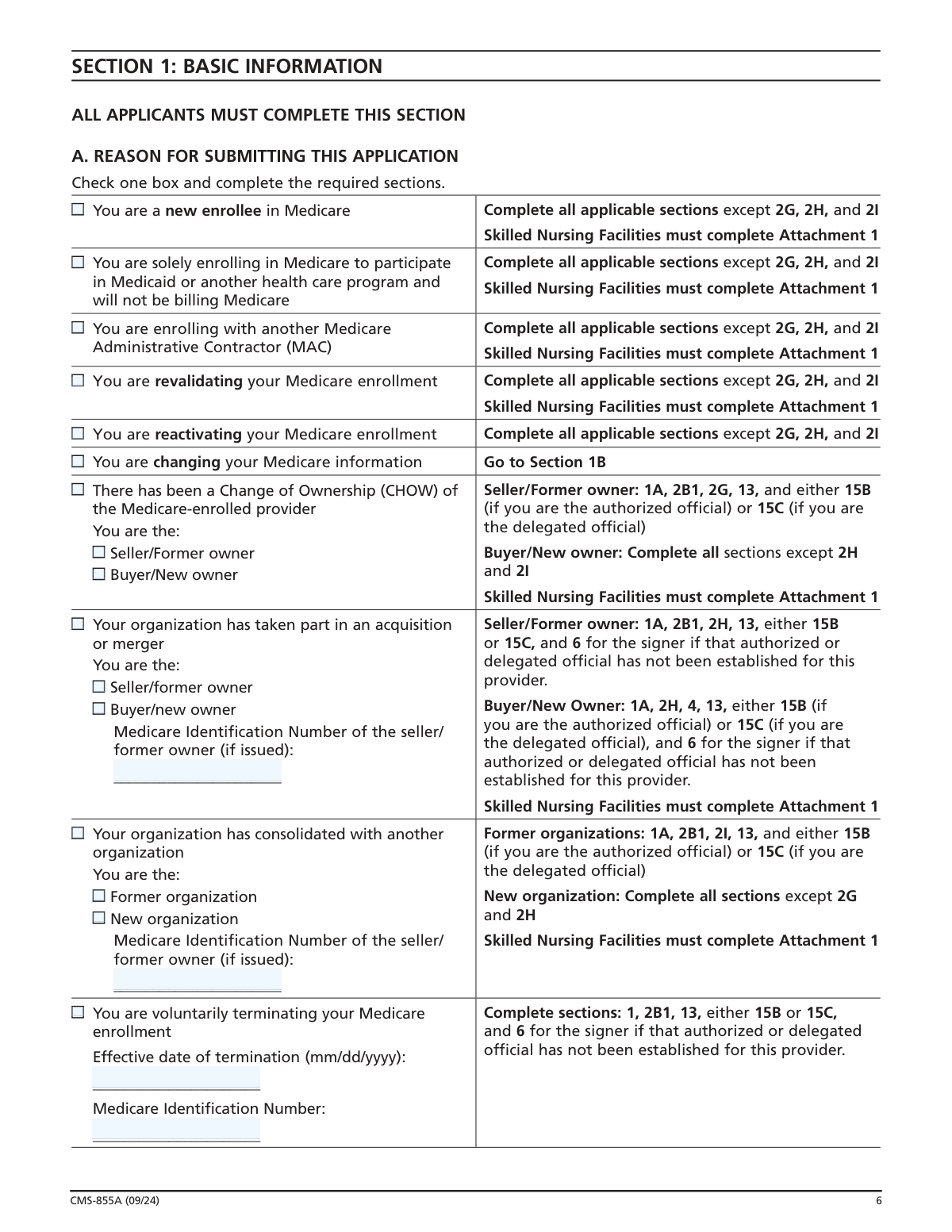
- 2 Complete Section 1 by selecting the reason for submitting the application (e.g., new enrollment, revalidation, change of information, CHOW) and identifying which sections of the form are required based on your selection.
- 3 Fill out Section 2 with your provider's identifying information, including provider type, legal business name, Tax Identification Number (TIN), National Provider Identifier (NPI), Medicare Identification Number (if issued), correspondence and medical record addresses, accreditation details, and any CHOW, acquisition, merger, or consolidation information as applicable.
- 4 Complete Sections 3 through 13 as applicable, covering final adverse legal actions, practice location information, ownership interest and managing control for both organizations and individuals, billing agency information, OTP personnel (if applicable), special HHA requirements, and contact person details.
- 5 Review Section 15 carefully, ensure all authorized and delegated officials are identified in Section 6, and have the appropriate authorized official(s) sign and date the Certification Statement to legally bind the provider to Medicare program requirements.
- 6 Gather and attach all required supporting documentation listed in Section 17, such as licenses, IRS confirmation of TIN, CMS-588 EFT Authorization Agreement, organizational structure diagrams, adverse legal action documentation, and any other applicable documents.
- 7 Review the completed application for accuracy and completeness, pay any required application fee via PECOS if applicable, and submit the signed application with all supporting documents to your designated Medicare Administrative Contractor (MAC).
Our AI-powered system ensures each field is filled out correctly, reducing errors and saving you time.
Why Choose Instafill.ai for Your Fillable CMS-855A Form?
Speed
Complete your CMS-855A in as little as 37 seconds.
Up-to-Date
Always use the latest 2026 CMS-855A form version.
Cost-effective
No need to hire expensive lawyers.
Accuracy
Our AI performs 10 compliance checks to ensure your form is error-free.
Security
Your personal information is protected with bank-level encryption.
Frequently Asked Questions About Form CMS-855A
The CMS-855A is the Medicare Enrollment Application for Institutional Providers. It must be completed by health care organizations such as hospitals, skilled nursing facilities, home health agencies, hospices, community mental health centers, federally qualified health centers, and other institutional provider types that want to enroll in Medicare and receive a Medicare billing number.
Yes. Institutional providers can apply for Medicare enrollment or make changes to their enrollment information using either the internet-based Provider Enrollment, Chain and Ownership System (PECOS) at PECOS.cms.hhs.gov or the paper CMS-855A form. Using Internet-based PECOS is often faster and more convenient.
Yes. Medicare healthcare providers (except organ procurement organizations) must obtain a Type 2 (Entity/Organization) NPI prior to enrolling in Medicare or before submitting a change to existing enrollment information. You can apply for an NPI online at nppes.cms.hhs.gov. The Legal Business Name and Tax Identification Number used to obtain your NPI must exactly match what you report on this application.
You should submit a CMS-855A if you are: enrolling in Medicare for the first time, revalidating your enrollment, reactivating a previously terminated billing number, enrolling with a new Medicare Administrative Contractor (MAC), reporting a change of ownership (CHOW), acquisition, or merger, making changes to your enrollment information, or voluntarily terminating your Medicare enrollment.
Required supporting documents include: applicable licenses, certifications, and registrations; IRS confirmation of your Tax Identification Number (e.g., IRS CP 575); a completed CMS-588 Electronic Funds Transfer Authorization Agreement with a voided check or bank letter; an organizational structure diagram; copies of bills of sale for ownership changes; and any final adverse legal action documentation. Home health agencies must also submit capitalization documentation, and non-profit organizations must include IRS Form 501(c)(3).
Yes. An application fee is required for initial enrollment, the addition of a new practice location, and revalidation. The fee must be paid via PECOS.cms.hhs.gov/pecos/feePaymentWelcome.do PRIOR to completing and submitting the paper application to your MAC.
A CHOW occurs when a Medicare provider is purchased or leased by another organization, transferring the old owner's Medicare Identification Number and provider agreement to the new owner. An acquisition/merger occurs when one enrolled provider purchases another; only the purchaser's Medicare ID and TIN remain, while the seller's dissolve. A consolidation occurs when two or more enrolled providers combine to form a new entity, with all original TINs and Medicare IDs dissolving and new ones being assigned.
An authorized official is an appointed individual (such as a CEO, CFO, or direct owner) with legal authority to enroll the organization in Medicare and commit it to program requirements — only an authorized official can sign the initial enrollment application. A delegated official is someone authorized by an authorized official to report changes and updates; they must have an ownership/control interest in or be a W-2 managing employee of the provider. Delegated officials are optional but cannot further delegate their authority.
Section 5 requires reporting all organizations with 5% or more direct or indirect ownership, any partnership interest, 5% or more mortgage or security interest, or managing control over the provider. Section 6 requires reporting all individuals with similar interests, plus all managing employees (such as general managers, administrators, and directors). Skilled Nursing Facilities must instead report this information in Attachment 1.
Deliberately falsifying information on this application can result in serious criminal and civil penalties. Criminal penalties can include fines up to $250,000 for individuals (or $500,000 for organizations) and imprisonment up to 10 years. Civil penalties under the False Claims Act include fines of $5,000–$10,000 per violation plus three times the damages sustained by the government, and providers may be excluded from the Medicare program.
CMS estimates the form takes approximately 6 hours to complete per response, including reviewing instructions, gathering data, and completing the form. Processing time varies and involves multiple steps: the MAC reviews the application, a state survey agency or accreditation organization conducts a survey, and CMS makes the final eligibility decision. You should submit all required documentation to avoid delays.
Send the completed application with original signatures and all required documentation to your designated Medicare Administrative Contractor (MAC). The MAC that services your state is responsible for processing your enrollment application. To find the mailing address for your designated MAC, visit CMS.gov/Medicare/Provider-Enrollment-and-Certification.
Yes. AI-powered services like Instafill.ai can help you accurately auto-fill the CMS-855A form fields, saving significant time and reducing errors. If you have a flat, non-fillable PDF version of the form, Instafill.ai can also convert it into an interactive fillable form so you can complete it digitally. Visit Instafill.ai to get started.
Yes. If your organization functions as two or more separately recognized provider types with different Medicare participation rules, you must submit a separate CMS-855A for each provider type. For example, a provider that operates as both a hospital and an end-stage renal disease (ESRD) facility must submit two separate applications. However, if a hospital simply performs multiple services (e.g., has a swing-bed unit), only one application is required.
Skilled Nursing Facilities must complete Attachment 1 (Skilled Nursing Facility Disclosures) instead of Sections 5 and 6 for ownership and managing control information. Attachment 1 requires more detailed disclosures, including information on 'additional disclosable parties' (ADPs) — organizations or individuals that provide services, leases, or financial/management control to the SNF — and two organizational structure diagrams showing all entities and their relationships.
Compliance CMS-855A
Validation Checks by Instafill.ai
1
Legal Business Name Matches IRS Records and NPI Registration
The Legal Business Name (LBN) entered in Section 2B1 must exactly match the name on file with the IRS (as confirmed by IRS CP 575 or equivalent documentation) and must also match the name used to obtain the National Provider Identifier (NPI) in NPPES. Even minor discrepancies such as abbreviations, punctuation differences, or missing words will cause a mismatch between PECOS and NPPES. If this validation fails, the application will be delayed or rejected, as CMS requires the LBN, TIN, and NPI to match exactly across both systems.
2
Tax Identification Number (TIN) Format and Consistency
The Tax Identification Number must be a valid 9-digit Employer Identification Number (EIN) in the format XX-XXXXXXX, as institutional providers enrolling on the CMS-855A are organizational entities and should not be using a Social Security Number as their primary TIN. The TIN entered in Section 2B1 must be consistent with the TIN used to obtain the NPI and must match IRS records. If the TIN does not match IRS documentation or conflicts with the NPI registration, the enrollment will be rejected and the provider will be unable to receive Medicare payments.
3
National Provider Identifier (NPI) Validity and Entity Type
The NPI provided must be a valid Type 2 (Entity/Organization) NPI, as all institutional providers submitting the CMS-855A are required to hold an Entity Type 2 NPI. The NPI must be active and registered in NPPES prior to submission of the enrollment application, with the exception of Organ Procurement Organizations which are exempt from the NPI requirement. If the NPI is a Type 1 (individual) NPI, is inactive, or has not yet been issued, the application cannot be processed and enrollment will be denied until a valid Type 2 NPI is obtained.
4
Date Format Validation for All Date Fields
All date fields throughout the application, including effective dates, dates of birth, license effective dates, accreditation dates, termination dates, and the date of first Medicare patient, must be entered in the required mm/dd/yyyy format. Dates must represent valid calendar dates (e.g., month values between 01–12, day values appropriate for the given month, and a four-digit year). Invalid or improperly formatted dates will prevent the MAC from processing the application and may result in incorrect effective dates for enrollment, ownership changes, or terminations.
5
Reason for Submission Selection and Required Sections Completeness
Exactly one reason for submission must be selected in Section 1A, and all sections required for that specific reason must be completed. For example, a new enrollee must complete all applicable sections except 2G, 2H, and 2I, while a CHOW buyer must complete all sections except 2H and 2I. If the reason for submission is not selected, or if required sections for the selected reason are left incomplete, the MAC will be unable to process the application and will return it to the provider, causing significant enrollment delays.
6
Practice Location Address Cannot Be a P.O. Box
All practice location addresses entered in Section 4A must be physical street addresses as recorded by the United States Postal Service and cannot be Post Office (P.O.) Box addresses. Similarly, medical records storage addresses in Section 4C cannot be P.O. Boxes or drop boxes. This requirement ensures that CMS and the MAC can verify the physical location where services are rendered to Medicare beneficiaries. If a P.O. Box is entered as a practice location address, the application will be rejected and the provider will be required to resubmit with a valid physical address.
7
Social Security Number Format for Individuals in Sections 5C, 6, 10, and 15
All Social Security Numbers (SSNs) entered for individuals throughout the application, including chain home office administrators (Section 5C), individual owners and managing employees (Section 6), OTP personnel (Section 10), and authorized/delegated officials (Section 15), must be in the standard 9-digit format (XXX-XX-XXXX). The form explicitly states that each authorized and delegated official must have and disclose their SSN. Missing or improperly formatted SSNs will prevent identity verification and background checks, and may result in the application being returned or denied.
8
Direct Ownership Percentage Totals Do Not Exceed 100%
The combined percentage totals for all direct owners reported in Section 5 (organizations) and Section 6 (individuals) must not exceed 100%. Each ownership entry requires an exact percentage, and the system must validate that the sum of all direct ownership interests does not surpass 100% of the provider's total ownership. Exceeding 100% in direct ownership percentages indicates a data entry error or misreporting of ownership structure, which could trigger fraud and abuse scrutiny and result in application denial or revocation of billing privileges.
9
Authorized Official Signature and Date Present on Section 15
Section 15B must contain a valid signature and date from at least one authorized official, as the application explicitly states it must be signed and dated in order to be processed. The authorized official must be an appointed individual such as a CEO, CFO, general partner, or chairman of the board who has been granted legal authority to enroll the organization in Medicare. If the signature is missing, the date is absent, or the signer does not qualify as an authorized official as defined in Section 15, the application will be rejected outright and cannot be processed by the MAC.
10
Final Adverse Legal Action Disclosure Completeness
Section 3 must be completed in its entirety for the provider organization, and Sections 5D and 6B must be completed for each reported organization and individual respectively, disclosing all final adverse legal actions including convictions, exclusions, license revocations, and suspensions within the preceding 10 years. All applicable supporting documentation (notifications, resolutions, reinstatement letters) must be attached. Incomplete disclosure of adverse legal actions, even those that were expunged or are under appeal, constitutes a material omission that can result in denial of enrollment, revocation of billing privileges, and potential criminal or civil penalties under 18 U.S.C. section 1001.
11
Provider Type Selection Consistency with Application Type
Only one provider type may be selected in Section 2A1 (or 2A2 for hospitals), and the selected provider type must be one of the recognized institutional provider types listed on the CMS-855A. If a provider functions as two or more separately recognized provider types (e.g., both a hospital and an ESRD facility), a separate CMS-855A must be submitted for each type rather than selecting multiple types on a single application. Selecting an incorrect or unsupported provider type, or attempting to enroll multiple distinct provider types on one application, will result in processing errors and potential denial of enrollment.
12
Accreditation Date Logical Consistency
If the provider indicates it is accredited in Section 2E, both the date of accreditation and the expiration date of accreditation must be provided, and the expiration date must be a future date that is chronologically after the accreditation date. An expiration date that precedes the accreditation date, or an accreditation that has already expired at the time of submission, indicates either a data entry error or lapsed accreditation status. Submitting an application with expired accreditation may result in the MAC requiring updated accreditation documentation before enrollment can be approved.
13
Billing Agency Address Cannot Match Correspondence Mailing Address
If a billing agency or agent is reported in Section 8, the billing agency's address must be different from the provider's correspondence mailing address entered in Section 2C. The form explicitly prohibits the use of a billing agent or agency's address as the provider's correspondence mailing address, ensuring that official MAC communications are directed to the provider rather than a third-party billing entity. If the billing agency address matches the correspondence address, the application must be corrected before submission to ensure the provider receives all enrollment-related correspondence directly.
14
OTP Personnel NPI and License Number Validity
For Opioid Treatment Programs completing Section 10, all ordering and dispensing personnel must have an active and valid NPI and a current license number provided. The NPI must be a Type 1 (individual) NPI for each practitioner listed, and the license must be active at the time of application submission. OTP personnel who are currently revoked from Medicare, on the CMS preclusion list, excluded by OIG, or have prior state board actions for patient harm-related misconduct cannot be employed or contracted by the OTP. Failure to report complete and valid NPI and license information for all OTP personnel will result in application rejection and potential compliance violations under 42 C.F.R. section 424.67.
15
Home Health Agency Capitalization Documentation Completeness
Home Health Agencies initially enrolling in Medicare on or after January 1, 1998 must complete Section 12 and provide documentation of sufficient initial reserve operating funds, including a financial statement, a bank attestation confirming fund availability, and a certification that at least 50% of reserve funds are non-borrowed. The projected number of visits for the first three months and first twelve months of operation must also be provided to allow the MAC to compare the enrolling HHA with comparable agencies. Failure to provide complete capitalization documentation will prevent the MAC from verifying financial readiness and will delay or deny the granting of Medicare billing privileges to the HHA.
16
CHOW Effective Date and Provider Agreement Assignment Consistency
For Change of Ownership submissions in Section 2G, the effective date of transfer must be provided and can be a future date, but must be a valid calendar date in mm/dd/yyyy format. The new owner must indicate whether they will accept assignment of the current provider agreement; if they elect not to accept the transfer, the old agreement must be terminated and the new owner is treated as an initial enrollee, requiring completion of all applicable new enrollment sections. A copy of the bill of sale must be submitted with the application, and the final sales agreement must be submitted once executed. Inconsistency between the CHOW election and the sections completed (e.g., selecting buyer/new owner but not completing all required sections) will result in application rejection.
Common Mistakes in Completing CMS-855A
Applicants frequently enter a shortened, informal, or 'doing business as' name in the Legal Business Name field instead of the exact name registered with the IRS. This causes a critical mismatch between the CMS-855A, PECOS, and NPPES systems, which must all reflect the identical LBN and TIN. The application will be rejected or delayed until the discrepancy is resolved. Always verify the exact legal name by referencing your IRS CP 575 letter or other IRS confirmation document before completing Section 2B1. AI-powered form filling tools like Instafill.ai can help by cross-referencing entered names against official records to flag potential mismatches.
Institutional providers sometimes submit the CMS-855B (for individual practitioners and group practices) or CMS-855S (for suppliers) instead of the CMS-855A, which is specifically required for institutional providers such as hospitals, home health agencies, skilled nursing facilities, and hospices. This mistake occurs because applicants are unfamiliar with the distinctions between form types. Submitting the wrong form results in outright rejection and significant processing delays. Carefully review the 'Who Should Submit This Application' section and confirm your provider type is listed before completing the form.
Institutional providers must obtain a Type 2 (organizational) NPI from NPPES before submitting the CMS-855A, yet many applicants submit the application without one or enter an individual (Type 1) NPI instead. The NPI must also match the Legal Business Name and TIN used in Section 2B1 exactly. Submitting without a valid Type 2 NPI will cause the application to be rejected. Apply for the NPI at nppes.cms.hhs.gov well in advance of submitting the enrollment application, and ensure the LBN and TIN used to obtain the NPI are identical to those on the CMS-855A.
For initial enrollments, additions of new practice locations, and revalidations, applicants are required to pay the application fee via PECOS.cms.hhs.gov prior to submitting the paper application to the MAC. Many applicants overlook this step entirely or attempt to pay after submission, which causes the application to be held or rejected. The fee payment must be completed first, and proof or confirmation should be retained. Review the 'Tips to Avoid Delays' section carefully and complete fee payment at the PECOS fee payment portal before mailing the application.
Applicants often check the incorrect reason for submission—for example, checking 'revalidation' when they should check 'change of information,' or confusing a CHOW with an acquisition/merger. Each reason for submission triggers different required sections, and selecting the wrong one means critical sections may be left blank or irrelevant sections may be completed unnecessarily. This leads to processing delays and potential rejection. Carefully read the definitions of CHOW, acquisition/merger, and consolidation in the instructions, and consult your MAC if uncertain which category applies to your situation.
Providers frequently fail to report all organizations and individuals with 5% or greater direct or indirect ownership, all general and limited partnership interests (regardless of percentage), or all managing employees. The multi-level indirect ownership calculation is particularly confusing, leading applicants to underreport owners at Level 2 and beyond. Omitting required ownership information is a compliance violation and can result in denial or revocation of billing privileges. Use the ownership calculation examples provided in Section 5 to work through each level of ownership, and submit the required organizational structure diagram/flowchart with the application.
Section 4 explicitly requires a specific physical street address for all practice locations as recorded by the United States Postal Service, yet applicants frequently enter a P.O. Box, which is not acceptable. This mistake often occurs when applicants confuse the correspondence mailing address (Section 2C, where a P.O. Box is permitted) with the practice location address. Using a P.O. Box for the practice location will result in the application being returned for correction. Always enter the actual physical street address where services are rendered for practice location fields, and reserve P.O. Box entries for correspondence address fields only.
One of the most common causes of application rejection is a missing, undated, or improperly completed signature in Section 15. The authorized official must be someone with legal authority to bind the organization (e.g., CEO, CFO, general partner, chairman of the board), and if this is the first time the authorized official is being reported, Section 6 must also be completed for that individual. Delegated officials cannot sign initial enrollment applications. Ensure the authorized official signs and dates Section 15B, that their information is complete, and that Section 6 has been completed for them if not previously reported to this MAC.
Applicants routinely submit the CMS-855A without all required supporting documents listed in Section 17, such as the IRS confirmation letter (e.g., CP 575), IRS Form 501(c)(3) for non-profits, the completed CMS-588 EFT Authorization Agreement with a voided check or bank letter, copies of all applicable licenses and certifications, and the organizational structure diagram. Missing documentation is one of the leading causes of processing delays, as the MAC will issue a request for additional information and the applicant has only 30 days to respond. Review Section 17 thoroughly before mailing and create a checklist of all required attachments specific to your provider type.
Applicants sometimes enter an incorrect TIN, use a Social Security Number instead of an Employer Identification Number (EIN) for an organizational provider, or enter a TIN that does not match the one used to obtain the NPI in NPPES. Since the TIN, LBN, and NPI must match exactly across PECOS and NPPES, any discrepancy will trigger a rejection or significant delay. Verify the TIN by referencing the IRS CP 575 or equivalent IRS confirmation document, and confirm it matches the TIN on file with NPPES before submitting. Tools like Instafill.ai can help validate TIN format and flag inconsistencies during form completion.
Skilled Nursing Facilities (SNFs) must skip Sections 5 and 6 for ownership and managing control information and instead complete Attachment 1, which has significantly more detailed disclosure requirements including additional disclosable parties (ADPs), two separate organizational structure diagrams, and extensive relationship questions. SNFs frequently either complete Sections 5 and 6 instead of Attachment 1, or complete Attachment 1 incompletely by missing ADP-related questions (items 14–19 for organizations and 17–23 for individuals). Failure to properly complete Attachment 1 will result in rejection or a request for additional information. SNF applicants should read the Attachment 1 instructions in full and ensure all ADP relationships are disclosed.
Section 2C explicitly states that the correspondence mailing address cannot be a billing agent or agency's address or a medical management company address, yet applicants who outsource billing frequently enter their billing agency's address in this field. This is a compliance violation and will cause the MAC to send correspondence to an unauthorized third party. The correspondence address must be the provider's own address where the provider itself receives mail. If a billing agency is used, report it separately in Section 8 and ensure the correspondence address in Section 2C reflects the provider's own mailing address.
Saved over 80 hours a year
“I was never sure if my IRS forms like W-9 were filled correctly. Now, I can complete the forms accurately without any external help.”
Kevin Martin Green
Your data stays secure with advanced protection from Instafill and our subprocessors
Robust compliance program
Transparent business model
You’re not the product. You always know where your data is and what it is processed for.
ISO 27001, HIPAA, and GDPR
Our subprocesses adhere to multiple compliance standards, including but not limited to ISO 27001, HIPAA, and GDPR.
Security & privacy by design
We consider security and privacy from the initial design phase of any new service or functionality. It’s not an afterthought, it’s built-in, including support for two-factor authentication (2FA) to further protect your account.
Fill out CMS-855A with Instafill.ai
Worried about filling PDFs wrong? Instafill securely fills cms-855a-medicare-enrollment-application-for-institutional-providers forms, ensuring each field is accurate.




