Yes! You can use AI to fill out CMS-855B, Medicare Enrollment Application for Clinics/Group Practices and Other Suppliers

Form CMS-855B is a Centers for Medicare & Medicaid Services (CMS) enrollment application used by clinics, group practices, ambulance suppliers, independent diagnostic testing facilities (IDTFs), opioid treatment programs, and other healthcare suppliers to enroll in the Medicare program, revalidate or reactivate their enrollment, report changes to existing enrollment information, or voluntarily terminate Medicare billing privileges. The form collects comprehensive information including business identification, practice locations, ownership and managing control details, final adverse legal actions, and requires signatures from authorized officials who legally bind the organization to Medicare program requirements. Completing this form accurately is critical, as falsifying information can result in criminal, civil, or administrative penalties including denial or revocation of Medicare billing privileges. Today, this lengthy and detailed form can be filled out quickly and accurately using AI-powered services like Instafill.ai, which can also convert non-fillable PDF versions into interactive fillable forms.
Our AI automatically handles information lookup, data retrieval, formatting, and form filling.
It takes less than a minute to fill out CMS-855B using our AI form filling.
Securely upload your data. Information is encrypted in transit and deleted immediately after the form is filled out.

Form specifications

Form name: CMS-855B, Medicare Enrollment Application for Clinics/Group Practices and Other Suppliers
Number of pages: 1
Language: English
Categories: CAR forms, healthcare provider forms, CMS forms, enrollment forms, L.A. Care forms, enrollment application forms, Medicare forms
main-image

Instafill Demo: How to fill out PDF forms in seconds with AI

How to Fill Out CMS-855B Online for Free in 2026

Are you looking to fill out a CMS-855B form online quickly and accurately? Instafill.ai offers the #1 AI-powered PDF filling software of 2026, allowing you to complete your CMS-855B form in just 37 seconds or less.
Follow these steps to fill out your CMS-855B form online using Instafill.ai:
  1. 1 Navigate to Instafill.ai and upload the CMS-855B PDF or select it from the available form library to begin filling it out online with AI assistance.
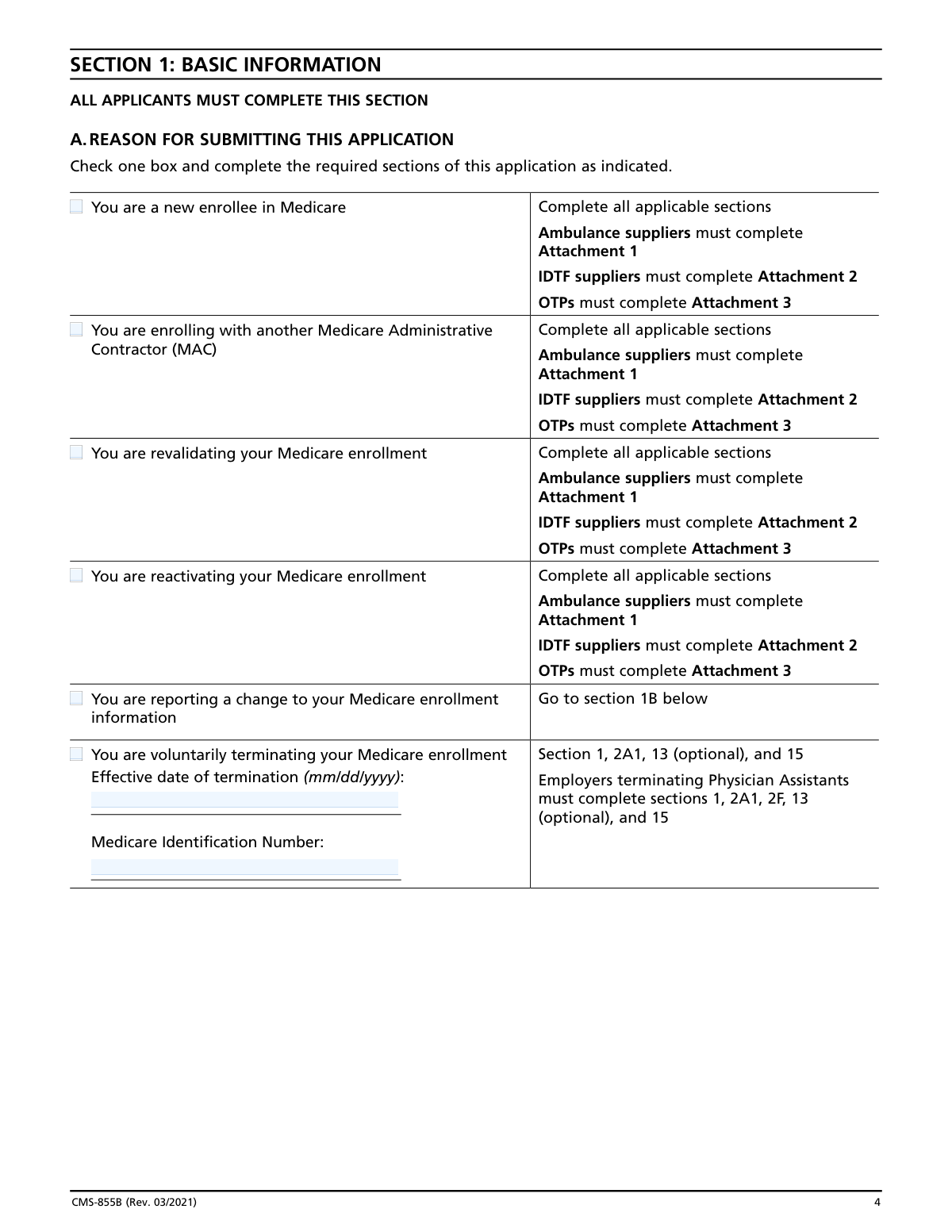
  2. 2 Complete Section 1 by selecting your reason for submitting the application (new enrollment, revalidation, reactivation, change of information, or voluntary termination) and identify which sections apply to your situation.
  3. 3 Fill in Section 2 with your supplier's identifying information, including Legal Business Name, Tax Identification Number (TIN), National Provider Identifier (NPI), business structure, supplier type, and all required address information for correspondence and medical records.
  4. 4 Complete Sections 3 through 6 by disclosing any final adverse legal actions, providing practice location details, and reporting all organizations and individuals with ownership interest or managing control over the supplier.
  5. 5 Fill out any applicable attachments (Attachment 1 for Ambulance Suppliers, Attachment 2 for IDTFs, or Attachment 3 for Opioid Treatment Programs) with the specific information required for your supplier type.
  6. 6 Complete Section 8 if you use a billing agency or agent, and review Section 12 to gather and attach all required supporting documentation such as IRS confirmation letters, EFT authorization, CMS-460, and applicable licenses.
  7. 7 Review the entire application for accuracy, have the authorized official(s) sign and date Section 15, then submit the completed application with all supporting documents to your designated Medicare Administrative Contractor (MAC).

Our AI-powered system ensures each field is filled out correctly, reducing errors and saving you time.

Why Choose Instafill.ai for Your Fillable CMS-855B Form?

Speed

Complete your CMS-855B in as little as 37 seconds.

Up-to-Date

Always use the latest 2026 CMS-855B form version.

Cost-effective

No need to hire expensive lawyers.

Accuracy

Our AI performs 10 compliance checks to ensure your form is error-free.

Security

Your personal information is protected with bank-level encryption.

Frequently Asked Questions About Form CMS-855B

The CMS-855B is the Medicare Enrollment Application for Clinics, Group Practices, and Other Suppliers. It must be completed by organizations such as group practices, clinics, independent laboratories, ambulatory surgical centers, ambulance suppliers, portable x-ray suppliers, opioid treatment programs, and other supplier types that want to enroll in Medicare and receive a Medicare billing number.

You can choose either method to enroll or update your Medicare enrollment information. You may submit the paper CMS-855B form to your designated Medicare Administrative Contractor (MAC), or you may use the Internet-based Provider Enrollment, Chain and Ownership System (PECOS) at https://pecos.cms.hhs.gov. Both options are equally valid, but make sure you are using the most current version of the paper form if you choose that route.

The NPI is a standard unique health identifier assigned by the National Plan and Provider Enumeration System (NPPES). You must obtain an NPI and include it on this application before enrolling in Medicare. Applying for an NPI is a separate process from Medicare enrollment, and you can apply online at https://NPPES.cms.hhs.gov. Organizations enrolling with the CMS-855B require a Type 2 (Entity) NPI.

Common reasons include: enrolling in Medicare for the first time, enrolling with a new Medicare Administrative Contractor (MAC), revalidating your existing Medicare enrollment, reactivating a previously deactivated billing number, reporting changes to your enrollment information (such as a new practice location or tax ID), reporting a change of ownership (CHOW), or voluntarily terminating your Medicare billing privileges.

Required supporting documents vary by situation but may include: a completed CMS-460 (Medicare Participating Physician or Supplier Agreement) for initial enrollments, a completed CMS-588 (Electronic Funds Transfer Authorization Agreement) with a voided check or bank letter, IRS confirmation of your Tax Identification Number and Legal Business Name (e.g., IRS Form CP-575), IRS Form 501(c)(3) for non-profit organizations, copies of any final adverse legal action documentation, an organizational structure diagram/flowchart, and any applicable licenses, certifications, or accreditation documents specific to your supplier type.

Yes, certain applicants must pay a required application fee. The fee applies for initial enrollment, the addition of a new business location, revalidation, and (if requested) reactivation. The fee must be paid PRIOR to completing and submitting the application to your MAC, and payment is made online at https://pecos.cms.hhs.gov/pecos/feePaymentWelcome.do.

A MAC is the regional contractor responsible for processing Medicare enrollment applications and claims for a specific geographic jurisdiction. You must submit your completed CMS-855B to the MAC that services your state. To find the mailing address for your designated MAC, visit www.cms.gov/MedicareProviderSupEnroll.

Section 5 requires information about all organizations with 5% or more ownership interest, any partnership interest, or managing control of the supplier. Section 6 requires information about all individuals with 5% or greater direct or indirect ownership, all officers and directors (for corporations), all managing employees, all partners, and all authorized and delegated officials. Final adverse legal action history must also be reported for each owner and managing employee.

Final adverse legal actions include federal or state felony or relevant misdemeanor convictions within the preceding 10 years, license revocations or suspensions, exclusions or debarments imposed by government agencies, and Medicaid payment suspensions or terminations. All applicable final adverse legal actions must be reported in Section 3, regardless of whether records were expunged or appeals are pending.

An Authorized Official is an appointed official (such as a CEO, CFO, general partner, or direct owner) who has legal authority to enroll the organization in Medicare and commit it to program requirements. A Delegated Official is an individual authorized by an Authorized Official to report changes and updates; they must have an ownership or control interest in, or be a W-2 managing employee of, the supplier. Only an Authorized Official can sign the initial enrollment application and add or remove other officials.

Providing false information can result in serious criminal, civil, and administrative penalties. Criminal penalties under 18 U.S.C. section 1001 include fines up to $250,000 and imprisonment up to five years for individuals, and fines up to $500,000 for organizations. Civil penalties under the False Claims Act include $5,000–$10,000 per violation plus three times the damages sustained by the government. Additional penalties include denial or revocation of Medicare billing privileges.

Yes. Ambulance service suppliers must complete Attachment 1 (covering transport type, geographic area, state license, and vehicle information). Independent Diagnostic Testing Facilities (IDTFs) must complete Attachment 2 (covering CPT-4/HCPCS codes, interpreting physicians, technicians, and supervising physicians). Opioid Treatment Programs (OTPs) must complete Attachment 3 (covering ordering and dispensing personnel identification).

Yes, AI-powered services like Instafill.ai can help you accurately auto-fill the CMS-855B form fields, saving significant time and reducing errors. Instafill.ai can also convert flat, non-fillable PDF versions of the form into interactive fillable forms, making the process even easier. You can visit Instafill.ai to get started with your CMS-855B enrollment application.

To fill out the CMS-855B online, go to Instafill.ai and upload your CMS-855B PDF. The AI will guide you through each section, auto-filling fields based on the information you provide. If your PDF is a flat, non-fillable version, Instafill.ai can convert it into an interactive form so you can complete it digitally before printing and submitting it to your designated MAC with original signatures.

If the CMS-855B PDF is a flat, non-interactive document, you can use Instafill.ai to convert it into a fillable form. Instafill.ai transforms non-fillable PDFs into interactive forms that you can complete online. Note that the form instructions require it to be typed (not handwritten), so using a digital tool is strongly recommended to avoid having your application returned by the MAC.

Compliance CMS-855B
Validation Checks by Instafill.ai

1
Legal Business Name Matches IRS Records and NPI Registration
Validates that the Legal Business Name (LBN) entered in Section 2A1 exactly matches the name on file with the IRS (as confirmed by IRS Form CP-575 or equivalent) and the name used to obtain the National Provider Identifier (NPI) in NPPES. This is critical because CMS requires the LBN, TIN, and NPI to match exactly across both PECOS and NPPES systems. If there is a mismatch, the application will be rejected or delayed, and Medicare billing privileges cannot be established.
2
Tax Identification Number (TIN) Format and Consistency Validation
Validates that the Tax Identification Number (TIN) entered in Section 2A1 follows the correct 9-digit EIN format (XX-XXXXXXX) and is consistent with the TIN used to obtain the NPI in NPPES. The TIN must match IRS records exactly, as any discrepancy between the TIN in PECOS and NPPES will prevent enrollment processing. If the supplier is a sole proprietor using an EIN, supporting IRS documentation (e.g., CP-575) must also be submitted.
3
National Provider Identifier (NPI) Type Validation
Validates that the NPI provided is a Type 2 (Entity/Organization) NPI, as required for all applicants submitting the CMS-855B. Sole proprietors must use a Type 1 (Individual) NPI, while corporations, partnerships, LLCs, and other organizations must use a Type 2 NPI. Submitting an incorrect NPI type will result in application rejection, as the NPI type must align with the organizational structure identified in Section 2A1.
4
Date Format Validation Across All Date Fields
Validates that all date fields throughout the application — including effective dates, dates of birth, license effective/expiration dates, accreditation dates, termination dates, and signature dates — are entered in the required mm/dd/yyyy format. Incorrectly formatted dates are a common cause of application delays and MAC returns. Fields such as the effective date of termination in Section 1, the first Medicare patient date in Section 4A, and all dates in Attachments 1–3 must all conform to this format.
5
Authorized Official Signature and Date Completeness
Validates that Section 15 contains at least one original Authorized Official signature accompanied by a printed name, title/position, telephone number, and a valid signature date in mm/dd/yyyy format. The application explicitly states it cannot be processed without a signature and date. Additionally, the Authorized Official must be reported in Section 6, and their Social Security Number must be disclosed; failure to meet any of these requirements will result in the application being returned unprocessed.
6
Social Security Number (SSN) Format Validation for Individuals
Validates that all SSN fields for individuals reported in Sections 6, 8 (Billing Agent), and Attachments 2 and 3 follow the standard 9-digit format (XXX-XX-XXXX) and are not left blank where required. The form notes that the name, date of birth, and SSN must coincide with the individual's information as listed with the Social Security Administration. Foreign nationals without an SSN must provide an Individual Tax Identification Number (ITIN) instead; submitting an improperly formatted or missing SSN will cause processing delays or rejection.
7
Practice Location Address Cannot Be a P.O. Box
Validates that the Practice Location Street Address entered in Section 4A is a physical street address as recorded by the United States Postal Service and does not contain a P.O. Box. The form explicitly prohibits P.O. Boxes for practice location addresses, as Medicare requires verification of the physical location where services are rendered to beneficiaries. Similarly, the Medical Records Storage Address in Section 4C cannot be a post office box or drop box. Submitting a P.O. Box in these fields will result in application rejection.
8
Correspondence Mailing Address Cannot Be a Billing Agency Address
Validates that the Correspondence Mailing Address provided in Section 2A3 is not the address of a billing agent, billing agency, or medical management company. The form explicitly prohibits this to ensure that official MAC correspondence reaches the supplier directly. Additionally, the billing agency address entered in Section 8 must be verified to differ from the correspondence address in Section 2A3. If these addresses match, the application will be flagged for correction.
9
Reason for Submission Selection and Required Sections Completeness
Validates that exactly one reason for submission is selected in Section 1A (e.g., new enrollee, revalidation, change of information, voluntary termination) and that all sections required for that reason are completed. For example, a voluntary termination requires an effective termination date and Medicare Identification Number, while a new enrollment requires completion of all applicable sections plus relevant attachments (Attachment 1 for ambulance suppliers, Attachment 2 for IDTFs, Attachment 3 for OTPs). Incomplete section coverage based on the selected reason will result in application return.
10
Final Adverse Legal Action History Completeness
Validates that Section 3C is fully completed when a 'Yes' response is given to the question about prior final adverse legal actions, including the specific action, date, and the federal/state agency or court that imposed it. This requirement also applies to organizations reported in Section 5B and individuals reported in Section 6B. All applicable supporting documentation (e.g., notifications, resolutions, reinstatement letters) must be attached. Incomplete adverse legal action disclosures, regardless of expungement or pending appeals, constitute a reportable omission and may result in denial or revocation of billing privileges.
11
Ownership and Managing Control Minimum Reporting Requirements
Validates that the application includes at least one organizational or individual owner (Section 5 or 6), at least one managing employee (Section 6), and at least one Authorized Official (Section 15), as explicitly required by the form instructions. All individuals with 5% or greater direct or indirect ownership, all officers and directors of corporations, all partners, and all managing employees must be reported in Section 6. Missing any of these required disclosures will result in application rejection, as CMS uses this information to assess program integrity risks.
12
License and Certification Effective Date Cannot Be in the Future for Active Licenses
Validates that license and certification effective dates entered in Sections 2A2a and 2A2b are not future dates, as these fields represent currently active credentials. For ambulance suppliers in Attachment 1C, the license effective date must be on or before the date of application submission, and the expiration date must be after the submission date to confirm the license is currently valid. Submitting expired or not-yet-effective licenses will result in the application being returned or denied, as active licensure is a prerequisite for Medicare enrollment.
13
ASC Accreditation Date Logical Consistency
Validates that for Ambulatory Surgical Centers completing Section 2E, the Expiration Date of Current Accreditation is chronologically after the Effective Date of Current Accreditation, and that the expiration date has not already passed at the time of submission. If the ASC is accredited, both dates are required and must form a valid date range. An expired accreditation or a date range where the expiration precedes the effective date indicates an invalid or lapsed accreditation status, which would disqualify the ASC from enrollment.
14
IDTF Supervising Physician General Supervision Site Limit Validation
Validates that each supervising physician listed in Attachment 2E who provides General Supervision is not already providing general supervision at three or more other IDTF sites, as prohibited by 42 C.F.R. section 410.33(b)(1). The 'Other Supervision Sites' table in Attachment 2E must be reviewed to ensure the total number of IDTF sites (including the enrolling facility) does not exceed three for any single supervising physician providing general supervision. Exceeding this limit disqualifies the physician from serving as a supervising physician for the enrolling IDTF.
15
OTP Personnel SSN, NPI, and License Number Completeness
Validates that all Opioid Treatment Program ordering and dispensing personnel reported in Attachment 3A and 3B have complete entries for all required fields: First Name, Last Name, Date of Birth (mm/dd/yyyy), Social Security Number, NPI, License Number, and Practitioner Type. These fields are mandatory for all staff legally authorized to order or dispense controlled substances, regardless of whether they are currently doing so. Missing any of these identifiers for OTP personnel will result in the application being returned, as CMS uses this information to screen against exclusion and preclusion lists.
16
Electronic Funds Transfer (EFT) Authorization Agreement Submission Validation
Validates that a completed CMS-588 Electronic Funds Transfer Authorization Agreement is included with the application for initial enrollments, reactivations, or any changes to banking information, accompanied by a voided check or bank letter. If the supplier has a lending relationship with the bank receiving Medicare payments, a written waiver of the bank's right of offset for Medicare receivables must also be included. Failure to submit the EFT agreement when required will delay the activation of Medicare billing privileges, as routine Medicare payments are made exclusively via electronic funds transfer.

Common Mistakes in Completing CMS-855B

Mismatched Legal Business Name between IRS records, PECOS, and NPPES

Applicants frequently enter a trade name, abbreviated name, or 'doing business as' name in the Legal Business Name (LBN) field instead of the exact name registered with the IRS. The form explicitly requires that the LBN and TIN in Section 2A must exactly match what was used to obtain the NPI in NPPES, and all three systems (IRS, PECOS, NPPES) must align perfectly. A mismatch will cause the application to be rejected or returned, significantly delaying enrollment. Always verify the exact legal name on your IRS CP-575 confirmation letter before completing this field. AI-powered tools like Instafill.ai can help cross-validate this information automatically.

Using a Type 1 (Individual) NPI instead of a Type 2 (Organizational) NPI

A very common error is submitting an individual practitioner's Type 1 NPI on the CMS-855B, which is specifically designed for organizations and requires a Type 2 NPI. Sole proprietors are the only exception where a Type 1 NPI may be appropriate, but corporations, LLCs, partnerships, and group practices must use a Type 2 organizational NPI obtained through NPPES. Submitting the wrong NPI type will result in application rejection. Verify your NPI type at NPPES.cms.hhs.gov before completing the application.

Failing to pay the required application fee before submitting

Many applicants submit their completed CMS-855B to the MAC without first paying the required enrollment application fee through the PECOS fee payment portal (https://pecos.cms.hhs.gov/pecos/feePaymentWelcome.do). The fee is required for initial enrollments, addition of new business locations, revalidations, and reactivations, and must be paid PRIOR to submitting the paper application. Failure to pay the fee in advance will delay or halt processing. Confirm fee payment and retain proof of payment before mailing your application package.

Submitting an outdated version of the CMS-855B form

CMS periodically revises the CMS-855B enrollment application, and MACs will reject applications submitted on outdated form versions. Applicants often use a previously downloaded or photocopied version without checking whether a newer revision has been released. The current version (Rev. 03/2021) must be used, and the most current version is always available at the CMS website. Always download a fresh copy of the form from the official CMS forms page before completing your application. Instafill.ai can help ensure you are always working with the most current, fillable version of the form.

Using a P.O. Box for the Practice Location Address

Section 4A explicitly states that practice location addresses must be a specific street address as recorded by the United States Postal Service and cannot be a Post Office (P.O.) Box. Applicants who work from home or use a mail service frequently enter a P.O. Box, which will cause the application to be returned. If you only render services in patients' homes and have no separate office, you may use your home address but must note in Section 4D3 that it is for administrative purposes only. Ensure every practice location entry contains a valid physical street address.

Omitting required ownership and managing control individuals or organizations

Applicants frequently fail to report all required individuals in Section 6, including all persons with 5% or greater direct or indirect ownership interest, all officers and directors (for corporations), all managing employees, all partners, and all authorized and delegated officials. Similarly, Section 5 requires reporting all organizations with 5% or more ownership, managing control, or any partnership interest. Missing even one required individual or organization is a compliance violation and can result in application rejection or later revocation of billing privileges. Review the definitions of 'officer,' 'director,' and 'managing employee' carefully before completing these sections.

Failing to disclose all Final Adverse Legal Actions

Section 3 requires disclosure of all final adverse legal actions—including convictions, exclusions, license revocations, and suspensions—regardless of whether records were expunged or appeals are pending. Applicants commonly omit actions they believe were resolved, expunged, or are under appeal, or they fail to report actions against owners and managing employees in Sections 5B and 6B. Incomplete disclosure is considered falsification of a federal application and can result in criminal penalties, fines, and permanent exclusion from Medicare. Report every applicable action and attach all required supporting documentation.

Using incorrect date formats throughout the application

The CMS-855B consistently requires dates in mm/dd/yyyy format across dozens of fields, including effective dates, dates of birth, license dates, and the date of first Medicare patient. Applicants frequently enter dates in other formats (e.g., mm/yyyy, yyyy-mm-dd, or written out as 'January 1, 2023'), which can cause data entry errors when the MAC processes the application or result in the application being returned. Double-check every date field to ensure the correct mm/dd/yyyy format is used. AI-powered form tools like Instafill.ai automatically format dates correctly to prevent this common error.

Submitting the application with handwritten entries instead of typed text

The instructions explicitly state that the CMS-855B must be typed and may not be handwritten. If any portions of the form are handwritten, the MAC will return the entire application, causing significant delays in enrollment. This is a flat PDF form, and applicants sometimes print it and fill it out by hand for convenience. To avoid this, use a fillable PDF version or a form-filling tool. Instafill.ai can convert this non-fillable PDF into a fillable version, ensuring all entries are typed and properly formatted before submission.

Failing to include all required supporting documentation

Section 12 lists numerous required supporting documents that must accompany the application, including IRS confirmation of TIN and LBN (e.g., IRS Form CP-575), the CMS-588 EFT Authorization Agreement with a voided check or bank letter, the CMS-460 Medicare Participating Physician or Supplier Agreement (for initial enrollments), copies of licenses and certifications, and organizational structure diagrams. Applicants frequently submit the application without one or more of these documents, causing the MAC to issue a development request and delaying enrollment by weeks or months. Create a checklist from Section 12 and verify every applicable document is included before mailing.

Section 15 not signed by a properly qualified Authorized Official, or missing the Authorized Official's signature entirely

The application must be signed in Section 15 by an Authorized Official—defined as an appointed official such as a CEO, CFO, general partner, or chairman of the board who has legal authority to enroll the organization in Medicare. Applicants sometimes have an office manager, billing staff member, or other employee sign the form who does not qualify as an Authorized Official or Delegated Official, or they forget to sign and date the certification entirely. An unsigned or improperly signed application cannot be processed. Additionally, the Authorized Official must be reported in Section 6, and if this is their first time being reported, Section 6 must be completed for them on this application.

Mailing the application to the wrong Medicare Administrative Contractor (MAC)

The CMS-855B must be submitted to the specific MAC that services the state where the supplier's practice location is located, and applicants with locations in multiple MAC jurisdictions must submit separate applications to each relevant MAC. Applicants frequently mail all applications to a single MAC or send the application to the CMS address listed in the Paperwork Reduction Act notice (which explicitly states 'DO NOT MAIL APPLICATIONS TO THIS ADDRESS'). Mailing to the wrong address will significantly delay processing. Always verify the correct MAC mailing address at www.cms.gov/MedicareProviderSupEnroll before submitting.
Saved over 80 hours a year

“I was never sure if my IRS forms like W-9 were filled correctly. Now, I can complete the forms accurately without any external help.”

Kevin Martin Green

Your data stays secure with advanced protection from Instafill and our subprocessors

Robust compliance program

Transparent business model

You’re not the product. You always know where your data is and what it is processed for.

ISO 27001, HIPAA, and GDPR

Our subprocesses adhere to multiple compliance standards, including but not limited to ISO 27001, HIPAA, and GDPR.

Security & privacy by design

We consider security and privacy from the initial design phase of any new service or functionality. It’s not an afterthought, it’s built-in, including support for two-factor authentication (2FA) to further protect your account.

Fill out CMS-855B with Instafill.ai

Worried about filling PDFs wrong? Instafill securely fills cms-855b-medicare-enrollment-application-for-clinicsgroup-practices-and-other-suppliers forms, ensuring each field is accurate.



