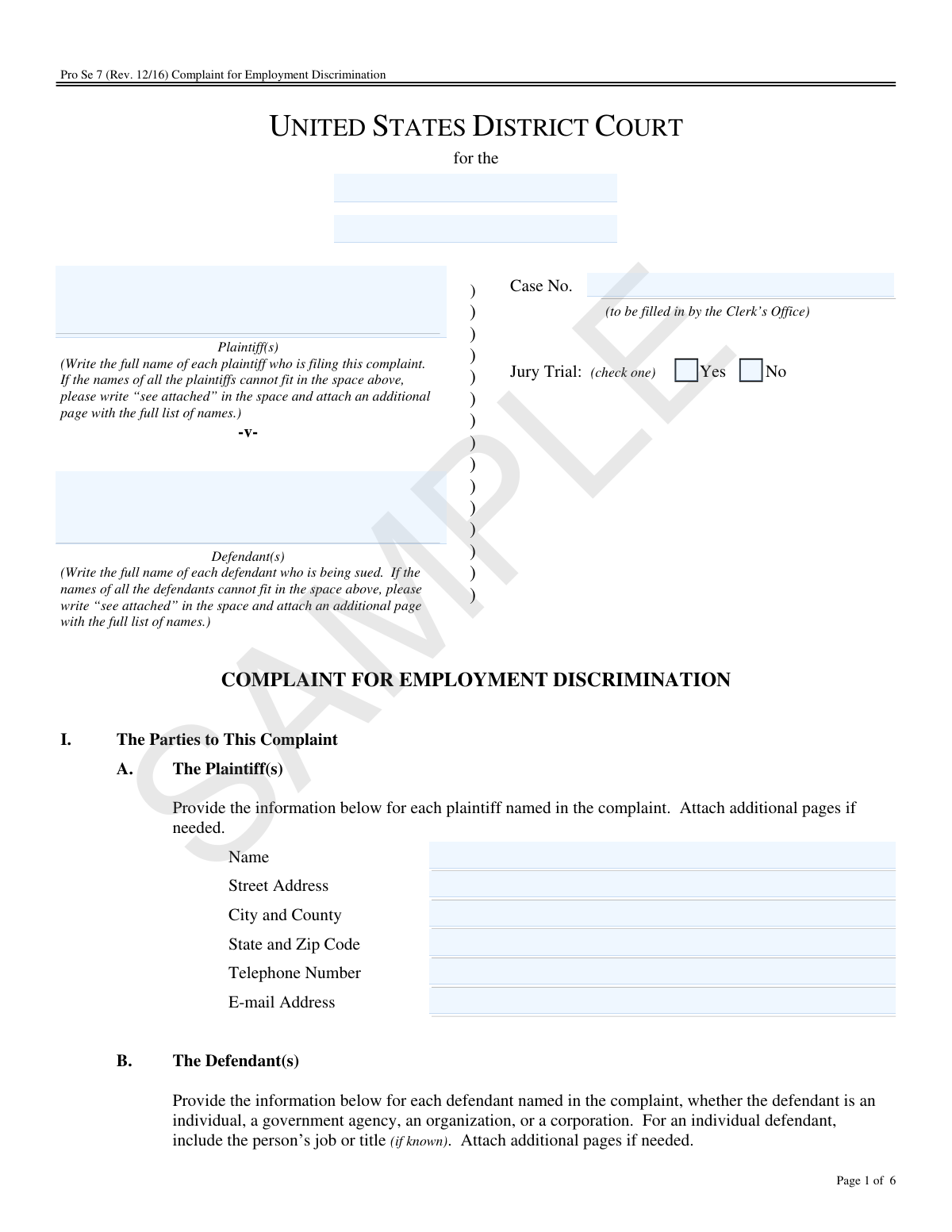
Yes! You can use AI to fill out Pro Se 7, Complaint for Employment Discrimination
The Pro Se 7, Complaint for Employment Discrimination, is a form provided by the United States Courts for individuals representing themselves (pro se) to initiate a lawsuit against an employer for discriminatory practices. This crucial document outlines the parties involved, the legal basis for the claim (such as Title VII, ADEA, or ADA), and the specific facts of the alleged discrimination. Today, this form can be filled out quickly and accurately using AI-powered services like Instafill.ai, which can also convert non-fillable PDF versions into interactive fillable forms.
Our AI automatically handles information lookup, data retrieval, formatting, and form filling.
It takes less than a minute to fill out Pro Se 7 using our AI form filling.
Securely upload your data. Information is encrypted in transit and deleted immediately after the form is filled out.
Form specifications
| Form name: | Pro Se 7, Complaint for Employment Discrimination |
| Number of fields: | 105 |
| Number of pages: | 6 |
| Language: | English |
| Categories: | discrimination forms, employment forms |
Instafill Demo: How to fill out PDF forms in seconds with AI
How to Fill Out Pro Se 7 Online for Free in 2026
Are you looking to fill out a PRO SE 7 form online quickly and accurately? Instafill.ai offers the #1 AI-powered PDF filling software of 2026, allowing you to complete your PRO SE 7 form in just 37 seconds or less.
Follow these steps to fill out your PRO SE 7 form online using Instafill.ai:
- 1 Navigate to Instafill.ai and upload or select the Pro Se 7 Complaint for Employment Discrimination form.
- 2 Use the AI-powered tool to automatically populate your personal information as the plaintiff and the details of the defendant(s).
- 3 In the 'Basis for Jurisdiction' section, check the boxes corresponding to the laws your claim is based on, such as Title VII, ADEA, or the ADA.
- 4 Complete the 'Statement of Claim' by detailing the discriminatory conduct, the dates it occurred, and a clear narrative of the facts of your case.
- 5 Provide information on the 'Exhaustion of Federal Administrative Remedies' section, including the date you filed a charge with the EEOC and the status of your Notice of Right to Sue letter.
- 6 Clearly state the 'Relief' you are seeking from the court, such as monetary damages or other remedies.
- 7 Carefully review all the information you've entered for accuracy, then digitally sign and date the form before downloading it for filing with the court.
Our AI-powered system ensures each field is filled out correctly, reducing errors and saving you time.
Why Choose Instafill.ai for Your Fillable Pro Se 7 Form?
Speed
Complete your Pro Se 7 in as little as 37 seconds.
Up-to-Date
Always use the latest 2026 Pro Se 7 form version.
Cost-effective
No need to hire expensive lawyers.
Accuracy
Our AI performs 10 compliance checks to ensure your form is error-free.
Security
Your personal information is protected with bank-level encryption.
Frequently Asked Questions About Form Pro Se 7
This form is used to initiate a lawsuit in a U.S. District Court for employment discrimination without the assistance of a lawyer. It is for individuals who believe they have been discriminated against by an employer based on race, color, gender, religion, age, disability, or other protected characteristics.
This form is designed for individuals representing themselves (known as 'pro se' litigants) to file a formal complaint against an employer in federal court. You should only use this form after you have already filed a charge with the Equal Employment Opportunity Commission (EEOC) and have completed that process.
Yes, for most discrimination claims (like those under Title VII or the ADA), you must first obtain a 'Notice of Right to Sue' letter from the EEOC. This letter is required to file a lawsuit in federal court, and you must attach a copy of it to this complaint.
You should leave the 'Case No.' field blank when you first fill out the form. The Clerk's Office at the courthouse will assign a case number and fill in this information when you officially file your complaint.
In this section, you should provide a short and plain statement of the facts of your case. Describe what happened, when it happened, and who was involved, but avoid making legal arguments.
This is where you state what you are asking the court to order. This could include financial compensation for lost wages, punitive damages, reinstatement to your job, or other actions to correct the discrimination.
The form instructs you to write 'see attached' in the defendant section if you run out of space. You can then list the remaining defendants' full names and information on a separate, attached page.
Yes, for claims under federal laws like Title VII, the ADA, and the ADEA, you are required to first file a charge with the Equal Employment Opportunity Commission (EEOC). This complaint form is the next step for taking your case to court after the EEOC process is complete.
Yes, you must file your complaint in court within 90 days of the date you receive the 'Notice of Right to Sue' from the EEOC. This is a strict deadline, so it is very important to file on time.
After you have completed and signed the form, you must file it with the Clerk's Office for the correct U.S. District Court. Remember to attach a copy of your 'Notice of Right to Sue' letter and any other supporting documents mentioned.
Yes, services like Instafill.ai use AI to help you accurately auto-fill form fields with your personal information, which saves time and helps prevent mistakes. However, AI cannot provide legal advice for the narrative sections of your claim.
You can upload the Pro Se 7 PDF to the Instafill.ai platform. Their service will make the document interactive, allowing you to easily type your information into the correct fields, save your progress, and download the completed form.
If you have a non-fillable or 'flat' PDF, you can use a service like Instafill.ai. It can convert the flat PDF into an interactive, fillable form that you can complete on your computer, print, and file.
Compliance Pro Se 7
Validation Checks by Instafill.ai
1
Plaintiff and Defendant Minimum Requirement
This check verifies that at least one plaintiff and at least one defendant have been fully identified in the complaint. It ensures that the 'Plaintiff(s)' section (I.A) and at least one 'Defendant' section (I.B) contain complete name and address information. A complaint cannot proceed without clearly identified opposing parties, and failure to provide this will result in the form being rejected as incomplete.
2
Jurisdictional Basis Selection
Validates that at least one checkbox is selected in Section II, 'Basis for Jurisdiction'. A federal court must have a legal basis (jurisdiction) to hear a case. Failing to select a basis, such as Title VII or the ADEA, means the complaint does not establish the court's authority to proceed, which is a fatal flaw that would lead to dismissal.
3
Conditional Jurisdiction Specification
Ensures that if the checkbox for 'Other federal law', 'Relevant state law', or 'Relevant city or county law' is selected in Section II, the corresponding text field to specify the law is not empty. This is critical for clarity and legal sufficiency, as simply checking 'Other' without specification leaves the basis for the lawsuit unknown to the court and the defendant.
4
Age Discrimination Claim Consistency
This is a logical check that verifies if 'Age Discrimination in Employment Act' is selected in Section II, then 'age (year of birth)' must be selected in Section III.D, and the 'year of birth' field must be populated with a valid four-digit year. This ensures consistency across the complaint and confirms the plaintiff meets the protected age class requirement, which is fundamental for an age discrimination claim.
5
Disability Discrimination Claim Consistency
Verifies that if 'Americans with Disabilities Act' is selected in Section II OR 'Failure to accommodate my disability' is selected in Section III.A, then the 'disability or perceived disability' box must be checked in Section III.D and the specific disability must be named. This cross-references related sections to ensure the claim is logically coherent and that the specific nature of the alleged disability discrimination is articulated as required.
6
Right-to-Sue Notice Date Requirement
Checks that if the box 'issued a Notice of Right to Sue letter' is selected in Section IV.B, the corresponding date field for when the letter was received is filled with a valid date. The date of receipt is legally critical as it starts a strict 90-day deadline to file a lawsuit in federal court. Missing this date makes it impossible to determine if the filing is timely.
7
Chronological Date Validation
This validation ensures that the date entered for receiving the 'Notice of Right to Sue letter' (Section IV.B) is on or after the date entered for filing a charge with the EEOC (Section IV.A). A Right to Sue letter cannot be received before the initial charge is filed. This check prevents logical errors and ensures the timeline of administrative exhaustion is plausible.
8
Age Claim 60-Day Waiting Period Prerequisite
Ensures that the question in Section IV.C regarding the 60-day waiting period is answered if, and only if, the claim is based on age discrimination. This question is irrelevant for other claim types but is a mandatory prerequisite for ADEA lawsuits. This validation prevents unnecessary data entry for non-age claims and ensures compliance for age claims.
9
Discriminatory Conduct Specification
Validates that at least one checkbox is selected in Section III.A ('The discriminatory conduct of which I complain'). Furthermore, if the 'Other acts (specify)' checkbox is selected, the corresponding text field must be filled out. This ensures the defendant is properly notified of the specific allegations against them, which is a core principle of due process.
10
Claim Basis Explanation Requirement
This check verifies that for each basis of discrimination checked in Section III.D (e.g., race, religion, gender/sex), the corresponding free-text explanation field is not empty. A mere checkmark is insufficient; the plaintiff must provide a minimal factual basis for why they believe the discrimination occurred. Failure to do so may lead to the dismissal of that specific claim for being conclusory.
11
Signature Block Exclusivity and Completeness
Verifies that either the 'For Parties Without an Attorney' section (VI.A) or the 'For Attorneys' section (VI.B) is completed, but not both. The section that is filled must be fully completed, including a date, signature, and printed name. A complaint is not valid without a proper signature, and this check ensures the correct party has certified the document as required by Rule 11.
12
Contact Information Formatting
Validates that all telephone number and email address fields across the form adhere to standard formats. For example, a telephone number should contain 10 digits, and an email must include an '@' symbol and a domain. This is crucial for ensuring the court and opposing parties can reliably contact the filer, as failure to maintain current contact information can be grounds for dismissal.
13
Address and ZIP Code Validation
Ensures that for every party and place of employment, the address fields are complete and the 'State and Zip Code' field contains a valid state abbreviation and a 5-digit or 9-digit ZIP code. Correct and complete addresses are essential for official mailings, service of process, and establishing court venue. Incorrect addresses can cause critical delays and legal complications.
14
Jury Trial Selection Requirement
This check ensures that exactly one option ('Yes' or 'No') is selected for the 'Jury Trial' request. This is a critical choice that determines whether the case will be decided by a jury of peers or a single judge. Leaving this ambiguous would require the court to seek clarification, delaying the case's progression.
Common Mistakes in Completing Pro Se 7
Plaintiffs often sue only their direct supervisor instead of the company, or they misspell the legal name of the corporation. This can be a fatal flaw, as a judgment may be unenforceable against the wrong party, or the case could be dismissed for failure to name the proper employer entity. To avoid this, research the company's official legal name and consider naming both the individual supervisor (if they had direct involvement) and the corporate entity as defendants in Section I.B.
The 'Statement of Claim' section asks for facts, not legal arguments. Pro se litigants often fill this section with conclusions like 'my rights were violated' instead of stating who did what, and when. This weakens the complaint and can lead to dismissal. You should clearly and chronologically list the factual events, specifying what each defendant did to cause you harm.
For claims under Title VII and the ADA, a 'Notice of Right to Sue' from the EEOC is a mandatory prerequisite for filing in federal court. A very common and critical error is forgetting to attach a copy of this letter to the complaint, as noted in Section IV.B. This omission will cause the court to reject the filing or dismiss the case for failure to exhaust administrative remedies.
A federal lawsuit is generally limited to the claims made in the original charge filed with the EEOC. A frequent mistake is adding new types of discrimination (e.g., adding a retaliation claim when the EEOC charge only mentioned disability) in Section III of the complaint. Courts will often dismiss any new claims that were not first presented to the EEOC, so ensure your complaint is consistent with your administrative filing.
The caption at the top of the form requires the specific U.S. District Court and Division (e.g., 'Southern District of New York'). Filers unfamiliar with the federal court system often leave this blank or enter the wrong information. Filing in the wrong court can lead to dismissal or lengthy delays from a case transfer, so it is crucial to identify the correct federal district before filing.
The 'Case No.' field is explicitly marked as 'to be filled in by the Clerk’s Office.' However, filers sometimes try to fill it in, writing 'N/A' or a number from their EEOC file, which creates confusion during intake. This mistake stems from the desire to complete every box, but you must leave this field blank for the court to assign a number upon filing.
In Section III.E, simply checking boxes is not enough; you must provide a narrative of the facts. Many filers write a single sentence or are too vague, failing to connect the discriminatory basis (like race or gender) to the specific adverse actions. You must explain the 'how' and 'why' of your claim, providing enough factual detail to show that your claim is plausible.
Unlike other claims, the Age Discrimination in Employment Act (ADEA) has a special rule referenced in Section IV.C: a plaintiff must wait 60 days after filing an EEOC charge before they can file a lawsuit. A common error is filing the complaint before this 60-day period has passed. This can lead to the case being dismissed as premature, forcing the plaintiff to refile.
Providing an incomplete or outdated address for yourself or the defendants is a frequent problem. If your own address in Section I.A is wrong, you will miss crucial court deadlines and orders, potentially resulting in dismissal. If the defendant's address is wrong, the court cannot ensure proper service of the lawsuit, halting the case. AI-powered tools like Instafill.ai can help prevent these errors by validating address formats and ensuring all required contact fields are complete.
The form provides limited space for listing multiple plaintiffs/defendants or for detailing the facts of the case. The instructions state to write 'see attached' and use additional pages, but filers often try to cram unreadable text into the small boxes or simply omit information. This makes the complaint difficult to understand and may leave out critical details. If the form is a non-fillable PDF, tools like Instafill.ai can convert it into a fillable version with expandable text fields to avoid this issue.
Saved over 80 hours a year
“I was never sure if my IRS forms like W-9 were filled correctly. Now, I can complete the forms accurately without any external help.”
Kevin Martin Green
Your data stays secure with advanced protection from Instafill and our subprocessors

Robust compliance program
Transparent business model
You’re not the product. You always know where your data is and what it is processed for.
ISO 27001, HIPAA, and GDPR
Our subprocesses adhere to multiple compliance standards, including but not limited to ISO 27001, HIPAA, and GDPR.
Security & privacy by design
We consider security and privacy from the initial design phase of any new service or functionality. It’s not an afterthought, it’s built-in, including support for two-factor authentication (2FA) to further protect your account.
Fill out Pro Se 7 with Instafill.ai
Worried about filling PDFs wrong? Instafill securely fills pro-se-7-complaint-for-employment-discrimination forms, ensuring each field is accurate.