Yes! You can use AI to fill out Resource Family Complaint Report

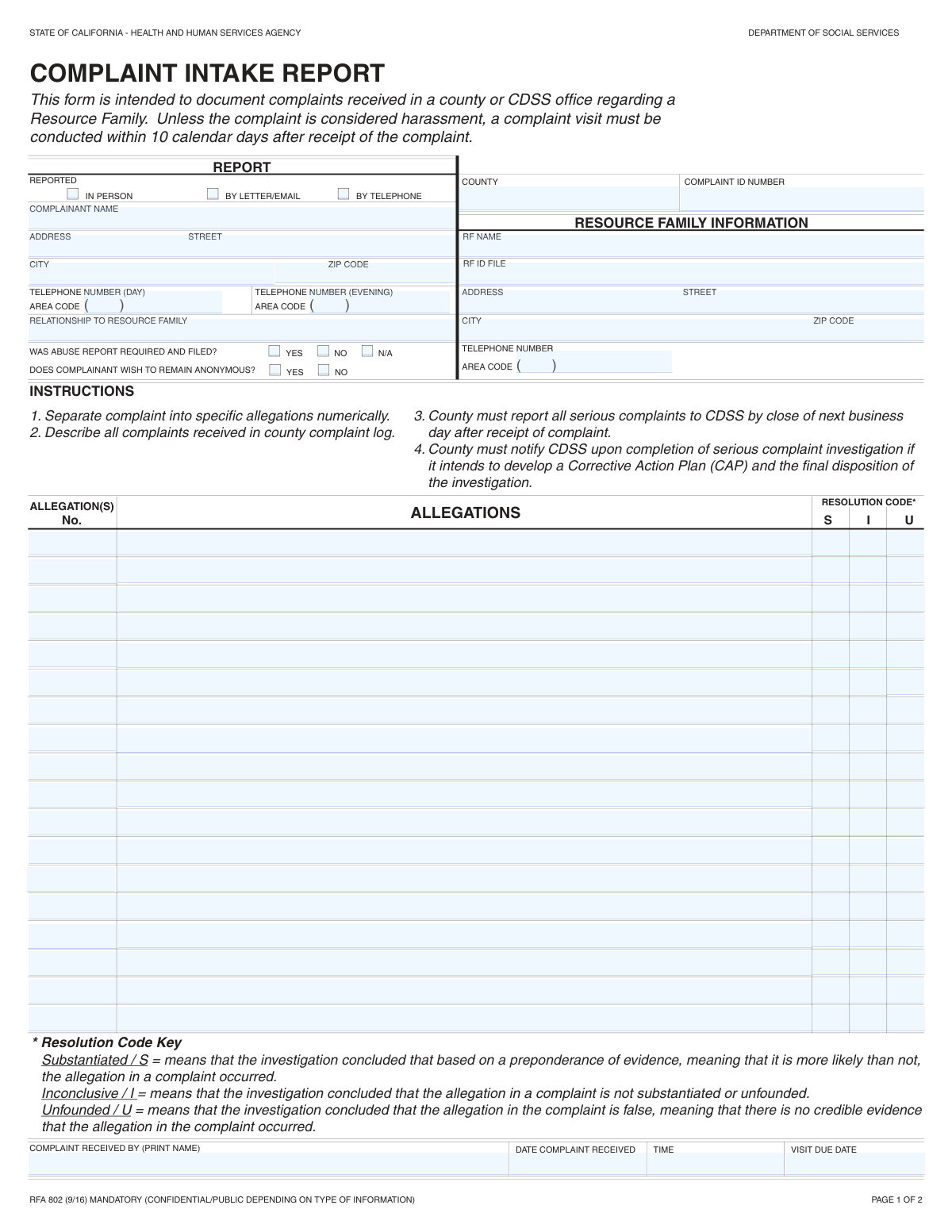
The Resource Family Complaint Report is an official form used by child welfare or social service agencies to document complaints lodged against a resource or foster family. It serves as a comprehensive record of the allegations, the details of the investigation, contact with the complainant, and the final determination for each allegation (substantiated, inconclusive, or unsubstantiated). This report is vital for ensuring accountability and protecting the welfare of children in care. Today, this form can be filled out quickly and accurately using AI-powered services like Instafill.ai, which can also convert non-fillable PDF versions into interactive fillable forms.
Our AI automatically handles information lookup, data retrieval, formatting, and form filling.
It takes less than a minute to fill out RF Complaint Report using our AI form filling.
Securely upload your data. Information is encrypted in transit and deleted immediately after the form is filled out.

Form specifications

Form name: Resource Family Complaint Report
Number of fields: 172
Number of pages: 2
Language: English
Categories: resource family forms
main-image

Instafill Demo: How to fill out PDF forms in seconds with AI

How to Fill Out RF Complaint Report Online for Free in 2026

Are you looking to fill out a RF COMPLAINT REPORT form online quickly and accurately? Instafill.ai offers the #1 AI-powered PDF filling software of 2026, allowing you to complete your RF COMPLAINT REPORT form in just 37 seconds or less.
Follow these steps to fill out your RF COMPLAINT REPORT form online using Instafill.ai:
  1. 1 Navigate to Instafill.ai and upload or select the Resource Family Complaint Report. The AI will automatically identify all the fields for you.
  2. 2 In the initial sections, provide the report identification details, such as county and complaint ID, and specify how the complaint was received.
  3. 3 Enter the complainant's information if they do not wish to remain anonymous, followed by the complete details of the resource family being investigated.
  4. 4 Systematically document each allegation in the numbered sections. For each one, provide a detailed description and check the box corresponding to the investigation's finding (e.g., Substantiated, Inconclusive, Unsubstantiated).
  5. 5 Complete the sections detailing pre- and post-investigation contact with the complainant, list any other reports obtained (e.g., from CPS), and add follow-up comments.
  6. 6 Review all entered information for accuracy. Finalize the report by entering the investigator's name, completion date, and obtaining the necessary approval signature and date.

Our AI-powered system ensures each field is filled out correctly, reducing errors and saving you time.

Why Choose Instafill.ai for Your Fillable RF Complaint Report Form?

Speed

Complete your RF Complaint Report in as little as 37 seconds.

Up-to-Date

Always use the latest 2026 RF Complaint Report form version.

Cost-effective

No need to hire expensive lawyers.

Accuracy

Our AI performs 10 compliance checks to ensure your form is error-free.

Security

Your personal information is protected with bank-level encryption.

Frequently Asked Questions About Form RF Complaint Report

This form is used to officially document and track a complaint made against a Resource Family. It details the allegations, the investigation process, and the final findings of the investigator.

This form is typically completed by the agency staff member or investigator who receives and is assigned to investigate the complaint.

Yes, you can choose to remain anonymous by checking the 'Yes' box in the 'Complainant Anonymity Preference' section. If you choose to be anonymous, your personal information will not be required for the form.

If you provide your contact information, the investigator may contact you before the investigation for more details and after the investigation to inform you of the outcome, as documented in the contact log sections.

'Substantiated' means the allegation was proven true with evidence. 'Inconclusive' means there was not enough evidence to either prove or disprove the allegation. 'Unsubstantiated' means the allegation was investigated and found to be untrue or lacking supporting evidence.

You need the Resource Family's full name and address. It is also highly recommended to include their specific ID or File Number to ensure the complaint is linked to the correct file.

The 'Visit Due Date' is the internal deadline for the investigator to conduct the initial on-site visit or make first contact as part of the complaint investigation.

This section documents whether the allegations in the complaint were severe enough to require a mandatory, separate report to a child abuse authority, like Child Protective Services (CPS), and confirms if that report was filed.

The form provides space to detail up to eighteen separate allegations. If you have more, you should use an additional form or attach a separate document detailing the remaining allegations.

If you have a non-fillable or 'flat' PDF, you can use an online tool like Instafill.ai. It can convert the document into an interactive, fillable form that you can complete on your computer.

Yes, services like Instafill.ai use AI to make filling out forms faster and more accurate. These tools can auto-fill repetitive information and help ensure all required fields are completed correctly.

To use Instafill.ai, you would upload this form to their website. The AI will automatically identify all the fields, allowing you to easily type in your information and complete the form digitally.

This section is for documenting all other evidence-gathering activities. You should list any reports obtained from other agencies like CPS, and detail all contacts made with other relevant parties, including the dates of contact.

The Resource Family (RF) Investigator who completed the report signs and dates it. There is also a field for an 'Approved Date,' which is likely filled in by a supervisor or manager who reviews and approves the investigation report.

Compliance RF Complaint Report
Validation Checks by Instafill.ai

1
Conditional Complainant Information Requirement
This check validates that if the 'Complainant Anonymity Preference' is 'No', then the 'Complainant Name' field must be filled. Conversely, if the preference is 'Yes', all complainant identifying fields (Name, Address, Phone, etc.) must be empty. This ensures data privacy is respected for anonymous reporters while capturing necessary contact information for non-anonymous ones. Failure would prevent form submission until the data inconsistency is resolved.
2
Chronological Date Sequence Integrity
This validation ensures that key dates are in a logical chronological order: 'Date Complaint Received' must be on or before the 'Visit Due Date', which must be on or before the 'Completion Date', which must be on or before the 'Approved Date'. This is critical for maintaining an accurate and logical timeline of the complaint process. An error would indicate a data entry mistake and require correction before the record can be saved.
3
Exclusive Report Method Selection
This check ensures that exactly one 'Report Method' (In Person, By Letter/Email, or By Telephone) is selected. It prevents ambiguity in how the complaint was initially received, which is important for reporting and process auditing. If zero or more than one option is selected, the system will prompt the user to choose a single, definitive method.
4
Exclusive Allegation Resolution Status
For each allegation entered, this validation confirms that only one resolution status (e.g., 'Substantiated', 'Inconclusive', 'Unsubstantiated') is selected. An allegation cannot have multiple conflicting outcomes. This rule is essential for data integrity and clear reporting on investigation results. A failure would highlight the specific allegation with the error and require the user to select a single resolution.
5
Allegation Entry Completeness
This check verifies that if an 'Allegation Description' field is filled for any of the allegations, then its corresponding 'Allegation Number' and a resolution status must also be provided. This prevents incomplete or orphaned allegation records that lack context or an outcome. The form will be considered incomplete if an allegation description exists without its required associated data.
6
Complainant Phone Number Format
This validation ensures that the 'Complainant Phone Area Code' contains exactly 3 digits and the 'Complainant Phone Number' contains exactly 7 digits. This maintains a standard format for telephone numbers, ensuring data quality and usability for contact purposes. If the format is incorrect, the user will be prompted to correct the entry before proceeding.
7
Zip Code Format Validation
This check verifies that the 'Complainant Zip Code' and the zip code within the 'Resource Family City and Zip Code' field are in a valid 5-digit or 9-digit (ZIP+4) format. Correctly formatted zip codes are essential for mailings, location services, and jurisdictional assignments. An invalid format will trigger an error message requiring the user to enter a standard US zip code.
8
Mandatory Core Identification Fields
This validation ensures that the 'Complaint ID Number', 'Resource Family Name', and 'Resource Family ID/File Number' fields are not empty. These fields are the primary identifiers for the entire complaint record and are crucial for filing, retrieval, and cross-referencing. The form cannot be submitted without this fundamental information.
9
Sequential and Unique Allegation Numbering
This check ensures that all entered 'Allegation Number' fields are populated with unique, sequential integers (1, 2, 3, etc.). This prevents duplicate or skipped allegation numbers, which could cause confusion and errors in reporting and legal documentation. The system would flag any duplicates or gaps in the numbering sequence for correction.
10
Investigator Completion Information Presence
This validation confirms that the 'Investigator Name', 'Completion Date', and 'Investigator Signature Date' are all filled out. These fields collectively signify that the investigation has been formally concluded and documented by the assigned investigator. Missing information in this section would indicate an incomplete report and prevent the record from being finalized.
11
Exclusive Abuse Report Status Selection
This check ensures that for the 'Abuse Report Filing Status', only one of the three options ('Yes', 'No', 'Not Applicable') is selected. This prevents contradictory information regarding a critical compliance step related to mandatory abuse reporting. The system will require the user to make a single, unambiguous selection to proceed.
12
Conditional Contact Section Completion
This validation verifies that if 'Complainant Anonymity Preference' is 'No', then the 'Pre-Investigation Contact' and 'Post-Investigation Contact' sections are logically filled. This means either a contact date and method are provided, or the 'N/A' box is checked for each section. This ensures the process of communicating with the complainant is properly documented. An error will be flagged if the sections are left blank without an explicit 'N/A' selection.
13
Visit Due Date Logic
This check ensures the 'Visit Due Date' is not a date in the past relative to the 'Date Complaint Received'. The due date for a visit must be on the same day or in the future to represent a valid deadline for action. This validation is important for ensuring timely responses and compliance with procedural timelines. An invalid date would require user correction.
14
Resource Family Address Parsing and Completeness
This validation checks that the 'Resource Family City and Zip Code' field contains both a non-empty city name and a validly formatted zip code. The system will attempt to parse the string to identify both components. This is crucial for accurately locating the resource family for visits and official correspondence. If either the city or a valid zip code is missing, the user will be prompted to provide the complete address information.

Common Mistakes in Completing RF Complaint Report

Providing Complainant Details Despite Requesting Anonymity

This error occurs when a user checks 'Yes' for 'Complainant Anonymity Preference' but then fills in the name, address, or phone number in the 'Complainant Information' section. This action directly contradicts the form's instructions and the complainant's stated wish, creating a legally ambiguous record. To avoid this, strictly follow the conditional logic and leave the complainant details section blank if anonymity is requested.

Inconsistent or Confusing Allegation Numbering

The form contains numerous, repetitively labeled fields for allegations (e.g., 'Allegation Number 1' appears under multiple sections). Users often get confused and restart the numbering for each section instead of maintaining a single sequential count for all allegations. This makes the report difficult to follow and can lead to misinterpretation of which outcome corresponds to which claim. Always use a continuous numbering sequence (1, 2, 3, 4...) across all allegation entries.

Misinterpreting Allegation Outcome Terminology

The form uses various similar-sounding terms for investigation outcomes, such as 'Unsubstantiated,' 'Inconclusive,' 'Unfounded,' and 'Insufficient.' Users frequently select the wrong status because they don't understand the specific procedural or legal distinctions between them. This can inaccurately represent the investigation's findings, so it is crucial to consult agency definitions to ensure the correct term is used for each allegation's resolution.

Omitting Critical Identification Numbers

Forgetting to enter the 'Complaint ID Number' or the 'Resource Family ID/File Number' is a critical mistake. These unique identifiers are the primary method for linking the report to the correct electronic and physical case files. Without them, the document can be misfiled, causing significant delays in processing the complaint and locating associated records.

Failing to Select an Outcome for a Detailed Allegation

A common oversight is to write a detailed description for an allegation but then neglect to check one of the corresponding outcome boxes ('Substantiated,' 'Inconclusive,' etc.). This leaves the record for that specific allegation incomplete and creates ambiguity about the investigation's official finding. To prevent this, ensure that every allegation described on the form has a final resolution status clearly marked.

Incomplete Phone Number Entry

The form splits the complainant's phone number into two separate fields: 'Complainant Phone Area Code' and 'Complainant Phone Number.' People often enter the full 10-digit number in one field while leaving the other blank, or they forget the area code entirely. This results in incomplete data and prevents staff from being able to contact the complainant. AI-powered form filling tools like Instafill.ai can prevent this by automatically parsing and placing number components into the correct fields.

Providing Vague or Subjective Allegation Details

In the 'Allegation Details' fields, users sometimes write emotional statements or general complaints instead of providing a factual account of events. Descriptions that lack specifics—such as who was involved, what happened, and when and where it occurred—hinder the investigation by not providing clear, actionable information. Always focus on objective facts and concrete details to ensure the allegation can be properly assessed.

Missing Crucial Complaint Receipt Timestamps

The 'Date Complaint Received' and 'Time Complaint Received' fields are essential for establishing an official timeline and ensuring compliance with procedural deadlines, like the 'Visit Due Date.' Omitting this information can compromise the integrity of the case record and lead to compliance issues during audits. Always record the precise date and time the complaint was officially received by the agency.

Incorrectly Filling Pre/Post-Investigation Contact Logs

The form clearly states that the pre- and post-investigation contact logs should only be filled out if the complainant is not anonymous. A common error is either filling this section out for an anonymous case, creating a contradictory record, or forgetting to complete it for a known complainant, resulting in an incomplete contact history. If the form is a non-fillable PDF, a tool like Instafill.ai can convert it into a smart, fillable version that helps enforce such conditional rules.

Confusing Address Field Formats

The form requests address information in different structures; the complainant's address is broken into separate 'Street,' 'City,' and 'Zip Code' fields, while the resource family's address combines 'City and Zip Code.' Users often mix up these formats or enter incomplete information, which can lead to returned mail and difficulty locating individuals. Using a tool like Instafill.ai can help prevent these errors by automatically populating and formatting addresses correctly according to each field's specific requirement.
Saved over 80 hours a year

“I was never sure if my IRS forms like W-9 were filled correctly. Now, I can complete the forms accurately without any external help.”

Kevin Martin Green

Your data stays secure with advanced protection from Instafill and our subprocessors

Robust compliance program

Transparent business model

You’re not the product. You always know where your data is and what it is processed for.

ISO 27001, HIPAA, and GDPR

Our subprocesses adhere to multiple compliance standards, including but not limited to ISO 27001, HIPAA, and GDPR.

Security & privacy by design

We consider security and privacy from the initial design phase of any new service or functionality. It’s not an afterthought, it’s built-in, including support for two-factor authentication (2FA) to further protect your account.

Fill out RF Complaint Report with Instafill.ai

Worried about filling PDFs wrong? Instafill securely fills resource-family-complaint-report forms, ensuring each field is accurate.