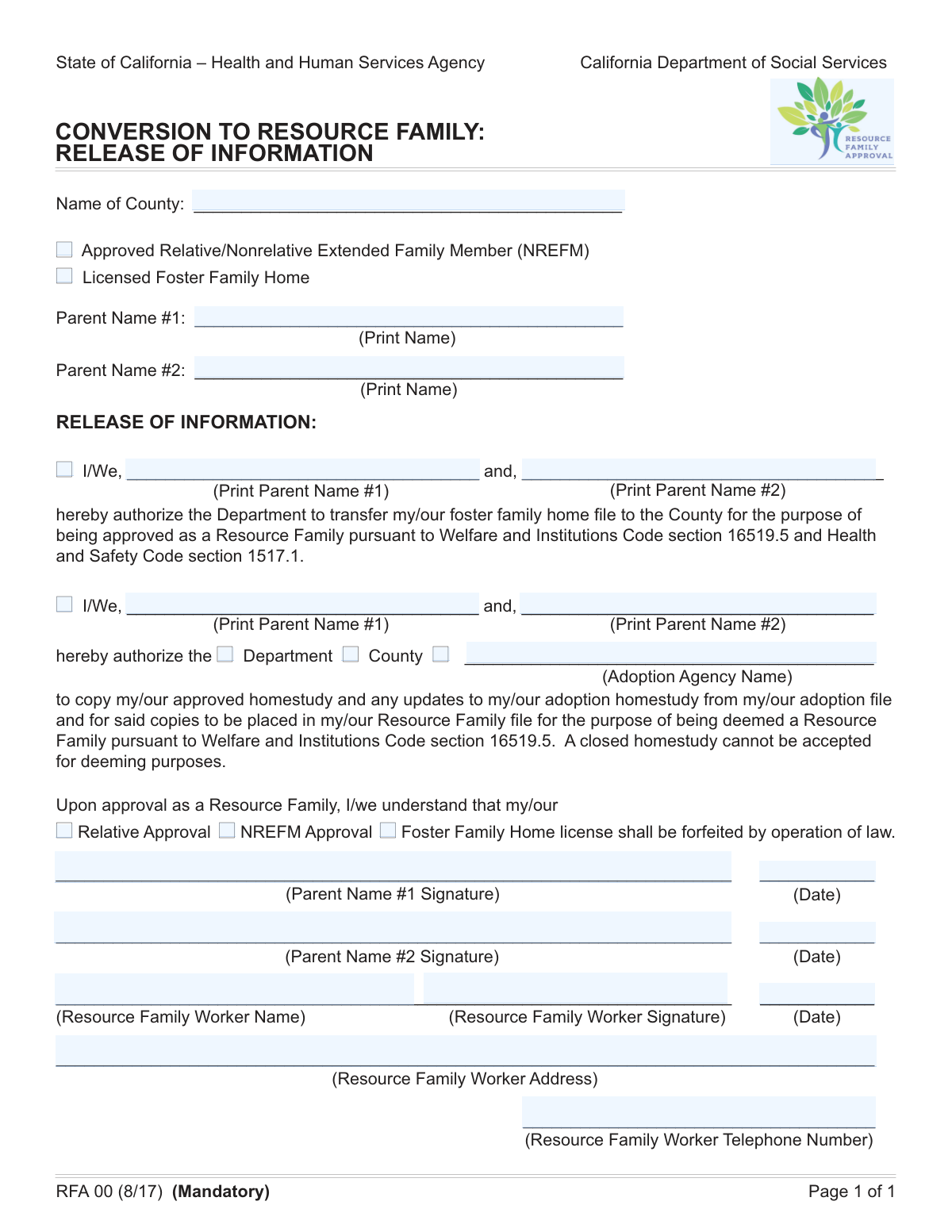
Yes! You can use AI to fill out RFA 03, Resource Family Approval - Authorization for File Transfer

The RFA 03, Authorization for File Transfer, is a California state form for current foster families, approved relatives, or nonrelative extended family members (NREFMs) to transition into the Resource Family Approval (RFA) program. It grants permission to transfer existing files and homestudies to the county and confirms the forfeiture of the previous license upon approval as a Resource Family. Today, this form can be filled out quickly and accurately using AI-powered services like Instafill.ai, which can also convert non-fillable PDF versions into interactive fillable forms.
Our AI automatically handles information lookup, data retrieval, formatting, and form filling.
It takes less than a minute to fill out RFA 03 using our AI form filling.
Securely upload your data. Information is encrypted in transit and deleted immediately after the form is filled out.

Form specifications

Form name: RFA 03, Resource Family Approval - Authorization for File Transfer
Number of fields: 29
Number of pages: 1
Language: English
Categories: authorization forms, resource family forms, transfer forms
main-image

Instafill Demo: How to fill out PDF forms in seconds with AI

How to Fill Out RFA 03 Online for Free in 2026

Are you looking to fill out a RFA 03 form online quickly and accurately? Instafill.ai offers the #1 AI-powered PDF filling software of 2026, allowing you to complete your RFA 03 form in just 37 seconds or less.
Follow these steps to fill out your RFA 03 form online using Instafill.ai:
  1. 1 Navigate to Instafill.ai, then upload your RFA 03 form or select it from the platform's template library.
  2. 2 Enter the county name and select your current family type (e.g., Licensed Foster Family Home, Approved Relative).
  3. 3 Provide the full names of the parent applicants.
  4. 4 Complete the 'Authorization for File Transfer' and 'Authorization for Homestudy Copying' sections by checking the relevant boxes and printing the applicants' names.
  5. 5 Acknowledge the forfeiture of your current license upon approval as a Resource Family by checking the appropriate box in the 'License Forfeiture Acknowledgement' section.
  6. 6 Electronically sign and date the form in the designated parent signature fields.
  7. 7 Review all entered information for accuracy before downloading or submitting the completed form to your Resource Family Worker.

Our AI-powered system ensures each field is filled out correctly, reducing errors and saving you time.

Why Choose Instafill.ai for Your Fillable RFA 03 Form?

Speed

Complete your RFA 03 in as little as 37 seconds.

Up-to-Date

Always use the latest 2026 RFA 03 form version.

Cost-effective

No need to hire expensive lawyers.

Accuracy

Our AI performs 10 compliance checks to ensure your form is error-free.

Security

Your personal information is protected with bank-level encryption.

Frequently Asked Questions About Form RFA 03

This form is used to authorize the transfer of your existing foster care or relative placement files to the county for the purpose of being approved as a Resource Family. It streamlines the transition by allowing the use of your existing records and homestudy.

This form should be completed by individuals or couples who are currently an approved relative, a Nonrelative Extended Family Member (NREFM), or a licensed foster family home and are in the process of becoming an approved Resource Family.

An NREFM is an adult who has a significant, family-like relationship with a child or the child's family. This form helps transition your NREFM approval to a Resource Family approval.

By checking this box, you are giving the Department permission to transfer your complete foster family home file to the County. This is a required step for the County to review your information for Resource Family approval.

Authorizing the copying of your homestudy allows the Department, County, or a specified adoption agency to use your existing approved homestudy. This saves time and resources by avoiding the need to conduct a brand new one.

This section confirms that you understand your current license or approval (e.g., Foster Family Home license) will be forfeited and replaced once you are officially approved as a Resource Family. The Resource Family approval consolidates and supersedes previous license types.

No, if you are applying as an individual, you only need to complete the fields for 'Parent 1'. The 'Parent 2' signature and name fields can be left blank.

The Resource Family Worker is the social worker or case manager from the county or agency who is handling your application. They will complete their section of the form to verify its submission and processing.

You will need to know your current approval type (e.g., Licensed Foster Family Home), the name of your county, and the name of a specific adoption agency if you wish to authorize them to copy your homestudy.

You should submit the completed and signed form directly to your assigned Resource Family Worker. They will process it as part of your application for Resource Family approval.

Yes, services like Instafill.ai use AI to help you accurately auto-fill form fields with your saved information, which can save time and help prevent errors.

To fill this form out online, you can use a platform like Instafill.ai. Simply upload the form, and the service will allow you to type your answers directly into the fields and add your electronic signature.

If your PDF is not fillable, you can use a service like Instafill.ai to make it interactive. Upload the flat PDF, and the platform will automatically convert it into a fillable form you can complete on your computer.

Compliance RFA 03
Validation Checks by Instafill.ai

1
Exclusive Family Type Selection
This check ensures that only one of the 'Family Type' checkboxes ('Approved Relative/NREFM' or 'Licensed Foster Family Home') is selected. Selecting multiple options would create ambiguity in how the application should be processed. If more than one box is checked, the form submission should be blocked with an error message prompting the user to select only one family type.
2
File Transfer Authorization Mandate
Validates that the 'I/We Authorize' checkbox for file transfer is checked. This authorization is critical for the department to legally proceed with transferring the applicant's file. Failure to check this box means the core purpose of the form cannot be fulfilled, so the submission must be rejected until consent is provided.
3
Parent Name Consistency Check
This validation verifies that the names entered in 'Parent 1 Printed Name' and 'Parent 1 Authorized Name' are identical to the name in the 'Parent Name 1' field. This consistency is crucial for legal and administrative accuracy, ensuring the person providing authorization is the same individual listed as the primary applicant. A mismatch would trigger an error requiring the user to correct the names.
4
Conditional Parent 2 Signature Requirement
If the 'Parent Name 2' field is filled, this check ensures that 'Parent #2 Signature' and its corresponding 'Signature Date' are also completed. The presence of a second parent's name implies joint application and authorization, which requires their signature for the document to be legally valid. The form should be considered incomplete if the second parent is named but has not signed.
5
Homestudy Copying Entity Requirement
This check is triggered if the 'General Homestudy Copying Authorization' box is checked. It then validates that at least one of the specific entities ('Authorize Department to Copy', 'Authorize County to Copy', or 'Authorize Adoption Agency to Copy') is also selected. General authorization is meaningless without specifying who is authorized, so this prevents incomplete consent and ensures the applicant's intent is clear.
6
Conditional Adoption Agency Name Requirement
Validates that the 'Adoption Agency Name' text field is filled out if and only if the 'Authorize Adoption Agency to Copy Homestudy' checkbox is selected. This ensures that a specific agency is identified when permission is granted to an agency. If the box is checked but the name is missing, the form is incomplete; if the name is present but the box is unchecked, it's a data inconsistency that must be corrected.
7
Family Type and License Forfeiture Consistency
This logical check ensures the 'License Forfeiture Acknowledgement' selection matches the 'Family Type' selection. For example, if 'Licensed Foster Family Home' is checked as the family type, the 'Foster Family Home' license forfeiture checkbox must also be checked. This confirms the applicant understands and agrees to the specific consequences of their application, preventing future disputes about license status.
8
Parent 1 Signature and Date Completeness
Ensures that both the 'Parent # 1 hand Signature' and 'Date parent # 1 signed' fields are filled. The primary applicant's signature and date are fundamental requirements for the form's validity and attest to the accuracy of the provided information. An empty signature or date field would render the document legally non-binding and must be completed before submission.
9
Universal Date Format Validation
This check iterates through all date fields on the form ('Date parent # 1 signed', 'Signature Date' for Parent 2, 'Signature Date' for worker) and validates that they are in a proper, consistent format (e.g., MM/DD/YYYY). Incorrectly formatted dates can cause data processing errors and ambiguity in legal timelines. The user should be prompted to correct any invalid date entries.
10
Signature Date Chronology
Validates that all signature dates are not set in the future. A signature date must be the current date or a past date to be valid. This prevents post-dating of legal documents, which can have serious legal and compliance implications. If a future date is entered, the system should reject it and require a valid date.
11
Resource Family Worker Information Completeness
Verifies that all fields in the 'Resource Family Worker Information' section (Name, Signature, Date, Address, Telephone) are filled out. This information is essential for internal tracking, accountability, and follow-up by the department. An incomplete worker section would halt the internal processing of the application, so it must be fully completed by the official.
12
Worker Telephone Number Format
This validation ensures the 'Resource Family Worker Telephone Number' adheres to a standard phone number format (e.g., (XXX) XXX-XXXX or XXX-XXX-XXXX). A consistent format is crucial for database integrity and ensures that communication systems can correctly parse and use the number. An invalid format would trigger an error, requiring the worker to re-enter the number correctly.
13
County Name Requirement
This check ensures that the 'County Name' field is not left blank. The county is a critical piece of information that determines which jurisdiction is responsible for processing the application and managing the case. Without this information, the form cannot be routed correctly, making it a mandatory field for submission.

Common Mistakes in Completing RFA 03

Inconsistent Parent Names Across Sections

Applicants often enter their name differently in various fields, such as using a full middle name in one section and only an initial in another. This inconsistency can raise red flags during verification, causing processing delays while the agency confirms the applicant's identity. To avoid this, ensure the full legal name is used consistently throughout the form; AI-powered tools like Instafill.ai can autofill information consistently across all relevant fields to prevent such discrepancies.

Omitting Second Applicant's Information

When two parents are applying together, they frequently forget to fill out the fields required for the second person, such as their printed name and signature, especially when it's conditional. This omission results in an incomplete application that will be returned for correction, delaying the approval process. Always double-check for fields related to a second applicant if you are applying as a couple.

Forgetting the Primary Authorization Checkbox

Applicants may fill out all the name and signature fields within an authorization section but forget to check the primary box like 'I/We Authorize' or 'General Homestudy Copying Authorization'. This single missed checkmark legally invalidates the entire section, even if it is signed and dated. Advanced form-filling tools like Instafill.ai can help by highlighting required fields and validating that interdependent fields are completed correctly.

Incomplete Homestudy Copying Authorization

An applicant might check the main box to authorize copying of their homestudy but then fail to specify *which* entity (Department, County, or Adoption Agency) is granted permission. This ambiguity makes the authorization useless, as the agency cannot act on it without clear direction. To prevent this, carefully review the section and check all applicable sub-options to specify who can receive the documents.

Missing Adoption Agency Name

A common conditional error is checking the box to authorize an adoption agency to receive a copy of the homestudy but then neglecting to write the agency's name in the corresponding field. Without the specific agency name, the authorization cannot be fulfilled, stalling collaboration with a chosen adoption partner. Always double-check that any selection requiring further details is fully completed.

Overlooking License Forfeiture Acknowledgement

Applicants transitioning to a Resource Family often overlook the section where they must acknowledge the forfeiture of their old license or approval. This is a critical legal step, and failing to check the appropriate box will halt the application until the acknowledgement is explicitly made. Carefully read all sections to ensure you understand and complete all required acknowledgements.

Using Nicknames Instead of Full Legal Names

People frequently use nicknames, shortened names, or initials in the 'Parent Name' fields instead of their full legal name as it appears on official documents. This creates a mismatch with background checks and other legal records, leading to significant delays and requests for clarification. Always use your complete and official legal name to ensure a smooth verification process.

Missing Signatures or Dates

Forgetting to sign the form or add the date is one of the most frequent and critical errors, rendering the document legally invalid. This often happens when applicants are rushing or, in the case of two applicants, when one person signs but the other does not. To avoid rejection, meticulously check for all signature and date fields before submission.

Filling Out 'Official Use' Sections

Applicants sometimes mistakenly fill in sections clearly marked for 'Official Use' or for the 'Resource Family Worker,' such as the worker's address or an internal tracking number. This can create confusion and require the agency to issue a new, clean form, causing unnecessary delays. Avoid this by carefully reading all field labels and leaving any sections not intended for the applicant blank.

Illegible Handwriting on a Non-Fillable Form

If this form is only available as a flat PDF, applicants are forced to print and fill it by hand, often leading to illegible handwriting. Unclear names, dates, or other details can be misinterpreted, causing data entry errors on the agency's end and significant delays. To prevent this, use a tool like Instafill.ai, which can convert non-fillable PDFs into interactive, fillable forms, ensuring all entries are clear and accurate.
Saved over 80 hours a year

“I was never sure if my IRS forms like W-9 were filled correctly. Now, I can complete the forms accurately without any external help.”

Kevin Martin Green

Your data stays secure with advanced protection from Instafill and our subprocessors

Robust compliance program

Transparent business model

You’re not the product. You always know where your data is and what it is processed for.

ISO 27001, HIPAA, and GDPR

Our subprocesses adhere to multiple compliance standards, including but not limited to ISO 27001, HIPAA, and GDPR.

Security & privacy by design

We consider security and privacy from the initial design phase of any new service or functionality. It’s not an afterthought, it’s built-in, including support for two-factor authentication (2FA) to further protect your account.

Fill out RFA 03 with Instafill.ai

Worried about filling PDFs wrong? Instafill securely fills rfa-03-resource-family-approval-authorization-for-file-transfer forms, ensuring each field is accurate.