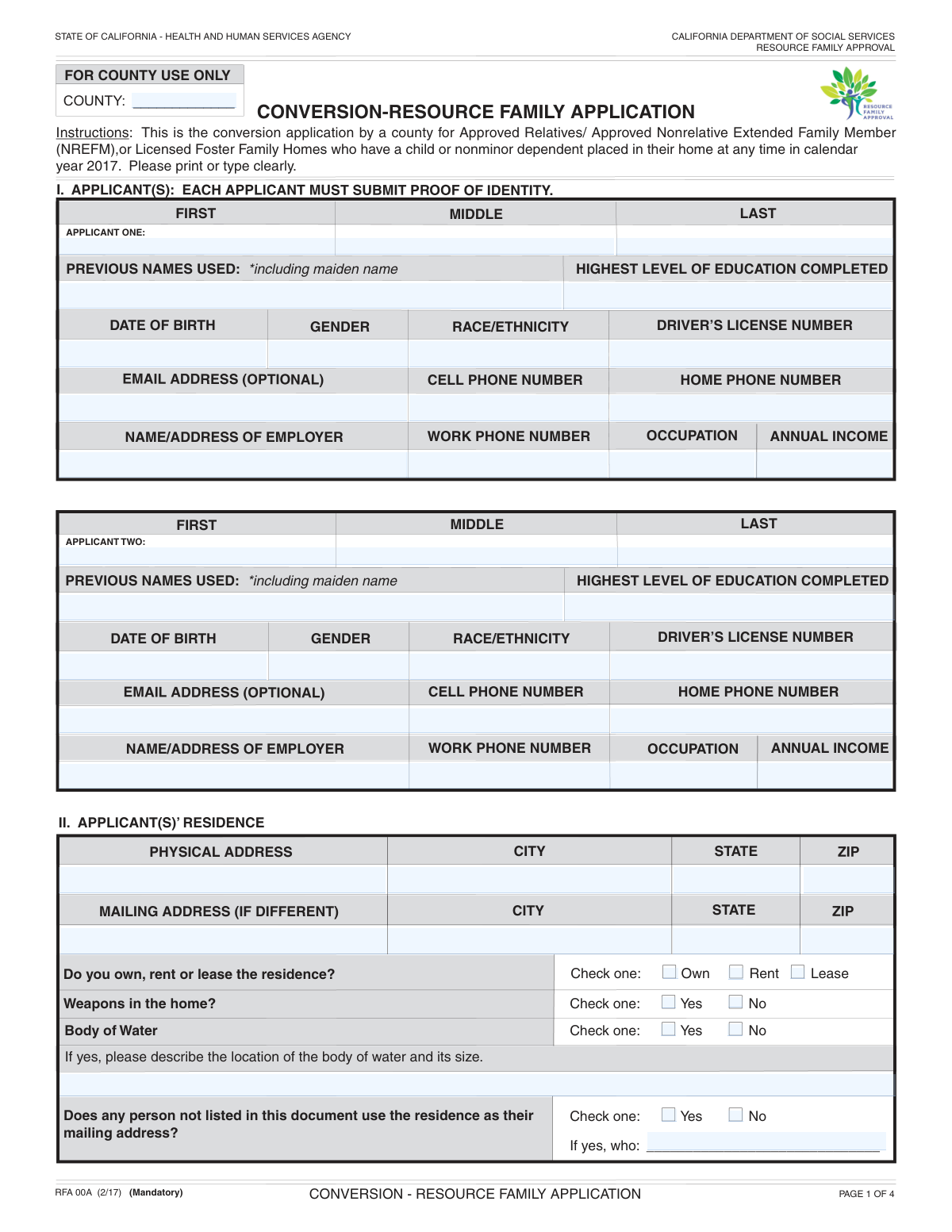
Yes! You can use AI to fill out Form RFA 01 A, Resource Family Application

Form RFA 01 A is the official application used by the California Department of Social Services for individuals or couples wishing to become a resource family, which is a prerequisite for providing foster care or adopting a child from the child welfare system. The form gathers extensive background information on the applicants, their household members, home environment, and any prior experience with licensed care to ensure a safe and stable home for children. Today, this form can be filled out quickly and accurately using AI-powered services like Instafill.ai, which can also convert non-fillable PDF versions into interactive fillable forms.
Our AI automatically handles information lookup, data retrieval, formatting, and form filling.
It takes less than a minute to fill out RFA 01 A using our AI form filling.
Securely upload your data. Information is encrypted in transit and deleted immediately after the form is filled out.

Form specifications

Form name: Form RFA 01 A, Resource Family Application
Number of fields: 165
Number of pages: 4
Language: English
Categories: resource family forms
main-image

Instafill Demo: How to fill out PDF forms in seconds with AI

How to Fill Out RFA 01 A Online for Free in 2026

Are you looking to fill out a RFA 01 A form online quickly and accurately? Instafill.ai offers the #1 AI-powered PDF filling software of 2026, allowing you to complete your RFA 01 A form in just 37 seconds or less.
Follow these steps to fill out your RFA 01 A form online using Instafill.ai:
  1. 1 Navigate to Instafill.ai and upload or select the RFA 01 A form.
  2. 2 Provide personal, contact, and employment information for Applicant One and Applicant Two (if applicable) through the guided AI chat.
  3. 3 Answer questions about your residence, including address, ownership status, and other household members like minor children and other adults.
  4. 4 Detail your relationship history, including current and past marriages or domestic partnerships.
  5. 5 Disclose any previous applications or licenses for foster care, adoption, or other community care facilities, and specify your preferences for a child's age and sibling group size.
  6. 6 Review the auto-filled form to ensure all information, including personal details, household data, and previous history, is accurate.
  7. 7 Electronically sign and date the application in the designated fields before downloading or submitting it to the appropriate county agency.

Our AI-powered system ensures each field is filled out correctly, reducing errors and saving you time.

Why Choose Instafill.ai for Your Fillable RFA 01 A Form?

Speed

Complete your RFA 01 A in as little as 37 seconds.

Up-to-Date

Always use the latest 2026 RFA 01 A form version.

Cost-effective

No need to hire expensive lawyers.

Accuracy

Our AI performs 10 compliance checks to ensure your form is error-free.

Security

Your personal information is protected with bank-level encryption.

Frequently Asked Questions About Form RFA 01 A

This form is a comprehensive application used to gather information about individuals and couples applying to become a resource family, likely for foster care or adoption. It collects personal, financial, and household details to assess suitability.

No, if you are a single applicant, you only need to complete the information for 'Applicant One'. The sections pertaining to 'Applicant Two' can be left blank.

You must list any adult, 18 years or older, who is not an applicant but resides in or is regularly present in your home. This includes adult children, relatives, roommates, or long-term guests.

The agency requires a complete background history for all applicants as part of the approval process. You must provide details for all former spouses or domestic partners, including dates of marriage, divorce, or death.

This form has space for up to four minor children, four adult children, and four other adults. If you need to list more individuals, contact the agency for guidance on how to submit the additional information, which may require an addendum.

You only need to complete the 'Mailing Address' section if the address where you receive mail is different from your physical residence address. If they are the same, you can leave this section blank.

Yes, you are required to disclose if there are any weapons in the home. This information is used for safety assessment purposes as part of the home study process.

You must report any previous application denials, license suspensions, or revocations. Be sure to provide the name of the agency that denied the application in the space provided, as this will be verified.

To complete this form efficiently, you should have personal details for all household members (dates of birth), your employment and income information, and dates and places for your current and past marriages or partnerships.

Yes, you can use AI-powered services like Instafill.ai to help complete this form. These tools can auto-fill many of the fields using your saved information, which saves time and helps ensure accuracy.

Simply upload the form to the Instafill.ai platform. The AI will detect the fields, allowing you to auto-fill your personal, contact, and household information from your secure profile with a single click.

If you have a non-fillable PDF, you can use a tool like Instafill.ai to convert it into an interactive, fillable form. This will allow you to type your answers directly into the fields on your computer before printing.

This section is for providing clear, detailed driving directions to your home, including major cross-streets. This information is used by agency staff, such as social workers, who will need to visit your home as part of the approval process.

Compliance RFA 01 A
Validation Checks by Instafill.ai

1
Applicant Minimum Age Verification
This check validates that the 'Date of Birth' for both Applicant One and Applicant Two corresponds to an age of 18 years or older. It is crucial to ensure that all primary applicants are legal adults, as required for legal agreements and responsibilities. If an applicant is found to be under 18, the form submission will be flagged for review or rejected.
2
Phone Number Format Validation
This validation ensures that all phone number fields (Cell, Home, Work) adhere to a standard 10-digit format, potentially allowing for common separators like hyphens or parentheses. Correctly formatted phone numbers are essential for ensuring the agency can successfully contact the applicants. An invalid format will trigger an error message prompting the user to correct the entry.
3
Email Address Structure Validation
This check verifies that the 'Email Address' fields for both applicants follow the standard '[email protected]' format. A valid email is a primary method of communication for application updates, requests for information, and official notices. If the format is incorrect, the system will prevent submission and require the user to provide a valid email address.
4
Exclusive Residence Ownership Selection
This validation ensures that only one option among 'Own', 'Rent', or 'Lease' is selected in the 'Residence Ownership Status' section. These options are mutually exclusive, and selecting more than one creates a logical contradiction in the applicant's housing status. A failed validation would require the user to select only one of the provided options before proceeding.
5
Conditional Body of Water Description
This check enforces that the 'Body of Water Description' field is mandatory if the applicant checks 'Yes' for the 'Body of Water Information' question. Conversely, it ensures the description field is empty if 'No' is checked. This is important for safety assessments, and failure to provide a required description will halt the submission until the information is provided.
6
Marital History Date Chronology
This validation checks the logical sequence of dates in the marital history sections. It ensures that any 'Divorce/Termination Date' or 'Death Date' occurs after the corresponding 'Marriage/Partnership Date'. This prevents logically impossible data entries and maintains the integrity of the applicant's historical information. An illogical date sequence will result in an error requiring correction.
7
Household Member Age Classification
This check validates the ages of other individuals listed in the home, based on their 'Date of Birth'. It ensures that anyone listed in the 'Minor Child Information' section is under 18 years old, and anyone in the 'Other Adult' or 'Adult Child' sections is 18 or older. This is critical for correctly identifying all household members and applying the appropriate background checks and assessments.
8
Annual Income Numeric Format
This validation ensures that the 'Annual Income' fields for both applicants contain only numeric values, possibly including a decimal point for cents. This is essential for financial assessments and eligibility calculations. Any non-numeric characters (e.g., letters, dollar signs, commas) will cause the validation to fail, prompting the user to enter a valid monetary amount.
9
Applicant Two Data Integrity
This check verifies that if 'Applicant Two First Name' is provided, then other essential fields for Applicant Two (such as 'Last Name', 'Date of Birth', and 'Email Address') are also completed. This rule ensures that a partial entry for a second applicant is not submitted, guaranteeing a complete dataset if two applicants are involved. A failure would prompt the user to either complete the required fields for Applicant Two or remove the partial information.
10
Conditional Previous Denial/Revocation Details
This validation ensures that if an applicant checks 'Yes' to having a previous application denial or license revocation, the corresponding text field ('Denying Agency Name' or 'Suspending/Revoking Agency Name') must be filled out. This information is critical for the background investigation and risk assessment process. The form cannot be submitted with a 'Yes' answer unless the required explanation is provided.
11
Signature Date Validity
This check validates that the 'Date Signed' fields for both applicants are valid dates and are not set in the future. The signature date legally marks the time of attestation, so it must be accurate and current. A future date is a logical impossibility and would invalidate the declaration, causing the submission to be rejected until a valid date is entered.
12
Zip Code Format Validation
This validation ensures that the 'Physical Zip Code' and 'Mailing Address Zip Code' fields conform to a valid 5-digit or 9-digit (ZIP+4) format. Accurate zip codes are essential for address verification, mail delivery, and determining geographic service areas. An incorrectly formatted zip code will trigger an error and must be corrected before submission.
13
Exclusive Binary Question Response
This check ensures that for any binary question pair (e.g., 'Weapons in the home Inquiry' Yes/No, 'Child Currently In Home' Yes/No), only one of the two options is selected. Selecting both or neither creates ambiguity and invalidates the response. The system should enforce a single selection for these question types to ensure clear and decisive answers.
14
Conditional Current Marriage Details
This validation rule ensures that if the 'Married' or 'Domestic Partnership' checkbox is selected, the 'Date of Current Marriage/Domestic Partnership' and 'Place of Current Marriage/Domestic Partnership' fields must be completed. This provides necessary context and proof for the declared relationship status. Failure to provide these details when required will prevent the form from being submitted.

Common Mistakes in Completing RFA 01 A

Filling in Fields Reserved for Official Use

Applicants often see a field like 'County (FOR COUNTY USE ONLY)' and fill it in out of habit, ignoring the explicit instruction. This happens because people tend to complete every box they see on a form. This can interfere with administrative processing, as officials may need to correct the applicant's entry or might misinterpret it as an official notation, leading to confusion and delays. To avoid this, carefully read the label for every field and skip any that are marked for official use only.

Providing Incomplete or Inaccurate Marital History

The form requires extensive details about current and past marriages or domestic partnerships, including names, dates, and specific locations (city/state) for the events. Applicants often provide estimated dates or forget to include the location of a divorce, which is critical for background checks and verification. These inaccuracies or omissions can halt the application, as they require the agency to request clarification or corrected information, significantly delaying the approval process. It is vital to gather all relevant documents like marriage certificates and divorce decrees before starting.

Mishandling Conditionally Required Fields

The form has numerous fields that are conditional, meaning they should only be filled out if a previous question was answered 'Yes' (e.g., 'Body of Water Description'). A frequent error is either checking 'Yes' and then forgetting to provide the required follow-up details, or checking 'No' but still filling in the conditional field. Both mistakes create an incomplete or contradictory record that must be returned for correction, stalling the application. AI-powered tools like Instafill.ai can help by automatically showing or hiding relevant fields based on your answers, ensuring all required information is captured correctly.

Omitting Previous or Maiden Names

The form asks for all 'Previous Names Used,' including maiden names, for each applicant. This information is crucial for conducting a thorough background check. Applicants sometimes forget to list a name from a previous marriage or an alias used in the past. When this undisclosed name appears during the verification process, it raises a red flag and can be perceived as an attempt to conceal information, leading to significant delays or even application denial.

Confusing Physical vs. Mailing Address

The form clearly separates 'Physical Address' from 'Mailing Address,' instructing applicants to fill the latter only if it's different. A common mistake is to either redundantly copy the physical address into the mailing address fields or, more critically, to forget to list a P.O. Box or alternate mailing address when mail is not deliverable to the physical residence. This can result in important correspondence being lost or returned, causing major delays in communication and the overall application timeline.

Entering Incomplete Employer Information

When asked for 'Employer Name and Address,' applicants frequently provide an abbreviated company name and neglect to include the full street address, city, state, and zip code. This lack of detail makes employment verification difficult or impossible for the processing agency. To avoid delays, it is essential to provide the complete, official name and full address of the employer, preferably for the specific branch or HR department that can handle the verification request.

Using Inconsistent or Ambiguous Date Formats

The form has many fields requiring a date (e.g., 'Date of Birth', 'Marriage/Partnership Date') but doesn't specify a format. This leads applicants to use various styles like 'Jan 1, 1990', '1/1/90', or '01-01-1990', which can cause data entry errors and ambiguity (e.g., is 02/04/06 February 4th or April 2nd?). To prevent misinterpretation and processing errors, always use the full MM/DD/YYYY format. Smart tools like Instafill.ai can automatically enforce a standard date format, preventing this issue entirely.

Leaving Applicant Two's Information Incomplete

On a form with sections for two applicants, it is very common for filers to suffer from 'form fatigue' and accidentally skip fields in the 'Applicant Two' section. Because the questions are duplicates of the 'Applicant One' section, the filer's eyes can glaze over and miss required fields for the second applicant's employment, background, or marital history. This guarantees the application will be returned as incomplete, so it's crucial for both applicants to review their respective sections thoroughly before submission.

Confusing 'Other Adults' with 'Adult Children' Sections

This form has separate sections for 'Other Adult' household members and 'Adult Child' information, which has complex conditional rules. Applicants often get confused, listing an adult child who lives at home in the 'Other Adults' section, or listing other adult relatives under the 'Adult Children' category. This creates a confusing household roster that requires clarification, delaying the home study and review process. It's important to read the section headers carefully and list each individual only once in the most appropriate category.

Providing Vague Directions to the Residence

The field 'Directions to Residence' specifically asks for 'detailed directions...including major cross-street information,' which is necessary for a potential home visit. Applicants often just write their street address or provide GPS-style directions, which may be insufficient in rural areas, new developments, or complex apartment buildings. Failing to provide clear, landmark-based directions can delay or prevent a required home visit, bringing the entire application to a standstill. If the form is a non-fillable PDF, a tool like Instafill.ai can convert it into a fillable version, making it easier to type out these detailed instructions.
Saved over 80 hours a year

“I was never sure if my IRS forms like W-9 were filled correctly. Now, I can complete the forms accurately without any external help.”

Kevin Martin Green

Your data stays secure with advanced protection from Instafill and our subprocessors

Robust compliance program

Transparent business model

You’re not the product. You always know where your data is and what it is processed for.

ISO 27001, HIPAA, and GDPR

Our subprocesses adhere to multiple compliance standards, including but not limited to ISO 27001, HIPAA, and GDPR.

Security & privacy by design

We consider security and privacy from the initial design phase of any new service or functionality. It’s not an afterthought, it’s built-in, including support for two-factor authentication (2FA) to further protect your account.

Fill out RFA 01 A with Instafill.ai

Worried about filling PDFs wrong? Instafill securely fills form-rfa-01-a-resource-family-application forms, ensuring each field is accurate.