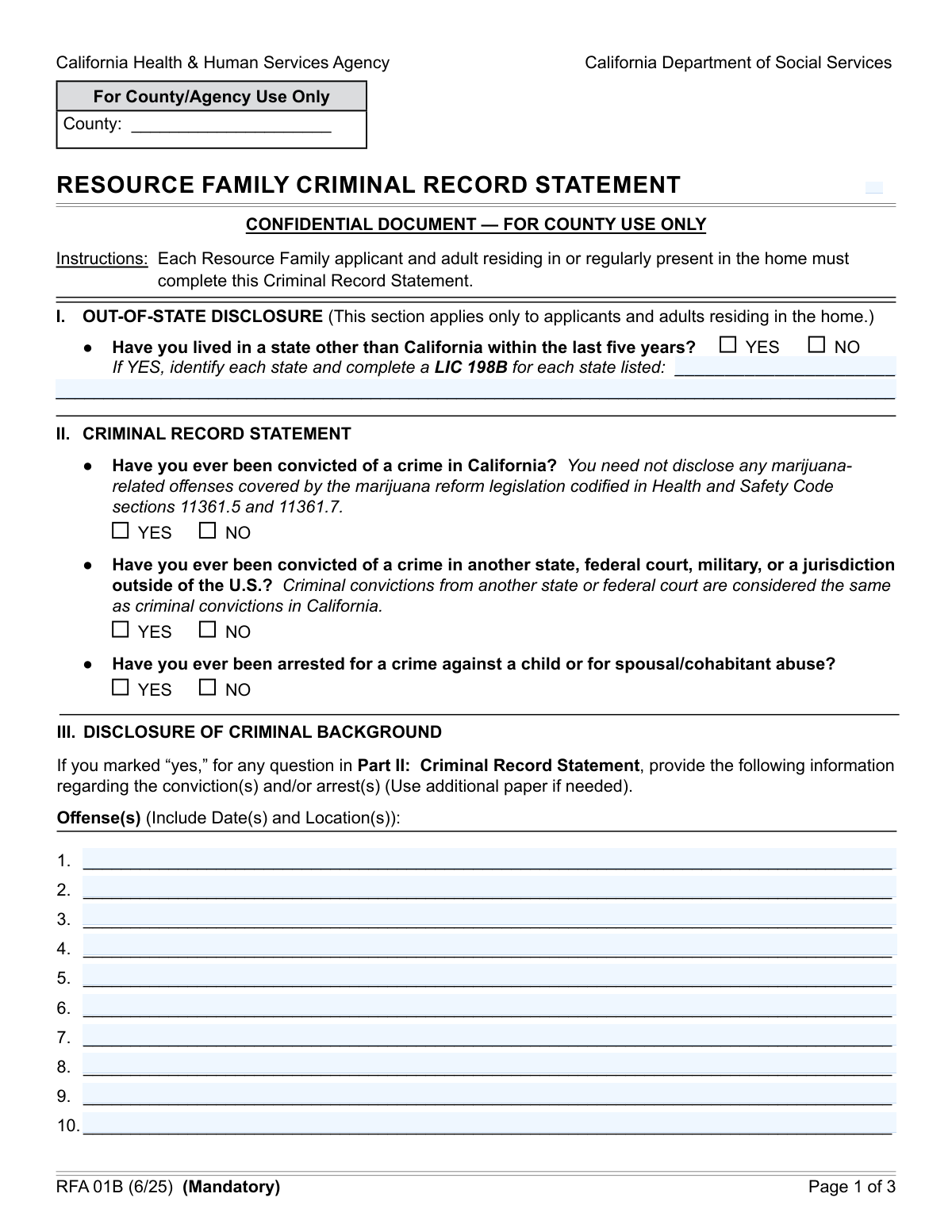
Yes! You can use AI to fill out Resource Family Application - Criminal Record Statement

The Criminal Record Statement is a mandatory form for prospective Resource Families in California, used to gather detailed information about an applicant's criminal background and residency history. This declaration is a critical part of the background check process required by law to ensure the safety and well-being of children in care. Today, this form can be filled out quickly and accurately using AI-powered services like Instafill.ai, which can also convert non-fillable PDF versions into interactive fillable forms.
Our AI automatically handles information lookup, data retrieval, formatting, and form filling.
It takes less than a minute to fill out Criminal Record Statement using our AI form filling.
Securely upload your data. Information is encrypted in transit and deleted immediately after the form is filled out.

Form specifications

Form name: Resource Family Application - Criminal Record Statement
Number of fields: 41
Number of pages: 3
Language: English
Categories: NJ state forms, PA state forms, resource family forms
main-image

Instafill Demo: How to fill out PDF forms in seconds with AI

How to Fill Out Criminal Record Statement Online for Free in 2026

Are you looking to fill out a CRIMINAL RECORD STATEMENT form online quickly and accurately? Instafill.ai offers the #1 AI-powered PDF filling software of 2026, allowing you to complete your CRIMINAL RECORD STATEMENT form in just 37 seconds or less.
Follow these steps to fill out your CRIMINAL RECORD STATEMENT form online using Instafill.ai:
  1. 1 Navigate to Instafill.ai and upload or select the Resource Family Criminal Record Statement form.
  2. 2 Enter your personal details in the declarant information section, including your full legal name, address, Social Security Number, and date of birth.
  3. 3 Complete the Out-of-State Disclosure by indicating whether you have lived outside of California in the past five years and listing the states if necessary.
  4. 4 Answer the series of 'Yes' or 'No' questions regarding your criminal history, including convictions in California, other jurisdictions, and specific types of arrests.
  5. 5 If you answered 'Yes' to any criminal history questions, provide the required details for each offense, such as dates, locations, and a brief explanation of the circumstances.
  6. 6 Carefully review all the information you have provided for accuracy, then apply your digital signature and the date to certify the statement.
  7. 7 Download, print, or securely share your completed and signed form as required by the approval agency.

Our AI-powered system ensures each field is filled out correctly, reducing errors and saving you time.

Why Choose Instafill.ai for Your Fillable Criminal Record Statement Form?

Speed

Complete your Criminal Record Statement in as little as 37 seconds.

Up-to-Date

Always use the latest 2026 Criminal Record Statement form version.

Cost-effective

No need to hire expensive lawyers.

Accuracy

Our AI performs 10 compliance checks to ensure your form is error-free.

Security

Your personal information is protected with bank-level encryption.

Frequently Asked Questions About Form Criminal Record Statement

This form is used to gather personal information and disclose your criminal history as part of a background check required to become an approved Resource Family, or to reside in a Resource Family home in California.

Any individual applying to be a Resource Family, or anyone who will be residing or be regularly present in the home of a Resource Family, must complete this form for a mandatory criminal background check.

No, providing your Social Security Number is voluntary according to the Privacy Statement. However, failing to provide it may delay the processing of your form and the criminal record check.

Yes, you must disclose any state other than California where you have lived within the last five years. Check the appropriate box and list the state(s) in the 'Out-of-State Disclosure' section.

You must report all convictions, and you are also required to report any arrests for crimes against a child or for spousal/cohabitant abuse, even if they did not result in a conviction.

The form provides space to detail up to ten offenses. If you have more, list the first ten on the form and use an additional sheet of paper to provide the details for the remaining offenses.

You are required to provide a brief explanation of the circumstances surrounding each offense. Be clear and concise, using the lines provided or attaching extra paper if necessary.

The form states that you can exclude certain marijuana-related offenses. You must carefully read the instructions for the 'California Crime Conviction' section to determine if your specific conviction needs to be disclosed.

Your personal information is used for the background check and may be included in a Written Report shared with placement agencies or the juvenile court. Under the California Public Records Act, some records may also be accessible to the public.

You should have your personal details like your full name, address, SSN, and driver's license number. You will also need the dates, locations, and circumstances for any criminal convictions or specific arrests you need to report.

Yes, services like Instafill.ai use AI to auto-fill form fields accurately and save time, which can be helpful for completing this form efficiently.

To fill this form out online, you can upload the document to Instafill.ai. The platform will make the fields interactive, allowing you to type your answers directly, then save or print the completed form.

If you have a non-fillable PDF, you can use a service like Instafill.ai. It can convert flat PDFs into interactive, fillable forms that you can easily complete on your computer.

Compliance Criminal Record Statement
Validation Checks by Instafill.ai

1
Social Security Number Format Validation
This check verifies that the 'Social Security Number' field, if provided, adheres to the standard 9-digit format (e.g., XXX-XX-XXXX or XXXXXXXXX). Although voluntary, an incorrectly formatted SSN can cause significant delays or failures in processing background checks with the Department of Justice. If the validation fails, the user will be prompted to correct the number or leave the field blank.
2
Date of Birth Logical and Format Check
This validation ensures the 'Date of Birth' is a valid calendar date, is in the past, and that the applicant is of a minimum legal age (e.g., 18 years old). This is critical for identity verification and ensuring the applicant is legally an adult. A failed validation will prevent form submission and require the user to enter a valid and plausible date.
3
Mutually Exclusive Residence Disclosure
This check ensures that the user selects either 'Yes, lived in another state' or 'No, have not lived in another state', but not both. Selecting both options creates a logical contradiction that makes the form data ambiguous and impossible to process correctly. If both are selected, an error message will instruct the user to choose only one option.
4
Conditional Requirement for Out-of-State Residence Details
This validation enforces that if 'Yes, lived in another state' is checked, the 'First Out-of-State Residence' field must be filled out. This ensures that affirmative answers are accompanied by the required supporting details for a complete background check. Failure to provide the state name will result in a completeness error, prompting the user to enter the required information.
5
Conditional Disabling of Out-of-State Residence Details
This check ensures that if 'No, have not lived in another state' is selected, the 'First Out-of-State Residence' and 'Additional Out-of-State Residences' fields are empty. This prevents the submission of contradictory information where a user denies living out-of-state but provides state names. If data is present in these fields when 'No' is checked, the system will flag an error or automatically clear the fields.
6
Mutually Exclusive Criminal Record Responses
This validation verifies that for each criminal record question (California, Other Jurisdiction, Child/Spousal Abuse), only one response ('YES' or 'NO') is selected. Answering both 'YES' and 'NO' to the same question is a logical impossibility that invalidates the form. The system should display an error and require the user to select only one option per question.
7
Conditional Requirement for Offense Details
This check ensures that if 'YES' or 'Yes' is selected for any of the three criminal record questions, at least the 'First Offense Details' field is completed. An affirmative answer to a criminal history question must be substantiated with specific details for the record to be processed. If this rule is violated, the form will be considered incomplete and an error will be shown.
8
Sequential Entry of Offense Details
This validation checks that the offense detail fields are filled in sequential order (e.g., 'Second Offense Details' cannot be filled if 'First Offense Details' is empty). This maintains the logical order and integrity of the reported criminal history, preventing gaps in the record. A violation would trigger an error message asking the user to fill the preceding offense field first.
9
Conditional Requirement for Offense Explanation
This validation ensures that if any criminal record question is answered with 'YES' or 'Yes', the 'Offense Explanation' field must contain some text. Providing an explanation is a mandatory part of disclosing an offense, giving context to the events. If no explanation is provided despite a 'Yes' answer, the submission will be blocked until the explanation is added.
10
Required Declarant Information Fields
This check verifies that the 'Full Legal Name' and 'Residence Address' fields are not empty. This information is fundamental for identifying the declarant and is a non-negotiable requirement for the form to be legally valid and processable. If these fields are left blank, the form submission will fail with a message indicating which required fields are missing.
11
Signature Date and Signature Presence
This validation confirms that the 'Digital Signature' has been applied and the 'Signature Date' field is filled. The signature and date are required to attest to the accuracy of the information provided, making the document legally binding. A missing signature or date will render the form invalid and prevent submission.
12
Signature Date Logical Validity
This check ensures the 'Signature Date' is a valid date that is not in the future and is on or after the applicant's 'Date of Birth'. A future date is impossible, and a date before birth is illogical, both of which would invalidate the attestation. The system will reject invalid dates and prompt the user for a correction.
13
Valid State Name for Out-of-State Residences
This validation checks that any state entered in 'First Out-of-State Residence' or 'Additional Out-of-State Residences' is a valid US state and is not 'California'. The purpose of the field is to identify other jurisdictions, so entering 'California' is redundant and incorrect. An invalid entry would trigger an error, asking the user to provide a valid state name other than California.
14
Offense Date Validity
This check parses the offense detail fields to ensure that any dates provided are in a valid format (e.g., MM/DD/YYYY) and are not in the future. An offense cannot have occurred in the future, and a properly formatted date is essential for accurate record-keeping and background checks. A validation failure would require the user to correct the date format or value.

Common Mistakes in Completing Criminal Record Statement

Inconsistent Criminal Record Reporting

Applicants often check 'YES' to having a criminal conviction or arrest but then fail to provide the required details in the 'Offense Details' and 'Offense Explanation' sections. This discrepancy creates an incomplete application and will halt the background check process, causing significant delays. To avoid this, carefully review your answers, ensuring that for every 'YES' checked in the criminal record section, a corresponding detailed entry is made. AI-powered tools like Instafill.ai can help by flagging these inconsistencies and prompting you to provide the necessary information before submission.

Omitting Required Offense Details

When detailing past offenses, individuals frequently provide a general description but forget to include the specific date(s) and location(s) as requested for each entry. This missing information is critical for the verification process and will result in the form being returned for correction. Always double-check that each offense entry includes the full date (MM/DD/YYYY) and the location (city and state) of the conviction or arrest. Using a form-filling tool can help ensure all required parts of a field are completed.

Failure to Detail Out-of-State Residences

A common error is checking 'Yes, lived in another state' but then leaving the 'First Out-of-State Residence' and 'Additional Out-of-State Residences' fields blank. This happens due to oversight when moving through the form quickly. This omission prevents the agency from conducting a complete background check, delaying the approval process. To prevent this, if you indicate you have lived out of state, immediately fill in the corresponding fields with the state names. If the form is a non-fillable PDF, a tool like Instafill.ai can convert it to a fillable version, making these conditional fields easier to manage.

Using a Nickname Instead of Full Legal Name

Applicants sometimes enter a preferred nickname, common name, or just initials instead of their 'Full Legal Name' as it appears on official documents like a birth certificate or driver's license. This causes a mismatch with official records used for the background check, leading to processing failures and delays. Always use your complete and official legal name to ensure a smooth verification process. Smart form fillers can often save your legal name and autofill it correctly to prevent this error.

Incomplete Driver's License Information

The form requires both the 'Driver's License Number and State,' but people often only enter the number and forget to include the issuing state. The state is essential for validating the license and identity, and its absence makes the information incomplete. This will require the agency to contact you for clarification, delaying your application. To avoid this, always provide both the full license number and the two-letter abbreviation for the issuing state.

Vague or Insufficient Offense Explanations

In the 'Offense Explanation' section, providing one-word answers like 'Theft' or overly brief phrases like 'Made a mistake' is a frequent error. The form requires a brief but clear explanation of the circumstances surrounding each offense to allow for a proper assessment. Insufficient detail can lead to requests for more information or a negative inference. Be concise but thorough, explaining the context of the event as requested. AI tools can help by providing examples or checking for minimum character counts to ensure your explanation is adequate.

Incorrect Social Security Number Entry

Entering an incorrect Social Security Number, often due to transposing digits or a simple typo, is a critical mistake. Since the SSN is used as a primary identifier for the criminal record check, an error will lead to a failed search or a mismatch, stopping the entire process. Carefully proofread the number after entering it, or use a secure tool like Instafill.ai which can store and accurately autofill sensitive information, reducing the risk of manual data entry errors.

Misunderstanding Reportable Convictions

The form specifies excluding certain marijuana-related offenses but requires disclosure of all other crimes. Applicants may misinterpret this and either fail to report a required offense or incorrectly report one that is exempt, leading to an inaccurate application. This can have serious consequences, including rejection for providing false information. If you are unsure which offenses to report, it is best to seek clarification or err on the side of disclosure. Carefully re-read the instructions for each question before answering.

Forgetting the Signature and Date

An unsigned or undated form is legally invalid and cannot be processed. Applicants often complete all the fields but overlook the final signature and date fields, especially on multi-page documents or digital forms. This simple oversight will result in the immediate rejection of the submission, requiring you to resubmit it. Always perform a final review of the entire form, paying special attention to the signature block, before you consider it complete. Digital form fillers can highlight required signature fields to ensure they are not missed.
Saved over 80 hours a year

“I was never sure if my IRS forms like W-9 were filled correctly. Now, I can complete the forms accurately without any external help.”

Kevin Martin Green

Your data stays secure with advanced protection from Instafill and our subprocessors

Robust compliance program

Transparent business model

You’re not the product. You always know where your data is and what it is processed for.

ISO 27001, HIPAA, and GDPR

Our subprocesses adhere to multiple compliance standards, including but not limited to ISO 27001, HIPAA, and GDPR.

Security & privacy by design

We consider security and privacy from the initial design phase of any new service or functionality. It’s not an afterthought, it’s built-in, including support for two-factor authentication (2FA) to further protect your account.

Fill out Criminal Record Statement with Instafill.ai

Worried about filling PDFs wrong? Instafill securely fills resource-family-application-criminal-record-statement forms, ensuring each field is accurate.