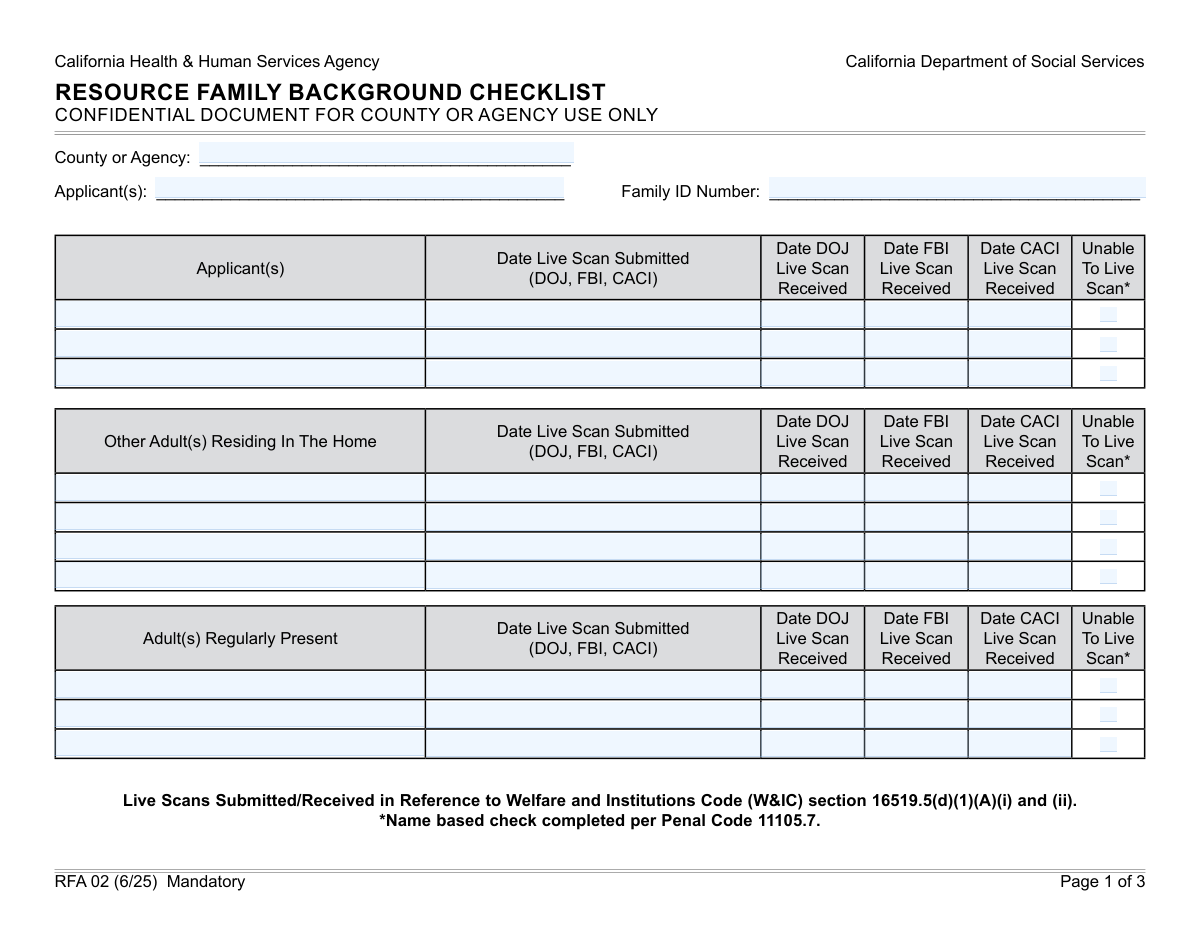
Yes! You can use AI to fill out Form GEN 1331, Criminal Record and Child Abuse Registry Checklist

Form GEN 1331 is a comprehensive checklist used by California social service and licensing agencies to track mandatory background checks for applicants, other residing adults, and regularly present individuals in a home. It ensures compliance by documenting the submission and receipt dates for various screenings, including Live Scan (DOJ, FBI, CACI), Megan's Law, and child abuse registry checks in other states, which is crucial for child safety and regulatory approval. Today, this form can be filled out quickly and accurately using AI-powered services like Instafill.ai, which can also convert non-fillable PDF versions into interactive fillable forms.
Our AI automatically handles information lookup, data retrieval, formatting, and form filling.
It takes less than a minute to fill out GEN 1331 using our AI form filling.
Securely upload your data. Information is encrypted in transit and deleted immediately after the form is filled out.

Form specifications

Form name: Form GEN 1331, Criminal Record and Child Abuse Registry Checklist
Number of fields: 229
Number of pages: 3
Language: English
main-image

Instafill Demo: How to fill out PDF forms in seconds with AI

How to Fill Out GEN 1331 Online for Free in 2026

Are you looking to fill out a GEN 1331 form online quickly and accurately? Instafill.ai offers the #1 AI-powered PDF filling software of 2026, allowing you to complete your GEN 1331 form in just 37 seconds or less.
Follow these steps to fill out your GEN 1331 form online using Instafill.ai:
  1. 1 Navigate to Instafill.ai and upload or select the GEN 1331 form.
  2. 2 Enter the agency, county, and family identification information in the designated fields.
  3. 3 For each applicant and other adult, systematically fill in their name and the dates for all required background checks, such as Live Scan, Megan's Law, AARS, LIS, and DMV.
  4. 4 If an individual has resided outside California, complete the section for out-of-state child abuse registry checks, including request dates and clearance status.
  5. 5 Document the status of any criminal exemption requests, providing the dates requested, approved, or denied for each relevant person.
  6. 6 Carefully review all entered information for completeness and accuracy, ensuring all dates and statuses are correctly recorded for every individual listed.
  7. 7 Finalize the form by saving or printing it for submission to the appropriate agency.

Our AI-powered system ensures each field is filled out correctly, reducing errors and saving you time.

Why Choose Instafill.ai for Your Fillable GEN 1331 Form?

Speed

Complete your GEN 1331 in as little as 37 seconds.

Up-to-Date

Always use the latest 2026 GEN 1331 form version.

Cost-effective

No need to hire expensive lawyers.

Accuracy

Our AI performs 10 compliance checks to ensure your form is error-free.

Security

Your personal information is protected with bank-level encryption.

Frequently Asked Questions About Form GEN 1331

This form is used to track the status of multiple background checks for applicants and other adults in a household. It records dates for Live Scans, criminal history checks (DOJ, FBI), and child abuse registry clearances (CACI).

You must list all applicants, any other adults who reside in the home, and any adults who are regularly present in the home. Each individual requires their own set of background checks to be documented.

Applicants are the primary individuals seeking approval from the agency. 'Other residing adults' live in the home but are not primary applicants, and 'regularly present adults' do not live in the home but are there frequently.

For that individual, you must check the 'Unable to Live Scan' box. You will then be required to provide the submission date for the NLI (name-based check) instead of the Live Scan dates.

You must check the 'Resided Outside CA' box, list the other states, and document the process of checking those states' child abuse registries, including request dates and clearance status.

This refers to a potential waiver for certain criminal convictions, typically when placing a child with a relative. The form requires you to track the request date and the final approval or denial date of this exemption.

These are different database checks for safety and suitability. CACI is the Child Abuse Central Index, AARS is the Adult Abuse Registry System, and LIS is the Licensing Information System.

Yes, for the sections related to DOJ, FBI, and CACI results, the fields are conditional. You should only enter the submission and received dates if the individual was able to complete the Live Scan.

The 'Family ID Number' is a unique identifier assigned to the family by your county or agency. You should find this number in the family's case file or by consulting with your agency administrator.

Yes, AI-powered services like Instafill.ai can help you fill out this form much faster. These tools can accurately auto-fill repetitive information and help ensure all required fields are completed.

Simply upload the form to the Instafill.ai platform. The AI will identify the fields, and you can use it to automatically and accurately populate the information for each applicant and adult.

Services like Instafill.ai can convert non-fillable PDFs into interactive, fillable forms. This allows you to easily type your information directly into the fields on your computer.

Compliance GEN 1331
Validation Checks by Instafill.ai

1
Required Agency and Family ID
This check ensures that the 'County or Agency' and 'Family ID Number' fields are both populated. These fields are essential for identifying the family and routing the form to the correct administrative body. A failure in this validation would make the entire form submission unidentifiable and unprocessable.
2
Conditional Live Scan Date Entry
This validation verifies that for any given individual, if the 'Unable to Live Scan' checkbox is checked, the corresponding Live Scan submission and received date fields (DOJ, FBI, CACI) must be empty. Conversely, if the checkbox is not checked, the 'Live Scan Submission Date' is required. This prevents contradictory data entry and ensures the correct background check pathway is followed.
3
Chronological Live Scan Dates
For each individual, this check ensures that the 'DOJ Live Scan Received Date', 'FBI Live Scan Received Date', and 'CACI Live Scan Received Date' are all on or after the 'Live Scan Submission Date'. An impossible date sequence indicates a data entry error that could misrepresent the status of the background check. This validation maintains the logical timeline of the screening process.
4
Mutually Exclusive Exemption Status
For each applicant or adult, this validates that only one of the 'Relative Specific Criminal Exemption - Yes' or 'Relative Specific Criminal Exemption - No' checkboxes is selected. Selecting both creates an ambiguous and invalid state for the individual's exemption status. This check is crucial for correctly determining if an exemption has been granted or denied.
5
Conditional Exemption Date Entry
This check ensures that an 'Exemption Approved Date' is provided only if the 'Relative Specific Criminal Exemption - Yes' checkbox is selected. Likewise, it verifies that an 'Exemption Denied Date' is entered only if the 'Relative Specific Criminal Exemption - No' checkbox is selected. This rule prevents orphaned dates and enforces the form's logic, ensuring dates are present only when contextually valid.
6
Chronological Exemption Process Dates
This validation verifies that for any given person, the 'Exemption Approved Date' or 'Exemption Denied Date' occurs on or after the 'Exemption Requested Date'. An approval or denial cannot precede the request. This check ensures the temporal integrity of the exemption process timeline and prevents logical impossibilities in the data.
7
Mutually Exclusive Residency Status
For each individual, this check ensures that the 'Resided Outside CA Within Last 5 Years Yes' and 'Resided Outside CA Within Last 5 Years No' checkboxes are not both selected. A person cannot simultaneously have and not have resided outside the state in the last five years. This validation enforces logical consistency and prevents contradictory information regarding out-of-state history.
8
Conditional Out-of-State Information Requirement
This validates that if 'Resided Outside CA Within Last 5 Years Yes' is checked for an individual, the 'Other States Resided In' field must be filled. If 'No' is checked, the 'Other States Resided In' field and all subsequent out-of-state registry check fields must be empty. This ensures that required information is captured for out-of-state residents and prevents irrelevant data from being entered for others.
9
Conditional NLI Submission Date Entry
This check verifies that the 'NLI Submission Date' is entered for an individual only if their corresponding 'Unable to Live Scan' checkbox is marked 'Yes'. The NLI (Name-Based Check) is the specified alternative to a Live Scan. This rule ensures the correct background check pathway is documented and prevents data entry for processes that were not performed.
10
Valid Date Format Across All Date Fields
This check iterates through all fields intended to capture a date and verifies that the entry is in a valid, parseable format (e.g., MM/DD/YYYY). Invalid date formats can cause system errors, break reporting, and corrupt the record. This is a fundamental check for data integrity and system stability.
11
Completeness of Individual Records
This validation ensures that if a name is entered for any person (e.g., 'Second Applicant Name', 'Third Other Adult Name'), at least one corresponding status checkbox or date field for that person is also filled out. An entry with only a name is incomplete and provides no useful information. This check helps catch partially entered records and ensures that every listed individual has their status documented.
12
Chronological Out-of-State Registry Dates
For individuals with out-of-state history, this check ensures the 'Date Info Received' is on or after the 'Date Info Requested'. It also verifies that the 'Cleared Date' or 'Not Cleared Date' is on or after the 'Date Info Received'. This maintains the logical sequence of events for the out-of-state registry check process and flags potential data entry errors.
13
Mutually Exclusive Registry Clearance Status
For each out-of-state registry check, this validation ensures that a 'Cleared Date' and a 'Not Cleared Date' are not both entered for the same person. An individual's registry check can either be cleared or not cleared, but not both. This prevents contradictory outcomes and ensures the record reflects a single, definitive result.
14
Conditional Registry Check Details
This check verifies that if 'Is Registry Maintained by Other State(s) Yes' is selected, the 'Date Info Requested' field must be filled. Conversely, if 'No' is selected, the date fields for requesting, receiving, and clearing registry information must be empty. This enforces the form's workflow, ensuring that follow-up actions are documented only when an out-of-state registry exists.

Common Mistakes in Completing GEN 1331

Ignoring Conditional Field Logic

Many fields on this form are conditional. For example, 'Live Scan Submission Date' should only be filled if the 'Unable to Live Scan' box is not checked, while the 'NLI Submission Date' is required if it is. Filling in fields that contradict a checkbox selection creates conflicting information that halts processing and requires manual correction. To avoid this, carefully read field instructions like 'Fill only if...' before entering data. AI-powered tools like Instafill.ai can automatically hide or disable irrelevant fields based on your answers, making it impossible to make this mistake.

Contradictory Checkbox Selections

The form contains several pairs of mutually exclusive checkboxes, such as 'Resided Outside CA... Yes/No' and 'Relative Specific Criminal Exemption... Yes/No'. A common error is checking both boxes or leaving both blank, creating ambiguity that delays the application pending clarification. This forces administrators to follow up manually to determine the correct status. To prevent this, carefully select only one option that accurately reflects the situation for each pair.

Data Entry in the Wrong Person's Section

The form has a highly repetitive structure with identical sections for multiple applicants, 'other residing adults,' and 'regularly present adults.' It is very easy to lose track and accidentally enter one person's Live Scan dates or Megan's Law check date into another person's designated section. This error leads to inaccurate records and can have serious consequences for the background check. Always verify the name at the top of each section before entering any data for that individual.

Inconsistent Date Formatting and Typos

This form requires dozens of dates, and users frequently enter them in inconsistent formats (e.g., MM-DD-YY vs. Month DD, YYYY), use invalid dates, or make simple typos. Inconsistent or invalid data can cause database import errors and requires manual correction, significantly slowing down the verification process. To avoid this, always use a consistent MM/DD/YYYY format and double-check every date for accuracy. AI-powered form fillers like Instafill.ai can automatically format dates correctly and validate them to prevent such errors.

Inconsistent Applicant Naming

An individual's name may appear in multiple sections (e.g., 'First Applicant Live Scan Details,' 'First Applicant Row'). Users sometimes enter a full legal name in one section and a nickname or a slightly different version in another, which can cause data matching problems in the system. This may lead to fragmented records or the inability to link all checks to a single person. Always use the full, official legal name as it appears on government identification in every field where the person's name is requested. Tools like Instafill.ai can auto-populate a name consistently across all relevant fields after it's entered once.

Incomplete Out-of-State Residency Information

When an applicant indicates they have lived outside of California, they must complete several follow-up fields, including listing the states and providing child abuse registry check dates. People often check 'Yes' to having resided out-of-state but then fail to fill in the required details. This incomplete information makes it impossible to conduct the necessary background checks, stopping the application until the missing data is provided. Ensure all subsequent fields are completed if you answer 'Yes' to an out-of-state residency question.

Omitting the Family ID Number

The 'Family ID Number' is a critical identifier used to link all individuals in the application to the correct case file. Forgetting to enter this number or entering it incorrectly can cause the entire form to be misfiled or detached from the primary application. This can lead to significant processing delays or even require the resubmission of all information. Always ensure the unique Family ID Number is entered accurately at the top of the form.

Misunderstanding Exemption Date Logic

The form requires dates for when a criminal exemption was approved or denied, but these fields are conditional upon which 'Relative Specific Criminal Exemption' box is checked. For example, the 'Exemption Approved Date' should only be filled if the 'Yes' box is checked. Users often get confused and enter a date in the 'Approved' field when the exemption was actually denied, or vice-versa. This misrepresents the legal status of the applicant and can cause serious processing errors and delays.

Leaving Mandatory Check Dates Blank

The dense, grid-like sections of the form require dates for several mandatory checks, including Megan's Law, AARS, LIS, and DMV. Due to the form's complexity, it is easy to overlook one of these date fields for an applicant or other resident. Each missing date represents an incomplete check, which prevents the agency from finalizing the safety assessment and approving the application. If the form is a non-fillable PDF, using a tool like Instafill.ai to convert it can help by creating distinct, clearly marked fields that are harder to miss.

Confusing 'Other Residing Adult' with 'Regularly Present Adult'

The form distinguishes between adults 'residing in the home' and those 'regularly present' in the home, each with their own sections for background checks. Applicants may not understand the distinction, leading them to list individuals in the wrong category or omit someone who should be included. This can result in incomplete household screening and non-compliance. Carefully review the agency's definitions for each category to ensure every adult is listed correctly.
Saved over 80 hours a year

“I was never sure if my IRS forms like W-9 were filled correctly. Now, I can complete the forms accurately without any external help.”

Kevin Martin Green

Your data stays secure with advanced protection from Instafill and our subprocessors

Robust compliance program

Transparent business model

You’re not the product. You always know where your data is and what it is processed for.

ISO 27001, HIPAA, and GDPR

Our subprocesses adhere to multiple compliance standards, including but not limited to ISO 27001, HIPAA, and GDPR.

Security & privacy by design

We consider security and privacy from the initial design phase of any new service or functionality. It’s not an afterthought, it’s built-in, including support for two-factor authentication (2FA) to further protect your account.

Fill out GEN 1331 with Instafill.ai

Worried about filling PDFs wrong? Instafill securely fills form-gen-1331-criminal-record-and-child-abuse-registry-checklist forms, ensuring each field is accurate.