
Instafill.ai
7 days free
AI form filling · 21 fields · 2 pages · done in seconds

Yes! You can use AI to fill out Form DS-3053, Statement of Consent

Don't type 21 fields by hand. Tell our AI about yourself, or upload a document you already have, and it fills every field in seconds. You check it, then download, print or sign.
7 days free, then $19.99/month · Cancel anytime
AI fills it, no typingEncrypted, never used to train AICancel in two clicks
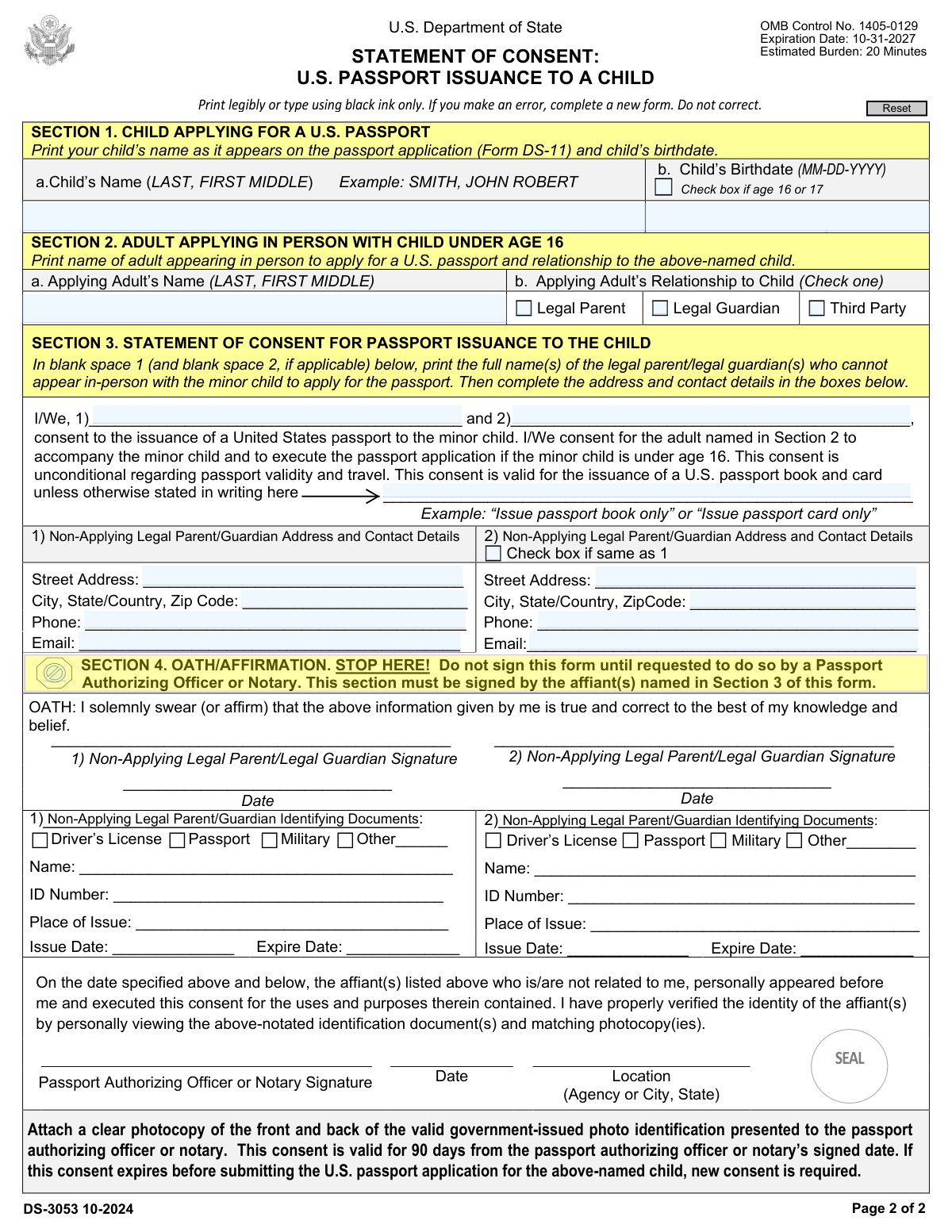
Form DS-3053, Statement of Consent, page 1
Basic · 40/100Form Complexity Index

The AI does the filling. You just check it.

No typing into boxes, nothing to install.

Tell the AI about youAnswer a few questions in plain words, or upload a document you already have. That is all the typing there is.
AI fills every field in secondsIt puts each answer in the right box on every page, tables and checkboxes included.
Check it and downloadReview every field, change anything, then download, print or sign the PDF.

What this form asks for

The AI fills all of it, from your answers or your documents.

Form DS-3053, known as the Statement of Consent, is required when one or both legal parents or guardians cannot appear in person to apply for a U.S. passport for their minor child. It authorizes passport issuance and may allow a third party to apply on the child's behalf. This form ensures that the child's passport application is processed with the consent of the non-applying parent or guardian.
Fillable fields21
Pages2
Sections7
Tables and lists1
Questions that depend on earlier answers5
Form Complexity IndexBasic, 40/100

The AI checks your answers before you download

15 checks built for this form, so a wrong date or a missing answer is caught before anyone else sees it.

Ensures that all information is filled out using black ink and is legible or typed.

The AI ensures that all entries on Form DS-3053 are completed using black ink, as required by the form's instructions. It verifies that the handwriting is legible to prevent any misunderstandings or processing delays. In cases where typing is an option, the AI confirms that the typed information is clear and adheres to the specified format. This check is crucial to maintain the form's readability and official acceptance.

Confirms that the child's name and birthdate in Section 1 match the information on Form DS-11.

The AI confirms that the child's name and birthdate provided in Section 1 of Form DS-3053 are consistent with the details on Form DS-11. This validation is essential to ensure the integrity of the child's identity and to avoid any discrepancies that could lead to processing delays or rejections. The AI cross-references both forms to validate the accuracy of the child's personal information.

Verifies that the child's age is correctly indicated in Section 1 if they are 16 or 17 years old.

The AI verifies the accuracy of the child's age stated in Section 1, particularly for those who are 16 or 17 years old. This check is important because different consent requirements may apply to minors of this age group. The AI calculates the child's age based on the birthdate provided and ensures that it is correctly represented on the form.

Checks that the adult's name in Section 2 is provided and their relationship to the child is correctly indicated.

The AI checks that the name of the non-applying parent or guardian is accurately provided in Section 2 of Form DS-3053. It also ensures that the relationship to the child is correctly indicated, as this information is critical for establishing the legal basis for the consent. The AI's validation helps to confirm that the consenting individual has the authority to grant permission for the child's passport application.

Confirms that the address and contact details for the non-applying legal parent(s)/guardian(s) in Section 2 are complete.

The AI confirms that the address and contact details for the non-applying legal parent(s) or guardian(s) listed in Section 2 are fully provided. This includes checking for a complete street address, city, state, zip code, and phone number. The AI's thorough validation ensures that all necessary contact information is available, which is essential for any required follow-up or official correspondence.

Verifies that the box indicating a shared address is checked if applicable in Section 2.

The AI ensures that if the child and the non-applying parent or guardian share the same address, the corresponding box in Section 2 of Form DS-3053 is checked. It checks for consistency in the address information provided and alerts if the box is unchecked when the addresses match. This validation is crucial for confirming the living arrangements of the child and the non-applying parent or guardian. The AI prevents processing delays by ensuring this field is accurately completed.

And 9 more checks
  • Ensures that the full name(s) of the legal parent(s)/guardian(s) is printed in Section 3 and that consent is clearly stated.
  • Confirms that the type of passport consented for (book, card, or both) is specified in Section 3.
  • Checks that Section 4 is unsigned until in the presence of a Passport Authorizing Officer or Notary.
  • Verifies that the date of the affiant(s) matches the date signed by the passport authorizing officer or notary in Section 4.
  • Ensures that a photocopy of the front and back of the valid government-issued photo ID is attached as per Section 4 instructions.
  • Confirms that the consent is still valid (not older than 90 days) at the time of submitting the U.S. passport application for the child.
  • Verifies if the notarization is done at a U.S. embassy or consulate when notarizing outside the United States.
  • Checks for any false statements and ensures that all provided information is truthful and accurate.
  • Confirms that the OMB Control Number (1405-0129) and expiration date (10-31-2027) are noted on the form.

Let AI fill out your DS-3053

No typing. Every field filled in seconds, checked, ready to sign.

7 days free, then $19.99/month · Cancel anytime

How to Fill Out DS-3053 Online for Free in 2026

What the AI walks you through.

  1. Visit instafill.ai site and select DS-3053
  2. Enter child's name and birthdate
  3. Provide applying adult's details
  4. Fill in non-applying parent/guardian info
  5. Sign and date form electronically
  6. Attach photocopy of ID front and back
  7. Check for accuracy and submit form

Common Mistakes in Completing DS-3053

The ones the AI is built to catch.

Using ink colors other than black
Form DS-3053 must be completed using black ink only. Using other ink colors can cause issues during the scanning and processing of the document, potentially leading to delays or rejection of the form. To avoid this mistake, always use a black ink pen when filling out the form. Double-check the form instructions for any specific requirements regarding ink color before submission.
Making corrections instead of using a new form
Corrections on Form DS-3053 are not permitted and can result in the form being rejected. If a mistake is made while filling out the form, it is essential to start over with a new form to ensure all information is clear and accurate. To prevent errors, review all entries carefully before finalizing the form and use a new form if any corrections are needed.
Child's name not matching Form DS-11
The child's name on Form DS-3053 must match exactly as it appears on Form DS-11, Application for a U.S. Passport. Discrepancies between the two forms can lead to processing delays or denial of the passport application. To avoid this issue, double-check the child's name on both forms for consistency and accuracy before submission.
Incorrectly completed Section 2 details
Section 2 of Form DS-3053 requires specific details to be filled out correctly. Any errors in this section can cause complications with the consent statement. Carefully read the instructions for Section 2, ensure that all required information is provided accurately, and review the section thoroughly before submitting the form.
Not checking the box for the child aged 16 or 17
For children aged 16 or 17, the appropriate box in the form must be checked to indicate that the statement of consent applies to them. Failing to check this box can result in the form being processed incorrectly. To avoid this mistake, verify the child's age and ensure the correct box is checked to reflect their age group.
Signing Section 4 before being with an officer
Section 4 of Form DS-3053 must be signed in the presence of a notary or authorized officer. Signing this section beforehand invalidates the consent. To avoid this mistake, ensure that the affiant does not sign Section 4 until they are physically with the notary or officer. The notary or officer must witness the signing to attest to the identity of the affiant.
Incomplete statement of consent in Section 3
Section 3 of Form DS-3053 requires a complete statement of consent from the non-applying parent or guardian. Leaving this section incomplete can lead to the rejection of the form. It is crucial to read the instructions carefully and provide all the required information in this section. Double-check to ensure that no part of the statement is left blank before submission.
Mismatched dates between affiant and officer
The dates entered by the affiant and the notary or authorized officer in Sections 3 and 4, respectively, must match to confirm that the consent was given on the same day it was notarized. Discrepancies in dates can cause processing delays or form rejection. To prevent this, the affiant should coordinate with the notary or officer to ensure that both parties enter the same date on the form.
Specifying incorrect document type in consent
In Section 3, the affiant must specify the correct document type for which they are providing consent. Entering an incorrect document type can lead to misunderstandings or processing errors. Carefully review the document type options provided in the form instructions and select the appropriate one that corresponds to the purpose of the consent. Verify the selected document type before finalizing the form.
Failing to check the box for same address
If the non-applying parent or guardian's address is the same as the child's, the corresponding box in Section 2 must be checked. Overlooking this box can result in unnecessary confusion or requests for additional documentation. To avoid this, review the address information provided in Section 1 and ensure that the box in Section 2 is checked if the addresses are indeed the same.
Not attaching a photocopy of ID for notary
Failing to attach a photocopy of the ID for the notary can lead to the rejection of Form DS-3053. It is crucial to provide a clear and legible photocopy of the non-applying parent or guardian's identification to validate their identity. This step is essential for the notarization process. To avoid this mistake, ensure that you have a photocopy of the ID ready when you go to the notary and attach it to the form before submission.
Not renewing consent after 90 days if expired
Consent provided on Form DS-3053 is only valid for 90 days after the date of notarization. If the consent expires before the passport application is processed, it will no longer be valid, and a new form must be submitted. To prevent this issue, it is advisable to submit the passport application well within the 90-day window or renew the consent by completing a new Form DS-3053 and having it notarized again if there are any delays.
Notarizing outside the U.S. without proper authority
When notarizing Form DS-3053 outside the United States, it is imperative to do so with proper authority, such as a U.S. embassy, consulate, or a military notary service. Notarizing the form with an unauthorized entity can invalidate the consent. To ensure the form is correctly notarized, always seek a U.S. diplomatic mission or use the services of a military notary if available when abroad.
Providing false statements on the form
Providing false statements on Form DS-3053 is a serious offense that can lead to legal consequences, including penalties for perjury. It is essential to provide accurate and truthful information on the form. To avoid this mistake, carefully review all the information you provide, ensure its accuracy, and understand that you are signing the form under penalty of perjury.
Failing to provide all requested information
Omitting requested information on Form DS-3053 can result in processing delays or outright denial of the passport application. It is important to fill out every section of the form completely and accurately. To avoid this mistake, double-check the form before submission to ensure that all fields are filled out and that no required information is missing.
Omitting OMB Control Number and Expiration Date
The OMB Control Number and expiration date are mandatory fields on Form DS-3053 and must be included. These details are essential for the form's validity and tracking purposes. To avoid this mistake, double-check the top right corner of the form to ensure that the OMB Control Number and expiration date are present and legible. If you are using a photocopy or a downloaded form, verify that these details have not been inadvertently cropped or omitted during the copying or printing process.

Frequently Asked Questions About DS-3053


Is it really free for 7 days?
Yes. You pay $0 today. Cancel before Nov 1 and you are never charged. Keep it, and it is $19.99 a month for 5 fills of your DS-3053.
Can I fill other forms too?
This plan is for your DS-3053: your own AI agent fills it as often as 5 times a month. To fill other forms and upload your own, choose a Professional plan from your account.
How do I cancel?
From your account, in two clicks, any time. No email, no call.
How does the AI fill out DS-3053?
You answer a few questions in plain words, or upload a document you already have. The AI reads what you give it and puts each answer into the right field of DS-3053, on every page, in seconds. It checks the answers against the form's own rules, and you review and change anything before you download, print or sign.
What happens to my information?
It is encrypted in transit and at rest, and it is never used to train AI.
How complex is DS-3053 to fill out?
DS-3053 has a Form Complexity Index of 40 out of 100, in the basic tier: 21 fillable fields across 2 pages. Instafill.ai's AI fills it in under a minute, with every field there for you to review before you download.
What is Form DS-3053 used for?
Form DS-3053, also known as the Statement of Consent, is used in the United States for the passport application process of a minor under the age of 16. It is a document that a non-applying parent or guardian completes to give consent for the minor to receive a U.S. passport. This form is necessary when one parent or guardian cannot be present at the time the passport application is executed for the child. It serves to provide legal proof of consent from the non-applying parent or guardian for the issuance of the passport.
Who needs to complete Form DS-3053?
Form DS-3053 must be completed by the non-applying parent or guardian of a minor under the age of 16 who is applying for a U.S. passport and cannot be present at the passport application center. This form allows the absent parent or guardian to express their consent for the passport issuance. It is particularly relevant in situations where parents are divorced or separated, and one parent has sole custody or is taking the child out of the country.
Can Form DS-3053 be used for children over 16?
No, Form DS-3053 cannot be used for children over the age of 16. This form is specifically designed for minors under the age of 16. Applicants who are 16 or 17 years old have different requirements and typically do not need a DS-3053 form. They may be required to show parental awareness when applying for a passport, but this does not necessitate the Statement of Consent form.
What are the requirements for a third party to apply for a child's passport using Form DS-3053?
When a third party is applying for a child's passport using Form DS-3053, the following requirements must be met: The applying parent or guardian must provide a notarized statement of consent from the non-applying parent or guardian, which is the completed Form DS-3053. Additionally, the applying parent or guardian must provide evidence of their relationship to the child, such as a birth certificate or adoption decree. The third party must also have written authorization from the applying parent or guardian to act on their behalf, and they must present valid identification to verify their own identity.
What documents must be submitted with Form DS-3053 for institutions or entities granted guardianship?
When institutions or entities have been granted guardianship and are submitting Form DS-3053, they must provide the following documents: a notarized statement of consent from the guardian on the institution's or entity's letterhead, a copy of the court order granting guardianship, and any other legal documents that establish the institution's or entity's authority to apply for a passport on behalf of the minor. These documents must accompany the completed Form DS-3053 to ensure that the passport application is processed correctly.
Is consent always required from both parents for passport issuance to a child?
Consent is generally required from both parents for passport issuance to a child under the age of 16. However, there are exceptions such as when one parent has sole legal custody, a court order allows one parent to travel with the child, or in special circumstances that may be outlined by the Department of State. In cases where consent from both parents is required, Form DS-3053 can be used by the non-applying parent to give consent.
How should Form DS-3053 be completed?
Form DS-3053 should be completed by the non-applying parent or guardian providing consent for a child under 16 to receive a U.S. passport. The form must include the child's full name and date of birth, the consenting parent's full name and date of birth, and the relationship to the child. The form must be signed and notarized, and the non-applying parent must provide a photocopy of the front and back of the ID used to notarize the form.
Where must the affiant sign Form DS-3053?
The affiant, who is the non-applying parent or guardian giving consent, must sign Form DS-3053 in the presence of a certified notary public. The signature must be provided in the designated area on the form under the 'Statement of Consent' section.
What identification is required to be attached with Form DS-3053?
When submitting Form DS-3053, the non-applying parent or guardian must attach a photocopy of the front and back of the identification document used when notarizing the form. Acceptable identification includes a valid driver's license, state-issued identification card, military ID, or passport.
How long is the consent valid on Form DS-3053?
The consent provided on Form DS-3053 is typically valid for a limited time, usually for the passport application process duration. It is advisable to use the consent for a passport application as soon as possible after the form is notarized. If there are specific validity periods, they will be outlined in the instructions for the form or by the Department of State's policies.
Can Form DS-3053 be notarized by a local notary public outside the United States?
Yes, Form DS-3053 can be notarized by a local notary public outside the United States. However, it is important to ensure that the notarization is done in accordance with the laws of the country where the notarization takes place. Additionally, the notarized form must be accompanied by the notary's seal or stamp and signature, and it may be subject to further authentication if required by the U.S. Department of State.
What are the consequences of making false statements on Form DS-3053?
Making false statements on Form DS-3053 is considered perjury and is punishable by law. Individuals who provide false information on this form may face serious legal consequences, including fines, imprisonment, or both. It is crucial to provide truthful and accurate information when completing the form to avoid any legal repercussions.
Under what legal authorities is Form DS-3053 collected?
Form DS-3053 is collected under the legal authorities of 22 U.S.C. 213n and 22 C.F.R. 51.28, which pertain to the issuance of U.S. passports to minors under the age of 16. These legal authorities require the consent of both parents or legal guardians for passport issuance, and Form DS-3053 serves as a statement of consent from a non-applying parent or guardian.
What is the primary purpose of collecting information on Form DS-3053?
The primary purpose of collecting information on Form DS-3053 is to obtain consent from a non-applying parent or legal guardian for the issuance of a U.S. passport to a minor under the age of 16. This form is used to document that the non-applying parent or guardian agrees to the passport application and to help prevent international child abduction.
Who can access the information provided on Form DS-3053?
The information provided on Form DS-3053 can be accessed by authorized personnel within the U.S. Department of State and other federal agencies as necessary for the processing of the passport application. The information may also be made available to law enforcement and other government entities as required by law or for the purposes of verifying consent, preventing fraud, and ensuring the welfare of the minor.
Is providing information on Form DS-3053 mandatory?
Yes, providing information on Form DS-3053 is mandatory when one parent or guardian cannot be present to give consent in person for a child under 16 to obtain a U.S. passport. The non-applying parent or guardian must complete this form to grant consent.
What is the estimated burden time for completing Form DS-3053?
The estimated burden time for completing Form DS-3053 is approximately 20 minutes. This time includes gathering the necessary documentation, completing the form, and reviewing the instructions.
What should be done if an error is made while filling out Form DS-3053?
If an error is made while filling out Form DS-3053, you should complete a new form with the correct information. It is important to ensure that all information provided is accurate and legible to avoid processing delays.
What is the OMB Control Number and expiration date for Form DS-3053?
The OMB Control Number for Form DS-3053 is a unique number assigned by the Office of Management and Budget that indicates the form has been approved for use. The expiration date is the date until which the current version of the form is valid. Both the OMB Control Number and the expiration date are typically found in the top right corner of the form.
How can I contact Passport Services or the Office of Children's Issues for more information?
You can contact Passport Services by calling the National Passport Information Center at 1-877-487-2778 or TDD/TTY at 1-888-874-7793. For the Office of Children's Issues, you can call the U.S. Department of State's Bureau of Consular Affairs at 1-888-407-4747. Additionally, you can visit the official website of the U.S. Department of State for more contact options and information.
Encrypted in transit and at restNever used to train AIDelete your forms any time

Get your DS-3053 filled out by AI

$0 today. Cancel before Nov 1 and you pay nothing.

Other forms like this one

PA state forms: Form 1095-A, Health Insurance Marketplace Statement, Form W-2, Wage and Tax Statement, Form 593, Real Estate Withholding, Form 8938, Statement of Specified Foreign Financial Assets, Form CMS-2567, Statement of Deficiencies, Form 1098, Mortgage Interest Statement, Form 1098-T, Tuition Statement, Form 1099-S, Proceeds From Real Estate Transactions, Form 1098-E, Student Loan Interest Statement, Form DS-86, Statement of Non-Receipt of a U.S. Passport, Form DS-86, Statement of Non-Receipt of a U.S. Passport, Form 108, Statement of Intention, Form 107, Statement of Financial Affairs, Form 121, Statement About Your SSNs, Form 122A-1, Chapter 7 Statement of Current Monthly Income, Center for Infertility & Reproductive Surgery – New Patient Questionnaire and Patient/Guarantor Statement (Brigham and Women’s Hospital, Department of Obstetrics and Gynecology), Adult Travel Document Application for Stateless and Protected Persons in Canada (16 years of age or over) (PPTC 190), Form W-8IMY (Rev. October 2021), Certificate of Foreign Intermediary, Foreign Flow-Through Entity, or Certain U.S. Branches for United States Tax Withholding and Reporting, Form W-2, Wage and Tax Statement (2025), State of New Mexico Workers’ Compensation Administration — Workers' Compensation Complaint (Rev. 8/22) (11.4.4.9 NMAC)

NJ state forms: Form 1095-A, Health Insurance Marketplace Statement, Form W-2, Wage and Tax Statement, Form 593, Real Estate Withholding, Form 8938, Statement of Specified Foreign Financial Assets, Form CMS-2567, Statement of Deficiencies, Form 1098, Mortgage Interest Statement, Form 1098-T, Tuition Statement, Form 1099-S, Proceeds From Real Estate Transactions, Form 1098-E, Student Loan Interest Statement, Form DS-86, Statement of Non-Receipt of a U.S. Passport, Form DS-86, Statement of Non-Receipt of a U.S. Passport, Form 108, Statement of Intention, Form 107, Statement of Financial Affairs, Form 121, Statement About Your SSNs, Form 122A-1, Chapter 7 Statement of Current Monthly Income, Center for Infertility & Reproductive Surgery – New Patient Questionnaire and Patient/Guarantor Statement (Brigham and Women’s Hospital, Department of Obstetrics and Gynecology), Adult Travel Document Application for Stateless and Protected Persons in Canada (16 years of age or over) (PPTC 190), Form W-8IMY (Rev. October 2021), Certificate of Foreign Intermediary, Foreign Flow-Through Entity, or Certain U.S. Branches for United States Tax Withholding and Reporting, Form W-2, Wage and Tax Statement (2025), State of New Mexico Workers’ Compensation Administration — Workers' Compensation Complaint (Rev. 8/22) (11.4.4.9 NMAC)

state ID forms: Application for Renewal or Duplicate of Alabama Driver License or ID card, Form 1095-A, Health Insurance Marketplace Statement, Form W-2, Wage and Tax Statement, Form 593, Real Estate Withholding, Form 8938, Statement of Specified Foreign Financial Assets, Form CMS-2567, Statement of Deficiencies, Form 1098, Mortgage Interest Statement, Form 1098-T, Tuition Statement, Form 1099-S, Proceeds From Real Estate Transactions, Form 1098-E, Student Loan Interest Statement, Form DS-86, Statement of Non-Receipt of a U.S. Passport, Form 108, Statement of Intention, Form 107, Statement of Financial Affairs, Form 121, Statement About Your SSNs, Form 122A-1, Chapter 7 Statement of Current Monthly Income, Center for Infertility & Reproductive Surgery – New Patient Questionnaire and Patient/Guarantor Statement (Brigham and Women’s Hospital, Department of Obstetrics and Gynecology), Adult Travel Document Application for Stateless and Protected Persons in Canada (16 years of age or over) (PPTC 190), Form W-8IMY (Rev. October 2021), Certificate of Foreign Intermediary, Foreign Flow-Through Entity, or Certain U.S. Branches for United States Tax Withholding and Reporting, Form W-2, Wage and Tax Statement (2025), State of New Mexico Workers’ Compensation Administration — Workers' Compensation Complaint (Rev. 8/22) (11.4.4.9 NMAC)

7 days free, then $19.99/month · Cancel anytime