
Instafill.ai
7 days free
AI form filling · 47 fields · 5 pages · done in seconds

Yes! You can use AI to fill out Form 1099-S, Proceeds From Real Estate Transactions

Don't type 47 fields by hand. Tell our AI about yourself, or upload your W-2 or last year's return, and it fills every field in seconds. You check it, then download, print or sign.
7 days free, then $19.99/month · Cancel anytime
AI fills it, no typingEncrypted, never used to train AICancel in two clicks
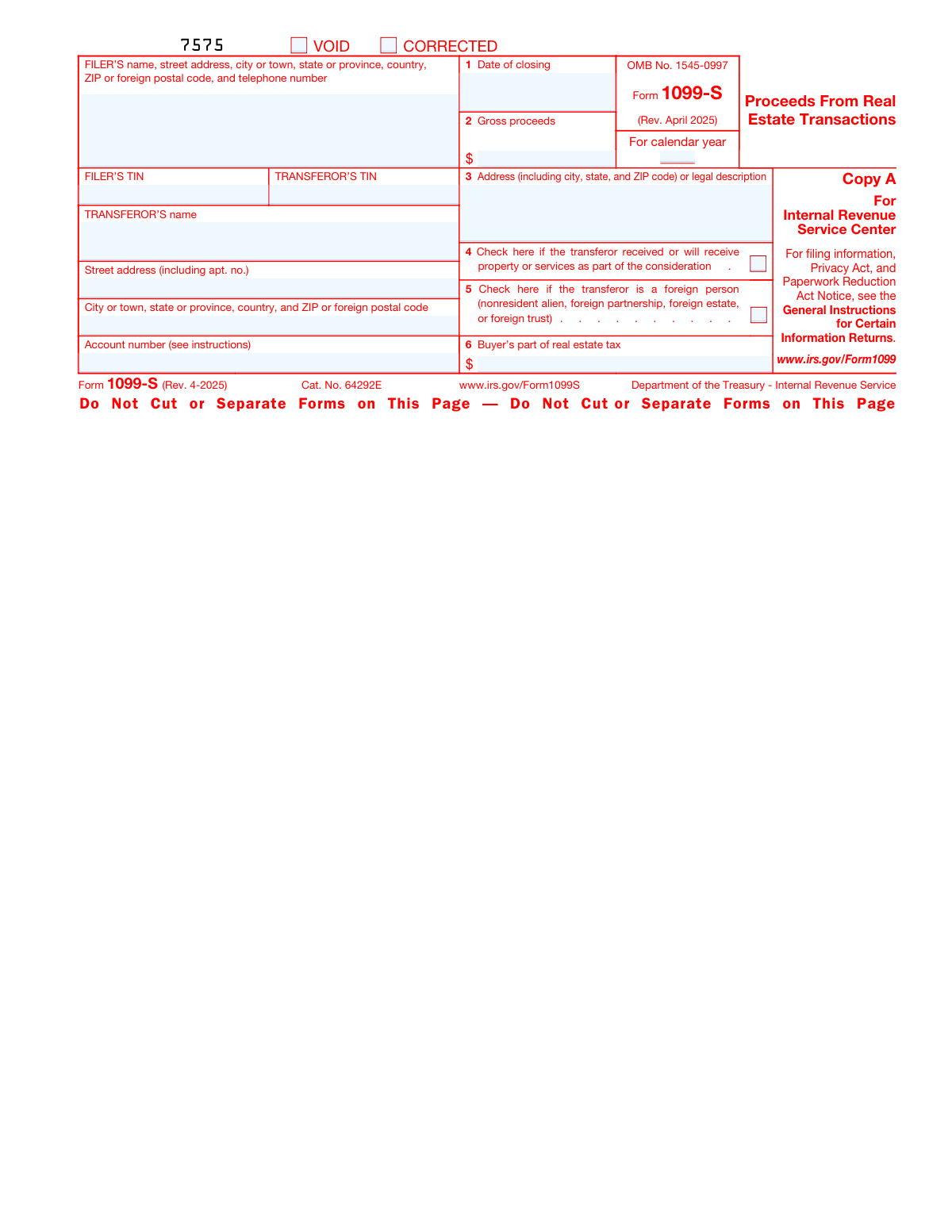
Form 1099-S, Proceeds From Real Estate Transactions, page 1
Moderate · 46/100Form Complexity Index

The AI does the filling. You just check it.

No typing into boxes, nothing to install.

Tell the AI about youAnswer a few questions in plain words, or upload your W-2 or last year's return. That is all the typing there is.
AI fills every field in secondsIt puts each answer in the right box on every page, checkboxes included.
Check it and downloadReview every field, change anything, then download, print or sign the PDF.

What this form asks for

The AI fills all of it, from your answers or your documents.

Form 1099-S, officially titled 'Proceeds From Real Estate Transactions', is a tax form used to report the sale or exchange of real estate. It is important for documenting the gross proceeds from the transaction and ensuring compliance with tax reporting requirements. The form is filed with the IRS and a copy is provided to the transferor (seller) of the property.
Fillable fields47
Pages5
Sections8
Form Complexity IndexModerate, 46/100

The AI checks your answers before you download

15 checks built for this form, so a wrong date or a missing answer is caught before anyone else sees it.

Ensures the official IRS scannable form is used for Copy A and the black version for Copy B and other copies.

The AI ensures that the correct version of Form 1099-S is used for each copy required. For Copy A, which is sent to the IRS, the AI confirms that the official scannable form is utilized. For Copy B, which is provided to the transferor, and any other copies that may be needed, the AI verifies that the black version of the form is used. This check is crucial to maintain compliance with IRS requirements and to ensure proper processing of the form.

Confirms that the filer's information is complete, including name, address, city, state, country, ZIP or foreign postal code, and telephone number.

The AI confirms that all required filer information fields on Form 1099-S are fully completed. It checks for the presence of the filer's name, address, city, state, country, ZIP code or foreign postal code, and telephone number. The AI ensures that no essential details are missing and that the information provided is formatted correctly to meet IRS standards. This validation is essential to avoid processing delays or issues with form acceptance.

Verifies that the filer's Taxpayer Identification Number (TIN) is provided and accurate.

The AI verifies the inclusion and accuracy of the filer's Taxpayer Identification Number (TIN) on Form 1099-S. It checks that the TIN is correctly entered and matches the filer's official records. The AI also ensures that the TIN format adheres to IRS specifications. This validation is critical to ensure that the IRS can correctly identify the filer and associate the form with the correct tax account.

Checks that the transferor's Taxpayer Identification Number (TIN) is entered correctly.

The AI checks the transferor's Taxpayer Identification Number (TIN) for correctness on Form 1099-S. It ensures that the TIN provided for the transferor is accurate and formatted according to IRS guidelines. This check is important to prevent errors that could result in misreporting or misidentification of the transferor in the IRS system.

Validates the full name and address of the transferor, including apartment number if applicable.

The AI validates the transferor's full name and address details on Form 1099-S. It ensures that the name is complete and matches official documents, and that the address includes all necessary components such as the street address, apartment number if applicable, city, state, and ZIP code. This validation is crucial for the IRS to accurately identify the transferor and for any necessary correspondence regarding the real estate transaction.

Confirms the presence of an account or unique number if the filer has assigned one to the transferor's account.

The AI ensures that an account number or a unique identifier is present on Form 1099-S if the filer has assigned one to the transferor's account. This check is crucial for maintaining accurate records and ensuring that the transaction can be matched to the correct individual or entity. The AI cross-references the provided information with the filer's records to confirm the presence and accuracy of the account or unique number. In the absence of such an identifier, the AI flags the form for further review to prevent potential errors in reporting.

And 9 more checks
  • Verifies the date of closing is entered in the correct format and reflects the actual closing date of the real estate transaction.
  • Ensures the gross proceeds amount is entered and represents the total gross proceeds from the transaction.
  • Checks that the address or legal description of the property is provided accurately.
  • Confirms if the 'Property or services as part of the consideration' box is checked when applicable.
  • Verifies the 'Foreign person' box is checked if the transferor is a foreign person.
  • Ensures the buyer's part of real estate tax is entered and accurate.
  • Checks for consistency of information between Copy A and Copy C (For Filer).
  • Validates that the form and instructions are the most current versions as per the official IRS website.
  • Confirms that electronic filing options are considered, directing to the IRS FIRE or AIR systems if applicable.

Let AI fill out your Form 1099-S

No typing. Every field filled in seconds, checked, ready to sign.

7 days free, then $19.99/month · Cancel anytime

How to Fill Out Form 1099-S Online for Free in 2026

What the AI walks you through.

  1. Visit instafill.ai site and select Form 1099-S
  2. Enter FILER'S and TRANSFEROR'S TIN
  3. Input FILER'S and TRANSFEROR'S name and address
  4. Fill in the date of closing and gross proceeds
  5. Provide property address or legal description
  6. Indicate if transferor received property or services
  7. Check if transferor is a foreign person
  8. Enter buyer's part of real estate tax
  9. Sign and date the form electronically
  10. Check for accuracy and submit form

Common Mistakes in Completing Form 1099-S

The ones the AI is built to catch.

Using non-scannable Copy A from the website
Submitting a non-scannable Copy A of Form 1099-S downloaded from the website can lead to processing errors, as the IRS requires a scannable version. To avoid this mistake, filers should use the official IRS scannable form for Copy A, which can be obtained by ordering through the IRS website or by calling the IRS to request the form. This ensures that the information is captured accurately and efficiently during processing.
Failing to use the official IRS scannable form for Copy A
Filers sometimes overlook the requirement to use the official IRS scannable form for Copy A of Form 1099-S. This can result in the form being rejected or incorrectly processed. To prevent this issue, it is crucial to obtain the correct scannable form either by ordering from the IRS or by visiting an authorized IRS distribution center. Always verify that the form is the correct, scannable version before submission.
Not providing the filer's complete address and telephone number
Neglecting to provide the filer's complete address and telephone number on Form 1099-S can cause delays or miscommunication. It is essential to double-check that all contact information is accurate and complete, including the street address, city, state, ZIP code, and telephone number. This information is necessary for the IRS to contact the filer if there are any questions or issues with the form.
Omitting or incorrectly entering the filer's TIN
Omitting or incorrectly entering the filer's Taxpayer Identification Number (TIN) is a critical error that can lead to penalties and processing delays. Filers must ensure that their TIN is entered correctly and corresponds with the name on the form. If the filer does not have a TIN, they should apply for one using the appropriate IRS procedure before submitting Form 1099-S.
Incorrectly entering the transferor's TIN
Entering the transferor's Taxpayer Identification Number (TIN) incorrectly on Form 1099-S can result in the IRS being unable to match the reported transaction with the correct taxpayer. It is imperative to verify the transferor's TIN and ensure it is entered accurately. If there is any uncertainty about the correct TIN, the filer should request confirmation from the transferor before completing the form.
Not fully completing the transferor's name and address
Failing to provide the complete name and address of the transferor can lead to processing delays and potential issues with tax records. It is crucial to double-check that all parts of the name, including middle initials or suffixes, are included and that the address is accurate and complete, with the correct street name, city, state, and ZIP code. Cross-referencing this information with official documents or identification can help ensure accuracy. Always review the form before submission to confirm that no part of the name or address has been inadvertently omitted.
Leaving out the account or unique number if applicable
Omitting the account or unique number when it is applicable can cause confusion and make it difficult to match the form with the correct taxpayer or transaction. If an account or unique number is associated with the transaction, it should be included on the form. This number helps in identifying the transaction and maintaining accurate records. Taxpayers should consult their closing statements or other transaction documents to locate this number and ensure it is entered correctly on the form.
Entering the wrong date of closing in Box 1
Entering an incorrect closing date in Box 1 can lead to discrepancies in tax reporting and may affect the recognition of the transaction within the correct tax year. It is important to verify the actual closing date of the real estate transaction, which is typically documented in the closing statement or settlement agreement. Carefully transcribe this date onto the form, and double-check it for accuracy. If there is any uncertainty about the correct date, consult with the closing agent or attorney involved in the transaction.
Misreporting the gross proceeds in Box 2
Misreporting the gross proceeds in Box 2 can result in incorrect tax calculations and potential audits. It is essential to report the exact amount of gross proceeds from the sale or exchange of the property, as this figure is used to determine capital gains or losses. This amount should match the figures in the settlement statement or other financial documentation related to the transaction. Taxpayers should carefully review these documents and ensure that the gross proceeds are reported accurately on the form.
Providing an incomplete address or legal description in Box 3
Providing an incomplete address or legal description of the property in Box 3 can cause identification issues and may lead to the form being rejected or incorrectly processed. The address and legal description should be detailed and match the information on the title or deed of the property. This typically includes the lot number, subdivision, and any other details that uniquely identify the property. It is advisable to copy this information directly from the legal documents to avoid errors and to review it for completeness before submitting the form.
Failing to check Box 4 when property or services are part of the consideration
When property or services, in addition to cash, are part of the transaction, Box 4 must be checked to indicate this. Failure to do so can lead to incorrect reporting and potential issues with the IRS. To avoid this mistake, carefully review the details of the transaction to determine if any property or services were exchanged and ensure that Box 4 is checked if applicable. Double-checking the transaction details against the form before submission can prevent this oversight.
Neglecting to check Box 5 if the transferor is a foreign person
Box 5 is specifically designated for indicating whether the transferor is a foreign person. Not checking this box when applicable can result in noncompliance with tax withholding requirements. To avoid this error, confirm the transferor's residency status before completing the form. If the transferor is a foreign person, make sure to check Box 5. It is also advisable to keep documentation that supports the residency status of the transferor for record-keeping purposes.
Incorrectly entering the buyer's part of real estate tax in Box 6
Box 6 requires accurate entry of the buyer's portion of real estate taxes for the year the property was sold. Incorrect entries can lead to discrepancies in tax reporting. To prevent this mistake, verify the real estate tax amounts attributed to the buyer with the closing documents or settlement statement. Ensure that the amount entered in Box 6 reflects only the buyer's portion and not the total taxes for the property. Cross-referencing with financial records can help ensure accuracy.
Not providing the same information on Copy C as on Copy A
It is essential that the information provided on Copy C is identical to that on Copy A, as inconsistencies can cause confusion and delays in processing. To avoid this error, use Copy A as a reference when completing Copy C to ensure all information matches exactly. Before submitting the form, review both copies side by side for any discrepancies. Consistency in reporting across all copies is crucial for accurate record-keeping and compliance.
Overlooking updates or changes to the form or instructions
The IRS may update Form 1099-S or its instructions from year to year. Overlooking these changes can result in the submission of outdated or incorrect information. To prevent this, always use the most current version of the form and thoroughly review the latest instructions before filling it out. Checking the IRS website for the latest updates or consulting with a tax professional can help ensure compliance with the most recent requirements.
Not consulting the General Instructions for Certain Information Returns
Filers often overlook the General Instructions for Certain Information Returns, which can lead to errors in completing Form 1099-S. These instructions provide crucial guidance on reporting requirements, deadlines, and the correct method of furnishing statements to recipients. To avoid this mistake, filers should review the General Instructions before completing Form 1099-S to ensure compliance with IRS guidelines. It is also advisable to keep a copy of these instructions for reference and to check for any updates each tax year.
Failing to report the transaction correctly on the transferor's tax return
A common error is the incorrect reporting of real estate transactions on the transferor's tax return. This can result from misunderstanding the information provided on Form 1099-S or from not properly accounting for the proceeds in the tax return. To prevent this mistake, transferors should carefully review the information on Form 1099-S and consult with a tax professional if necessary. Accurate reporting is essential to avoid potential penalties and to ensure the correct calculation of any tax liability associated with the real estate transaction.
Not using electronic filing options when available
Many filers miss the opportunity to use electronic filing options for Form 1099-S, which can streamline the submission process and reduce the risk of errors. Electronic filing is often faster and more secure than paper filing, and it provides immediate confirmation of receipt by the IRS. To avoid this mistake, filers should explore the IRS's electronic filing options, such as the Filing Information Returns Electronically (FIRE) system, and consider using them to submit Form 1099-S and other information returns.
Contacting the wrong IRS service for assistance
When seeking assistance with Form 1099-S, filers sometimes contact the wrong IRS service, leading to delays and potential miscommunication. It is important to direct inquiries to the appropriate IRS department to receive accurate and timely help. Filers should consult the IRS website or the instructions for Form 1099-S to find the correct contact information for questions related to real estate transaction reporting. Additionally, using the IRS's online resources and frequently asked questions can provide quick answers to common issues.

Frequently Asked Questions About Form 1099-S


Is it really free for 7 days?
Yes. You pay $0 today. Cancel before Nov 1 and you are never charged. Keep it, and it is $19.99 a month for 5 fills of your Form 1099-S.
Can I fill other forms too?
This plan is for your Form 1099-S: your own AI agent fills it as often as 5 times a month. To fill other forms and upload your own, choose a Professional plan from your account.
How do I cancel?
From your account, in two clicks, any time. No email, no call.
How does the AI fill out Form 1099-S?
You answer a few questions in plain words, or upload your W-2 or last year's return. The AI reads what you give it and puts each answer into the right field of Form 1099-S, on every page, in seconds. It checks the answers against the form's own rules, and you review and change anything before you download, print or sign.
What happens to my information?
It is encrypted in transit and at rest, and it is never used to train AI.
How complex is Form 1099-S to fill out?
Form 1099-S has a Form Complexity Index of 46 out of 100, in the moderate tier: 47 fillable fields across 5 pages. Instafill.ai's AI fills it in under a minute, with every field there for you to review before you download.
What is Form 1099-S used for?
Form 1099-S, Proceeds From Real Estate Transactions, is used to report the sale or exchange of real estate. The form is used by the person responsible for closing the transaction, such as the title or settlement company, to report to the Internal Revenue Service (IRS) and the seller the proceeds from the sale. This information is used by the seller to calculate any capital gain or loss on their tax return.
Can I print and file Copy A of Form 1099-S from the IRS website?
No, you cannot print and file Copy A of Form 1099-S from the IRS website. Copy A of Form 1099-S is a scannable document that the IRS processes. For filing with the IRS, you must use the official printed version of Copy A that complies with IRS standards for scanning. You can order the official forms from the IRS or use an IRS-approved software program to generate the scannable form.
Where can I find the official scannable Copy A of Form 1099-S for filing with the IRS?
The official scannable Copy A of Form 1099-S can be obtained by ordering it from the IRS. You can order the forms free of charge by visiting the IRS website or by calling the IRS order line. The IRS does not provide a downloadable version of the scannable Copy A because it must meet specific printing standards to be accurately read by their scanning equipment.
How can I order official IRS information returns including Form 1099-S?
You can order official IRS information returns, including Form 1099-S, by visiting the IRS website and searching for the 'Order Forms & Publications' section. Alternatively, you can call the IRS at 1-800-TAX-FORM (1-800-829-3676) to place an order. The IRS will mail the forms to you free of charge.
Is it possible to file information returns electronically, and if so, how?
Yes, it is possible to file information returns, including Form 1099-S, electronically through the IRS Filing Information Returns Electronically (FIRE) system. To file electronically, you must have software that generates a file according to the specifications in IRS Publication 1220. You also need to apply for a Transmitter Control Code (TCC) from the IRS before you can transmit electronically. More information about electronic filing can be found on the IRS website under the 'Filing Information Returns Electronically (FIRE)' section.
Where can I find more information about printing tax forms like Form 1099-S?
More information about printing tax forms like Form 1099-S can be found on the IRS website (www.irs.gov). You can download a copy of the form and its instructions directly from the site. Additionally, the IRS provides guidelines for the correct format and printing specifications if you are required to print these forms for filing with the IRS or distributing to recipients. It's important to ensure that the forms are legible and comply with IRS standards to avoid any processing issues.
What should I do with Form 1099-S Copy B?
Form 1099-S Copy B is intended for the recipient of the proceeds from real estate transactions. If you receive Copy B, you should keep it for your records and use the information reported on it to complete your tax return. Specifically, you may need to report the real estate transaction on Schedule D (Form 1040) if you are required to file a tax return. It's important to consult with a tax professional or refer to IRS instructions to determine how this sale impacts your tax situation.
What are the consequences of not reporting information required on Form 1099-S?
Failing to report information required on Form 1099-S can lead to a variety of consequences, including penalties and interest for underreporting income. The IRS may also conduct audits if discrepancies are found between the information reported by the payer and the income reported by the recipient. It's crucial to accurately report all information from Form 1099-S on your tax return to comply with tax laws and avoid potential fines or legal issues.
What information is reported in Box 1 of Form 1099-S?
Box 1 of Form 1099-S reports the date of closing of the real estate transaction. This date is important as it determines the tax year in which the transaction should be reported. The closing date is when the legal ownership of the property is transferred from the seller to the buyer, and it is a key piece of information for both parties' tax records.
What does Box 2 on Form 1099-S represent?
Box 2 on Form 1099-S represents the gross proceeds from the real estate transaction. This amount is the total consideration paid to the seller before any deductions, such as commissions or closing costs. It is not necessarily the amount of profit or loss from the transaction; rather, it is the total amount received by the seller from the buyer. Taxpayers should use this figure along with their adjusted basis in the property to calculate any capital gain or loss on their tax return.
What is shown in Box 3 of Form 1099-S?
Box 3 of Form 1099-S, 'Proceeds From Real Estate Transactions,' reports the gross proceeds from the sale or exchange of real estate. This amount represents the total consideration paid by the buyer before any expenses or adjustments. It does not reflect any mortgage or debt on the property, nor does it indicate the seller's net profit or loss from the transaction.
What does it mean if Box 4 on Form 1099-S is checked?
If Box 4 on Form 1099-S is checked, it indicates that the seller received or will receive property or services as part of the consideration for the real estate transaction. This means that the transaction was not solely for cash and that other forms of payment were involved, such as a trade or the provision of services as part of the purchase price.
What does Box 5 indicate on Form 1099-S?
Box 5 on Form 1099-S indicates whether the seller is certifying that the sale or exchange of the property qualifies for full or partial exclusion from gross income under Section 121 of the Internal Revenue Code. If Box 5 is checked, the seller is asserting that the gain on the sale of the property is not taxable because it falls under the exclusion for the sale of a principal residence, subject to certain conditions and limitations.
How is the buyer's part of real estate tax reported on Form 1099-S?
The buyer's part of real estate tax is not directly reported on Form 1099-S. However, real estate taxes are often prorated between the buyer and seller at the time of the transaction. The seller's portion of these taxes may be deducted from the gross proceeds reported in Box 3, but the specific allocation of real estate taxes is typically detailed in the settlement statement or closing disclosure, not on Form 1099-S itself.
What should I do if I received a federal mortgage subsidy and sold my home?
If you received a federal mortgage subsidy and sold your home, you may be subject to recapture tax if you sold your home within 9 years of purchase and your income has increased past a certain threshold. You should report any recapture of the federal mortgage subsidy on your tax return for the year in which you sold your home. It is advisable to consult with a tax professional or refer to IRS Publication 523, 'Selling Your Home,' for guidance on how to calculate and report any recapture tax due.
What is the Transferor's taxpayer identification number (TIN) used for on Form 1099-S?
The Transferor's taxpayer identification number (TIN) on Form 1099-S is used to identify the individual or entity that has sold or transferred real estate. It is crucial for the IRS to track the transaction and ensure that the transferor reports any capital gain or loss resulting from the sale on their tax return. The TIN is also used to match the reported information on Form 1099-S with the transferor's tax records.
What is the purpose of the account number on Form 1099-S?
The account number on Form 1099-S is an optional field that may be used by the filer to establish an account or other unique number to distinguish between multiple transactions or forms for the same transferor. It helps in the management and tracking of the submitted forms, especially when the transferor is involved in more than one real estate transaction in the same tax year.
How do I report a real estate transaction if the property was not my main home?
If the property sold was not your main home, you must report the real estate transaction on Schedule D (Form 1040), Capital Gains and Losses, and on Form 8949, Sales and Other Dispositions of Capital Assets, if required. You will need to calculate the capital gain or loss by subtracting the property's basis (usually the purchase price plus any improvements) from the sale price. It's important to keep records of the sale and any related expenses, as these will be necessary for accurately reporting the transaction to the IRS.
Where can I find the latest developments related to Form 1099-S and its instructions?
The latest developments related to Form 1099-S and its instructions can be found on the IRS website. You can visit the IRS official page for Form 1099-S, which may include recent updates, related forms, and instructions on how to file. Additionally, you can check for any recent tax law changes, IRS notices, or other guidance that may affect the reporting of real estate transactions.
Does the IRS offer a Free File Program for filing taxes online?
Yes, the IRS offers a Free File Program for filing taxes online. This program provides two options: IRS Free File, which is available to taxpayers with an adjusted gross income (AGI) of $73,000 or less, and offers access to free tax preparation software; and Free File Fillable Forms, which are electronic versions of IRS paper forms available to all taxpayers regardless of income. These options are designed to help taxpayers prepare and file their federal income tax returns online for free. More information about the Free File Program can be found on the IRS website.
Encrypted in transit and at restNever used to train AIDelete your forms any time

Get your Form 1099-S filled out by AI

$0 today. Cancel before Nov 1 and you pay nothing.

Other forms like this one

real estate forms: Form 593, Real Estate Withholding, Inland Residential Real Estate Services LLC Application for Lease (Form 4301, Rev. 11/14), New licence application – Form 1–1 (IND), Application for an individual’s licence (Real estate agent, property auctioneer, resident letting agent, motor dealer, chattel auctioneer, field agent), Texas Real Estate Commission (TREC) One to Four Family Residential Contract (Resale) (TREC No. 20-18), City of Harvey Real Estate Transfer Declaration & Application (with Certificate for Exemption), Alaska Residential Real Estate Purchase Agreement, Form 21, Residential Purchase and Sale Agreement, Form L-4260, Property Transfer Affidavit, Form TC201, Income and Expense Schedule for Rent Producing Properties, Memorandum of Contract, Notice of Transfer Forms Packet, Oklahoma Real Estate Commission Tenancy Guidelines (01-01-2026), Oklahoma Real Estate Commission Residential Property Condition Disclosure Exemption Form (RPCD EXEMPTION FORM), Oklahoma Real Estate Commission Residential Lease, Oklahoma Real Estate Commission Tenant Flood Notice (01-01-2026), Oklahoma Real Estate Commission Property Data Form (Residential), Oklahoma Real Estate Commission Pet Addendum, Oklahoma Real Estate Commission Lease Application, Oklahoma Real Estate Commission Keys and Re-Keying Addendum, Oklahoma Real Estate Commission, Disclosure of Broker Duties & Responsibilities

estate forms: Form 593, Real Estate Withholding, Inland Residential Real Estate Services LLC Application for Lease (Form 4301, Rev. 11/14), New licence application – Form 1–1 (IND), Application for an individual’s licence (Real estate agent, property auctioneer, resident letting agent, motor dealer, chattel auctioneer, field agent), Judicial Council of California Form DE-111, Petition for Probate (Probate—Decedents Estates), Texas Real Estate Commission (TREC) One to Four Family Residential Contract (Resale) (TREC No. 20-18), City of Harvey Real Estate Transfer Declaration & Application (with Certificate for Exemption), Judicial Council of California Form DE-120, Notice of Hearing—Decedent's Estate or Trust, Form DE-160/GC-040, Inventory and Appraisal (Declaration of Representative/Guardian/Conservator or Small Estate Claimant and Declaration of Probate Referee), Judicial Council of California Form DE-120, Notice of Hearing—Decedent's Estate or Trust, Fidelity Change of Account Ownership — Mutual Fund Only Accounts (Changing to a Trust, Estate, Guardian, or Conservator Account), Fidelity Change of Account Registration — Changing to a Trust, Estate, Guardian, or Conservator Brokerage Account, Valuing Your Estate Worksheet (from Vanguard's 'Understanding the basics of estate planning' guide), Alaska Residential Real Estate Purchase Agreement, Merrill Edge Self-Directed Trust and Estate Cash Management Account (CMA Account) Account Application Booklet and Agreements, Affidavit for Collection of Personal Property California Probate Code Section 13100, Oklahoma Real Estate Commission Tenancy Guidelines (01-01-2026), Oklahoma Real Estate Commission Residential Property Condition Disclosure Exemption Form (RPCD EXEMPTION FORM), Oklahoma Real Estate Commission Residential Lease, Oklahoma Real Estate Commission Tenant Flood Notice (01-01-2026), Oklahoma Real Estate Commission Property Data Form (Residential)

PA state forms: Form 1095-A, Health Insurance Marketplace Statement, Form W-2, Wage and Tax Statement, Form 593, Real Estate Withholding, Form 8938, Statement of Specified Foreign Financial Assets, Form CMS-2567, Statement of Deficiencies, Form 1098, Mortgage Interest Statement, Form 1098-T, Tuition Statement, Form 1098-E, Student Loan Interest Statement, Form DS-3053, Statement of Consent, Form DS-86, Statement of Non-Receipt of a U.S. Passport, Form DS-86, Statement of Non-Receipt of a U.S. Passport, Form 108, Statement of Intention, Form 107, Statement of Financial Affairs, Form 121, Statement About Your SSNs, Form 122A-1, Chapter 7 Statement of Current Monthly Income, Center for Infertility & Reproductive Surgery – New Patient Questionnaire and Patient/Guarantor Statement (Brigham and Women’s Hospital, Department of Obstetrics and Gynecology), Adult Travel Document Application for Stateless and Protected Persons in Canada (16 years of age or over) (PPTC 190), Form W-8IMY (Rev. October 2021), Certificate of Foreign Intermediary, Foreign Flow-Through Entity, or Certain U.S. Branches for United States Tax Withholding and Reporting, Form W-2, Wage and Tax Statement (2025), State of New Mexico Workers’ Compensation Administration — Workers' Compensation Complaint (Rev. 8/22) (11.4.4.9 NMAC)

1099 forms: Form 1099-NEC, Nonemployee Compensation, Form 4852, Substitute for Form W-2 or 1099-R, Form 1099-MISC, Miscellaneous Information, Form 1099-INT, Interest Income, Form 1099-DIV, Dividends and Distributions, Form 1099-R, Distributions From Pensions etc., Form 1099-G, Certain Government Payments, Form 1099-C, Cancellation of Debt, Form 1099-K, Payment Card and Third Party Network Transactions, Form 1099-OID, Original Issue Discount, Form 1099-PATR, Taxable Distributions from Cooperatives, Form 1099-Q, Payments From Qualified Education Programs, Form 1099-SA, Distributions from HSA/MSA, Form 1099-B, Proceeds From Broker Transactions, Form 1099-NEC, Nonemployee Compensation, Form 1099-NEC, Nonemployee Compensation, Form 1099-NEC, Nonemployee Compensation, Form 1099-NEC, Nonemployee Compensation, Instructions for Forms 1099-R and 5498, Form 1099-MISC, Miscellaneous Information

NJ state forms: Form 1095-A, Health Insurance Marketplace Statement, Form W-2, Wage and Tax Statement, Form 593, Real Estate Withholding, Form 8938, Statement of Specified Foreign Financial Assets, Form CMS-2567, Statement of Deficiencies, Form 1098, Mortgage Interest Statement, Form 1098-T, Tuition Statement, Form 1098-E, Student Loan Interest Statement, Form DS-3053, Statement of Consent, Form DS-86, Statement of Non-Receipt of a U.S. Passport, Form DS-86, Statement of Non-Receipt of a U.S. Passport, Form 108, Statement of Intention, Form 107, Statement of Financial Affairs, Form 121, Statement About Your SSNs, Form 122A-1, Chapter 7 Statement of Current Monthly Income, Center for Infertility & Reproductive Surgery – New Patient Questionnaire and Patient/Guarantor Statement (Brigham and Women’s Hospital, Department of Obstetrics and Gynecology), Adult Travel Document Application for Stateless and Protected Persons in Canada (16 years of age or over) (PPTC 190), Form W-8IMY (Rev. October 2021), Certificate of Foreign Intermediary, Foreign Flow-Through Entity, or Certain U.S. Branches for United States Tax Withholding and Reporting, Form W-2, Wage and Tax Statement (2025), State of New Mexico Workers’ Compensation Administration — Workers' Compensation Complaint (Rev. 8/22) (11.4.4.9 NMAC)

state ID forms: Application for Renewal or Duplicate of Alabama Driver License or ID card, Form 1095-A, Health Insurance Marketplace Statement, Form W-2, Wage and Tax Statement, Form 593, Real Estate Withholding, Form 8938, Statement of Specified Foreign Financial Assets, Form CMS-2567, Statement of Deficiencies, Form 1098, Mortgage Interest Statement, Form 1098-T, Tuition Statement, Form 1098-E, Student Loan Interest Statement, Form DS-3053, Statement of Consent, Form DS-86, Statement of Non-Receipt of a U.S. Passport, Form 108, Statement of Intention, Form 107, Statement of Financial Affairs, Form 121, Statement About Your SSNs, Form 122A-1, Chapter 7 Statement of Current Monthly Income, Center for Infertility & Reproductive Surgery – New Patient Questionnaire and Patient/Guarantor Statement (Brigham and Women’s Hospital, Department of Obstetrics and Gynecology), Adult Travel Document Application for Stateless and Protected Persons in Canada (16 years of age or over) (PPTC 190), Form W-8IMY (Rev. October 2021), Certificate of Foreign Intermediary, Foreign Flow-Through Entity, or Certain U.S. Branches for United States Tax Withholding and Reporting, Form W-2, Wage and Tax Statement (2025), State of New Mexico Workers’ Compensation Administration — Workers' Compensation Complaint (Rev. 8/22) (11.4.4.9 NMAC)

7 days free, then $19.99/month · Cancel anytime