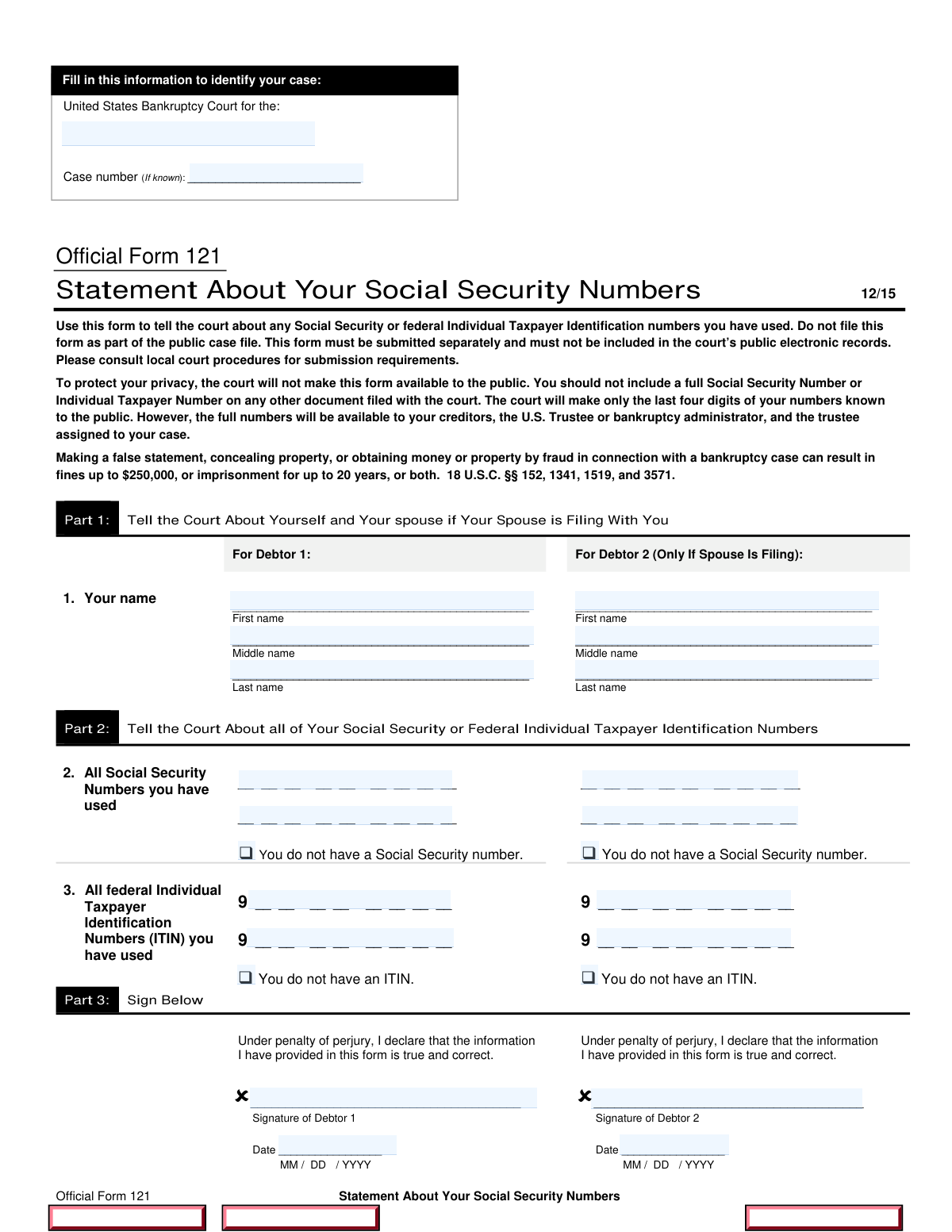
Fill out Form 121, Statement About Your SSNs with Instafill.ai
Worried about filling PDFs wrong? Instafill securely fills FORM_B121 forms, ensuring each field is accurate.
#1 AI PDF Filling Software of 2026
3 out of 4 customers say they prepare their Form 121 forms in 37 seconds or less
Secure platform for your PDF forms and personal information
| Form name: | Form 121, Statement About Your SSNs |
| Number of fields: | 27 |
| FCI: | Moderate (46/100) |
Form Complexity Index
Moderate
46 / 100
| Fillable fields | 27 |
| Pages | 1 |
| Fields per page | 27 |
| Sections | 11 |
| Conditional rules | 8 |
| Tables & lists | 1 |
| Instruction pages | — |
| Instafill Form ID | IF-FORM_B121 |
Form 121 has a moderate Form Complexity Index of 46/100. Instafill’s AI completes it accurately in under a minute.
Instafill Demo: How to fill out PDF forms in seconds with AI
Compliance Form 121
Validation Checks by Instafill.ai
1
Verifies that the name of the district court is correctly filled in both blanks at the top of the form.
This validation check ensures that the name of the district court is accurately entered in both designated areas at the top of Form 121. It confirms that there are no typographical errors or omissions in the court's name, which is crucial for the document's validity. The check also verifies that the format of the court's name adheres to any specified guidelines. By performing this validation, the software helps to prevent potential delays or issues in processing the form.
2
Confirms that the case number is entered in the designated space if available, or left blank if not applicable.
This validation check verifies that the case number is correctly entered in the specified field if it is available. It ensures that the case number is not mistakenly omitted or incorrectly filled out, which could lead to confusion or misfiling. If a case number is not applicable, the check confirms that the field is left blank as required. This process helps maintain the integrity of the form and ensures that it is processed efficiently.
3
Ensures that Debtor 1's first name, middle name, and last name are accurately provided in the respective fields.
This validation check confirms that Debtor 1's full name is accurately filled out in the appropriate fields of the form. It verifies that each component of the name, including the first name, middle name, and last name, is correctly entered without any errors. This check is essential for identifying the debtor and ensuring that the form is associated with the correct individual. By validating this information, the software helps to prevent any potential legal complications that may arise from incorrect name entries.
4
Checks that Debtor 2's information is filled out correctly if filing jointly, including first name, middle name, and last name.
This validation check ensures that if Debtor 2 is included on the form, their information is accurately provided in the designated fields. It verifies that the first name, middle name, and last name are all correctly entered, similar to the checks performed for Debtor 1. This is particularly important in joint filings, as any inaccuracies could lead to complications in the case. By performing this check, the software helps to ensure that all parties are correctly identified and that the form is complete.
5
Validates that all Social Security Numbers used are listed in Part 2, or confirms that the box indicating no Social Security Number is checked if applicable.
This validation check ensures that all Social Security Numbers (SSNs) required in Part 2 of the form are accurately listed. It verifies that no SSNs are omitted and that they are entered in the correct format. If applicable, the check also confirms that the box indicating that no Social Security Number is available is checked. This process is crucial for compliance and helps to protect the identities of the individuals involved by ensuring that the information is handled correctly.
6
Ensures that all Individual Taxpayer Identification Numbers (ITIN) used are provided in Part 2, or confirms that the corresponding box is checked if no ITIN is available.
This validation check ensures that all Individual Taxpayer Identification Numbers (ITIN) are accurately provided in Part 2 of the form. It verifies that if no ITIN is available, the appropriate box is checked to indicate this status. This is crucial for maintaining accurate records and compliance with tax regulations. By confirming this information, the software helps prevent potential issues related to missing or incorrect ITINs.
7
Confirms that both Debtor 1 and Debtor 2 (if applicable) have signed the form in Part 3.
This validation check confirms that both Debtor 1 and Debtor 2 have provided their signatures in Part 3 of the form, if applicable. It ensures that all necessary parties have acknowledged and agreed to the contents of the form, which is essential for its validity. By verifying the presence of these signatures, the software helps to uphold the integrity of the document. This check is vital for preventing disputes or challenges regarding the authenticity of the form.
8
Verifies that the date of signing is included in the correct format (MM/DD/YYYY) by both debtors.
This validation check verifies that the date of signing is included and formatted correctly as MM/DD/YYYY by both debtors. It ensures that the dates are not only present but also adhere to the specified format, which is important for legal and administrative purposes. By confirming the accuracy of the date format, the software helps to avoid any potential confusion or errors in processing the form. This check is essential for maintaining a clear timeline of the document's execution.
9
Ensures that the form is not filed as part of the public case file and is submitted separately according to local court procedures.
This validation check ensures that the form is not filed as part of the public case file and is submitted separately in accordance with local court procedures. It verifies that the submission process adheres to the specific guidelines set forth by the court, which is crucial for maintaining confidentiality. By confirming this aspect, the software helps to protect sensitive information from being publicly accessible. This check is vital for compliance with legal standards and safeguarding personal data.
10
Confirms that the form is kept confidential and not included with other documents filed with the court.
This validation check confirms that the form is kept confidential and is not included with other documents filed with the court. It ensures that sensitive information is handled appropriately and remains protected from public disclosure. By verifying this confidentiality requirement, the software helps to uphold the privacy of the individuals involved. This check is essential for ensuring compliance with legal confidentiality standards and protecting personal information.
11
Validates that all entries on the form are reviewed for accuracy and completeness before submission.
This validation check ensures that every entry on Form 121 is thoroughly examined for both accuracy and completeness prior to submission. It confirms that no fields are left blank and that all information provided aligns with the required standards. By performing this check, the software helps to minimize errors that could lead to delays or complications in processing. This step is crucial for maintaining the integrity of the information submitted.
12
Checks that no full Social Security Numbers are included on any other documents filed with the court.
This validation check verifies that no full Social Security Numbers are present on any other documents that are submitted alongside Form 121 to the court. It ensures compliance with privacy regulations and protects sensitive information from unauthorized disclosure. By conducting this check, the software helps to safeguard the personal data of the individuals involved. This is an essential step in maintaining confidentiality and adhering to legal requirements.
13
Ensures that the form is filled out in accordance with the specific instructions provided for Form 121.
This validation check confirms that Form 121 is completed in strict accordance with the specific instructions outlined for the form. It verifies that all formatting, required fields, and procedural guidelines are followed correctly. By ensuring adherence to these instructions, the software helps to prevent common mistakes that could result in the rejection of the form. This check is vital for ensuring that the submission meets all necessary criteria for acceptance.
14
Confirms that all necessary boxes are checked where applicable, such as for the absence of a Social Security Number or ITIN.
This validation check ensures that all relevant boxes on Form 121 are appropriately checked, particularly those indicating the absence of a Social Security Number or ITIN. It verifies that the form accurately reflects the circumstances of the individuals involved. By performing this check, the software helps to ensure that the form is complete and that all necessary disclosures are made. This step is important for clarity and compliance with the form's requirements.
15
Verifies that the information provided is true and correct, as declared by the signatures of Debtor 1 and Debtor 2.
This validation check verifies that the information provided on Form 121 is accurate and truthful, as affirmed by the signatures of Debtor 1 and Debtor 2. It ensures that the individuals submitting the form are held accountable for the accuracy of the information they provide. By conducting this check, the software helps to uphold the integrity of the submission process. This validation is crucial for legal compliance and for maintaining trust in the information presented.
Common Mistakes in Completing Form 121
It is crucial to accurately identify the correct district court on Form 121, as this information is essential for the processing of your statement. Failing to do so can lead to delays or rejection of your submission. To avoid this mistake, double-check the court's jurisdiction and ensure that you are referencing the correct court based on your case's location. Consulting the court's website or contacting their office can provide clarity on the appropriate district.
Omitting the case number can result in confusion and may hinder the processing of your statement. The case number serves as a unique identifier for your case, and its absence can lead to misfiling or delays. Always ensure that you include the case number if it is applicable to your situation. Review your court documents to find the correct case number before submitting the form.
Accurate identification of Debtor 1 and Debtor 2 is vital for the integrity of the form. Incorrectly filling in these names can lead to legal complications and miscommunication with the court. To prevent this mistake, carefully verify the names against official documents and ensure that they are spelled correctly and match the names on the court records. Taking the time to cross-check this information can save you from potential issues down the line.
Failing to check the box indicating that you do not have a Social Security Number can create confusion and may result in unnecessary follow-up requests from the court. This oversight can delay the processing of your statement. To avoid this mistake, carefully read the instructions on the form and ensure that you check the appropriate box if you do not possess a Social Security Number. Being thorough in this step can help streamline your submission.
Including full Social Security Numbers on documents submitted alongside Form 121 can pose a significant risk to your privacy and security. This practice can lead to identity theft and other security issues. To mitigate this risk, always redact or omit your full Social Security Number from any documents that are not required to display it. Familiarize yourself with the guidelines regarding sensitive information to ensure your personal data remains protected.
Failing to provide Individual Taxpayer Identification Numbers (ITINs) or neglecting to check the 'no ITIN' box can lead to processing delays or rejections. It is crucial to ensure that all required identification numbers are accurately filled in. To avoid this mistake, double-check that you have included your ITIN if applicable, or clearly indicated that you do not have one. This attention to detail will help ensure that your form is processed smoothly.
Omitting signatures from either Debtor 1 or Debtor 2 can render the form invalid and may result in delays in processing. Each debtor must sign the form to confirm the accuracy of the information provided. To prevent this issue, review the form carefully before submission to ensure that all required signatures are present. It is advisable to have a checklist to confirm that all necessary fields, including signatures, are completed.
Incorrectly dating the form can lead to confusion regarding the submission timeline and may affect the processing of your request. The date should be formatted according to the instructions provided on the form. To avoid this mistake, familiarize yourself with the required date format and ensure that you enter the date correctly. Taking a moment to verify the date format can save time and prevent potential issues.
Submitting the form as part of the public case file can compromise the confidentiality of sensitive information, such as Social Security Numbers. It is essential to follow the specific submission guidelines to protect personal data. To avoid this mistake, carefully read the instructions regarding where and how to submit the form. Ensuring that you follow the correct submission protocol will help maintain the privacy of the information provided.
Failing to review the entries for accuracy can lead to errors that may affect the processing of the form. Even minor mistakes can have significant consequences, so it is important to take the time to verify all information before submission. To prevent this oversight, consider having a second person review the form or set it aside for a short period before re-evaluating it. This practice can help catch errors that may have been missed during the initial completion.
Saved over 80 hours a year
“I was never sure if my IRS forms like W-9 were filled correctly. Now, I can complete the forms accurately without any external help.”
Kevin Martin Green
Your data stays secure with advanced protection from Instafill and our subprocessors




Robust compliance program
Transparent business model
You’re not the product. You always know where your data is and what it is processed for.
ISO 27001, HIPAA, and GDPR
Our subprocesses adhere to multiple compliance standards, including but not limited to ISO 27001, HIPAA, and GDPR.
Security & privacy by design
We consider security and privacy from the initial design phase of any new service or functionality. It’s not an afterthought, it’s built-in, including support for two-factor authentication (2FA) to further protect your account.
Fill out Form 121 with Instafill.ai
Worried about filling PDFs wrong? Instafill securely fills form_b121 forms, ensuring each field is accurate.
