Yes! You can use AI to fill out Resource Family Risk Assessment Checklist
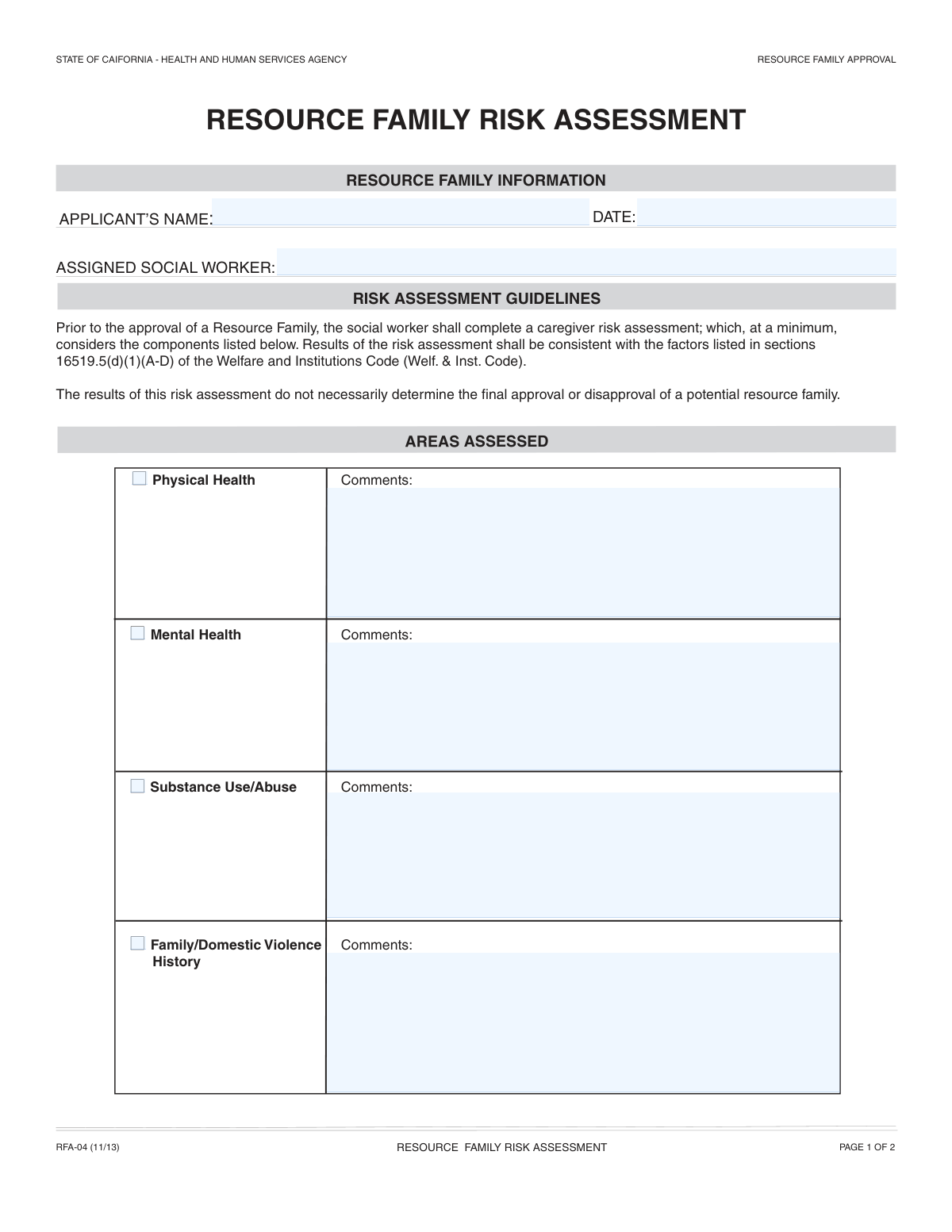
The Resource Family Risk Assessment Checklist is a standardized form used by social services agencies to evaluate and document potential risks associated with prospective resource families. It guides social workers through assessing critical areas such as physical and mental health, substance use history, and domestic violence to ensure a safe environment for children. Today, this form can be filled out quickly and accurately using AI-powered services like Instafill.ai, which can also convert non-fillable PDF versions into interactive fillable forms.
Our AI automatically handles information lookup, data retrieval, formatting, and form filling.
It takes less than a minute to fill out Resource Family Risk Assessment using our AI form filling.
Securely upload your data. Information is encrypted in transit and deleted immediately after the form is filled out.
Form specifications
| Form name: | Resource Family Risk Assessment Checklist |
| Number of fields: | 21 |
| Number of pages: | 2 |
| Language: | English |
| Categories: | resource family forms |
Instafill Demo: How to fill out PDF forms in seconds with AI
How to Fill Out Resource Family Risk Assessment Online for Free in 2026
Are you looking to fill out a RESOURCE FAMILY RISK ASSESSMENT form online quickly and accurately? Instafill.ai offers the #1 AI-powered PDF filling software of 2026, allowing you to complete your RESOURCE FAMILY RISK ASSESSMENT form in just 37 seconds or less.
Follow these steps to fill out your RESOURCE FAMILY RISK ASSESSMENT form online using Instafill.ai:
- 1 Navigate to Instafill.ai and upload or select the Resource Family Risk Assessment Checklist.
- 2 Allow the AI to scan and identify all the fields on the form, such as applicant information, assessment areas, and signature blocks.
- 3 Enter the applicant's name, date, and the assigned social worker's name in the 'Resource Family Information' section.
- 4 Complete the assessment sections (Physical Health, Mental Health, Substance Use, Domestic Violence), checking the relevant boxes and providing detailed comments for each area based on your findings.
- 5 Provide a comprehensive summary of the overall risk assessment in the designated summary field, noting any required follow-up evaluations.
- 6 Complete the 'Risk Factor Declaration' and then digitally sign and date the form in the social worker and supervisor signature sections.
- 7 Review the entire completed form for accuracy and completeness, then download, save, or share the final document as required for case files.
Our AI-powered system ensures each field is filled out correctly, reducing errors and saving you time.
Why Choose Instafill.ai for Your Fillable Resource Family Risk Assessment Form?
Speed
Complete your Resource Family Risk Assessment in as little as 37 seconds.
Up-to-Date
Always use the latest 2026 Resource Family Risk Assessment form version.
Cost-effective
No need to hire expensive lawyers.
Accuracy
Our AI performs 10 compliance checks to ensure your form is error-free.
Security
Your personal information is protected with bank-level encryption.
Frequently Asked Questions About Form Resource Family Risk Assessment
This form is used by social workers to document and assess potential risks associated with an applicant who wants to become a resource family, such as for foster care or adoption.
The assigned social worker completes the assessment and fills out the form. A supervisor must then review and sign the document to finalize it.
In the comments sections, provide specific, objective observations and findings from your assessment. This includes relevant history, interview details, and any information that supports your evaluation of the applicant's health or history.
The summary should synthesize the findings from all assessment areas into a comprehensive overview. It should clearly state the overall risk level and justify the final recommendation regarding the applicant.
You should list additional evaluations only if the initial assessment reveals that more specialized information, such as a psychological or medical evaluation, is necessary to complete the Resource Family Assessment Process.
Checking this box signifies that, based on a thorough assessment, the social worker has found no identifiable risk factors at the time of the evaluation. This should only be checked after all other sections are completed.
Both the social worker who conducted the assessment and their direct supervisor must sign and date the form. Both signatures are required for the form to be considered complete and official.
Once signed, this form becomes a critical part of the applicant's file. It is used to help determine their overall suitability and eligibility to be approved as a resource family.
Yes, you should check the box for each area (e.g., Physical Health, Mental Health) to confirm that the assessment was performed. You can then state that no concerns were identified in the corresponding comments section.
If a risk factor is identified, you must document it thoroughly in the appropriate comments section and the overall summary. Depending on the severity, it may lead to a recommendation for further evaluations or a decision not to approve the family.
Yes, services like Instafill.ai use AI to auto-fill form fields accurately and save time. This can help reduce manual data entry and ensure consistency across documents.
Simply upload the form to the Instafill.ai platform. The service will make the document interactive, and its AI can help you populate the fields before you review, sign, and save the completed form.
If your PDF is not fillable, you can use a tool like Instafill.ai. It can convert flat, non-fillable PDFs into interactive forms that you can easily complete and manage online.
Compliance Resource Family Risk Assessment
Validation Checks by Instafill.ai
1
Ensures Key Identifying Information is Complete
This check verifies that the 'Applicant's Name', 'Date', and 'Assigned Social Worker' fields are all filled out. This information is critical for identifying the case, establishing a timeline, and assigning responsibility. A submission will be rejected if this core information is missing, as the form would be unidentifiable and lack proper context.
2
Validates All Date Formats
This validation ensures that the 'Date', 'Social Worker Signature Date', and 'Supervisor Signature Date' fields are entered in a valid, standard date format (e.g., MM/DD/YYYY). Incorrect date formats can cause data processing errors and make it difficult to establish a correct timeline of events. If validation fails, the user will be prompted to correct the format before submission.
3
Ensures Supervisor Signature Date Follows Social Worker Signature Date
This check confirms that the 'Supervisor Signature Date' is on or after the 'Social Worker Signature Date'. A supervisor's review and signature must logically occur after the social worker has completed and signed their assessment. An error will be shown if the supervisor's date precedes the social worker's, preventing submission of an improperly sequenced form.
4
Ensures Signature Dates are After Initial Assessment Date
This validation confirms that both the 'Social Worker Signature Date' and 'Supervisor Signature Date' are on or after the initial 'Date' recorded in the Resource Family Information section. The form cannot be signed and finalized before it is officially started. This check maintains the chronological integrity of the assessment process.
5
Requires Comments for Checked Risk Assessment Areas
This rule checks that if any of the risk assessment checkboxes ('Physical Health', 'Mental Health', 'Substance Use/Abuse', 'Family/Domestic Violence History') are checked, their corresponding comments field is not empty. Checking a box indicates a potential area of concern that must be documented for a complete assessment. Failure to provide comments will result in a prompt to explain the checked item.
6
Prevents Contradictory Risk Factor Declarations
This validation checks for logical inconsistency between the individual risk factor checkboxes and the 'No Presenting Risk Factors' checkbox. If any of the specific risk assessment boxes are checked, the 'No Presenting Risk Factors' box cannot also be checked. This prevents the submission of a form with contradictory conclusions about the presence of risk.
7
Ensures Required Evaluations are Listed when Necessary
This check is triggered if the user indicates that further evaluations are necessary. It validates that at least 'Required Evaluation 1' is filled in, ensuring that when follow-up actions are identified, they are explicitly documented on the form. The submission will be rejected if evaluations are marked as necessary but none are listed.
8
Prevents Listing Evaluations When Not Necessary
This validation ensures that if the user has not indicated that further evaluations are necessary, the 'Required Evaluation 1, 2, and 3' fields are empty. This prevents extraneous or confusing information from being added to the record. The system may automatically clear these fields or prompt the user to remove the text.
9
Verifies Consistency of Social Worker Name
This check compares the 'Assigned Social Worker' name from the top of the form with the 'Social Worker Name' in the signature block. The names should match to confirm that the person who conducted the assessment is the same person signing off on it. A mismatch would trigger a warning to correct the name before submission to ensure accountability.
10
Ensures Risk Assessment Summary is Substantive
This validation verifies that the 'Risk Assessment Summary' field contains more than a minimum number of characters (e.g., 50). This is to ensure a 'comprehensive summary' is actually provided, rather than a brief, incomplete, or empty entry. A short or missing summary would prompt the user to provide more detail before the form can be submitted.
11
Validates Full Name Format for Key Personnel
This check ensures the 'Applicant's Name', 'Assigned Social Worker', and 'Social Worker Name' fields contain at least two words, suggesting a first and last name have been entered. It also validates that the fields do not contain numbers or excessive special characters. This helps enforce the instruction to provide a 'full name' and improves data quality for record-keeping.
12
Ensures All Signature Fields are Complete
This validation confirms that the 'Social Worker Name', 'Social Worker Signature Date', 'Supervisor Signature', and 'Supervisor Signature Date' fields are all filled. These fields are critical for final approval and accountability. The form cannot be considered complete or officially filed without all required signature information.
Common Mistakes in Completing Resource Family Risk Assessment
This error occurs when a user checks a box indicating a risk factor (e.g., 'Substance Use/Abuse') and also checks the 'No Presenting Risk Factors' box at the end of the form. This logical contradiction invalidates the assessment's conclusion and shows a lack of careful review. To avoid this, double-check that the final declaration is consistent with all the individual assessment findings before signing; if any risk factor boxes are checked, the 'No Presenting Risk Factors' box must remain unchecked.
Users often check a box for an assessed area like 'Mental Health' or 'Family/Domestic Violence History' but then fail to provide the mandatory explanation in the corresponding comments field. This renders the form incomplete, as the checkmark alone provides no context for the assessment. To prevent this, always treat the checkbox and its comment field as a single unit; if you check the box, you must provide detailed, objective observations. AI-powered tools can enforce this by making the comment field required if its associated box is checked.
In fields like 'Mental Health Assessment Comments' or the 'Risk Assessment Summary', users may write subjective statements like 'applicant seems fine' or 'no major issues'. This language is not evidence-based and weakens the credibility of the assessment, making it difficult for supervisors or auditors to understand the basis for a decision. Always use objective, behavioral descriptions and cite specific examples or observations from the assessment to support your conclusions.
The form requires users to list evaluations only if the preceding checkbox, 'The following evaluation(s) are necessary...', is selected. A common mistake is to either list evaluations without checking the box, or check the box and forget to list the required evaluations. This creates ambiguity and can delay the case. To avoid this, pay close attention to the instructions; AI form-filling tools like Instafill.ai can help by automatically showing or hiding the 'Required Evaluation' fields based on the checkbox selection.
The 'Risk Assessment Summary' is frequently filled out with a brief, generic statement that fails to incorporate findings from the preceding sections. A proper summary should be a comprehensive synthesis of the physical health, mental health, substance use, and domestic violence assessments, leading to a clear conclusion. To avoid this, review each assessment section and explicitly reference its key findings in the summary to justify the overall risk determination.
Users may enter dates that are out of chronological order, such as a supervisor's signature date that is earlier than the social worker's signature date. This undermines the integrity of the document's timeline and can cause it to be rejected during an audit. Always ensure the dates reflect the actual sequence of events: assessment, social worker signature, then supervisor signature. AI tools can help by auto-populating the current date and flagging illogical date entries.
A critical error is submitting the form without the social worker's or supervisor's signature and date, which are required to make the document legally valid. This often happens when forms are passed between individuals for review and a field is overlooked. To prevent this, implement a clear sign-off checklist. If the form is a non-fillable PDF, a tool like Instafill.ai can convert it into a fillable version with clearly marked, required signature fields to ensure completion.
Social workers may use professional jargon or agency-specific acronyms in the comment and summary sections, assuming the reader will understand. This can make the form incomprehensible to auditors, supervisors from other departments, or legal reviewers, leading to misinterpretation. Always write out terms in full and avoid abbreviations to ensure the report is clear and accessible to any authorized party who may review it.
The form asks for names in multiple places (Applicant, Assigned Social Worker, Social Worker Name), and users sometimes enter inconsistent versions, such as using a middle initial in one field but not another. This can create confusion in record-keeping and database management, potentially leading to duplicate or fragmented case files. To avoid this, always use the full, legal name as it appears on official documents and ensure it is spelled identically in every field. AI tools can help by storing and auto-filling names consistently.
People often enter dates in ambiguous formats like 4/5/24, which could be interpreted as either April 5th or May 4th depending on the reader's location. This ambiguity is problematic for official records that may be used in legal proceedings. To prevent this, always use a clear, unambiguous format such as MM/DD/YYYY (e.g., 04/05/2024) or write out the month. Form-filling software like Instafill.ai can automatically enforce a standard date format to eliminate this error entirely.
Saved over 80 hours a year
“I was never sure if my IRS forms like W-9 were filled correctly. Now, I can complete the forms accurately without any external help.”
Kevin Martin Green
Your data stays secure with advanced protection from Instafill and our subprocessors

Robust compliance program
Transparent business model
You’re not the product. You always know where your data is and what it is processed for.
ISO 27001, HIPAA, and GDPR
Our subprocesses adhere to multiple compliance standards, including but not limited to ISO 27001, HIPAA, and GDPR.
Security & privacy by design
We consider security and privacy from the initial design phase of any new service or functionality. It’s not an afterthought, it’s built-in, including support for two-factor authentication (2FA) to further protect your account.
Fill out Resource Family Risk Assessment with Instafill.ai
Worried about filling PDFs wrong? Instafill securely fills resource-family-risk-assessment-checklist forms, ensuring each field is accurate.