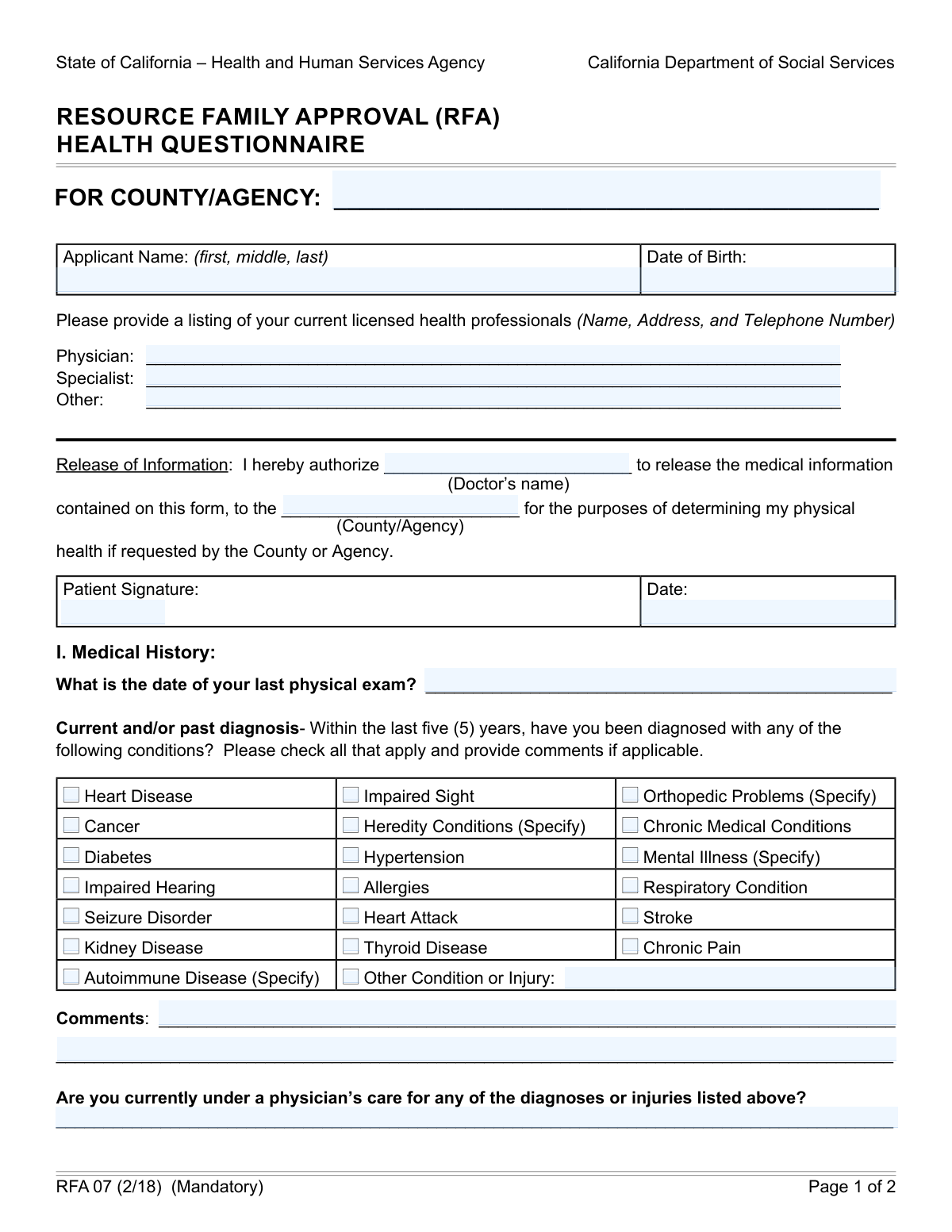
Yes! You can use AI to fill out California Department of Social Services Form RFA 07 (2/18), Resource Family Approval (RFA) Health Questionnaire (Mandatory)
Form RFA 07 is a mandatory health questionnaire used in Californiaâs Resource Family Approval (RFA) process to document an applicantâs medical history, current health providers, tobacco/alcohol use, surgeries/hospitalizations, medications, and related certifications. Counties/agencies use the information to help assess an applicantâs physical health and suitability for caregiving responsibilities, and it includes an authorization to release medical information if requested. Accurate completion is important because omissions or inaccuracies can delay processing or affect approval decisions. Today, this form can be filled out quickly and accurately using AI-powered services like Instafill.ai, which can also convert non-fillable PDF versions into interactive fillable forms.
Our AI automatically handles information lookup, data retrieval, formatting, and form filling.
It takes less than a minute to fill out RFA 07 using our AI form filling.
Securely upload your data. Information is encrypted in transit and deleted immediately after the form is filled out.
Form specifications
| Form name: | California Department of Social Services Form RFA 07 (2/18), Resource Family Approval (RFA) Health Questionnaire (Mandatory) |
| Number of pages: | 2 |
| Language: | English |
| Categories: | California state forms, CDSS forms, social services forms, foster care forms, resource family forms |
Instafill Demo: filling out a legal form in seconds
How to Fill Out RFA 07 Online for Free in 2026
Are you looking to fill out a RFA 07 form online quickly and accurately? Instafill.ai offers the #1 AI-powered PDF filling software of 2026, allowing you to complete your RFA 07 form in just 37 seconds or less.
Follow these steps to fill out your RFA 07 form online using Instafill.ai:
- 1 Go to Instafill.ai and upload the RFA 07 (2/18) Health Questionnaire PDF (or search/select the form from the form library).
- 2 Let the AI detect and map the form fields, then confirm the form version and the county/agency you are submitting to.
- 3 Enter applicant details (full name, date of birth) and list current licensed health professionals (physician, specialist, and other) with contact information.
- 4 Complete the Release of Information section by entering the doctor’s name and the receiving county/agency, then add the patient signature and signature date as required.
- 5 Fill out the Medical History section by checking applicable conditions, adding the date of last physical exam, providing comments, and stating whether you are currently under a physician’s care for any listed diagnoses/injuries.
- 6 Provide lifestyle and treatment details: tobacco usage, alcohol consumption, physical activity restrictions, surgeries/hospital stays (type/reason and year), and all current medications (name, dosage/frequency, and condition prescribed for), adding attachments if needed.
- 7 Review the completed form for accuracy, add the certification signature and date, then download, e-sign (if supported), and submit/return it to your assigned RFA worker per county/agency instructions.
Our AI-powered system ensures each field is filled out correctly, reducing errors and saving you time.
Why Choose Instafill.ai for Your Fillable RFA 07 Form?
Speed
Complete your RFA 07 in as little as 37 seconds.
Up-to-Date
Always use the latest 2026 RFA 07 form version.
Cost-effective
No need to hire expensive lawyers.
Accuracy
Our AI performs 10 compliance checks to ensure your form is error-free.
Security
Your personal information is protected with bank-level encryption.
Frequently Asked Questions About Form RFA 07
This form is part of Californiaâs Resource Family Approval (RFA) process and is used to document an applicantâs health history, current conditions, and medications. The county/agency may use it to help determine whether you can safely meet the needs of a child in care.
Each RFA applicant (and typically each adult applicant in the household who is being assessed) must complete their own Health Questionnaire. Follow your assigned RFA workerâs instructions for who in the home must submit one.
The form is primarily completed and signed by the applicant. However, the âRelease of Informationâ section authorizes a doctor to release information if the county/agency requests it.
Have your full legal name, date of birth, the date of your last physical exam, and contact details for your current licensed health professionals (physician, specialist, and any other providers). You should also gather a complete list of medications, including over-the-counter items and medical marijuana.
List your primary physician if you have one, and leave the specialist/other lines blank if they do not apply. If you do not currently have a provider, ask your RFA worker whether you should write âN/Aâ or provide your most recent provider information.
It authorizes the named doctor to release the medical information on this form to the named county/agency if requested for the RFA health determination. If you sign it, make sure the doctorâs name and the county/agency name are filled in correctly.
Check any conditions you have been diagnosed with in the last five years and add brief details in the comments area (for example, date diagnosed, current status, and treatment). If a condition is older than five years but still affects you now, note it in comments or âOther Condition or Injury.â
Provide a short explanation such as whether it is controlled, what treatment you receive, and whether it affects daily functioning. You can also note your providerâs name or whether you are currently under a physicianâs care for it.
Indicate âyesâ or ânoâ and briefly describe which condition(s) you are being treated for and by whom. If you are monitored periodically (even without frequent visits), you can note that as ongoing care.
Yesâthis form asks whether you smoke and how many packs per day, and how many alcoholic beverages you consume daily. Answer honestly and provide the requested amounts.
Provide the type of surgery/reason for hospitalization and an approximate year. If you are unsure, estimate as closely as you can and note that it is approximate.
List all current medications, including prescriptions, over-the-counter medications, supplements if relevant, and medical marijuana, along with dosage/frequency and the condition prescribed for. If you have more medications than the form allows, attach an additional page.
Return the completed form to your assigned RFA worker (the form includes this reminder). Processing time varies by county/agency and whether follow-up medical information is requested, so ask your RFA worker for local timelines.
YesâAI tools can help you organize your information and auto-fill form fields to save time, as long as you review everything for accuracy. Services like Instafill.ai can map your details to the correct fields and reduce manual typing.
You can upload the RFA 07 PDF to Instafill.ai, enter or import your information, and let the AI auto-fill the fields before you review and download the completed form. If the PDF is flat/non-fillable, Instafill.ai can convert it into an interactive fillable form so you can complete it digitally.
Compliance RFA 07
Validation Checks by Instafill.ai
1
Applicant Name completeness and structure (first, middle, last)
Validates that the Applicant Name field is present and contains at least a first and last name, with middle name/initial optional but properly placed if provided. This helps ensure the record can be matched to the correct applicant and reduces downstream identity ambiguity. If validation fails, the submission should be rejected or routed for correction with a prompt to enter the full legal name components.
2
Applicant Date of Birth is a valid date and within plausible range
Checks that the Date of Birth is a valid date format (e.g., MM/DD/YYYY) and represents a plausible human age (e.g., not in the future and not unreasonably old such as > 120 years). This is important for eligibility, identity verification, and ensuring medical history timelines make sense. If invalid, the system should block submission and request a corrected DOB.
3
County/Agency name required and consistent across form sections
Ensures the County/Agency Name is provided and matches the County/Agency referenced in the Release of Information section (Authorizing County/Agency). Consistency is important because the authorization is granted to a specific entity and mismatches can invalidate the release. If the values differ or one is missing, the form should be flagged for correction before acceptance.
4
Licensed health professional entries contain name, address, and telephone number
Validates that each provided health professional entry (Physician, Specialist, Other) includes the required components: provider name, address, and telephone number, rather than a partial entry. This is necessary so the county/agency can contact providers to verify information if needed. If any listed provider is missing required components, the system should prompt the applicant to complete the missing details or remove the entry.
5
Telephone number format validation for provider contact information
Checks that any telephone number included in the Physician/Specialist/Other fields conforms to an acceptable format (e.g., 10-digit US number with optional separators and optional extension). Correct formatting ensures the number is dialable and reduces contact failures. If validation fails, the system should require correction and highlight the specific provider entry with the invalid phone number.
6
Release of Information authorization completeness (doctor and recipient)
Ensures the Authorizing Doctor's Name and the Authorizing County/Agency are both filled in when the Release of Information statement is present (as it is on this mandatory form). This is critical because an incomplete authorization may be legally insufficient to request or share medical information. If either field is missing, the submission should be rejected or marked incomplete until corrected.
7
Patient signature and signature date present and properly formatted
Validates that the Patient Signature field is not blank and that the Signature Date is a valid date format. Signatures and dates are required to make the release authorization effective and auditable. If missing or invalid, the system should prevent submission and request the applicant to sign and date the form.
8
Certification signature and certification date required (final attestation)
Checks that the Applicant Signature (Certification) and Certification Date are completed and that the date is valid. This attestation is required to confirm the applicant declares the information true and correct, which is essential for compliance and enforcement. If either is missing/invalid, the form should be considered incomplete and not accepted.
9
Signature date logic: authorization and certification dates not in the future and in reasonable order
Ensures both the Release-of-Information Signature Date and the Certification Date are not future-dated, and flags unusual ordering (e.g., certification dated earlier than the release signature if both are expected to be completed during the same submission). This helps prevent processing errors and reduces risk of invalid consent timing. If the dates are illogical, the system should flag for review or require correction depending on policy.
10
Last physical exam date is valid and not after today
Validates that the Last Physical Exam Date is a valid date and not in the future. This is important for assessing recency of medical evaluation and ensuring the applicant did not enter an impossible date. If invalid, the system should request a corrected date or allow an explicit 'unknown' workflow if supported.
11
Diagnosis checkbox-to-comment dependency for 'Specify' conditions
For conditions that require specification (e.g., Orthopedic Problems, Heredity Conditions, Mental Illness, Autoimmune Disease, and Other Condition or Injury), validates that if the checkbox is selected, a corresponding description is provided in the specified field or comments area. This is necessary to understand the nature of the condition and evaluate impact on caregiving capacity. If missing, the system should prompt the applicant to add the required details before submission.
12
Physician care status details required when any diagnosis is indicated
If any diagnosis checkbox is selected or an 'Other Condition or Injury' is provided, validates that the Physician's Care Status Details field is completed (e.g., yes/no with explanation, or narrative indicating current care). This ensures the agency can assess whether conditions are being managed and whether follow-up is needed. If diagnoses are indicated but care status is blank, the submission should be flagged as incomplete.
13
Tobacco usage logical consistency (smoking vs packs per day)
Validates that if the applicant indicates they smoke cigarettes, the 'packs per day' value is provided and is a non-negative numeric value (allowing decimals such as 0.5). If the applicant indicates they do not smoke, the packs-per-day field should be blank or zero. If inconsistent, the system should prompt for correction to avoid inaccurate health risk reporting.
14
Alcohol consumption is numeric and within reasonable bounds
Checks that Daily Alcoholic Beverages is a numeric value (integer or decimal if allowed) and is not negative, and optionally flags extreme values for review (e.g., unusually high daily counts). This supports consistent health risk assessment and reduces data entry errors like text or misplaced units. If invalid, the system should require a corrected numeric entry.
15
Surgery/hospital stay entries require paired type/reason and year; year is plausible
For each surgery/hospitalization row, validates that if a Type/Reason is entered, a Year is also entered, and vice versa. The year must be a 4-digit year within a plausible range (e.g., not in the future and not before the applicantâs birth year). If pairing or year plausibility fails, the system should prompt the applicant to complete or correct the row.
16
Medication list row completeness and internal consistency
For each medication row (1st through 7th), validates that if a Medication Name is provided, Dosage/Frequency and Condition Prescribed For are also provided, and that dosage/frequency is not obviously empty (e.g., contains at least a number/unit or frequency term). This is important for understanding current treatment and for follow-up questions about health conditions. If incomplete, the system should flag the specific row and require completion or removal of the partial entry.
Common Mistakes in Completing RFA 07
Applicants often assume the county/agency is implied by where they live or where they picked up the packet, so they leave it blank or write a program name instead of the official county/agency name. This can delay processing because the release authorization and routing may not match the assigned RFA workerâs office. Use the exact county or agency name provided by your RFA worker (copy it from emails/letters) and keep it consistent anywhere it appears. AI-powered form filling tools like Instafill.ai can help by auto-populating the correct agency name and flagging mismatches across fields.
People frequently enter a nickname, omit the middle name, or forget suffixes (Jr., Sr., III), especially when theyâre trying to match everyday usage rather than legal identity. This can create identity verification issues and cause the form to be rejected or require follow-up, particularly when cross-checked against IDs and background/medical records. Enter your full legal name exactly as it appears on your government ID and other RFA documents. Instafill.ai can reduce errors by reusing verified identity data and ensuring consistent formatting across the packet.
Applicants often mix formats (MM/DD/YY vs. MM/DD/YYYY), write ambiguous numeric dates (e.g., 03/04/05), or leave dates partially filled. Inconsistent or unclear dates can trigger clarification requests and slow approval, especially for the âwithin the last five (5) yearsâ medical history section. Use a clear format (typically MM/DD/YYYY) and ensure all date fields are complete and consistent. Instafill.ai can automatically format dates correctly and validate that required date fields are not left incomplete.
A common mistake is listing only the physicianâs name (or only the clinic name) without the full address and telephone number, or listing outdated providers. This can prevent the county/agency from contacting providers if follow-up is needed, leading to delays or additional paperwork requests. Provide the current providerâs full name, clinic address, and direct phone number (and include specialists/other providers if applicable). Instafill.ai can prompt for missing components (name/address/phone) and standardize phone number formatting.
Applicants sometimes put their own name where the doctorâs name should go, leave the recipient county/agency blank, or authorize the wrong provider (e.g., a clinic instead of the treating physician). If the authorization is incorrect, the release may be invalid and the county/agency may be unable to request or verify medical information when needed. Enter the specific doctor/provider being authorized and the exact county/agency receiving the information, matching the assigned RFA office. Instafill.ai can help prevent swapped fields and missing recipients by validating roles (doctor vs. agency) before submission.
This form requires a patient signature/date for the release and a separate applicant signature/date for the certification, and people often sign only once or forget the date. Missing signatures or dates typically result in the form being considered incomplete and returned for correction. Sign and date both the Release of Information section and the Certification section, using your legal signature and the correct signing date. Instafill.ai can highlight required signature/date fields and reduce the chance of submitting an incomplete form (and if the form is a flat non-fillable PDF, Instafill.ai can convert it into a fillable version).
Applicants may check boxes like Orthopedic Problems, Mental Illness, Autoimmune Disease, or Heredity Conditions but forget to specify the condition, severity, or relevant context in the comments. This creates ambiguity and often triggers follow-up questions or requests for additional documentation. When a condition says â(Specify),â include the diagnosis name, approximate onset, current status, and any functional impact, and use the comments area or an attachment if needed. Instafill.ai can prompt for required âSpecifyâ details when a related checkbox is selected.
People sometimes report lifetime history in the checkbox section (or, conversely, omit relevant recent diagnoses because they think it means âeverâ). Incorrect timeframe reporting can lead to inconsistent disclosures and delays while the county/agency clarifies what applies to the last five years. For the checkbox list, focus on diagnoses within the last five years, and use comments to clarify older history if itâs relevant to current functioning. Instafill.ai can help by reminding you of the timeframe and prompting for dates when you indicate a condition.
Applicants often write âN/A,â ânone,â or leave blanks without clarifying whether they are currently under care or have restrictions, especially if conditions are controlled. Vague responses can raise concerns about completeness and may require follow-up to assess ability to meet caregiving demands. If you have any checked conditions, clearly state whether you are currently under a physicianâs care, and describe any limits (e.g., lifting restrictions, mobility limits) in plain terms. Instafill.ai can flag logical gaps (e.g., a condition checked but no care status provided) before you submit.
Applicants may skip these questions, write âsocially,â or provide inconsistent units (cigarettes vs. packs; drinks per week vs. per day) because theyâre unsure whatâs being asked. Missing or unclear entries can lead to follow-up and may be interpreted as incomplete disclosure. Answer exactly as asked: packs per day for cigarettes and number of alcoholic beverages consumed daily (and add clarifying notes if your use varies). Instafill.ai can enforce unit-specific inputs and prompt you to convert entries into the requested format.
Many people list only prescription medications and forget over-the-counter drugs, supplements, âas neededâ (PRN) medications, or medical marijuana, or they omit dosage and frequency. Incomplete medication information can cause medical review delays and follow-up requests because the form explicitly requires all current medications and their dosing details. List every current medication (including OTC and PRN), include strength, dosage, and frequency (e.g., âIbuprofen 200 mg, 2 tablets PRN, up to 3x/dayâ), and attach an additional page if needed. Instafill.ai can help by structuring medication entries consistently and ensuring each medication has a name, dosage/frequency, and condition.
Saved over 80 hours a year
âI was never sure if my IRS forms like W-9 were filled correctly. Now, I can complete the forms accurately without any external help.â
Kevin Martin Green
Your data stays secure with advanced protection from Instafill and our subprocessors

Robust compliance program
Transparent business model
Youâre not the product. You always know where your data is and what it is processed for.
ISO 27001, HIPAA, and GDPR
Our subprocesses adhere to multiple compliance standards, including but not limited to ISO 27001, HIPAA, and GDPR.
Security & privacy by design
We consider security and privacy from the initial design phase of any new service or functionality. Itâs not an afterthought, itâs built-in, including support for two-factor authentication (2FA) to further protect your account.
Fill out RFA 07 with Instafill.ai
Worried about filling PDFs wrong? Instafill securely fills california-department-of-social-services-form-rfa-07-218-resource-family-approval-rfa-health-questionnaire-mandatory forms, ensuring each field is accurate.