Yes! You can use AI to fill out New Jersey Judiciary Resource Family Information Form
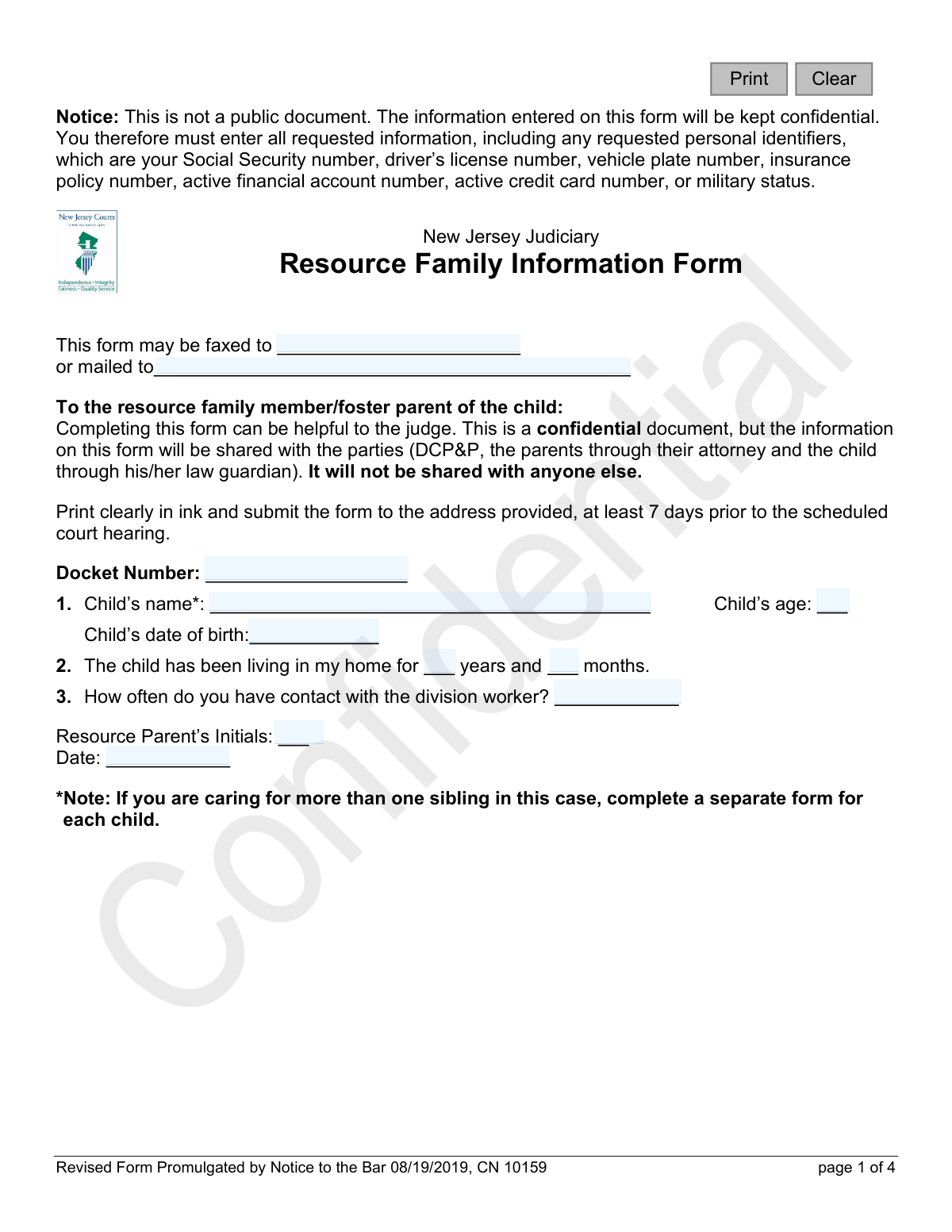
This form is a confidential document for resource family members or foster parents in New Jersey to report information about a child in their care to the court. It covers the child's health, education, adjustment in the home, and relationships, providing the judge with crucial insights before a hearing. Today, this form can be filled out quickly and accurately using AI-powered services like Instafill.ai, which can also convert non-fillable PDF versions into interactive fillable forms.
CN 10159 is part of the
family court forms, New Jersey forms and resource family forms categories on Instafill.
Our AI automatically handles information lookup, data retrieval, formatting, and form filling.
It takes less than a minute to fill out CN 10159 using our AI form filling.
Securely upload your data. Information is encrypted in transit and deleted immediately after the form is filled out.
Form specifications
| Form name: | New Jersey Judiciary Resource Family Information Form |
| Number of fields: | 81 |
| Number of pages: | 1 |
| Language: | English |
Instafill Demo: How to fill out PDF forms in seconds with AI
How to Fill Out CN 10159 Online for Free in 2026
Are you looking to fill out a CN 10159 form online quickly and accurately? Instafill.ai offers the #1 AI-powered PDF filling software of 2026, allowing you to complete your CN 10159 form in just 37 seconds or less.
Follow these steps to fill out your CN 10159 form online using Instafill.ai:
- 1 Navigate to Instafill.ai and upload or select the Resource Family Information Form.
- 2 Use the AI assistant to automatically populate initial details such as the child's name, date of birth, and the court docket number.
- 3 Answer the detailed sections regarding the child's medical, educational, and emotional status by selecting the appropriate options and typing in explanations.
- 4 Provide information on the child's adjustment to the living arrangement and their relationships, including visitation schedules with parents and siblings.
- 5 Detail the child's participation in special activities or programs and note any additional services you believe are needed.
- 6 Carefully review all entered information for accuracy, provide your initials and the date, and attach any additional sheets if necessary.
- 7 Securely download the completed confidential form to print and submit to the court via fax or mail as instructed.
Our AI-powered system ensures each field is filled out correctly, reducing errors and saving you time.
Why Choose Instafill.ai for Your Fillable CN 10159 Form?
Speed
Complete your CN 10159 in as little as 37 seconds.
Up-to-Date
Always use the latest 2026 CN 10159 form version.
Cost-effective
No need to hire expensive lawyers.
Accuracy
Our AI performs 10 compliance checks to ensure your form is error-free.
Security
Your personal information is protected with bank-level encryption.
Frequently Asked Questions About Form CN 10159
This form is for resource family members or foster parents to provide the court with current information about a child in their care. The information helps the judge make informed decisions during court hearings.
Yes, the form is a confidential document and not public. However, the information will be shared with the Division of Child Protection and Permanency (DCP&P), the child's parents through their attorney, and the child's law guardian.
Yes, the form explicitly states that you must complete a separate Resource Family Information Form for each sibling involved in the case. This ensures the court has specific details for each individual child.
You should print the form clearly in ink and submit it to the provided address at least 7 days before the scheduled court hearing.
The form can be submitted either by faxing it or mailing it to the address specified at the top of the first page.
The form requires this information for official record-keeping, but it is kept confidential and is not a public document. This information helps the court maintain accurate and secure records for the case.
If you run out of space, you can attach an additional sheet of paper with your detailed explanations. Be sure to reference the child's name and docket number on the extra sheet.
You need to provide the child's current grade, their academic progress, and their behavior in school. You should also indicate if the child receives special education services or accommodations and if there are any attendance issues.
If you have a non-fillable PDF, you can use a service like Instafill.ai to convert it into an interactive, fillable form. This allows you to type your answers directly into the fields before printing.
Yes, services like Instafill.ai use AI to help you accurately auto-fill form fields, which can save you time and reduce errors. This is especially helpful for repetitive information if you are filling out forms for multiple children.
Simply upload the Resource Family Information Form to the Instafill.ai platform. The AI will identify the fields, allowing you to type in your information or use the auto-fill feature to complete it quickly and accurately.
The 'division worker' refers to your case worker or representative from the Division of Child Protection and Permanency (DCP&P). You should state how frequently you communicate with them.
You should describe any notable interactions or behaviors you observed during visits between the child and their parents or siblings. This can include the child's emotional state before, during, and after the visit.
Yes, the form states that you must enter all requested information to ensure the court has a complete picture of the child's situation. If a question is not applicable, you should indicate that rather than leaving it blank.
Compliance CN 10159
Validation Checks by Instafill.ai
1
Docket Number Consistency
Checks that the 'Docket Number' field is filled out and is identical on all pages of the form. This is critical for ensuring all pages of the submission are correctly associated with the same legal case. A mismatch could lead to incomplete or misfiled information, delaying court proceedings.
2
Child's Age and Date of Birth Coherence
Validates that the 'Child’s age' field is consistent with the 'Child’s date of birth'. The system should calculate the age from the DOB and the form's date, then flag any discrepancy with the manually entered age. This prevents data entry errors that could impact assessments related to developmental milestones or educational placement.
3
Placement Duration vs. Child's Age
Ensures the duration the child has been in the resource home (years and months) is not longer than the child's actual age. This is a logical consistency check to catch significant data entry errors. An impossible duration would invalidate the resource parent's reported experience with the child and call the data's reliability into question.
4
Conditional Explanation for Negative Status
This check requires that an explanation is provided if a status is marked as 'Fair', 'Poor', or 'Very Poor'. This applies to sections like the child's health, school progress, and adjustment in the home. This ensures the court receives necessary context for any reported issues, which is crucial for making informed decisions.
5
Conditional Explanation for 'Yes' Responses
Verifies that if a user answers 'Yes' to a question with a follow-up explanation, such as 'Are there any concerns/issues regarding attendance at school?', the corresponding 'Explain' text field is not empty. This rule ensures that affirmative answers are substantiated with details, providing the court with actionable information. Failure to provide details makes the 'Yes' answer less useful.
6
Sibling Visitation Logic Flow
This validation enforces a required workflow for the sibling visitation section. If the user selects 'No' for 'Does the child visit with his/her siblings?', the subsequent question 'do you believe the child would benefit from visitation' must be answered. This ensures that when sibling contact is absent, the resource parent's perspective on its potential benefits is captured for the court's consideration.
7
Specification for 'Other' Activity
Checks that if the 'Other' checkbox is selected under 'Special Interests/Activities', the adjacent text field to specify the activity is filled out. This prevents incomplete data and ensures clarity on what the 'Other' activity is. Without this validation, the checked box provides no meaningful information to the court.
8
Header Information Consistency Across Pages
Validates that the 'Child’s name', 'Docket Number', and 'Date' fields are identical across all pages of the form. This is a critical integrity check to confirm that all pages belong to a single, complete document for one child and case. Inconsistent headers would suggest a collation error, potentially mixing information from different cases.
9
Parental Visitation Detail Requirement
Ensures that if the resource parent indicates the child visits with their parents ('Yes'), the 'Describe visitation with each parent' field is completed. This detail is vital for the court to understand the nature, frequency, and quality of parent-child interactions. An empty description field would leave a critical gap in the court's understanding of the family dynamic.
10
Number of Children and Ages/Genders Correlation
This check validates that if the 'How many other children are in the home?' field contains a number greater than zero, the 'What are their ages and gender?' field must be populated. This ensures that information about the child's living environment and social dynamics is complete. The system could also perform a soft validation to check if the number of children described matches the number entered.
11
Date Field Validity
This validation ensures that the 'Date' field on the form contains a valid, correctly formatted date that is not in the future. It confirms the form was completed on or before the submission date, which is essential for establishing the timeline of the reported information. An invalid or future date would call the document's authenticity into question.
12
Child's Grade Level Plausibility
This check compares the child's age (calculated from DOB) with their stated 'current grade in school' to flag obvious inconsistencies. For example, a 5-year-old in 10th grade would be flagged for review. This helps catch data entry errors and ensures the educational information presented to the court is logical and credible.
13
Resource Parent Initials Presence
Validates that the 'Resource Parent’s Initials' field on the first page is not empty. These initials serve as a form of signature, indicating that the resource parent has reviewed and completed the information. An absence of initials could suggest an incomplete review or submission process.
Common Mistakes in Completing CN 10159
The form requires the child's name and docket number to be entered at the top of all four pages. Applicants often fill this out on the first page but forget on subsequent pages, or they make typos leading to inconsistencies. This can cause confusion and delays in processing, as it becomes unclear if all pages belong to the same child's case. To avoid this, double-check the header on every page before submission; AI-powered tools like Instafill.ai can automatically populate these repetitive fields across all pages to ensure perfect consistency.
A note on the first page explicitly states, 'If you are caring for more than one sibling in this case, complete a separate form for each child.' Resource parents trying to save time may consolidate information for multiple siblings onto a single form. This violates the instructions and makes it impossible for the court to assess each child's individual status, needs, and adjustment, potentially harming their case. Always use a distinct form for each child to provide clear, specific information.
Many sections pair a checkbox rating (e.g., 'How is the child’s overall health?') with a mandatory 'Explain' field. A frequent error is to check a box like 'Fair' or 'Poor' but leave the explanation field blank. This leaves the court without the critical context needed to understand the rating, rendering the feedback incomplete. Always provide a concise but detailed explanation for any rating or 'Yes/No' answer to give the court a full picture.
In open-ended fields, such as describing a child's behavior or progress in school, users often provide generic, one-word answers like 'Good,' 'Fine,' or 'Okay.' These responses lack the specific details the court needs to make an informed decision. To be effective, provide concrete examples and observations, such as 'He struggles with math homework but excels in reading and enjoys class discussions.' This gives the judge actionable insight.
The 'Resource Parent’s Initials' and 'Date' fields are located at the bottom of the first page and are easily overlooked. Missing initials or a date can raise questions about the form's authenticity or when it was completed, potentially causing it to be disregarded. It is crucial to carefully review the entire form, including the footer, and ensure all signature, initial, and date fields are completed before submission.
Question 3b asks, 'How many other children are in the home? What are their ages and gender?' People frequently answer the first part (the number) but neglect to provide the required details about ages and gender. This partial information prevents the court from fully understanding the child's home environment and social dynamics. Always read questions carefully and ensure every part of a multi-component question is answered completely.
The form instructs users to 'Print clearly in ink,' but since it is a non-fillable PDF, it must be filled out by hand. Rushed or poor handwriting can make critical information like names, dates, and explanations unreadable, leading to data entry errors or the dismissal of the information. To prevent this, consider using an AI tool like Instafill.ai, which can convert flat PDFs into digitally fillable forms, ensuring all your entries are perfectly legible and professional.
In Section 5a, after checking multiple activities the child participates in (e.g., 'Day Care,' 'Sports/Arts'), the form asks for an explanation of 'how the child is doing in each program checked.' A common mistake is to check several boxes but then only provide an explanation for one of them. This leaves the court without information on the child's progress and adjustment in the other important activities. Be sure to provide a brief summary for every single item you check.
The instructions clearly state that the form must be submitted 'at least 7 days prior to the scheduled court hearing.' Resource parents often have demanding schedules and may forget this deadline, submitting the form too late. A late submission means the judge and other parties will not have time to review this vital information, completely defeating the purpose of the form. Mark the deadline on a calendar and aim to submit it even earlier to avoid any issues.
Saved over 80 hours a year
“I was never sure if my IRS forms like W-9 were filled correctly. Now, I can complete the forms accurately without any external help.”
Kevin Martin Green
Your data stays secure with advanced protection from Instafill and our subprocessors

Robust compliance program
Transparent business model
You’re not the product. You always know where your data is and what it is processed for.
ISO 27001, HIPAA, and GDPR
Our subprocesses adhere to multiple compliance standards, including but not limited to ISO 27001, HIPAA, and GDPR.
Security & privacy by design
We consider security and privacy from the initial design phase of any new service or functionality. It’s not an afterthought, it’s built-in, including support for two-factor authentication (2FA) to further protect your account.
Fill out CN 10159 with Instafill.ai
Worried about filling PDFs wrong? Instafill securely fills new-jersey-judiciary-resource-family-information-form forms, ensuring each field is accurate.