Yes! You can use AI to fill out FL Certification of Requested Background Checks for Kinship Legal Guardianship
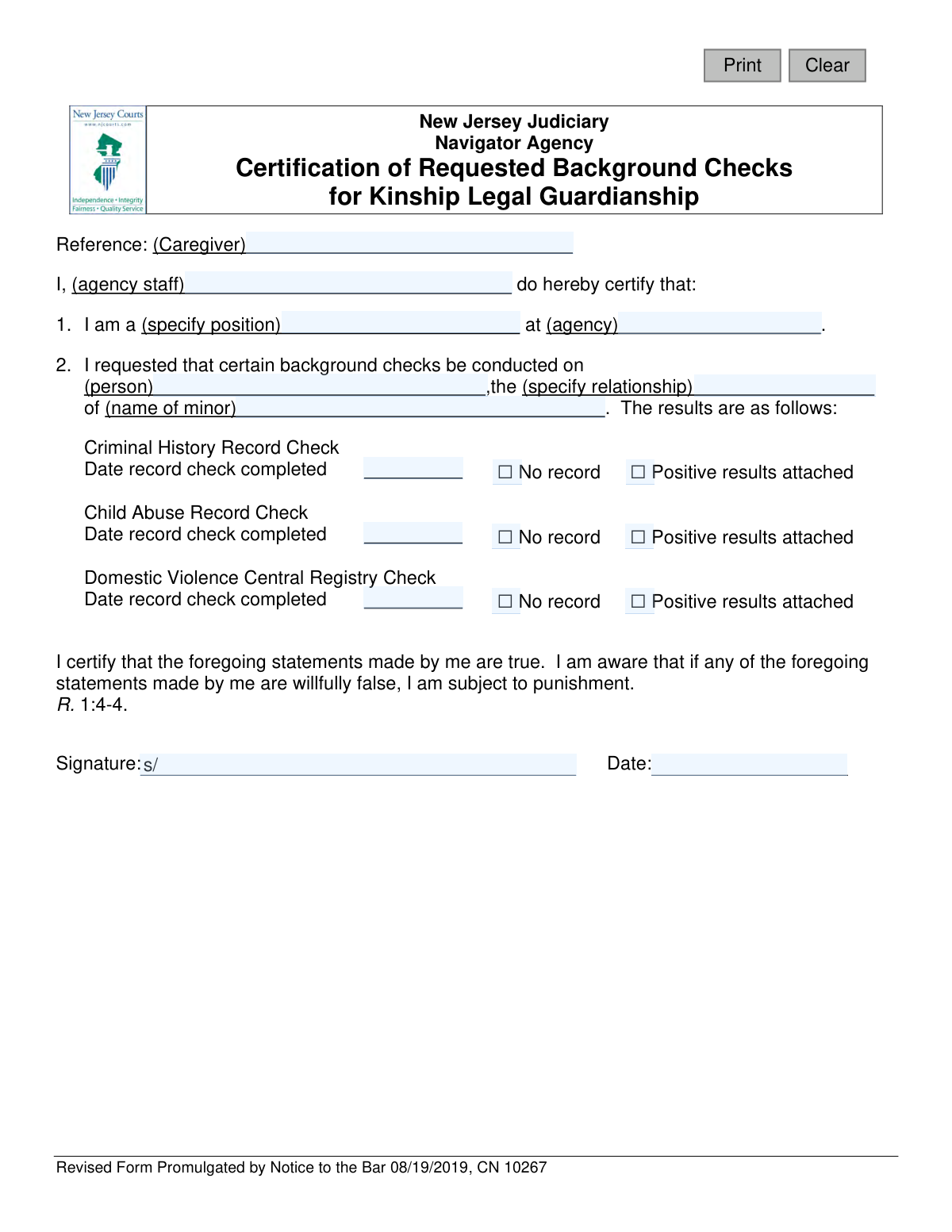
This form is an official certification used by a designated navigator agency in New Jersey to confirm that background checks—including criminal history, child abuse, and domestic violence registries—have been requested for an individual seeking kinship legal guardianship over a minor. It serves as a formal record for the court, detailing the completion dates and outcomes of these essential checks. Today, this form can be filled out quickly and accurately using AI-powered services like Instafill.ai, which can also convert non-fillable PDF versions into interactive fillable forms.
NJ CN 10267 is part of the
New Jersey forms category on Instafill.
Our AI automatically handles information lookup, data retrieval, formatting, and form filling.
It takes less than a minute to fill out NJ CN 10267 using our AI form filling.
Securely upload your data. Information is encrypted in transit and deleted immediately after the form is filled out.
Form specifications
| Form name: | FL Certification of Requested Background Checks for Kinship Legal Guardianship |
| Number of fields: | 20 |
| Number of pages: | 1 |
| Language: | English |
Instafill Demo: How to fill out PDF forms in seconds with AI
How to Fill Out NJ CN 10267 Online for Free in 2026
Are you looking to fill out a NJ CN 10267 form online quickly and accurately? Instafill.ai offers the #1 AI-powered PDF filling software of 2026, allowing you to complete your NJ CN 10267 form in just 37 seconds or less.
Follow these steps to fill out your NJ CN 10267 form online using Instafill.ai:
- 1 Navigate to Instafill.ai and upload your 'Certification of Requested Background Checks for Kinship Legal Guardianship' form or select it from the template library.
- 2 Use the AI assistant to automatically populate the details of the navigator agency, the staff member completing the form, and their position.
- 3 Enter the name of the caregiver, the person undergoing the checks, and their relationship to the minor.
- 4 Input the completion dates for the Criminal History, Child Abuse, and Domestic Violence record checks.
- 5 For each background check, check the corresponding box to indicate whether there was 'No record' or if 'Positive results' are attached.
- 6 Review all entered information for accuracy, ensuring all names, dates, and check results are correct.
- 7 Electronically sign and date the form to certify the truthfulness of the statements before submission.
Our AI-powered system ensures each field is filled out correctly, reducing errors and saving you time.
Why Choose Instafill.ai for Your Fillable NJ CN 10267 Form?
Speed
Complete your NJ CN 10267 in as little as 37 seconds.
Up-to-Date
Always use the latest 2026 NJ CN 10267 form version.
Cost-effective
No need to hire expensive lawyers.
Accuracy
Our AI performs 10 compliance checks to ensure your form is error-free.
Security
Your personal information is protected with bank-level encryption.
Frequently Asked Questions About Form NJ CN 10267
This form is used by a designated Navigator Agency in New Jersey to certify that required background checks have been completed for an individual seeking kinship legal guardianship of a minor. It officially documents the results for the court.
A staff member from a Navigator Agency, acting on behalf of the New Jersey Judiciary, is responsible for completing and signing this form. The signer certifies that the background check information is accurate.
The form requires the completion dates and results for three specific background checks: a Criminal History Record Check, a Child Abuse Record Check, and a Domestic Violence Central Registry Check.
You will need the names of the caregiver and the minor, the name of the person who was checked, and your own staff details. Most importantly, you must have the official completion dates and results for all three required background checks.
For each of the three checks, you must enter the date it was completed and check the box for either 'No record' or 'Positive results attached'. If you check the 'Positive results' box, you must attach the corresponding report.
A Navigator Agency is an organization designated by the New Jersey court system to assist families through the process of obtaining kinship legal guardianship. This includes facilitating these mandatory background checks.
You must wait until you have received the final results for all three background checks before completing and signing this form. The form cannot be certified with incomplete or pending information.
By signing, you are certifying under penalty of law (R. 1:4-4) that the statements you made about the background checks are true and complete. Providing willfully false information can result in punishment.
This form is part of a legal proceeding and should be submitted to the court or the family's legal representative as part of the kinship legal guardianship application packet.
Yes, services like Instafill.ai use AI to help you accurately auto-fill form fields, which can save time and reduce errors. However, you are still responsible for verifying the information and providing a valid signature.
To fill this form out online, you can upload the PDF to a service like Instafill.ai. The platform will make the fields interactive, allowing you to type your information, check the boxes, and then download the completed document.
If you have a non-fillable or 'flat' PDF, you can use a platform like Instafill.ai. Its technology can convert the document into an interactive, fillable form that you can complete on your computer.
Compliance NJ CN 10267
Validation Checks by Instafill.ai
1
Ensures Certifying Staff Name is Provided
This check verifies that the 'agencyStaffName' field is not empty. This name identifies the individual from the navigator agency who is certifying the background check results. A missing name invalidates the certification, as there is no accountable person for the statements made, preventing the form from being processed.
2
Verifies Position and Agency are Specified
This validation ensures that both the 'positionName' and 'agencyName' fields are completed. These fields establish the authority and context of the person certifying the results, confirming they are an official representative of a recognized navigator agency. If this information is missing, the legitimacy of the certification is questionable and the form will be rejected.
3
Confirms Subject and Minor Names are Complete
This check validates that the 'personName' (the individual checked) and 'minorName' fields are filled out. These names are fundamental to the legal document, as they identify the prospective guardian and the child involved in the kinship legal guardianship case. Without these names, the form is ambiguous and legally void.
4
Validates Signature Date Chronology
This check ensures the signature date ('sigDt') is on or after the completion dates of all background checks ('histDt', 'childAbuseRecordCheckDt', 'domesticViolenceDt'). A person cannot certify results before the checks are completed, so this logic is crucial for the document's integrity. A signature date preceding a check completion date would indicate a procedural error and invalidate the form.
5
Standardizes All Date Formats
This validation confirms that all date fields ('histDt', 'childAbuseRecordCheckDt', 'domesticViolenceDt', 'sigDt') adhere to a standard format, such as MM/DD/YYYY. Consistent formatting is essential for accurate data processing, record-keeping, and legal clarity. An invalid date format will cause a processing error and require the user to correct the entry.
6
Prohibits Future Dates
This check verifies that all entered dates are not in the future. The completion of background checks and the act of signing the certification must have already occurred. Allowing future dates would be illogical and could be indicative of fraud or significant error, leading to immediate rejection of the submission.
7
Ensures Consistency Between Certifier and Signatory
This validation compares the 'agencyStaffName' provided at the beginning of the form with the 'sigName' provided in the signature block. These names must match to confirm that the person making the certification is the same person signing the legal attestation. A mismatch would suggest a critical error or potential impersonation, invalidating the document.
8
Validates Criminal History Check Completeness
This check ensures that if a date is entered in 'histDt', a corresponding result ('historyResults') must be selected (either 'No record' or 'Positive results attached'). Conversely, if a result is selected, a date must be provided. This guarantees that each reported check is a complete record with both a date and an outcome, preventing incomplete or ambiguous information.
9
Validates Child Abuse Check Completeness
This validation requires that if a date is entered for the 'childAbuseRecordCheckDt', a result ('childAbuse') must also be selected. This rule works both ways, ensuring that a selected result is accompanied by a completion date. This prevents partial entries and ensures the form provides a full account of the child abuse record check.
10
Validates Domestic Violence Check Completeness
This check confirms that the 'domesticViolenceDt' and 'domViolence' result fields are filled out as a pair. A date for the domestic violence check requires a result to be selected, and a selected result requires a date. This maintains the integrity of the report, ensuring all provided information is complete and actionable.
11
Ensures Relationship to Minor is Specified
This validation checks that the 'relationshipName' field is not empty. This field is critical for establishing the legal standing of the prospective guardian ('personName') in relation to the minor. Without this information, the basis for the kinship legal guardianship is unclear, and the application cannot proceed.
12
Verifies Signature Block is Fully Completed
This check ensures that both the signature name ('sigName') and signature date ('sigDt') are provided. The signature block is the legal attestation where the certifier affirms the truthfulness of the statements under penalty of punishment. An incomplete signature block renders the entire document invalid and unenforceable.
13
Confirms Caregiver and Person Checked are the Same
This validation compares the 'caregiveName' in the reference line with the 'personName' who underwent the background checks. These fields should refer to the same individual, who is the subject of the guardianship request. A discrepancy could indicate a clerical error or confusion about who the application pertains to, requiring clarification before processing.
14
Validates Format of Name Fields
This check ensures that all name fields ('caregiveName', 'agencyStaffName', 'personName', 'minorName') contain valid characters and do not consist of only numbers or symbols. Proper name formatting is important for maintaining accurate legal records and preventing data entry errors. Submissions with invalid name formats will be flagged for correction.
Common Mistakes in Completing NJ CN 10267
The form has separate fields for the reference caregiver ('caregiveName') and the person undergoing the background checks ('personName'). Users often assume these are the same and enter the name incorrectly, or mix them up if multiple adults are involved. This error can lead to legal complications and requires resubmission with corrected information. To avoid this, carefully read each field label and confirm the identity of the individual required for each specific entry.
The certifier's authority is established by their position and agency, yet these fields ('positionName', 'agencyName') are often filled with abbreviations or left partially blank. An incomplete entry undermines the certification's validity and can cause the court to reject the document, delaying the guardianship process. Always provide the full, official name of the agency and the specific job title of the certifying staff member for verification.
The 'relationshipName' field requires the specific relationship of the caregiver to the minor, but people often write generic terms like 'relative' or 'family friend'. This lack of specificity is insufficient for legal proceedings and will require the court to request clarification, causing delays. To prevent this, always state the precise familial connection, such as 'maternal aunt,' 'paternal grandfather,' or 'step-parent.'
Each of the three background check sections requires a specific completion date ('histDt', 'childAbuseRecordCheckDt', 'domesticViolenceDt'). A common oversight is checking the result box but forgetting to enter the corresponding date. A missing date makes it impossible to verify the timeliness of the check, rendering the certification incomplete and leading to its rejection. Always double-check that each section has both a date and a result checked.
Dates on the form, such as completion and signature dates, are often entered in ambiguous formats (e.g., 01/02/03), creating confusion over the month and day. This can cause significant processing delays while the correct date is verified. To prevent this, always use a clear, four-digit year format (MM/DD/YYYY). AI-powered form filling tools like Instafill.ai can help prevent this by automatically validating and formatting dates correctly.
For each of the three background checks, the user must check either 'No record' or 'Positive results attached.' A frequent mistake is leaving the checkboxes blank for one or more sections, which makes the submission ambiguous and incomplete. This will always result in the form being returned for correction. Before signing, review the form to ensure one box is checked for the Criminal History, Child Abuse, and Domestic Violence sections.
If the 'Positive results attached' box is checked, the corresponding report must be included with the submission. A critical error is checking this box but failing to attach the necessary documents, which can happen when paperwork is disorganized. This makes the certification invalid and halts the legal process until the records are provided. Always create a checklist to ensure all supporting documents are compiled and attached before submission.
The form requires the certifying agency staff member to be identified by name ('agencyStaffName') and to sign the document. A mismatch between the printed name and the signature, which can happen when an assistant prepares the form, raises questions about the certification's authenticity. This can lead to rejection or requests for verification. Ensure the individual named as the certifier is the one who signs the document to maintain its legal integrity.
The signature and signature date legally validate the certification under penalty of perjury. Forgetting to sign or date the form is a critical error that renders the entire document invalid, yet it is a surprisingly common oversight made in haste. This requires a complete resubmission, causing significant delays in the guardianship case. Always perform a final review focusing specifically on the signature block before submitting.
This form is often distributed as a non-fillable PDF, leading users to print it and fill it out by hand. Illegible handwriting for critical information like names, dates, and agency details is a primary cause of processing errors and rejections. If the court or agency cannot read the information, they cannot process the certification. To avoid this, use a tool like Instafill.ai, which can convert flat PDFs into fillable forms, allowing you to type information clearly and ensure legibility.
Saved over 80 hours a year
“I was never sure if my IRS forms like W-9 were filled correctly. Now, I can complete the forms accurately without any external help.”
Kevin Martin Green
Your data stays secure with advanced protection from Instafill and our subprocessors

Robust compliance program
Transparent business model
You’re not the product. You always know where your data is and what it is processed for.
ISO 27001, HIPAA, and GDPR
Our subprocesses adhere to multiple compliance standards, including but not limited to ISO 27001, HIPAA, and GDPR.
Security & privacy by design
We consider security and privacy from the initial design phase of any new service or functionality. It’s not an afterthought, it’s built-in, including support for two-factor authentication (2FA) to further protect your account.
Fill out NJ CN 10267 with Instafill.ai
Worried about filling PDFs wrong? Instafill securely fills fl-certification-of-requested-background-checks-for-kinship-legal-guardianship forms, ensuring each field is accurate.