Yes! You can use AI to fill out New Jersey Judiciary Attorney Fee Arbitration Request

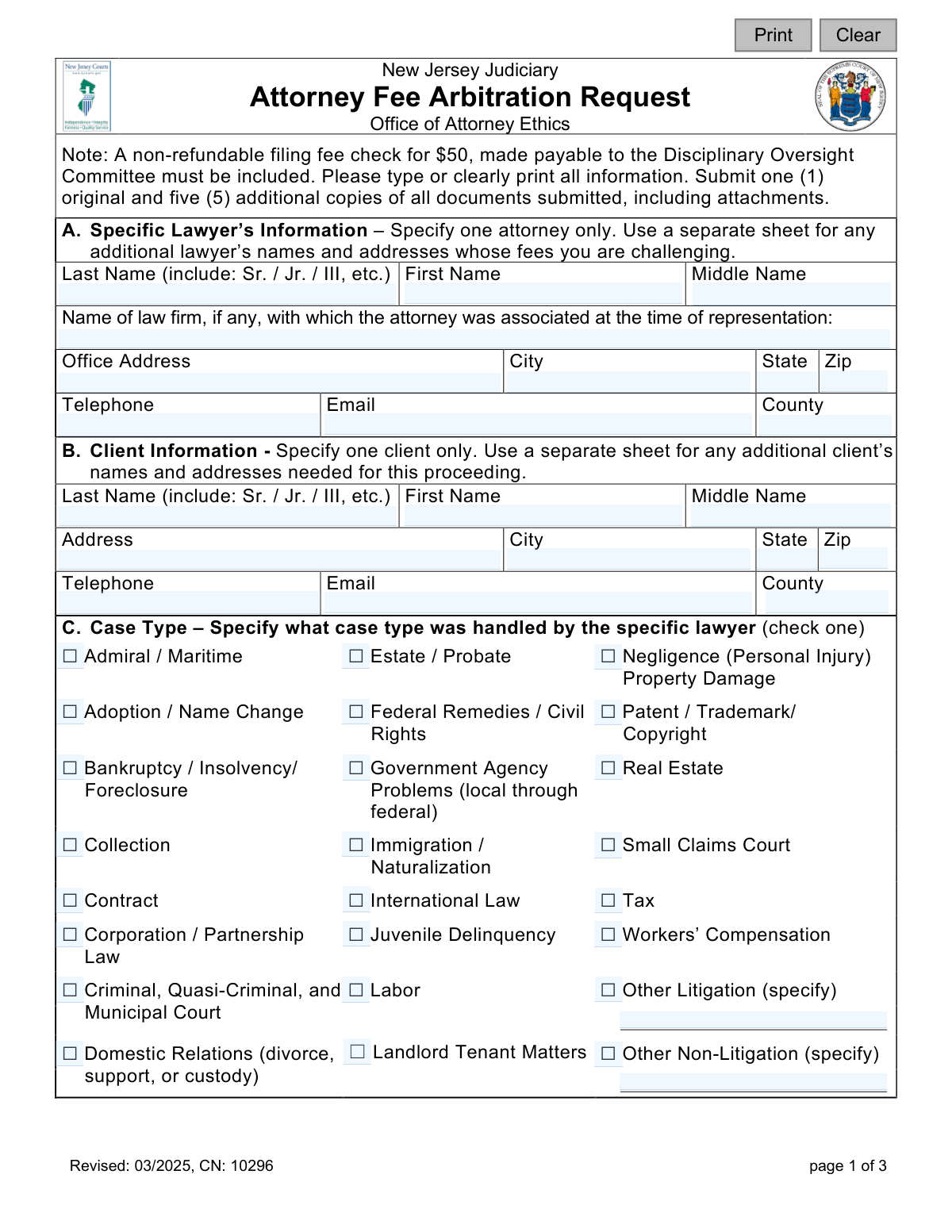
This form initiates a formal process with the New Jersey Judiciary's Office of Attorney Ethics to resolve a disagreement over legal fees between a client and their lawyer. It serves as an alternative to litigation, allowing a neutral arbitration committee to determine a fair and reasonable fee. Today, this form can be filled out quickly and accurately using AI-powered services like Instafill.ai, which can also convert non-fillable PDF versions into interactive fillable forms.
CN: 10296 is part of the New Jersey forms category on Instafill.
Our AI automatically handles information lookup, data retrieval, formatting, and form filling.
It takes less than a minute to fill out CN: 10296 using our AI form filling.
Securely upload your data. Information is encrypted in transit and deleted immediately after the form is filled out.

Form specifications

Form name: New Jersey Judiciary Attorney Fee Arbitration Request
Number of fields: 92
Number of pages: 1
Language: English
main-image

Instafill Demo: How to fill out PDF forms in seconds with AI

How to Fill Out CN: 10296 Online for Free in 2026

Are you looking to fill out a CN: 10296 form online quickly and accurately? Instafill.ai offers the #1 AI-powered PDF filling software of 2026, allowing you to complete your CN: 10296 form in just 37 seconds or less.
Follow these steps to fill out your CN: 10296 form online using Instafill.ai:
  1. 1 Navigate to Instafill.ai and upload or select the New Jersey Attorney Fee Arbitration Request form.
  2. 2 Use the AI assistant to accurately input the specific lawyer's information, including their name, law firm, and contact details.
  3. 3 Provide your complete client information, such as your name, address, and contact details.
  4. 4 Specify the case type, the total amount of the attorney's bill, costs, and any payments you have already made.
  5. 5 Answer the series of questions regarding the fee agreement, prior representation, and whether the attorney has already filed a lawsuit for the fees.
  6. 6 Clearly explain the reason for your disagreement with the attorney's bill and attach all required supporting documents like fee agreements, bills, and proof of payment.
  7. 7 Carefully review the disclosure statement, digitally sign the client certification, and then download the completed form to submit with the required copies and filing fee.

Our AI-powered system ensures each field is filled out correctly, reducing errors and saving you time.

Why Choose Instafill.ai for Your Fillable CN: 10296 Form?

Speed

Complete your CN: 10296 in as little as 37 seconds.

Up-to-Date

Always use the latest 2026 CN: 10296 form version.

Cost-effective

No need to hire expensive lawyers.

Accuracy

Our AI performs 10 compliance checks to ensure your form is error-free.

Security

Your personal information is protected with bank-level encryption.

Frequently Asked Questions About Form CN: 10296

This form is used by a client to formally dispute the reasonableness of a fee charged by an attorney in New Jersey. It initiates a binding arbitration process through the New Jersey Judiciary to resolve the fee dispute without going to court.

Any client who believes the fee charged by their New Jersey attorney is unreasonable should fill out this form. It is for individuals who wish to have their fee dispute resolved by a District Fee Arbitration Committee.

Yes, you must include a non-refundable filing fee of $50 with your request. The check must be made payable to the 'Disciplinary Oversight Committee'.

You must submit the completed form, the $50 filing fee, and copies of any written fee agreements, bills from the attorney, and proof of payments. You are required to submit one original and five additional copies of all documents.

You must complete and submit a separate Attorney Fee Arbitration Request form for each individual attorney whose fees you are challenging. This form is designed to handle a dispute with one specific lawyer at a time.

The 'total bill' is the complete amount the attorney has charged you, which is the sum of the legal fee for their time plus any additional costs or disbursements. This is not just the specific amount you are disputing.

You can still file for fee arbitration, but you must do so in a timely manner after being served with the lawsuit. If you file a timely request, the court action will be paused until the arbitration process is complete.

Yes, the determination of the Fee Committee is final and legally binding on both you and the attorney. Appeals are only allowed in very limited situations, such as proven fraud or significant procedural errors.

You have a 30-day window from the date your request is officially docketed to withdraw from the process in writing. If you withdraw, you cannot file for fee arbitration for the same dispute again.

You must submit one original signed form and five complete copies of the form and all attachments. This means you will be sending a total of six sets of all your paperwork.

Use Section I, titled 'Briefly explain why you disagree with the attorney’s total bill,' to provide your reasons for the dispute. If you need more space than what is provided, you can attach additional sheets.

Yes, services like Instafill.ai use AI to accurately auto-fill form fields, which can save you time and help prevent errors. This ensures all required information is entered correctly before you print and submit the form.

You can upload the PDF of the Attorney Fee Arbitration Request to the Instafill.ai platform. The AI will make the form interactive, allowing you to easily type your information into the fields before downloading the completed document.

If you have a non-fillable or 'flat' PDF, you can upload it to a service like Instafill.ai. The platform can convert the document into an interactive, fillable form that you can complete on your computer.

Compliance CN: 10296
Validation Checks by Instafill.ai

1
Ensures Total Bill Calculation is Accurate
This validation checks that the sum of 'Total legal fee charged' and 'Total costs/disbursements' equals the value entered in the 'Total bill' field in Section D. This is critical for ensuring the foundational financial data of the dispute is arithmetically correct before processing. If the values do not add up, the form submission should be flagged for user correction to prevent errors in the arbitration amount.
2
Validates Conditional 'Other' Case Type Specification
This check ensures that if the user selects 'Other Litigation' or 'Other Non-Litigation' in Section C, the corresponding specification text field is not empty. This is important because 'Other' is meaningless without context, and the arbitrators need this information to understand the nature of the case. A failure would prompt the user to provide the required details.
3
Verifies Consistency of Total Paid Amount
This validation cross-references the 'Amount paid to attorney' in Section D with the sum of all individual payments listed in Section H. The two totals should match to ensure consistency and accuracy in the payment history provided. A mismatch indicates a data entry error or incomplete information, which could compromise the integrity of the financial facts presented and requires user correction.
4
Requires Lawsuit Details if Applicable
This is a conditional check for Section G. If the user answers 'Yes' to the question 'Has the attorney brought a lawsuit...against you for the fee?', then the 'Docket Number', 'County where filed', and 'Date you were served' fields must be populated. This information is crucial for procedural reasons, such as staying the court action. If the details are missing, the form is incomplete and cannot be processed correctly.
5
Enforces Chronological Order of Case Dates
This check validates that the 'When did the attorney last do any work on this case?' date in Section E is on or after the 'When did the attorney first agree to handle your case?' date. This ensures logical consistency in the case timeline. An invalid sequence would suggest a data entry error that needs to be corrected to accurately represent the period of representation.
6
Mandatory Core Contact Information
This validation ensures that essential contact information for both the attorney (Section A) and the client (Section B) is provided. Specifically, it checks that First Name, Last Name, Address, City, State, and Zip are not empty. This information is fundamental for all official communication and docketing, and its absence would make it impossible to proceed with the case.
7
Validates Email Address Format
This check verifies that the values entered into the 'attyEmail' and 'clientEmail' fields conform to a standard email format (e.g., '[email protected]'). This is important for ensuring that electronic communications and notices can be successfully delivered. An invalid format would prevent submission until corrected, avoiding communication failures.
8
Requires Explanation of Disagreement
This validation ensures that the text area in Section I, 'Briefly explain why you disagree with the attorney’s total bill,' is not left empty. This explanation is the core of the client's dispute and is essential for the arbitrators to understand the basis of the claim. A submission without this information would be incomplete and lack the necessary substance for review.
9
Validates All Date Fields for Correct Format
This check systematically scans all date-related fields on the form (e.g., 'firstDate', 'lastDate', 'receivedDate', 'attyFeeSuitDate', 'sigClientDt') to ensure they are entered in a valid and recognizable date format (e.g., MM/DD/YYYY). This prevents data corruption and ensures that all timeline information is unambiguous and machine-readable. An invalid format would trigger an error message prompting the user to correct the entry.
10
Ensures Single Case Type Selection
This validation confirms that in Section C, exactly one checkbox for 'Case Type' has been selected. This prevents ambiguity and ensures the case can be categorized correctly for assignment to appropriately experienced arbitrators. If zero or more than one box is checked, the user will be prompted to make a single, specific selection.
11
Requires Arbitration Notice Date if Applicable
This is a conditional check for Section F. If the user answers 'Yes' to 'Did the attorney advise you in writing that you could request fee arbitration?', the 'date received' field must be filled with a valid date. This date is legally significant for determining timeliness. Failure to provide the date when 'Yes' is selected would render the submission incomplete.
12
Validates Monetary Field Format
This check ensures that all fields intended to contain dollar amounts (e.g., 'totLegalFeeCharged', 'totCosts', 'amtPaidAtty') are valid numeric or currency formats. This prevents non-numeric characters from being entered, which would cause calculation errors. This validation is crucial for maintaining the financial integrity of the submission.
13
Requires 'Who Paid' Specification if 'Other'
This validation rule applies to Section D. If the 'Who paid' checkbox is marked as 'Other', the corresponding text field specifying the name of the payer must be filled out. This information is necessary for a complete financial record and to understand the parties involved in the transactions. The form would be considered incomplete if this detail is missing.
14
Validates Presence of Signature Date and Printed Name
This check ensures that the 'Date' and 'Print Name of Client' fields in the Client Certification section are both filled out. The signature date is critical for establishing when the certification was made, and the printed name clarifies the identity of the signatory. A missing date or printed name would invalidate the certification and block submission.

Common Mistakes in Completing CN: 10296

Missing or Incorrect Filing Fee

Applicants often forget to include the $50 filing fee or make the check payable to the wrong entity. The form explicitly requires a check made payable to the 'Disciplinary Oversight Committee.' Submitting the form without the correct fee and payee will result in an immediate rejection and delay the arbitration process until the payment is corrected.

Submitting an Incorrect Number of Copies

A frequent procedural error is failing to submit the required number of copies. The instructions clearly state to submit one original and five additional copies of all documents, including attachments. This oversight halts the processing of the request, as the office cannot distribute the case materials to the arbitrators and the opposing party until all required copies are received.

Miscalculating or Misreporting the Total Bill

In Section D, filers often confuse the 'Total legal fee charged' with the 'Total bill.' They may enter the total amount in the first box, or only list the disputed portion. It is crucial to accurately break down the bill into 'legal fee,' 'costs/disbursements,' and the 'total bill' as requested, as this clarifies the exact financial scope of the dispute for the arbitrators.

Forgetting to Attach Supporting Documents

Many submissions are incomplete because the filer forgets to attach required documents mentioned throughout the form. This includes proof of payment (Section D), the written fee agreement (Section E), copies of any lawsuit complaints (Section G), and attorney bills (Section H). Missing attachments weaken the case and require follow-up correspondence, significantly delaying the hearing.

Improperly Listing Multiple Attorneys

When a dispute involves more than one attorney, filers mistakenly list all of them in the primary fields of Section A. The form directs you to specify only one attorney per form and use a separate sheet for any others. This error creates administrative confusion and can delay the case while the office clarifies which attorney the primary filing is against.

Incomplete Information on Pending Lawsuits

In Section G, filers may incorrectly answer 'No' if a lawsuit has been filed against them for the fee, or they answer 'Yes' but omit the docket number, county, and date of service. This information is critical because filing for fee arbitration can pause the lawsuit. Failing to provide complete and accurate details can lead to procedural errors or jeopardize the filer's ability to stay the court action.

Providing a Vague Dispute Explanation

In Section I, clients sometimes write an overly emotional or vague explanation for the dispute. While the situation may be frustrating, a clear, concise, and factual summary of why the bill is being challenged is far more effective. It is best to state the specific services or charges you disagree with and why, as this provides the arbitrators with a clear foundation for their review.

Missing Signature or Date on Certification

Forgetting to sign and date the 'Client Certification' on the final page is a simple but critical mistake that renders the entire submission invalid. An unsigned form cannot be processed and will be returned, forcing the filer to resubmit and causing unnecessary delays. Always double-check that the signature, printed name, and date fields are completed.

Submitting an Illegible Form

Forms filled out with poor or illegible handwriting cause significant problems, leading to data entry errors and processing delays. The instructions specify to 'type or clearly print.' If the form is a non-fillable PDF, AI-powered tools like Instafill.ai can convert it into a fillable version, ensuring all information is clear, professional, and easily readable, preventing these avoidable issues.

Providing an Incomplete Payment History

In Section H, filers often provide an incomplete list of payments made to the attorney or fail to include the specific dates of payment. A complete and accurate payment history, supported by attached receipts or bank statements, is crucial evidence. An incomplete record makes it difficult for arbitrators to verify the financial facts of the case and may weaken the client's position.

Providing Incomplete or Outdated Contact Information

A simple but damaging error is providing incomplete or outdated contact information for either the client (Section B) or the attorney (Section A). All official notices, hearing schedules, and decisions are sent to the addresses on file. Incorrect information can cause a party to miss critical deadlines or even the hearing itself, potentially resulting in a default judgment.
Saved over 80 hours a year

“I was never sure if my IRS forms like W-9 were filled correctly. Now, I can complete the forms accurately without any external help.”

Kevin Martin Green

Your data stays secure with advanced protection from Instafill and our subprocessors

Robust compliance program

Transparent business model

You’re not the product. You always know where your data is and what it is processed for.

ISO 27001, HIPAA, and GDPR

Our subprocesses adhere to multiple compliance standards, including but not limited to ISO 27001, HIPAA, and GDPR.

Security & privacy by design

We consider security and privacy from the initial design phase of any new service or functionality. It’s not an afterthought, it’s built-in, including support for two-factor authentication (2FA) to further protect your account.

Fill out CN: 10296 with Instafill.ai

Worried about filling PDFs wrong? Instafill securely fills new-jersey-judiciary-attorney-fee-arbitration-request forms, ensuring each field is accurate.