Yes! You can use AI to fill out State Tax Case Information Statement (CIS-State)
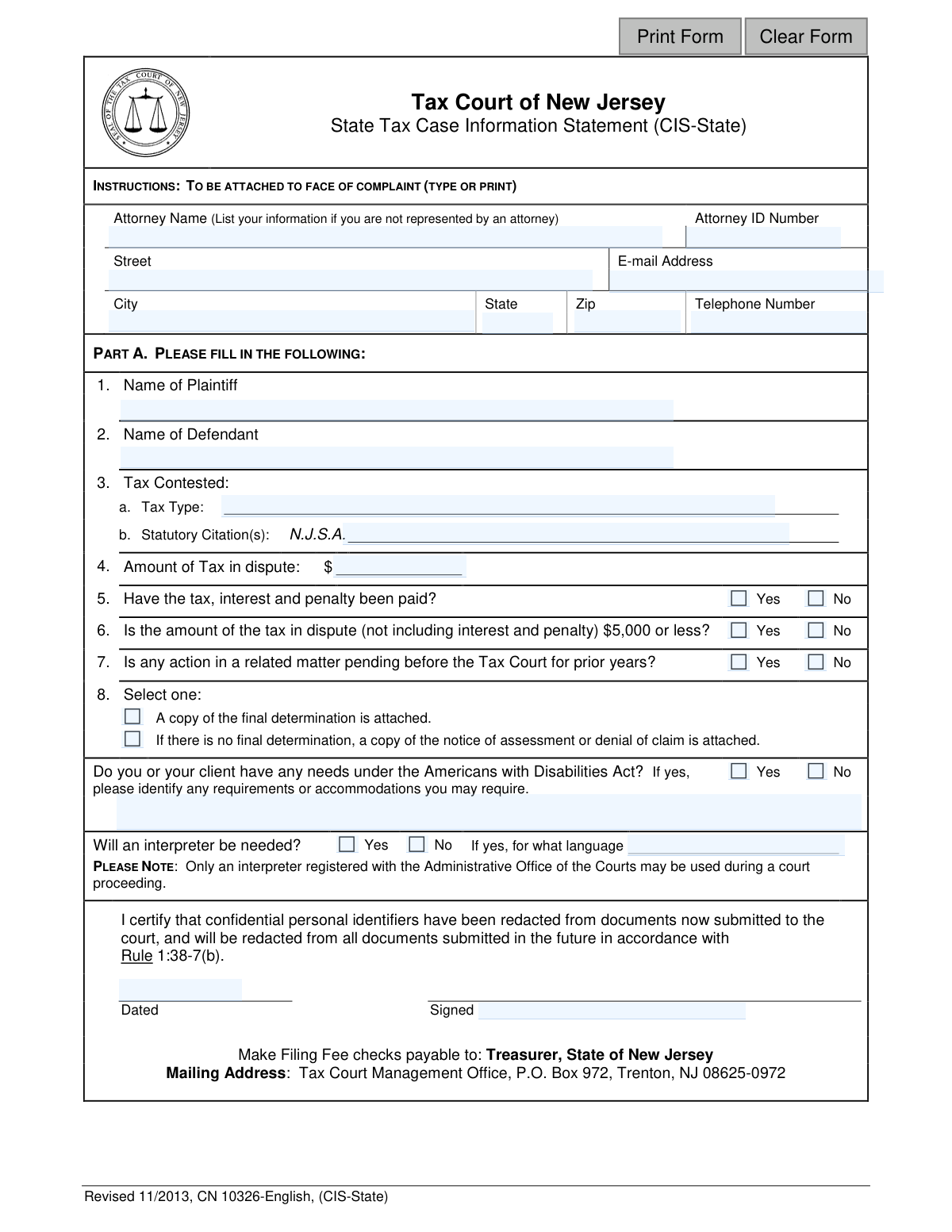
The State Tax Case Information Statement (CIS-State) is a mandatory form attached to a complaint filed with the Tax Court of New Jersey. It summarizes key details of a tax dispute, including the parties involved, the type and amount of tax contested, and whether related actions are pending. This statement helps the court properly docket and manage the case from the outset. Today, this form can be filled out quickly and accurately using AI-powered services like Instafill.ai, which can also convert non-fillable PDF versions into interactive fillable forms.
Our AI automatically handles information lookup, data retrieval, formatting, and form filling.
It takes less than a minute to fill out CIS-State using our AI form filling.
Securely upload your data. Information is encrypted in transit and deleted immediately after the form is filled out.
Form specifications
| Form name: | State Tax Case Information Statement (CIS-State) |
| Number of fields: | 31 |
| Number of pages: | 1 |
| Language: | English |
Instafill Demo: How to fill out PDF forms in seconds with AI
How to Fill Out CIS-State Online for Free in 2026
Are you looking to fill out a CIS-STATE form online quickly and accurately? Instafill.ai offers the #1 AI-powered PDF filling software of 2026, allowing you to complete your CIS-STATE form in just 37 seconds or less.
Follow these steps to fill out your CIS-STATE form online using Instafill.ai:
- 1 Navigate to Instafill.ai and upload the State Tax Case Information Statement (CIS-State) form or select it from their template library.
- 2 Provide your personal or attorney information, including name, ID number, and contact details in the designated fields.
- 3 Enter the names of the plaintiff and defendant, and specify the type of tax being contested and the relevant statutory citations in Part A.
- 4 Clearly state the amount of tax in dispute and answer the yes/no questions regarding payment status, dispute amount, and pending actions.
- 5 Indicate if a final determination or notice of assessment is attached, and specify any needs for ADA accommodations or a language interpreter.
- 6 Review all the information auto-filled by the AI for accuracy, then date and sign the form to certify its contents and confirm redaction of personal identifiers.
- 7 Download, print, and attach the completed form to the face of your complaint for filing with the Tax Court Management Office.
Our AI-powered system ensures each field is filled out correctly, reducing errors and saving you time.
Why Choose Instafill.ai for Your Fillable CIS-State Form?
Speed
Complete your CIS-State in as little as 37 seconds.
Up-to-Date
Always use the latest 2026 CIS-State form version.
Cost-effective
No need to hire expensive lawyers.
Accuracy
Our AI performs 10 compliance checks to ensure your form is error-free.
Security
Your personal information is protected with bank-level encryption.
Frequently Asked Questions About Form CIS-State
This form provides the Tax Court of New Jersey with a summary of your state tax case. It must be completed and attached to the front of your complaint when you initiate a lawsuit.
The plaintiff (the person or business challenging a tax assessment) or their attorney must complete this form when filing a complaint with the Tax Court of New Jersey.
You must attach a copy of the final determination from the tax authority. If you did not receive a final determination, you must attach a copy of the notice of assessment or the denial of your claim instead.
If you are not represented by an attorney, you should enter your own name, address, and contact details in the section at the top of the form designated for attorney information.
The 'Plaintiff' is you, the taxpayer filing the complaint. The 'Defendant' is typically the Director of the New Jersey Division of Taxation.
This refers to the specific New Jersey state law (N.J.S.A.) that authorizes the tax being disputed. You can usually find this citation on the tax notice or assessment you received.
The completed form should be attached to your complaint and mailed to the Tax Court Management Office, P.O. Box 972, Trenton, NJ 08625-0972, along with the required filing fee.
Yes, a filing fee is required when you submit your complaint. Make the check payable to 'Treasurer, State of New Jersey' and include it with your mailed documents.
Indicating that the amount is $5,000 or less may make your case eligible for the Small Claims Division of the Tax Court, which often has simpler and faster procedures.
By signing, you certify that you have removed sensitive information like Social Security numbers or bank account details from all documents submitted to the court, as required by Court Rule 1:38-7(b).
You should check 'Yes' for question 9 and specify the language needed. The court will arrange for a registered interpreter, as only those registered with the Administrative Office of the Courts may be used.
Yes, services like Instafill.ai use AI to help you accurately auto-fill form fields with your saved information, which saves time and reduces the chance of errors.
You can use a service like Instafill.ai to upload the PDF and fill it out on your computer. This allows you to type your answers directly into the fields and then print the completed form for submission.
If you have a non-fillable or 'flat' PDF, you can use a tool like Instafill.ai. It can convert the document into an interactive, fillable form that you can easily complete online.
Compliance CIS-State
Validation Checks by Instafill.ai
1
Attorney/Filer Name and Address Completeness
This check ensures that the attorney or self-represented filer's name, street, city, state, and zip code fields are all populated. This contact information is critical for all official correspondence from the court. If any of these fields are left blank, the submission will be rejected with a message indicating which required fields are missing.
2
Attorney Email Format Validation
This validation verifies that the value entered in the 'attyEmail' field follows the standard email address format (e.g., [email protected]). An incorrect email address would prevent the court from sending electronic notices and updates, potentially causing the filer to miss important deadlines. A failed validation will prompt the user to correct the email address before proceeding.
3
Attorney Zip Code Format
This check ensures the 'attyAddrZip' field contains a valid 5-digit or 9-digit (ZIP+4) US postal code. Correct formatting is essential for mail delivery and data consistency within the court's systems. An invalid entry will trigger an error message requesting the user to enter a valid ZIP code.
4
Plaintiff and Defendant Name Presence
This validation confirms that both the 'Name of Plaintiff' (plaName) and 'Name of Defendant' (defName) fields are filled. These names are the primary identifiers for the legal case and are absolutely mandatory for filing. The form cannot be submitted if either of these core fields is empty.
5
Tax Type and Citation Completeness
This check verifies that the 'Tax Type' (taxType) and 'Statutory Citation(s)' (taxCitations) fields are not empty. This information is fundamental for the court to understand the nature and legal basis of the dispute. A submission lacking this information would be considered incomplete and rejected until the fields are properly filled.
6
Tax Amount in Dispute Format
This validation ensures the 'Amount of Tax in dispute' (taxAmt) field contains only numeric digits and an optional decimal point. This is crucial for accurate case classification and financial record-keeping. Any non-numeric characters will be flagged, and the user will be required to enter a valid monetary amount.
7
Logical Consistency of Disputed Tax Amount
This check cross-references the numeric value in 'taxAmt' with the answer to question 6 ('Is the amount of the tax in dispute... $5,000 or less?'). If the amount entered is greater than $5,000, the answer must be 'No', and if it is $5,000 or less, the answer must be 'Yes'. A mismatch indicates a user error and will prompt a warning to review and correct the conflicting information.
8
Mandatory Yes/No Question Completion
This validation ensures that a 'Yes' or 'No' option has been selected for questions 5, 6, and 7 ('TaxDispPd', 'TaxDispUnder2K', 'TaxDispPending'). These questions provide critical context about the case status and are required for proper processing. The form submission will be blocked until all three of these questions are answered.
9
Conditional Requirement for ADA Accommodation Details
This check enforces a conditional rule: if the user answers 'Yes' to the ADA needs question ('AdaAccom'), the corresponding description field ('AdaAccomDesc') must be filled out. This ensures the court receives the necessary details to provide required accommodations. If 'Yes' is selected but the description is empty, an error will prompt the user to provide details.
10
Conditional Requirement for Interpreter Language
This validation checks that if a user selects 'Yes' for needing an interpreter ('InterpAccom'), the 'for what language' field ('InterpAccomLang') must be completed. This information is essential for the court to arrange for a qualified interpreter in a timely manner. The form will not be accepted if the language is missing after indicating an interpreter is needed.
11
Attachment Documentation Selection
This check ensures that one of the two options in question 8, regarding the attachment of a final determination or notice of assessment, has been selected. This selection serves as a confirmation that the required supporting documentation is included with the complaint. The submission will be blocked until the user makes a selection, confirming the status of their attachments.
12
Signature Date Validity
This validation verifies that the 'Dated' field ('SigDt') contains a valid date that is not in the future. The signature date legally establishes when the document was certified by the filer. An invalid or future date would compromise the legal integrity of the document, so the system will require a valid, current or past date.
13
Signature Name Presence
This check confirms that the 'Signed' field ('SigName') is not empty. This field serves as the legal signature of the filer, certifying the accuracy of the information and the redaction of personal identifiers. A submission without a signature is legally invalid and will be rejected.
Common Mistakes in Completing CIS-State
Individuals representing themselves (pro se litigants) often mistakenly leave the attorney information section blank. The instructions clarify that self-represented parties must enter their own name, address, and contact details in these fields. Leaving this section empty can cause significant delays in communication from the court and opposing parties, as there is no designated contact on record for the case.
A frequent error is reversing the roles of the plaintiff and defendant or using incorrect names. In a state tax appeal, the taxpayer filing the complaint is the Plaintiff, and the correct Defendant is typically the 'Director, Division of Taxation'. Naming the 'State of New Jersey' or another incorrect entity can lead to the filing being rejected for procedural defects, requiring an amendment and causing delays.
In the 'Tax Contested' section, filers often write a generic term like 'State Tax' or 'NJ Tax'. The court requires the specific tax type, such as 'Sales and Use Tax,' 'Corporation Business Tax,' or 'Gross Income Tax.' This lack of specificity makes it difficult for the court to properly categorize and assign the case, leading to processing delays until the information is clarified.
The form requires the specific 'Statutory Citation(s)' (N.J.S.A.) for the tax being contested, which is a common point of confusion, especially for non-attorneys. Many filers leave this blank or guess the citation, which can weaken the legal basis of their complaint. An incorrect citation may need to be amended later, adding unnecessary steps to the litigation process.
Filers often include penalties and interest when stating the 'Amount of Tax in dispute'. This field should only contain the principal tax amount, as confirmed by question #6 which explicitly asks for the amount 'not including interest and penalty'. An incorrect calculation here can lead to an improper classification of the case, potentially disqualifying it from a more streamlined small claims track.
The form requires the filer to check a box indicating that either a 'final determination' or a 'notice of assessment or denial' is attached to the complaint. A very common and critical mistake is failing to attach this required document, which serves as the basis for the court's jurisdiction. A filing without the proper attachment is incomplete and will be rejected by the court clerk.
Filers may sign the certification clause without actually redacting confidential personal identifiers (like Social Security Numbers or full bank account numbers) from the documents they submit, as required by Court Rule 1:38-7(b). This is a serious error that compromises data security and violates court rules, potentially leading to sanctions. It is crucial to review all attachments and redact sensitive information before signing and filing.
Forgetting to physically sign and date the Case Information Statement is a simple but surprisingly common mistake. An unsigned form is legally invalid and will be immediately rejected by the court, halting the progress of the case. This oversight can be catastrophic if the filing deadline (statute of limitations) passes before the error is corrected and the form is re-filed.
Although the form instructs users to 'TYPE OR PRINT', many are submitted with illegible handwriting. This leads to data entry errors by court staff, causing misdirected mail, incorrect case records, and significant processing delays. Since this form is often a non-fillable PDF, using a tool like Instafill.ai to convert it into a fillable version ensures all entries are typed, clear, and legible.
Filers sometimes omit key parts of their contact information, such as the zip code, a complete email address, or a direct phone number. This is a critical error as it prevents the court and opposing counsel from delivering important notices, scheduling orders, and other vital communications. AI-powered form-filling tools like Instafill.ai can help prevent this by validating contact information formats and using stored profiles to ensure all fields are completed accurately.
Saved over 80 hours a year
“I was never sure if my IRS forms like W-9 were filled correctly. Now, I can complete the forms accurately without any external help.”
Kevin Martin Green
Your data stays secure with advanced protection from Instafill and our subprocessors

Robust compliance program
Transparent business model
You’re not the product. You always know where your data is and what it is processed for.
ISO 27001, HIPAA, and GDPR
Our subprocesses adhere to multiple compliance standards, including but not limited to ISO 27001, HIPAA, and GDPR.
Security & privacy by design
We consider security and privacy from the initial design phase of any new service or functionality. It’s not an afterthought, it’s built-in, including support for two-factor authentication (2FA) to further protect your account.
Fill out CIS-State with Instafill.ai
Worried about filling PDFs wrong? Instafill securely fills state-tax-case-information-statement-cis-state forms, ensuring each field is accurate.