Yes! You can use AI to fill out Tax Court of New Jersey Case Information Statement - Correction of Error in Assessment
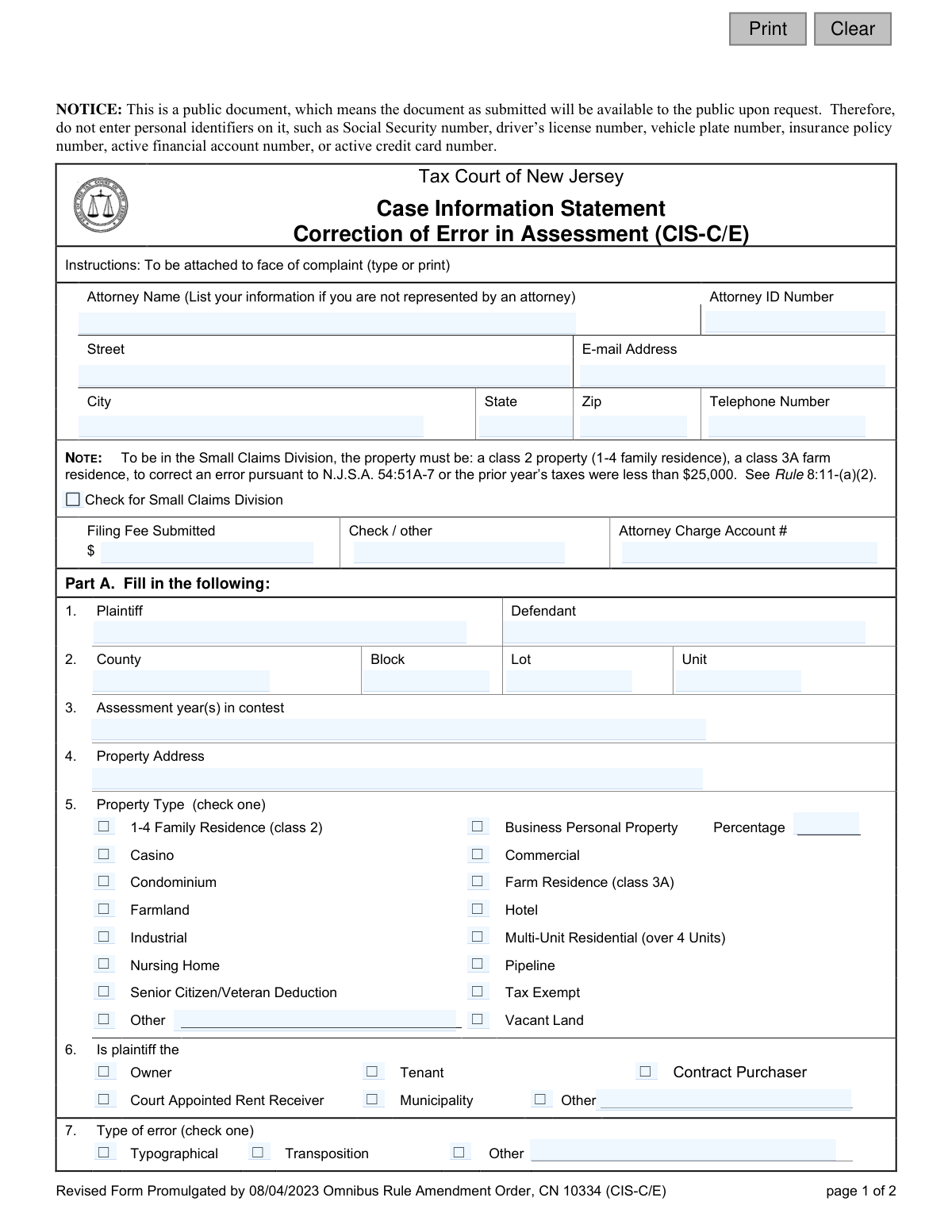
The CIS-C/E is a mandatory Case Information Statement that must be attached to a complaint filed with the Tax Court of New Jersey. It is used specifically to correct typographical, transposition, or other similar errors in a property's tax assessment, as distinct from challenging the valuation itself. This form provides the court with essential case, property, and plaintiff information to properly docket and process the complaint. Today, this form can be filled out quickly and accurately using AI-powered services like Instafill.ai, which can also convert non-fillable PDF versions into interactive fillable forms.
Our AI automatically handles information lookup, data retrieval, formatting, and form filling.
It takes less than a minute to fill out CIS-C/E using our AI form filling.
Securely upload your data. Information is encrypted in transit and deleted immediately after the form is filled out.
Form specifications
| Form name: | Tax Court of New Jersey Case Information Statement - Correction of Error in Assessment |
| Number of fields: | 61 |
| Number of pages: | 1 |
| Language: | English |
Instafill Demo: How to fill out PDF forms in seconds with AI
How to Fill Out CIS-C/E Online for Free in 2026
Are you looking to fill out a CIS-C/E form online quickly and accurately? Instafill.ai offers the #1 AI-powered PDF filling software of 2026, allowing you to complete your CIS-C/E form in just 37 seconds or less.
Follow these steps to fill out your CIS-C/E form online using Instafill.ai:
- 1 Navigate to Instafill.ai and upload or select the New Jersey CIS-C/E form.
- 2 Use the AI assistant to input your personal or attorney information, including name, ID number, address, and contact details.
- 3 Enter the specific case information, such as plaintiff/defendant names, county, block, lot, and the assessment year(s) being contested.
- 4 Provide details about the property, including its address, type (e.g., residential, commercial), and your relationship to it (e.g., owner, tenant).
- 5 Check the box corresponding to the type of error being corrected (typographical, transposition, or other) and answer the questions regarding prior court actions and attached affidavits.
- 6 Review all the information populated by the AI for accuracy and completeness, ensuring no confidential personal identifiers are included as per the form's notice.
- 7 Date and sign the form, then download the completed document to attach to your complaint for filing with the Tax Court Management Office.
Our AI-powered system ensures each field is filled out correctly, reducing errors and saving you time.
Why Choose Instafill.ai for Your Fillable CIS-C/E Form?
Speed
Complete your CIS-C/E in as little as 37 seconds.
Up-to-Date
Always use the latest 2026 CIS-C/E form version.
Cost-effective
No need to hire expensive lawyers.
Accuracy
Our AI performs 10 compliance checks to ensure your form is error-free.
Security
Your personal information is protected with bank-level encryption.
Frequently Asked Questions About Form CIS-C/E
This form provides the New Jersey Tax Court with essential information about your case when you file a complaint to correct an error in your property tax assessment. It must be attached to the front of your complaint.
Anyone filing a complaint with the NJ Tax Court to correct a typographical, transposition, or other similar error in their property assessment must complete and submit this form.
Do not enter personal identifiers like your Social Security number, driver’s license number, vehicle plate number, or active financial account numbers, as this is a public document.
If you are not represented by an attorney, you should enter your own name, address, email, and phone number in the fields at the top of the form.
Your case may qualify if the property is a 1-4 family residence, a farm residence, or if the prior year’s taxes were less than $25,000. If it qualifies, check the 'Small Claims Division' box.
This form is specifically for correcting errors such as typographical mistakes, transposition of numbers, or other clerical errors in your assessment, not for challenging the assessed value itself.
Yes, a filing fee is required. You must make the check payable to 'Treasurer, State of New Jersey' and mail it with your complaint and this form.
Mail the completed form, along with your complaint and filing fee, to the Tax Court Management Office, P.O. Box 972, Trenton, NJ 08625-0972.
The Verified Affidavit is a separate sworn statement that must be completed and attached to your complaint. You must check 'Yes' on this form to confirm it is attached.
You must disclose this on the form by checking 'Yes' for question 8 and writing in the year(s) for which the action is pending.
The Plaintiff is the person filing the complaint (e.g., the property owner). The Defendant is the municipality where the property is located.
Yes, services like Instafill.ai use AI to help you accurately auto-fill form fields, which can save time and reduce the chance of errors.
Simply upload the form to the Instafill.ai platform. Its AI will help you fill in the required fields, and you can then download the completed document for printing and submission.
You can use a service like Instafill.ai, which can convert flat, non-fillable PDFs into interactive forms that you can easily complete on your computer.
Compliance CIS-C/E
Validation Checks by Instafill.ai
1
Valid Email Address Format
This check ensures that the value entered in the 'E-mail Address' field follows the standard '[email protected]' format. It is important for ensuring that case correspondence can be successfully delivered electronically. If the format is invalid, the system will reject the submission and prompt the user to correct the email address before proceeding.
2
Valid ZIP Code Format
This validation verifies that the 'Zip' code field contains either a 5-digit or 9-digit (ZIP+4) numeric value. Correctly formatted ZIP codes are essential for mail delivery and for accurately identifying the geographic location of the attorney or filer. An invalid entry will prevent form submission and require the user to enter a valid US ZIP code.
3
Plaintiff and Defendant Name Completeness
This check confirms that both the 'Plaintiff' and 'Defendant' name fields (plaName, defName) are not empty. These names are fundamental to identifying the parties in the legal action and are required to officially file the case. Failure to provide both names will result in a validation error, blocking the submission until the required information is entered.
4
Property Identification Completeness
This validation ensures that the 'County', 'Block', and 'Lot' fields are all filled out. These identifiers are critical for uniquely identifying the property in question within the municipality's and county's records. A submission without this complete set of information would be ambiguous and cannot be processed, so the form will be rejected until all three fields are completed.
5
Assessment Year Logic
This check validates that the 'Assessment year(s) in contest' field contains a valid year or range of years (e.g., '2023' or '2022-2023'). It also ensures the year(s) are not in the future. This is crucial for defining the scope of the legal challenge and ensuring it pertains to a valid tax period. An invalid or future year will trigger an error, requiring the user to input a valid past or current assessment year.
6
Exclusive Property Type Selection
This validation ensures that exactly one checkbox is selected from the 'Property Type' section. A property can only have one primary classification for tax purposes, so selecting zero or more than one would create ambiguity. If this rule is violated, the user will be prompted to select a single, appropriate property type.
7
Conditional 'Other' Property Type Description
This check is a conditional rule that requires the text field next to 'Other' (propTypeDesc) to be filled out if and only if the 'Other' checkbox is selected in the 'Property Type' section. This ensures that when a non-standard property type is indicated, a specific description is provided for clarity. The submission will fail if 'Other' is checked and the description is empty.
8
Conditional Business Personal Property Percentage
This validation ensures that the 'Percentage' field (busPercent) is filled with a numeric value if the 'Business Personal Property' checkbox is selected. This percentage is a key detail for this specific property type. The form will not be accepted if 'Business Personal Property' is checked without a corresponding percentage value.
9
Exclusive Plaintiff Type Selection
This check verifies that the user has selected exactly one option from the 'Is plaintiff the' section (e.g., Owner, Tenant). The plaintiff's legal standing is a critical element of the case and must be clearly and singularly defined. The system will return an error if zero or multiple options are selected, forcing the user to make a single choice.
10
Conditional Pending Action Year
This validation requires the 'Year(s)' field (actionPendingDesc) to be completed if the user answers 'Yes' to the question 'Is any action pending before the Tax Court for above property for a prior year(s)?'. This provides necessary context about related ongoing litigation. The submission will be blocked if 'Yes' is selected but the corresponding year(s) are not provided.
11
Verified Affidavit Confirmation
This check ensures the user has selected 'Yes' for the question 'Is the Verified Affidavit complete and attached to complaint?'. The affidavit is a mandatory component of the complaint, and its absence makes the filing incomplete and invalid. A selection of 'No' will result in a hard stop, informing the user that the affidavit must be completed and attached before the CIS can be submitted.
12
Conditional Interpreter Language Specification
This validation rule requires the 'If yes, for what language' field (interpLang) to be filled out if the user selects 'Yes' for 'Will an interpreter be needed?'. This is essential for the court to arrange for the correct interpreter ahead of any proceedings. The form submission will fail if 'Yes' is checked without specifying the required language.
13
Signature Date Validation
This check ensures the 'Dated' field (sigDt) contains a valid date that is not in the future. The signature date legally attests to when the document was signed and its contents certified. An invalid format or a future date would render the signature date questionable, so the system will require a valid, non-future date for submission.
14
Signature Name Presence
This validation confirms that the 'Signed' field (sigName) is not empty. A signature is a fundamental requirement for any legal filing, certifying the authenticity and accuracy of the information provided by the plaintiff. The form is considered incomplete and legally invalid without a signature, so the submission will be rejected if this field is blank.
15
Exclusive Error Type Selection
This check ensures that exactly one option is selected from the 'Type of error' section (Typographical, Transposition, Other). The specific nature of the alleged error must be clearly identified to properly categorize and adjudicate the case. The system will prevent submission if the user fails to select one, and only one, error type.
Common Mistakes in Completing CIS-C/E
Filers often mistakenly list themselves (the property owner) as the defendant and the municipality as the plaintiff due to confusion about legal terms. This error causes initial processing delays and requires the court to issue a deficiency notice, delaying the case. To avoid this, remember that the plaintiff is the party filing the complaint, and the defendant is the entity whose assessment you are challenging (the municipality).
The form directs filers to list their own information in the 'Attorney Name' section if not represented by counsel, but pro se litigants often leave it blank. This omission results in an incomplete filing and prevents the court from being able to contact the filer, halting the case. If you are representing yourself, you must fill in your own name, address, and contact details in this section.
Entering an incorrect Block, Lot, or Unit number is a critical error, often caused by referencing an old document or a simple data entry mistake like transposing digits. This can lead to the court reviewing the wrong property assessment, potentially causing the case to be dismissed and requiring a complete refiling. Always double-check these numbers against your most recent official tax bill or assessment notice from the municipality.
Filers frequently enter the current calendar year in the 'Assessment year(s) in contest' field instead of the specific tax year being challenged. Tax assessment years often differ from the calendar year in which the appeal is filed, and this mistake can cause the appeal to be applied to the wrong tax period or be rejected. Carefully review your assessment notice to identify the exact year under appeal.
The form asks in question 9 if the 'Verified Affidavit' is complete and attached, and many filers check 'Yes' but forget to physically include the document. An incomplete filing without the required affidavit will be rejected by the court clerk, halting the entire process. Always create a checklist to confirm all required attachments are included before submitting your complaint.
Despite a prominent notice, individuals sometimes include personal identifiers like Social Security or bank account numbers, often by failing to redact attached documents. Submitting public documents with this sensitive information creates a security risk and violates court rules, which can lead to the rejection of the filing. AI-powered form filling tools like Instafill.ai can help prevent this by flagging and assisting in the removal of such data before submission.
The form requires that it 'must be signed by each plaintiff,' but if a property is jointly owned, often only one owner signs. A submission with missing signatures is considered invalid and will not be processed, leading to significant delays and potential dismissal. Ensure every individual named as a plaintiff provides their signature where indicated.
The instructions clearly state to make checks payable to 'Treasurer, State of New Jersey,' but filers commonly write checks to the 'Tax Court of New Jersey' or the local municipality. An incorrectly addressed check will be returned and the filing deemed incomplete until proper payment is received, which can cause you to miss filing deadlines. Always verify the payee information at the bottom of the form.
This form is often distributed as a non-fillable PDF, leading people to print it and fill it out by hand, which can result in illegible entries. Poor handwriting can cause data entry errors by court staff, leading to misidentification of the case or property and significant delays. To avoid this, use a tool like Instafill.ai, which can convert flat PDFs into interactive, fillable forms, ensuring all your entries are clear and legible.
A filer might check the box for the Small Claims Division without meeting the specific criteria outlined on the form, such as property type or prior year's taxes. This misclassification can lead to the case being transferred out of the division, causing delays and procedural adjustments. Carefully read the criteria in the 'NOTE' section to confirm your eligibility before checking this box.
Saved over 80 hours a year
“I was never sure if my IRS forms like W-9 were filled correctly. Now, I can complete the forms accurately without any external help.”
Kevin Martin Green
Your data stays secure with advanced protection from Instafill and our subprocessors

Robust compliance program
Transparent business model
You’re not the product. You always know where your data is and what it is processed for.
ISO 27001, HIPAA, and GDPR
Our subprocesses adhere to multiple compliance standards, including but not limited to ISO 27001, HIPAA, and GDPR.
Security & privacy by design
We consider security and privacy from the initial design phase of any new service or functionality. It’s not an afterthought, it’s built-in, including support for two-factor authentication (2FA) to further protect your account.
Fill out CIS-C/E with Instafill.ai
Worried about filling PDFs wrong? Instafill securely fills tax-court-of-new-jersey-case-information-statement-correction-of-error-in-assessment forms, ensuring each field is accurate.