Yes! You can use AI to fill out New Jersey Judiciary Records Request Form

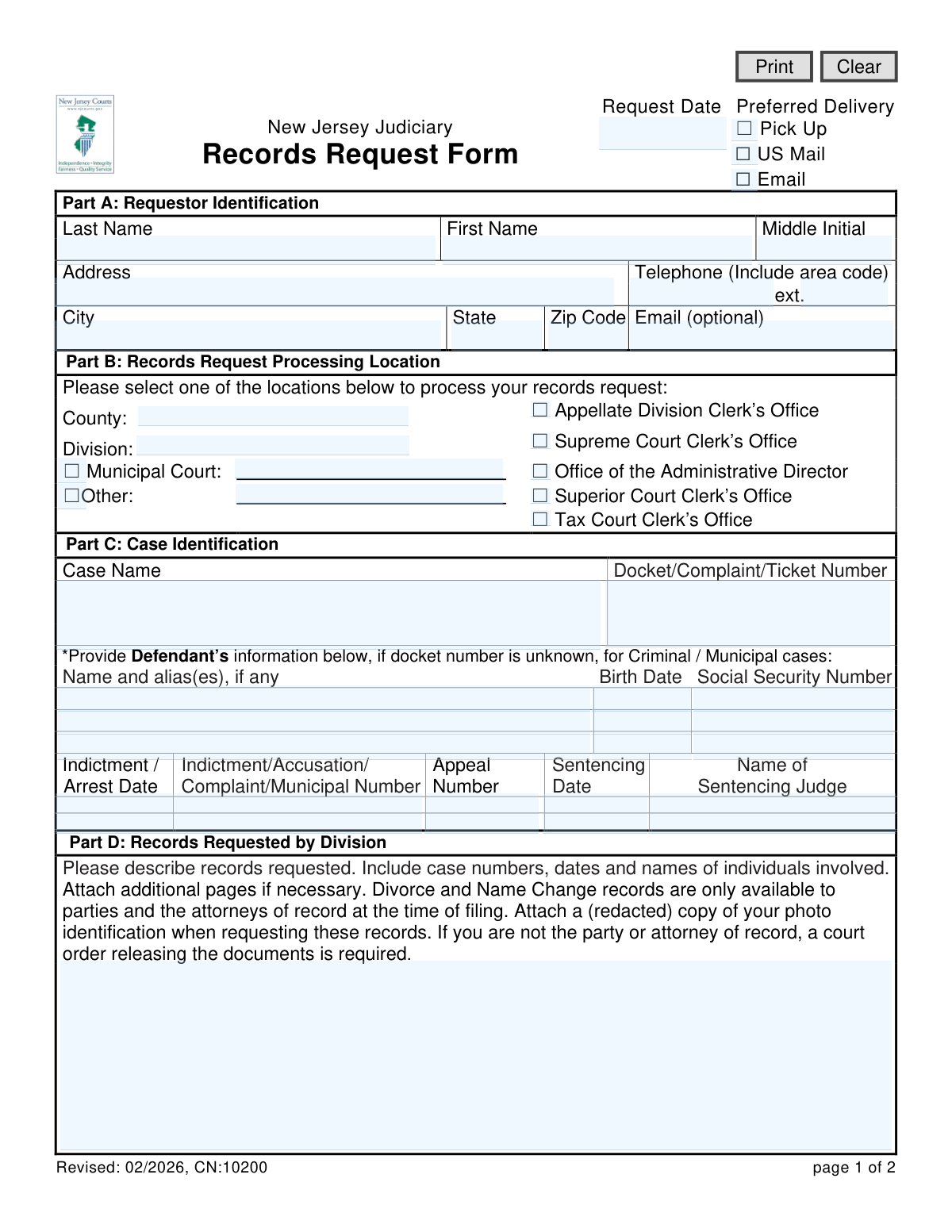
This is a multipurpose form used to formally request records from the New Jersey Judiciary system, covering various courts like the Supreme Court, Superior Court, and Tax Court. It is essential for individuals, attorneys, and other parties needing access to official case files, dockets, and other court documents for legal proceedings or personal records. Today, this form can be filled out quickly and accurately using AI-powered services like Instafill.ai, which can also convert non-fillable PDF versions into interactive fillable forms.
CN:10200 is part of the New Jersey forms category on Instafill.
Our AI automatically handles information lookup, data retrieval, formatting, and form filling.
It takes less than a minute to fill out CN:10200 using our AI form filling.
Securely upload your data. Information is encrypted in transit and deleted immediately after the form is filled out.

Form specifications

Form name: New Jersey Judiciary Records Request Form
Number of fields: 60
Number of pages: 1
Language: English
main-image

Instafill Demo: How to fill out PDF forms in seconds with AI

How to Fill Out CN:10200 Online for Free in 2026

Are you looking to fill out a CN:10200 form online quickly and accurately? Instafill.ai offers the #1 AI-powered PDF filling software of 2026, allowing you to complete your CN:10200 form in just 37 seconds or less.
Follow these steps to fill out your CN:10200 form online using Instafill.ai:
  1. 1 Navigate to Instafill.ai and upload the New Jersey Judiciary Records Request Form or select it from the template library.
  2. 2 In Part A, provide your personal information, including your full name, address, and contact details, and select your preferred delivery method.
  3. 3 In Part B, specify the court location that should process your request, such as the Tax Court Clerk's Office or a specific Municipal Court.
  4. 4 Complete Part C with case identification details like the case name and docket number. If the docket number is unknown for a criminal case, provide the defendant's information.
  5. 5 In Part D, write a clear and detailed description of the records you are requesting, including any relevant dates, names, and case numbers.
  6. 6 Review all entered information across the form for accuracy, then download the completed document to submit it via the appropriate channel, such as the Judiciary Electronic Documents Submission (JEDS) system or email for Tax Court records.

Our AI-powered system ensures each field is filled out correctly, reducing errors and saving you time.

Why Choose Instafill.ai for Your Fillable CN:10200 Form?

Speed

Complete your CN:10200 in as little as 37 seconds.

Up-to-Date

Always use the latest 2026 CN:10200 form version.

Cost-effective

No need to hire expensive lawyers.

Accuracy

Our AI performs 10 compliance checks to ensure your form is error-free.

Security

Your personal information is protected with bank-level encryption.

Frequently Asked Questions About Form CN:10200

This is a multipurpose form used to request official records from various courts within the New Jersey Judiciary, including the Tax Court, Superior Court, and Municipal Courts.

Anyone needing to obtain copies of court records from the New Jersey Judiciary should use this form. This includes parties to a case, attorneys, and members of the public, though some records may have access restrictions.

For Tax Court records, email the form to [email protected]. For all other requests, you must submit the form through the Judiciary Electronic Documents Submission system (JEDS).

If the docket number for a Criminal or Municipal case is unknown, you must complete the defendant information section in Part C. This includes the defendant's name, date of birth, and other identifying details.

Yes, these records are only available to the parties involved or their attorneys of record. You must attach a redacted copy of your photo ID with your request, or provide a court order if you are not a party to the case.

Standard copy fees are 5 cents per letter-sized page and 7 cents per legal-sized page. Additional fees will be charged for special requests like certified or exemplified copies.

You should select the court or office where the case was originally heard or filed. For example, if you need records from a case in the Tax Court, select the 'Tax Court Clerk’s Office'.

You can choose your preferred delivery method at the top of the form. The available options are Pick Up, delivery by US Mail, or delivery by Email.

For general questions, email [email protected]. For case-specific questions, it is best to contact the clerk's office for the relevant court, such as the specific Municipal Court where the matter was heard.

No, this form is not intended for requesting wills or probate records. To obtain those documents, you must contact the Surrogate's Office in the county where the will was probated.

Yes, services like Instafill.ai use AI to accurately auto-fill form fields, which can save you time and help prevent common errors.

Simply upload the Records Request Form to the Instafill.ai platform. The AI will identify all the fields, allowing you to provide your information once and have it automatically and accurately placed throughout the document.

If you have a non-fillable or 'flat' PDF, you can use a service like Instafill.ai. It can convert the document into an interactive, fillable form online, making it easy to complete and sign electronically.

Compliance CN:10200
Validation Checks by Instafill.ai

1
Requestor Name Completeness
This check ensures that the 'Last Name' and 'First Name' fields in Part A are not empty. These fields are fundamental for identifying the requestor for communication and processing purposes. If validation fails, the form cannot be submitted, and the user will be prompted to enter their full name.
2
Delivery Method and Dependent Field Validation
This validation confirms that a 'Preferred Delivery' method is selected. If 'US Mail' is chosen, the address fields (Street, City, State, Zip) must be complete. If 'Email' is chosen, the 'Email' field must contain a syntactically valid email address. This is crucial for ensuring the requested records can be delivered successfully.
3
Request Date Format and Plausibility
Validates that the 'Request Date' is a valid, correctly formatted date (e.g., MM/DD/YYYY). It also checks that the date is not in the future and is within a reasonable past timeframe. This ensures accurate record-keeping and prevents data entry errors that could complicate tracking.
4
Exclusive Processing Location Selection
This check verifies that the user has selected exactly one processing location in Part B. The form requires a single, specific office to handle the request. If zero or multiple locations are selected, the submission will fail, and the user will be instructed to choose only one option to ensure proper routing.
5
Primary Case Identifier Requirement
This validation ensures that at least one of the primary case identifiers in Part C, 'Case Name' or 'Docket/Complaint/Ticket Number', is provided. Without at least one of these, locating the correct case file is nearly impossible. A failed validation will prompt the user to supply this critical information.
6
Conditional Defendant Information for Missing Docket Number
This check enforces the rule stated in Part C. If the 'Docket/Complaint/Ticket Number' field is left empty, the system will require that at least one piece of defendant information (Name, Birth Date, or Social Security Number) is provided. This provides an alternative pathway for locating records when the primary docket number is unknown.
7
Social Security Number Format
This validation ensures that the 'Social Security Number' field, if filled, contains exactly nine digits and no other characters. This is critical for data integrity and for successfully querying databases that use SSN as an identifier. An invalid format would cause search failures and could compromise data handling protocols.
8
Date Field Format Consistency
This check applies to all date fields in Part C, such as 'Birth Date', 'Indictment / Arrest Date', and 'Sentencing Date'. It verifies that any entered date is in a valid format (e.g., MM/DD/YYYY) and represents a plausible calendar date. This prevents data corruption and ensures dates can be correctly interpreted by the processing system.
9
Request Details Completeness
This validation ensures the 'Please describe records requested' text area in Part D is not empty. This field is the core of the request, specifying exactly what documents are needed. An empty request is unfulfillable, so submission is blocked until the user describes the records they are seeking.
10
Named Party Status Selection
This check verifies that the user has answered the 'Are you a named party or attorney in this case?' question in Part E. This information is important as it can affect access rights to certain records (like divorce files) and may influence copy fees. The form cannot be submitted until the user selects either 'Yes' or 'No'.
11
US Phone Number Format
This validation checks that the 'Telephone' number in Part A follows a standard 10-digit US format, optionally allowing for common formatting like parentheses or hyphens. A valid phone number is essential for the judiciary staff to contact the requestor if there are questions or issues with the request. If the format is invalid, the user is prompted to correct it.
12
ZIP Code Format Validation
This check ensures that the 'Zip Code' provided in Part A is a valid 5-digit or 9-digit (ZIP+4) format. Correct formatting is essential for requests where 'US Mail' is the preferred delivery method. An invalid ZIP code would result in failed delivery, so the system will require a valid format before submission.
13
Logical Date Sequence
This validation performs a logical check to ensure the 'Sentencing Date' is not earlier than the 'Indictment / Arrest Date'. Such a sequence is chronologically impossible and indicates a data entry error. This check helps maintain the logical integrity of the case information provided.
14
Municipal Court Name Requirement
This is a conditional check for Part B. If the 'Municipal Court' checkbox is selected as the processing location, this validation ensures that the corresponding text field for the court's name is filled in. Without the specific name of the municipal court, the request cannot be routed correctly, so the submission is blocked until the name is provided.

Common Mistakes in Completing CN:10200

Selecting the Wrong Court or Division

Requestors often guess which court handled their case, for example, choosing 'Superior Court' when it was a 'Municipal Court' matter. This causes the request to be sent to the wrong location, leading to significant processing delays or outright rejection. To avoid this, carefully review any existing case paperwork to identify the correct court, division, and county before filling out Part B.

Omitting the Specific County or Municipality Name

In Part B, even if the correct court type like 'Superior Court' or 'Municipal Court' is checked, people frequently forget to write the specific county or town name on the corresponding line. The judiciary system is organized by location, so without this detail, staff cannot route the request. This simple omission will halt the entire process until the information is clarified.

Providing an Ambiguous Record Description

In Part D, using vague requests like 'all records' or 'the entire file' is a common error. This forces clerks to guess what is needed and may lead to a denial for being overly broad or the delivery of incorrect documents. To prevent this, be as specific as possible by listing document titles (e.g., 'Final Judgment of Divorce', 'Sentencing Order'), relevant dates, and the full names of individuals involved.

Failing to Provide a Docket Number or Sufficient Alternatives

The quickest way to locate a file is with the 'Docket/Complaint/Ticket Number' in Part C. Many people leave this blank without providing the required alternative information. If the docket number is unknown, you must provide the defendant's full name, date of birth, and other details as requested, otherwise, staff will be unable to locate the case, resulting in a denial.

Not Attaching Required Identification for Confidential Records

The instructions in Part D clearly state that for sensitive records like divorce and name changes, a redacted photo ID (for parties) or a court order (for others) is mandatory. Forgetting to attach these documents is a frequent oversight that leads to an automatic rejection of the request. Always read the fine print for the specific records you need and include all required attachments.

Inconsistent Delivery Preference and Contact Information

A common mistake is selecting 'Email' as the preferred delivery method but then failing to provide an email address in Part A, or providing one with a typo. This makes it impossible to fulfill the request electronically, causing delays while the office attempts to contact the requestor by other means. AI-powered form fillers like Instafill.ai can help by validating that an email address is entered correctly if email delivery is selected.

Submitting the Form to the Wrong Office

The bottom of the form lists several different submission methods depending on the court type (e.g., a specific email for Tax Court, the JEDS system for others). Many people overlook these instructions and send the form to a generic address. This guarantees the request will not reach the correct processing team, causing major delays or even resulting in the request being lost.

Ignoring the 'Named Party' Question

In Part E, the simple 'Yes/No' question 'Are you a named party or attorney in this case?' is often left unanswered. This information is critical as it can affect copy fees and, more importantly, determine your legal eligibility to receive certain confidential records. Leaving it blank forces the clerk to halt processing and contact you for clarification.

Submitting an Illegible, Hand-Written Form

When the form is printed and filled out by hand, poor handwriting can make names, addresses, and case numbers impossible to read. This leads to data entry errors by the clerk, resulting in failed case searches or documents being mailed to the wrong address. To ensure accuracy, it is best to fill out the form electronically. If you only have a non-fillable PDF, a tool like Instafill.ai can make it fillable, ensuring every entry is perfectly legible.
Saved over 80 hours a year

“I was never sure if my IRS forms like W-9 were filled correctly. Now, I can complete the forms accurately without any external help.”

Kevin Martin Green

Your data stays secure with advanced protection from Instafill and our subprocessors

Robust compliance program

Transparent business model

You’re not the product. You always know where your data is and what it is processed for.

ISO 27001, HIPAA, and GDPR

Our subprocesses adhere to multiple compliance standards, including but not limited to ISO 27001, HIPAA, and GDPR.

Security & privacy by design

We consider security and privacy from the initial design phase of any new service or functionality. It’s not an afterthought, it’s built-in, including support for two-factor authentication (2FA) to further protect your account.

Fill out CN:10200 with Instafill.ai

Worried about filling PDFs wrong? Instafill securely fills new-jersey-judiciary-records-request-form forms, ensuring each field is accurate.