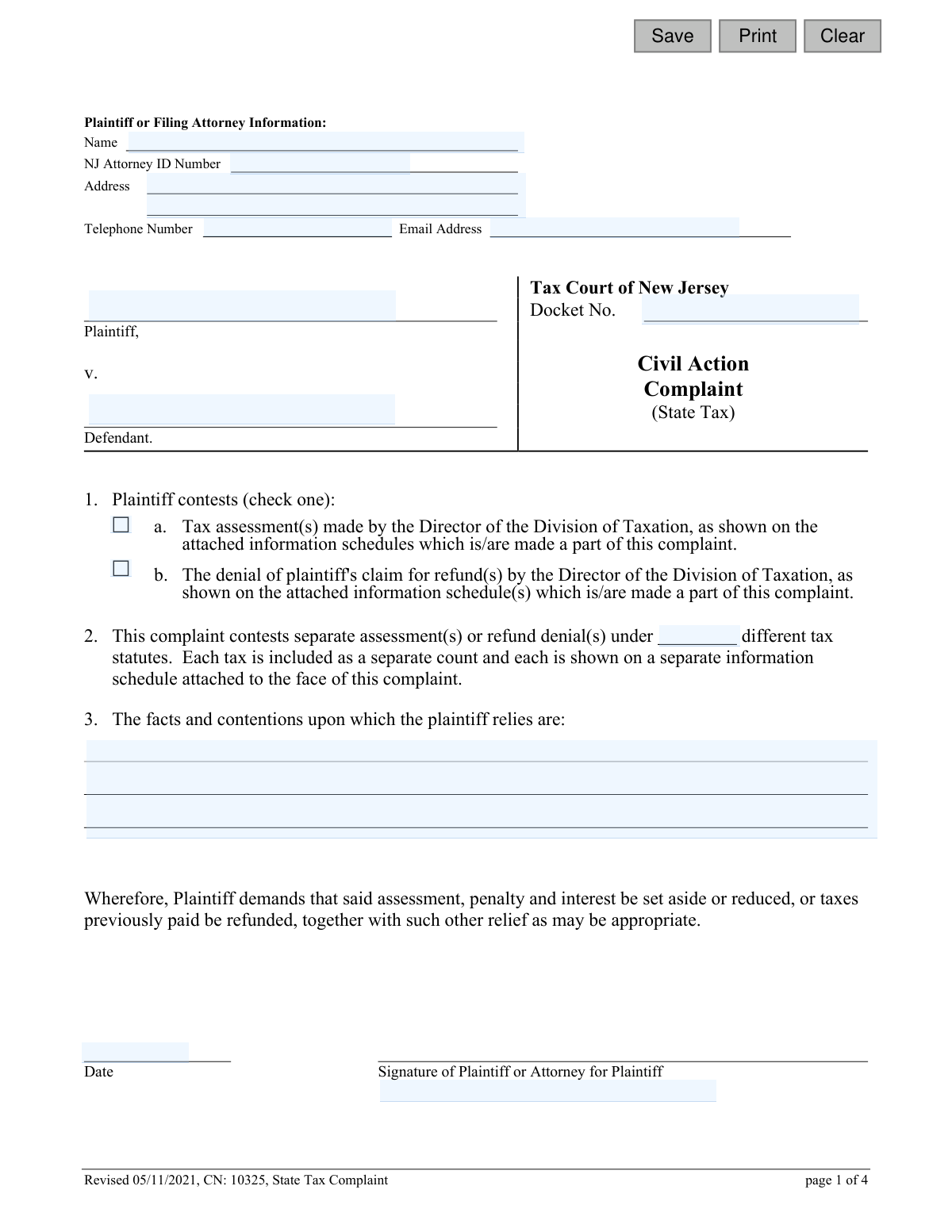
Yes! You can use AI to fill out Tax Court of New Jersey, State Tax Complaint

This form is a legal document used by taxpayers in New Jersey to initiate a civil action in the Tax Court. It allows a plaintiff to formally contest a tax assessment made by the Director of the Division of Taxation or the denial of a claim for a tax refund. Today, this form can be filled out quickly and accurately using AI-powered services like Instafill.ai, which can also convert non-fillable PDF versions into interactive fillable forms.
CN 10325 is part of the New Jersey forms and state tax forms categories on Instafill.
Our AI automatically handles information lookup, data retrieval, formatting, and form filling.
It takes less than a minute to fill out CN 10325 using our AI form filling.
Securely upload your data. Information is encrypted in transit and deleted immediately after the form is filled out.

Form specifications

Form name: Tax Court of New Jersey, State Tax Complaint
Number of fields: 21
Number of pages: 1
Language: English
main-image

Instafill Demo: How to fill out PDF forms in seconds with AI

How to Fill Out CN 10325 Online for Free in 2026

Are you looking to fill out a CN 10325 form online quickly and accurately? Instafill.ai offers the #1 AI-powered PDF filling software of 2026, allowing you to complete your CN 10325 form in just 37 seconds or less.
Follow these steps to fill out your CN 10325 form online using Instafill.ai:
  1. 1 Navigate to Instafill.ai and upload or select the New Jersey State Tax Complaint form.
  2. 2 Provide the plaintiff's information, including name, address, and attorney details if applicable.
  3. 3 Identify the defendant and check the appropriate box to indicate whether you are contesting a tax assessment or a refund denial.
  4. 4 Clearly state the facts, contentions, and legal basis for your complaint in the provided section.
  5. 5 Attach all required supporting documents, such as the notice of assessment or refund denial, and the State Tax Case Information Statement.
  6. 6 Review all information populated by the AI for accuracy, then electronically or manually sign and date the complaint and the Proof of Service section.
  7. 7 Download the completed form and follow the instructions to file it with the Tax Court Management Office and serve copies to the Division of Taxation and the Attorney General.

Our AI-powered system ensures each field is filled out correctly, reducing errors and saving you time.

Why Choose Instafill.ai for Your Fillable CN 10325 Form?

Speed

Complete your CN 10325 in as little as 37 seconds.

Up-to-Date

Always use the latest 2026 CN 10325 form version.

Cost-effective

No need to hire expensive lawyers.

Accuracy

Our AI performs 10 compliance checks to ensure your form is error-free.

Security

Your personal information is protected with bank-level encryption.

Frequently Asked Questions About Form CN 10325

This form is used to file a formal complaint with the Tax Court of New Jersey to contest a state tax assessment or the denial of a tax refund claim issued by the Director of the Division of Taxation.

Any taxpayer or their attorney who wishes to legally challenge a final determination made by the New Jersey Division of Taxation regarding their state taxes should file this form.

Yes, the complaint must be received by the Tax Court Administrator's Office within the 90-day time period from the date of the notice you are contesting.

You must attach a copy of the notice or determination you are contesting (e.g., the assessment or refund denial letter) and the applicable State Tax Case Information Statement.

The complaint, supporting documents, and filing fee must be mailed to the Tax Court Management Office in Trenton. You must also serve copies to the Director of the Division of Taxation and the Office of the Attorney General, preferably via email.

This section is your sworn statement confirming that you have sent a copy of the complaint to both the Director of the Division of Taxation and the Attorney General of New Jersey, which is a required step.

In this section, you must clearly explain the factual and legal reasons why you believe the tax assessment or refund denial is incorrect. Be specific about your arguments against the Division of Taxation's decision.

Redacting means you must remove or black out sensitive personal information, such as Social Security numbers, driver's license numbers, or full bank account numbers, from all documents before you file them with the court.

No, using this form is optional. However, any complaint you submit must include all the required information, conform to court rules, and have the State Tax Case Information Statement attached.

You must modify the complaint form to name the Director of the correct State agency that administers the tax as the defendant in your case.

Yes, services like Instafill.ai use AI to auto-fill form fields accurately and save time, helping you complete the complaint form more efficiently.

You can use a service like Instafill.ai to upload the PDF and fill it out on your computer. This allows you to type your information, save your progress, and print a clean, legible copy for filing.

If you have a non-fillable or 'flat' PDF, Instafill.ai can convert it into an interactive, fillable form that you can easily complete online.

The defendant is typically the Director of the Division of Taxation. You should list this official title in the defendant field on the form.

Compliance CN 10325
Validation Checks by Instafill.ai

1
Requires Plaintiff or Attorney Name
This check ensures that the 'Name' field under 'Plaintiff or Filing Attorney Information' is not empty. This information is essential for identifying the filing party and for all future correspondence from the court. If this field is left blank, the submission will be rejected as it lacks the primary identifier for the case filer.
2
Validates Attorney Email Address Format
This validation verifies that the value entered in the 'Email Address' field follows the standard email format (e.g., '[email protected]'). An accurate email address is critical for electronic service and official communication from the court, as specified on page 4 of the form. An invalid format will prevent submission and prompt the user to correct the entry.
3
Validates Telephone Number Format
This check ensures the 'Telephone Number' field contains a valid phone number format, such as (XXX) XXX-XXXX or a similar standard. A valid contact number is necessary for the court or opposing counsel to communicate directly if needed. The validation prevents the entry of non-numeric characters or incomplete numbers, ensuring contact information is reliable.
4
Conditional Requirement for NJ Attorney ID
This validation checks if the 'NJ Attorney ID Number' is provided when the filer is an attorney. The system should determine if the filer is an attorney (perhaps via a separate question) and make this field mandatory in that case. This ID is crucial for verifying the attorney's standing with the New Jersey State Bar and for court records.
5
Ensures Plaintiff and Defendant Names are Provided
This check verifies that both the 'Plaintiff' and 'Defendant' name fields in the main body of the complaint are filled out. These names formally establish the parties to the legal action and are fundamental to the case caption. A complaint cannot be filed without clearly identifying who is suing whom.
6
Verifies Exclusive Selection of Contest Reason
This validation ensures that the plaintiff has selected exactly one option in section 1, either 'a. Tax assessment(s)' or 'b. The denial of plaintiff's claim for refund(s)'. The form specifies 'check one,' and selecting zero or both options would make the basis of the complaint ambiguous. This check is critical for properly categorizing and processing the complaint.
7
Requires Statement of Facts and Contentions
This check ensures that the text area for 'The facts and contentions upon which the plaintiff relies are' is not empty. This section contains the core legal and factual basis for the complaint and is a non-optional, essential part of the filing. A submission without this information would be incomplete and legally insufficient.
8
Validates Main Complaint Signature Date
This validation confirms that the 'Date' field next to the primary signature is a valid, properly formatted date and is not a future date. The signature date establishes when the complaint was formally attested to by the plaintiff or their attorney. An invalid or future date would call the document's authenticity and timing into question.
9
Ensures Both Proof of Service Dates are Present
This check verifies that both date fields in the 'Proof of Service' section are filled out, indicating when the complaint was served on the Director of the Division of Taxation and the Attorney General. Proper service is a jurisdictional requirement, and failure to provide these dates indicates a potentially fatal flaw in the filing process. The dates must also be in a valid format.
10
Verifies Logical Consistency of Service Dates
This validation checks that the two service dates in the 'Proof of Service' section are on or before the signature date on the 'Proof of Service' certification. A person cannot certify that service was completed on a future date. This logical check prevents chronological errors and ensures the certification is credible.
11
Requires Signature for Proof of Service
This check ensures that the 'Signature of Plaintiff or Attorney for Plaintiff' and the 'Date' fields at the bottom of the 'Proof of Service' section are both completed. This signed certification, made under penalty of perjury, is the official evidence that service was properly executed. Without it, the court cannot confirm that the defendant was legally notified of the lawsuit.
12
Confirms Acknowledgment of Attachment Requirements
This validation ensures the user has acknowledged that all required documents are attached to the complaint, as specified in the form's notes (e.g., the notice in controversy, information schedules). This could be a mandatory checkbox confirming 'I have attached a copy of the determination in controversy per Rule 8:3-5(b)(1)'. This prevents incomplete filings which would be rejected by the court administrator.

Common Mistakes in Completing CN 10325

Failure to Attach All Required Documents

The form requires several critical attachments that are often forgotten, including the specific tax assessment or refund denial notice, the applicable State Tax Case Information Statement (CIS), and any referenced information schedules. Missing these documents will result in the court deeming the filing incomplete, causing significant delays or even rejection of the complaint. To avoid this, create a checklist of all documents mentioned in the instructions on page 2 (Notes 1, 4, and 5) and ensure each one is included before mailing.

Improper or Incomplete Proof of Service

Filers often make errors on the 'Proof of Service' page, such as failing to serve both the Director of the Division of Taxation and the Attorney General, or using an outdated service method. The form presents conflicting information, with page 3 suggesting certified mail while page 4 specifies email as the preferred method. This confusion can lead to improper service and potential dismissal. The best practice is to follow the most current instructions on page 4, serve both parties via the provided email addresses, and then accurately complete the Proof of Service section with the correct dates before signing.

Incorrectly Identifying the Defendant

A common procedural error is naming the wrong defendant in the case caption. Filers may incorrectly list 'State of New Jersey' or 'Division of Taxation' as the defendant. The instructions clarify that the proper defendant is the 'Director of the Division of Taxation' or the director of the specific state agency administering the tax. Naming the wrong party can cause procedural delays and may require filing an amended complaint, wasting time and resources.

Missing the 90-Day Filing Deadline

The instructions state that the complaint must be received by the Tax Court within a 90-day period. This is a strict, jurisdictional deadline, not a postmark deadline. Missing it, even by one day, will almost certainly result in the case being permanently dismissed without the court ever considering its merits. To prevent this, filers should calculate the deadline immediately upon receiving the final determination and file the complaint well in advance, accounting for mail or processing time.

Including Confidential Personal Identifiers

Despite a clear warning on page 2 (Rule 1:38-7), filers frequently submit the complaint or attached evidence with unredacted confidential information like Social Security numbers, driver's license numbers, or full bank account numbers. This violates court rules and exposes the filer to identity theft, as the documents become part of a public record. Before filing, carefully review every page and redact all such identifiers. AI-powered tools can help identify and flag sensitive data in documents before submission.

Confusing Filing with Service

Filers often confuse the address for filing the complaint with the addresses for serving the complaint. The complaint must be filed with the Tax Court Management Office (the P.O. Box on page 4), while copies must be served on the Director of Taxation and the Attorney General (at their email or physical addresses). Mailing the original complaint to a service address instead of the court will fail to initiate the case and can cause you to miss the filing deadline.

Forgetting to Sign or Date the Complaint

An unsigned or undated complaint is legally invalid and will be rejected by the court clerk. This simple oversight can lead to the filing being returned and may jeopardize the case if the deadline is near. The form requires two separate signatures: one on the main complaint (page 1) and another on the Proof of Service certification (page 3). Always double-check that both sections are properly signed and dated before submission.

Submitting an Insufficient Factual Basis

In Section 3, 'The facts and contentions upon which the plaintiff relies,' filers often provide a vague, emotional, or legally insufficient explanation. This section is the core of the legal argument and must clearly state the specific facts and reasons why the tax determination is incorrect. A weak or unclear statement can undermine the entire case from the start. It is crucial to provide a concise, organized, and fact-based narrative that directly addresses the errors in the assessment or refund denial.

Failing to Include the Filing Fee

The instructions on page 2 mention that the complaint must be submitted with the 'correct filing fee.' Filing without the fee, or with an incorrect amount, will prevent the complaint from being processed. The court will typically return the package, which can be a critical problem if the 90-day filing deadline is imminent. Before mailing, verify the current Tax Court filing fee on the New Jersey Courts website and include a check or money order for the correct amount.

Filling in Court-Use-Only Fields

The 'Docket No.' field on the first page is for official court use only and is assigned by the court clerk upon filing. Some filers mistakenly try to fill this in themselves, creating confusion. This field, and any other field marked for court use, should always be left blank. Using an AI-powered form-filling tool like Instafill.ai can help prevent this by identifying and skipping fields reserved for administrative use.

Incomplete or Incorrect Contact Information

Errors in the 'Plaintiff or Filing Attorney Information' section, such as a misspelled name, incorrect address, or outdated phone number, can have serious consequences. The court and the opposing party use this information for all official correspondence, including hearing notices and orders. An error could cause you to miss a critical deadline or court appearance. Always double-check that all contact details are current and accurate. If the form is a non-fillable PDF, a tool like Instafill.ai can convert it to a fillable version, ensuring information is entered clearly and legibly.
Saved over 80 hours a year

“I was never sure if my IRS forms like W-9 were filled correctly. Now, I can complete the forms accurately without any external help.”

Kevin Martin Green

Your data stays secure with advanced protection from Instafill and our subprocessors

Robust compliance program

Transparent business model

You’re not the product. You always know where your data is and what it is processed for.

ISO 27001, HIPAA, and GDPR

Our subprocesses adhere to multiple compliance standards, including but not limited to ISO 27001, HIPAA, and GDPR.

Security & privacy by design

We consider security and privacy from the initial design phase of any new service or functionality. It’s not an afterthought, it’s built-in, including support for two-factor authentication (2FA) to further protect your account.

Fill out CN 10325 with Instafill.ai

Worried about filling PDFs wrong? Instafill securely fills tax-court-of-new-jersey-state-tax-complaint forms, ensuring each field is accurate.

Related forms by category

New Jersey forms State of New Jersey Alternate Benefit Program Withdrawal Request Acknowledgement Receipt, Horizon Blue Cross Blue Shield of New Jersey Applied Behavior Analysis Supplemental Information Form, State of New Jersey Application for Employment (Form DPF-663), New Jersey Judiciary Plea Form (Plea 01), Supplemental Plea Form for Certain Sexual Offenses: Megan’s Law/Parole Supervision for Life/Community Supervision for Life (Plea 05), Financial Questionnaire to Establish Indigency, New Jersey Judiciary Resource Family Information Form, Foreclosure Case Information Statement (FCIS) - Appendix XII-B2, New Jersey Judiciary Records Request Form, Superior Court of New Jersey, Application for Appeal and Order, FL Certification of Requested Background Checks for Kinship Legal Guardianship, Certification of Caregiver as to Knowledge of Identity and/or Location of Parents, FL Order Judgment for Kinship Legal Guardianship, New Jersey Judiciary Certification of Repair and Plea of Guilty, Uniform Summary Support Order (USSO), New Jersey Judiciary Volunteer Application (CN 10293), Application to Take the New Jersey Court Interpreter Oral Examination, New Jersey Judiciary Attorney Fee Arbitration Request, Order to Show Cause with Temporary Restraints Pursuant to Rule 4:52, State Tax Case Information Statement (CIS-State) · + 110 more →
state tax forms Form W-2, Wage and Tax Statement, Form 1041, U.S. Income Tax Return for Estates and Trusts, Form 3911, Taxpayer Statement Regarding Refund, Form W-8IMY (Rev. October 2021), Certificate of Foreign Intermediary, Foreign Flow-Through Entity, or Certain U.S. Branches for United States Tax Withholding and Reporting, Form W-2, Wage and Tax Statement (2025), Form W-8BEN-E (Rev. October 2021), Certificate of Status of Beneficial Owner for United States Tax Withholding and Reporting (Entities), Dealer’s Heavy Equipment Inventory Tax Statement (Form 50-266), Form W-8BEN-E, Certificate of Status of Beneficial Owner for United States Tax Withholding and Reporting (Entities), Form 1041, U.S. Income Tax Return for Estates and Trusts, Form 4852, Substitute for Form W-2, Wage and Tax Statement, or Form 1099-R, Colorado Form DR 0026, Tax Statement for Leased Motor Vehicle, Form W-2, Wage and Tax Statement, Form W-2, Wage and Tax Statement, Form DE 4, Employee’s Withholding Allowance Certificate, Form 3911, Taxpayer Statement Regarding Refund, Form 706-NA, United States Estate (and Generation-Skipping Transfer) Tax Return Estate of Nonresident Not a Citizen of the United States, Form W-2, Wage and Tax Statement, Form 1310, Statement of Person Claiming Refund Due a Deceased Taxpayer, Form ST-120, New York State and Local Sales and Use Tax Resale Certificate, Form 1120-REIT, U.S. Income Tax Return for Real Estate Investment Trusts · + 4 more →