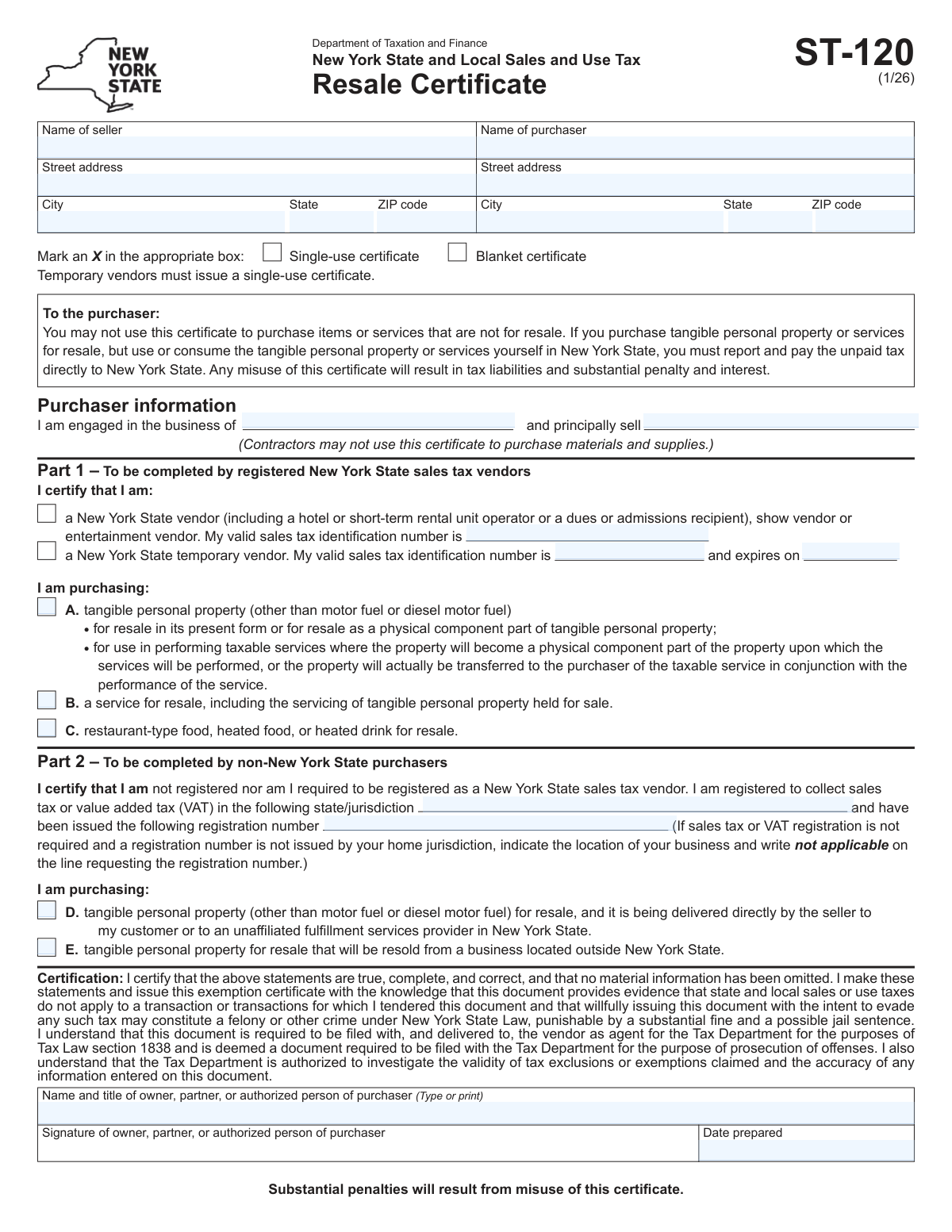
Yes! You can use AI to fill out Form ST-120, New York State and Local Sales and Use Tax Resale Certificate
Form ST-120 is a resale certificate used in New York State that allows a business to purchase goods or services for resale without paying sales tax to the seller. It serves as proof that the purchase is exempt because the tax will be collected on the final retail sale. Today, this form can be filled out quickly and accurately using AI-powered services like Instafill.ai, which can also convert non-fillable PDF versions into interactive fillable forms.
ST-120 is part of the
ESA forms, NJ state forms, New York State forms, New York forms, PA state forms, resale certificate forms, sales tax forms, state ID forms, state tax forms and tax forms categories on Instafill.
Our AI automatically handles information lookup, data retrieval, formatting, and form filling.
It takes less than a minute to fill out ST-120 using our AI form filling.
Securely upload your data. Information is encrypted in transit and deleted immediately after the form is filled out.
Form specifications
| Form name: | Form ST-120, New York State and Local Sales and Use Tax Resale Certificate |
| Number of fields: | 28 |
| Number of pages: | 2 |
| Language: | English |
More forms in ESA forms
Instafill Demo: How to fill out PDF forms in seconds with AI
How to Fill Out ST-120 Online for Free in 2026
Are you looking to fill out a ST-120 form online quickly and accurately? Instafill.ai offers the #1 AI-powered PDF filling software of 2026, allowing you to complete your ST-120 form in just 37 seconds or less.
Follow these steps to fill out your ST-120 form online using Instafill.ai:
- 1 Navigate to Instafill.ai and upload or select Form ST-120, the NYS Resale Certificate.
- 2 Provide the seller's name and address in the designated fields.
- 3 Enter your business information as the purchaser, including name, address, and business activity.
- 4 Certify your status by completing either Part 1 for New York vendors or Part 2 for non-New York purchasers, providing your sales tax ID number.
- 5 Indicate the type of certificate (blanket or single-use) and the property or services being purchased for resale.
- 6 Review all entered information for accuracy, then electronically sign and date the certificate.
- 7 Download the completed Form ST-120 to provide to the seller for their records.
Our AI-powered system ensures each field is filled out correctly, reducing errors and saving you time.
Why Choose Instafill.ai for Your Fillable ST-120 Form?
Speed
Complete your ST-120 in as little as 37 seconds.
Up-to-Date
Always use the latest 2026 ST-120 form version.
Cost-effective
No need to hire expensive lawyers.
Accuracy
Our AI performs 10 compliance checks to ensure your form is error-free.
Security
Your personal information is protected with bank-level encryption.
Frequently Asked Questions About Form ST-120
This form allows a purchaser to buy goods or services for resale without paying sales tax to the seller. It serves as proof that the items are being purchased for resale in the regular course of business.
The purchaser is responsible for completing and signing this form. It should then be given to the seller to keep for their records as justification for not collecting sales tax.
A single-use certificate is valid for only one specific purchase transaction. A blanket certificate can be used for multiple purchases from the same seller over time, eliminating the need to fill out a new form for each transaction.
You should complete Part 1 of the form. Check the box for 'New York State vendor' and enter your valid New York State sales tax identification number.
If you are not a New York purchaser, you must complete Part 2. You will need to provide your home state or jurisdiction of registration and your sales tax or VAT registration number.
You will need the full name and address of the seller, your own business name and address, and your sales tax identification number. You should also be prepared to describe your business activity and the principal items you sell.
For 'Business activity,' briefly describe your type of business, such as 'retail clothing store.' For 'Principal items sold,' list the main goods or services you provide, like 'women's apparel' or 'computer parts'.
You must give the completed and signed certificate to the seller at the time of purchase. Do not send this form to any tax authority; it is for the seller's records only.
If you are a temporary vendor, check the 'New York State temporary vendor' box in Part 1. You must provide your temporary sales tax ID number and its expiration date.
If your home jurisdiction does not issue a registration number, you should write 'not applicable' in the field for the 'Sales tax or VAT registration number' in Part 2.
Yes, services like Instafill.ai use AI to accurately auto-fill form fields, which can save you time and help prevent errors.
To fill this form online, upload the PDF to the Instafill.ai platform. The AI will make the form fillable, and you can then type in your information or use the service to auto-fill details from your profile.
If you have a non-fillable PDF, you can use a service like Instafill.ai. It can convert flat PDFs into interactive, fillable forms that you can complete easily on your computer.
Compliance ST-120
Validation Checks by Instafill.ai
1
Exclusive Certificate Type Selection
Ensures that the user selects either 'Single-use certificate' or 'Blanket certificate', but not both. These options are mutually exclusive and define the scope of the certificate's validity. If both or neither are selected, the form will display an error and require the user to choose exactly one option before proceeding.
2
Conditional NYS Registered Vendor ID
This check validates that if the 'New York State vendor' box is checked, the 'Registered vendor sales tax ID' field must be populated. This is a logical requirement, as claiming to be a registered vendor necessitates providing the associated ID number for verification. If the box is checked but the ID is missing, the user will be prompted to enter the ID or uncheck the box.
3
Conditional NYS Temporary Vendor Details
Verifies that if the 'New York State temporary vendor' box is selected, both the 'Temporary vendor sales tax ID' and 'Temporary vendor ID expiration date' fields are completed. This ensures all necessary information for a temporary vendor status is captured for compliance and verification. Submission will be blocked until both fields are filled or the temporary vendor checkbox is deselected.
4
Exclusive Vendor Type Selection
This validation ensures a user cannot select both 'New York State vendor' and 'New York State temporary vendor' simultaneously. A vendor holds either a permanent or a temporary registration, not both, so these statuses are mutually exclusive. If a user attempts to select both, an error message will appear, forcing them to choose only one status.
5
Temporary Vendor ID Expiration Logic
Checks that the 'Temporary vendor ID expiration date' is not in the past relative to the 'Date prepared' or the current date. An expired temporary ID would invalidate the certificate for future transactions, so this check prevents the submission of a form with an already-expired credential. If the expiration date is in the past, the user will be notified that the ID is expired and cannot be used.
6
Valid Date Format
This validation ensures that the 'Temporary vendor ID expiration date' and 'Date prepared' fields are entered in a valid date format (e.g., MM/DD/YYYY). It also checks that the date is a plausible, real date (e.g., not February 30). This is critical for data integrity and ensuring the certificate's temporal validity is correctly recorded.
7
Minimum Purchase Type Selection
This validation ensures that the purchaser has selected at least one type of purchase by checking at least one box from options A, B, C, or E. The purpose of the certificate is to declare the nature of the tax-exempt purchase, so this information is fundamental. If no purchase type is selected, the form will be considered incomplete and an error will prompt the user to make a selection.
8
Conditional Non-NYS Purchaser Details
This rule validates that if a user checks box 'E' (indicating they are a non-NYS purchaser), they must also complete the 'State or jurisdiction of registration' and 'Sales tax or VAT registration number' fields. This information is required to verify the purchaser's out-of-state tax-exempt status. The form will not submit without this information if box 'E' is checked.
9
Purchaser Information Completeness
Ensures that the purchaser's full legal name and complete address (street, city, state, ZIP code) are provided. This information is essential for identifying the party claiming the tax exemption and is a primary requirement for the certificate's validity. The form cannot be submitted until all parts of the purchaser's identification and address are filled out.
10
Seller Address Completeness
Checks that if the seller's name is entered, the corresponding street, city, state, and ZIP code are also provided. A complete address is crucial for legal and tax purposes, ensuring the seller can be correctly identified and located. Failure to provide a full address will prevent form submission and prompt the user to complete the missing fields.
11
Valid ZIP Code Format
Verifies that the Seller and Purchaser ZIP code fields contain either a 5-digit or 9-digit (ZIP+4) numeric value. This is important for mail delivery and address validation systems. An invalid format will trigger an error message asking the user to correct the entry to a standard US ZIP code format.
12
Standard State Abbreviation Format
This check verifies that the 'Seller state' and 'Purchaser state' fields contain a valid two-letter postal abbreviation (e.g., NY, CA, TX). Using a standardized format is crucial for address validation, data consistency, and integration with other systems. The system should reject non-standard entries like 'New York' and prompt the user for the correct format.
13
Required Purchaser Business Description
This check mandates that the 'Business activity' and 'Principal items sold' fields are not left empty. This information is critical for the seller to determine if the purchase qualifies for a resale exemption based on the purchaser's line of business. An incomplete description could lead to improper tax exemption claims, so the form will require these fields to be completed.
14
Signatory and Date Prepared Completion
Validates that the 'Name and title of owner, partner, or authorized person' and 'Date prepared' fields are filled out. These fields constitute the legal certification and dating of the document, making them essential for its validity and enforceability. The form submission will be blocked until the name, title, and date are provided.
Common Mistakes in Completing ST-120
Purchasers often enter their 'Doing Business As' (DBA) or trade name instead of the full legal business name registered with the state. This happens because the DBA is more commonly used in daily operations. However, a resale certificate is a legal tax document, and a mismatch between the name on the form and official tax records can render the certificate invalid, leading to rejection by the seller or penalties during an audit.
Users frequently misunderstand the distinction between a 'single-use' and 'blanket' certificate, selecting the wrong option for their transaction type. For example, they might select 'single-use' for an ongoing purchasing relationship, creating unnecessary administrative work to issue a new certificate for every transaction. Conversely, selecting 'blanket' for a one-time sale can create a false impression of an ongoing relationship, which could have compliance implications. Always clarify the nature of the purchasing relationship with the seller before selecting.
In the 'Business activity' and 'Principal items sold' fields, filers often provide overly broad descriptions like 'Retail' or 'Sales'. This mistake occurs due to haste or uncertainty about the required level of detail. A vague description prevents the seller from verifying that the items being purchased tax-free are legitimately for resale within the purchaser's line of business, often leading to the certificate's rejection until more specific information (e.g., 'Retail women's apparel' or 'Wholesale computer parts') is provided.
Data entry errors, such as transposing digits or using a federal EIN instead of a state sales tax ID, are common and critical mistakes. For temporary vendors, forgetting to check and entering an expired ID is also a frequent issue. An invalid or expired ID number makes the entire certificate void, and if the seller accepts it, they become liable for the uncollected sales tax. To avoid this, copy the number directly from official state tax documentation and always verify the expiration date for temporary IDs.
A frequent error is filling out sections for both New York and non-New York purchasers, creating a contradiction. For example, a user might check the 'New York State vendor' box in Part 1 and also enter information in Part 2 for non-NY purchasers. This indicates confusion about the form's structure and results in an invalid certificate that will be immediately rejected. Filers must carefully determine if they are a NYS registered vendor (Part 1) or a non-NYS purchaser (Part 2) and complete only the relevant section.
Filers often overlook the checkboxes in 'Part 1 (A/B/C types of purchase)' that specify what is being purchased for resale (e.g., tangible personal property, services). Leaving this section blank makes the certificate incomplete, as it fails to define the scope of the tax exemption. A seller cannot legally accept a certificate that does not clearly state what category of items are being purchased tax-free.
Forgetting to sign and date the form is a simple but common oversight that completely invalidates the document. Similarly, printing a name without an official title (e.g., 'President', 'Owner', 'Purchasing Manager') is also an error. An unsigned certificate is not legally binding, and a missing title makes it impossible for the seller to verify that the signer has the authority to make tax-related declarations on behalf of the business.
Rushing through the form often leads to incomplete addresses, such as missing suite or apartment numbers, or using an incorrect ZIP code. This happens due to carelessness or not having the full address readily available. An incomplete address can cause the certificate to be flagged as invalid during a tax audit and can create issues for the seller's record-keeping. Using an AI-powered form filling tool like Instafill.ai can help prevent this by using address validation to ensure accuracy and completeness.
In Part 2, non-New York purchasers sometimes write 'N/A' for their sales tax registration number even when their home jurisdiction issues one. This happens when they misinterpret the instruction "(or write 'not applicable' if your home jurisdiction does not issue a registration number)" as an excuse for not having the number handy. This will invalidate the certificate, as the seller needs the number for verification. 'N/A' should only be used if the state or jurisdiction genuinely does not issue registration numbers.
When a form is only available as a non-fillable PDF, users print, fill, and scan it, often resulting in a low-quality, skewed, or unreadable document. This can cause data entry errors on the seller's end or lead to the form being rejected outright. To avoid this, it's crucial to ensure scans are clear and legible. Advanced tools like Instafill.ai can convert flat PDFs into fillable forms, allowing for clean, digital entries and eliminating the need for printing and scanning altogether.
Saved over 80 hours a year
“I was never sure if my IRS forms like W-9 were filled correctly. Now, I can complete the forms accurately without any external help.”
Kevin Martin Green
Your data stays secure with advanced protection from Instafill and our subprocessors

Robust compliance program
Transparent business model
You’re not the product. You always know where your data is and what it is processed for.
ISO 27001, HIPAA, and GDPR
Our subprocesses adhere to multiple compliance standards, including but not limited to ISO 27001, HIPAA, and GDPR.
Security & privacy by design
We consider security and privacy from the initial design phase of any new service or functionality. It’s not an afterthought, it’s built-in, including support for two-factor authentication (2FA) to further protect your account.
Fill out ST-120 with Instafill.ai
Worried about filling PDFs wrong? Instafill securely fills form-st-120-new-york-state-and-local-sales-and-use-tax-resale-certificate forms, ensuring each field is accurate.