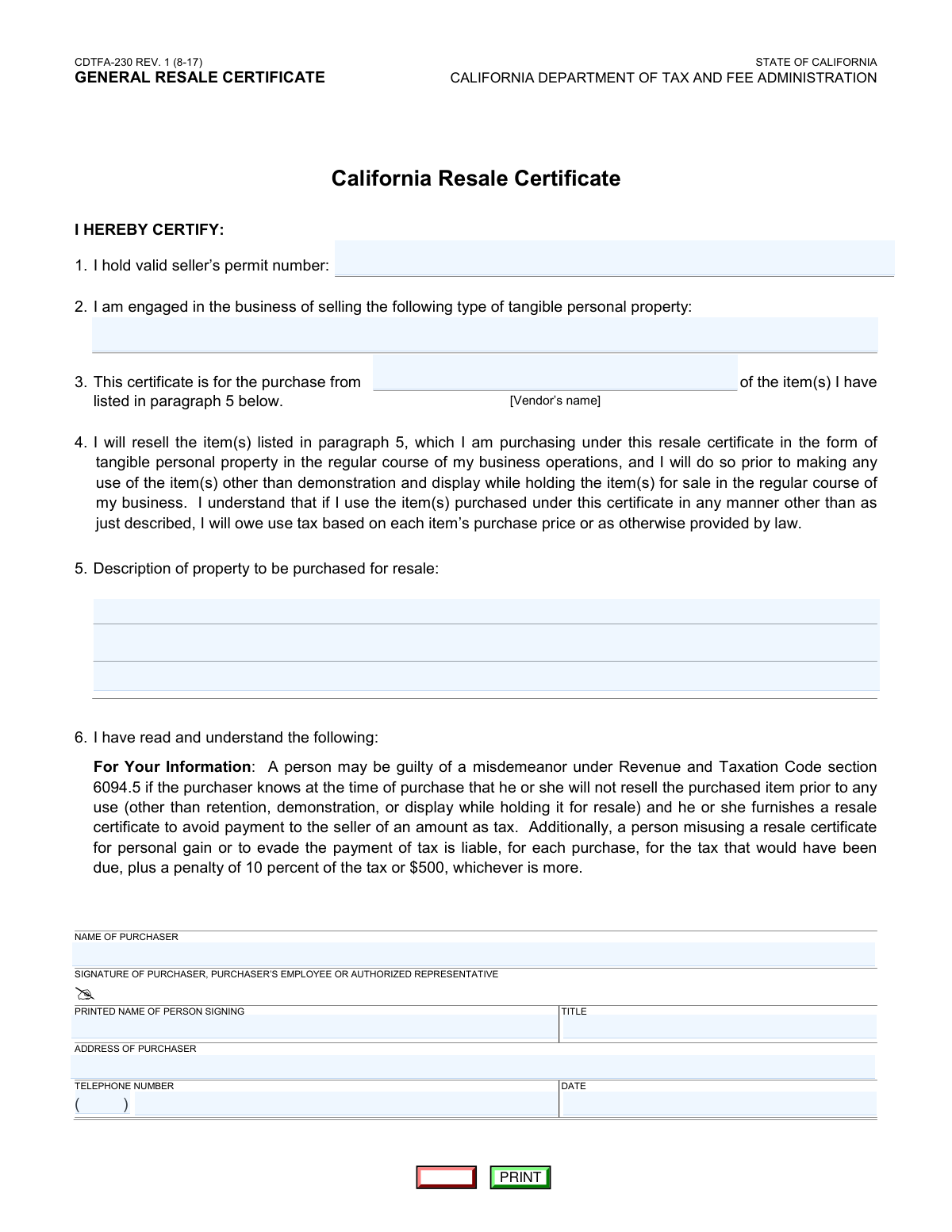
Yes! You can use AI to fill out California Department of Tax and Fee Administration Form CDTFA-230, General Resale Certificate
Form CDTFA-230, the General Resale Certificate, is a legal document used in California that allows a business to buy goods from a supplier without paying sales tax, on the condition that these goods will be resold. By presenting this certificate, the buyer certifies to the seller that the purchase is for resale in the regular course of business. Today, this form can be filled out quickly and accurately using AI-powered services like Instafill.ai, which can also convert non-fillable PDF versions into interactive fillable forms.
Our AI automatically handles information lookup, data retrieval, formatting, and form filling.
It takes less than a minute to fill out CDTFA-230 using our AI form filling.
Securely upload your data. Information is encrypted in transit and deleted immediately after the form is filled out.
Form specifications
| Form name: | California Department of Tax and Fee Administration Form CDTFA-230, General Resale Certificate |
| Number of fields: | 13 |
| Number of pages: | 1 |
| Language: | English |
| Categories: | California tax forms, resale certificate forms, tax forms |
Instafill Demo: How to fill out PDF forms in seconds with AI
How to Fill Out CDTFA-230 Online for Free in 2026
Are you looking to fill out a CDTFA-230 form online quickly and accurately? Instafill.ai offers the #1 AI-powered PDF filling software of 2026, allowing you to complete your CDTFA-230 form in just 37 seconds or less.
Follow these steps to fill out your CDTFA-230 form online using Instafill.ai:
- 1 Navigate to Instafill.ai and upload or select the CDTFA-230 General Resale Certificate.
- 2 Use the AI assistant to automatically identify and label all the required fields, such as purchaser details, vendor name, and property description.
- 3 Enter your business information, including your valid California seller's permit number and the type of property you sell.
- 4 Specify the vendor's name and provide a clear description of the items you are purchasing for resale.
- 5 Carefully review all the auto-filled and manually entered information for complete accuracy.
- 6 Electronically sign the certificate by providing your printed name, title, and the current date.
- 7 Download the completed, signed certificate to provide to your vendor for your tax-exempt purchase.
Our AI-powered system ensures each field is filled out correctly, reducing errors and saving you time.
Why Choose Instafill.ai for Your Fillable CDTFA-230 Form?
Speed
Complete your CDTFA-230 in as little as 37 seconds.
Up-to-Date
Always use the latest 2026 CDTFA-230 form version.
Cost-effective
No need to hire expensive lawyers.
Accuracy
Our AI performs 10 compliance checks to ensure your form is error-free.
Security
Your personal information is protected with bank-level encryption.
Frequently Asked Questions About Form CDTFA-230
This form allows a business to purchase items intended for resale without paying sales tax to the vendor. By completing it, you certify that you will resell the items and collect sales tax from the end customer.
Any business or individual with a valid California seller's permit who is purchasing goods to resell them in the regular course of business must fill out this form and provide it to their supplier.
You should give the completed and signed certificate to the vendor from whom you are purchasing the goods. Do not send this form to the California Department of Tax and Fee Administration (CDTFA).
A seller's permit number is your business's unique registration number with the CDTFA, allowing you to sell goods in California. This number is provided to you when you register your business for a seller's permit.
In this section, provide a general description of the products your business typically sells. For example, you could write 'women's apparel,' 'computer hardware,' or 'home decor items'.
You can list specific items or provide a general description of the category of items you will be purchasing from that vendor for resale, such as 'assorted jewelry' or 'electronic components'.
If you use an item purchased under a resale certificate for any purpose other than resale, demonstration, or display, you are legally required to pay use tax on that item's purchase price.
Yes, misusing a certificate to evade tax can result in a penalty for each purchase, equal to 10 percent of the tax due or $500, whichever is more. Knowingly misusing the certificate is also a misdemeanor.
Yes, this is a general resale certificate, which means the vendor can keep it on file to cover all subsequent purchases of the types of items described on the form.
The certificate can be signed by the purchaser, an employee of the purchaser, or an authorized representative who has the authority to act on behalf of the business.
Yes, services like Instafill.ai use AI to accurately auto-fill form fields with your saved information, which saves time and helps prevent errors.
You can use a service like Instafill.ai to upload the form, and it will automatically detect the fields for you to fill out online. You can then save, print, or share the completed document directly from the platform.
If you have a non-fillable PDF, you can use a tool like Instafill.ai to convert it into an interactive, fillable form. Simply upload the document, and the platform will make the fields editable for you.
Compliance CDTFA-230
Validation Checks by Instafill.ai
1
Validates Seller's Permit Number Format
This check ensures the Seller's Permit Number provided follows the expected format for a California Department of Tax and Fee Administration (CDTFA) permit. This is critical for verifying the purchaser's legal authority to make tax-exempt purchases for resale. If the number format is invalid, the form submission will be rejected as the certificate's legitimacy cannot be confirmed.
2
Verifies Date of Signature is Valid and Current
This validation confirms the 'Date of Signature' is a real calendar date and is not set in the future. An accurate date is essential for establishing when the certificate was executed, which is important for audit trails. A form with an invalid or future date will be rejected, as it compromises the legal timeline and validity of the document.
3
Validates Purchaser Telephone Number Structure
This check verifies that the 'Purchaser Telephone Area Code' is 3 digits and the 'Purchaser Telephone Number' is 7 digits, and both contain only numbers. A complete and valid 10-digit phone number is necessary for the vendor to contact the purchaser if questions arise about the certificate. Submissions with incorrectly formatted numbers will be flagged for correction to ensure reliable communication.
4
Ensures Purchaser Address is Complete
This validation ensures the 'Address of Purchaser' field includes all necessary components: a street address, city, state, and ZIP code. A complete address is a legal requirement for identifying the purchaser and is crucial for correspondence and record-keeping. A submission with an incomplete address will be rejected until the information is fully provided.
5
Verifies Signer's Title is Provided for Business Purchasers
This check determines if the 'Name of Purchaser' appears to be a business entity (e.g., contains 'Inc.', 'LLC', 'Corp'). If it is a business, the validation ensures the 'Title of Signer' field is not empty. This is vital for confirming the signer has the legal authority to bind the company to the certificate's terms, and a missing title can invalidate the certificate.
6
Confirms Both Property Descriptions are Provided
This validation confirms that both the 'Type of tangible personal property sold' (describing the purchaser's business) and the 'Description of property to be purchased for resale' fields are filled out. These descriptions define the scope of the tax exemption and are legally required. A certificate with blank description fields is too vague to be valid and will be rejected.
7
Ensures Vendor Name is Specified
This check verifies that the 'Vendor Name' field, identifying the seller from whom the items are being purchased, is not left blank. A resale certificate is specific to a transaction between a purchaser and a particular vendor. Without the vendor's name, the certificate is incomplete and legally insufficient for claiming a tax exemption for that purchase.
8
Ensures Purchaser's Full Legal Name is Provided
This validation confirms that the 'Name of Purchaser' field is completed with the full legal name of the individual or business. This is the primary identifier for the party claiming the tax exemption and must be unambiguous for legal and audit purposes. Abbreviated or missing names will cause the form to be rejected.
9
Validates Completion of Signer's Name and Title
This check ensures that both the 'Printed Name of Signer' and 'Title of Signer' fields are filled out. The printed name clearly identifies the individual who signed the document, while the title establishes their authority to act on behalf of the purchaser. Missing either piece of information undermines the signature's legal weight and will result in the form being flagged as incomplete.
10
Validates Purchaser's ZIP Code Format
This check examines the ZIP code within the 'Address of Purchaser' field to ensure it conforms to a standard 5-digit or 9-digit (ZIP+4) numeric format. A valid ZIP code is essential for address verification and ensuring mailability for any future correspondence. An incorrectly formatted ZIP code will trigger an error, requiring the user to correct it before submission.
11
Logical Consistency Between Business Type and Items Purchased
This validation performs a soft check for logical consistency between the purchaser's stated business ('Type of tangible personal property sold') and the items they are buying ('Description of property to be purchased'). For example, a bakery buying auto parts would be unusual. A significant mismatch doesn't cause an automatic failure but flags the certificate for manual review to prevent potential misuse.
12
Verifies State in Purchaser's Address is a Valid Abbreviation
This check validates that the state entered in the 'Address of Purchaser' field is a valid two-letter U.S. state or territory abbreviation. This ensures data standardization and accuracy for record-keeping and address verification purposes. An invalid entry, such as a full state name or a typo, will cause a validation error and must be corrected.
Common Mistakes in Completing CDTFA-230
Users often enter an incorrect, expired, or improperly formatted seller's permit number, or confuse it with a federal EIN. This is a critical error as the permit number is the primary identifier validating the purchaser's resale status. An invalid number will cause the seller to reject the certificate, forcing them to charge sales tax and potentially leading to compliance issues for both parties during an audit. To avoid this, always double-check the number against your official CDTFA documentation before entering it.
In section 2, filers frequently provide overly broad or vague descriptions like 'general merchandise' or 'various items'. This happens when they rush or don't understand the need for specificity. A vague description may lead the seller to reject the certificate, as it doesn't clearly establish that the items being purchased are consistent with the purchaser's normal course of business. Be specific by listing the primary categories of goods you sell, such as 'consumer electronics and accessories' or 'handcrafted wooden furniture'.
Section 5, which describes the specific items being purchased for resale, is one of the most commonly skipped fields. This invalidates the certificate for the transaction, as it fails to link the document to specific goods. The seller is then legally required to charge sales tax, and the purchaser could be liable for misusing the certificate. Always provide a clear description of the items being purchased, such as 'assorted cotton t-shirts' or 'all items purchased from this vendor for resale'.
Purchasers often write an informal or abbreviated name for the vendor in section 3, such as 'Staples' instead of 'Staples, Inc.'. This can create ambiguity and weaken the legal validity of the certificate during a tax audit. To prevent this, always use the vendor's full legal business name as it appears on their official invoices or corporate documents.
The form is often signed by an individual who is not legally authorized to bind the company, or the signature, printed name, and title fields are left incomplete. An unauthorized or missing signature completely invalidates the certificate, exposing both the seller and purchaser to significant liability for uncollected taxes and penalties. Ensure the form is signed by a company owner, officer, or a specifically authorized representative, and that their printed name and title are clearly legible.
Many people leave one or more required fields blank, assuming they are not important. However, a seller is required by law to obtain a 'fully completed' resale certificate. An incomplete form must be rejected, leading to transaction delays and requiring the seller to charge sales tax until a corrected form is provided. Review every field before submission to ensure all information is present and accurate.
A serious error is using the certificate to purchase items for business or personal use, such as office supplies, cleaning materials, or equipment used in operations. This constitutes tax evasion and carries severe penalties, including the owed tax, fines up to $500 or 10% of the tax, and potential misdemeanor charges. This certificate should only be used for items you intend to sell to customers in the regular course of business.
Typos in the purchaser's business name or address are frequent and can invalidate the certificate if the information doesn't match official records. For example, using a trade name instead of the legal entity name can cause rejection. This can lead to communication failures and compliance issues. Always use the full legal business name and registered address as they appear on your seller's permit.
This form specifically separates the area code from the main telephone number, a detail many people miss. Filers often write the full number in one field or format it incorrectly, leading to incomplete data. While a minor error, it contributes to an unprofessional and potentially incomplete form. AI-powered form-filling tools like Instafill.ai can help prevent this by automatically parsing and formatting data into the correct fields.
The signature date is crucial as it establishes when the certificate becomes effective, yet it is frequently left blank. An undated certificate is technically incomplete and may be rejected by the seller or questioned during an audit. Always fill in the current date when you sign the form. Since this form is a non-fillable PDF, tools like Instafill.ai can convert it into an interactive, fillable version, making it easier to complete all fields accurately, including the date.
Saved over 80 hours a year
“I was never sure if my IRS forms like W-9 were filled correctly. Now, I can complete the forms accurately without any external help.”
Kevin Martin Green
Your data stays secure with advanced protection from Instafill and our subprocessors

Robust compliance program
Transparent business model
You’re not the product. You always know where your data is and what it is processed for.
ISO 27001, HIPAA, and GDPR
Our subprocesses adhere to multiple compliance standards, including but not limited to ISO 27001, HIPAA, and GDPR.
Security & privacy by design
We consider security and privacy from the initial design phase of any new service or functionality. It’s not an afterthought, it’s built-in, including support for two-factor authentication (2FA) to further protect your account.
Fill out CDTFA-230 with Instafill.ai
Worried about filling PDFs wrong? Instafill securely fills california-department-of-tax-and-fee-administration-form-cdtfa-230-general-resale-certificate forms, ensuring each field is accurate.