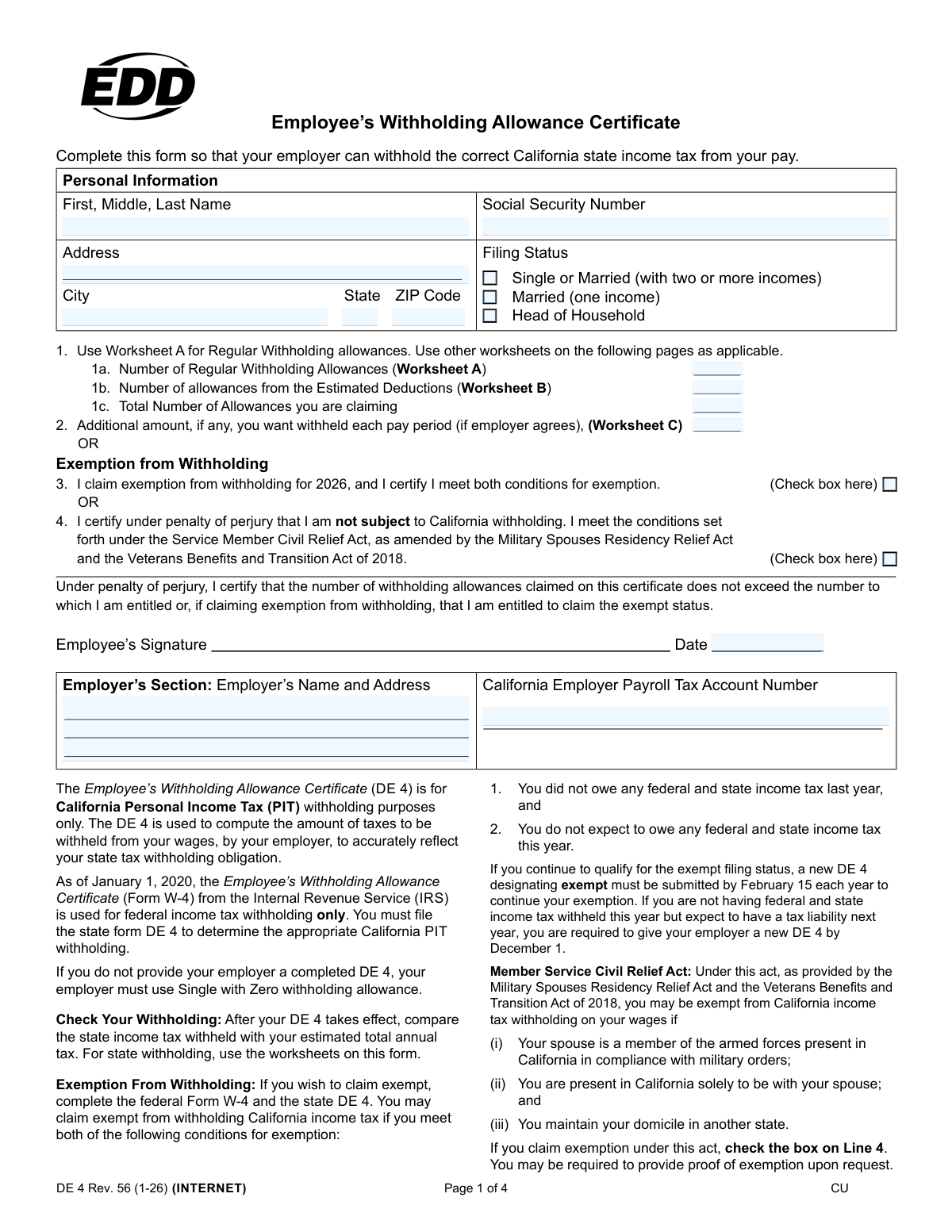
Yes! You can use AI to fill out Form DE 4, Employee’s Withholding Allowance Certificate

Form DE 4, the Employee's Withholding Allowance Certificate, is a required California state form that employees use to determine the amount of state income tax their employer should withhold from their paycheck. It is separate from the federal Form W-4 and ensures that the correct amount of California tax is paid throughout the year, helping to avoid penalties for underpayment. Today, this form can be filled out quickly and accurately using AI-powered services like Instafill.ai, which can also convert non-fillable PDF versions into interactive fillable forms.
Our AI automatically handles information lookup, data retrieval, formatting, and form filling.
It takes less than a minute to fill out DE 4 using our AI form filling.
Securely upload your data. Information is encrypted in transit and deleted immediately after the form is filled out.

Form specifications

Form name: Form DE 4, Employee’s Withholding Allowance Certificate
Number of pages: 4
Language: English
Categories: employee forms
main-image

Instafill Demo: How to fill out PDF forms in seconds with AI

How to Fill Out DE 4 Online for Free in 2026

Are you looking to fill out a DE 4 form online quickly and accurately? Instafill.ai offers the #1 AI-powered PDF filling software of 2026, allowing you to complete your DE 4 form in just 37 seconds or less.
Follow these steps to fill out your DE 4 form online using Instafill.ai:
  1. 1 Navigate to Instafill.ai and upload your DE 4 form, or select it from the platform's library of official documents.
  2. 2 Use the AI assistant to automatically populate your personal information, including your full name, Social Security Number, and address.
  3. 3 Select your appropriate filing status (Single, Married, or Head of Household) based on your personal circumstances.
  4. 4 Complete the integrated worksheets (A, B, and C) with AI-powered guidance to accurately calculate your total withholding allowances and determine if any additional tax should be withheld.
  5. 5 Transfer the calculated totals from the worksheets to the corresponding lines on the main form, or allow the AI to do it for you.
  6. 6 Carefully review all entered information for accuracy, then electronically sign and date the certificate to certify its correctness.
  7. 7 Download the completed, signed DE 4 form and submit it directly to your employer's payroll or HR department.

Our AI-powered system ensures each field is filled out correctly, reducing errors and saving you time.

Why Choose Instafill.ai for Your Fillable DE 4 Form?

Speed

Complete your DE 4 in as little as 37 seconds.

Up-to-Date

Always use the latest 2026 DE 4 form version.

Cost-effective

No need to hire expensive lawyers.

Accuracy

Our AI performs 10 compliance checks to ensure your form is error-free.

Security

Your personal information is protected with bank-level encryption.

Frequently Asked Questions About Form DE 4

The DE 4 form, or Employee’s Withholding Allowance Certificate, is used to tell your employer the correct amount of California state income tax to withhold from your pay. It is for state tax purposes only and is separate from the federal W-4 form.

Yes, you must file the state DE 4 form to determine your California tax withholding. As of January 1, 2020, the federal Form W-4 is used for federal income tax withholding only.

If you do not provide your employer with a completed DE 4, your employer is required to use the default withholding status of 'Single with Zero' allowances, which is the highest withholding rate.

If you are married and have two or more incomes in your household, you should check the 'Single or Married (with two or more incomes)' box. This helps ensure your withholding is more accurate and prevents under-withholding tax.

You should use Worksheet A on page 3 of the form to calculate your regular withholding allowances. This includes allowances for yourself, your spouse, any dependents, and blindness if applicable.

You should use Worksheet B if you plan to itemize deductions on your California tax return instead of taking the standard deduction. This worksheet can help you claim additional allowances to more accurately reflect your tax situation.

You can claim an exemption from California withholding only if you owed no federal and state income tax last year AND you do not expect to owe any this year. You must meet both of these conditions to qualify.

You may be exempt from California withholding if your spouse is an active-duty military member in California on orders, you are here solely to be with them, and you maintain legal residency in another state. If you qualify, check the box on Line 4.

To ensure the most accurate withholding, you should calculate your total household allowances on one DE 4 form. It is recommended to claim all allowances on the DE 4 for the highest-paying job and claim zero allowances on the other job(s).

This line allows you to have an extra flat-dollar amount withheld from each paycheck, if your employer agrees. This is useful if you have other income not subject to withholding and want to avoid a large tax bill at the end of the year.

Yes, services like Instafill.ai use AI to help you accurately auto-fill form fields, which can save you time and reduce errors. These tools can make completing complex forms much simpler.

You can use a service like Instafill.ai to fill out the DE 4 form online. Simply upload the PDF, and the AI will make the fields interactive for you to complete, sign, and download.

If you have a non-fillable or 'flat' PDF, you can use a tool like Instafill.ai. It can convert the static PDF into an interactive, fillable form that you can easily complete on your computer or mobile device.

Compliance DE 4
Validation Checks by Instafill.ai

1
Social Security Number Format Validation
This check verifies that the Social Security Number (SSN) field contains a 9-digit number, optionally formatted as XXX-XX-XXXX. It is crucial for correctly identifying the employee for tax reporting to state agencies. A failure in this validation would prevent the form from being processed, as the SSN is a primary identifier for payroll and tax purposes.
2
Exclusive Filing Status Selection
This validation ensures that the employee has selected exactly one filing status from the available options: 'Single or Married (with two or more incomes)', 'Married (one income)', or 'Head of Household'. Selecting more than one or none at all would lead to incorrect tax calculations. If this check fails, the form should be returned to the user with an error message requiring them to select a single status.
3
Mutually Exclusive Withholding vs. Exemption Claim
This check confirms that an employee cannot claim both withholding allowances (a value greater than zero in Line 1c) and an exemption from withholding (by checking the box on Line 3 or Line 4). These are mutually exclusive options for determining tax withholding. If an employee attempts to do both, the system should flag an error, as this represents a logical contradiction in their tax declaration.
4
Total Allowances Summation (Line 1c)
This validation verifies that the value entered in Line 1c ('Total Number of Allowances') is the mathematical sum of the values from Line 1a ('Regular Withholding Allowances') and Line 1b ('Estimated Deductions'). This ensures the total claim is calculated correctly before being used by the payroll system. An incorrect total would lead to improper tax withholding from the employee's pay.
5
Worksheet A Total Calculation (Line F)
This check validates the arithmetic on Worksheet A, ensuring that the total on Line F is the correct sum of the allowances entered on lines (A) through (E). This internal worksheet consistency is vital because the result is used on the main form. A miscalculation here would carry forward and result in an incorrect number of regular allowances being claimed.
6
Worksheet A to Form Line 1a Data Consistency
This validation ensures that the total number of allowances calculated on Worksheet A, Line F, is the same value that is entered on Line 1a of the main form. This cross-references the worksheet with the final declaration, preventing manual data entry errors. If the values do not match, the employee's regular allowances will be misstated, affecting their tax withholding.
7
Worksheet B to Form Line 1b Data Consistency
This check verifies that the number of allowances from estimated deductions calculated on Worksheet B, Line 8, is correctly transferred to Line 1b on the main form. This ensures that the complex calculation from the worksheet is accurately reflected in the final allowance claim. A discrepancy would mean the employee's itemized deduction estimates are not being properly accounted for in their withholding.
8
Mutually Exclusive Exemption Types (Line 3 vs. Line 4)
This validation ensures an employee does not check both the box for general exemption (Line 3) and the box for the military spouse exemption (Line 4). An employee can only qualify for one type of exemption. Allowing both to be selected would create ambiguity and prevent correct processing of the employee's exempt status.
9
Completeness of Personal Information
This check verifies that all required fields in the 'Personal Information' section are filled out, including First/Last Name, Social Security Number, and the full address (Street, City, State, ZIP Code). This information is legally required by the employer for payroll and tax reporting. Incomplete information would render the form invalid and require correction before it can be accepted.
10
Date Field Presence and Validity
This validation confirms that the 'Date' field next to the employee's signature is filled in with a valid, plausible date. The date is legally significant as it establishes when the withholding certificate takes effect. A missing or invalid date (e.g., February 30) can cause compliance issues and makes it unclear when the new withholding instructions should be applied.
11
Employer Payroll Tax Account Number Format
This check validates that the 'California Employer Payroll Tax Account Number' entered in the employer's section is present and conforms to the expected state-specific format (e.g., XXX-XXXX-X). This number is critical for the employer's tax filings with the state of California. An incorrect or missing number can lead to processing delays and filing errors for the employer.
12
Head of Household and Spouse Allowance Contradiction
This logical check flags a potential error if a user selects 'Head of Household' as their filing status but also claims an allowance for a spouse on Worksheet A, Line B. The definition of Head of Household typically requires the filer to be unmarried or considered unmarried. Claiming a spouse allowance contradicts this status and likely indicates a user error that needs correction to ensure accurate withholding.
13
Additional Withholding Amount Format
This validation ensures that the value entered on Line 2 for an additional withholding amount is a valid, non-negative numerical or currency value. This prevents non-numeric characters or negative numbers from being entered, which would cause calculation errors in the payroll system. The field should accept zero or any positive number to correctly process the employee's request for extra withholding.
14
Worksheet C to Form Line 2 Data Consistency
This check verifies that the additional withholding amount calculated on Worksheet C, Line 15, is the same value entered on Line 2 of the main form. This ensures the result of the detailed tax liability estimation is accurately reflected in the employee's final instruction to the employer. If the values differ, the amount of extra tax withheld will not match the employee's calculated need, potentially leading to under- or over-withholding.

Common Mistakes in Completing DE 4

Using Federal W-4 Rules for the State DE 4 Form

Employees often mistakenly believe the federal Form W-4 and the California DE 4 are interchangeable. This leads them to apply federal rules or allowance numbers to the state form, which has different worksheets and requirements. This error results in incorrect California tax withholding, potentially causing a large tax bill or an unnecessarily large refund. To avoid this, always use the worksheets and instructions provided specifically with the DE 4 and treat it as a separate document from the federal W-4.

Selecting the Wrong Filing Status for Married Couples

A frequent error is choosing the incorrect filing status, especially for married couples. Selecting 'Married (one income)' when both spouses work will cause significant under-withholding and a likely tax bill at the end of the year. This happens because the calculation assumes a single income for the entire household tax bracket. Always select 'Single or Married (with two or more incomes)' if you and your spouse both have jobs to ensure withholding is more accurate.

Duplicating Allowances Across Multiple Jobs

When an employee has more than one job, they may incorrectly fill out a DE 4 and claim their total allowances with each employer. The form's instructions state that allowances should only be claimed with one employer, typically the one with the highest paying job. Duplicating allowances causes each employer to withhold too little tax, which will almost certainly result in a large tax liability and potential underpayment penalties when filing your annual return.

Improperly Claiming Exemption from Withholding

Employees may check the exemption box on Line 3 without meeting both strict conditions: having owed no state income tax last year AND expecting to owe no state income tax this year. This mistake often occurs when someone had no tax liability last year but will have one this year due to higher income or a new job. Claiming exemption improperly results in no state tax being withheld, leading to a large tax bill and potential penalties.

Estimating Allowances Instead of Using Worksheets

Instead of completing the required worksheets, some individuals guess a number for their total allowances on Line 1c, often because the worksheets seem complex. This guess is rarely accurate and can lead to significant over- or under-withholding, resulting in either smaller paychecks or a surprise tax bill. If the form is a non-fillable PDF, tools like Instafill.ai can convert it into an interactive version that can perform calculations automatically, reducing the chance of manual errors.

Forgetting to Sign and Date the Form

Forgetting to sign and date the certificate is a simple but critical omission that invalidates the entire form. An unsigned DE 4 cannot be processed by the employer, who is then required by law to withhold taxes at the highest rate: 'Single with Zero withholding allowances.' This results in the maximum amount of tax being taken from each paycheck until a valid, signed form is submitted.

Making Calculation Errors on Worksheet B

Worksheet B, for estimated deductions, is complex and a common source of errors. People may miscalculate the difference between their estimated deductions and the standard deduction, or incorrectly factor in non-wage income. These mistakes can lead to claiming the wrong number of additional allowances, skewing withholding amounts. Using an AI-powered form filler like Instafill.ai can help by performing the calculations automatically based on your inputs, minimizing the risk of mathematical mistakes.

Entering an Incorrect Social Security Number

A simple typo or transposition of digits when entering the Social Security Number (SSN) is a frequent data entry mistake. An incorrect SSN can cause significant processing delays and mismatches with state tax records, potentially leading to issues with wage and tax reporting. Carefully double-check the SSN before submitting the form; AI-powered form filling tools like Instafill.ai can help prevent these errors by automatically validating data formats to ensure accuracy.

Failing to Submit a Completed DE 4 Form

New employees sometimes forget or fail to submit a DE 4 form altogether, assuming the federal W-4 is sufficient for state purposes. As the form clearly states, if an employer does not receive a completed DE 4, they are required to use the default withholding status of 'Single with Zero allowances.' This is the highest withholding rate and will result in a significantly smaller take-home pay until a correct form is provided.

Incorrectly Transferring Totals from Worksheets

Even when the worksheets are completed correctly, users can make mistakes when transferring the final numbers to the main form on page 1. For example, a user might correctly calculate 3 allowances on Worksheet A, Line F, but accidentally write '1' or '0' on Line 1a of the DE 4. This simple transcription error negates the work done on the worksheet and leads to incorrect withholding. It is crucial to double-check that the values entered on lines 1a, 1b, and 2 match the calculated totals from the corresponding worksheets.
Saved over 80 hours a year

“I was never sure if my IRS forms like W-9 were filled correctly. Now, I can complete the forms accurately without any external help.”

Kevin Martin Green

Your data stays secure with advanced protection from Instafill and our subprocessors

Robust compliance program

Transparent business model

You’re not the product. You always know where your data is and what it is processed for.

ISO 27001, HIPAA, and GDPR

Our subprocesses adhere to multiple compliance standards, including but not limited to ISO 27001, HIPAA, and GDPR.

Security & privacy by design

We consider security and privacy from the initial design phase of any new service or functionality. It’s not an afterthought, it’s built-in, including support for two-factor authentication (2FA) to further protect your account.

Fill out DE 4 with Instafill.ai

Worried about filling PDFs wrong? Instafill securely fills form-de-4-employees-withholding-allowance-certificate forms, ensuring each field is accurate.