Yes! You can use AI to fill out IRA/ESA Distribution Request
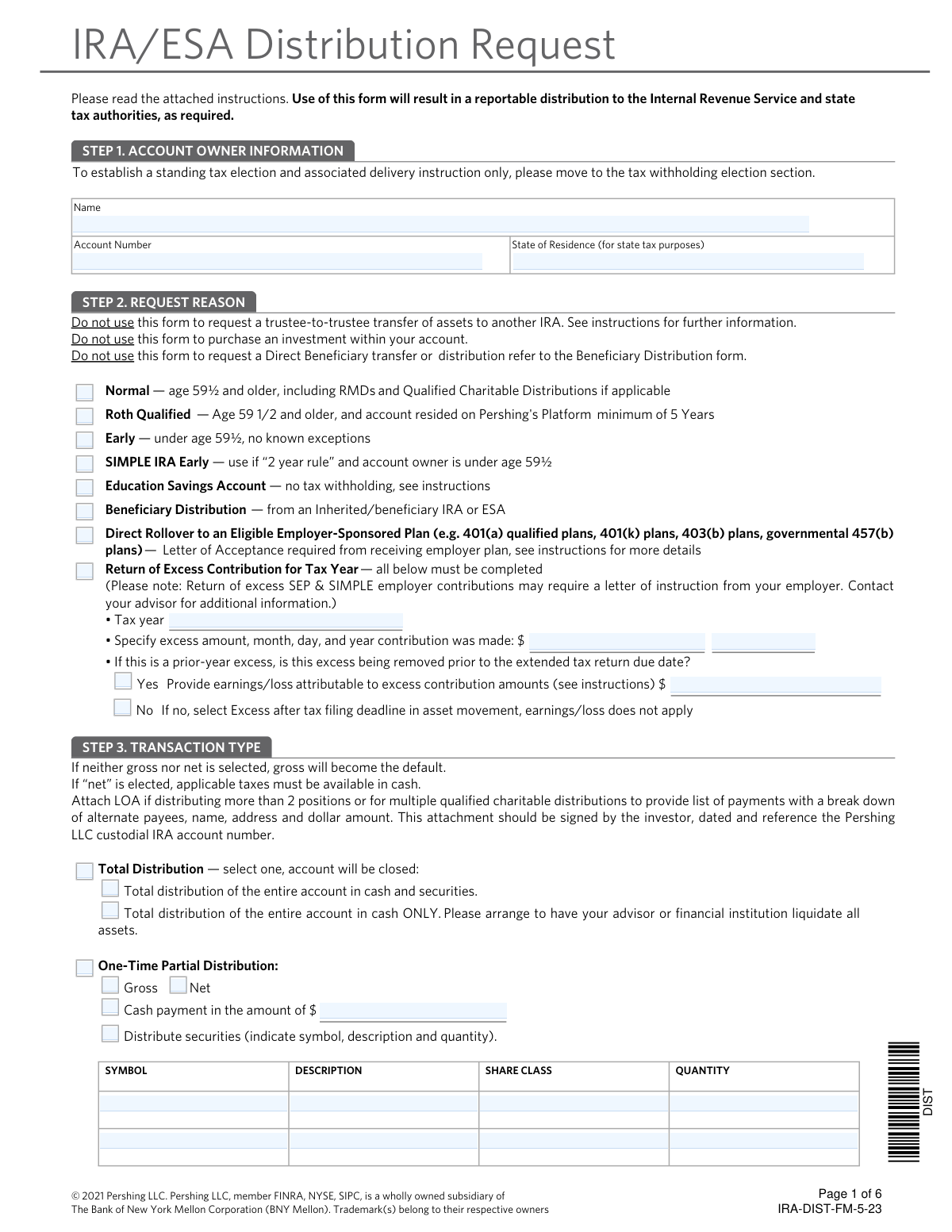
This form facilitates the process of requesting a reportable distribution of assets from accounts such as Traditional IRAs, SEP IRAs, Roth IRAs, and Education Savings Accounts (ESAs). It is crucial for account holders who need to withdraw funds, as it ensures the transaction is properly documented and reported to the IRS. Today, this form can be filled out quickly and accurately using AI-powered services like Instafill.ai, which can also convert non-fillable PDF versions into interactive fillable forms.
Our AI automatically handles information lookup, data retrieval, formatting, and form filling.
It takes less than a minute to fill out IRA-DIST-FM-5-23 using our AI form filling.
Securely upload your data. Information is encrypted in transit and deleted immediately after the form is filled out.
Form specifications
| Form name: | IRA/ESA Distribution Request |
| Number of pages: | 1 |
| Language: | English |
| Categories: | IRA forms, distribution forms |
Instafill Demo: How to fill out PDF forms in seconds with AI
How to Fill Out IRA-DIST-FM-5-23 Online for Free in 2026
Are you looking to fill out a IRA-DIST-FM-5-23 form online quickly and accurately? Instafill.ai offers the #1 AI-powered PDF filling software of 2026, allowing you to complete your IRA-DIST-FM-5-23 form in just 37 seconds or less.
Follow these steps to fill out your IRA-DIST-FM-5-23 form online using Instafill.ai:
- 1 Navigate to Instafill.ai and upload or select the IRA/ESA Distribution Request form.
- 2 Provide your account owner information, including your name, account number, and state of residence in Step 1.
- 3 In Step 2, select the appropriate reason for your distribution, such as Normal, Early, Beneficiary, or Return of Excess Contribution.
- 4 Specify the transaction type in Step 3, choosing between a total distribution, a one-time partial distribution, or setting up periodic distributions.
- 5 Complete the Tax Withholding Election in Step 4, indicating your preferences for federal and state tax withholding.
- 6 Choose your preferred Method of Delivery in Step 5, such as a check, journal entry, ACH, or wire transfer.
- 7 Review all the information you've entered for accuracy, then electronically sign and date the form in Step 8 before submitting it to your financial institution.
Our AI-powered system ensures each field is filled out correctly, reducing errors and saving you time.
Why Choose Instafill.ai for Your Fillable IRA-DIST-FM-5-23 Form?
Speed
Complete your IRA-DIST-FM-5-23 in as little as 37 seconds.
Up-to-Date
Always use the latest 2026 IRA-DIST-FM-5-23 form version.
Cost-effective
No need to hire expensive lawyers.
Accuracy
Our AI performs 10 compliance checks to ensure your form is error-free.
Security
Your personal information is protected with bank-level encryption.
Frequently Asked Questions About Form IRA-DIST-FM-5-23
This form is used to request a reportable withdrawal of assets from various retirement and savings accounts, including Traditional IRAs, Roth IRAs, SEP IRAs, SIMPLE IRAs, and Education Savings Accounts (ESAs).
You should fill out this form if you are the owner or beneficiary of an IRA or ESA and want to take a distribution of assets. This action is reportable to the IRS.
You will need your account number, the reason for the distribution (e.g., normal, early), the transaction type and amount, your tax withholding preferences, and your desired method of delivery for the funds.
In Step 2, you should select "Normal" as the request reason. You can then set up scheduled RMD payments by completing the "Periodic Distributions" section in Step 3.
A 'Total Distribution' liquidates and closes your entire account. A 'One-Time Partial Distribution' allows you to withdraw a specific cash amount or number of securities while leaving the account open.
In Step 3, choose the "Periodic Distributions" option. You can then specify the frequency (e.g., Monthly), the start date, and the amount you wish to receive regularly.
Federal tax withholding is generally optional, and if you make no election, a default rate of 10% will be withheld. You can elect to have no taxes withheld or choose a different percentage in Step 4, but you are still responsible for any taxes owed.
Step 5 outlines your delivery options, which include a check mailed to your address, an electronic transfer (ACH) to your bank, a wire transfer, or a journal entry to another Pershing account. Note that some methods like wires may incur fees.
By selecting 'Standing Instructions,' you authorize your financial professional to request future distributions on your behalf using the tax and delivery methods specified on this form, without needing a new signed form each time.
You should select "Beneficiary Distribution" in Step 2. Be aware that the rules for inherited IRAs, especially those inherited after January 1, 2020, can be complex, so consulting a tax advisor is strongly recommended.
After you sign and date the form in Step 8, it must be returned to your advisor and processed within 60 days.
Yes, services like Instafill.ai use AI to accurately auto-fill form fields with your information, which can save you time and help reduce errors.
You can use a service like Instafill.ai to complete the form digitally. Simply upload the PDF, and the AI-powered tool will guide you through filling out the necessary fields before you download and sign it.
If you have a flat or scanned PDF, you can use a tool like Instafill.ai. It can convert non-fillable PDFs into interactive, fillable forms that you can easily complete on your computer.
Compliance IRA-DIST-FM-5-23
Validation Checks by Instafill.ai
1
Ensures Signature Date is Recent
This check validates that the signature date in Step 8 is present and is not more than 60 days in the past. It is critical because the form instructions state the request must be processed within 60 days of the signature. If the date is missing or stale, the request is considered invalid and cannot be processed, requiring the user to submit a newly signed form.
2
Exclusive Request Reason Selection
Verifies that only one distribution reason has been selected in Step 2. The form's logic is built around a single, specific reason for the distribution, which dictates tax reporting and eligibility rules. Selecting multiple reasons would create ambiguity and lead to processing errors, so the form must be rejected if more than one option is checked.
3
Conditional Tax Withholding Disablement
This validation ensures that no tax withholding elections are made in Step 4 if the 'Request Reason' in Step 2 is 'Education Savings Account', 'Roth Qualified', or 'Direct Rollover'. These distribution types are explicitly exempt from withholding per the instructions. An invalid selection could lead to incorrect tax withholding and reporting, requiring complex corrections.
4
Periodic Distribution Date Logic
For 'Periodic Distributions' in Step 3, this check confirms the 'Start Date' is a valid date in the future. It also ensures that if an 'End Date' is provided, it occurs after the 'Start Date'. This prevents the creation of impossible or immediately expired distribution schedules, ensuring the instructions can be executed as intended.
5
Return of Excess Contribution Completeness
If 'Return of Excess Contribution' is selected in Step 2, this check verifies that the 'Tax year', 'excess amount', and 'contribution date' fields are all filled. Furthermore, if the user indicates the excess is being removed before the tax deadline, the 'earnings/loss' amount becomes mandatory. Missing information prevents the accurate calculation and reporting of the returned contribution and its associated earnings.
6
Federal Wire Information Completeness
When 'Federal Fund Wire' is chosen as the delivery method in Step 5, this validation confirms that both the 'ABA/Routing Number' and 'DDA/Bank Account Number' fields are completed. These numbers are essential for routing the funds to the correct bank and account. Failure to provide this information will result in the wire transfer failing.
7
Specific Mutual Fund Percentage Sum
If the 'Distribute by specific eligible mutual funds' funding method is selected in Step 3, this check validates that the percentages assigned to each fund add up to exactly 100%. This ensures the entire requested distribution amount is funded correctly according to the user's instructions. A total other than 100% would result in an incorrect distribution amount and requires correction.
8
Age-Based Distribution Reason Consistency
This check cross-references the account owner's date of birth with the selected 'Request Reason' in Step 2. It verifies that 'Normal' or 'Roth Qualified' is selected only if the owner is age 59½ or older, and 'Early' is selected only if they are younger. This is crucial for applying the correct IRS distribution code and potential penalties, preventing significant tax reporting errors.
9
State of Residence Format Validation
Validates that the 'State of Residence' provided in Step 1 is a valid two-letter state abbreviation. This field is critical as it determines which state's tax withholding rules apply to the distribution. An invalid or missing state code would prevent the system from calculating mandatory state withholding, leading to non-compliance.
10
Overnight Delivery and Periodic Instruction Conflict
This validation ensures that 'Overnight check delivery' in Step 5 is not selected at the same time as 'Periodic Distributions' in Step 3 or 'Standing Instructions' in Step 6. The form explicitly states that overnight service is not available for recurring or standing instructions. If these conflicting options are selected, the request must be rejected for clarification.
11
Beneficiary RMD Date Coherency
When 'Required Minimum Distribution due to death' is selected, this check validates the logical consistency of the provided dates. It ensures the 'Decedent’s Date of Death' is after the 'Decedent’s Date of Birth' and that the 'Original Beneficiary’s Date of Birth' is also a valid date. Incoherent dates would make the RMD calculation impossible and indicate a data entry error that must be fixed.
12
Direct Rollover Attachment Requirement
If the 'Request Reason' in Step 2 is 'Direct Rollover to an Eligible Employer-Sponsored Plan', this validation flags the submission to confirm a 'Letter of Acceptance' is attached. The instructions mandate this letter from the receiving plan. Processing without this document could result in a failed rollover and unintended tax consequences for the account owner.
13
Beneficiary RMD Inheritance Date Check
When 'Required Minimum Distribution due to death' is selected, this check verifies the account's inheritance date against the January 1, 2020 threshold mentioned in the form's warning. If the assets were inherited on or after this date, the user may be subject to the 10-year rule and selecting this option could be incorrect. The system should flag this for review to prevent the setup of an improper distribution schedule.
14
Transaction Type Exclusivity
This check ensures that options from 'Total Distribution' are not selected simultaneously with options from 'One-Time Partial Distribution' or 'Periodic Distributions' in Step 3. An account cannot be both fully and partially distributed at the same time. Selecting conflicting types requires the user to clarify their intent before the request can be processed.
Common Mistakes in Completing IRA-DIST-FM-5-23
Users often misinterpret the options in Step 2, such as selecting 'Normal' when under age 59½ (which should be 'Early'), or confusing a standard 'Beneficiary Distribution' with a 'Required Minimum Distribution due to death'. This happens due to the complexity of IRA rules and can lead to incorrect tax reporting, unexpected penalties, and processing delays. To avoid this, carefully read the description for each reason and consult a tax advisor; AI-powered tools like Instafill.ai can also help guide users by highlighting field requirements based on initial selections.
When requesting a 'Return of Excess Contribution', applicants frequently forget to provide all the required details, such as the tax year, the exact amount and date of the excess contribution, and the calculated earnings or loss. These calculations can be complex, leading to omissions that will cause the request to be rejected. It is crucial to use the IRS-approved method for calculating earnings and provide all data points; if the form is a non-fillable PDF, a tool like Instafill.ai can convert it to a fillable version to ensure no fields are missed.
The form has a specific option for 'Required Minimum Distribution due to death' intended for assets inherited before January 1, 2020. A common error is selecting this option for assets inherited after this date, which are typically subject to the 10-year rule. This mistake can lead to non-compliance with IRS regulations and significant tax penalties. Before selecting this option, verify the inheritance date and consult a tax professional to understand your specific distribution requirements.
In Step 4, many people either leave the tax withholding section blank, triggering a default 10% federal withholding that may not be suitable, or they misunderstand their state's requirements (e.g., mandatory vs. voluntary). This can result in an incorrect amount of tax being withheld, leading to a large tax bill or a smaller-than-expected distribution. To prevent this, make an explicit election for both federal and state taxes and review the provided state-by-state guide. AI form-fillers can automatically validate that withholding percentages are entered correctly.
Data entry errors are extremely common in the 'Method of Delivery' section (Step 5), especially for wire transfers. Transposing digits in the ABA/Routing Number or the DDA/Bank Account Number will cause the wire to fail, significantly delaying access to funds. To avoid this, meticulously double-check all bank details against a reliable source like a check or bank statement. Using a tool like Instafill.ai can help prevent typos by saving and accurately auto-filling this information for future use.
Applicants often request a cash distribution (either partial or total) without ensuring sufficient cash is available in the account. They forget that securities must be sold and the trade must settle before the funds are available for withdrawal. This oversight results in the distribution being rejected or only a partial amount being sent. Always coordinate with your financial advisor to liquidate the necessary assets well in advance of submitting the distribution request.
The form's instructions explicitly state it should not be used for trustee-to-trustee transfers, Roth conversions, or transfers due to divorce. However, individuals often overlook these instructions and attempt to use this form anyway, leading to an immediate rejection and lost time. Always read the introductory instructions carefully to confirm the form is appropriate for your transaction, and contact your advisor for the correct paperwork if it is not.
A surprising number of forms are submitted without a signature or date in Step 8. An unsigned form is invalid and cannot be processed, halting the entire distribution. Furthermore, the request is only valid for 60 days from the signature date, so a missing date can also cause processing issues. Always perform a final review of the completed form to ensure you have signed and dated it correctly before submission.
When establishing recurring payments in Step 3, users make errors like selecting a start date that has already passed, or choosing to fund the distribution from specific mutual funds but failing to list funds whose percentages total 100%. These inconsistencies will cause the periodic payment setup to fail. Carefully review all frequency, date, and funding method details to ensure they are logical and complete. AI-powered tools like Instafill.ai can perform calculations and validations to prevent such errors.
For services like wire transfers or overnight delivery, a fee is assessed. In Step 7, applicants often forget to specify a non-retirement account from which to deduct these fees. If no payment method is provided, the special delivery request may be ignored, and the distribution will be sent via standard mail, or the entire request could be delayed while the firm attempts to contact you for fee payment instructions. Always complete Step 7 if you are requesting a service that incurs a fee.
Saved over 80 hours a year
“I was never sure if my IRS forms like W-9 were filled correctly. Now, I can complete the forms accurately without any external help.”
Kevin Martin Green
Your data stays secure with advanced protection from Instafill and our subprocessors

Robust compliance program
Transparent business model
You’re not the product. You always know where your data is and what it is processed for.
ISO 27001, HIPAA, and GDPR
Our subprocesses adhere to multiple compliance standards, including but not limited to ISO 27001, HIPAA, and GDPR.
Security & privacy by design
We consider security and privacy from the initial design phase of any new service or functionality. It’s not an afterthought, it’s built-in, including support for two-factor authentication (2FA) to further protect your account.
Fill out IRA-DIST-FM-5-23 with Instafill.ai
Worried about filling PDFs wrong? Instafill securely fills iraesa-distribution-request-1 forms, ensuring each field is accurate.