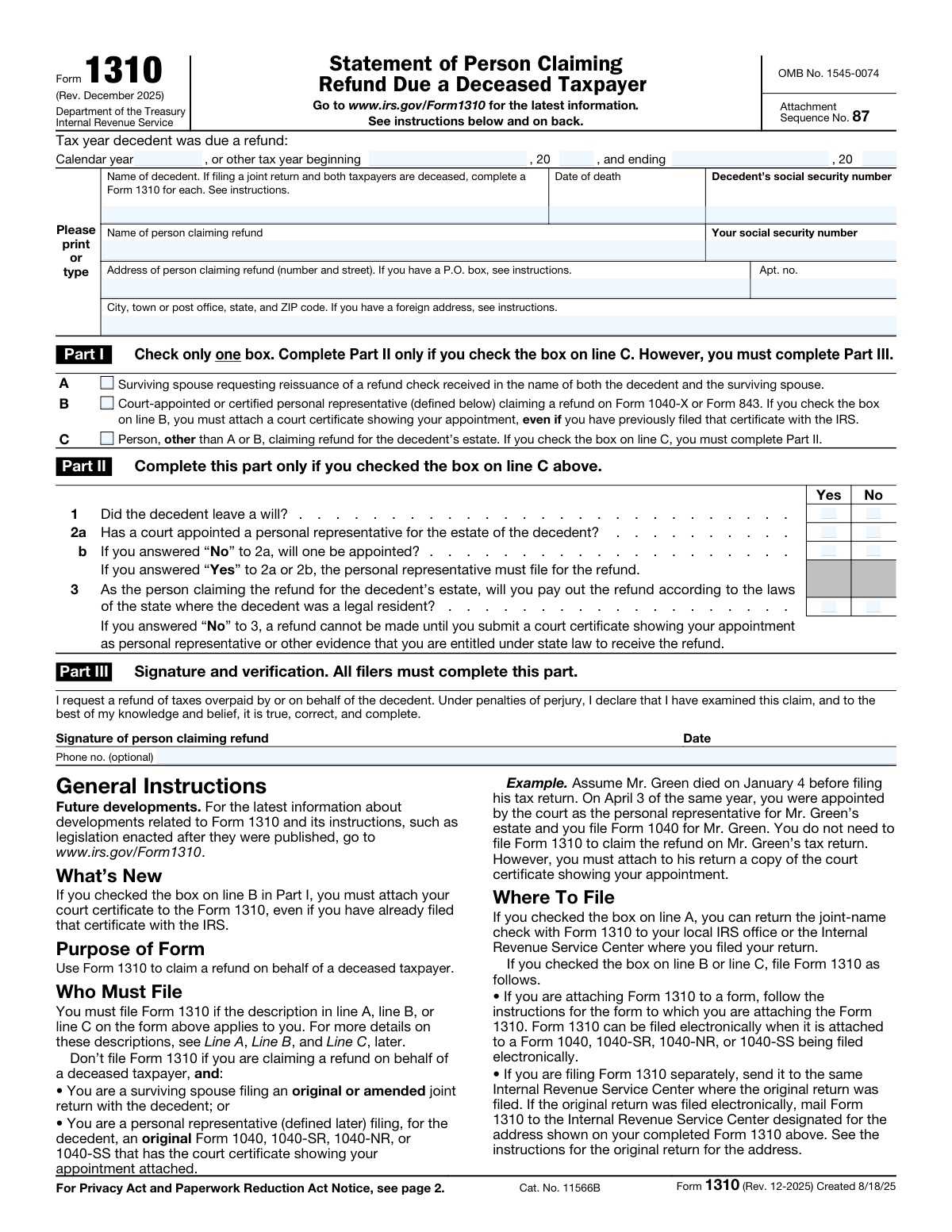
Yes! You can use AI to fill out Form 1310, Statement of Person Claiming Refund Due a Deceased Taxpayer

IRS Form 1310, Statement of Person Claiming Refund Due a Deceased Taxpayer, is a crucial document filed with the IRS to claim a tax refund for someone who has passed away. It establishes the claimant's legal right to the refund, whether they are a surviving spouse, a court-appointed representative, or another entitled person, ensuring the refund is properly distributed. Today, this form can be filled out quickly and accurately using AI-powered services like Instafill.ai, which can also convert non-fillable PDF versions into interactive fillable forms.
Form 1310 is part of the NJ state forms, PA state forms, state ID forms, state tax forms, tax forms and VA claim forms categories on Instafill.
Our AI automatically handles information lookup, data retrieval, formatting, and form filling.
It takes less than a minute to fill out Form 1310 using our AI form filling.
Securely upload your data. Information is encrypted in transit and deleted immediately after the form is filled out.

Form specifications

Form name: Form 1310, Statement of Person Claiming Refund Due a Deceased Taxpayer
Number of fields: 25
Number of pages: 2
Language: English
main-image

Instafill Demo: How to fill out PDF forms in seconds with AI

How to Fill Out Form 1310 Online for Free in 2026

Are you looking to fill out a FORM 1310 form online quickly and accurately? Instafill.ai offers the #1 AI-powered PDF filling software of 2026, allowing you to complete your FORM 1310 form in just 37 seconds or less.
Follow these steps to fill out your FORM 1310 form online using Instafill.ai:
  1. 1 Navigate to Instafill.ai and upload your Form 1310, or select it from the platform's library of official documents.
  2. 2 Provide the decedent's information, including their full name, Social Security number, and date of death, as prompted by the AI assistant.
  3. 3 Enter your information as the claimant, including your full name, Social Security number, and current mailing address.
  4. 4 Complete Part I by checking the box that describes your right to claim the refund (e.g., surviving spouse, court-appointed representative).
  5. 5 If applicable, complete Part II by answering the questions about the decedent's will and the appointment of a personal representative.
  6. 6 Review all entered information for accuracy, then proceed to Part III to sign and date the form, verifying the statements are true and correct.
  7. 7 Download your completed Form 1310, ready to be attached to the decedent's tax return or filed according to IRS instructions.

Our AI-powered system ensures each field is filled out correctly, reducing errors and saving you time.

Why Choose Instafill.ai for Your Fillable Form 1310 Form?

Speed

Complete your Form 1310 in as little as 37 seconds.

Up-to-Date

Always use the latest 2026 Form 1310 form version.

Cost-effective

No need to hire expensive lawyers.

Accuracy

Our AI performs 10 compliance checks to ensure your form is error-free.

Security

Your personal information is protected with bank-level encryption.

Frequently Asked Questions About Form Form 1310

This form is used to claim a federal income tax refund on behalf of a deceased person (a decedent). It establishes who is eligible to receive the refund, such as a surviving spouse or a personal representative of the estate.

You need to fill out this form if you are a surviving spouse, a court-appointed personal representative, or another person entitled to claim a tax refund for a deceased individual.

You will need the decedent's full legal name, their Social Security Number (SSN), their date of death, and the tax year for which the refund is due.

If you are the surviving spouse requesting the reissuance of a refund check that was in both your names, you should check the first box in Part I. You do not need to complete Part II.

You must check the second box in Part I for a 'Court-appointed or certified personal representative.' You are also required to attach a copy of the court certificate that shows your appointment.

If you are another relative or person claiming the refund, you must check the third box in Part I and then complete all of Part II. Part II asks questions about the decedent's will and your agreement to distribute the funds according to state law.

In Part II, question 1, you should check the 'No' box to indicate the decedent did not leave a will. You must still answer the other questions in Part II regarding the appointment of a personal representative.

This means you affirm that you will distribute the refund money to the rightful heirs according to the inheritance laws of the state where the decedent was a legal resident. Answering 'Yes' may allow the IRS to issue the refund without requiring court documents.

You should attach this form to the decedent's final tax return (Form 1040). If claiming a refund for a prior year, attach it to an amended return (Form 1040-X) or a claim for refund (Form 843).

No, providing a phone number in Part III is optional. However, it is recommended so the IRS can contact you if there are any questions regarding your claim.

Yes, services like Instafill.ai use AI to accurately auto-fill form fields, which can save you time and help prevent common errors. This is particularly useful for ensuring all required information is entered correctly.

You can use a service like Instafill.ai to complete this form online. Simply upload the PDF, and the platform will make it an interactive, fillable form that you can type your information into directly.

If you have a non-fillable or 'flat' PDF, you can use a tool like Instafill.ai to instantly convert it into an interactive, fillable form. This allows you to easily complete, save, and print your form without needing to write by hand.

Compliance Form 1310
Validation Checks by Instafill.ai

1
Exclusive Claim Type Selection
Validates that exactly one claim type is selected in Part I (Surviving spouse, Court-appointed representative, or Other person). This is crucial because the claimant's relationship to the decedent determines the required documentation and processing path. If zero or more than one box is checked, the form is ambiguous and cannot be processed correctly.
2
Decedent SSN Format and Validity
Ensures the 'Decedent's Social Security number' is a 9-digit number in a valid SSN format (XXX-XX-XXXX or XXXXXXXXX). This number is the primary identifier for the decedent's tax records, and an invalid or malformed number will prevent the IRS from locating the account. The validation should reject any input that does not match the required structure.
3
Claimant SSN Format and Validity
Ensures the 'Claimant social security number' is a 9-digit number in a valid SSN format. This is required to identify the person claiming the refund and to ensure they are eligible to receive it. An incorrect SSN could lead to processing delays or the refund being issued to the wrong individual.
4
Distinct Claimant and Decedent SSNs
This check verifies that the Decedent's Social Security number is not identical to the Claimant's Social Security number. A person cannot claim a refund for themselves as a decedent, making this a fundamental logical check to prevent fraudulent or nonsensical submissions. If the numbers match, the form submission should be flagged for review or rejected.
5
Date of Death Chronology
Validates that the 'Date of death' is a real, correctly formatted date that occurs in the past, not in the future. This date is a critical piece of information that establishes the event triggering the claim. A future or invalid date would render the entire claim invalid and indicates a significant data entry error.
6
Tax Year and Date of Death Consistency
This logical check ensures the tax year being claimed is consistent with the decedent's date of death. The decedent must have been alive for some portion of the tax year for which a refund is being claimed. Therefore, the tax year start date cannot be after the date of death, as this would be a logical impossibility.
7
Part II Conditional Requirement
Verifies that if the claimant selects the third checkbox in Part I ('Person other than surviving spouse...'), then the required questions in Part II are completed. Part II gathers necessary information about the estate that is legally required for this type of claimant. Failure to complete Part II when required will result in an incomplete application and rejection.
8
Part II Conditional Invalidation
This check ensures that if the claimant is a surviving spouse or court-appointed representative (first or second checkbox in Part I), then Part II is left blank. The questions in Part II are not applicable to these claimant types. Filling them in creates confusion and may indicate the claimant has selected the wrong box in Part I.
9
Conditional Logic for Question 2b
Validates that question 2b in Part II ('will one be appointed?') is only answered if the response to question 2a ('Court appointed personal representative?') is 'No'. This follows the explicit instructions on the form and maintains the logical flow of the questionnaire. Answering 2b when 2a is 'Yes' is a contradiction and indicates a user error.
10
Required Claimant Address Information
Confirms that the claimant's full mailing address, including 'Street address', 'City, state, and ZIP code', is provided. This information is absolutely essential, as it is where the physical refund check will be mailed. Missing address information would make it impossible to fulfill the claim.
11
Mutually Exclusive Part II Answers
For each question in Part II (1, 2a, 2b, 3), this validation ensures that the claimant has not checked both 'Yes' and 'No'. Each question requires a single, unambiguous answer. Selecting both options for a single question makes the response invalid and requires correction.
12
Tax Year Period Validity
For non-calendar year filers, this check ensures the 'Tax year ending' date occurs after the 'Tax year beginning' date. This confirms the tax period is chronologically correct. An ending date that is before the beginning date is a logical error that would invalidate the tax period being claimed.
13
Required Decedent Information
Verifies that essential information about the decedent, including 'Decedent's full name', 'Date of death', and 'Decedent's Social Security number', has been provided. These fields are mandatory for identifying the decedent and locating their tax records. An omission of any of these fields will halt the processing of the claim.
14
Phone Number Format Validation
Checks that if a phone number is provided, it conforms to a standard North American format (e.g., 10 digits with an optional country code and formatting characters). Although the field is optional, validating any provided data ensures its usability if the IRS needs to contact the claimant. An incorrectly formatted number is useless for communication.

Common Mistakes in Completing Form 1310

Using the Wrong Tax Year

Claimants often mistakenly enter the year of death or the current year instead of the specific tax year for which the refund is due. This mismatch with the tax record in question causes processing delays or rejection. To avoid this, carefully check the original tax return (e.g., Form 1040) that generated the refund to identify the correct tax year to enter on the form.

Mismatching Decedent's Name or SSN

The decedent's full name and Social Security Number must exactly match official IRS and Social Security Administration records. Using a nickname, a different last name, or transposing SSN digits will cause an identity mismatch in the system, leading to an automatic rejection of the claim. Always refer to the decedent's Social Security card and prior tax filings to ensure complete accuracy.

Choosing the Incorrect Claimant Category in Part I

A frequent and significant error is selecting the wrong claimant type, which dictates the required documentation and processing path. For example, a surviving spouse might incorrectly check the box for a court-appointed representative, or a child might not realize they must check box C and complete Part II. This mistake leads to requests for different documentation and major delays. Carefully read the definition for each category before making a selection.

Forgetting to Attach Required Documentation

The form instructions specify that certain claims require supporting documents, such as a court certificate for a personal representative. Claimants often forget to include these attachments with their submission. An incomplete application will be flagged, and the IRS will send a notice requesting the missing information, halting the process and significantly delaying the refund.

Improperly Completing Part II

Part II contains conditional questions that only apply if box C in Part I is checked. People often fill out this section when it's not required or answer the questions inconsistently, creating confusion for the processor. This can lead to the form being returned or delayed while the IRS seeks clarification. Only complete Part II if you are a claimant other than a surviving spouse or court-appointed representative.

Providing an Incomplete Claimant Address

Omitting information like an apartment or unit number, or having a typo in the street name or ZIP code, is a common error. An incomplete or inaccurate address can result in the refund check being delayed, returned as undeliverable, or even lost in the mail. To prevent this, double-check your full address for accuracy, using the standard USPS format. AI form-filling tools like Instafill.ai can help by validating addresses against a postal database.

Submitting an Illegible Handwritten Form

If the form is a non-fillable PDF, it must be printed and completed by hand, often resulting in illegible handwriting. A single hard-to-read digit in an SSN or address can cause data entry errors on the IRS's end, leading to rejection. To ensure clarity, use a tool like Instafill.ai, which can convert flat PDFs into fillable versions, allowing you to type your information.

Forgetting to Sign and Date the Form

An unsigned form is not legally valid and is one of the most common reasons for immediate rejection. Forgetting to sign and date the form in Part III will cause the IRS to return it without processing, forcing you to resubmit and start the waiting period all over again. Make it a habit to perform a final check for a signature and date just before mailing.

Incorrectly Formatting the Tax Year Fields

The form specifies entering only the last two digits of the beginning and ending tax years, as '20' is pre-printed. Many people overlook this instruction and write the full four-digit year, which can cause automated scanning systems to misread the data. This formatting error can lead to the form being flagged as incorrectly filled, causing unnecessary delays. AI-powered tools like Instafill.ai can automatically format such fields correctly.

Misinterpreting the 'Pay Out Per State Law' Question

In Part II, Question 3 asks if you will distribute the refund according to state law. Answering 'No' effectively stops the refund process until you provide court documentation proving your entitlement. Claimants may answer 'No' without understanding this consequence, believing it's a neutral option. Answering 'Yes' is a sworn statement that you will act as a fiduciary, so if you are unsure, you should seek clarity on your state's laws before answering.
Saved over 80 hours a year

“I was never sure if my IRS forms like W-9 were filled correctly. Now, I can complete the forms accurately without any external help.”

Kevin Martin Green

Your data stays secure with advanced protection from Instafill and our subprocessors

Robust compliance program

Transparent business model

You’re not the product. You always know where your data is and what it is processed for.

ISO 27001, HIPAA, and GDPR

Our subprocesses adhere to multiple compliance standards, including but not limited to ISO 27001, HIPAA, and GDPR.

Security & privacy by design

We consider security and privacy from the initial design phase of any new service or functionality. It’s not an afterthought, it’s built-in, including support for two-factor authentication (2FA) to further protect your account.

Fill out Form 1310 with Instafill.ai

Worried about filling PDFs wrong? Instafill securely fills form-1310-statement-of-person-claiming-refund-due-a-deceased-taxpayer forms, ensuring each field is accurate.