Yes! You can use AI to fill out New Jersey Judiciary Volunteer Application (CN 10293)

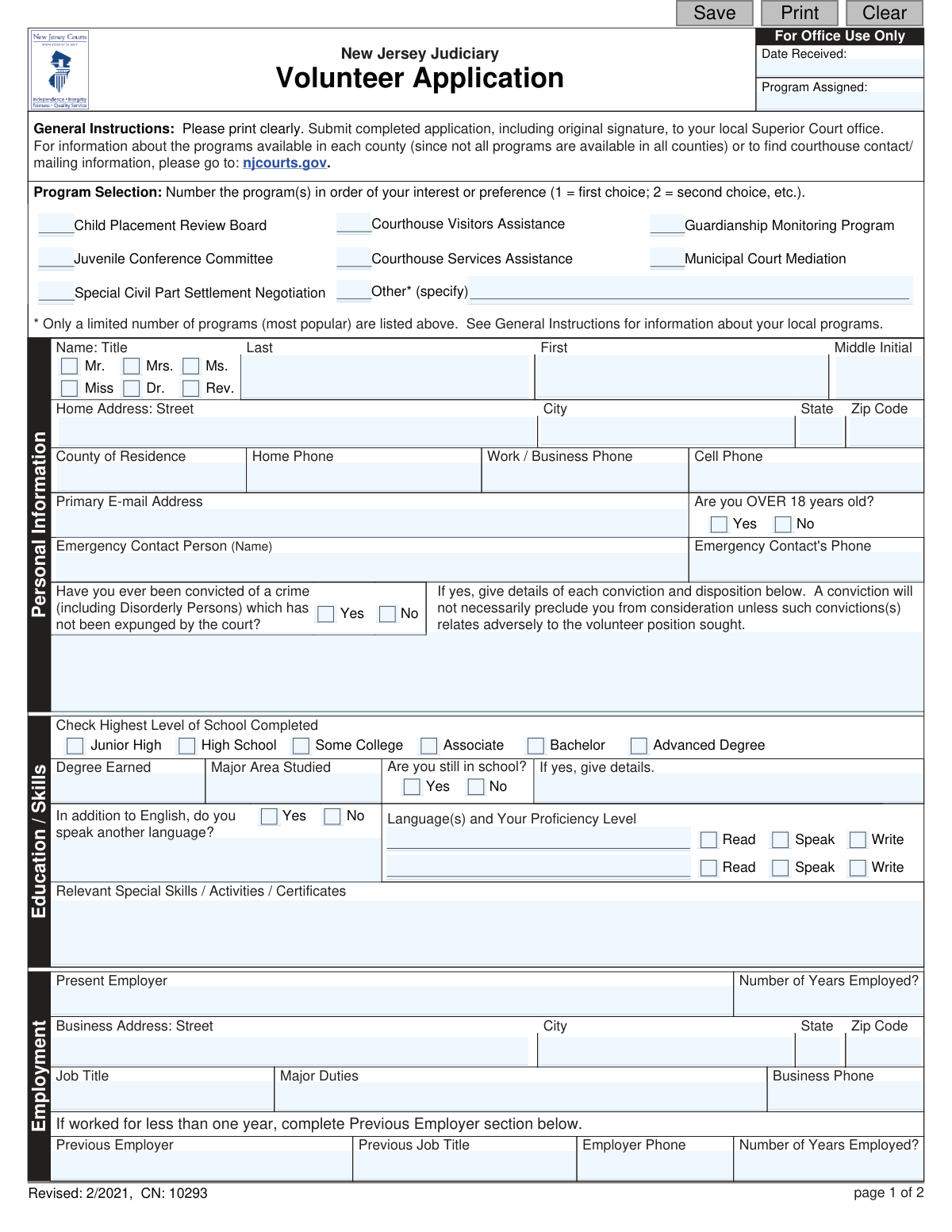
The New Jersey Judiciary Volunteer Application (CN 10293) is the official form for individuals wishing to volunteer their time and skills within the New Jersey court system. It gathers essential personal, educational, and background information to determine a candidate's suitability for various programs, making it a critical part of the screening and placement process. Today, this form can be filled out quickly and accurately using AI-powered services like Instafill.ai, which can also convert non-fillable PDF versions into interactive fillable forms.
CN 10293 is part of the New Jersey forms category on Instafill.
Our AI automatically handles information lookup, data retrieval, formatting, and form filling.
It takes less than a minute to fill out CN 10293 using our AI form filling.
Securely upload your data. Information is encrypted in transit and deleted immediately after the form is filled out.

Form specifications

Form name: New Jersey Judiciary Volunteer Application (CN 10293)
Number of fields: 138
Number of pages: 1
Language: English
main-image

Instafill Demo: How to fill out PDF forms in seconds with AI

How to Fill Out CN 10293 Online for Free in 2026

Are you looking to fill out a CN 10293 form online quickly and accurately? Instafill.ai offers the #1 AI-powered PDF filling software of 2026, allowing you to complete your CN 10293 form in just 37 seconds or less.
Follow these steps to fill out your CN 10293 form online using Instafill.ai:
  1. 1 Navigate to Instafill.ai and upload or select the New Jersey Judiciary Volunteer Application form.
  2. 2 Use the AI assistant to input your personal information, including name, address, contact details, and emergency contact.
  3. 3 Complete the 'Program Selection' section by indicating your preferred volunteer programs in order of interest.
  4. 4 Fill in the 'Education / Skills' and 'Employment' sections, providing details about your background, qualifications, and work history.
  5. 5 Specify your availability and answer the questions in the 'Affiliations' section regarding your connections to the justice system and other organizations.
  6. 6 Provide the names and contact information for two references as requested.
  7. 7 Carefully review all auto-filled information for accuracy, read the final statements, and apply your signature to complete the application before submission.

Our AI-powered system ensures each field is filled out correctly, reducing errors and saving you time.

Why Choose Instafill.ai for Your Fillable CN 10293 Form?

Speed

Complete your CN 10293 in as little as 37 seconds.

Up-to-Date

Always use the latest 2026 CN 10293 form version.

Cost-effective

No need to hire expensive lawyers.

Accuracy

Our AI performs 10 compliance checks to ensure your form is error-free.

Security

Your personal information is protected with bank-level encryption.

Frequently Asked Questions About Form CN 10293

This form is used to apply for volunteer positions within the New Jersey Judiciary. It gathers your personal information, skills, and background to assess your suitability for various court-related volunteer programs.

Anyone interested in volunteering their time with the New Jersey court system should complete this form. This includes adults and, in some cases, minors with parental or guardian consent.

You must submit the completed application with your original signature to your local Superior Court office. To find the correct mailing address for your county, visit the NJ Courts website at njcourts.gov.

The form notes that not all programs are available in all counties. You should visit the njcourts.gov website to learn about the specific programs offered in your local area before numbering your preferences on the application.

Yes, you can still apply, but you must disclose any convictions that have not been expunged. The form states that a conviction does not automatically disqualify you unless it is directly relevant to the volunteer position you are seeking.

After you apply, court personnel will review your information and may conduct a background investigation. If you are selected, you will be fingerprinted for a criminal history check and must complete all required training for your appointment.

The application asks if you are willing to make a volunteer commitment for one year or longer. You will also need to specify the days and hours you are available to volunteer.

Yes, it appears you can. The signature line on the form specifies that a parent or guardian must sign for applicants under the age of 18, indicating that minors are eligible to apply.

Yes, the application requires you to provide contact information for two references. You should be prepared to list their name, relationship to you, phone number, and address.

If you have a non-fillable or 'flat' PDF, you can use a service like Instafill.ai to make it interactive. This will allow you to type your information directly into the fields on your computer.

Yes, services like Instafill.ai use AI to help you accurately auto-fill form fields with your personal information. This can save you time and help prevent common mistakes.

To fill out the form using Instafill.ai, you can upload the PDF to their platform. The tool will make the document fillable online, and you can then type in your answers, save, and print the completed form for submission.

This information helps the Judiciary identify any potential conflicts of interest. It also provides a broader picture of your community involvement and background.

Compliance CN 10293
Validation Checks by Instafill.ai

1
Conditional Conviction Details
Checks if the applicant answered 'Yes' to the question 'Have you ever been convicted of a crime...'. If 'Yes', this validation ensures the corresponding details field is not empty. This is crucial for the background check process and for determining suitability for a volunteer position, as an omission could lead to application rejection.
2
Phone Number Formatting
Verifies that all phone number fields (Home, Work, Cell, Emergency Contact, Reference) adhere to a standard 10-digit format, potentially allowing for common separators like hyphens or parentheses. This ensures the court can successfully contact the applicant and their emergency contacts or references. An invalid format would prevent communication and delay the application process.
3
Age Verification Requirement
Ensures the 'Are you OVER 18 years old?' question has been answered with either 'Yes' or 'No'. This information is mandatory as it determines legal eligibility for certain volunteer roles and affects signature requirements, as minors may need a parent or guardian to sign. An unanswered question would halt the application as basic eligibility cannot be confirmed.
4
Program Preference Logic
Validates the 'Program Selection' section to ensure that if multiple programs are numbered, the numbers are unique and sequential (e.g., 1, 2, 3). This check prevents ambiguity in the applicant's preferences, allowing staff to correctly prioritize their placement. If duplicate numbers or gaps are found, the system should flag the entry for manual review or user correction.
5
Conditional Employment History
This check is triggered if the applicant indicates they have been with their 'Present Employer' for less than one year. It then validates that the 'Previous Employer' section is filled out completely. This rule ensures a more complete employment history for background and stability assessment, which is important for long-term volunteer roles.
6
Availability Time Consistency
For each day in the 'Hours Available' section, this validation ensures that if a 'From' time is entered, a corresponding 'To' time is also provided. It also checks that the 'To' time is chronologically later than the 'From' time. This prevents scheduling errors and ensures the data is logical and usable for program coordinators.
7
Conditional 'Other' Field Population
This validation applies to any question with an 'Other (please specify)' option, such as the 'How did you learn about...' section. If the 'Other' checkbox is selected, the validation ensures the accompanying text field for details is not left empty. This provides valuable data for the organization and prevents incomplete, un-actionable responses.
8
Conditional Affiliation Details
For all Yes/No questions in the 'Affiliations' section (e.g., 'Are you associated with the justice system?'), this check verifies that if 'Yes' is selected, the corresponding details field is filled in. This is critical for identifying potential conflicts of interest or relevant experience. Failure to provide details would render the 'Yes' answer incomplete and require follow-up.
9
Reference Information Completeness
Ensures that all required fields for at least one, and preferably both, references are completed, including name, relationship, and a valid daytime phone number. References are a key part of the vetting process for volunteers. Incomplete reference information would prevent the Judiciary from performing this necessary background step, likely stalling the application.
10
Signature Date Logic
Validates that the 'Date' field next to the applicant's signature is filled with a valid date in a recognized format (e.g., MM/DD/YYYY). The check also ensures the date is not in the future. This confirms when the application was signed and attests to the accuracy of the information as of that date.
11
Zip Code Formatting
Verifies that all zip code fields on the form (home address, business address, reference addresses) contain a valid 5-digit numeric value. Correctly formatted zip codes are essential for mail correspondence and for demographic analysis. An invalid format could lead to returned mail and processing delays.
12
Emergency Contact Completeness
This check ensures that both the 'Emergency Contact Person (Name)' and 'Emergency Contact's Phone' fields are filled out. This information is critically important for the safety and well-being of the volunteer while they are on duty. An application without this information would be considered incomplete due to the potential risk.
13
Conditional Education Details
If the applicant checks a box indicating a completed degree ('Associate', 'Bachelor', 'Advanced Degree'), this validation ensures that the 'Degree Earned' and 'Major Area Studied' fields are also filled out. This provides necessary context to the applicant's educational background. An omission would make the highest level of education unclear.
14
Primary Contact Information
Ensures that the applicant's first name, last name, and at least one primary method of contact (Home Phone, Cell Phone, or Primary E-mail Address) are provided. This is the most fundamental check to ensure the application is attributable to a specific person and that the organization can contact them. An application failing this check is not processable.

Common Mistakes in Completing CN 10293

Forgetting to Provide Details for 'Yes' Answers

The form has multiple questions (e.g., about criminal history, affiliations) that require a detailed explanation if the applicant answers 'Yes.' Applicants often check 'Yes' but forget to fill in the corresponding details box, leading to an incomplete application that delays the review process. To avoid this, carefully review each 'Yes' answer to ensure you've provided the necessary explanation. AI-powered form fillers can help by automatically highlighting required detail fields when 'Yes' is selected.

Using Checkmarks Instead of Numbering Program Preferences

The 'Program Selection' section asks applicants to number their choices in order of preference (1, 2, 3, etc.). A common error is to use checkmarks or 'X's instead, which fails to communicate the order of interest and can lead to being considered for a lower-preference program. Always read instructions carefully and use numbers to rank your choices as requested to ensure your preferences are clear.

Providing Unclear or Inconsistent Availability Hours

The 'Hours Available' grid requires specific 'From' and 'To' times, but applicants often use inconsistent formats (e.g., '9-5' vs '14:00'), forget to specify AM/PM, or write vague terms like 'anytime.' This makes it impossible for coordinators to schedule interviews or assignments. To prevent this, use a consistent format like '9:00 AM' for all entries. Tools like Instafill.ai can help by standardizing time formats as you type.

Submitting Incomplete Reference Information

The application requires full contact details for two references, including their daytime phone number and full address. A frequent mistake is omitting a phone number or providing only a city and state, which prevents the Judiciary from conducting necessary background checks. This can halt the application process entirely, so double-check that all fields for both references are filled out completely and accurately.

Forgetting to Sign and Date the Application

The application requires an 'original signature' to be valid and to authorize the background check, meaning it must be printed and physically signed. Applicants often forget to sign and date the form on the final page, which results in an automatic rejection and requires resubmission. Always perform a final check to ensure you have physically signed and dated the document before submitting it.

Inconsistent or Incorrect Phone Number Formatting

The form asks for multiple phone numbers, and people often enter them with inconsistent formats like '(123) 456-7890', '123.456.7890', or '1234567890'. This can cause data entry issues for the court and may lead to difficulties when trying to contact you or your references. Using an AI form-filling tool like Instafill.ai can prevent this by automatically formatting all phone numbers into a standard, consistent format.

Overlooking the Conditional Previous Employer Section

The form instructs applicants to provide details about their previous employer only if they have been at their present job for less than one year. Many applicants who meet this condition miss the instruction and leave the 'Previous Employer' section blank. This creates a gap in the employment history that is crucial for a thorough review and may delay the application. If you've been at your current job for under a year, be sure to complete this section.

Failing to Specify Language Proficiency Levels

When an applicant indicates they speak another language, they must also specify the language and check their proficiency level for reading, speaking, and writing. A common error is to write the language name but forget to check the corresponding proficiency boxes. This leaves the reviewer guessing about the applicant's actual skill level, so be sure to check all three proficiency boxes to accurately represent your abilities.

Submitting an Application with Illegible Handwriting

The instructions state 'Please print clearly,' but applications are often submitted with messy handwriting that makes names, phone numbers, or emails unreadable. This can lead to critical data entry errors, missed communications, or a rejected application. To avoid this, take your time to write neatly or use a digital tool to fill out the form. If the form is a non-fillable PDF, a tool like Instafill.ai can convert it into a fillable version to ensure all your entries are perfectly legible.

Writing in the 'For Office Use Only' Section

The top of the form has a clearly marked section for internal administrative tracking. Some applicants mistakenly write in this area, often putting the current date in the 'Date Received' box or a program name in the 'Program Assigned' box. This interferes with the court's official workflow and should be avoided. Applicants must leave any section marked 'For Office Use Only' completely blank.
Saved over 80 hours a year

“I was never sure if my IRS forms like W-9 were filled correctly. Now, I can complete the forms accurately without any external help.”

Kevin Martin Green

Your data stays secure with advanced protection from Instafill and our subprocessors

Robust compliance program

Transparent business model

You’re not the product. You always know where your data is and what it is processed for.

ISO 27001, HIPAA, and GDPR

Our subprocesses adhere to multiple compliance standards, including but not limited to ISO 27001, HIPAA, and GDPR.

Security & privacy by design

We consider security and privacy from the initial design phase of any new service or functionality. It’s not an afterthought, it’s built-in, including support for two-factor authentication (2FA) to further protect your account.

Fill out CN 10293 with Instafill.ai

Worried about filling PDFs wrong? Instafill securely fills new-jersey-judiciary-volunteer-application-cn-10293 forms, ensuring each field is accurate.