Yes! You can use AI to fill out State of New Jersey Alternate Benefit Program Withdrawal Request Acknowledgement Receipt
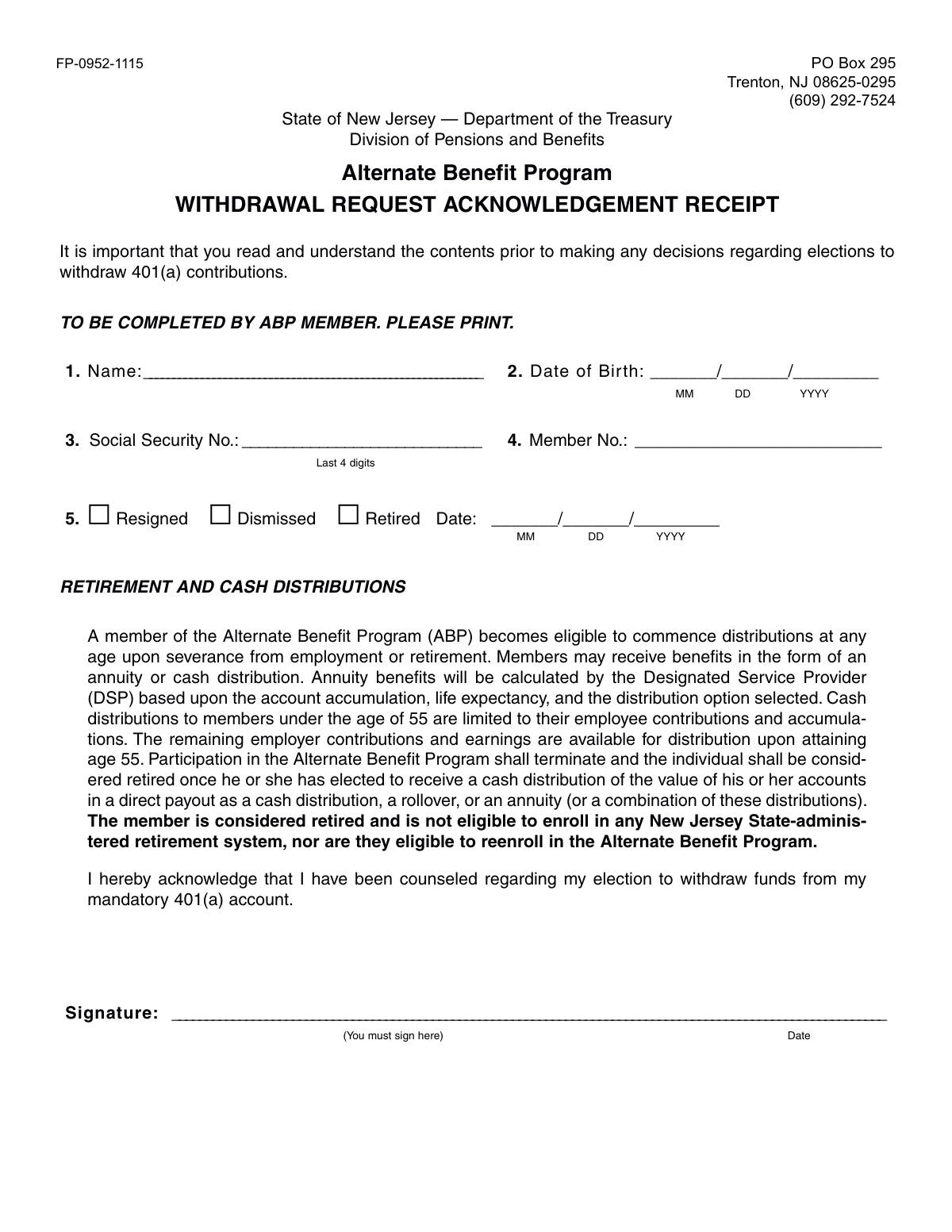
This form is a legal acknowledgment for members of the New Jersey Alternate Benefit Program (ABP) who are severing employment and wish to withdraw funds from their mandatory 401(a) account. By signing, the member confirms they have received counseling regarding their distribution options and understand the implications of their decision, such as terminating their participation in the program. Today, this form can be filled out quickly and accurately using AI-powered services like Instafill.ai, which can also convert non-fillable PDF versions into interactive fillable forms.
FP-0952-1115 is part of the
withdrawal forms, New Jersey forms, benefit withdrawal forms and withdrawal request forms categories on Instafill.
Rather not fill this in by hand? Instafill is an online form filler that completes PDF forms automatically — upload the blank form, answer a few questions, and the AI fills every field.
Form specifications
| Form name: | State of New Jersey Alternate Benefit Program Withdrawal Request Acknowledgement Receipt |
| Number of pages: | 1 |
| Language: | English |
Our AI automatically handles information lookup, data retrieval, formatting, and form filling.
It takes less than a minute to fill out FP-0952-1115 using our AI form filling.
Securely upload your data. Information is encrypted in transit and deleted immediately after the form is filled out.
Instafill Demo: How to fill out PDF forms in seconds with AI
How to Fill Out FP-0952-1115 Online for Free in 2026
Are you looking to fill out a FP-0952-1115 form online quickly and accurately? Instafill.ai offers the #1 AI-powered PDF filling software of 2026, allowing you to complete your FP-0952-1115 form in just 37 seconds or less.
Follow these steps to fill out your FP-0952-1115 form online using Instafill.ai:
- 1 Navigate to Instafill.ai and upload the 'Alternate Benefit Program Withdrawal Request Acknowledgement Receipt' form or select it from their template library.
- 2 Use the AI assistant to automatically fill in your personal details, such as your full name, date of birth, the last 4 digits of your Social Security Number, and your Member Number.
- 3 Indicate the reason for your withdrawal by checking the appropriate box (Resigned, Dismissed, or Retired) and provide the effective date.
- 4 Carefully review the 'Retirement and Cash Distributions' section to understand the rules and consequences of your withdrawal election.
- 5 Read the acknowledgment statement confirming you have been counseled about your withdrawal from your mandatory 401(a) account.
- 6 Electronically sign and date the form in the designated signature field to finalize your request.
- 7 Download, print, or securely submit the completed form as instructed by the New Jersey Division of Pensions and Benefits.
Our AI-powered system ensures each field is filled out correctly, reducing errors and saving you time.
Why Choose Instafill.ai for Your Fillable FP-0952-1115 Form?
Speed
Complete your FP-0952-1115 in as little as 37 seconds.
Up-to-Date
Always use the latest 2026 FP-0952-1115 form version.
Cost-effective
No need to hire expensive lawyers.
Accuracy
Our AI performs 10 compliance checks to ensure your form is error-free.
Security
Your personal information is protected with bank-level encryption.
Frequently Asked Questions About FP-0952-1115
This form is used by members of the New Jersey Alternate Benefit Program (ABP) to formally acknowledge that they have been counseled and understand the consequences of withdrawing funds from their 401(a) account after separating from employment.
Any ABP member who has resigned, been dismissed, or retired and now wishes to initiate a distribution (withdrawal) of their account funds must complete this form.
You will need to provide your full name, date of birth, the last four digits of your Social Security Number, your ABP Member Number, and the date and reason for your separation from employment.
Your ABP Member Number is typically found on statements from the NJ Division of Pensions and Benefits or your investment provider. If you cannot find it, contact the Division at the phone number listed on the form.
No, if you are under age 55, you can only receive a cash distribution of your own employee contributions and their earnings. The employer-funded portion of your account will only become available for distribution when you turn 55.
Taking any distribution (cash, rollover, or annuity) terminates your participation in the ABP and you are considered 'retired' by the state system. You will not be eligible to re-enroll in the ABP or any other NJ State-administered retirement system in the future.
You may be able to work for the state again, but you will be permanently ineligible to enroll in a state-administered retirement system. This is a critical factor to consider for any future public employment in New Jersey.
This means you have received and understood information about your distribution options and the irreversible consequences of withdrawing your funds. Your signature confirms this understanding, so it's important to ask questions if you are unsure about anything.
You must mail the signed, completed form to the Division of Pensions and Benefits at the address provided: PO Box 295, Trenton, NJ 08625-0295.
Yes, services like Instafill.ai use AI to accurately auto-fill your personal information onto the form, which can save time and help prevent common errors.
You can use a service like Instafill.ai to upload the PDF and fill it out directly on your computer or mobile device. After filling it, you can download the completed form for printing and signing.
Tools like Instafill.ai can convert flat, non-fillable PDFs into interactive, fillable forms. Simply upload the document, and the tool will make the fields editable for you to complete online before printing.
Compliance FP-0952-1115
Validation Checks by Instafill.ai
1
Member Name Completeness
This check ensures that the 'Name' field is not left blank. The member's full name is required for proper identification and to match the request with the correct account in the system. If this field is empty, the form submission will be rejected and the user will be prompted to provide their name.
2
Date of Birth Format and Validity
Validates that the 'Date of Birth' is entered in the correct MM/DD/YYYY format and represents a real, valid date. It also checks that the date is in the past and indicates the member is of a plausible age for employment. An invalid format or a future date would cause a validation error, as it's critical for age-related benefit calculations.
3
Social Security Number Last 4 Digits Format
This check verifies that the 'Social Security No.' field contains exactly four numeric digits. This specific format is required for identity verification purposes. Submissions with fewer or more than four digits, or containing non-numeric characters, will be flagged as invalid to ensure data integrity and security.
4
Member Number Presence
Ensures that the 'Member No.' field is filled out. The Member Number is a primary key for locating the member's account within the Alternate Benefit Program. A missing Member Number would make it impossible to process the withdrawal request, so the form cannot be submitted without it.
5
Separation Reason Selection
This validation confirms that exactly one of the separation reasons ('Resigned', 'Dismissed', or 'Retired') has been selected. The reason for separation can affect eligibility and processing, so selecting zero or multiple options is not allowed. The form will be returned if this condition is not met.
6
Separation Date Format and Presence
Verifies that the separation 'Date' field is completed and adheres to the MM/DD/YYYY format. The date of separation from employment is a prerequisite for withdrawal eligibility. An empty or incorrectly formatted date will prevent the form from being processed.
7
Separation Date Logical Consistency
Checks that the provided separation 'Date' is not a future date and occurs after the member's 'Date of Birth'. A member cannot withdraw funds based on a future separation date. This logical check prevents premature or invalid withdrawal requests from being submitted.
8
Signature Presence Verification
Confirms that the signature field has been signed by the member. The signature legally acknowledges that the member has been counseled and authorizes the withdrawal. A missing signature invalidates the entire request, and the form will be rejected until it is properly signed.
9
Signature Date Presence and Validity
Ensures the 'Date' field next to the signature is filled in with a valid date. This date records when the member signed the acknowledgement, which is important for legal and auditing purposes. An empty or invalid date will cause the submission to fail.
10
Signature Date vs. Separation Date
This check validates that the signature date is on or after the employment separation date. A member is only eligible to withdraw funds upon severance, so signing the request before the official separation date is logically inconsistent. The system will flag an error if the signature date precedes the separation date.
11
Age-Based Distribution Rule Check
Calculates the member's age at the time of the request using the 'Date of Birth'. Based on the form's text, if the member is under 55, the system flags the request for special handling, as cash distributions are limited to employee contributions only. This ensures compliance with program rules and prevents incorrect payouts.
12
Member Data Cross-Reference
This backend validation checks the provided 'Name', 'Member No.', and 'Social Security No. (Last 4 digits)' against the Division of Pensions and Benefits database. It confirms that the data matches an existing member record. A mismatch would indicate a data entry error or a potentially fraudulent request, triggering a rejection and manual review.
Common Mistakes in Completing FP-0952-1115
The form explicitly requests only the last 4 digits of the Social Security Number for identity verification, but applicants often provide the full nine-digit number out of habit. This creates an unnecessary security risk for their personal information and may cause the form to be returned for correction. To avoid this, carefully read the field label and enter only the last four digits as specified.
A missing signature or date is a critical error that renders the entire withdrawal request invalid. This often happens when applicants are in a hurry and overlook the signature line at the bottom. An unsigned form cannot be processed and will be returned, causing significant delays in accessing funds. Always perform a final review to ensure you have signed and dated the document in the designated area.
The Member Number is a unique account identifier essential for processing the request quickly and accurately. Applicants may not know their number and leave the field blank, forcing administrators to perform a time-consuming manual search. This will significantly slow down the approval of your withdrawal. Before filling out the form, locate your Member Number on a previous statement or by contacting the Division of Pensions and Benefits.
The form requires applicants to check a box for 'Resigned', 'Dismissed', or 'Retired' to determine withdrawal eligibility. Forgetting to select one of these options makes the form incomplete. This simple oversight will lead to processing delays as the form will be sent back for completion. Always double-check that you have selected the appropriate reason for your separation from employment.
The form specifies a MMDDYYYY format for the Date of Birth, without any slashes or dashes. Applicants frequently use other formats like MM/DD/YY or DD/MM/YYYY, which can cause data entry errors and identity verification failures. An incorrect date can halt the entire process. To prevent this, enter your birth date exactly as requested, using two digits for the month, two for the day, and four for the year.
The most serious mistake is signing the form without fully understanding its implications. The text clearly states that a withdrawal terminates participation in the ABP and makes the member ineligible for any other NJ State-administered retirement system in the future. Signing this acknowledgement without grasping these permanent consequences can jeopardize long-term financial security. It is crucial to read all the fine print and seek financial counseling before making a decision.
This form is a non-fillable PDF, meaning it must be printed and completed by hand, where illegible handwriting is a common problem. If names, dates, or numbers cannot be clearly read, it will lead to data entry errors, processing delays, or outright rejection of the form. To avoid this, print neatly in block letters. Alternatively, AI-powered tools like Instafill.ai can convert flat PDFs into fillable forms, allowing you to type your information for perfect clarity.
The date of separation from employment is a key data point affecting distribution eligibility, but applicants sometimes enter the current date or an estimated date. An inaccurate separation date can lead to incorrect eligibility calculations, especially regarding the age 55 rule for employer contributions. This can result in the rejection of the request or incorrect fund distribution. Always verify your official last day of employment and enter it carefully in the MM/DD/YYYY format.
The 'Name' field requires your full legal name as it appears on your account and official documents. Using a nickname, an initial, or an abbreviated version of your name can cause a mismatch during the identity verification process. This discrepancy will flag your application for manual review, delaying your withdrawal. Ensure the name you provide matches your government-issued ID and ABP account records exactly.
Saved over 80 hours a year
“I was never sure if my IRS forms like W-9 were filled correctly. Now, I can complete the forms accurately without any external help.”
Kevin Martin Green
Your data stays secure with advanced protection from Instafill and our subprocessors




Robust compliance program
Transparent business model
You’re not the product. You always know where your data is and what it is processed for.
ISO 27001, HIPAA, and GDPR
Our subprocesses adhere to multiple compliance standards, including but not limited to ISO 27001, HIPAA, and GDPR.
Security & privacy by design
We consider security and privacy from the initial design phase of any new service or functionality. It’s not an afterthought, it’s built-in, including support for two-factor authentication (2FA) to further protect your account.
Fill out FP-0952-1115 with Instafill.ai
Worried about filling PDFs wrong? Instafill securely fills state-of-new-jersey-alternate-benefit-program-withdrawal-request-acknowledgement-receipt forms, ensuring each field is accurate.
