Yes! You can use AI to fill out Financial Questionnaire to Establish Indigency

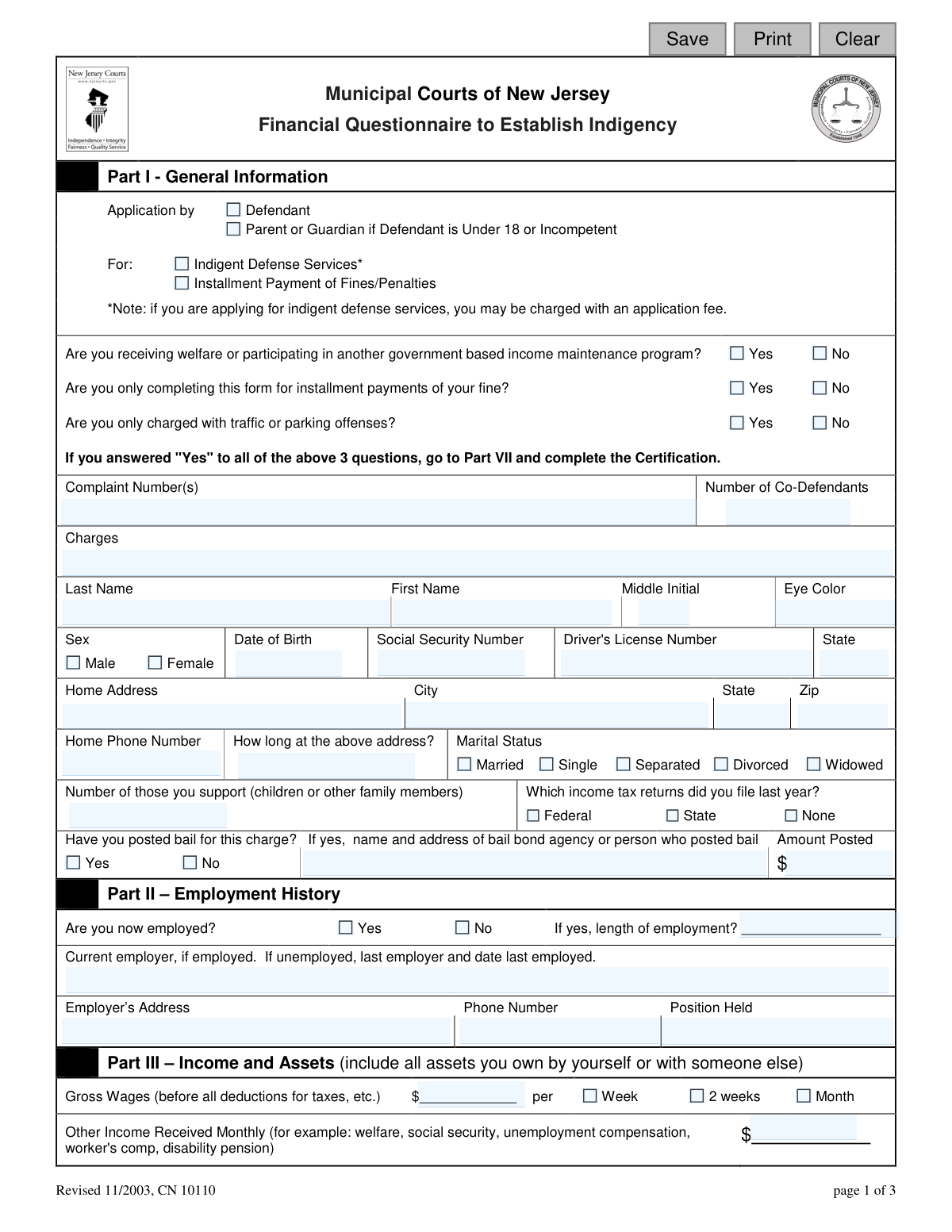
This form is a detailed financial statement required by the Municipal Courts of New Jersey for individuals requesting indigent defense services or a payment plan for fines. It collects comprehensive information on an applicant's income, assets, expenses, and liabilities to assess their financial inability to afford legal representation or pay penalties in full. Today, this form can be filled out quickly and accurately using AI-powered services like Instafill.ai, which can also convert non-fillable PDF versions into interactive fillable forms.
CN 10110 is part of the New Jersey forms category on Instafill.
Our AI automatically handles information lookup, data retrieval, formatting, and form filling.
It takes less than a minute to fill out CN 10110 using our AI form filling.
Securely upload your data. Information is encrypted in transit and deleted immediately after the form is filled out.

Form specifications

Form name: Financial Questionnaire to Establish Indigency
Number of fields: 175
Number of pages: 1
Language: English
main-image

Instafill Demo: How to fill out PDF forms in seconds with AI

How to Fill Out CN 10110 Online for Free in 2026

Are you looking to fill out a CN 10110 form online quickly and accurately? Instafill.ai offers the #1 AI-powered PDF filling software of 2026, allowing you to complete your CN 10110 form in just 37 seconds or less.
Follow these steps to fill out your CN 10110 form online using Instafill.ai:
  1. 1 Navigate to Instafill.ai and upload or select the 'Financial Questionnaire to Establish Indigency' form.
  2. 2 Use the AI assistant to automatically populate Part I with your personal information, such as name, address, date of birth, and complaint number.
  3. 3 Provide details for Part II (Employment History) and Part III (Income and Assets), letting the AI guide you through entering wages, other income, bank accounts, and property values.
  4. 4 Complete Part IV by listing all your monthly expenses and liabilities, including housing, loans, credit card debt, and child support.
  5. 5 Answer the questions in Part V regarding your ability to afford an attorney and any previous legal representation.
  6. 6 Carefully review all the auto-filled information for accuracy, then proceed to Part VI and Part VII to electronically sign and date the authorization and certification.
  7. 7 Download, print, or securely submit your completed and signed form as directed by the court.

Our AI-powered system ensures each field is filled out correctly, reducing errors and saving you time.

Why Choose Instafill.ai for Your Fillable CN 10110 Form?

Speed

Complete your CN 10110 in as little as 37 seconds.

Up-to-Date

Always use the latest 2026 CN 10110 form version.

Cost-effective

No need to hire expensive lawyers.

Accuracy

Our AI performs 10 compliance checks to ensure your form is error-free.

Security

Your personal information is protected with bank-level encryption.

Frequently Asked Questions About Form CN 10110

This form is used by the New Jersey Municipal Courts to determine if you are financially unable to afford a lawyer or pay court fines all at once. It helps the court decide if you qualify for a public defender or an installment payment plan.

You should complete this form if you are a defendant in a New Jersey Municipal Court and cannot afford to hire a private attorney or pay your court-ordered fines in a single payment.

Not necessarily. If you receive welfare, are only applying for an installment plan, and are only charged with traffic/parking offenses, you can answer 'Yes' to the first three questions in Part I and skip directly to the certification in Part VII.

You must provide a complete picture of your finances, including all income sources, assets like bank accounts and vehicles, and all expenses and debts like loans, rent, and credit card balances.

The form asks for your 'Gross Wages,' which is your total pay before any deductions for taxes, insurance, or other withholdings are taken out.

Yes, the form specifies that you must include all assets you own, whether by yourself or jointly with another person.

By signing Part VI, you give the court permission to verify the financial information you provided. This may include reviewing your credit history, tax returns, and bank records.

The court will review your application to determine if you qualify as indigent. A judge will then approve or deny your request for a public defender or an installment plan based on the information you provided.

You may be charged an application fee if you apply for indigent defense services. The court will decide if you must pay the fee, if it can be waived, or if you can pay it in installments.

Yes, services like Instafill.ai use AI to help you accurately auto-fill form fields, which can save you time and reduce errors on complex forms like this one.

You can use a service like Instafill.ai to complete this form online. Simply upload the PDF, and the platform will make it interactive so you can type your information directly into the fields.

If you have a non-fillable or 'flat' PDF, you can upload it to a platform like Instafill.ai. The service can convert it into an interactive, fillable form that you can complete on your computer.

Assets are things you own that have value, such as cash, bank accounts, and property. Liabilities are your debts and financial obligations, such as loans, credit card balances, and outstanding fines.

The court asks this to get a complete picture of your ability to afford legal representation. Information about past legal fees helps them assess your current financial situation and eligibility for a public defender.

Compliance CN 10110
Validation Checks by Instafill.ai

1
Social Security Number Format
This check ensures the Social Security Number in the 'appSsn' field is entered in a valid format, such as XXX-XX-XXXX or as 9 consecutive digits. Validating the SSN format is critical for identity verification and cross-referencing with other government systems. If the format is incorrect, the submission should be rejected to prevent data entry errors and ensure the application can be processed correctly.
2
Date of Birth Validity
Validates that the 'appDob' field contains a legitimate date in a recognized format (e.g., MM/DD/YYYY) and that the date is logically sound. The check ensures the date is not in the future and represents a plausible age for a defendant. An invalid date of birth would prevent proper identification and could halt the entire application process.
3
Conditional Field Requirement for Bail
This validation checks if the applicant answered 'Yes' to 'appBail' (Have you posted bail for this charge?). If 'Yes', it then verifies that the 'bailName' (name of person/agency) and 'bailAmt' (amount posted) fields are filled. This is important for assessing the applicant's financial resources, as access to bail money may impact the indigency determination. Failure to provide these details when required will result in an incomplete application.
4
Conditional Field Requirement for Employment
If the applicant selects 'Yes' for 'empCurrent' (Are you now employed?), this check ensures that the employer's name, address, phone number, and position held are all provided. This information is fundamental to verifying the applicant's stated income and employment status. An application indicating employment without these details is incomplete and cannot be properly evaluated.
5
Part I Triage Logic
This check validates the initial screening questions. If the applicant answers 'Yes' to all three questions ('receiveWelfare', 'payFine', 'trafficOffense'), the system should verify that only Part VII (Certification) is completed, as instructed on the form. This rule streamlines the process for a specific subset of applicants, and enforcing it prevents them from filling out unnecessary sections. An error here could lead to user confusion and incorrect form submissions.
6
Total Assets Calculation
Verifies that the value in the 'assetsTotal' field is the correct sum of all individual asset fields, including bank balances, real estate values, vehicle value, and other property. This check ensures the mathematical accuracy of the applicant's financial summary, which is crucial for a fair indigency assessment. If the total is incorrect, the form should be flagged for correction, as it indicates a miscalculation of the applicant's financial standing.
7
Total Liabilities Calculation
This check ensures the 'liabilityTotal' field accurately reflects the sum of all outstanding balances owed (e.g., 'expensesMortOwe', 'expensesLoanOwe', 'expensesCreditOwe'). Validating this calculation is essential for understanding the applicant's financial obligations and debt burden. An incorrect total could misrepresent the applicant's financial distress, leading to an improper decision on their indigency status.
8
Net Worth Calculation Consistency
Validates that the 'networthTotal' field is correctly calculated by subtracting 'liabilityTotal' from 'assetsTotal'. This is the ultimate summary of the applicant's financial position and a key metric for determining indigency. An error in this final calculation invalidates the entire financial summary and must be corrected before the application can be reviewed.
9
Phone Number Format
This validation ensures that all phone number fields ('appPh', 'empPh', 'attyPh') adhere to a standard US format (e.g., 10 digits, with or without parentheses, spaces, or hyphens). Correctly formatted phone numbers are essential for the court to contact the applicant, their employer, or their attorney. An invalid format could render the contact information useless and delay the case.
10
Zip Code Format
Ensures the 'appAddrZip' field contains a valid 5-digit or 9-digit (ZIP+4) numerical format. A valid zip code is necessary for address verification and for any official mailings sent by the court. An incorrect zip code can lead to returned mail and significant delays in communication.
11
Conditional Real Estate Details
If the applicant answers 'Yes' to 'realEstate' (Real Estate Owned?), this check verifies that at least the first set of property details ('realestateAddr1', 'realestateDesc1', 'realestateValue1') is completed. This prevents an applicant from acknowledging ownership of an asset without providing the necessary details for verification. An incomplete entry would require follow-up and delays the assessment.
12
Signature Date Presence and Validity
This check verifies that the signature date fields ('authSigDt', 'certSigDt') are not empty and contain a valid date that is not in the future. The signature date legally attests to when the information was certified as true and correct. A missing or future date invalidates the signature and the legal certification of the document.
13
Driver's License State Dependency
This validation ensures that if a Driver's License Number ('appLicNo') is provided, the corresponding state ('appLicNoSt') is also selected. A license number is meaningless for verification purposes without knowing the issuing state. This check prevents incomplete data entry and ensures the information can be used for identity confirmation.
14
Monthly Income Summation
This check verifies that the 'incomeTotal' field is the correct sum of all monthly income sources, including wages (converted to monthly), welfare, social security, alimony, and contributions. The accuracy of this total is paramount, as it is a primary factor in determining financial eligibility for indigent services. A miscalculation could lead to an incorrect assessment of the applicant's ability to pay.

Common Mistakes in Completing CN 10110

Confusing Gross vs. Net Income

Applicants often enter their take-home pay (net income) instead of their gross wages as requested in Part III. This happens because people are more familiar with their net pay. This mistake can lead to an inaccurate assessment of financial need, potentially resulting in the denial of services. To avoid this, carefully read the field label which specifies 'Gross Wages (before all deductions for taxes, etc.)' and use the pre-tax amount from your pay stub.

Omitting the Income Timeframe

In Part III, after entering the 'Gross Wages' amount, individuals frequently forget to check the box for the corresponding pay period ('Week', '2 weeks', 'Month'). This omission makes the income figure ambiguous and requires the court to guess or follow up, delaying the application process. Always double-check that you have selected the correct timeframe next to your wage amount to ensure your income is calculated correctly.

Mixing Up Monthly Payments and Total Balances

In the 'Expenses and Liabilities' section (Part IV), a common error is to transpose the 'Total monthly payment' and 'Total balance owed' figures for debts like loans, credit cards, or fines. This significantly misrepresents one's financial situation, showing either impossibly high monthly expenses or trivial total debt. To prevent this, carefully review each column header before entering amounts for your liabilities. AI-powered tools like Instafill.ai can help by validating data formats and flagging potential inconsistencies.

Incomplete Employment Information When Unemployed

When an applicant is unemployed, they often leave the employment section (Part II) entirely blank. The form explicitly asks for the 'last employer and date last employed' if currently unemployed. Failing to provide this information can be seen as an attempt to hide work history and may slow down the verification process. If you are not currently working, you must fill in the details of your most recent job.

Failing to List All Assets

Applicants sometimes forget to declare all assets in Part III, such as a second vehicle, a boat, or other valuable personal property. This may be an oversight or a misunderstanding of what constitutes a reportable asset. Omitting assets can be considered a willful falsehood, leading to penalties and the immediate denial of the application. Be thorough and list all significant property you own, by yourself or jointly, including its estimated current value.

Ignoring Conditional Skip Logic

The form states that if you answer 'Yes' to the first three questions in Part I, you should skip to the certification in Part VII. Many people miss this instruction and fill out the entire lengthy questionnaire unnecessarily. This wastes time and can introduce errors. Read the instructions carefully after answering the initial screening questions to see if you can use the simplified path. Since this form is a non-fillable PDF, a tool like Instafill.ai could convert it to a smart, fillable version that automatically hides irrelevant sections based on your answers.

Mathematical Errors in Financial Totals

The form requires manual calculation of 'Total Assets', 'Total Liabilities', and 'Total Net Worth'. Simple arithmetic mistakes are very common and can drastically alter the financial picture presented to the court. An incorrect total can lead to a wrongful denial or approval of indigency status. To avoid this, use a calculator and double-check all your additions and subtractions. Using a digital form-filler like Instafill.ai can prevent this entirely by performing the calculations for you automatically.

Missing Signatures or Dates

Forgetting to sign and date the form in Part VI (Authorization) and Part VII (Certification) is one of the most frequent and critical errors. An unsigned form is invalid and will be rejected, causing significant delays in the legal process. Always perform a final review of the entire document to ensure all signature and date lines are completed before submission.

Underreporting 'Other' Income and Contributions

In Part III, applicants often neglect to report all sources of income beyond their primary job. This includes unemployment benefits, social security, disability payments, or financial support received from family or friends. This omission provides an incomplete financial picture and can lead to denial if discovered during verification. It is crucial to list all money you receive, regardless of the source, to comply with the form's requirements.

Vague or Incomplete Bail Information

When an applicant has posted bail (Part I), they may fail to provide the complete name and address of the person or agency who posted it, or they may enter an incorrect amount. This information is used to assess available financial resources. Incomplete details require court staff to investigate further, delaying the application. If bail was posted, ensure you provide the full, accurate details as requested.
Saved over 80 hours a year

“I was never sure if my IRS forms like W-9 were filled correctly. Now, I can complete the forms accurately without any external help.”

Kevin Martin Green

Your data stays secure with advanced protection from Instafill and our subprocessors

Robust compliance program

Transparent business model

You’re not the product. You always know where your data is and what it is processed for.

ISO 27001, HIPAA, and GDPR

Our subprocesses adhere to multiple compliance standards, including but not limited to ISO 27001, HIPAA, and GDPR.

Security & privacy by design

We consider security and privacy from the initial design phase of any new service or functionality. It’s not an afterthought, it’s built-in, including support for two-factor authentication (2FA) to further protect your account.

Fill out CN 10110 with Instafill.ai

Worried about filling PDFs wrong? Instafill securely fills financial-questionnaire-to-establish-indigency forms, ensuring each field is accurate.