Yes! You can use AI to fill out Uniform Summary Support Order (USSO)

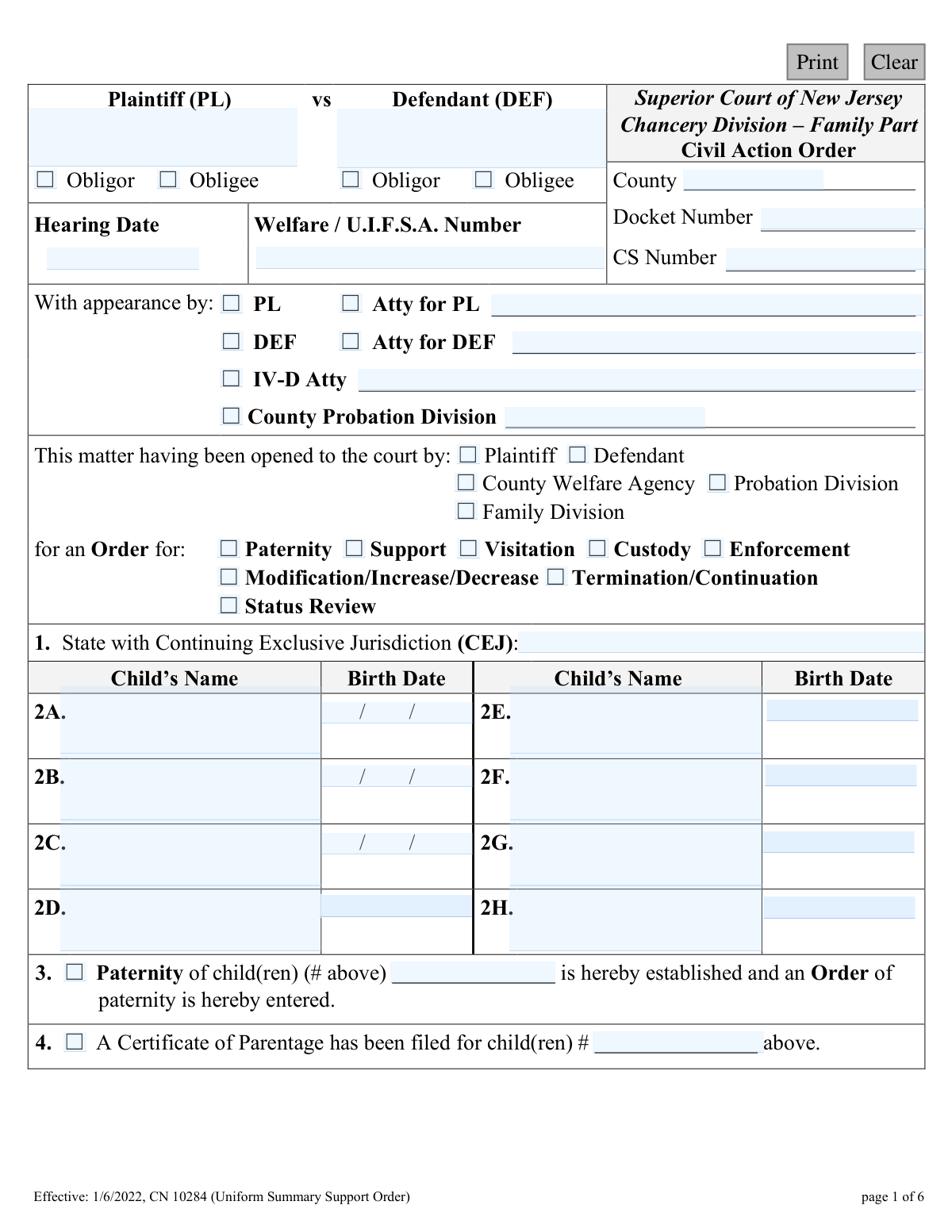
The Uniform Summary Support Order (USSO) is a legal document issued by the Superior Court of New Jersey's Family Part to formalize orders related to family law cases. It covers critical details such as establishing paternity, setting child and spousal support amounts, defining medical support obligations, and outlining enforcement actions. The USSO serves as a binding record of the court's decisions, ensuring clarity and enforceability for all parties involved; today, this form can be filled out quickly and accurately using AI-powered services like Instafill.ai, which can also convert non-fillable PDF versions into interactive fillable forms.
USSO (CN 10284) is part of the New Jersey forms category on Instafill.
Our AI automatically handles information lookup, data retrieval, formatting, and form filling.
It takes less than a minute to fill out USSO (CN 10284) using our AI form filling.
Securely upload your data. Information is encrypted in transit and deleted immediately after the form is filled out.

Form specifications

Form name: Uniform Summary Support Order (USSO)
Number of fields: 186
Number of pages: 1
Language: English
main-image

Instafill Demo: How to fill out PDF forms in seconds with AI

How to Fill Out USSO (CN 10284) Online for Free in 2026

Are you looking to fill out a USSO (CN 10284) form online quickly and accurately? Instafill.ai offers the #1 AI-powered PDF filling software of 2026, allowing you to complete your USSO (CN 10284) form in just 37 seconds or less.
Follow these steps to fill out your USSO (CN 10284) form online using Instafill.ai:
  1. 1 Navigate to Instafill.ai and upload the Uniform Summary Support Order (USSO) form, or select it from their template library.
  2. 2 Use the AI assistant to automatically identify and label all the fields, such as plaintiff/defendant information, docket numbers, and child details.
  3. 3 Enter the case details, including court, county, docket number, and hearing date, with the AI guiding you to the correct sections.
  4. 4 Fill in the specific orders by checking the appropriate boxes for paternity, support, custody, and enforcement, and inputting financial details like income and support payment amounts.
  5. 5 Specify medical support obligations, income withholding details, and any arrears calculations as directed by the court's ruling.
  6. 6 Review all the entered information for accuracy, then prepare the document for the required signatures of the parties, Hearing Officer, and Judge.
  7. 7 Download, print, or securely share the completed USSO form for filing with the Superior Court of New Jersey.

Our AI-powered system ensures each field is filled out correctly, reducing errors and saving you time.

Why Choose Instafill.ai for Your Fillable USSO (CN 10284) Form?

Speed

Complete your USSO (CN 10284) in as little as 37 seconds.

Up-to-Date

Always use the latest 2026 USSO (CN 10284) form version.

Cost-effective

No need to hire expensive lawyers.

Accuracy

Our AI performs 10 compliance checks to ensure your form is error-free.

Security

Your personal information is protected with bank-level encryption.

Frequently Asked Questions About Form USSO (CN 10284)

The USSO is an official court order from the New Jersey Superior Court that summarizes a judge's decision regarding child support, spousal support, paternity, and medical support. It details the payment amounts, schedules, and responsibilities of each party involved in a family law case.

A Hearing Officer or Judge completes this form during or after a court hearing to document the official court order. The parties involved (Plaintiff and Defendant) review and may sign it to acknowledge they understand its terms.

The court requires information such as the names and birth dates of the children, the gross weekly incomes of both parties, and details about available health insurance coverage. This information is used to calculate support based on New Jersey Child Support Guidelines.

The total payment is calculated by adding the base child support amount, any spousal support, and a payment towards any outstanding arrears (past-due support). The form clearly breaks down these components to show how the final amount is determined.

This section specifies which party must provide health insurance for the child(ren) and how unreimbursed medical expenses are divided. Typically, the receiving parent (obligee) is responsible for the first $250 per child per year in out-of-pocket costs.

You must notify the Probation Division of your change in employment within 10 days and immediately file a motion with the court to request a modification of your support order. Your payment obligation continues at the ordered amount until the court officially changes it.

Missing a payment can lead to serious consequences, including the issuance of a bench warrant for your arrest, suspension of your driver's or professional licenses, and negative reporting to credit agencies. Interest will also accrue on the unpaid amount.

To change the support amount, you must file a formal motion with the Family Division in the county where the order was entered. A significant change in circumstances, such as a change in income, is typically required for the court to consider a modification.

Income withholding is a process where support payments are automatically deducted from the paying parent's (obligor's) paycheck by their employer. This is the standard method for collecting support in New Jersey unless the court approves an alternative arrangement.

In New Jersey, child support automatically terminates when a child turns 19, unless a court order specifies otherwise. Support can be extended up to age 23 if the child is still in high school or attending college full-time.

Yes, while the USSO itself is completed by the court, AI-powered services like Instafill.ai can help you prepare related documents you might need to file, such as a motion or financial statement. These tools accurately auto-fill your information, saving time and reducing errors.

You can upload your form as a PDF to the Instafill.ai platform. The AI will identify the fields, allowing you to enter your information once and have it automatically populate across the entire document, making the process fast and simple.

Services like Instafill.ai can convert flat, non-fillable PDFs into interactive, fillable forms. Simply upload the document, and the platform will make it easy for you to type your information directly into the correct fields online.

Once signed, the USSO becomes a legally binding court order, and copies are provided to both parties. The support order is then administered and enforced by the county's Probation Division, which manages payments and enforcement actions.

Compliance USSO (CN 10284)
Validation Checks by Instafill.ai

1
Validates all date fields are in MM/DD/YYYY format
This check ensures that all date fields, such as 'Hearing Date', 'Birth Date', and various effective dates, are entered in a valid MM/DD/YYYY format. Consistent date formatting is crucial for accurate record-keeping, calculating timelines, and preventing data entry errors. If a date is not in the correct format, the system should reject the entry and prompt the user for correction to maintain data integrity.
2
Ensures Child Birth Date is in the past
This validation confirms that any entered 'Birth Date' for a child in Section 2 is a date that has already occurred. It is logically impossible for a child involved in a support order to have a birth date in the future. This check prevents typographical errors and ensures the logical and legal soundness of the information on the form.
3
Verifies the sum of support payments in Section 5
This is a critical calculation check for Section 5. It verifies that the values entered for 'Child Support', 'Spousal Support', and 'Arrears Payment' correctly sum up to the value entered in the 'Total' field. This prevents mathematical errors in the final order, ensuring the legally mandated payment amount is calculated and recorded correctly. A mismatch would render the payment order ambiguous and unenforceable.
4
Conditional Requirement for Payment Details in Section 5
If the checkbox for 'It Is Hereby Ordered That' (Section 5) is selected, this validation ensures that the payment amounts, 'Frequency', and 'effective Date' fields are all populated. An order to pay is incomplete and invalid without specifying how much, how often, and when the payments start. Failure to provide these details would make the core component of the support order unenforceable.
5
Validates Medical Support Unreimbursed Expense Percentages
For Section 12, this check ensures that the percentages assigned to the 'Obligor' and 'Obligee' for unreimbursable health care expenses sum to exactly 100%. This is a logical validation to guarantee that the financial responsibility is fully and clearly allocated between the two parties. An incorrect total would create ambiguity and potential disputes over medical bills.
6
Conditional Requirement for Deviation Reason in Section 6
If the 'Deviation' checkbox is selected in Section 6, indicating the support amount deviates from standard child support guidelines, this validation requires that the 'Deviation reason' text field must be filled. The court requires a justification for any deviation from the standard calculation. An empty reason field would make the order legally incomplete and subject to challenge.
7
Validates Gross Weekly Income fields are numeric
This check ensures that the 'Gross Weekly Incomes' for both the Obligee and Obligor in Section 10 are entered as valid numerical values. These figures are fundamental to the child support calculation, and non-numeric or empty entries would prevent the system from processing the order correctly. This validation maintains the integrity of the financial data upon which the order is based.
8
Conditional Requirement for Income Withholding Details
When the 'Income Withholding is hereby Ordered' checkbox in Section 11 is checked, this validation mandates that the 'Name of Income Source' and 'Address of Income Source' fields must be completed. Without the employer's or income source's information, the Probation Division cannot execute the income withholding order. This check ensures the order is actionable and can be enforced as intended.
9
Conditional Requirement for Relisting Details in Section 14
If the 'This matter is hereby Relisted' checkbox in Section 14 is selected, this validation ensures that the 'relist date' and the 'before' (judge/officer name) fields are populated. Scheduling a future hearing requires a specific date and presiding official to be legally binding and properly noticed. Missing this information would make the relisting notice invalid and cause procedural confusion.
10
Validates Employment Search Contacts is a positive integer
When an 'Employment Search' is ordered in Section 15, this check verifies that the number entered for required weekly employment contacts is a positive integer. The number of contacts cannot be negative, zero, or a fraction. This ensures the requirement is clear, specific, and measurable for the obligor and the monitoring Probation Division.
11
Conditional Requirement for Lump Sum Payment Details
If the 'A Lump Sum Payment' checkbox in Section 19 is checked, this validation requires that both the 'LumpSumPayAmt' (amount) and 'LumpSumPayDt' (due date) fields are filled. A directive to make a lump sum payment is meaningless without specifying the amount and the deadline. This check ensures the order is complete and creates a clear, enforceable obligation.
12
Conditional Requirement for Termination Date
When the 'Order of Support is hereby Terminated' checkbox in Section 21 is selected, this validation ensures the 'effective date' of the termination is provided. The termination date is legally critical as it defines when the support obligation officially ends and how any remaining arrears are calculated. An order of termination without an effective date is ambiguous and legally deficient.
13
Validates Docket and CS Number format and presence
This check ensures that the 'Docket Number' and 'CS Number' fields are present and, if possible, conform to the expected format of the New Jersey court system. These numbers are the primary identifiers for the case and are essential for filing, tracking, and cross-referencing documents. An invalid or missing number would prevent the order from being correctly associated with its case file.
14
Ensures Child Information is complete if a child is listed
This validation rule checks that for every child name entered in Section 2 (2A through 2H), a corresponding birth date is also provided. A child's record is incomplete without both a name and a birth date, which is essential for identification and determining the duration of support. This prevents incomplete records and ensures each dependent is properly accounted for in the order.

Common Mistakes in Completing USSO (CN 10284)

Confusing 'Obligor' and 'Obligee' Roles

Users frequently mix up the terms 'Obligor' (the person who pays support) and 'Obligee' (the person who receives support). This mistake often happens at the top of page 1 and in Section 12, leading to incorrect assignment of payment duties and medical responsibilities. An incorrect designation can cause the entire order to be legally flawed, requiring correction and causing significant delays in support payments.

Inconsistent Case Identifiers Across Pages

The Docket Number and CS Number are required in the header of every page, but people often make typos or forget to fill them in on subsequent pages. This inconsistency can lead to filing errors, rejection by the court clerk, or confusion in linking the pages together as a single, valid order. It is crucial to ensure these numbers are identical on all six pages before submission.

Reporting Incorrect Gross Weekly Income

In Section 10, parties often mistakenly enter their net (take-home) pay instead of their gross (pre-tax) income, or they provide a monthly or annual figure instead of the required weekly amount. Since the Gross Weekly Income is the foundational number for all child support calculations, this error leads to an incorrect and legally challengeable support amount. To avoid this, calculate weekly income by dividing annual salary by 52 or hourly wage by hours worked per week.

Providing Incomplete Employer Details for Income Withholding

Section 11 requires the full legal name and complete address of the obligor's income source for the income withholding order to be effective. Common mistakes include using a colloquial business name (e.g., 'McDonald's' instead of the franchisee's corporate name) or providing an incomplete address. These errors cause the withholding order to be rejected by the employer's payroll department, severely delaying the start of automatic payments.

Miscalculating Total Support Payment in Section 5

This section requires adding Child Support, Spousal Support, and Arrears Payment to arrive at a Total. Simple arithmetic errors are frequent, where the individual components do not sum up to the entered total. This creates an ambiguous and unenforceable order, as it's unclear which figure is correct, leading to payment disputes and requiring a corrected order to be issued.

Using Ambiguous or Incorrect Payment Effective Dates

The 'effective date' in Section 5 dictates when the support obligation legally begins. People sometimes leave this blank, enter a future date incorrectly, or use a date that doesn't align with the legal findings, leading to disputes over arrears calculations. It is critical to enter a specific, unambiguous date (MM/DD/YYYY) to ensure clarity on when the financial responsibility starts.

Incorrectly Defining Medical Support Responsibilities

Section 12, which details medical support, is often filled out incorrectly. Mistakes include failing to specify which party provides insurance or entering percentages for unreimbursed expenses that do not add up to 100%. This ambiguity leads to future conflicts when large medical bills arise, as there is no clear directive on how to split costs.

Omitting Essential Checkbox Selections

This form's legal power comes from its checkboxes, which specify the court's orders (e.g., Paternity, Support, Enforcement). A common mistake is overlooking a required checkbox, which can render a provision legally void or create ambiguity. For example, failing to check the box in Section 7 ('Support order shall be administered and enforced by the Probation Division') can prevent the state from providing enforcement services.

Using Vague Language in the 'Further Ordered' Section

The free-text field in Section 23 is intended for specific, clear directives but is often filled with vague or unenforceable language like 'parties will cooperate on visitation.' This creates confusion and is ineffective in court because it lacks specific, measurable terms. All orders in this section should be concrete, such as 'Plaintiff shall have parenting time every other weekend from Friday at 6:00 PM to Sunday at 6:00 PM.'

Entering Incorrect Child Information

In Section 2, misspellings of a child's name or entering an incorrect birth date are common data entry errors. These mistakes can cause significant administrative problems, affecting the automatic termination date of support (which is often age-based) and creating issues linking the order to other state and federal databases for benefits and enforcement. AI-powered tools like Instafill.ai can help prevent these errors by validating data formats and ensuring consistency. Since this form is a non-fillable PDF, Instafill.ai can also convert it into an interactive, fillable version to streamline the process.
Saved over 80 hours a year

“I was never sure if my IRS forms like W-9 were filled correctly. Now, I can complete the forms accurately without any external help.”

Kevin Martin Green

Your data stays secure with advanced protection from Instafill and our subprocessors

Robust compliance program

Transparent business model

You’re not the product. You always know where your data is and what it is processed for.

ISO 27001, HIPAA, and GDPR

Our subprocesses adhere to multiple compliance standards, including but not limited to ISO 27001, HIPAA, and GDPR.

Security & privacy by design

We consider security and privacy from the initial design phase of any new service or functionality. It’s not an afterthought, it’s built-in, including support for two-factor authentication (2FA) to further protect your account.

Fill out USSO (CN 10284) with Instafill.ai

Worried about filling PDFs wrong? Instafill securely fills uniform-summary-support-order-usso forms, ensuring each field is accurate.