Yes! You can use AI to fill out Foreclosure Case Information Statement (FCIS) - Appendix XII-B2
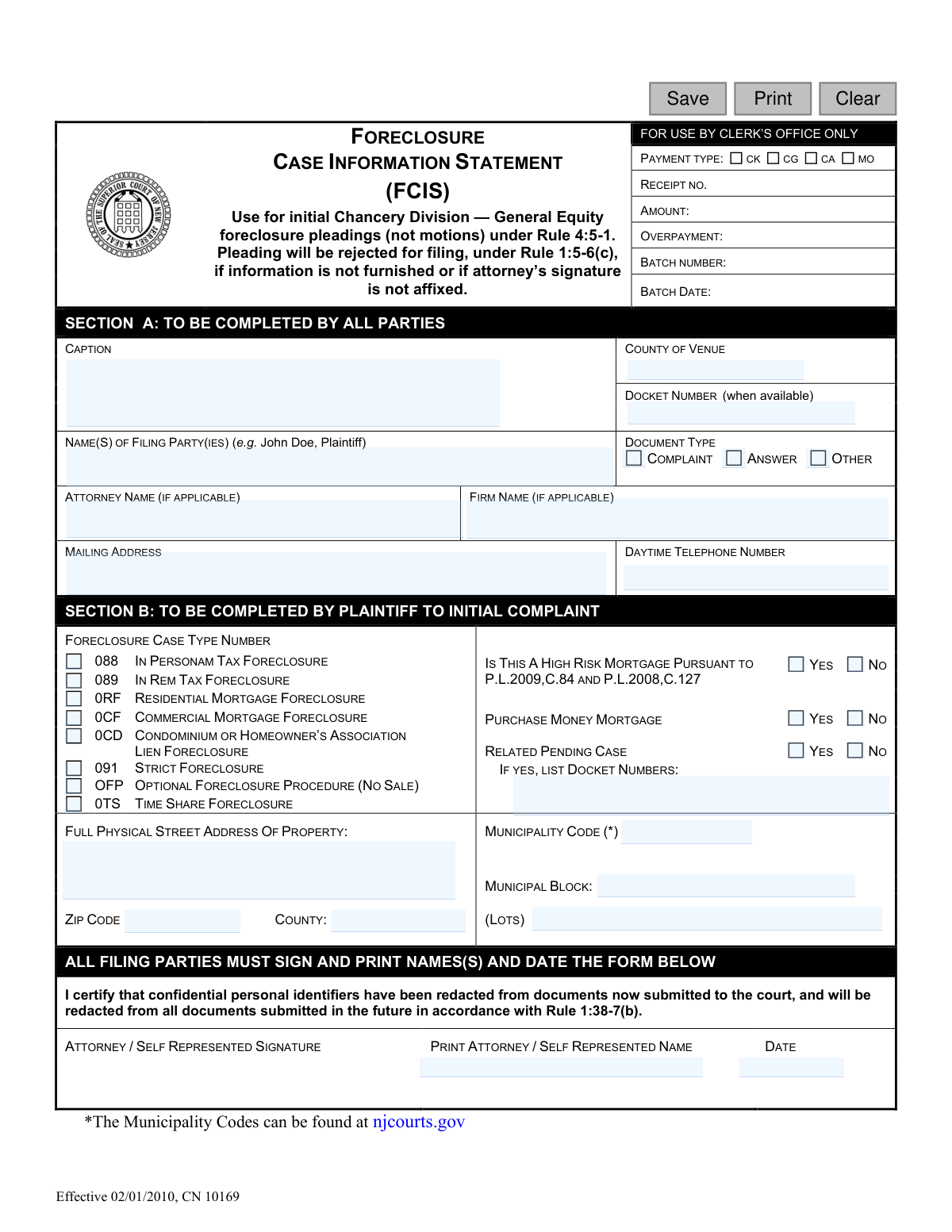
The Foreclosure Case Information Statement (FCIS), designated as Appendix XII-B2, is a mandatory document used in New Jersey's Chancery Division for initial foreclosure pleadings. It serves as a cover letter that provides the court with essential case details, including party information, property location, and the specific type of foreclosure action being filed. Today, this form can be filled out quickly and accurately using AI-powered services like Instafill.ai, which can also convert non-fillable PDF versions into interactive fillable forms.
FCIS / Appendix XII-B2 is part of the
New Jersey forms category on Instafill.
Our AI automatically handles information lookup, data retrieval, formatting, and form filling.
It takes less than a minute to fill out FCIS / Appendix XII-B2 using our AI form filling.
Securely upload your data. Information is encrypted in transit and deleted immediately after the form is filled out.
Form specifications
| Form name: | Foreclosure Case Information Statement (FCIS) - Appendix XII-B2 |
| Number of fields: | 37 |
| Number of pages: | 1 |
| Language: | English |
Instafill Demo: How to fill out PDF forms in seconds with AI
How to Fill Out FCIS / Appendix XII-B2 Online for Free in 2026
Are you looking to fill out a FCIS / APPENDIX XII-B2 form online quickly and accurately? Instafill.ai offers the #1 AI-powered PDF filling software of 2026, allowing you to complete your FCIS / APPENDIX XII-B2 form in just 37 seconds or less.
Follow these steps to fill out your FCIS / APPENDIX XII-B2 form online using Instafill.ai:
- 1 Navigate to Instafill.ai and upload or select the Foreclosure Case Information Statement (FCIS) form.
- 2 Allow the AI to scan the document and identify all the required fields in Section A and Section B.
- 3 Provide your case information for Section A, including the case caption, county, docket number, and your role as plaintiff or defendant.
- 4 If you are the plaintiff, proceed to fill out Section B by selecting the foreclosure case type and providing the full property address and details.
- 5 Carefully review all the information auto-populated by the AI to ensure it is correct and complete.
- 6 Electronically sign and date the form in the designated signature section at the bottom.
- 7 Download the completed FCIS form to file it as the cover letter for your initial pleading with the court.
Our AI-powered system ensures each field is filled out correctly, reducing errors and saving you time.
Why Choose Instafill.ai for Your Fillable FCIS / Appendix XII-B2 Form?
Speed
Complete your FCIS / Appendix XII-B2 in as little as 37 seconds.
Up-to-Date
Always use the latest 2026 FCIS / Appendix XII-B2 form version.
Cost-effective
No need to hire expensive lawyers.
Accuracy
Our AI performs 10 compliance checks to ensure your form is error-free.
Security
Your personal information is protected with bank-level encryption.
Frequently Asked Questions About Form FCIS / Appendix XII-B2
The FCIS serves as a mandatory cover sheet for the first legal document (pleading) filed in a foreclosure case. It provides the court with essential summary information about the case, the parties, and the property involved.
All parties filing an initial pleading must complete this form. Plaintiffs must fill out the entire form (Sections A and B), while defendants only need to complete Section A and the signature section.
As a defendant, you only need to complete Section A with your personal and case information. After that, you must sign, print your name, and date the form in the signature area at the bottom.
According to the form's instructions, your pleading will be rejected for filing if the FCIS is not furnished or is missing a required signature. It is a mandatory part of your initial filing.
If you are representing yourself (pro se), you should enter your own full name in the 'Attorney Name' field. You can leave the 'Firm Name' field blank.
The form states that the Municipality Codes can be found on the New Jersey Courts' official website, njcourts.gov. Plaintiffs must look up this code to complete Section B correctly.
Section B, which is for plaintiffs only, requires the foreclosure case type, answers to specific questions about the mortgage, and the full physical address of the property, including the municipality code, block, and lot numbers.
Your signature certifies that the statements on the form are true and that you have redacted confidential personal identifiers (like Social Security numbers) from all documents submitted to the court, as required by Rule 1:38-7(b).
You should enter the docket number if it is available. If you are the plaintiff filing the initial complaint, a docket number will not have been assigned yet, and you can leave that field blank.
Yes, you can use AI-powered services like Instafill.ai to help fill out this form. These tools can accurately populate fields with your information, saving time and helping to prevent errors.
To fill out the form online, you can upload the PDF to Instafill.ai. The service will make the document interactive, allowing you to type your information directly into the fields before printing the completed form for submission.
If you have a non-fillable or 'flat' PDF, you can use a tool like Instafill.ai to convert it into an interactive, fillable form. This allows you to easily type your information on a computer instead of filling it out by hand.
A 'Complaint' is the initial document filed by the plaintiff to start the foreclosure lawsuit. An 'Answer' is the document filed by the defendant in response to the plaintiff's complaint.
Compliance FCIS / Appendix XII-B2
Validation Checks by Instafill.ai
1
Conditional Completion of Section B
Validates that Section B is completed if and only if the filing party is the Plaintiff and the 'Document Type' is 'Complaint'. This check prevents defendants or parties filing other document types from providing unnecessary or incorrect information. If a defendant fills out Section B, the form should be rejected for non-compliance with instructions.
2
Exclusive Document Type Selection
Verifies that exactly one option from the 'Document Type' checkboxes ('Complaint', 'Answer', or 'Other') is selected in Section A. This is a mandatory choice that defines the nature of the pleading for proper court processing. A submission with zero or multiple selections would be ambiguous and should be rejected.
3
Party Role Identification
Ensures the 'Name(s) of Filing Party(ies)' field contains either the term 'Plaintiff' or 'Defendant' as instructed. This is crucial for correctly identifying the role of the filer within the legal proceeding. A failure would result in an ambiguous filing that cannot be properly docketed or processed.
4
Valid Daytime Phone Number Format
Checks that the 'Daytime Telephone Number' field contains a valid 10-digit US phone number, including the area code. This information is essential for the court or opposing counsel to contact the filing party. An invalid format would hinder communication and could cause case delays.
5
Mandatory Docket Numbers for Related Cases
If the 'Related Pending Case' option in Section B is marked 'YES', this validation ensures the corresponding 'IF YES, LIST DOCKET NUMBERS' text field is not empty. This rule is critical for linking related legal matters to ensure judicial efficiency and consistency. Failure to provide the numbers when required would result in an incomplete filing.
6
Single Foreclosure Case Type Selection
Verifies that the plaintiff has selected exactly one 'Foreclosure Case Type Number' in Section B. Each case must be categorized into a single, specific type for correct statistical reporting and judicial assignment. Multiple or no selections would make the case type ambiguous and lead to rejection of the complaint.
7
Consistent County of Venue and Property Location
This logical check compares the 'County of Venue' from Section A with the 'County' of the property address in Section B. The two values must match to ensure the case is filed in the correct jurisdiction where the property is located. A mismatch indicates a critical error that could lead to the case being dismissed or transferred.
8
Valid New Jersey Municipality Code
Validates the 'Municipality Code' entered in Section B against an official list of New Jersey municipal codes, as referenced in the form's instructions. Using a valid code is essential for accurate property identification for court and tax records. An incorrect or non-existent code would cause data errors and potential processing delays.
9
Signature and Printed Name Presence
Confirms that both the 'ATTORNEY / SELF REPRESENTED SIGNATURE' and 'PRINT ATTORNEY / SELF REPRESENTED NAME' fields are completed. The form explicitly states that the pleading will be rejected without a signature, making this a critical check for the document's legal validity. The printed name ensures the signature is legible and correctly identified.
10
Valid and Current Signature Date
Checks that the 'Date' field in the signature section contains a valid calendar date that is not in the future. This certifies when the document was signed and attests to the truthfulness of the information as of that date. An invalid or future date would call the validity of the certification into question.
11
Valid 5-Digit ZIP Code Format
This validation ensures the 'ZIP CODE' field in Section B contains exactly five numeric digits. A valid ZIP code is necessary for accurate mail delivery and geographic data integrity for the property's location. An invalid format could cause returned mail and errors in location-based services.
12
Attorney Name Logic for Self-Represented Filers
Checks that if the 'Firm Name' field is left blank, the name in the 'Attorney Name' field matches the filer's name in the 'Name(s) of Filing Party(ies)' field. This enforces the instruction for pro se litigants to list themselves as the attorney of record. This validation ensures clarity on whether the party has legal representation.
13
Plaintiff's Section B Completeness
If the filer is a plaintiff submitting a complaint, this check verifies that all applicable fields in Section B are completed. This includes the full property address, municipality code, block/lot, and the three mandatory Yes/No questions. Incomplete property information would prevent the court from properly identifying the subject of the foreclosure.
Common Mistakes in Completing FCIS / Appendix XII-B2
Filers often mistakenly enter the county where they reside instead of the county where the property being foreclosed on is located. This is a critical error as legal venue is determined by the property's location, not the party's residence. An incorrect venue will lead to the case being filed in the wrong court, causing significant delays, dismissal, and the need to refile, incurring additional costs. To avoid this, always double-check the property's official records and enter the county where the physical address is situated.
Users frequently enter only their own name or the property address in the 'Caption' field, rather than the required legal format. The instructions specify the full case name in the format 'Plaintiff(s) vs. Defendant(s)'. An incorrect caption can lead to filing rejections under Rule 1:5-6(c) and difficulty in matching the document to the correct case file. Always follow the 'Plaintiff vs. Defendant' structure, ensuring all party names are spelled correctly as they appear in the initial complaint.
Self-represented (Pro Se) litigants often get confused by the 'Attorney Name' and 'Firm Name' fields. The correct procedure is to enter your own name in the 'Attorney Name' field and leave the 'Firm Name' field completely blank. Incorrectly filling this section can cause confusion for the court clerk and delays in processing, as it may be unclear if the party is represented or not. Always enter your own name in the 'Attorney Name' field if you are representing yourself.
These fields are frequently left blank because the information is not immediately available and requires an external search. The Municipality Code must be looked up on the njcourts.gov website, and the Block/Lot numbers are found on tax records or the property deed. Failing to provide this specific information can result in the pleading being rejected for filing, as it is essential for uniquely identifying the property in court and municipal records. AI-powered tools like Instafill.ai can help by auto-populating these details from public records, ensuring accuracy and completeness.
Plaintiffs often select an incorrect 'Foreclosure Case Type Number' from the list in Section B. The distinctions between Residential (0RF), Commercial (0CF), Tax (088/089), and other types are legally specific and crucial for case processing. Choosing the wrong type can lead to the case being miscategorized, causing procedural delays and potentially requiring an amended filing. It is vital to understand the nature of the foreclosure and select the corresponding code accurately.
Despite clear instructions that Section B is for the plaintiff only, defendants sometimes fill it out. This happens when filers rush and do not read the instructions for each section carefully. Submitting a form with incorrectly completed sections can lead to its rejection or create confusion in the case record. Defendants must only complete Section A, then proceed directly to the signature section.
In Section B, if a filer checks 'YES' for 'Related Pending Case,' they frequently forget to list the corresponding docket numbers in the space provided. This omission negates the purpose of the question, which is to alert the court to related legal matters that could impact the current case. This can delay proceedings as the court may need to issue a deficiency notice to obtain the missing information. Always provide the specific docket numbers if you indicate a related case exists.
The form requires all self-represented parties filing the document to sign and print their names. A common mistake is having only one of several co-defendants or co-plaintiffs sign the form. A submission with missing signatures is considered incomplete and will be rejected by the court clerk. Ensure that every individual party named as a filer who is not represented by an attorney personally signs and dates the form.
Filers may provide a partial address in the 'Full Physical Street Address of Property' field, omitting details like an apartment or unit number, or the correct ZIP code and county. The form requires the complete and exact address for proper identification. An incomplete address can cause issues with serving legal notices and correctly identifying the property, leading to processing delays. Using a tool like Instafill.ai can help ensure address validation and completeness, especially for non-fillable PDFs which it can convert.
The question 'IS THIS A HIGH RISK MORTGAGE PURSUANT TO P.L.2009,C.84 AND P.L.2008,C.127' is a legal determination that filers may not understand, leading them to guess or leave it blank. Answering this incorrectly can have significant legal implications, as high-risk mortgages are subject to different rules and consumer protections. Plaintiffs must verify the loan's status against the criteria in the cited public laws before answering. Incorrectly answering can lead to challenges and delays in the foreclosure process.
Saved over 80 hours a year
“I was never sure if my IRS forms like W-9 were filled correctly. Now, I can complete the forms accurately without any external help.”
Kevin Martin Green
Your data stays secure with advanced protection from Instafill and our subprocessors

Robust compliance program
Transparent business model
You’re not the product. You always know where your data is and what it is processed for.
ISO 27001, HIPAA, and GDPR
Our subprocesses adhere to multiple compliance standards, including but not limited to ISO 27001, HIPAA, and GDPR.
Security & privacy by design
We consider security and privacy from the initial design phase of any new service or functionality. It’s not an afterthought, it’s built-in, including support for two-factor authentication (2FA) to further protect your account.
Fill out FCIS / Appendix XII-B2 with Instafill.ai
Worried about filling PDFs wrong? Instafill securely fills foreclosure-case-information-statement-fcis-appendix-xii-b2 forms, ensuring each field is accurate.