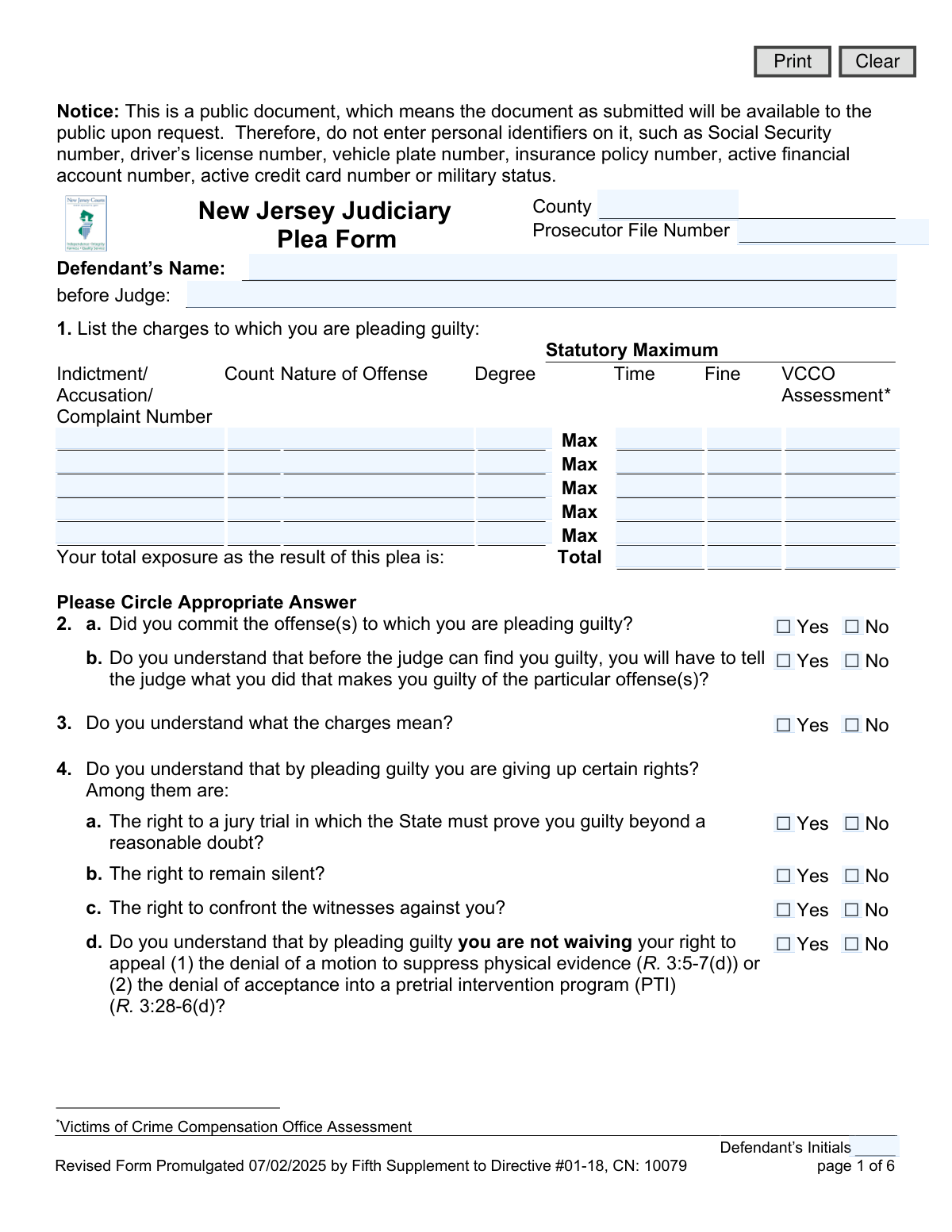
Yes! You can use AI to fill out New Jersey Judiciary Plea Form (Plea 01)
The New Jersey Judiciary Plea Form, also known as Plea 01, is a legal document used within the New Jersey court system for a defendant to formally enter a guilty plea. This comprehensive form ensures the defendant understands the charges, the rights they are waiving (such as the right to a trial), and the full scope of potential consequences, including sentences, fines, and immigration implications. It serves as a formal record of the plea agreement between the defendant and the prosecution. Today, this form can be filled out quickly and accurately using AI-powered services like Instafill.ai, which can also convert non-fillable PDF versions into interactive fillable forms.
Plea 01 is part of the
New Jersey forms category on Instafill.
Our AI automatically handles information lookup, data retrieval, formatting, and form filling.
It takes less than a minute to fill out Plea 01 using our AI form filling.
Securely upload your data. Information is encrypted in transit and deleted immediately after the form is filled out.
Form specifications
| Form name: | New Jersey Judiciary Plea Form (Plea 01) |
| Number of fields: | 178 |
| Number of pages: | 1 |
| Language: | English |
Instafill Demo: How to fill out PDF forms in seconds with AI
How to Fill Out Plea 01 Online for Free in 2026
Are you looking to fill out a PLEA 01 form online quickly and accurately? Instafill.ai offers the #1 AI-powered PDF filling software of 2026, allowing you to complete your PLEA 01 form in just 37 seconds or less.
Follow these steps to fill out your PLEA 01 form online using Instafill.ai:
- 1 Navigate to Instafill.ai and upload or select the New Jersey Plea Form (Plea 01).
- 2 Use the AI assistant to input case details such as the county, prosecutor file number, defendant's name, and the presiding judge.
- 3 Accurately list all charges to which you are pleading guilty, including indictment numbers, offense details, and maximum penalties, letting the AI guide you through the table.
- 4 Methodically answer all yes/no questions regarding your understanding of your rights, the consequences of the plea, and potential immigration effects.
- 5 Specify the terms of the plea agreement, including any charges the prosecutor has agreed to dismiss and the recommended sentence.
- 6 Review the entire completed form for accuracy, then e-sign and date the document in the designated fields for the defendant, defense attorney, and prosecutor.
Our AI-powered system ensures each field is filled out correctly, reducing errors and saving you time.
Why Choose Instafill.ai for Your Fillable Plea 01 Form?
Speed
Complete your Plea 01 in as little as 37 seconds.
Up-to-Date
Always use the latest 2026 Plea 01 form version.
Cost-effective
No need to hire expensive lawyers.
Accuracy
Our AI performs 10 compliance checks to ensure your form is error-free.
Security
Your personal information is protected with bank-level encryption.
Frequently Asked Questions About Form Plea 01
This form is a legal document used in New Jersey for a defendant to formally enter a guilty plea. It ensures the defendant understands the charges, the rights they are giving up, and all the potential consequences of their plea.
The defendant is responsible for completing this form, typically with the direct guidance of their defense attorney. The prosecutor and defense attorney also review and sign the document as part of the plea agreement process.
As this is a public document, you must not enter personal identifiers. This includes your Social Security number, driver’s license number, vehicle plate number, insurance policy number, or active financial account numbers.
By pleading guilty, you are waiving several constitutional rights, most notably the right to a jury trial, the right to remain silent, and the right to confront witnesses against you.
Pleading guilty can have very serious immigration consequences, including deportation, denial of naturalization, or being barred from re-entering the U.S. You must discuss these potential outcomes with an attorney before entering a plea.
If you are currently on probation or parole, pleading guilty to a new offense may result in a violation of your supervision. This could lead to the revocation of your probation or parole and additional penalties.
No, the judge is not bound by the prosecutor's recommendation and can impose a more severe sentence. However, if this happens, you have the right to withdraw your guilty plea.
These are mandatory financial penalties and assessments applied to criminal convictions in New Jersey. They are separate from any fines and are used to fund various state programs, such as victim compensation and law enforcement training.
This section details the specific terms of your plea bargain that your attorney negotiated with the prosecutor. This includes the recommended jail or prison time, probation period, and any other conditions of the sentence.
Initialing each page confirms that you have read, understood, and acknowledged all the information presented throughout the document. It is a required step to ensure your plea is knowing and voluntary.
Yes, services like Instafill.ai use AI to auto-fill form fields accurately and save time. While helpful, you must review the entire form with your attorney to ensure all information is correct before signing.
To fill out the form online, you can upload the PDF to a platform like Instafill.ai. The service will make the document interactive, allowing you to type your answers directly into the fields and then save or print the completed form.
If you have a flat or non-fillable PDF, you can use a service like Instafill.ai to convert it. The tool will automatically detect the fields and make the document interactive and easy to complete on your computer.
Compliance Plea 01
Validation Checks by Instafill.ai
1
Header Information Completeness
This check ensures that the core case identifying fields at the top of the form—County, Prosecutor File Number, Defendant’s Name, and Judge—are all filled in. This information is essential for correctly filing, routing, and retrieving the document within the judicial system. A submission will be rejected if any of these required header fields are left blank.
2
Minimum Charge Entry
This validation verifies that at least one complete row of charge information is entered in the table for Question 1. A plea form is meaningless without at least one charge to which the defendant is pleading guilty. If the charge table is empty, the form is considered incomplete and cannot be submitted.
3
Charge Totals Calculation
This validation checks that the values entered in the 'Total' row for Maximum Time, Maximum Fine, and VCCO Assessment are the correct sum of the individual charge values listed above. This is crucial for ensuring the defendant is being informed of the correct total maximum exposure they face. If the totals do not match the sum of the parts, the form will be rejected, and the user will be prompted to correct the calculation.
4
Affirmation of Guilt
This check verifies that the response to Question 2a, 'Did you commit the offense(s) to which you are pleading guilty?', is 'Yes'. A 'No' answer is a logical contradiction to a guilty plea and invalidates the entire form's purpose. If 'No' is selected, the submission process should be halted, and the user should be informed that the plea cannot be accepted with this answer.
5
Understanding of Rights Validation
This check ensures that the defendant has affirmatively acknowledged their understanding of the rights they are waiving. It verifies that questions 3, 4a, 4b, and 4c are all answered 'Yes'. A 'No' answer to any of these questions indicates a potential lack of understanding that could invalidate the plea, and the submission should be flagged for review.
6
Conditional Parole Ineligibility Details
This validation enforces conditional logic on Question 7. If the user answers 'Yes' to pleading guilty to a charge with mandatory parole ineligibility, the system must ensure that the corresponding year and month fields in section 7a or 7b are filled out. This prevents incomplete plea agreements where critical sentencing details are omitted. A failure will result in an error message prompting the user to provide the mandatory term lengths.
7
Conditional Probation/Parole Status
This check enforces the dependency between Question 9 and 9a. If the defendant indicates they are currently on probation or parole by answering 'Yes' to Q9, then Q9a must be answered to acknowledge they understand the consequences. Conversely, if Q9 is 'No', Q9a must be marked 'NA' to show it is not applicable. This ensures the form's internal logic is sound and all relevant questions are answered.
8
Immigration Advisement Logic Path
This check validates the response flow for Question 17 regarding immigration consequences. It ensures that if 17c ('Have you discussed...') is 'No', then 17d ('Would you like the opportunity...') must be answered. This logic is critical to document that the defendant was properly advised of their rights regarding immigration advice. An illogical or incomplete path will block submission and guide the user to complete the section correctly.
9
Contradictory Promises Alert
This check flags any submission where Question 22 ('Have any promises other than those mentioned on this form... been made?') is answered 'Yes'. A 'Yes' answer suggests the written plea agreement is incomplete or that the defendant may have been unduly coerced, which could invalidate the plea. The system should not reject the form but should escalate it for immediate and mandatory manual review by a supervisor or judge.
10
Satisfaction with Counsel Alert
This validation checks the response to Question 24, 'Are you satisfied with the advice you have received from your lawyer?'. A 'No' response raises serious concerns about the defendant's legal representation and the voluntariness of the plea. The system must flag this submission for urgent review by the court to address the potential ineffective assistance of counsel claim before the plea can be accepted.
11
Defendant Name Consistency
This check compares the defendant's name entered at the top of the form (`defName`) with the name entered in the signature block on the final page (`sigDefName`). This is essential for verifying the identity of the person signing the document and ensuring the plea is being entered by the correct individual. A mismatch will trigger a warning and require correction before the form can be submitted.
12
Signature Date Chronology
This validation ensures the date entered in the `sigDt` field is a valid, correctly formatted date that is not in the future. A plea form cannot be signed on a future date, as this would be legally nonsensical and invalid. The check prevents clerical errors and ensures the document's chronological integrity, rejecting any future dates or invalid formats.
13
Prohibited Personal Identifiers Scan
This validation scans all free-text fields for patterns that resemble personal identifiers like Social Security or driver's license numbers, as explicitly forbidden by the notice on page 1. This is a data privacy and security measure to protect the defendant, as the form is a public document. If a potential identifier is found, the system will flag the entry and require the user to remove it before proceeding.
14
Defendant Initials Presence
This check verifies that the 'Defendant’s Initials' field (`defInit`) is filled on each page of the form. The presence of initials on every page serves as confirmation that the defendant has reviewed the entire document. A missing initial on any page would render the form incomplete and require correction before it can be accepted.
Common Mistakes in Completing Plea 01
Defendants or their counsel often mistype the Indictment, Accusation, or Complaint Number in Section 1. This can also include incorrectly stating the offense, degree, or statutory maximums. Such errors occur due to manual data entry from other legal documents and can lead to the plea being recorded for the wrong charge, causing significant legal complications and delays. To avoid this, double-check all numbers and descriptions against the official charging documents before submission.
The form explicitly requires the defendant's initials at the bottom of every page, but this is frequently overlooked. This requirement ensures the defendant has reviewed and acknowledged each page of the agreement. Forgetting to initial a page can lead to the court rejecting the form, delaying the plea process, and requiring the entire document to be re-executed. Using a guided form-filling process can help prevent this by highlighting all required signature and initial fields.
A person might answer 'No' to understanding the charges (Question 3) or their rights (Question 4) but continue to fill out the form as if they wish to plead guilty. This contradiction signals a lack of comprehension or a mistake and will cause a judge to halt the proceedings to ensure the defendant's plea is knowing and voluntary. It is crucial to answer these questions honestly and seek clarification from an attorney if there is any confusion before checking 'Yes'.
In Section 12, defendants may fail to list all charges the prosecutor has agreed to recommend for dismissal as part of the plea bargain. This omission can be a critical error, as the court record would not reflect the full scope of the agreement, potentially leaving those charges open. To prevent this, carefully list every single charge to be dismissed, including the indictment number, count, and offense description, exactly as specified in the plea agreement.
The free-text field in Section 13, for specifying the prosecutor's recommended sentence, is often filled out with vague or incomplete language. This ambiguity can lead to disputes later about the terms of the plea deal. A proper entry should be precise, detailing specific terms of incarceration, probation, fines, and any other conditions. AI-powered tools like Instafill.ai can help by providing templates or structured inputs to ensure all necessary components of a sentence recommendation are included.
The series of questions in Section 17 regarding immigration consequences is complex and often answered incorrectly. For example, a non-citizen might not understand the gravity and answer 'Yes' to question 17(e) without having properly consulted an attorney as indicated in 17(c). These mistakes can have irreversible consequences, including deportation, and may invalidate the plea. It is vital to follow the question logic carefully and always seek legal advice on immigration matters before proceeding.
Despite a clear warning on page 1, individuals sometimes include personal identifiers like Social Security or driver's license numbers in open-ended fields like Section 13 or 21. This happens when they are trying to provide complete information but are unaware of the redaction rules. Including this information makes it a public record, exposing the defendant to identity theft and privacy risks. AI form-filling tools like Instafill.ai can scan for and flag such prohibited data before submission.
In Section 1, after listing the maximum penalties for each charge, the form requires calculating the total exposure for time, fines, and assessments. Simple arithmetic errors are common here, which can misrepresent the defendant's understanding of the total potential sentence. An incorrect total can lead to the judge questioning the defendant's comprehension of the plea's consequences. Using a tool that can automatically calculate these totals, like Instafill.ai which can make a flat PDF fillable and add calculations, helps ensure accuracy.
The form contains several questions (e.g., 7, 9, 10) that have conditional follow-up parts (e.g., 7a, 9a, 10a). A common mistake is to answer 'Yes' to the main question but leave the detailed follow-up section blank. For instance, answering 'Yes' to being on parole (Question 9) but not answering 9a about understanding the consequences creates ambiguity. This incomplete information can cause the court to reject the form for clarification.
Forgetting to sign or date the form on the final page is one of the most basic yet frequent errors. A plea form is a legal contract, and it is invalid without the signatures of the defendant, defense attorney, and prosecutor, along with the date. This oversight immediately halts the acceptance of the plea and requires everyone to re-convene to sign the document, causing unnecessary delays. Always perform a final review of the last page to ensure all signature lines and the date field are properly completed.
Saved over 80 hours a year
“I was never sure if my IRS forms like W-9 were filled correctly. Now, I can complete the forms accurately without any external help.”
Kevin Martin Green
Your data stays secure with advanced protection from Instafill and our subprocessors

Robust compliance program
Transparent business model
You’re not the product. You always know where your data is and what it is processed for.
ISO 27001, HIPAA, and GDPR
Our subprocesses adhere to multiple compliance standards, including but not limited to ISO 27001, HIPAA, and GDPR.
Security & privacy by design
We consider security and privacy from the initial design phase of any new service or functionality. It’s not an afterthought, it’s built-in, including support for two-factor authentication (2FA) to further protect your account.
Fill out Plea 01 with Instafill.ai
Worried about filling PDFs wrong? Instafill securely fills new-jersey-judiciary-plea-form-plea-01 forms, ensuring each field is accurate.