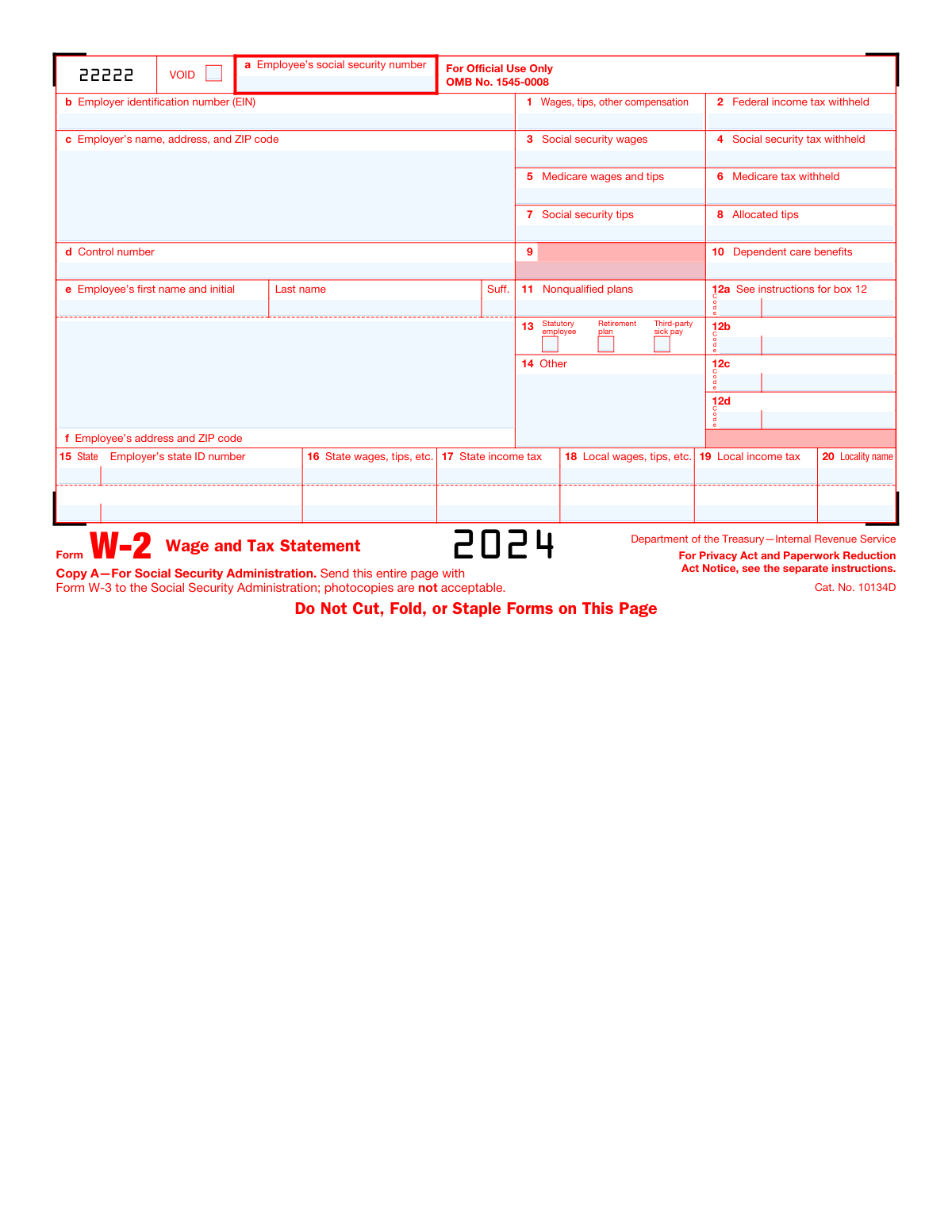
Yes! You can use AI to fill out Form W-2, Wage and Tax Statement
Form W-2, the Wage and Tax Statement, is a crucial IRS document that employers must send to each employee and the Social Security Administration (SSA) at the end of the year. It details the employee's annual wages and the amount of federal, state, and other taxes withheld from their paycheck, which is essential for employees to file their personal income tax returns. Today, this form can be filled out quickly and accurately using AI-powered services like Instafill.ai, which can also convert non-fillable PDF versions into interactive fillable forms.
W-2 is part of the
NJ state forms, PA state forms, state ID forms, state tax forms, tax forms and wage forms categories on Instafill.
Our AI automatically handles information lookup, data retrieval, formatting, and form filling.
It takes less than a minute to fill out W-2 using our AI form filling.
Securely upload your data. Information is encrypted in transit and deleted immediately after the form is filled out.
Form specifications
| Form name: | Form W-2, Wage and Tax Statement |
| Number of fields: | 272 |
| Number of pages: | 10 |
| Language: | English |
More forms in NJ state forms
Instafill Demo: How to fill out PDF forms in seconds with AI
How to Fill Out W-2 Online for Free in 2026
Are you looking to fill out a W-2 form online quickly and accurately? Instafill.ai offers the #1 AI-powered PDF filling software of 2026, allowing you to complete your W-2 form in just 37 seconds or less.
Follow these steps to fill out your W-2 form online using Instafill.ai:
- 1 Navigate to Instafill.ai and upload your Form W-2 document or select it from the template library.
- 2 Allow the AI to scan and identify all the necessary fields, including employer details, employee information, wages, and tax withholding boxes.
- 3 Enter the required data, such as the Employer Identification Number (EIN), employee's Social Security Number, and all wage and tax figures for boxes 1 through 20.
- 4 Use the AI assistant to accurately populate complex sections like Box 12 with the correct codes and amounts for various types of compensation and benefits.
- 5 Carefully review all the information entered on the digital form to verify its accuracy and completeness.
- 6 Securely download the completed copies for distribution to employees, for filing with state or local tax departments, and for your records, or prepare for electronic submission to the SSA.
Our AI-powered system ensures each field is filled out correctly, reducing errors and saving you time.
Why Choose Instafill.ai for Your Fillable W-2 Form?
Speed
Complete your W-2 in as little as 37 seconds.
Up-to-Date
Always use the latest 2026 W-2 form version.
Cost-effective
No need to hire expensive lawyers.
Accuracy
Our AI performs 10 compliance checks to ensure your form is error-free.
Security
Your personal information is protected with bank-level encryption.
Frequently Asked Questions About Form W-2
Form W-2, the Wage and Tax Statement, is used by employers to report an employee's annual wages and the amount of taxes withheld. Employees use this form to file their federal, state, and local tax returns.
Employers are required to complete a Form W-2 for each employee and send copies to the employee, the Social Security Administration (SSA), and any applicable state or local tax departments.
Employers must send W-2 forms to their employees by January 31. They must also file Copy A of the forms with the Social Security Administration by the same date.
Copy A is for the SSA, Copy B is filed with the employee's federal tax return, Copy C is for the employee's records, and Copy D is for the employer's records. Copies 1 and 2 are for state and local tax departments.
No. The Copy A provided on the IRS website is for informational purposes only and is not scannable. Filing a non-scannable form may result in a penalty, so you must order official forms or file electronically.
If your name, SSN, or address is incorrect, you should notify your employer immediately. They will need to issue a corrected Form W-2c, which you should use when filing your taxes.
The codes in Box 12 represent various types of compensation and benefits, such as retirement plan contributions, health savings account contributions, or the cost of employer-sponsored health coverage. The form instructions provide a detailed list explaining each code.
You should keep Copy C for your records for at least three years after filing your tax return. It is recommended to keep it until you begin receiving Social Security benefits to resolve any potential questions about your work history.
If you file 10 or more information returns (including W-2s), you are required to file them electronically. The SSA provides an online service for creating and submitting W-2s.
Box 1 shows total wages for federal income tax, while Box 3 (Social Security) and Box 5 (Medicare) show wages subject to those specific taxes. Pre-tax deductions like health insurance or 401(k) contributions can cause these amounts to differ.
Yes, services like Instafill.ai use AI to help employers accurately auto-fill form fields. This can save significant time and reduce errors when preparing multiple W-2s for your employees.
You can use a service like Instafill.ai to upload the W-2 PDF. Its AI technology makes the form interactive, allowing you to easily fill in all the required fields online before printing.
If you have a flat, non-fillable PDF, you can use a tool like Instafill.ai. It can convert the non-fillable PDF into an interactive form that you can easily complete and print for your records or for filing where permitted.
Compliance W-2
Validation Checks by Instafill.ai
1
Validates Employee Social Security Number Format
This check ensures the Employee's Social Security Number (SSN) in box 'a' is a 9-digit number, formatted as XXX-XX-XXXX. The SSN is critical for matching earnings to the employee's Social Security record for future benefits. An invalid format will cause the Social Security Administration (SSA) to reject the filing, leading to penalties and delays in crediting the employee's earnings.
2
Validates Employer Identification Number (EIN) Format
This check ensures the Employer Identification Number (EIN) in box 'b' is a 9-digit number formatted as XX-XXXXXXX. The EIN is the unique identifier for the business entity with the IRS and SSA. An incorrect or improperly formatted EIN will lead to filing rejection, requiring correction and resubmission, and may result in penalties.
3
Verifies Social Security Tax Withholding Calculation
This check validates that the Social Security tax withheld (Box 4) is approximately 6.2% of the Social Security wages (Box 3), up to the annual wage base limit. It also flags if Box 3 exceeds this annual limit. This is crucial for ensuring correct tax remittance and prevents notices from the IRS or SSA for under or over-withholding, which can result in penalties and interest.
4
Verifies Medicare Tax Withholding Calculation
This validation confirms that the Medicare tax withheld (Box 6) is at least 1.45% of the Medicare wages and tips (Box 5). It should also account for the additional 0.9% Additional Medicare Tax on wages over the applicable threshold for the employee's filing status. Accurate calculation is essential for compliance and prevents tax discrepancies that could trigger audits for both the employer and employee.
5
Ensures Medicare Wages are Greater Than or Equal to Social Security Wages
This check verifies that the amount in Box 5 (Medicare wages and tips) is greater than or equal to the amount in Box 3 (Social security wages). This is because the Social Security wage base is capped annually, while the Medicare wage base is not. An error where Box 3 exceeds Box 5 indicates a fundamental reporting error and will cause the filing to be rejected.
6
Confirms Federal Tax Withheld Does Not Exceed Total Wages
This validation ensures that the federal income tax withheld (Box 2) is not greater than the total wages, tips, and other compensation (Box 1). It is logically impossible to withhold more tax than the total compensation earned. A failure here points to a severe data entry or calculation error that must be corrected before filing to avoid rejection and potential payroll system audits.
7
Verifies Completeness of Employee and Employer Information
This check confirms that essential identification fields, including the employee's name (Box e), employee's address (Box f), and employer's name and address (Box c), are not empty. This information is mandatory for correctly identifying the parties involved for the SSA and IRS. Incomplete forms are subject to rejection and can lead to penalties for the employer.
8
Ensures Completeness of State Tax Data
This rule validates that if an amount greater than zero is present for state income tax withheld (Box 17), then the corresponding Employer's state ID (Box 15) and State wages (Box 16) fields must also be populated. Missing state identification or wage information renders the tax withholding data meaningless and will cause processing errors with state tax agencies, potentially leading to non-compliance notices.
9
Ensures Completeness of Local Tax Data
This check ensures that if an amount greater than zero is entered for local income tax withheld (Box 19), then the Local wages (Box 18) and Locality name (Box 20) fields are also completed. Withholding local taxes without specifying the locality and the associated wage base is an incomplete record. This validation prevents filing errors with local tax authorities and ensures proper credit for the employee.
10
Validates Box 12 Codes
This check verifies that any codes entered in Box 12 (12a, 12b, 12c, 12d) are valid, recognized IRS codes (e.g., D, DD, W, AA). Using invalid codes will cause processing errors and may misrepresent important financial information about benefits and deferrals. The system should flag any unrecognized codes for manual review to ensure accurate reporting.
11
Confirms Social Security Wages Do Not Exceed Total Wages
This check validates that the Social Security wages reported in Box 3 are less than or equal to the total federal wages in Box 1. Social Security wages are a component of total compensation, so this check catches basic data entry errors. An inconsistency where Box 3 is greater than Box 1 would lead to immediate rejection by the SSA.
12
Validates Numeric Format for all Monetary Fields
This validation ensures that all fields intended to hold monetary values (e.g., Boxes 1-8, 10, 11, 16-19, and the amount fields for Box 12) contain only valid numeric characters. Non-numeric data in these fields would cause calculation and processing failures by tax authorities. This is a fundamental check to ensure the form's data is machine-readable and arithmetically sound.
13
Cross-references Wage and Tip Boxes
This check ensures logical consistency between wage and tip fields. Specifically, it verifies that Box 1 (Wages, tips, other compensation) is greater than or equal to the sum of Box 3 (Social security wages) and Box 7 (Social security tips), with certain adjustments. This complex validation helps catch errors in how different types of compensation are categorized and reported, preventing mismatches in tax calculations.
14
Verifies State and Local Wages vs Federal Wages
This check validates that both State wages (Box 16) and Local wages (Box 18) are less than or equal to Federal wages (Box 1). While some exceptions exist, this is generally true, and a discrepancy often indicates a data entry error. Flagging this for review prevents incorrect state and local tax filings and potential employee tax issues.
Common Mistakes in Completing W-2
This mistake occurs when an employer downloads and prints Copy A from the IRS website and files it with the Social Security Administration (SSA). The form instructions explicitly state that the online version is not scannable and should not be filed. Filing a non-scannable form can result in processing delays, rejection of the filing, and potential penalties from the IRS. To avoid this, employers must use official, scannable forms ordered from the IRS or file electronically, which is the recommended method.
Entering an Employee's Social Security Number (Box a) or Employer Identification Number (Box b) with transposed digits, incorrect numbers, or improper formatting is a frequent error. This often happens due to manual data entry mistakes. An incorrect identifier will cause the SSA to reject the filing, leading to delays in processing the employee's tax return and crediting their Social Security earnings, which can affect future benefits. Double-checking these numbers against official records is crucial before submission.
The employee's name in Box e must exactly match the name on their Social Security card. Mistakes happen when using nicknames, shortened names, or failing to update records after a name change (e.g., marriage). A mismatch will cause a validation error with the SSA, potentially delaying the employee's tax refund and requiring the employer to file a corrected Form W-2c. Employers should verify names against employee records and advise employees to ensure their name is current with the SSA.
Box 12 is used to report various types of compensation and benefits using specific codes, such as 'D' for 401(k) deferrals or 'DD' for health coverage costs. Employers often make mistakes by using the wrong code, entering an incorrect amount, or omitting required information. These errors can lead to incorrect tax calculations for the employee, affecting things like retirement contribution limits and taxable income, and may trigger an IRS notice. Carefully reviewing the W-2 instructions for each code is essential for accuracy.
Boxes 15 through 20 are for state and local wage and tax information, which can be complex for employees who work in multiple jurisdictions. Common errors include entering the wrong state ID number, reporting wages in the wrong state's box, or incorrectly calculating local tax withholdings. These mistakes can result in the employee filing an incorrect state tax return, leading to tax notices, penalties, and the need to file amended returns. It is critical to accurately allocate wages and taxes to the correct state and locality.
A frequent error is a mismatch between the wage amounts in Box 1 (Wages, tips, other compensation), Box 3 (Social security wages), and Box 5 (Medicare wages and tips). These amounts are often different due to pre-tax deductions like 401(k) contributions, but they must follow specific rules. For example, Social Security wages are capped, while Medicare wages are not. Incorrect calculations can lead to incorrect tax withholding and reporting, causing reconciliation problems for both the employer and the employee's tax return.
The checkboxes in Box 13 for 'Statutory employee,' 'Retirement plan,' and 'Third-party sick pay' have significant tax implications but are often overlooked or checked in error. For instance, checking the 'Retirement plan' box incorrectly can limit an employee's ability to deduct IRA contributions on their tax return. This mistake can lead to the employee overpaying taxes or taking improper deductions, potentially requiring a tax amendment. Employers must carefully verify each employee's status for the year.
Box 14 is a catch-all for items that don't fit elsewhere, such as state disability insurance taxes, union dues, or health insurance premiums. Employers may forget to include important items, or they may use unclear abbreviations, confusing the employee. Since some of these items may be deductible on federal or state returns, omitting them can cause the employee to miss out on tax savings. Clear, accurate, and complete reporting in this box is necessary for correct tax filing.
Failing to enter a complete and current address for the employer (Box c) or employee (Box f) is a simple but common mistake. This often involves missing suite or apartment numbers or using an old address if an employee has moved. An incorrect address can result in the employee not receiving their W-2 in a timely manner, delaying their ability to file taxes, or causing mailed correspondence from tax agencies to be lost. Using AI-powered form-filling tools like Instafill.ai can help by auto-validating address formats to ensure they are complete.
Employers sometimes download a non-fillable PDF version of the W-2, print it, and fill it out by hand. This can lead to illegible handwriting, data entry errors, and misalignment with the form's boxes, all of which can cause scanning failures and processing rejections by the SSA. To avoid this, employers should always use the official electronic filing methods or use a tool like Instafill.ai, which can convert flat, non-fillable PDFs into interactive, fillable forms to ensure data is clean, properly formatted, and accurately placed.
Saved over 80 hours a year
“I was never sure if my IRS forms like W-9 were filled correctly. Now, I can complete the forms accurately without any external help.”
Kevin Martin Green
Your data stays secure with advanced protection from Instafill and our subprocessors

Robust compliance program
Transparent business model
You’re not the product. You always know where your data is and what it is processed for.
ISO 27001, HIPAA, and GDPR
Our subprocesses adhere to multiple compliance standards, including but not limited to ISO 27001, HIPAA, and GDPR.
Security & privacy by design
We consider security and privacy from the initial design phase of any new service or functionality. It’s not an afterthought, it’s built-in, including support for two-factor authentication (2FA) to further protect your account.
Fill out W-2 with Instafill.ai
Worried about filling PDFs wrong? Instafill securely fills form-w-2-wage-and-tax-statement-2 forms, ensuring each field is accurate.